
The @Timeout annotation in JUnit 5 and JUnit 6 fails a test, a test factory, a test template or a lifecycle method when its execution takes longer than the given duration. The default unit is seconds, and the failure is reported as a java.util.concurrent.TimeoutException that names the method and the limit.
We put a time limit on tests that call slow or blocking code, such as a payment gateway, a message queue or a polling loop, so a hanging call fails the build within seconds instead of blocking the CI pipeline for an hour. The following example limits a test of a payment gateway to two seconds.
@Test
@Timeout(2)
void chargeIsApprovedInTime() throws InterruptedException {
  String status = gateway.charge(4999);         // takes about 50 ms
  assertEquals("APPROVED", status);
}
Notice that the test passes as long as the charge returns within two seconds. When the gateway hangs, JUnit interrupts the test and reports chargeIsApprovedInTime() timed out after 2 seconds. We start with the attributes and the failure output, apply the annotation to classes and lifecycle methods, compare the two thread modes and set global defaults in junit-platform.properties.
1. How @Timeout Fails a Slow Test
JUnit runs the annotated method and starts a timer at the same time. If the method returns in time, nothing happens. If the time runs out, JUnit interrupts the thread that runs the method, waits for the method to return, and fails it with a TimeoutException, even if the assertions in the method passed.
The annotation has three attributes, and only value is required, so @Timeout(5) is enough for most tests.
| Attribute | Type | Default | Meaning |
|---|---|---|---|
| value | long | required | the duration |
| unit | TimeUnit | TimeUnit.SECONDS | the unit of value |
| threadMode | Timeout.ThreadMode | INFERRED | the thread the method runs on, see section 4 |
For limits below one second, we set the unit. A connection setup in @BeforeEach that should never take more than half a second looks like this.
@BeforeEach
@Timeout(value = 500, unit = TimeUnit.MILLISECONDS)
void connect() {
  gateway = new PaymentGateway(Duration.ofMillis(50));
}
The examples run on JUnit 6.1.3 and Java 25 with Maven Surefire 3.6.0. The @Timeout annotation exists since JUnit 5.5 and works the same in JUnit 5 and JUnit 6. Readers on JUnit 5.12 or later can use every snippet, because the thread dump option in section 7 arrived in 5.12. The complete project is junit-timeout on GitHub, and the JUnit tutorial lists the guides for setting up a new one.
1.1. Failure Output
The following test uses a gateway that needs three seconds per charge and allows one second. The gateway reacts to the interrupt, so the test stops right after one second.
@Test
@Timeout(1)
void slowGatewayTimesOut() throws InterruptedException {
  assertEquals("APPROVED", slowGateway.charge(4999));
}
[ERROR] com.howtodoinjava.junit.payment.TimeoutFailureDemo.slowGatewayTimesOut -- Time elapsed: 1.006 s <<< ERROR!
java.util.concurrent.TimeoutException: slowGatewayTimesOut() timed out after 1 second
Suppressed: java.lang.InterruptedException: interrupted while waiting for the gatewayWe can see two details in the report. Maven counts a timeout as an error, not as a failure, because the test ends with an exception other than AssertionFailedError. The InterruptedException from our code is attached as a suppressed exception, so the stack trace shows the line where the test was waiting.
2. Timeouts on a Class and on Nested Classes
A @Timeout on the class applies to every @Test, @TestFactory and @TestTemplate method of that class and of its @Nested classes. A @Timeout on a method overrides the class value, so one slow test can get more time or a quick one less. The class-level annotation does not apply to lifecycle methods such as @BeforeEach.
@Timeout(3)
class RefundTimeoutTest {

  @Test
  void refundUsesClassTimeout() throws InterruptedException {
    assertEquals("APPROVED", gateway.charge(1000));   // limit 3 seconds from the class
  }

  @Test
  @Timeout(value = 200, unit = TimeUnit.MILLISECONDS)
  void partialRefundHasItsOwnTimeout() throws InterruptedException {
    assertEquals("APPROVED", gateway.charge(250));    // limit 200 ms from the method
  }

  @Nested
  class BulkRefunds {

    @Test
    void inheritsClassTimeout() throws InterruptedException {
      assertEquals("APPROVED", gateway.charge(5000)); // limit 3 seconds from the outer class
    }
  }
}
On a lifecycle method, we put the annotation on the method itself, as in the @BeforeEach example in section 1, or we set a global default for lifecycle methods, which section 5 covers.
3. Parameterized, Repeated and Dynamic Tests
For a @TestTemplate method, such as a parameterized test or a @RepeatedTest, the limit applies to each invocation separately. The following test gets one second per amount, so three amounts may take up to three seconds in total.
@ParameterizedTest
@ValueSource(ints = {100, 2500, 99999})
@Timeout(1)
void everyAmountIsChargedWithinOneSecond(int amountInCents) throws InterruptedException {
  assertEquals("APPROVED", gateway.charge(amountInCents));
}
A @TestFactory method is different. The timeout only checks that the factory method returns its stream of dynamic tests in time, and it does not time the execution of each DynamicTest. Inside dynamic tests, we use assertTimeout() or assertTimeoutPreemptively() instead.
4. Thread Modes
By default, JUnit runs the test method on the main test thread, and a separate timer thread interrupts it when the time is up. This mode is ThreadMode.SAME_THREAD. It keeps ThreadLocal values, such as a Spring test transaction, on the thread that the framework expects. Note that an interrupt stops only code that checks it, such as blocking I/O, Object.wait(), LockSupport.park() or Thread.sleep. A CPU-bound loop ignores the interrupt and runs to the end.
With ThreadMode.SEPARATE_THREAD, JUnit runs the method on its own thread, named junit-timeout-thread-1, and the main thread stops waiting when the time is up. The test fails on time, whatever the code does, but the worker thread keeps running in the background until it ends.
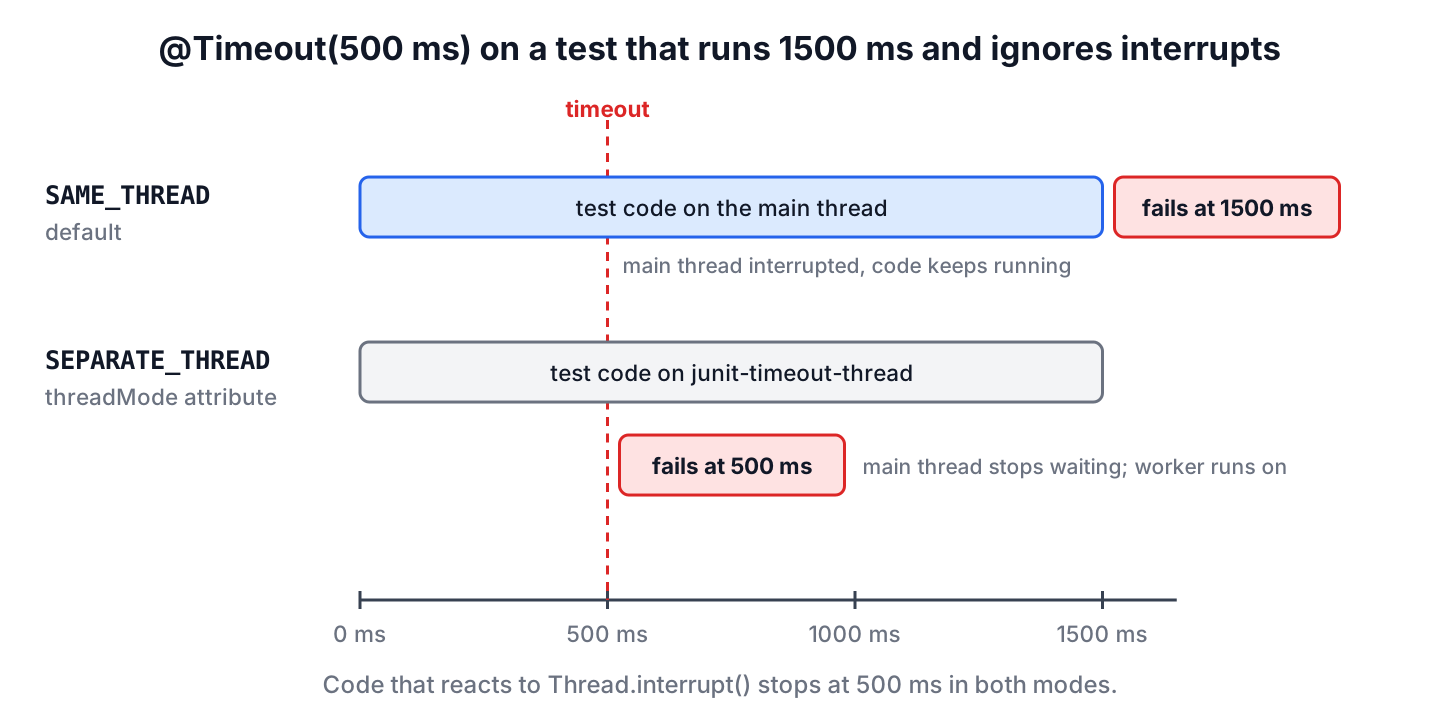
The following two tests run a fraud-score calculation that spins the CPU for 1.5 seconds and never checks the interrupt flag. Both allow 500 ms, and only the thread mode differs.
@Test
@Timeout(value = 500, unit = TimeUnit.MILLISECONDS)
void busyLoopIgnoresInterrupt() {
  long score = slowGateway.fraudScore(Duration.ofMillis(1500));   // never checks the interrupt flag
  assertTrue(score >= 0);
}

@Test
@Timeout(value = 500, unit = TimeUnit.MILLISECONDS, threadMode = ThreadMode.SEPARATE_THREAD)
void busyLoopInSeparateThread() {
  long score = slowGateway.fraudScore(Duration.ofMillis(1500));
  assertTrue(score >= 0);
}
Both fail with the same message, but the elapsed times show the difference. The first test waited for the loop to finish, and the second one failed after half a second, with the stack trace of the worker thread as the cause.
[ERROR] com.howtodoinjava.junit.payment.TimeoutFailureDemo.busyLoopIgnoresInterrupt -- Time elapsed: 1.626 s <<< ERROR!
java.util.concurrent.TimeoutException: busyLoopIgnoresInterrupt() timed out after 500 milliseconds

[ERROR] com.howtodoinjava.junit.payment.TimeoutFailureDemo.busyLoopInSeparateThread -- Time elapsed: 0.517 s <<< ERROR!
java.util.concurrent.TimeoutException: busyLoopInSeparateThread() timed out after 500 milliseconds
Caused by: org.junit.jupiter.api.timeout.PreemptiveTimeoutUtils$ExecutionTimeoutException: Execution timed out in thread junit-timeout-thread-1
We keep the default SAME_THREAD mode for tests that use Spring transactions or other ThreadLocal state, and switch to SEPARATE_THREAD only for code that ignores interrupts. The third value, INFERRED, is the default of the attribute. It reads the configuration parameter junit.jupiter.execution.timeout.thread.mode.default and falls back to SAME_THREAD when that parameter is not set.
5. Global Timeout Defaults in junit-platform.properties
Annotating hundreds of test methods is tedious, and a forgotten one can still hang a build. JUnit reads default timeouts from configuration parameters, which we put in src/test/resources/junit-platform.properties. A @Timeout annotation always wins over these defaults.
# Default timeout for every @Test method without its own @Timeout
junit.jupiter.execution.timeout.test.method.default=5 s
# Lifecycle methods such as @BeforeEach get less time
junit.jupiter.execution.timeout.lifecycle.method.default=2 s
# No timeouts while a debugger is attached
junit.jupiter.execution.timeout.mode=disabled_on_debug
A value is a number followed by an optional unit, such as ns, ms, s, m, h or d, and a number without a unit means seconds. The space between them is optional, so 5s and 5 s both work. A more specific parameter overrides a general one.
| Parameter | Applies to |
|---|---|
| junit.jupiter.execution.timeout.default | all testable and lifecycle methods |
| junit.jupiter.execution.timeout.testable.method.default | all @Test, @TestTemplate and @TestFactory methods |
| junit.jupiter.execution.timeout.test.method.default | @Test methods |
| junit.jupiter.execution.timeout.testtemplate.method.default | @TestTemplate methods, such as parameterized and repeated tests |
| junit.jupiter.execution.timeout.testfactory.method.default | @TestFactory methods |
| junit.jupiter.execution.timeout.lifecycle.method.default | all lifecycle methods |
| junit.jupiter.execution.timeout.beforeall.method.default (and beforeeach, aftereach, afterall) | one kind of lifecycle method |
| junit.jupiter.execution.timeout.mode | enabled (default), disabled or disabled_on_debug |
| junit.jupiter.execution.timeout.thread.mode.default | SAME_THREAD or SEPARATE_THREAD for INFERRED |
| junit.jupiter.execution.timeout.threaddump.enabled | true prints a thread dump before the interrupt |
With these settings, a test without its own @Timeout gets five seconds. The following test calls a gateway that needs eight seconds and fails at the default limit.
@Test
void slowChargeHitsTheDefault() throws InterruptedException {
  PaymentGateway verySlowGateway = new PaymentGateway(Duration.ofSeconds(8));
  assertEquals("APPROVED", verySlowGateway.charge(4999));         // no @Timeout, default is 5 s
}
java.util.concurrent.TimeoutException: slowChargeHitsTheDefault() timed out after 5 secondsSince JUnit 6.0, an invalid value for junit.jupiter.execution.timeout.mode or junit.jupiter.execution.timeout.thread.mode.default fails the test run instead of being ignored, so a typo in the properties file does not go unnoticed.
6. Turning Timeouts Off While Debugging
When we stop at a breakpoint, the timer keeps counting, and the test fails as soon as we continue. The mode disabled_on_debug turns all timeouts off when the JVM runs with a debug agent, which JUnit detects from a JVM argument that starts with -agentlib:jdwp or -Xrunjdwp. IntelliJ IDEA and Eclipse add such an argument when we start a test in debug mode.
We can also switch timeouts off for a single run from the command line, because JVM system properties are configuration parameters too, and they take precedence over the properties file. The busy-loop test from section 4 passes with this setting.
mvn test -Dtest=TimeoutFailureDemo#busyLoopIgnoresInterrupt -Djunit.jupiter.execution.timeout.mode=disabled[INFO] Tests run: 1, Failures: 0, Errors: 0, Skipped: 0, Time elapsed: 1.659 s -- in com.howtodoinjava.junit.payment.TimeoutFailureDemo7. Finding Out Where a Test Hangs
A timeout tells us that a test was slow, but not why. With junit.jupiter.execution.timeout.threaddump.enabled=true, JUnit prints the stack of every thread to System.out right before it interrupts the test, so we see the exact line the test was waiting on.
mvn test -Dtest=TimeoutFailureDemo#slowGatewayTimesOut -Djunit.jupiter.execution.timeout.threaddump.enabled=trueThread "main" prio=5 Id=3 TIMED_WAITING will be interrupted.
"main" prio=5 Id=3 TIMED_WAITING
at java.base@25.0.4.1/jdk.internal.misc.Unsafe.park(Native Method)
at java.base@25.0.4.1/java.util.concurrent.locks.LockSupport.parkNanos(LockSupport.java:408)
at app//com.howtodoinjava.junit.payment.Latency.waitFor(Latency.java:15)
at app//com.howtodoinjava.junit.payment.PaymentGateway.charge(PaymentGateway.java:18)
at app//com.howtodoinjava.junit.payment.TimeoutFailureDemo.slowGatewayTimesOut(TimeoutFailureDemo.java:21)The dump comes from a built-in PreInterruptCallback extension. We can register our own implementation of that interface to log extra state, such as open connections, before JUnit interrupts the test.
8. Waiting for an Asynchronous Result
A common use of @Timeout is a test that polls until an asynchronous operation finishes. In a shop backend, the payment confirmation arrives on another thread, and the test waits for it. Without a limit, a lost confirmation would keep the loop running forever.
@Test
@Timeout(5)
void asyncChargeIsConfirmed() {
  CompletableFuture<String> confirmation = gateway.chargeAsync(4999);
  while (!confirmation.isDone()) {
    Thread.onSpinWait();
  }
  assertEquals("APPROVED", confirmation.join());
}
The loop never checks the interrupt flag, so with the default thread mode the timeout fails the test only if the loop ends. In a real project, a bounded confirmation.get(5, TimeUnit.SECONDS) or a polling library such as Awaitility is the cleaner choice, and @Timeout still limits the whole test.
9. @Timeout vs assertTimeout() vs assertTimeoutPreemptively()
The Assertions class also has two timeout methods. They limit a block of code inside a test instead of the whole method.
| @Timeout | assertTimeout() | assertTimeoutPreemptively() | |
|---|---|---|---|
| Limits | a whole test or lifecycle method | one lambda | one lambda |
| Thread | same thread (default) or separate | same thread | separate thread |
| Stops slow code | interrupts it; code that ignores interrupts runs on | no, waits until the lambda ends | stops waiting at the limit; code that ignores interrupts runs on in the background |
| Failure | TimeoutException (error) | AssertionFailedError (failure) | AssertionFailedError (failure) |
| Global default | yes, configuration parameters | no | no |
We use @Timeout as the general guard against hanging tests and the assertion methods when one step inside a test has its own time budget, for example a cache lookup that must answer in 50 ms after a slow setup.
10. JUnit Timeout FAQs
Default values, lifecycle methods and the JUnit 4 timeout attribute cause most of the confusion about time limits.
10.1. What Is the Default Time Unit of @Timeout?
Seconds. @Timeout(5) means five seconds, and @Timeout(value = 5, unit = TimeUnit.MILLISECONDS) means five milliseconds.
10.2. Is There a Default Timeout for All Tests in JUnit?
No, not unless we set one. Without a @Timeout annotation and without the junit.jupiter.execution.timeout.*.default parameters, a test can run forever. Setting junit.jupiter.execution.timeout.default in junit-platform.properties gives every method a limit.
10.3. What Replaces @Test(timeout = 1000) From JUnit 4?
The annotation @Timeout(value = 1000, unit = TimeUnit.MILLISECONDS) next to @Test. JUnit 4’s timeout attribute ran the test in a separate thread, so the closest behavior is threadMode = ThreadMode.SEPARATE_THREAD. The JUnit 4 Timeout rule maps to a class-level @Timeout.
10.4. Does a Timeout Also Apply to @BeforeEach?
Only when we annotate the lifecycle method itself or set a lifecycle default such as junit.jupiter.execution.timeout.lifecycle.method.default. A class-level @Timeout covers the test methods but not @BeforeEach, @AfterEach, @BeforeAll or @AfterAll.
11. Conclusion
The @Timeout annotation puts a time limit on a test, a lifecycle method or a whole class, with seconds as the default unit. A slow test fails with a TimeoutException that names the method and the limit, and parameterized and repeated tests get the limit per invocation.
The default SAME_THREAD mode interrupts the test thread, which works for blocking calls and keeps ThreadLocal state intact. For CPU-bound code that ignores interrupts, SEPARATE_THREAD fails the test on time.
Global defaults in junit-platform.properties protect a build from tests that hang, disabled_on_debug keeps breakpoints usable, and the thread dump option shows where a slow test was waiting.
12. References
- JUnit User Guide 6.1.3, Timeouts
- Timeout Javadoc (JUnit 6.1.3)
- JUnit User Guide 6.1.3, Configuration Parameters
- JUnit 6.0.0 Release Notes
Happy Learning !!
