

Upgrading a test framework to a new major version means moving the test code, the build configuration and the test-runner plugins to a release that has removed APIs, new minimum requirements and changed defaults. In a Java project, this applies to JUnit, and JUnit 6 is its major release after JUnit 5. JUnit 6.0.0 was released on September 30, 2025, and the current release is 6.1.3.
JUnit 6 keeps the Jupiter programming model, so most JUnit 5 tests compile and run after a version change. The release raises the minimum Java version to 17, removes the APIs that were deprecated in JUnit 5, and gives the Platform, Jupiter and Vintage modules one shared version number.
We need the JUnit 5 to 6 upgrade when we move a project to Spring Boot 4, which manages JUnit 6 for us, or when we want the new built-in extensions and the stricter CSV handling in parameterized tests. In a Maven build, the version is controlled by the JUnit BOM (bill of materials), which is a POM that sets the versions of all JUnit artifacts, so changing its version changes every JUnit module together.
The following example is the complete BOM entry for JUnit 6.1.3.
<dependencyManagement>
  <dependencies>
    <dependency>
      <groupId>org.junit</groupId>
      <artifactId>junit-bom</artifactId>
      <version>6.1.3</version>   <!-- was 5.14.4 -->
      <type>pom</type>
      <scope>import</scope>
    </dependency>
  </dependencies>
</dependencyManagement>
Notice that the test code stays in the org.junit.jupiter packages, so ordinary test imports do not change. The rest of this guide compares both versions, then covers the migration steps, the compile errors we can expect, the behavior changes that appear only at runtime, and the new features.
1. JUnit 5 vs JUnit 6 at a Glance
JUnit 6 is an evolution of JUnit 5, not a rewrite like the move from JUnit 4 to JUnit 5 was. It keeps the same annotations, assertions and extension model, and changes the requirements around them, such as the Java version, the module list and the CSV parser. The following table compares the latest JUnit 5 line (5.14) with JUnit 6.1, and most rows matter only to some projects.
| Area | JUnit 5 (5.14) | JUnit 6 (6.1) |
|---|---|---|
| Minimum Java version | Java 8 | Java 17 |
| Minimum Kotlin version | Older Kotlin versions supported | Kotlin 2.2 |
| Version numbers | Platform 1.14, Jupiter 5.14, Vintage 5.14 | Platform, Jupiter and Vintage all 6.1.3 |
| Null-safety | No nullability annotations | JSpecify annotations on all modules |
| CSV parser for @CsvSource | univocity-parsers | FastCSV, stricter with malformed input |
| Parameterized display names | fruit=apple | fruit = “apple” |
| JUnit 4 runner (junit-platform-runner) | Available, deprecated | Removed |
| Vintage engine for JUnit 4 tests | Supported | Deprecated |
| Maven Surefire and Failsafe | 2.22.0 and newer | 3.0.0 and newer |
| Locale, time zone and system property extensions | JUnit Pioneer library | Built in since 6.1 |
| Kotlin suspend test methods | Not supported | Supported |
If a project already runs on Java 17 or newer and the compiler reports no warnings about deprecated JUnit APIs, the JUnit upgrade is only a version change.
2. Should We Upgrade to JUnit 6?
JUnit 6 needs Java 17 or newer to run the tests, and Maven builds need Surefire 3.0.0 or newer. If both are in place, the framework version and the remaining JUnit 4 tests decide how much work the upgrade takes.
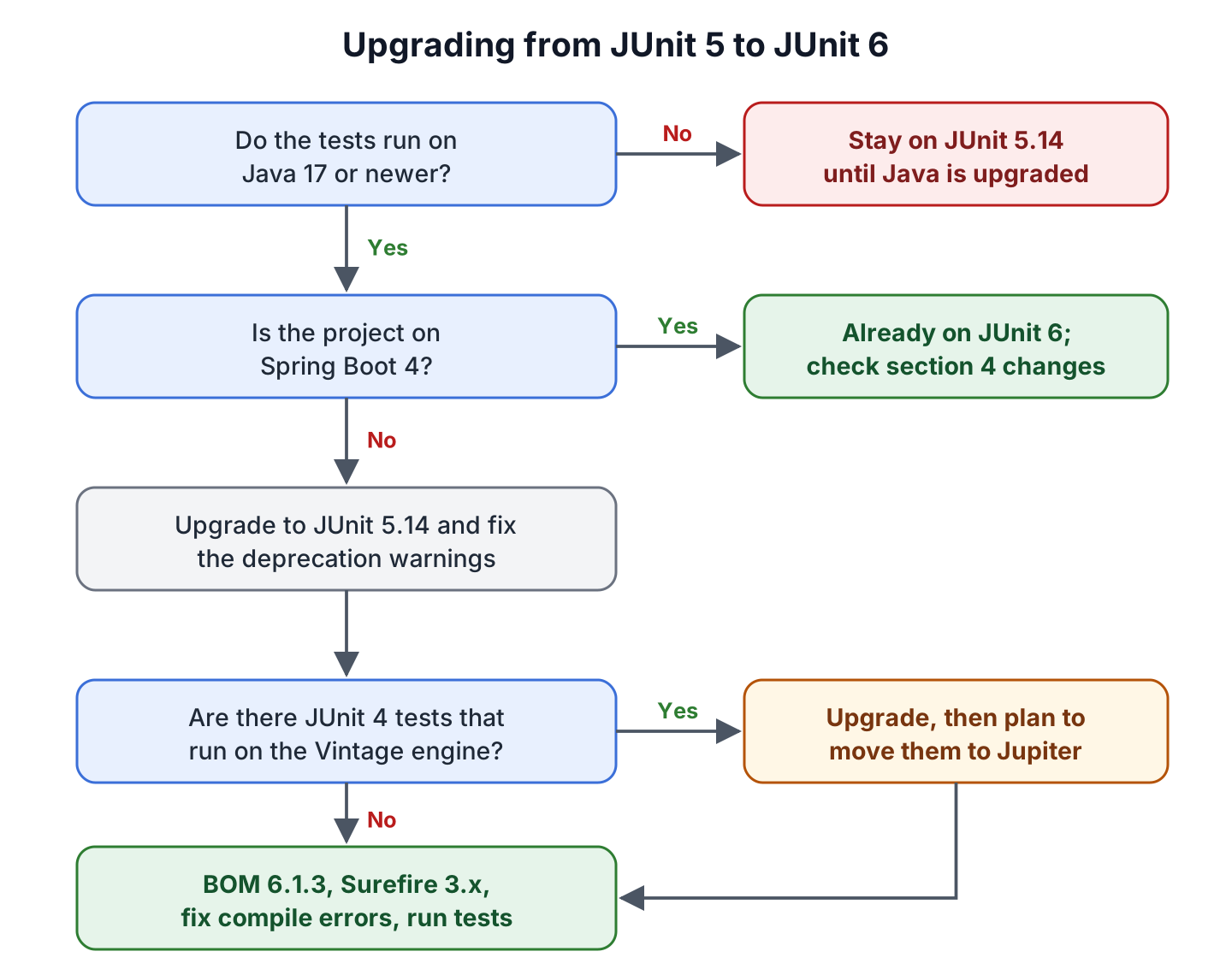
Spring Boot 4 manages the JUnit version through its dependency management, and Spring Boot 4.1.1 manages JUnit Jupiter 6.0.3. So a Spring Boot 4 project gets JUnit 6 without a version change. A project that wants the 6.1 features from section 5 overrides the version with a Maven property.
<properties>
  <junit-jupiter.version>6.1.3</junit-jupiter.version>
</properties>
Spring Boot 3.x projects use JUnit 5, and the simplest path for them is to upgrade JUnit together with the Spring Boot version.
3. How to Migrate from JUnit 5 to JUnit 6
We remove the deprecated API usage while the project is still on JUnit 5, and change the version after that. With this order, a failing build always points to one small change.
The following example is a small project with one class, PriceCalculator, which calculates and formats the total price of fruit orders. Its tests use the JUnit 5 APIs that JUnit 6 removed or deprecated, and we migrate it on Java 25 with Maven 3.9.16, from JUnit 5.14.4 to JUnit 6.1.3. The complete project is in the junit-5-to-6-migration folder on GitHub.
3.1. Upgrade to JUnit 5.14 and Fix Deprecation Warnings
Most APIs that JUnit 6 removed were already deprecated in JUnit 5, so the compiler lists many of them for us. We set the BOM to 5.14.4, compile the tests with deprecation warnings turned on, and fix each warning while the build still passes.
mvn test-compile -Dmaven.compiler.showDeprecation=true3.2. Change the JUnit Version in Maven or Gradle
In Maven, we change the BOM version as shown in the intro and raise Surefire (and Failsafe, if the project has integration tests) to a 3.x version, because JUnit 6 no longer supports Surefire versions below 3.0.0. The JUnit 6 Maven dependency post has the full pom.xml.
<plugin>
  <groupId>org.apache.maven.plugins</groupId>
  <artifactId>maven-surefire-plugin</artifactId>
  <version>3.6.0</version>
</plugin>
If the build pins any junit-platform-* artifact to a 1.x version, we remove that version, because the Platform artifacts follow the same 6.1.3 version as Jupiter. In Gradle, we change the BOM version and add junit-platform-launcher as a testRuntimeOnly dependency, as the JUnit 6 Gradle dependency post explains in detail.
dependencies {
    testImplementation platform("org.junit:junit-bom:6.1.3")       // was 5.14.4
    testImplementation "org.junit.jupiter:junit-jupiter"
    testRuntimeOnly "org.junit.platform:junit-platform-launcher"
}

test {
    useJUnitPlatform()
}
We ran the same tests with Gradle 9.1.0 and this configuration, and all of them passed.
3.3. Remove the Modules That JUnit 6 Dropped
JUnit 6 removed three modules (junit-platform-runner, junit-platform-jfr and junit-platform-suite-commons) and deprecated a fourth (junit-jupiter-migrationsupport). A build that still declares one of the removed modules fails at dependency resolution, because no 6.x version of that artifact exists.
| Module | Status in JUnit 6 | What to do |
|---|---|---|
| junit-platform-runner | Removed | Delete it, and run the tests through the JUnit Platform in the IDE or build tool instead of the JUnit 4 @RunWith(JUnitPlatform.class) runner |
| junit-platform-jfr | Removed | Delete it; the Java Flight Recorder events are part of junit-platform-launcher |
| junit-platform-suite-commons | Removed | Delete it; its classes moved into junit-platform-suite |
| junit-jupiter-migrationsupport | Deprecated | Replace the JUnit 4 rule support with Jupiter extensions before the next major version removes it |
3.4. Fix the Compile Errors
On JUnit 5.14.4, our project showed only one warning, for MethodOrderer.Alphanumeric. Other changes, such as the removed lineSeparator attribute, were never marked deprecated in JUnit 5, so they appear only when we compile against JUnit 6. Compiling the JUnit 5 version of our tests against JUnit 6.1.3 gives two errors and two warnings.
[WARNING] CallCounterExtension.java:[16,9] <K,V>getOrComputeIfAbsent(K,java.util.function.Function<? super K,? extends V>,java.lang.Class<V>) in org.junit.jupiter.api.extension.ExtensionContext.Store has been deprecated
[WARNING] JreConditionTest.java:[12,32] JAVA_11 in org.junit.jupiter.api.condition.JRE has been deprecated and marked for removal
[ERROR] CsvFileSourceTest.java:[15,65] cannot find symbol
  symbol:   method lineSeparator()
  location: @interface org.junit.jupiter.params.provider.CsvFileSource
[ERROR] MethodOrderTest.java:[9,31] cannot find symbol
  symbol:   class Alphanumeric
  location: interface org.junit.jupiter.api.MethodOrderer
Each message maps to a one-line fix. The table lists the changes that JUnit 6 forces most often, with the JUnit 5 code on the left.
| JUnit 5 code | JUnit 6 code | Why |
|---|---|---|
| @TestMethodOrder(MethodOrderer.Alphanumeric.class) | @TestMethodOrder(MethodOrderer.MethodName.class) | Alphanumeric was removed |
| @CsvFileSource(resources = “/prices.csv”, lineSeparator = “\n”) | @CsvFileSource(resources = “/prices.csv”) | JUnit 6 detects \n, \r and \r\n by itself |
| @EnabledForJreRange(min = JRE.JAVA_11) | Remove it, because every test runs on Java 17 or newer; keep a condition only for a newer version, such as minVersion = 21 | JAVA_8 to JAVA_16 are deprecated |
| store.getOrComputeIfAbsent(key, factory, type) | store.computeIfAbsent(key, factory, type) | getOrComputeIfAbsent() is deprecated |
| org.junit.jupiter.engine.Constants | org.junit.jupiter.api.Constants | The engine class is deprecated since 6.1 |
The extension store change is the easiest one to miss, because it can sit in shared test utilities that no test names directly. In our example, the beforeEach(ExtensionContext context) method of a small extension counts the tests that run, and only the method name changes.
ExtensionContext.Namespace NAMESPACE = ExtensionContext.Namespace.create(CallCounterExtension.class);
ExtensionContext.Store store = context.getRoot().getStore(NAMESPACE);

// JUnit 5: store.getOrComputeIfAbsent("calls", key -> new AtomicInteger(), AtomicInteger.class)
AtomicInteger counter = store.computeIfAbsent("calls", key -> new AtomicInteger(), AtomicInteger.class);
3.5. Automate the Migration With OpenRewrite
For a large codebase, the OpenRewrite JUnit 5 to 6 recipe applies most of these changes for us. OpenRewrite is a tool that edits source code and build files with predefined recipes, and it runs as a Maven or Gradle plugin. We ran it on the JUnit 5 version of our project with the plugin version available on Maven Central.
mvn org.openrewrite.maven:rewrite-maven-plugin:6.46.1:run \
  -Drewrite.recipeArtifactCoordinates=org.openrewrite.recipe:rewrite-testing-frameworks:RELEASE \
  -Drewrite.activeRecipes=org.openrewrite.java.testing.junit6.JUnit5to6Migration
The recipe changed the JUnit version to 6.1.3 and Surefire to 3.6.0, replaced Alphanumeric with MethodName and removed the lineSeparator attribute. The recipe also deleted the @EnabledForJreRange(min = JRE.JAVA_11) condition, because that condition is always true on Java 17. The getOrComputeIfAbsent() call stayed as it was, so we still review the compiler warnings after the recipe runs.
The OpenRewrite documentation lists newer plugin versions that it serves from a repository that needs credentials. The 6.46.1 plugin from Maven Central works without credentials, and RELEASE in the command resolved to version 3.44.0 of the recipe library.
4. Behavior Changes to Check After Upgrading
Some changes do not break the build. The tests still compile, but test names, CSV parsing or execution order differ, so we compare one CI run before and after the upgrade.
4.1. Parameterized Test Display Names
A display name is the text that test reports and IDEs show for each test. In a parameterized test, JUnit builds it from the argument names and values, and TestInfo.getDisplayName() returns it. JUnit 6 writes the arguments as name = value and puts every argument that comes from CSV text in quotes, numbers included. The following parameterized test prints its own display name, and we ran it once on each version with the -parameters compiler flag (maven.compiler.parameters set to true), which lets JUnit read the parameter names.
private final PriceCalculator calculator = new PriceCalculator();

@ParameterizedTest
@CsvSource({
    "apple,  5, 2.0, 10.0",
    "banana, 3, 1.5, 4.5"
})
void total(String fruit, int quantity, double unitPrice, double expected, TestInfo info) {
  System.out.println("Display name: " + info.getDisplayName());
  assertEquals(expected, calculator.total(quantity, unitPrice));
}
JUnit 5.14.4
Display name: [1] fruit=apple, quantity=5, unitPrice=2.0, expected=10.0
JUnit 6.1.3
Display name: [1] fruit = "apple", quantity = "5", unitPrice = "2.0", expected = "10.0"Test reports, CI dashboards and flaky-test trackers identify tests by display name, so they treat these tests as new tests after the upgrade. A test that sets its own name attribute on @ParameterizedTest keeps its pattern, but the placeholders inside it use the new format.
4.2. Stricter CSV Parsing in @CsvSource and @CsvFileSource
JUnit 6 parses parameterized test data with the FastCSV library instead of univocity-parsers. Malformed rows that JUnit 5 accepted fail in JUnit 6, for example a character right after a closing quote.
@ParameterizedTest
@CsvSource("'apple'x, 5")      // passes on JUnit 5.14.4, fails on JUnit 6.1.3
void textAfterClosingQuote(String fruit, int quantity) {
  assertNotNull(fruit);
}
org.junit.jupiter.params.provider.CsvParsingException: Failed to parse CSV input configured via @org.junit.jupiter.params.provider.CsvSource(...)
Caused by: org.junit.jupiter.params.shadow.de.siegmar.fastcsv.reader.CsvParseException: Unexpected character after closing quote: 'x' (0x78)Two more CSV rules changed. The attributes ignoreLeadingAndTrailingWhitespace and nullValues apply to header fields too, and since 6.0.1 a new commentCharacter attribute (default #) controls which lines count as comments.
4.3. Test Order in @Nested Classes
In JUnit 6, @TestMethodOrder on a test class also applies to its @Nested classes, the same way @TestClassOrder already did. JUnit 6 also runs @Nested classes in a fixed order that does not change between runs, but that order is not alphabetical.
@TestMethodOrder(MethodOrderer.MethodName.class)
class MethodOrderTest {

  @Nested
  class Inner {                 // JUnit 6: methods also run in name order here

    @Test
    void dTest() {
    }

    @Test
    void cTest() {              // runs before dTest()
    }
  }
}
If one @Nested class needs the default order back, we annotate it with @TestMethodOrder(MethodOrderer.Default.class). Tests that depend on running in a certain order are fragile in any version, so the upgrade is a good moment to remove that dependency.
4.4. Other Runtime Changes
A few smaller changes affect only projects that use these settings, so we search the code and the junit-platform.properties file for them.
- Invalid values for enum-based configuration parameters, such as junit.jupiter.execution.parallel.mode.default, fail the run instead of being ignored.
- String to Locale conversion in parameterized tests always uses the BCP 47 format, such as en-US, and the junit.jupiter.params.arguments.conversion.locale.format parameter was removed.
- The junit.jupiter.tempdir.scope parameter for @TempDir is no longer supported.
- The ConsoleLauncher, the command-line tool for running tests outside an IDE or build tool, needs a subcommand such as execute, and it accepts only the standard option spellings, such as –help instead of -help.
5. New Features in JUnit 6
JUnit 6.1 added extensions that many projects used to get from the JUnit Pioneer library. The extensions set the default locale, the default time zone or a system property for one test and restore the old value afterwards.
@Test
@DefaultLocale("en-US")
void formatsUsDollars() {
  assertEquals("$10.00", calculator.format(10.0));                // passes
}

@Test
@DefaultTimeZone("Asia/Kolkata")
void usesKolkataTimeZone() {
  assertEquals("Asia/Kolkata", TimeZone.getDefault().getID());   // passes
}

@Test
@SetSystemProperty(key = "store.currency", value = "EUR")
void readsSystemProperty() {
  assertEquals("EUR", System.getProperty("store.currency"));     // passes
}
The annotations are in the org.junit.jupiter.api.util package, and the test class has a PriceCalculator field named calculator and imports java.util.TimeZone. Projects that used the Pioneer versions can switch to them and drop one dependency, and the current OpenRewrite recipe from section 3.5 lists a step for this change.
JUnit 6 also brings a few features that matter to fewer projects.
- All JUnit modules use JSpecify annotations (a standard set of @Nullable and @NullMarked annotations), so tools such as NullAway warn when we pass null where JUnit does not accept it. The JUnit 6 nullability post explains @Nullable and @NullMarked.
- Kotlin tests can be suspend functions, so coroutine code no longer needs a runBlocking wrapper.
- The ConsoleLauncher has a –fail-fast option that stops the run after the first failure, based on a new cancellation API that build tools and IDEs can use.
- JUnit 6.1 adds an org.junit.start module for running tests from Java compact source files with a single module import.
6. JUnit 4 Tests and the Vintage Engine
The Vintage engine, which runs JUnit 4 tests on the JUnit Platform, still works in JUnit 6, but it is deprecated and reports an INFO-level message when it finds a JUnit 4 test class. JUnit describes it as a temporary compatibility layer, so a project that still has JUnit 4 tests should plan to move them to Jupiter.
The differences between the two programming models are covered in JUnit 5 vs JUnit 4, and everything in that post also applies when the target is JUnit 6.
7. JUnit 5 to JUnit 6 FAQs
Teams planning this upgrade often ask whether their Java version, their framework or their other test libraries prevent it.
7.1. Is JUnit 6 Backward Compatible With JUnit 5?
Mostly, yes. JUnit 6 keeps the Jupiter annotations, assertions and extension model, so tests compile after the fixes in section 3.4, and only the behavior changes in section 4 need a check.
7.2. Does JUnit 6 Work With Java 11?
No. JUnit 6 needs Java 17 or newer, so a project that runs its tests on Java 8 or Java 11 stays on JUnit 5.14 until it upgrades Java.
7.3. Do I Need to Change My Imports?
No, not for ordinary tests. The packages stay the same, for example org.junit.jupiter.api.Test and org.junit.jupiter.params.ParameterizedTest. Only code that uses removed or moved classes, such as MethodOrderer.Alphanumeric or org.junit.jupiter.engine.Constants, needs a change.
7.4. Does Spring Boot 3 Support JUnit 6?
Spring Boot 3.x manages JUnit 5, and Spring Boot 4 manages JUnit 6. A Spring Boot 3 project on Java 17 can set the junit-jupiter.version property to 6.1.3, but upgrading JUnit together with Spring Boot 4 keeps the versions that Spring tests with.
7.5. Does Mockito Work With JUnit 6?
Yes. Mockito 5 and its MockitoExtension run on JUnit 6, as the examples in the Mockito 5 tutorial show. For other test libraries, we check that their latest version supports JUnit 6 before the upgrade.
8. Conclusion
Moving from JUnit 5 to JUnit 6 is a small upgrade for most projects. If the tests run on Java 17, the build uses Surefire 3 and no deprecated JUnit APIs remain, the change is one BOM version.
The changes that need attention are the ones that do not break the build, such as the new display names in test reports and the stricter CSV parsing. One CI run before and one after the upgrade shows both. The built-in locale, time zone and system property extensions are a reason to upgrade to 6.1 specifically.
9. References
- JUnit 6.0.0 Release Notes
- JUnit 6.1 Release Notes
- JUnit User Guide
- OpenRewrite JUnit 6 Migration Recipe
- Maven Surefire Plugin
Happy Learning !!
