

A large language model (LLM) is a program that reads text as tokens and predicts the next token, one at a time, until it has produced a full answer. Almost every other LLM term describes one part of that loop, such as how text becomes tokens, how many tokens fit into one request, or how random the choice of the next token is.
Java developers meet these terms in Spring AI and LangChain4j settings, in provider API docs and on pricing pages. Knowing them makes it clear why a request fails with a context length error, why the same prompt gives different answers, and why a bill grows with every long conversation.
The following example counts tokens with the JTokkit library, which implements the tokenizers that OpenAI models use. Other providers use their own tokenizers, so the counts differ slightly between models.
Encoding encoding = Encodings.newDefaultEncodingRegistry().getEncoding(EncodingType.O200K_BASE);

String sentence = "Spring Boot makes Java microservices easy to build.";
int tokens = encoding.countTokens(sentence);                // tokens = 10 (8 words)

IntArrayList ids = encoding.encode("unbelievably");         // 3 tokens: un, bel, ievably
Notice that a token is not a word. Common words are often one token, while longer or rarer words are split into pieces. In the rest of the article, we group the terms the way we meet them in code, from the request itself to cost and safety, and finish with a table that maps each term to its Spring AI and LangChain4j class.
1. How an LLM Request Works
Every call to a chat model follows the same path, whether we use Spring AI, LangChain4j or plain HTTP. Our application sends messages, the provider turns them into tokens, the model generates new tokens until it stops, and the provider turns those tokens back into text.
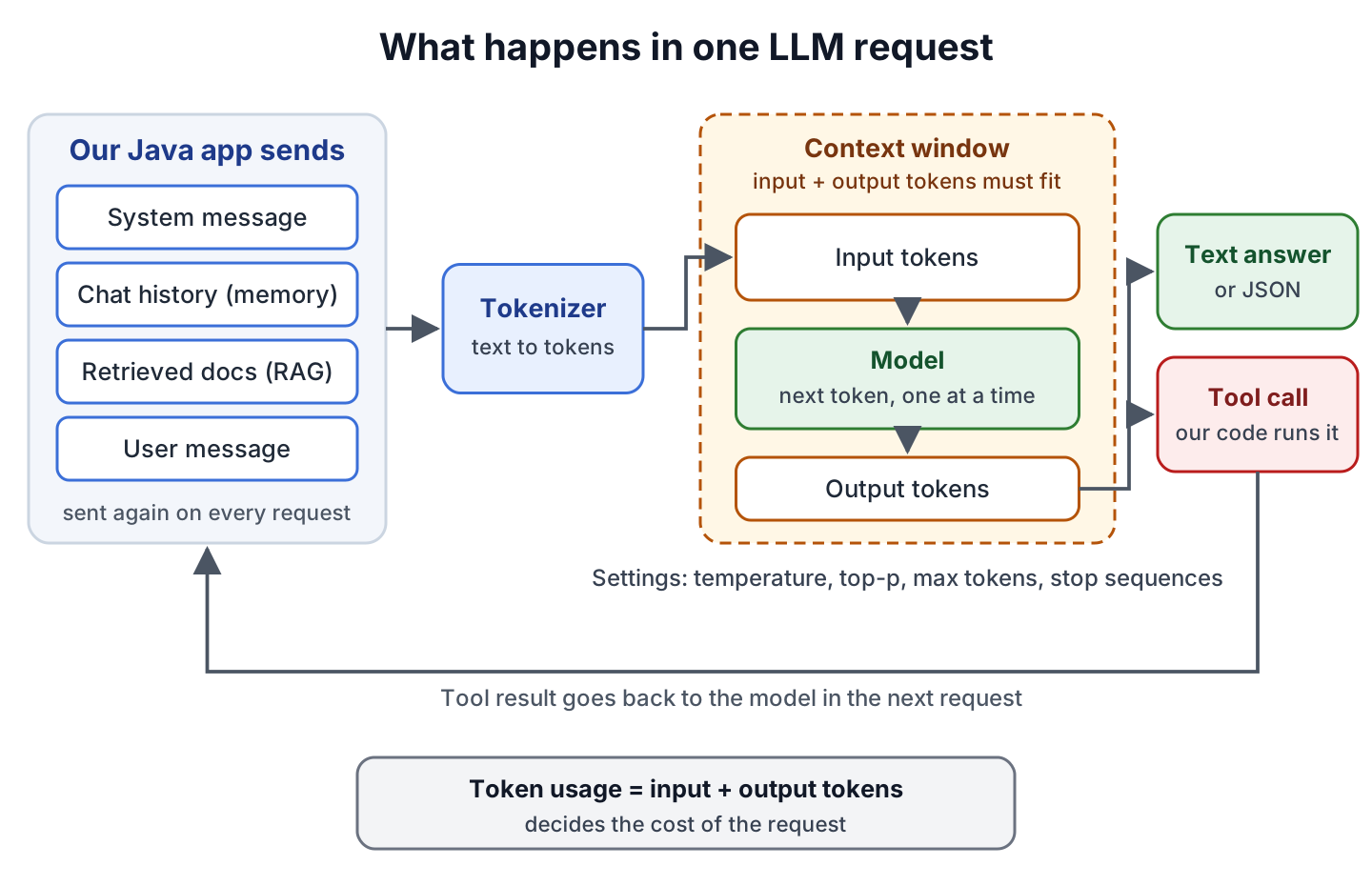
A model does not remember anything between two requests, so the application sends the conversation history, the documents and the instructions again with every call. Because of that, many of the terms below, from chat memory to RAG and token costs, are about what we send with each request.
2. Model Terms
We meet the model terms when we choose a provider or a model name in the configuration.
| Term | What it means |
|---|---|
| Large language model (LLM) | A model trained on large amounts of text and code that generates text by predicting the next token |
| Parameters (weights) | The numbers the model learned during training; the model size, such as 8 billion parameters, counts them |
| Training | The phase in which the model learns its parameters from data; it happens once, before we use the model |
| Inference | Running the trained model to answer a request; every API call is an inference call |
| Base model | A model after pre-training only, good at continuing text but not at following instructions |
| Instruct or chat model | A base model trained further to follow instructions and hold a conversation; chat APIs use these |
| Fine-tuning | Training an existing model further on our own examples to change its style or teach it a narrow task |
| Open-weight model | A model whose weights we can download and run ourselves, for example with Ollama, a tool that runs models locally |
| Multimodal model | A model that also accepts or produces images, audio or video, not only text |
| Knowledge cutoff | The date after which the model has no training data, so it does not know about newer events or library versions |
| Quantization | Storing the weights with fewer bits, which makes an open-weight model small enough to run on a laptop at some cost in quality |
| Reasoning model | A model that generates internal reasoning tokens before the answer, which improves hard tasks but costs more tokens and time |
3. Prompt and Token Terms
A token is the unit a model reads and writes, and the tokenizer is the part that splits text into tokens and back. The Spring AI reference says that in English one token is roughly 75% of a word, so 1,000 words are about 1,300 tokens. Code, numbers and languages other than English often need more tokens per word.
The following example shows how one tokenizer splits a word and a line of Java code. The name O200K_BASE refers to one of the tokenizer encodings that JTokkit ships, and each token has an integer ID, so decoding the IDs one by one shows the pieces.
Encoding encoding = Encodings.newDefaultEncodingRegistry().getEncoding(EncodingType.O200K_BASE);

IntArrayList ids = encoding.encode("unbelievably");                         // ids.size() = 3
List<String> pieces = IntStream.range(0, ids.size())
    .mapToObj(i -> {
      IntArrayList one = new IntArrayList();
      one.add(ids.get(i));
      return encoding.decode(one);
    })
    .toList();                                                               // [un, bel, ievably]

int codeTokens = encoding.countTokens("List<String> names = new ArrayList<>();");  // codeTokens = 10
The remaining terms cover what goes into a request and how long the answer may get.
| Term | What it means |
|---|---|
| Context window | The maximum number of tokens the model handles in one request, input and output together; large hosted models offer about 128,000 to 1 million tokens, and small local models often much less |
| Prompt | Everything we send to the model in one request |
| System message (system prompt) | Instructions that set the model’s role and rules, such as “Answer only questions about our product” |
| User message | The question or input from the user |
| Assistant message | A previous answer from the model, sent back as part of the chat history |
| Prompt template | A prompt with placeholders, such as Summarize {text} in {count} bullet points, that we fill in at runtime |
| Max tokens | The limit on how many tokens the model may generate for the answer; a cut-off answer often means this limit was too low |
| Streaming | Receiving the answer token by token as the model generates it, instead of waiting for the full text |
| Zero-shot and few-shot prompting | Asking without examples (zero-shot) or with a few worked examples in the prompt (few-shot) |
4. Terms for Controlling the Output
For every next token, the model gives a score, called a logit, to each token in its vocabulary (the set of all tokens it knows), and the scores are turned into probabilities. Temperature changes how those probabilities are spread. A low temperature makes the most likely token win almost every time, whereas a high temperature gives the less likely tokens a real chance.
The following example uses four made-up scores for the word after “The coffee is” and converts them into probabilities at three temperatures. Real models do the same calculation over their whole vocabulary.
static double[] softmax(double[] scores, double temperature) {
  double[] scaled = Arrays.stream(scores).map(s -> Math.exp(s / temperature)).toArray();
  double sum = Arrays.stream(scaled).sum();
  return Arrays.stream(scaled).map(s -> s / sum).toArray();
}

double[] scores = {4.0, 3.0, 2.5, 0.5};  // hot, ready, strong, purple

double[] low = softmax(scores, 0.2);     // hot 99%, ready 1%,  strong 0%,  purple 0%
double[] normal = softmax(scores, 1.0);  // hot 62%, ready 23%, strong 14%, purple 2%
double[] high = softmax(scores, 2.0);    // hot 44%, ready 27%, strong 21%, purple 8%
The method softmax() divides each score by the temperature, applies Math.exp() and divides by the sum, so all probabilities add up to 100%. We can see that at temperature 2.0 even “purple” gets an 8% chance, which is why high temperatures produce more surprising and sometimes wrong text. The formula works only for temperatures above 0, so providers treat temperature 0 as always picking the most likely token.
| Term | What it means |
|---|---|
| Temperature | Controls randomness; low values for facts, code and extraction, higher values for brainstorming; the allowed range differs by provider, for example 0.0 to 1.0 for Anthropic models |
| Top-p (nucleus sampling) | Picks the next token only from the smallest group of most likely tokens (the nucleus) whose probabilities add up to p, so 0.1 keeps the top 10% of the probability; providers recommend changing either top-p or temperature, not both |
| Top-k | Picks the next token only from the k most likely tokens |
| Stop sequence | A string that ends generation when the model produces it |
| Structured output | Asking the model for JSON that matches a schema, so we can map the answer to a Java record or class |
| Deterministic output | The same answer for the same input; temperature 0 makes answers more repeatable but does not guarantee identical output |
Some newer models restrict these settings. For example, the Spring AI docs note that GPT-5 models such as gpt-5-mini reject the temperature parameter, and the Spring AI Anthropic page notes that Anthropic rejects top-p values below 0.99 and top-k on models released after Claude Opus 4.6, so we check the provider page before we copy settings from an older example.
5. Embeddings, Vector Search and RAG Terms
An embedding is an array of floating-point numbers (a vector) that represents the meaning of a text. An embedding model creates it, and texts with similar meaning get vectors that point in similar directions, so we can find related text by comparing vectors instead of matching keywords.
The following example compares three made-up vectors with four dimensions each, while real embedding models return hundreds or thousands of dimensions. Cosine similarity returns a value close to 1 for vectors that point the same way.
static double cosineSimilarity(float[] a, float[] b) {
  double dot = 0, normA = 0, normB = 0;
  for (int i = 0; i < a.length; i++) {
    dot += a[i] * b[i];
    normA += a[i] * a[i];
    normB += b[i] * b[i];
  }
  return dot / (Math.sqrt(normA) * Math.sqrt(normB));
}

float[] cat = {0.9f, 0.8f, 0.1f, 0.0f};
float[] kitten = {0.85f, 0.75f, 0.2f, 0.05f};
float[] invoice = {0.05f, 0.1f, 0.9f, 0.8f};

double catKitten = cosineSimilarity(cat, kitten);     // 0.995
double catInvoice = cosineSimilarity(cat, invoice);   // 0.147
A vector store saves these vectors and finds the closest ones to a query vector. A RAG pipeline splits documents into chunks, stores an embedding for each chunk, and at question time embeds the question, finds the closest chunks and adds them to the prompt. The nearest-vector search is the core of that pipeline, and the existing Spring AI EmbeddingModel example shows the same idea with a real embedding model.
| Term | What it means |
|---|---|
| Embedding | A vector of numbers that represents the meaning of a text, image or other input |
| Dimensions | The length of the embedding vector, fixed for each embedding model |
| Cosine similarity | A measure of how close two vectors point, from -1 to 1, where values near 1 mean similar meaning |
| Vector store (vector database) | A database that stores embeddings and returns the most similar ones, such as PGvector, Chroma or Redis |
| Chunking | Splitting long documents into smaller pieces before creating embeddings, so each piece fits and matches precisely |
| Retrieval augmented generation (RAG) | Finding the document chunks related to a question and adding them to the prompt, so the model answers from our data |
| Top-K retrieval and similarity threshold | How many of the closest chunks the vector store returns, and the minimum similarity a chunk needs to be included |
| Re-ranking | A second step that sorts the retrieved chunks again with a more precise model before they go into the prompt |
| Grounding | Making the model answer from given sources instead of from what it learned in training |
| Hallucination | A confident answer that is false, because the model predicts likely tokens rather than checking facts |
6. Tool, Agent and Memory Terms
A model on its own can only produce text, and its knowledge stops at its training date. Tool calling lets the model ask our application to run a Java method, such as looking up an order, and the application sends the result back in the next request.
| Term | What it means |
|---|---|
| Tool calling (function calling) | The model returns the name and arguments of a tool instead of text, our code runs the tool, and the result goes back to the model |
| Agent | An application where the model decides, step by step, which tools to call, reads each result and repeats this loop until the task is done |
| Model Context Protocol (MCP) | An open standard for connecting AI applications to external tools and data; an MCP server exposes tools, data and prompts, and an MCP client inside the AI application calls them, so one server works with many applications |
| Chat memory | The part of our application that stores past messages and sends them with each new request |
| Guardrails | Checks before or after the model call that block unsafe input or output, such as personal data in an answer |
7. Cost, Quality and Safety Terms
Hosted models charge for input and output tokens, so the token count of every request is also its price. At most providers, output tokens cost several times more than input tokens, and the provider pricing page lists both per million tokens.
| Term | What it means |
|---|---|
| Token usage | The input and output token counts that the provider returns with each response; we log them to track cost |
| Prompt caching | Many providers charge less for repeated input, such as a long system prompt, that they have cached from an earlier request |
| Rate limit | The maximum requests or tokens per minute that a provider allows for our account |
| Latency and time to first token | The total time until the full answer, and the time until the first streamed token appears |
| Evaluation (evals) | Automated tests that check model answers, for example for relevance or factual correctness |
| LLM-as-a-judge | Using a second model call to grade the answer of the first one |
| Prompt injection | Text in user input or retrieved documents that tries to override our instructions; the OWASP Top 10 for LLM Applications lists it first |
8. LLM Terms and Their Java Classes
Both main Java libraries use the same concepts under slightly different names. The table maps the terms to the types we use in Spring AI and LangChain4j.
| Term | Spring AI | LangChain4j |
|---|---|---|
| Chat model call | ChatClient, ChatModel | ChatModel, AiServices |
| Prompt and messages | Prompt, SystemMessage, UserMessage | ChatRequest, SystemMessage, UserMessage |
| Prompt template | PromptTemplate | PromptTemplate |
| Temperature, max tokens | ChatOptions | ChatRequest builder methods |
| Structured output | BeanOutputConverter, entity() | Return types of an AiServices interface |
| Embeddings | EmbeddingModel | EmbeddingModel |
| Vector store | VectorStore | EmbeddingStore |
| Chunking | TokenTextSplitter | DocumentSplitter |
| RAG | QuestionAnswerAdvisor, RetrievalAugmentationAdvisor | EmbeddingStoreContentRetriever |
| Tool calling | @Tool | @Tool |
| Chat memory | ChatMemory, MessageChatMemoryAdvisor | MessageWindowChatMemory |
| Streaming | ChatClient stream(), returns a Flux | StreamingChatModel |
| Token usage | Usage in the ChatResponse metadata | Token usage in the ChatResponseMetadata |
| MCP | MCP client and server Boot starters | langchain4j-mcp module, McpToolProvider |
The Spring AI tutorial and getting started with LangChain4j show these types in working Spring Boot applications.
9. LLM Terms FAQs
Beginners reading LLM API docs ask these four questions most often.
9.1. What Is the Difference Between a Token and a Word?
A token is a piece of text that the tokenizer defines, which can be a whole word, part of a word, a space or a symbol. In English, 100 words are roughly 130 tokens, and each tokenizer splits text a little differently.
9.2. What Is the Difference Between RAG and Fine-Tuning?
RAG adds our documents to the prompt at request time, so the data can change every day without retraining. Fine-tuning changes the model itself with training examples, which suits a fixed style or task better than changing facts.
9.3. What Does Temperature 0 Mean?
Temperature 0 tells the model to pick the most likely token almost every time. The answers become more repeatable, which suits extraction and classification, but providers do not guarantee identical output for identical requests.
9.4. Why Does My Request Fail With a Context Length Error?
The input tokens plus the requested max tokens are larger than the model’s context window. We shorten the chat history, retrieve fewer or smaller document chunks, or lower the max tokens setting.
10. Conclusion
Most LLM terms describe one step of the same request, which turns our messages into tokens, fits them into the context window, generates new tokens and turns them back into text. Tokens decide both the limits and the cost, temperature and its relatives decide how predictable the answer is, and embeddings with RAG decide which of our data the model gets to see.
With these terms in place, the Spring AI and LangChain4j docs read much faster, because each class maps to one idea from this page.
11. References
- Spring AI Concepts
- Spring AI OpenAI Chat Options
- Spring AI Anthropic Chat Options
- LangChain4j RAG Tutorial
- What Is the Model Context Protocol
- OWASP Top 10 for LLM Applications
- JTokkit
Happy Learning !!
