

The Model Context Protocol (MCP) gives AI applications a common way to discover tools and access external systems. A server exposes capabilities such as searching a catalog or reading a document. A compatible host can use that server without inventing a new integration format for each application.
In Java, you may build a server that exposes your application’s capabilities or a client that consumes another server. Keep these roles separate: the server implements the operation, while the host controls how the model sees and uses it.
The following example is a tiny MCP server built with the official MCP Java SDK. It exposes one tool, check_availability, which tells an AI application how many copies of a book a library has.
McpSyncServer server = McpServer.sync(new StdioServerTransportProvider(McpJsonDefaults.getMapper()))
    .serverInfo("library-server", "1.0.0")
    .capabilities(McpSchema.ServerCapabilities.builder().tools(true).build())
    .tools(checkAvailability)      // the tool definition plus its Java handler, shown in section 6.1
    .build();
The example server does not call a model. It lists a tool and runs its Java handler when the client requests it. We first explain the roles and messages, then build the server and client, and finally cover permissions and validation.
1. Why MCP Exists
A custom integration ties an application to a particular tool interface. MCP provides shared discovery, schemas and message formats so implementations can interoperate. Compatibility still depends on supported protocol revisions, transports and capabilities.
The MCP documentation compares the protocol to a USB-C port for AI applications. Clients that support MCP include coding assistants, chat apps and IDEs such as VS Code and Cursor, and frameworks such as Spring AI and LangChain4j.
MCP supplies and invokes external tools; model tool calling selects a tool name and arguments within the host’s workflow. The host translates definitions, checks proposed calls and sends authorized requests to the server. The model does not open a direct connection to the tool.
2. MCP Architecture with Host, Client and Server
The host is the user-facing AI application. A client inside it communicates with an MCP server. The server exposes tools, resources and prompts. Connection and session behavior depends on the negotiated protocol revision.
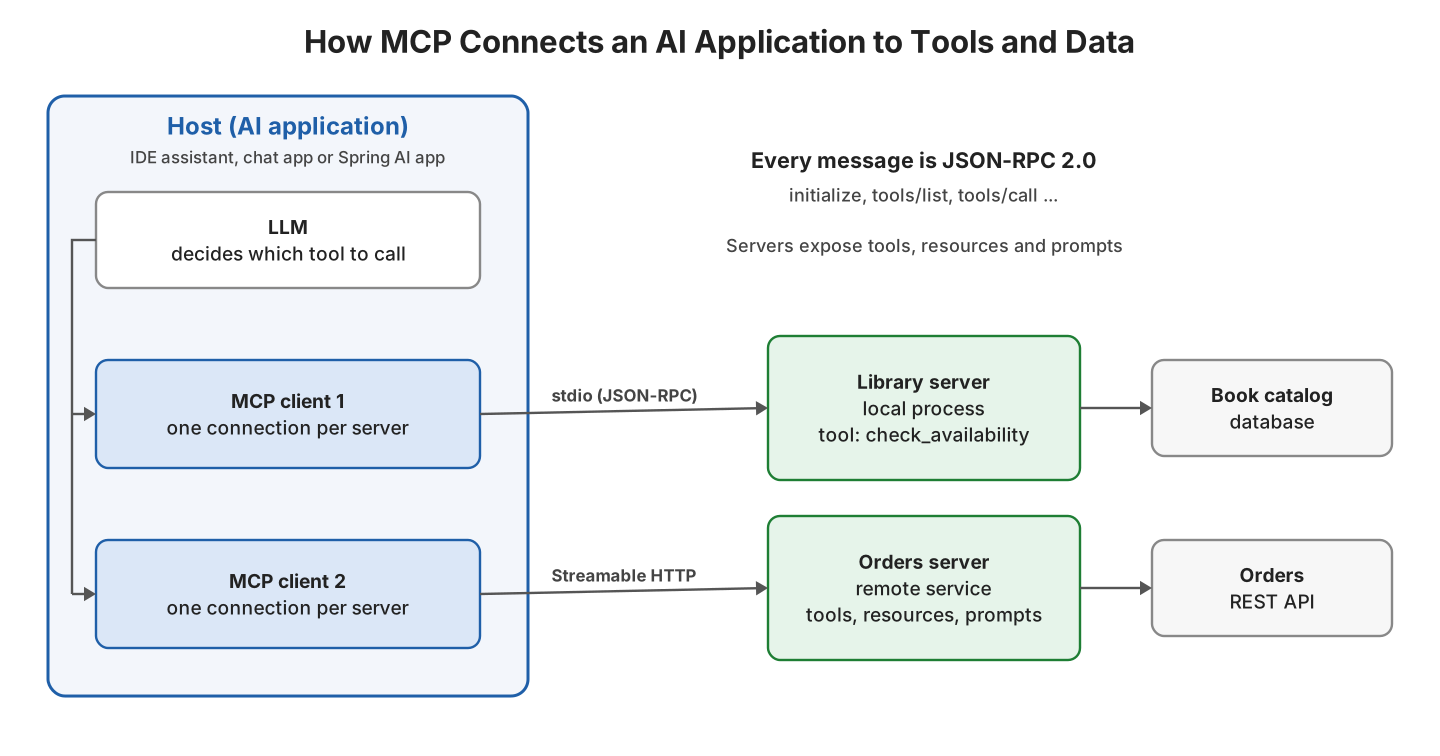
The protocol itself has two layers. The data layer defines the messages, which are JSON-RPC 2.0 requests, responses and notifications. The transport layer defines how those messages are sent, and MCP has two standard transports. Older servers still use a third one, which is deprecated.
| Transport | How it works | Typical use |
|---|---|---|
| stdio | The client starts the server as a child process and exchanges one JSON message per line over standard input and output | Local servers, such as a tool that reads files on the developer’s machine |
| Streamable HTTP | The client sends JSON-RPC messages with HTTP POST, and the server can answer with a stream of events | Remote servers shared by many users, such as a company-wide orders server |
| HTTP with SSE (old) | The original HTTP transport with a separate Server-Sent Events channel | Deprecated since the 2025-03-26 spec; use Streamable HTTP for new servers |
3. Tools, Resources and Prompts
An MCP server can offer three kinds of things, called server primitives. They differ in who decides to use them, which matters for both design and security.
| Primitive | What it is | Who decides to use it | Library example |
|---|---|---|---|
| Tools | Functions the AI application can call, with a name, a description and a JSON Schema for the arguments | The model, and the user can approve or deny each call | check_availability(title), reserve_book(title, memberId) |
| Resources | Read-only data identified by a URI, such as a file or a database record | The application or the user | library://catalog/clean-code |
| Prompts | Reusable prompt templates with arguments | The user, for example from a slash command | summarize_reviews(title) |
Tools cover both reads and writes, while resources and prompts have different integration roles. The older 2025-11-25 examples below also support features such as elicitation. Check the revision before copying an interaction pattern into a current implementation.
4. What MCP Messages Look Like
Every MCP exchange is plain JSON-RPC, so we can watch it without any client. In the next example, we start the library server from section 6 with java -cp and type four messages into its standard input, one per line. The server answers on standard output.
{"jsonrpc":"2.0","id":1,"method":"initialize","params":{"protocolVersion":"2025-11-25","capabilities":{},"clientInfo":{"name":"terminal","version":"1.0"}}}
{"jsonrpc":"2.0","method":"notifications/initialized"}
{"jsonrpc":"2.0","id":2,"method":"tools/list"}
{"jsonrpc":"2.0","id":3,"method":"tools/call","params":{"name":"check_availability","arguments":{"title":"Clean Code"}}}
The server sends one response for each request with an id. The notification has no id, so it gets no response.
{"jsonrpc":"2.0","id":1,"result":{"protocolVersion":"2025-11-25","capabilities":{"logging":{},"tools":{"listChanged":true}},"serverInfo":{"name":"library-server","version":"1.0.0"}}}
{"jsonrpc":"2.0","id":2,"result":{"tools":[{"name":"check_availability","description":"Returns how many copies of a book the library has on the shelf","inputSchema":{"required":["title"],"type":"object","properties":{"title":{"description":"Book title","type":"string"}}}}]}}
{"jsonrpc":"2.0","id":3,"result":{"content":[{"type":"text","text":"2 copies of 'clean code' available"}],"isError":false}}
In four lines we can see the whole 2025-11-25 lifecycle. The client and server agree on a protocol version and their capabilities in initialize, and the client confirms with notifications/initialized. After that, tools/list returns the tool definitions that the host passes to the model, and tools/call runs the tool when the model asks for it.
5. MCP Spec Versions and the Java SDK
MCP revision identifiers are dates. This article’s Java examples use 2025-11-25, while the specification also defines 2026-07-28. A compatible implementation must agree on how it handles the chosen revision; do not mix modern request metadata with the older handshake shown below.
The 2026-07-28 version makes the protocol stateless. It removes the initialize handshake and sessions, sends the protocol version and client capabilities with every request instead, adds a server/discover method, and marks sampling, roots and logging as deprecated. The spec changelog lists every change.
The examples pin MCP Java SDK 2.0.1 and demonstrate the 2025-11-25 lifecycle. Treat that as the example’s compatibility baseline. Before connecting to a server that requires 2026-07-28, check your SDK release’s supported revisions; changing only the version string is not a migration.
6. Building an MCP Server and Client in Java
The following example is a library server and a client that starts it, written with the MCP Java SDK 2.0.1 on Java 25. The SDK needs Java 17 or newer, and the complete project, including the Spring AI version from section 7, is in the mcp-explained folder on GitHub.
<dependency>
  <groupId>io.modelcontextprotocol.sdk</groupId>
  <artifactId>mcp</artifactId>
  <version>2.0.1</version>
</dependency>
6.1. The Server
A tool has two parts. The definition is what the model sees, and the handler is the Java code that runs when the model calls the tool. The input schema is a JSON Schema written as a Map, and the handler returns a CallToolResult, with isError(true) when the call fails in a way the model should know about.
import io.modelcontextprotocol.json.McpJsonDefaults;
import io.modelcontextprotocol.server.McpServer;
import io.modelcontextprotocol.server.McpServerFeatures;
import io.modelcontextprotocol.server.McpSyncServer;
import io.modelcontextprotocol.server.transport.StdioServerTransportProvider;
import io.modelcontextprotocol.spec.McpSchema;
import java.util.List;
import java.util.Map;

public class LibraryServer {

  public static void main(String[] args) {
    Map<String, Integer> copies = Map.of("clean code", 2, "effective java", 0, "refactoring", 1);

    // 1. The tool's input: one required string argument named "title"
    Map<String, Object> inputSchema = Map.of(
        "type", "object",
        "properties", Map.of("title", Map.of("type", "string", "description", "Book title")),
        "required", List.of("title"));

    // 2. The tool definition plus the Java code that runs when a client calls it
    McpServerFeatures.SyncToolSpecification checkAvailability =
        McpServerFeatures.SyncToolSpecification.builder()
            .tool(McpSchema.Tool.builder("check_availability", inputSchema)
                .description("Returns how many copies of a book the library has on the shelf")
                .build())
            .callHandler((exchange, request) -> {
              String title = String.valueOf(request.arguments().get("title")).toLowerCase();
              Integer count = copies.get(title);
              if (count == null) {
                return McpSchema.CallToolResult.builder()
                    .addTextContent("No book with the title '" + title + "' in the catalog")
                    .isError(true)
                    .build();
              }
              return McpSchema.CallToolResult.builder()
                  .addTextContent(count + " copies of '" + title + "' available")
                  .build();
            })
            .build();

    // 3. A server that talks JSON-RPC over stdin and stdout
    McpSyncServer server = McpServer.sync(new StdioServerTransportProvider(McpJsonDefaults.getMapper()))
        .serverInfo("library-server", "1.0.0")
        .capabilities(McpSchema.ServerCapabilities.builder().tools(true).build())
        .tools(checkAvailability)
        .build();
  }
}
The stdio transport reads standard input on its own thread, so the JVM keeps running after main() returns, until the client closes the stream. A stdio server must never print anything else to standard output, because every line there is read as a JSON-RPC message, so logging goes to standard error or a file.
6.2. The Client
The client starts the server as a child process, runs the handshake and calls the tool. In a real host, the tool list goes to the model, and the model decides when to call the tool, but here we call it ourselves to see the result.
ServerParameters params = ServerParameters.builder(Path.of(System.getProperty("java.home"), "bin", "java").toString())
    .args("-cp", System.getProperty("java.class.path"), "com.howtodoinjava.mcp.LibraryServer")
    .build();

try (McpSyncClient client = McpClient.sync(new StdioClientTransport(params, McpJsonDefaults.getMapper()))
    .requestTimeout(Duration.ofSeconds(10))
    .build()) {

  McpSchema.InitializeResult init = client.initialize();      // protocol 2025-11-25
  McpSchema.ListToolsResult tools = client.listTools();       // [check_availability]

  McpSchema.CallToolResult found = client.callTool(
      McpSchema.CallToolRequest.builder("check_availability").arguments(Map.of("title", "Clean Code")).build());
  // isError=false, "2 copies of 'clean code' available"

  McpSchema.CallToolResult missing = client.callTool(
      McpSchema.CallToolRequest.builder("check_availability").arguments(Map.of("title", "Dune")).build());
  // isError=true, "No book with the title 'dune' in the catalog"
}
The client uses the same Java executable as the current process to start the server, so the child process runs on the same Java version. The try-with-resources block closes the client, which also stops the server process.
7. MCP in Spring AI and LangChain4j
Framework integrations can manage discovery, client lifecycle and the mapping to model tools. They still depend on compatible protocol revisions and supported capabilities. Use the plain SDK example to understand the exchange even when a framework handles it in your application.
| Need | Spring AI 2.0 | LangChain4j |
|---|---|---|
| MCP server over stdio | spring-ai-starter-mcp-server with spring.ai.mcp.server.stdio=true | Use the MCP Java SDK |
| MCP server over HTTP | spring-ai-starter-mcp-server-webmvc or -webflux | Use the MCP Java SDK |
| Define tools | @McpTool and @McpToolParam on Spring bean methods | Tools come from the server |
| MCP client | spring-ai-starter-mcp-client, tools passed to ChatClient | langchain4j-mcp module, McpToolProvider passed to AiServices |
8. MCP Security Rules
An MCP server gives an AI application real access to real systems, so a bad server or a careless tool can leak data or change things nobody approved. The MCP security best practices list the main rules.
- The spec asks hosts to get the user’s explicit consent before calling a tool or sharing user data with a server.
- Tool descriptions from an untrusted server are untrusted input, because a description can contain instructions that try to change what the model does (often called tool poisoning).
- Servers must validate every tool argument, check access rights and limit the call rate, the same as for any public API.
- An MCP server must not accept access tokens that were issued for a different service, and it must not pass the client’s token through to other APIs.
Authorize every operation for the actual caller and validate arguments inside the server. A read-only tool can still expose confidential data; a write tool can change it. Limit both data scope and action permissions, and return only the information needed for the request.
9. MCP FAQs
Most questions about MCP come from comparing it with features Java developers already use, such as tool calling and REST APIs.
9.1. What Is the Difference Between MCP and Tool Calling?
Tool calling is the model feature that returns a tool name and arguments instead of text. MCP is the protocol that delivers tool definitions to the application and runs the tools in a separate server, so the same tools work in many applications.
9.2. Is MCP Only for Anthropic Models?
No. MCP is an open standard, and the host can use any model that supports tool calling. The server has no direct access to the model. In the 2025-11-25 spec, a server can ask the host for a completion through sampling, and the host decides whether to run it.
9.3. Is MCP Different From a REST API?
Yes, but an MCP server often calls a REST API inside its tools. MCP adds what an AI application needs on top, such as tool descriptions and schemas that the model reads, discovery with tools/list, and one format for results and errors.
10. Conclusion
MCP separates the external capability from the model-facing application. The host controls the workflow, the client speaks the protocol and the server implements the operation. The Java example demonstrates that separation without requiring a model call.
A working connection is only the start. Pin compatible SDK and protocol versions, design clear tool schemas, validate inputs and enforce caller permissions. The model’s choice of a tool is a request to evaluate, not authorization to execute it.
11. References
- What Is the Model Context Protocol
- MCP Architecture Overview
- MCP Specification 2026-07-28 Changelog
- MCP Specification 2025-11-25, Tools
- MCP Java SDK Documentation
- Spring AI MCP Overview
- LangChain4j MCP Tutorial
Happy Learning !!
