

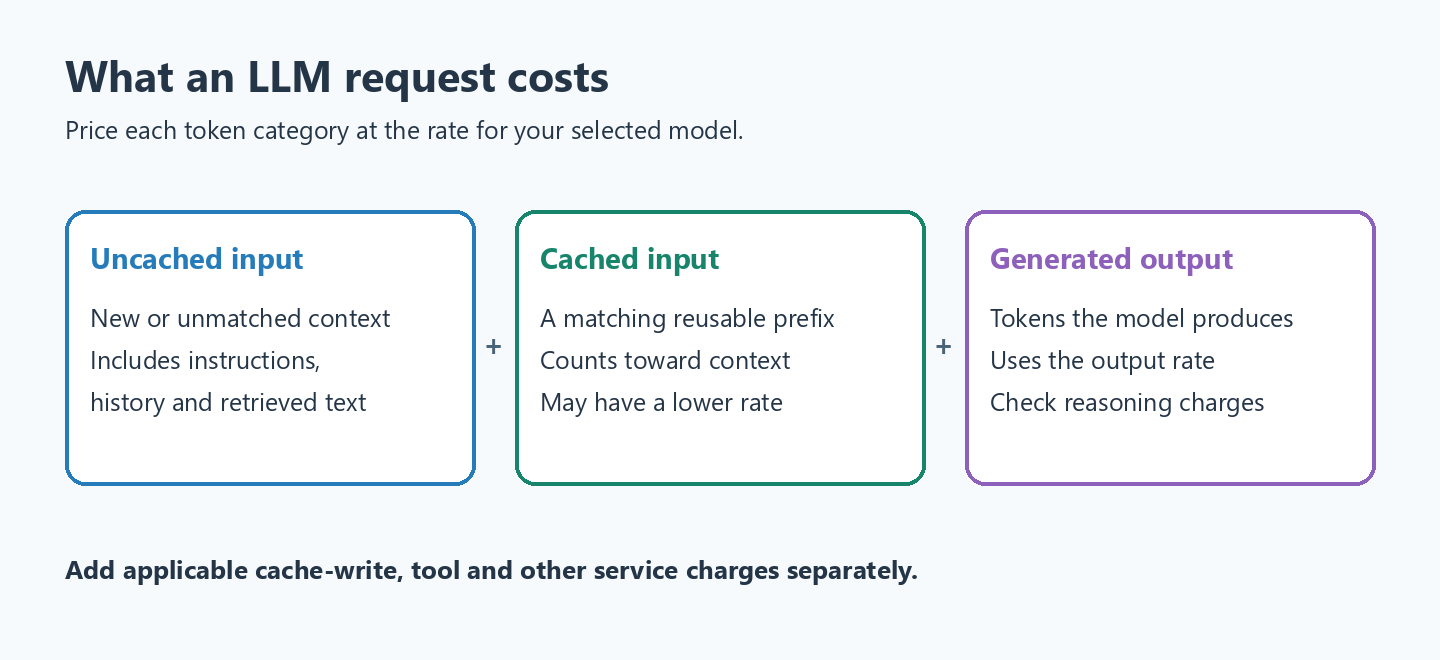
Estimate an LLM request by pricing its input and output tokens separately. Split cached input from uncached input when the provider reports it, and include cache-write or tool charges where applicable. A conversation can become expensive because history, instructions and retrieved documents are processed again on later calls.
Use estimates to compare workloads, then replace assumptions with recorded usage. Track cost per completed task as well as cost per call: retries, tool loops and failed answers can change the budget more than a cheaper model rate.
The following example is a small cost calculator for one request. The record holds a model’s prices, and the method splits the input into cached and uncached tokens, because input that the provider has cached from an earlier request with the same prefix is much cheaper.
public record ModelPrice(String model, double input, double cachedInput, double output) {

  public double cost(long inputTokens, long cachedTokens, long outputTokens) {
    long uncached = inputTokens - cachedTokens;
    return (uncached * input + cachedTokens * cachedInput + outputTokens * output) / 1_000_000;
  }
}

ModelPrice sonnet = new ModelPrice("Claude Sonnet 5.5", 2.00, 0.10, 10.00);
double noCache = sonnet.cost(6_000, 0, 400);          // 0.01600 dollars
double withCache = sonnet.cost(6_000, 5_000, 400);    // 0.00650 dollars
Under the rates configured in this example, caching 5,000 of 6,000 input tokens reduces the calculated request cost by about 60 percent. That is an illustrative calculation, not a measured invoice. The following sections explain the assumptions and how to collect usage from Java.
1. What Makes Up the Token Count of a Request
A generation uses context available to that request. The application may resend it explicitly, or a provider may manage conversation state, but retained context can still consume tokens. For a support chatbot, the actual question is often only a small part of the input:
| Part of the request | Example size | Sent again on every request? |
|---|---|---|
| System prompt with rules and product facts | 1,000 to 10,000 tokens | Yes, unchanged |
| Tool definitions | 100 to 500 tokens per tool | Yes, unchanged |
| Retrieved documents (RAG, retrieval-augmented generation) | 1,000 to 5,000 tokens | Yes, different each time |
| Chat history | Grows with every turn | Yes, longer each time |
| User question | 20 to 200 tokens | New each time |
| Answer (output) | 100 to 1,000 tokens | New each time, at a higher price |
The sizes are example ranges for a chat app with a long system prompt, not limits, and every app should measure its own. In most chat apps, the repeated parts of the input cost more than the question and the answer together. That is why caching and trimming the context give the biggest savings.
2. Token Prices Used in the Examples
The table records the rates used by these examples, from October 9, 2026, in US dollars per million tokens. Treat them as a dated pricing snapshot. Providers may also distinguish context length, cache writes, processing tier or other billable features.
| Model | Input | Cached input | Output |
|---|---|---|---|
| OpenAI GPT-5.6 Terra | $2.00 | $0.20 | $12.00 |
| OpenAI GPT-5.6 Luna | $0.20 | $0.02 | $1.20 |
| Anthropic Claude Sonnet 5.5 | $2.00 | $0.10 | $10.00 |
| Anthropic Claude Haiku 5.5 (prompts up to 100k tokens) | $0.10 | $0.01 | $0.50 |
| Google gemini-3.5-flash | $1.50 | $0.15 | $9.00 |
| Google gemini-3.5-flash-lite | $0.30 | $0.03 | $2.50 |
Output tokens cost five to about eight times the input price for these models. A small model’s prices are 5% to 28% of the mid-size model’s prices from the same provider. Prices change often, so we keep them in configuration and check the OpenAI, Anthropic and Gemini pricing pages before a cost review.
3. Estimating the Monthly Cost in Java
A monthly estimate needs the average tokens per request and the number of requests. We price a support chatbot with a 5,000-token system prompt, 1,000 tokens of history and question, a 400-token answer and 100,000 requests a month, priced for all six models.
static final List<ModelPrice> PRICES = List.of(
    new ModelPrice("GPT-5.6 Terra", 2.00, 0.20, 12.00),
    new ModelPrice("GPT-5.6 Luna", 0.20, 0.02, 1.20),
    new ModelPrice("Claude Sonnet 5.5", 2.00, 0.10, 10.00),
    new ModelPrice("Claude Haiku 5.5", 0.10, 0.01, 0.50),
    new ModelPrice("gemini-3.5-flash", 1.50, 0.15, 9.00),
    new ModelPrice("gemini-3.5-flash-lite", 0.30, 0.03, 2.50));

long input = 6_000, cached = 5_000, output = 400, requestsPerMonth = 100_000;

System.out.printf("%-22s %12s %12s %14s %14s%n", "Model", "Per request", "Monthly", "With caching", "Batch API");
for (ModelPrice p : PRICES) {
  double perRequest = p.cost(input, 0, output);
  double monthly = perRequest * requestsPerMonth;
  double withCache = p.cost(input, cached, output) * requestsPerMonth;
  double batch = monthly * 0.5;
  System.out.printf("%-22s %12s %12s %14s %14s%n", p.model(),
      String.format("$%.5f", perRequest), String.format("$%,.0f", monthly),
      String.format("$%,.0f", withCache), String.format("$%,.0f", batch));
}
Model Per request Monthly With caching Batch API
GPT-5.6 Terra $0.01680 $1,680 $780 $840
GPT-5.6 Luna $0.00168 $168 $78 $84
Claude Sonnet 5.5 $0.01600 $1,600 $650 $800
Claude Haiku 5.5 $0.00080 $80 $35 $40
gemini-3.5-flash $0.01260 $1,260 $585 $630
gemini-3.5-flash-lite $0.00280 $280 $145 $140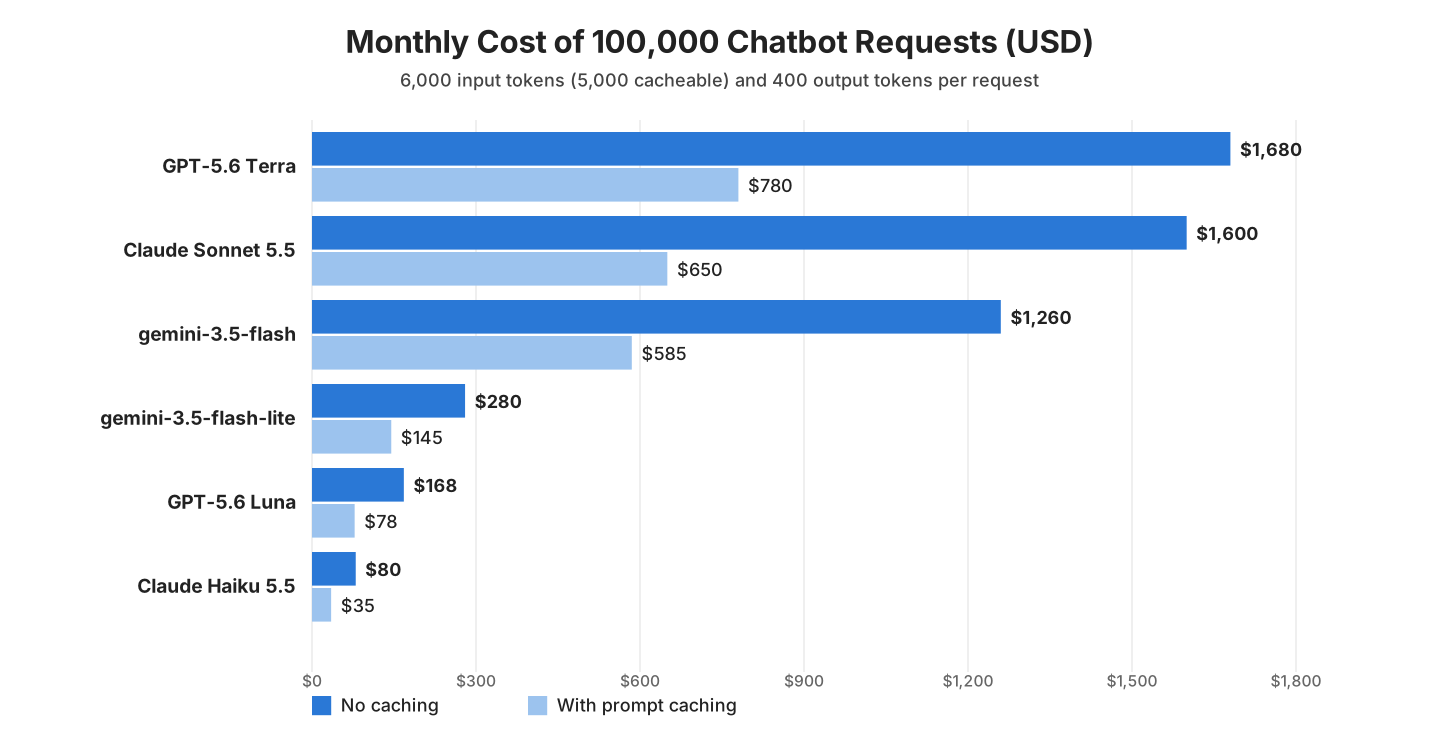
For this configured workload, the lower-priced model changes the estimate more than caching alone. Choose it only if it meets the task’s quality requirements. The cached column assumes repeated cache hits; low traffic, expiry or prefix changes can make that assumption fail.
4. Counting Tokens Before Sending a Request
A local tokenizer estimates request size before an API call. JTokkit 1.1.0 provides several OpenAI encodings in Java; select the encoding that matches the target model rather than assuming O200K_BASE applies to every current model. Structured-message and tool overhead may add to the plain-text count.
Encoding encoding = Encodings.newDefaultEncodingRegistry().getEncoding(EncodingType.O200K_BASE);

String question = "My order 1042 arrived damaged. Can I get a replacement or a refund?";
int questionTokens = encoding.countTokens(question);     // 17
Other providers use their own tokenizers, so a local count is an estimate for their models. For exact numbers, Anthropic and Google offer token counting endpoints (count_tokens and countTokens), and OpenAI offers one for its Responses API, but each call is an extra HTTP request.
5. Reading Real Token Usage With Spring AI
Many provider responses include usage metadata. Spring AI exposes available counts through Usage, but fields may be absent or differ between integrations and streaming modes. Record the provider, model and reported counts so you can reconcile estimates against billing.
The next example uses Spring AI 2.0.1 with a stand-in ChatModel that returns fixed usage numbers, so it runs without an API key. In a real application, a provider starter creates the ChatModel, and the code that reads the usage stays the same.
// A stand-in ChatModel with fixed usage numbers: 6,000 prompt tokens (5,000 read from the cache), 400 output tokens
ChatModel model = (Prompt prompt) -> new ChatResponse(
    List.of(new Generation(new AssistantMessage("You can get a replacement within 30 days."))),
    ChatResponseMetadata.builder().usage(new DefaultUsage(6000, 400, 6400, null, 5000L, 0L)).build());
ChatClient chatClient = ChatClient.create(model);

ChatResponse response = chatClient.prompt()
    .user("My order 1042 arrived damaged. Can I get a replacement?")
    .call()
    .chatResponse();

Usage usage = response.getMetadata().getUsage();
System.out.println("Prompt tokens: " + usage.getPromptTokens());
System.out.println("Completion tokens: " + usage.getCompletionTokens());
System.out.println("Total tokens: " + usage.getTotalTokens());
System.out.println("Cache read tokens: " + usage.getCacheReadInputTokens());

ModelPrice sonnet = new ModelPrice("Claude Sonnet 5.5", 2.00, 0.10, 10.00);
double cost = sonnet.cost(usage.getPromptTokens(), usage.getCacheReadInputTokens(), usage.getCompletionTokens());
System.out.printf("Cost of this call: $%.5f%n", cost);
Prompt tokens: 6000
Completion tokens: 400
Total tokens: 6400
Cache read tokens: 5000
Cost of this call: $0.00650Check nullable cache-usage fields before calculating cost. Confirm whether the integration includes cached tokens in its total prompt count so you do not bill the same tokens twice in your estimate. Micrometer metrics can reveal trends, while invoice reconciliation remains a separate check.
6. Ten Ways to Reduce Token Costs
First find the largest cost in your workload. Reducing context cuts token volume; model routing and caching change rates or reuse. The table is a menu of options, not a guaranteed savings ranking. Measure complete-task quality and cost after each change.
| Technique | How it saves | Watch out for |
|---|---|---|
| 1. Prompt caching | Repeated input, such as the system prompt and tool definitions, costs a tenth or a twentieth of the normal price | Put the fixed parts first; each provider has a minimum cacheable size |
| 2. Smaller model for simple tasks | Classification, extraction and short answers often work on a model whose prices are 5% to 28% of a mid-size model’s | Test answer quality with real examples before switching |
| 3. Batch API for offline work | OpenAI, Anthropic and Google charge 50% less for requests that may take up to 24 hours | Only for work that does not need an immediate answer, such as nightly summaries |
| 4. Limit the output | Set the max tokens option, which caps the length of the answer, and ask for short answers, because output is the most expensive token type | A limit that is too low cuts answers in the middle |
| 5. Trim the chat history | Send only the last few turns, or a short summary of older turns | The model forgets details that were trimmed away |
| 6. Retrieve fewer, smaller chunks | In RAG, send the three best chunks instead of ten long ones | Check that answers still find the right facts |
| 7. Shorter system prompts | Remove repeated rules and examples the model does not need | Re-test behavior after every cut |
| 8. Cache whole answers | Return a stored answer for questions we have already answered | Answers that depend on the user or on fresh data must not be shared |
| 9. Route by difficulty | Send simple requests to a small model and hard ones to a larger model | The routing rule itself must be cheap and reliable |
| 10. Structured output | JSON with only the needed fields is shorter than free text | Validate the JSON against our Java type |
Prompt caching needs almost no code. The rules differ by provider, and the table lists the main ones from the providers’ caching guides.
| Provider | How caching starts | Minimum prompt size | Cache lifetime |
|---|---|---|---|
| OpenAI | On by default; newer models also allow explicit cache points | 1,024 tokens on GPT-5.6 models | 30 minutes on GPT-5.6 models |
| Anthropic | We mark cacheable blocks with cache_control in the request | 512 to 4,096 tokens, depending on the model | 5 minutes by default, 1 hour optional; each hit restarts the timer |
| Google Gemini | Implicit caching on by default, or explicit cache objects | 4,096 tokens on Gemini 3.x Flash models | Explicit caches live 1 hour by default and are billed per hour of storage |
Writing to the cache can cost more than a normal input token, for example 1.25 times the input price for Anthropic’s 5-minute cache and for GPT-5.6 models. A busy endpoint pays that once and reads the cache many times, so the extra cost is spread over many cheap reads, whereas an endpoint with a few requests per hour may never reuse its cache.
7. Token Cost FAQs
Token bills raise a few questions that the pricing pages do not answer directly.
7.1. Why Are Output Tokens More Expensive Than Input Tokens?
The model reads all input tokens in one pass but generates output tokens one at a time, so each output token needs more computing work. For the models in section 2, output costs five to about eight times the input price.
7.2. Do Failed or Cut-Off Requests Cost Money?
A response stopped by an output limit can still be billable for processed input and generated tokens. Other failures and client-side cancellations have provider-specific accounting. Check response usage and billing records rather than assuming that every failed request is free or fully charged.
7.3. How Do I Estimate Tokens Without a Tokenizer?
For English text, about 1.3 tokens per word or 4 characters per token is close enough for a first estimate. Code and other languages need more tokens, so we measure with a tokenizer or with the usage numbers before a budget decision.
8. Conclusion
Start with separate rates for uncached input, cached input and output, then add the other charges your provider applies. The Java calculator makes workload assumptions explicit; usage logging shows where those assumptions differ from real traffic.
Prompt caching and a smaller model are the two biggest savings for most apps, and both need little code. The other techniques help once we measure where our tokens go.
9. References
- OpenAI API Pricing
- Anthropic Pricing
- Gemini API Pricing
- OpenAI Prompt Caching
- Anthropic Prompt Caching
- Gemini Context Caching
- Spring AI Observability
Happy Learning !!
