

Retrieval augmented generation (RAG) is a way of answering questions with a large language model (LLM) in which our application first searches its own documents for text related to the question and sends that text to the model along with the question. The model then answers from our data instead of from what it remembers.
We see how RAG works in three steps, and then build a small RAG example in plain Java 17. The demo application answers questions about a few of our own recipes and runs entirely on our machine, with no API key. A small embedding model from LangChain4j turns the recipe text into numbers we can search, and a small model running in Ollama writes the answer. In demo application, without RAG, the model guesses the baking time of our lemon cake and gets it wrong. With RAG, it reads our recipe first and answers correctly.
1. Why an LLM Doesn’t Know Your Documents
An LLM knows only the public text it was trained on. Our own documents (a company wiki, a family recipe file) were never part of it, so the model has nothing to look up when we ask about them. It doesn’t say so either; it produces the answer that sounds most likely.
Let’s say we keep our family recipes as text files, and one of them is Nani’s Lemon Semolina Cake. The recipe says to bake the cake at 170 C for 38 minutes. We ask a small local model, qwen2.5:0.5b on Ollama, about it with no other text in the prompt:
Question: How long do I bake Nani's Lemon Semolina Cake, and at what temperature?

Answer: To bake Nani's Lemon Semolina Cake, you should bake it at 350°F (180°C) for 30 minutes.
The answer is wrong on both numbers, and nothing in it sounds unsure. RAG fixes this without retraining the model: we hand it the right page of our documents with every question. The AskWithoutRag class that sent this question is part of the project we build in section 4.
2. How Retrieval Augmented Generation Works in Three Phases
A RAG application runs in three phases. The first one runs once, before any question arrives, and the other two run for every question.
- Index: we split every document into small pieces called chunks, turn each chunk into a list of numbers with an embedding model, and save the chunk and its numbers in a vector store.
- Retrieve: when a question arrives, we turn the question into numbers with the same embedding model, and the vector store returns the few chunks whose numbers are closest to the question’s.
- Generate: we put an instruction, the question and the retrieved chunks into one prompt, and send that prompt to the LLM, which writes the answer.
The name follows the phases: we retrieve text, augment (extend) the prompt with it, and let the model generate the answer.
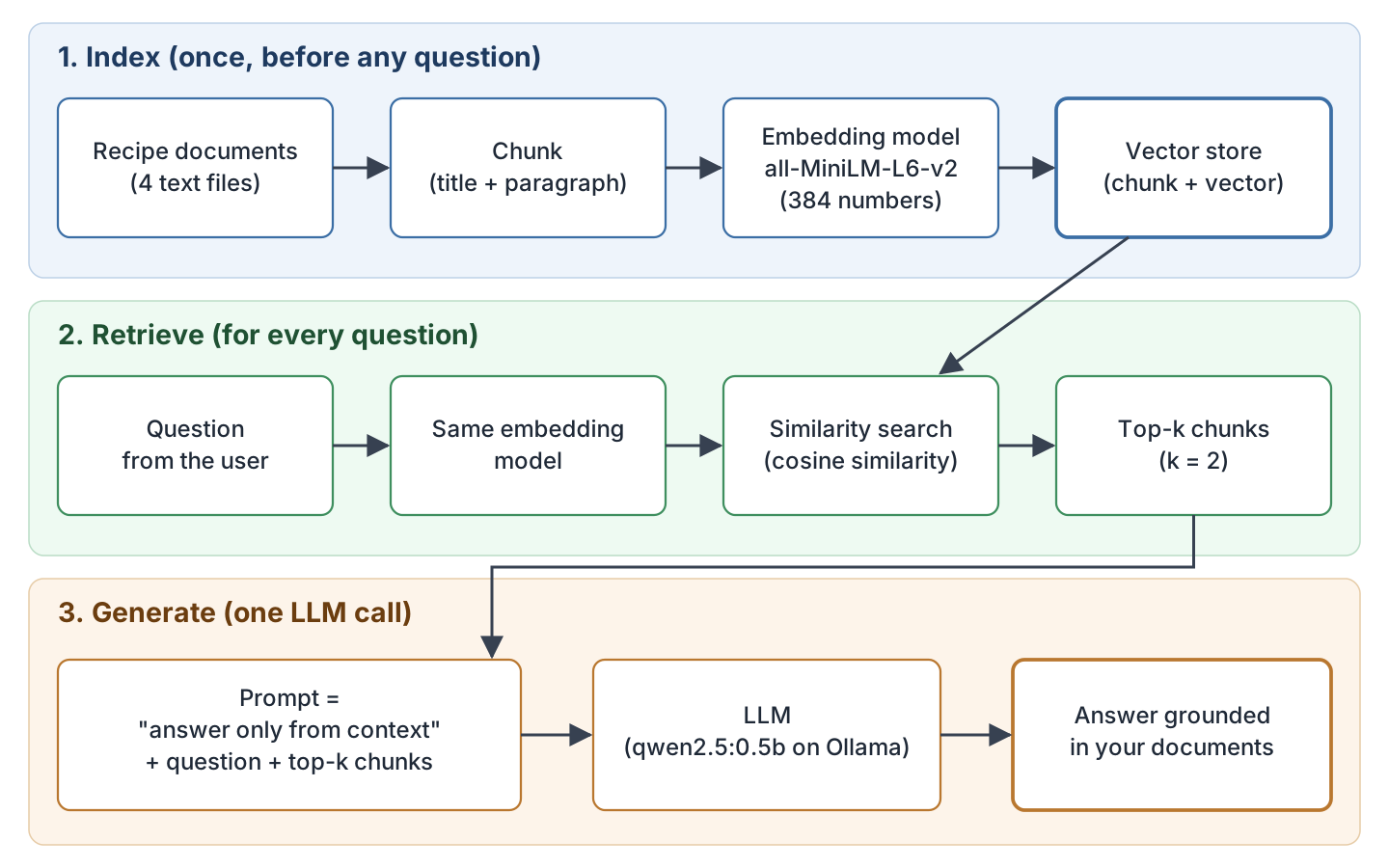
An open-book exam has the same structure: the student (the LLM) has never read our textbook, so a helper finds the two matching pages and puts them on the desk. A support chatbot that answers from a product’s help pages works the same way.
3. Parts of a RAG Pipeline
Each part below shows up as one line or one class in the Java example of section 4.
A chunk is a piece of a document small enough to be about one thing, such as one paragraph of a recipe. We search chunks, not whole documents, because a whole document fills the prompt with text the question doesn’t need. A chunk should also make sense when read alone; section 5 shows what happens when it doesn’t.
An embedding is an array of numbers (a float[] in Java) that represents the meaning of a text, and an embedding model produces it. Let’s use arrays of only two numbers to see the idea. Say “bake the cake” becomes {0.9, 0.1} and “oven time for the cake” becomes {0.8, 0.2}. These two arrays hold almost the same numbers, because the two texts mean almost the same thing. “Serve the soup hot” becomes {0.1, 0.9}, which looks very different. Cosine similarity (explained below) gives one score for each pair: 0.991 for the first two arrays, and 0.220 for the first and the third.

The all-MiniLM-L6-v2 model we use works the same way with 384 numbers instead of two. It reads at most 256 tokens (pieces of words, counted by the model’s own tokenizer) and cuts off the rest.
The question and the chunks must be embedded by the same model, because each model places meanings in its own way, and vectors from two different models don’t line up.
A vector store keeps every chunk next to its embedding and finds the stored vectors closest to a given one. Production systems use a vector database such as PostgreSQL with pgvector; for a few hundred chunks, a plain Java list does the same job.
Cosine similarity compares two embeddings and returns one score between -1 and 1. A score of 1 means the same meaning, 0 means unrelated, and -1 means opposite. To get it, we multiply the two arrays position by position and add the results (the dot product). Then we divide by the magnitude of each array (the square root of the sum of its squared numbers). For the first two arrays, that is (0.9 x 0.8 + 0.1 x 0.2) / (0.906 x 0.825) = 0.991. Dividing by the magnitudes means a long text and a short text with the same meaning still score high.
A score like 0.84 has no fixed meaning on its own, and there is no universal “good” threshold. Higher means closer, and the score is useful for ranking the chunks of one index against each other.
Top-k is the number of best-scoring chunks we keep from the search. A small k keeps the prompt short but can miss the chunk with the answer, and a large k puts more unrelated text in front of the model. Our example uses k = 2. For your own data, start with 3 to 5, print what comes back for a few real questions, and adjust.
The context window is the maximum number of tokens the LLM reads in one call, prompt and answer together, so the instruction, the question and all top-k chunks must fit in it. Our prompt is a few hundred tokens, far below the limit of even a small local model.
4. Building a Minimal RAG in Plain Java
The following steps build the Recipe Box example as a small Maven project: first the project and the documents, then the vector store and the Ollama client, and finally the class that runs the three phases. The only AI library is LangChain4j’s in-process embedding model, so the chunking, the vector store, the similarity search and the prompt are all our own code.
Step 1: Create the Maven Project
Let’s start with an empty Maven project. Every class goes into the package com.howtodoinjava.rag, and the recipes go under src/main/resources so the program can read them from the classpath:
rag-explained/
  pom.xml
  src/main/java/com/howtodoinjava/rag/
    InMemoryVectorStore.java    (Step 3)
    OllamaClient.java           (Step 4)
    AskWithoutRag.java          (Step 4)
    RecipeBoxRag.java           (Step 5)
    ConsoleFormat.java          (console helpers, on GitHub)
    RagTrap.java                (section 5, on GitHub)
  src/main/resources/recipes/
    lemon-semolina-cake.txt
    banana-walnut-bread.txt
    tomato-rasam.txt
    sunday-pancakes.txt
The project needs one dependency, langchain4j-embeddings-all-minilm-l6-v2, which holds the model file and the code that runs it inside the JVM, so embedding text needs no network call or API key. It also brings in Jackson, the JSON library we use for the Ollama call.
<?xml version="1.0" encoding="UTF-8"?>
<project xmlns="http://maven.apache.org/POM/4.0.0"
         xmlns:xsi="http://www.w3.org/2001/XMLSchema-instance"
         xsi:schemaLocation="http://maven.apache.org/POM/4.0.0
                             https://maven.apache.org/xsd/maven-4.0.0.xsd">
  <modelVersion>4.0.0</modelVersion>

  <groupId>com.howtodoinjava</groupId>
  <artifactId>rag-explained</artifactId>
  <version>1.0</version>

  <properties>
    <maven.compiler.release>17</maven.compiler.release>
    <project.build.sourceEncoding>UTF-8</project.build.sourceEncoding>
    <exec.mainClass>com.howtodoinjava.rag.RecipeBoxRag</exec.mainClass>
  </properties>

  <dependencies>
    <!-- Offline embedding model: all-MiniLM-L6-v2 runs inside the JVM, no API key -->
    <dependency>
      <groupId>dev.langchain4j</groupId>
      <artifactId>langchain4j-embeddings-all-minilm-l6-v2</artifactId>
      <version>1.22.0-beta32</version>
    </dependency>
  </dependencies>

  <build>
    <plugins>
      <plugin>
        <groupId>org.apache.maven.plugins</groupId>
        <artifactId>maven-compiler-plugin</artifactId>
        <version>3.16.0</version>
      </plugin>
      <plugin>
        <groupId>org.codehaus.mojo</groupId>
        <artifactId>exec-maven-plugin</artifactId>
        <version>3.6.4</version>
      </plugin>
    </plugins>
  </build>
</project>
The first build downloads about 190 MB, most of it the model and its runtime. The exec.mainClass property sets the class that mvn compile exec:java starts.
Step 2: Add the Recipe Documents
Next, we add the documents that the model has never seen: four plain text files with a title on the first line, then one paragraph each for the ingredients, the method and the serving notes. The lemon cake file is the one our questions are about:
Nani's Lemon Semolina Cake

Ingredients: 1 cup fine semolina, 3/4 cup sugar, 1 cup yogurt, 1/2 cup
melted butter, zest of 2 lemons, 1 teaspoon baking powder and a pinch of
cardamom.

Method: Mix the semolina, sugar and yogurt, and let the batter rest for
20 minutes so the semolina softens. Stir in the butter, zest, cardamom
and baking powder. Bake at 170 C for 38 minutes in a 9-inch tin.

Serving: Pour warm lemon syrup over the cake while it is still hot. The
cake keeps for 3 days in an airtight box at room temperature.
The other three files have the same shape and are on GitHub. The banana bread matters, because its method paragraph also says “Bake at … in a tin”, so the search has a near-miss to get wrong.
Step 3: Create the Vector Store
Now we create the vector store. It is a list of entries, each holding one chunk and its embedding, and a search() method that scores every entry against the question’s embedding with cosine similarity, sorts by score and keeps the top-k:
package com.howtodoinjava.rag;

import java.util.ArrayList;
import java.util.Comparator;
import java.util.List;

/**
 * A vector store kept in a plain list: every chunk is saved next to its embedding,
 * and a search compares the question's embedding with all of them.
 */
public class InMemoryVectorStore {

    public record Entry(String chunk, float[] embedding) {
    }

    public record Match(String chunk, double score) {
    }

    private final List<Entry> entries = new ArrayList<>();

    public void add(String chunk, float[] embedding) {
        entries.add(new Entry(chunk, embedding));
    }

    public int size() {
        return entries.size();
    }

    /** Similarity search: score every stored chunk and keep the top-k. */
    public List<Match> search(float[] questionEmbedding, int topK) {
        return entries.stream()
                .map(e -> new Match(e.chunk(), cosineSimilarity(questionEmbedding,
                        e.embedding())))
                .sorted(Comparator.comparingDouble(Match::score).reversed())
                .limit(topK)
                .toList();
    }

    /** Cosine similarity = (A . B) / (|A| * |B|), a number from -1 to 1. */
    static double cosineSimilarity(float[] a, float[] b) {
        double dot = 0;
        double normA = 0;
        double normB = 0;
        for (int i = 0; i < a.length; i++) {
            dot += a[i] * b[i];
            normA += a[i] * a[i];
            normB += b[i] * b[i];
        }
        return dot / (Math.sqrt(normA) * Math.sqrt(normB));
    }
}
Comparing the question with every stored vector is called a brute-force search; vector databases add an index that skips most of the comparisons.
Step 4: Create the Ollama Client
Then we need a way to call the LLM. Ollama is a tool that downloads open models and runs them on our own machine behind an HTTP API on port 11434. If you haven’t installed it yet, the article Run LLMs Locally for Java covers it; after that, one command downloads the model we use, about 400 MB:
ollama pull qwen2.5:0.5bThe client sends our prompt to Ollama’s /api/chat endpoint and returns the answer text, with timeouts so a stopped server can’t hang the program:
package com.howtodoinjava.rag;

import java.io.IOException;
import java.net.URI;
import java.net.http.HttpClient;
import java.net.http.HttpRequest;
import java.net.http.HttpResponse;
import java.time.Duration;
import java.util.List;
import java.util.Map;

import com.fasterxml.jackson.databind.JsonNode;
import com.fasterxml.jackson.databind.ObjectMapper;

/**
 * Sends one prompt to a local Ollama server and returns the model's text answer.
 * This is the "generate" phase of RAG; the class knows nothing about retrieval.
 */
public class OllamaClient {

    /** The same instruction for every call, with or without RAG. */
    static final String SYSTEM_MESSAGE =
            "You are a cooking assistant. Answer in one or two sentences.";

    private static final ObjectMapper JSON = new ObjectMapper();

    private final HttpClient http = HttpClient.newBuilder()
            .connectTimeout(Duration.ofSeconds(5))
            .build();
    private final String baseUrl;
    private final String model;

    public OllamaClient(String baseUrl, String model) {
        this.baseUrl = baseUrl;
        this.model = model;
    }

    /** Reads OLLAMA_URL and OLLAMA_MODEL, with the Ollama defaults as fallback. */
    public static OllamaClient fromEnvironment() {
        String url = System.getenv()
                .getOrDefault("OLLAMA_URL", "http://localhost:11434");
        String model = System.getenv().getOrDefault("OLLAMA_MODEL", "qwen2.5:0.5b");
        return new OllamaClient(url, model);
    }

    public String generate(String prompt) throws IOException, InterruptedException {
        Map<String, Object> body = Map.of(
                "model", model,
                "stream", false,
                "messages", List.of(
                        Map.of("role", "system", "content", SYSTEM_MESSAGE),
                        Map.of("role", "user", "content", prompt)),
                // temperature 0 and a fixed seed give the same answer on every run;
                // num_predict caps the answer length in tokens
                "options", Map.of("temperature", 0, "seed", 42, "num_predict", 200));

        HttpRequest request = HttpRequest.newBuilder(URI.create(baseUrl + "/api/chat"))
                .timeout(Duration.ofMinutes(2))
                .header("Content-Type", "application/json")
                .POST(HttpRequest.BodyPublishers.ofString(JSON.writeValueAsString(body)))
                .build();

        HttpResponse<String> response =
                http.send(request, HttpResponse.BodyHandlers.ofString());
        if (response.statusCode() != 200) {
            throw new IOException("Ollama returned " + response.statusCode()
                    + ": " + response.body());
        }
        JsonNode json = JSON.readTree(response.body());
        return json.path("message").path("content").asText().strip();
    }
}
Temperature 0 and the fixed seed make repeated calls give the same answer, and num_predict caps the answer at 200 tokens, because this small model sometimes repeats itself.
The AskWithoutRag class is the quickest test of the client, and it is the program that printed the wrong answer in section 1:
package com.howtodoinjava.rag;

/**
 * Asks the model about a private recipe with no retrieved text in the prompt.
 * The model has never seen our Recipe Box, so it can only guess.
 */
public class AskWithoutRag {

    public static void main(String[] args) throws Exception {
        String question = "How long do I bake Nani's Lemon Semolina Cake, "
                + "and at what temperature?";

        OllamaClient llm = OllamaClient.fromEnvironment();
        String answer = llm.generate(question);

        System.out.println("Question: " + question);
        System.out.println("Answer:");
        System.out.println(answer);
    }
}
Step 5: Run Index, Retrieve and Generate
Finally, we create the class that runs the three phases. The main() method follows the order of section 2, and each phase is marked with a comment. The two console helpers it calls, ConsoleFormat.shorten() (one line per chunk) and ConsoleFormat.wrap() (line breaks in the answer), only format the output and are on GitHub.
package com.howtodoinjava.rag;

import java.io.IOException;
import java.io.InputStream;
import java.io.UncheckedIOException;
import java.net.ConnectException;
import java.nio.charset.StandardCharsets;
import java.util.ArrayList;
import java.util.List;
import java.util.Locale;

import dev.langchain4j.model.embedding.EmbeddingModel;
import dev.langchain4j.model.embedding.onnx.allminilml6v2.AllMiniLmL6V2EmbeddingModel;

/**
 * A minimal RAG pipeline for a private Recipe Box: index, retrieve, generate.
 */
public class RecipeBoxRag {

    static final List<String> RECIPE_FILES = List.of(
            "lemon-semolina-cake.txt",
            "banana-walnut-bread.txt",
            "tomato-rasam.txt",
            "sunday-pancakes.txt");

    static final int TOP_K = 2;

    public static void main(String[] args) throws Exception {
        String question = args.length > 0
                ? String.join(" ", args)
                : "How long do I bake Nani's Lemon Semolina Cake, "
                        + "and at what temperature?";

        // embedding model: runs inside the JVM, no API key, 384 numbers per text
        EmbeddingModel embeddingModel = new AllMiniLmL6V2EmbeddingModel();
        InMemoryVectorStore store = new InMemoryVectorStore();

        // Phase 1: index. Chunk every document, embed every chunk, store both.
        for (String file : RECIPE_FILES) {
            for (String chunk : chunk(loadRecipe(file))) {
                float[] vector = embeddingModel.embed(chunk).content().vector();
                store.add(chunk, vector);
            }
        }
        System.out.println("Indexed " + store.size() + " chunks");

        // Phase 2: retrieve. Embed the question, then run a similarity search.
        float[] questionVector = embeddingModel.embed(question).content().vector();
        List<InMemoryVectorStore.Match> matches = store.search(questionVector, TOP_K);

        System.out.println("Question: " + question);
        System.out.println("Top-" + TOP_K + " chunks:");
        for (InMemoryVectorStore.Match match : matches) {
            System.out.printf(Locale.ROOT, "  %.3f  %s%n", match.score(),
                    ConsoleFormat.shorten(match.chunk()));
        }

        // Phase 3: generate. Put the retrieved text into the prompt, then call the LLM.
        String prompt = buildPrompt(question, matches);
        System.out.println();
        System.out.println("Prompt sent to the model:");
        System.out.println(prompt);
        System.out.println();
        System.out.println("Answer:");
        System.out.println(ConsoleFormat.wrap(generateOrExplain(prompt)));
    }

    /** Splits a recipe into chunks: one per paragraph, each starting with the title. */
    static List<String> chunk(String recipe) {
        String[] paragraphs = recipe.strip().split("\\n\\s*\\n");
        String title = paragraphs[0].strip();
        List<String> chunks = new ArrayList<>();
        for (int i = 1; i < paragraphs.length; i++) {
            chunks.add(title + "\n" + paragraphs[i].strip());
        }
        return chunks;
    }

    /** The augmented prompt: instruction, question, then the retrieved chunks. */
    static String buildPrompt(String question, List<InMemoryVectorStore.Match> matches) {
        List<String> chunks = matches.stream()
                .map(InMemoryVectorStore.Match::chunk)
                .toList();
        return """
                Answer the question using only the context below.
                If the context does not contain the answer,
                say "The Recipe Box does not say."

                Question: %s

                Context:
                %s""".formatted(question, String.join("\n\n", chunks));
    }

    static String generateOrExplain(String prompt) throws InterruptedException {
        try {
            return OllamaClient.fromEnvironment().generate(prompt);
        } catch (ConnectException e) {
            return "(no Ollama server found; start one to see the generated answer)";
        } catch (IOException e) {
            return "(Ollama call failed: " + e.getMessage() + ")";
        }
    }

    static String loadRecipe(String file) {
        String path = "/recipes/" + file;
        try (InputStream in = RecipeBoxRag.class.getResourceAsStream(path)) {
            if (in == null) {
                throw new IllegalStateException("Recipe not found: " + file);
            }
            return new String(in.readAllBytes(), StandardCharsets.UTF_8);
        } catch (IOException e) {
            throw new UncheckedIOException(e);
        }
    }
}
The chunk() method makes one chunk per paragraph and starts every chunk with the recipe title. The title looks redundant, but it is what makes the method paragraph findable, as section 5.1 shows.
The buildPrompt() method puts the question before the chunks; with the chunks first, this small model answered with the 20-minute resting time instead of the baking time.
Step 6: Run the Program
Now we start Ollama (the desktop app starts it, or ollama serve in a terminal) and run the program:
mvn compile exec:javaThe program prints the two chunks it retrieved with their scores, the exact prompt it sent, and the answer. You may also see a few harmless warning lines from the embedding runtime and the logging library, which are left out here:
Indexed 12 chunks
Question: How long do I bake Nani's Lemon Semolina Cake, and at what temperature?
Top-2 chunks:
  0.840  Nani's Lemon Semolina Cake | Method: Mix the semolina, su...
  0.788  Nani's Lemon Semolina Cake | Serving: Pour warm lemon syr...

Prompt sent to the model:
Answer the question using only the context below.
If the context does not contain the answer,
say "The Recipe Box does not say."

Question: How long do I bake Nani's Lemon Semolina Cake, and at what temperature?

Context:
Nani's Lemon Semolina Cake
Method: Mix the semolina, sugar and yogurt, and let the batter rest for
20 minutes so the semolina softens. Stir in the butter, zest, cardamom
and baking powder. Bake at 170 C for 38 minutes in a 9-inch tin.

Nani's Lemon Semolina Cake
Serving: Pour warm lemon syrup over the cake while it is still hot. The
cake keeps for 3 days in an airtight box at room temperature.

Answer:
  To bake Nani's Lemon Semolina Cake, you should bake it at 170 C for 38
  minutes.
Both retrieved chunks belong to the right recipe, the method paragraph ranks first (0.840, ahead of 0.788), and the answer now matches the recipe: 170 C for 38 minutes. If Ollama is not running, the program still prints the chunks and the prompt, and says that no Ollama server was found in place of the answer.
5. Why RAG Still Gives Wrong Answers and How to Fix Them
RAG fails in two places: the search returns the wrong chunks, or the model adds facts that are not in the chunks. The RagTrap class runs both cases against the same recipes. This section shows only the lines that differ from RecipeBoxRag; the complete runnable class is RagTrap.java on GitHub, and we run it with:
mvn compile exec:java -Dexec.mainClass=com.howtodoinjava.rag.RagTrap5.1. Retrieving the Wrong Chunk
The first case uses a chunker that splits each recipe into paragraphs but drops the title, which is the obvious way to write one:
/** The broken chunker: one chunk per paragraph, and the title is dropped. */
static List<String> chunkWithoutTitle() {
    List<String> chunks = new ArrayList<>();
    for (String file : RecipeBoxRag.RECIPE_FILES) {
        String recipe = RecipeBoxRag.loadRecipe(file);
        String[] paragraphs = recipe.strip().split("\\n\\s*\\n");
        for (int i = 1; i < paragraphs.length; i++) {
            chunks.add(paragraphs[i].strip());
        }
    }
    return chunks;
}
We ask “How long do I bake the lemon cake, and at what temperature?” with top-1 retrieval (k = 1), once against an index built from these chunks and once against an index built from the chunks of Step 5:
Trap 1, question: How long do I bake the lemon cake, and at what temperature?
Chunks WITHOUT the title:
  0.687  Serving: Pour warm lemon syrup over the cake while it is ...
  Answer: To bake the lemon cake, you should pour warm lemon syrup over the
  cake while it is still hot. The cake keeps for 3 days in an airtight box
  at room temperature.
Chunks WITH the title:
  0.585  Nani's Lemon Semolina Cake | Method: Mix the semolina, su...
  Answer: To bake the lemon cake, you should bake it at 170 C for 38
  minutes.
The two scores come from two different indexes, so 0.687 and 0.585 can’t be compared with each other. What matters is which chunk ranks first in each index. The table lists the top three chunks of each index for this question, from the same embedding model; read it by rank within one column pair.
| Rank | Without the title | Score | With the title | Score |
|---|---|---|---|---|
| 1st | Lemon cake, serving notes | 0.687 | Lemon cake, method (has the answer) | 0.585 |
| 2nd | Lemon cake, method (has the answer) | 0.432 | Lemon cake, serving notes | 0.542 |
| 3rd | Banana bread, method | 0.413 | Lemon cake, ingredients | 0.368 |

Without the title, the method paragraph never says “lemon” or “cake”; it says semolina, yogurt and a 9-inch tin. The serving paragraph says “lemon syrup over the cake”, so it ranks first, and the model turns it into a wrong answer about pouring syrup. With the title on every chunk, the method paragraph ranks first and the answer is right.
Every chunk should carry the name of the document it came from, such as the title, the file name or the section heading, because the search sees only the chunk. The chunk should also stay at one topic and under the 256-token limit of the embedding model. And top-k should leave some margin: with k = 1, one near-miss in the ranking loses the answer, so a few chunks are safer as long as they fit in the context window.
5.2. Answering Beyond the Retrieved Text
The second case asks a question the Recipe Box can’t answer: “Can I freeze Nani’s Lemon Semolina Cake?”. The recipe only says the cake keeps for 3 days at room temperature. We send the same retrieved chunks with two prompts, the strict one from buildPrompt() and a loose one that differs only in its first line:
/** The broken prompt: it lets the model add what it "knows" to the context. */
static String loosePrompt(String question, List<InMemoryVectorStore.Match> matches) {
    List<String> chunks = matches.stream()
            .map(InMemoryVectorStore.Match::chunk)
            .toList();
    return """
            Use the context below to help you answer.

            Question: %s

            Context:
            %s""".formatted(question, String.join("\n\n", chunks));
}
Trap 2, question: Can I freeze Nani's Lemon Semolina Cake?
Loose prompt answer:
Yes, you can freeze Nani's Lemon Semolina Cake. The cake keeps for 3 days
in an airtight box at room temperature.
Strict prompt answer:
The Recipe Box does not say.With the loose prompt, the model says yes and mixes in a sentence from the chunk, so the made-up part reads as if it came from our recipe. The strict prompt tells the model to answer only from the context and gives it an exact sentence for a missing answer, and our code can check for that sentence.
The instruction lowers the risk but doesn’t remove it; a bigger model follows it more reliably, and showing the retrieved chunks next to the answer lets the user check it.
6. RAG With LangChain4j and Spring AI
In an application, a framework provides the same pieces we wrote by hand. In LangChain4j, InMemoryEmbeddingStore replaces our list and EmbeddingStoreContentRetriever runs the similarity search with maxResults (our top-k); the LangChain4j RAG tutorial walks through them, and a LangChain4j RAG Example with Embedding Store article is coming on this site. In Spring, the Spring AI RAG chatbot example builds the same pipeline with Spring AI’s EmbeddingModel and VectorStore.
RAG is one of three ways to make an LLM work with your own data, next to fine-tuning and prompt engineering. Which one to pick is the topic of the article Fine-Tuning vs RAG vs Prompt Engineering for LLM Apps.
7. FAQs
7.1. What is the difference between RAG and fine-tuning?
RAG puts our documents in the prompt at question time, and fine-tuning changes the model’s weights by training it further on our data. A changed document takes effect in RAG as soon as it is re-indexed, while a fine-tuned model has to be trained again.
7.2. Do I need a vector database for RAG?
No. A list in memory, like the InMemoryVectorStore in this article, works for a small document set. A vector database becomes useful when the index must survive a restart or comparing every vector gets too slow.
7.3. Can RAG run without an API key or internet connection?
Yes. The example in this article runs fully offline after the first build: all-MiniLM-L6-v2 runs inside the JVM, and Ollama runs the LLM on the same machine. Only the first Maven build and the ollama pull need a network connection.
7.4. Can I use PDF or Word files instead of text files?
Yes. A document loader and a parser turn the file into plain text first, and the rest of the pipeline stays the same. LangChain4j and Spring AI both ship document loaders for this.
7.5. Does RAG stop LLM hallucinations?
No, it reduces them. A hallucination is an answer the model makes up, and as section 5.2 shows, a model can still add facts that are not in the retrieved text.
8. Conclusion
RAG is three phases: index the documents once (chunk, embed, store), then for each question retrieve the closest chunks and generate the answer from them. In our Recipe Box, the same 0.5B-parameter model answered 180 C for 30 minutes without RAG and 170 C for 38 minutes with it, after a search that ranked the right chunk first. The trap is the chunk that doesn’t make sense on its own: without the recipe title, the method paragraph lost the search to the serving notes, so put the document’s name into every chunk and tell the model to answer only from the context.
9. References
- Lewis et al., Retrieval-Augmented Generation for Knowledge-Intensive NLP Tasks (2020)
- LangChain4j documentation: RAG
- LangChain4j documentation: in-process embedding models
- all-MiniLM-L6-v2 model card
- Ollama API reference
Drop me your questions related to RAG in the comments.
Happy Learning !!
