
Spring AI connects a Java application to a model through a common API. In this guide, we build a small Spring Boot support assistant that answers questions using delivery rules supplied by the application.
The model runs locally in Ollama, so the example requires no hosted account or API key. We install the model, configure Spring AI, create a ChatClient, and expose an HTTP endpoint. We also inspect a wrong answer and the common errors that appear during a first run.
1. What Does Spring AI Provide?
A large language model generates responses from the input and context it receives. Models and hosted services are different: ChatGPT is an application, while providers expose particular models through APIs. Those APIs differ in authentication, request formats, options, and supported features.
Spring AI provides Java interfaces and provider integrations for these tasks. A Spring Boot starter adds the integration and its auto-configuration, so application code can use ChatClient instead of constructing HTTP requests for each provider.
This means moving from one provider to another usually comes down to changing the starter and a few properties, as long as the new provider supports the features your app uses.
Spring AI covers the common jobs of an AI app:
- Chat: send messages to a model and read the answer, in full or as a stream.
- Structured output: turn the model’s answer into a Java object.
- Retrieval-augmented generation (RAG): find our own documents and add them to the prompt, so the model can answer from them.
- Tools: let the model ask our app to run a Java method, such as looking up an order.
This article covers only chat. The learning path at the end of the article lists the articles for the other three.
Ollama is a free tool that downloads open models and runs them on our own computer. It serves them over HTTP at http://localhost:11434. Spring AI has a starter for it.
2. Prerequisites
We need these on our computer:
- Java 21 or newer.
- Maven 3.9 or newer.
- About 8 GB of RAM, so the model and the app fit in memory together.
- About 3 GB of free disk space. The model we use, qwen2.5:3b, takes 1.9 GB.
Check Java and Maven with java -version and mvn -v. No GPU is needed.
3. Installing Ollama and the Model
First check that Ollama can run the selected model independently of Spring Boot. This separates model installation and serving problems from application configuration. A successful local check is useful evidence, but later network or runtime failures can still occur.
3.1. Installing Ollama
Pick one of three ways:
- Windows and macOS: download the installer from ollama.com/download and run it. Ollama then starts in the background.
- Linux: run the install script from the same page. It also sets up Ollama as a service:
curl -fsSL https://ollama.com/install.sh | sh- Docker: run the official ollama/ollama image and publish port 11434. The -v option keeps the downloaded models in a volume:
docker run -d -v ollama:/root/.ollama -p 11434:11434 --name ollama ollama/ollamaIf Ollama is installed but not running, start it with ollama serve and keep that window open. With Docker, run the ollama commands in this article through docker exec -it ollama, for example docker exec -it ollama ollama pull qwen2.5:3b.
3.2. Downloading the Model
The example uses qwen2.5:3b, a compact Qwen model with about three billion parameters. It can run on the laptop setup used for the recorded examples, but it can misread instructions and policies. Choosing a locally runnable model is not a guarantee of reliable support decisions.
Let’s download it:
ollama pull qwen2.5:3bWhen the download ends, ollama list shows the model:
NAME            ID              SIZE      MODIFIED
qwen2.5:3b      357c53fb659c    1.9 GB    About an hour ago
3.3. Testing the Model
Now we ask the model something directly, without any Java:
ollama run qwen2.5:3b "Reply with exactly five words: hello from a local model"Hello from Alibaba Cloud Qwen.A response confirms that this model request reached Ollama and completed. It does not establish that every instruction was followed or that the answer is accurate.
4. Creating the Spring Boot Project
Next, we create the project. We can write the pom.xml below by hand in a folder named orderdesk, or generate the project at start.spring.io.
On start.spring.io, choose Maven, Java 21, and Spring Boot 4.1.1. Use com.howtodoinjava as the group, orderdesk as the artifact, and OrderDesk as the name, then add the “Spring Web” and “Ollama” dependencies.
The name decides the main class name. If you keep the default name orderdesk, the site generates OrderdeskApplication with a lowercase “d”, so either set the name to OrderDesk or rename the class to OrderDeskApplication.
The generated project differs from the pom below in three small ways, and none of them changes how the app runs:
- “Spring Web” adds spring-boot-starter-webmvc, the new Spring Boot 4 name. Our pom uses spring-boot-starter-web, which is deprecated in Spring Boot 4 but pulls in the same Spring MVC and Tomcat libraries.
- The test starter is spring-boot-starter-webmvc-test, and the site adds a test class, OrderDeskApplicationTests.
- The Spring AI version 2.0.1 sits in a spring-ai.version property.
This is the pom.xml that we use:
<?xml version="1.0" encoding="UTF-8"?>
<project xmlns="http://maven.apache.org/POM/4.0.0"
  xmlns:xsi="http://www.w3.org/2001/XMLSchema-instance"
  xsi:schemaLocation="http://maven.apache.org/POM/4.0.0 https://maven.apache.org/xsd/maven-4.0.0.xsd">
  <modelVersion>4.0.0</modelVersion>

  <parent>
    <groupId>org.springframework.boot</groupId>
    <artifactId>spring-boot-starter-parent</artifactId>
    <version>4.1.1</version>
    <relativePath/>
  </parent>

  <groupId>com.howtodoinjava</groupId>
  <artifactId>orderdesk</artifactId>
  <version>1.0.0</version>
  <name>orderdesk</name>

  <properties>
    <java.version>21</java.version>
  </properties>

  <dependencyManagement>
    <dependencies>
      <dependency>
        <groupId>org.springframework.ai</groupId>
        <artifactId>spring-ai-bom</artifactId>
        <version>2.0.1</version>
        <type>pom</type>
        <scope>import</scope>
      </dependency>
    </dependencies>
  </dependencyManagement>

  <dependencies>
    <dependency>
      <groupId>org.springframework.boot</groupId>
      <artifactId>spring-boot-starter-web</artifactId>
    </dependency>
    <dependency>
      <groupId>org.springframework.ai</groupId>
      <artifactId>spring-ai-starter-model-ollama</artifactId>
    </dependency>
    <dependency>
      <groupId>org.springframework.boot</groupId>
      <artifactId>spring-boot-starter-test</artifactId>
      <scope>test</scope>
    </dependency>
  </dependencies>

  <build>
    <plugins>
      <plugin>
        <groupId>org.springframework.boot</groupId>
        <artifactId>spring-boot-maven-plugin</artifactId>
      </plugin>
    </plugins>
  </build>
</project>
The parts that matter for Spring AI are these:
- The parent, spring-boot-starter-parent 4.1.1, fixes the versions of all Spring Boot libraries.
- The spring-ai-bom 2.0.1 in dependencyManagement is Spring AI’s BOM (bill of materials), a list of matching versions for all Spring AI libraries. Because of it, the Spring AI starters below need no version of their own.
- spring-boot-starter-web gives us Spring MVC and an embedded Tomcat server, so the app can answer HTTP requests.
- spring-ai-starter-model-ollama adds Spring AI’s chat API and its Ollama support. At startup, it creates the beans that talk to Ollama (a bean is an object that Spring creates and manages for us).
- spring-boot-maven-plugin lets us start the app with mvn spring-boot:run.
5. Configuring the Model in application.properties
Now we tell Spring AI where Ollama runs and which model to use. Put these lines in src/main/resources/application.properties:
spring.application.name=orderdesk

# Ollama runs on this computer; no API key is needed
spring.ai.ollama.base-url=http://localhost:11434
spring.ai.ollama.chat.options.model=qwen2.5:3b
spring.ai.ollama.chat.options.temperature=0.2
Line by line:
- spring.application.name names the app in the log. start.spring.io already writes this line.
- spring.ai.ollama.base-url is the address of Ollama. This is the default, so the line only makes it visible. With Ollama on another machine, put that machine’s address here.
- spring.ai.ollama.chat.options.model picks the model that we pulled in section 3.
- spring.ai.ollama.chat.options.temperature controls how random the answers are, from 0 upward. A higher value allows more variation, while a lower value makes answers more predictable. For a support assistant, a low value such as 0.2 is a sensible starting point.
6. Build the Client and Question Endpoint
The app we build is OrderDesk, the support assistant of a demo online store. This is the first version of the app, and every article in this series adds to it. It needs three classes, in these files:
orderdesk/
  pom.xml
  src/main/java/com/howtodoinjava/orderdesk/
    OrderDeskApplication.java
    chat/
      ChatClientConfig.java
      ChatController.java
  src/main/resources/
    application.properties
The main class belongs to the com.howtodoinjava.orderdesk package, and the other two classes in this article belong to the com.howtodoinjava.orderdesk.chat sub-package. By default, Spring Boot scans for components only in the main class’s package and the packages below it, so every class in this series goes under com.howtodoinjava.orderdesk.
6.1. The Main Class
The main class starts Spring Boot:
package com.howtodoinjava.orderdesk;

import org.springframework.boot.SpringApplication;
import org.springframework.boot.autoconfigure.SpringBootApplication;

@SpringBootApplication
public class OrderDeskApplication {

    public static void main(String[] args) {
        SpringApplication.run(OrderDeskApplication.class, args);
    }
}
6.2. The ChatClient Bean with a System Prompt
ChatClient prepares the request to the model. The system message supplies the assistant’s role and store rules, while the user message contains the customer’s question. Keeping these separate makes their purpose clear:
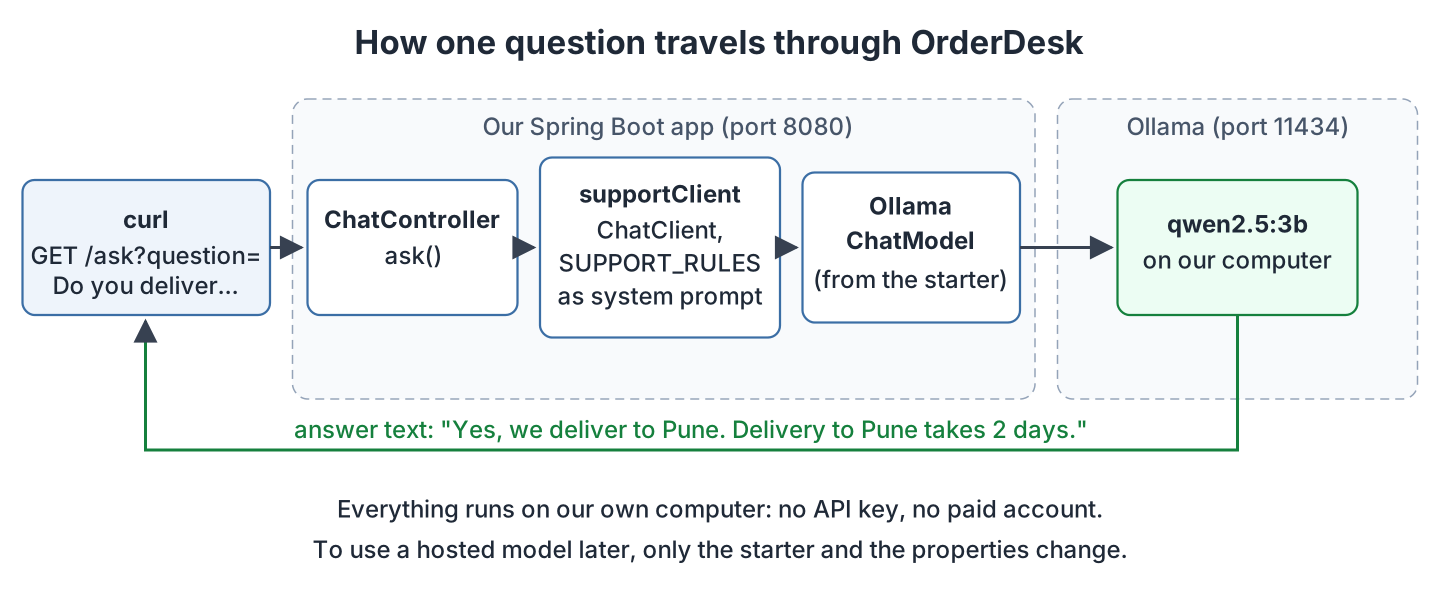
The Ollama starter creates two beans for us:
- OllamaChatModel is a ChatModel: the lower-level Spring AI interface that sends one request to one provider, here Ollama.
- ChatClient.Builder builds a ChatClient, the easier fluent API on top of that ChatModel.
Our code only uses the ChatClient. We build one with OrderDesk’s rules as its default system prompt:
package com.howtodoinjava.orderdesk.chat;

import org.springframework.ai.chat.client.ChatClient;
import org.springframework.context.annotation.Bean;
import org.springframework.context.annotation.Configuration;

@Configuration
public class ChatClientConfig {

    static final String SUPPORT_RULES = """
        You are OrderDesk, the support assistant of an online store.
        Answer in at most three sentences.
        Delivery: Pune, Mumbai and Delhi in 2 days; every other city in India in 5 days.
        Delivery is free above INR 499; below that it costs INR 49.
        We do not deliver outside India.
        """;

    @Bean
    ChatClient supportClient(ChatClient.Builder builder) {
        return builder
            .defaultSystem(SUPPORT_RULES)
            .build();
    }
}
Line by line:
- SUPPORT_RULES is the system prompt, written as a Java text block (a string between triple quotes that keeps its line breaks). The model knows nothing about our store, so the rules give it the facts it may use.
- The method name, supportClient, becomes the bean name.
- ChatClient.Builder builder is filled in by Spring with the builder that the Ollama starter created.
- defaultSystem(SUPPORT_RULES) sends the rules with every request made through this client.
The code on GitHub has more ChatClient beans in this class, which later articles add.
6.3. The REST Controller
Finally, we write the endpoint that customers call. ChatController takes a question as a URL parameter and returns the model’s answer:
package com.howtodoinjava.orderdesk.chat;

import org.springframework.ai.chat.client.ChatClient;
import org.springframework.web.bind.annotation.GetMapping;
import org.springframework.web.bind.annotation.RequestParam;
import org.springframework.web.bind.annotation.RestController;

@RestController
public class ChatController {

    private final ChatClient supportClient;

    ChatController(ChatClient supportClient) {
        this.supportClient = supportClient;
    }

    @GetMapping("/ask")
    String ask(@RequestParam String question) {
        return supportClient.prompt()
            .user(question)
            .call()
            .content();
    }
}
The ask() method is one chain of four calls:
- prompt() starts a new request.
- user(question) adds the customer’s question as the user message. The system prompt is already there, from defaultSystem().
- call() prepares a blocking request. It doesn’t contact the model yet; that happens in the next step.
- content() sends the request, waits for the whole answer, and returns it as a String.
Spring passes the supportClient bean into the constructor, because it is the only ChatClient bean in the app so far.
This diagram shows the path of one question through these classes:
7. Starting and Testing the App
Now we start the app. First, make sure Ollama is running: ollama list (with Docker, docker exec -it ollama ollama list) should answer without an error. Then run this command in the orderdesk folder:
mvn spring-boot:runThese are the lines to look for in the log:
INFO 2365 --- [orderdesk] [           main] c.h.orderdesk.OrderDeskApplication       : Starting OrderDeskApplication using Java 21.0.12.1 with PID 2365
INFO 2365 --- [orderdesk] [           main] o.s.boot.tomcat.TomcatWebServer          : Tomcat started on port 8080 (http) with context path '/'
INFO 2365 --- [orderdesk] [           main] c.h.orderdesk.OrderDeskApplication       : Started OrderDeskApplication in 2.99 seconds (process running for 3.49)
“Tomcat started on port 8080” means the app accepts HTTP requests. The app doesn’t call Ollama at startup, so only the first request shows whether Ollama works.
In a second terminal window, we ask a question:
curl -G "localhost:8080/ask" --data-urlencode "question=Do you deliver to Pune? How long does it take?"The -G option sends the data as URL parameters, and –data-urlencode encodes the spaces and the question mark for us. In Windows PowerShell 5, curl is a name for a different command, so type curl.exe instead, or use Git Bash. The answer looks like this:
Yes, we deliver to Pune. Delivery to Pune takes 2 days.The sample’s two-day estimate comes from the system instructions, not the customer’s question. Its first request took 9.7 seconds in the recorded setup. Model loading can make a first request slower; later timings depend on hardware, prompt size, and whether the model remains loaded.
Let’s ask about a city outside India:
curl -G "localhost:8080/ask" --data-urlencode "question=Do you deliver to London?"No, we do not deliver outside India. Our service is only available for delivery within India to cities like Pune, Mumbai, and Delhi within 2 days, and to other cities within 5 days. Delivery costs start at INR 49 for orders above INR 499, and is free for orders above that amount.The answer correctly refuses delivery outside India, but reverses the delivery-fee condition. This demonstrates the difference between receiving an answer and applying a policy correctly. Supply the relevant facts and validate decisions that affect orders, prices, or eligibility in application code.
To stop the app, press Ctrl+C in its window. Every other article in this series starts the app the same way.
8. Troubleshooting
These three problems are the most common on the first run.
8.1. Ollama Is Not Running
If Ollama is stopped, curl gets an HTTP 500 error, and the app log shows the cause:
org.springframework.web.client.ResourceAccessException: I/O error on POST request for "http://localhost:11434/api/chat": finishConnect(..) failed with error(-111): Connection refused: localhost/127.0.0.1:11434“Connection refused” on port 11434 means nothing listens there. Start Ollama with the installer’s app, ollama serve, or docker start ollama.
A connection error can be repeated according to the integration’s retry settings, making a simple local failure take much longer to surface. The recorded run was still waiting after ten minutes. Check the configured attempts and timeouts when diagnosing a request that appears to hang.
17:58:19 WARN ... SpringAiRetryAutoConfiguration : Retry error. Retry count:1
17:58:29 WARN ... SpringAiRetryAutoConfiguration : Retry error. Retry count:2
17:59:19 WARN ... SpringAiRetryAutoConfiguration : Retry error. Retry count:3
18:02:19 WARN ... SpringAiRetryAutoConfiguration : Retry error. Retry count:4
Retries are useful when a hosted API is temporarily busy or experiencing a transient failure. But when you’re running a model locally, repeated retries can simply delay the error without fixing the underlying problem.
While developing, add the following line to application.properties to disable retries. The request will then fail on the first unsuccessful attempt, making the error easier to diagnose:
spring.ai.retry.max-attempts=18.2. The Model Is Not Pulled
If the model name in application.properties isn’t downloaded, Ollama answers with HTTP 404. For example, with qwen2.5:7b not pulled:
org.springframework.ai.retry.NonTransientAiException: HTTP 404 - {"error":"model 'qwen2.5:7b' not found"}Pull the model with ollama pull, or fix the name in the property. ollama list shows the exact names.
8.3. Port 8080 Is Busy
If another app already uses port 8080, our app stops at startup:
APPLICATION FAILED TO START
***************************

Description:

Web server failed to start. Port 8080 was already in use.
Stop the other app, or move ours to a free port with server.port=8081 in application.properties. Then use that port in the curl commands.
9. Using a Hosted Model Instead
For this basic chat request, a compatible hosted integration can reuse the client and controller structure. The following configuration illustrates changing the backend; provider capabilities and request options still need to match the application.
- In pom.xml, replace spring-ai-starter-model-ollama with spring-ai-starter-model-openai.
- In application.properties, replace the three Ollama lines with the API key and the model name. Add a temperature line again if you want one:
spring.ai.openai.api-key=YOUR_OPENAI_API_KEY
spring.ai.openai.chat.options.model=gpt-4o-mini
Keep the key out of the code. For example, set it in an environment variable named SPRING_AI_OPENAI_API_KEY, which Spring Boot maps to the spring.ai.openai.api-key property. A hosted provider charges for each request, so the series stays with Ollama. We didn’t run this part.
10. What to Learn Next
This app is the base for the rest of the series. Each article adds one feature to OrderDesk, in this order:
- Spring AI ChatClient API: Fluent Chat Examples (system prompts, parameters, Java records, token usage, options).
- Spring AI PromptTemplate: Creating Prompts
- Spring AI Structured Output Converters
- Spring AI Streaming Responses with Server-Sent Events
- Spring AI Chat Memory: Keep Conversation History
- Spring AI Multimodality: Send Images to a Chat Model
- RAG with Spring AI: embeddings, vector stores and RAG advisors
- Tools, MCP and agents with Spring AI
- Testing, observability and moderation of Spring AI apps
The Spring AI Tutorial page lists every article in this order.
11. FAQs
11.1. Do I need a GPU to run Spring AI with Ollama?
No. Ollama runs on the CPU when there is no GPU, only more slowly. Every example in this series runs without one.
11.2. Which Spring Boot version does Spring AI 2.0 need?
Spring AI 2.0 is built for Spring Boot 4. The older Spring AI 1.x line is for Spring Boot 3.
11.3. Can I use a bigger model?
Yes. Download the desired model and update spring.ai.ollama.chat.options.model. Check memory needs, latency, and behavior on representative questions. A larger model may improve results, but it still needs the store’s policies and can make mistakes.
11.4. Why does the first request take so long?
Ollama loads the model into memory on the first request and keeps it loaded for a few minutes after the last one, so later calls are much faster.
11.5. Is my data sent anywhere?
With the localhost Ollama configuration shown here, model inference is local and prompts are not sent to a hosted model provider. This does not describe other application components or remote Ollama deployments. With a hosted integration, the submitted context goes to that service.
12. Conclusion
A first Spring AI application needs a reachable model, the matching starter, model configuration, and a ChatClient. The endpoint adds the customer’s question to shared instructions and returns the generated response.
Check the model connection separately from answer quality. Useful error handling and bounded retries make setup problems easier to diagnose; policy validation remains necessary even after the request succeeds.
All articles in order: Spring AI Tutorial
13. References
- Spring AI Reference: Getting Started
- Spring AI Reference: Ollama Chat
- Ollama download
- qwen2.5 in the Ollama library
Drop me your questions related to getting started with Spring AI in the comments.
Happy Learning !!
