
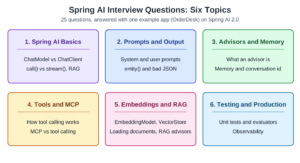
These Spring AI interview questions cover the core APIs, advisors, chat memory, tool calling, RAG, and testing. Each answer starts with a short reply you could say out loud, then gives the reason. The examples come from OrderDesk, the support assistant of a demo online store. All answers target Spring AI 2.0.1 on Spring Boot 4.1.1 and Java 21.
The snippets are short excerpts without imports. The full OrderDesk project, with all dependencies, is linked at the end.
1. Spring AI Basics
1.1. What is Spring AI?
Spring AI is a Spring project that connects Java applications to AI models through common interfaces, such as ChatClient, EmbeddingModel, and VectorStore. The starter you add selects the provider, for example OpenAI or Ollama. To switch providers, we change a starter and a few properties, not our code.
Spring AI also gives you prompt templates, structured output, chat memory, tool calling, and RAG. The Chat Model API reference lists the supported chat providers.
1.2. What is RAG, and why do we need it?
A model knows only its training data, not your store’s return policy. If we ask anyway, it may guess and still sound sure.
Retrieval-augmented generation (RAG) fixes this. Before the model call, the app searches its own documents for text that matches the question. It adds that text to the prompt, and the model answers from it. In OrderDesk, a question about returns gets the returns policy added to the prompt.
The search usually runs on meaning, with embeddings and a vector store (see Section 5). The RAG reference shows how Spring AI does it.
1.3. What is the difference between ChatModel and ChatClient?
ChatModel is the lower-level interface for a model provider: it takes a Prompt and returns a ChatResponse. ChatClient is a fluent API on top of it. It helps us build prompts and supports advisors, which run before and after the model call. An advisor is a small class that can read or modify the request and the response (see Section 3.1). Memory and RAG can use advisors to add context to a request, and tool calling is also integrated into Spring AI’s advisor-based flow.
// ChatModel: we build the Prompt ourselves and read the text from the ChatResponse
ChatResponse response = chatModel.call(new Prompt(List.of(
    new SystemMessage("You are OrderDesk, the support assistant of an online store."),
    new UserMessage("Do you deliver to Pune?"))));
String answer = response.getResult().getOutput().getText();

// ChatClient: the same request in one chain
String sameAnswer = supportClient.prompt()
    .system("You are OrderDesk, the support assistant of an online store.")
    .user("Do you deliver to Pune?")
    .call()
    .content();
The other key difference is tool calling. If the model asks for a tool, ChatModel returns that request; it doesn’t execute the Java method for us. ChatClient can handle the tool-calling loop: it runs the Java method, sends the result back to the model, and repeats this until the model gives a final answer. In application code, we usually use ChatClient because it handles these higher-level interactions for us.
See Spring AI’s Tool Calling reference.
1.4. How do ChatClient.Builder defaults work?
The Spring AI starter creates a ChatClient.Builder bean. Each class that injects it gets its own new builder, because the bean has prototype scope. We set defaults on it and build one ChatClient per purpose. For example, OrderDesk builds a supportClient, and the other answers use this client.
@Configuration
public class ChatClientConfig {

    static final String SUPPORT_RULES = """
        You are OrderDesk, the support assistant of an online store.
        Answer in at most three sentences.
        """;

    @Bean
    ChatClient supportClient(ChatClient.Builder builder) {
        return builder
            .defaultSystem(SUPPORT_RULES)
            .defaultOptions(OllamaChatOptions.builder().temperature(0.2))
            .build();
    }
}
The temperature controls how random the answer is. A higher value allows more variation, while a lower value makes answers more predictable. Ollama’s default is 0.8 (Ollama Chat reference). For a support assistant, a lower value, such as 0.2, is a sensible starting point.
Since Spring AI 2.0, defaultOptions() accepts an options builder directly, so we don’t call build() on it.
The builder also has defaultAdvisors() and defaultTools(). Individual requests can override these defaults. For example, system(…) on a request replaces the default system prompt for that request only.
Inject the builder rather than creating the client yourself. The injected builder uses Spring Boot’s configuration and customizations, including settings for metrics and any registered builder customizers. Calling ChatClient.create(chatModel) bypasses that setup (ChatClient reference).
1.5. What is the difference between call() and stream()?
The call() method waits for the whole answer. After it, content() returns a String, chatResponse() returns a ChatResponse, and entity() returns a Java object.
The stream() method returns a Flux. A Flux is a type from Project Reactor that emits values one by one over time. Here it emits the answer in pieces while the model writes, so a chat screen shows the first words early.
@GetMapping(value = "/ask/stream", produces = MediaType.TEXT_EVENT_STREAM_VALUE)
Flux<String> askStream(@RequestParam String question) {
    return supportClient.prompt()
        .user(question)
        .stream()
        .content();
}
Calling call() doesn’t contact the model yet. The request is sent when we ask for the result with content(), chatResponse(), or entity() (ChatClient reference). There’s no entity() after stream(), so a structured answer needs call().
Streaming needs the reactive stack (spring-webflux), and OrderDesk’s starters already bring it.
For depth, see Getting Started with Spring AI.
1.6. Which Spring AI version goes with which Spring Boot version?
Spring AI 2.0 needs Spring Boot 4, and Spring AI 1.1.x is the last line for Spring Boot 3. So to move to Spring AI 2.0, you must also move to Spring Boot 4.
The follow-up is usually “what changed in 2.0?”. These changes affect most apps (Spring AI upgrade notes):
- ChatModel.call() no longer runs tools. ChatClient runs them, through ToolCallingAdvisor.
- options() and defaultOptions() take the options builder, for example OllamaChatOptions.builder(). Don’t call build().
- Memory advisors need a conversation id on every call. PromptChatMemoryAdvisor is removed; use MessageChatMemoryAdvisor.
- toolNames() is removed. We pass @Tool objects to tools(), or ToolCallback instances to toolCallbacks().
2. Prompts and Structured Output
2.1. What is the difference between a system prompt and a user prompt?
A chat model receives a list of messages, each with a role. The system message contains the application’s instructions: the assistant’s job, its tone, and its rules. The user message contains the customer’s question. An assistant message contains a previous response from the model.
In OrderDesk, we put the store rules in the system prompt and the customer’s question in user(). Keep these separate. Customer input should not be allowed to replace or modify the application’s instructions. Otherwise, a customer could try to manipulate the model into ignoring the store’s rules.
See the Spring AI Prompts reference for details about message roles.
2.2. How do prompt templates work?
A template is text with placeholders in curly braces, such as {customer}. Spring AI’s PromptTemplate fills each placeholder with a value before the request leaves the application. With ChatClient, the user() and system() lambdas fill in the values for us:
String reply = supportClient.prompt()
    .user(u -> u.text("Write a short reply to {customer} about order {orderId}.")
        .param("customer", "Priya")
        .param("orderId", "ORD-1042"))
    .call()
    .content();
A common trap: the default renderer, StTemplateRenderer, reads every curly brace as a placeholder, so a JSON example breaks the template. If you want JSON back, use entity() instead.
2.3. How does entity() turn a model answer into a Java object?
The entity() method creates a BeanOutputConverter for the target type. The converter makes a JSON schema from the class, adds the schema to the prompt, and asks the model to answer in that format. When the model answers, Jackson parses the JSON into the object.
OrderDesk turns a customer message into a support ticket:
public record TicketTriage(
    @JsonPropertyDescription("Order id such as ORD-1042, or NONE if the message has none")
    String orderId,
    Category category,
    Priority priority,
    @JsonPropertyDescription("One sentence of at most 15 words")
    String summary) {

    public enum Category { RETURN, DELIVERY, PAYMENT, WARRANTY, OTHER }

    public enum Priority { LOW, MEDIUM, HIGH }
}
TicketTriage ticket = supportClient.prompt()
.user("I paid for order ORD-1042 twice. Please fix this today.")
.call()
.entity(TicketTriage.class);The enums limit the model to fixed values. @JsonPropertyDescription (from Jackson) adds a field description to the schema. For a list or a map, we pass a ParameterizedTypeReference, so we rarely create a converter ourselves (Structured Output Converter reference).
2.4. What happens when the model’s JSON doesn’t parse?
The call throws an exception from Jackson. In the default mode, the schema is only text in the prompt, so the model can rename a field or add words around the JSON. Spring AI 2.0 offers two fixes:
- Native structured output sends the schema to the provider as a request parameter. Providers such as Ollama and OpenAI then restrict the answer to that schema (Structured Output Converter reference).
- StructuredOutputValidationAdvisor checks the JSON against the schema. When the check fails, it asks the model again with the error added, up to maxRepeatAttempts times.
We turn on native mode per call. TRIAGE is OrderDesk’s system prompt for this task:
private static final String TRIAGE = """
    You sort customer messages for the OrderDesk support team.
    Category: RETURN, DELIVERY, PAYMENT, WARRANTY or OTHER.
    Order id: copy it exactly if the message has one, such as ORD-1042, else write NONE.
    Priority HIGH: money lost, damaged or missing items. LOW: questions only.""";
TicketTriage ticket = supportClient.prompt()
.system(TRIAGE)
.user(message)
.call()
.entity(TicketTriage.class, spec -> spec.useProviderStructuredOutput());For a whole client, pass AdvisorParams.ENABLE_NATIVE_STRUCTURED_OUTPUT to defaultAdvisors(). In our tests on qwen2.5:3b, native mode was clearly more reliable.
Two points make a strong answer. First, in native mode the model doesn’t see the field descriptions, so explain each field in the system prompt, as TRIAGE does.
Second, valid JSON can still hold wrong values, so business rules belong in our code after entity() returns.
For depth, see Spring AI PromptTemplate and Spring AI Structured Output Converters.
3. Advisors and Chat Memory
3.1. What is an advisor?
An advisor is a class that runs as part of every ChatClient call. It can read or modify the request before it reaches the model and inspect or modify the response afterward. Advisors run in sequence, forming a chain, with the final step calling the model. Chat memory and RAG can use advisors to add context to a request. Tool calling is also integrated into Spring AI’s advisor-based flow.
We implement CallAdvisor for call() requests and StreamAdvisor for stream() requests. This one logs how long the rest of the chain takes:
public class TimingAdvisor implements CallAdvisor {

    private static final Logger log = LoggerFactory.getLogger(TimingAdvisor.class);

    @Override
    public ChatClientResponse adviseCall(ChatClientRequest request, CallAdvisorChain chain) {
        long start = System.currentTimeMillis();
        ChatClientResponse response = chain.nextCall(request);   // the rest of the chain
        log.info("Call took {} ms", System.currentTimeMillis() - start);
        return response;
    }

    @Override
    public String getName() {
        return "TimingAdvisor";
    }

    @Override
    public int getOrder() {
        return Ordered.HIGHEST_PRECEDENCE + 100;
    }
}
Code before chain.nextCall() runs before the model, and code after it runs after. An advisor can also return its own response without calling the chain. This is how SafeGuardAdvisor blocks a request.
For depth, see Spring AI Custom Advisors.
3.2. Which advisors are built in, and in what order do they run?
Think of advisors as layers wrapped around each other. When a request moves through the chain, the advisor with the lowest order value gets to handle it first. On the way back, the response travels through the same layers in reverse order.
Spring AI sorts advisors by the value their getOrder() method returns. If two advisors have the same order value, their relative order isn’t guaranteed.
This also means the order in which you list advisors in advisors(…) doesn’t determine their execution order. Spring AI sorts them using their order values instead.
You can find more details in the Advisors API reference.
| Advisor | What it does | Default order |
|---|---|---|
| MessageChatMemoryAdvisor | Adds the conversation history, saves the new messages | HIGHEST_PRECEDENCE + 200 |
| ToolCallingAdvisor | Runs the tool loop; added automatically | HIGHEST_PRECEDENCE + 300 |
| QuestionAnswerAdvisor | Adds matching documents from a vector store | 0 |
| SafeGuardAdvisor | Blocks a request that contains a listed word | 0 |
The order has real effects. At its default order value of 0, SafeGuardAdvisor runs after the memory advisor, so a blocked message is already saved in chat memory. Give a guard advisor Ordered.HIGHEST_PRECEDENCE.
The memory advisor also runs before ToolCallingAdvisor, so it doesn’t see tool calls. It saves only the question and the final answer.
SafeGuardAdvisor only blocks words from a fixed list. For real content checks, Spring AI has a ModerationModel for OpenAI and Mistral AI (OpenAI Moderation reference).
3.3. How does chat memory work?
A model remembers nothing between calls, so the application stores the earlier messages and sends them again with each request. Three types share this work:
- ChatMemory decides which messages to keep. MessageWindowChatMemory keeps the last 20 messages by default.
- ChatMemoryRepository stores the messages. The default keeps them in memory; the JDBC repository and others keep them in a database.
- MessageChatMemoryAdvisor reads the history before the call and saves the new messages after it.
OrderDesk keeps 10 messages per conversation in a database table:
@Bean
ChatMemory chatMemory(JdbcChatMemoryRepository repository) {
    return MessageWindowChatMemory.builder()
        .chatMemoryRepository(repository)
        .maxMessages(10)
        .build();
}
The JdbcChatMemoryRepository bean comes from the spring-ai-starter-model-chat-memory-repository-jdbc starter, plus a DataSource. For an embedded database, the starter creates the table at startup. A bigger window costs more, because every stored message is sent to the model on every call. The Chat Memory reference lists the repositories and their starters.
3.4. Why does every memory call need a conversation id?
The conversation id names one conversation, and the advisor reads only the messages stored under it. In Spring AI 2.0, the id is required and has no default value:
MessageChatMemoryAdvisor memoryAdvisor = MessageChatMemoryAdvisor.builder(chatMemory).build();

String answer = supportClient.prompt()
    .user(message)
    .advisors(a -> a.advisors(memoryAdvisor)
        .param(ChatMemory.CONVERSATION_ID, customerId))
    .call()
    .content();
Without the param() call, the request fails:
java.lang.IllegalArgumentException: conversationId cannot be nullIn a real app, take the id from the logged-in user on the server. If it comes from a request parameter, anyone can read another customer’s chat.
4. Tool Calling and MCP
4.1. How does tool calling work?
The model never runs our code. Spring AI sends a description of each tool with the question, and the model can reply with a tool call. Spring AI runs the Java method and sends the result back. Then the model writes the final answer.
Each method with @Tool becomes one tool:
@Component
public class OrderTools {

    private final JdbcClient jdbcClient;

    OrderTools(JdbcClient jdbcClient) {
        this.jdbcClient = jdbcClient;
    }

    @Tool(description = "Get the status, city, total and dates of one order by its id")
    public OrderInfo getOrderStatus(
            @ToolParam(description = "Order id, for example ORD-1042") String orderId) {
        return jdbcClient.sql("""
                SELECT order_id, customer_name, city, status, total_inr, placed_on, delivered_on
                FROM orders WHERE order_id = ?""")
            .param(orderId.trim().toUpperCase())
            .query(OrderInfo.class)
            .optional()
            .orElseThrow(() -> new IllegalArgumentException("No order with id " + orderId));
    }

    public record OrderInfo(String orderId, String customerName, String city, String status,
                            double totalInr, LocalDate placedOn, LocalDate deliveredOn) {
    }
}
The method name becomes the tool name, unless we set one (Section 4.4 does). The descriptions tell the model when to use the tool.
4.2. What is the difference between tools() and defaultTools()?
The tools(orderTools) call gives the tools to one request, while defaultTools(orderTools) on the builder gives them to every request of that client. Per-call tools are added to the defaults; they don’t replace them (Tool Calling reference).
Don’t make a tool that changes data a default tool. Even better, let the tool only prepare the change, and let a person confirm it.
4.3. What happens when a tool fails or is slow?
When a tool throws a runtime exception, Spring AI doesn’t fail the request by default. It sends the exception message to the model as the tool result, and the model explains it to the user. So exception messages must be safe to show. If you set spring.ai.tools.throw-exception-on-error=true, the request fails instead (Tool Calling reference, Exception Handling).
A slow tool is a bigger problem because Spring AI waits for it to finish before continuing. Spring AI doesn’t provide a general timeout setting for tool execution, so you need to handle timeouts inside the tool itself. Set a timeout on its HTTP client or database query, and throw a clear exception if the timeout is reached. The model can then tell the customer to try again later.
4.4. What is MCP, and how is it different from tool calling?
The Model Context Protocol (MCP) is an open standard for sharing tools between AI apps over the network. An MCP server exposes tools. An MCP client connects to servers and calls those tools for its AI app (Spring AI MCP overview).
Tool calling gives a model the Java methods of its own app. With MCP, OrderDesk publishes its tools once, and any MCP client can call them, even one that isn’t a Java app.
On the server side, the spring-ai-starter-mcp-server-webmvc starter scans beans for @McpTool methods. This method sits in a @Component of the server app that has an OrderTools field:
@McpTool(name = "get_order_status",
    description = "Get the status, city, total and dates of one order by its id")
public OrderInfo getOrderStatus(
        @McpToolParam(description = "Order id, for example ORD-1042") String orderId) {
    return orderTools.getOrderStatus(orderId);
}
On the client side, spring-ai-starter-mcp-client connects to the servers in the properties. It creates a ToolCallbackProvider bean with their tools (MCP Client Boot Starter reference). We pass it to defaultToolCallbacks(), and the remote tools work like local ones. For the server annotations, see the MCP Server Annotations reference.
For depth, see Spring AI Function Calling Example.
5. Embeddings, Vector Stores and RAG
5.1. What is the difference between EmbeddingModel and ChatModel?
A ChatModel writes text. An EmbeddingModel turns text into a vector: an array of numbers (a float[]) that represents aspects of its meaning. Texts with similar meaning get vectors that are close together, so an app can search by meaning instead of by exact words.
float[] vector = embeddingModel.embed("You can return most items within 10 days of delivery.");
int size = embeddingModel.dimensions();   // the length of every vector from this model
Store and search with the same embedding model, because vectors from different models can’t be compared. The Embeddings Model API reference shows the full interface.
5.2. What is a VectorStore?
A VectorStore saves documents together with their embeddings and finds the documents closest to a query. The add() method embeds each Document with the EmbeddingModel and stores it. The similaritySearch() method embeds the query and returns the nearest documents.
vectorStore.add(List.of(new Document(
    "You can return most items within 10 days of delivery.", Map.of("topic", "returns"))));

List<Document> matches = vectorStore.similaritySearch(SearchRequest.builder()
    .query("How long do I have to send a jacket back?")
    .topK(3)
    .similarityThreshold(0.5)
    .filterExpression("topic == 'returns'")
    .build());
By default, topK is 4 and the threshold is 0.0, which accepts every result (Vector Databases reference). SimpleVectorStore keeps vectors in memory for demos. Stores such as PgVector or Qdrant serve production with the same code.
5.3. How do you load documents into a vector store?
Spring AI uses an ETL (Extract, Transform, Load) pipeline with three parts. A DocumentReader extracts documents from a source. A DocumentTransformer changes them, and a DocumentWriter loads them. A VectorStore is a DocumentWriter.
This example reads a Markdown file. MarkdownDocumentReader needs the spring-ai-markdown-document-reader dependency.
MarkdownDocumentReaderConfig config = MarkdownDocumentReaderConfig.builder()
    .withAdditionalMetadata("topic", "returns")
    .build();
List<Document> sections = new MarkdownDocumentReader(
    new ClassPathResource("policies/returns.md"), config).get();   // extract

List<Document> chunks = TokenTextSplitter.builder()
    .withChunkSize(300)
    .build()
    .apply(sections);                                              // transform

vectorStore.add(chunks);                                           // load
We split long documents into chunks because a long text gets one vector for many topics, so it matches every question a little and none well. Small chunks also keep the prompt short.
TokenTextSplitter measures size in tokens. A token is a small piece of text, often part of a word, and providers charge per token. The default chunk size is 800 tokens (ETL Pipeline reference).
5.4. What is the difference between QuestionAnswerAdvisor and RetrievalAugmentationAdvisor?
Both advisors do RAG (see Section 1.2): they add matching documents to the prompt before the model call. QuestionAnswerAdvisor is one class. It searches with the user’s text as it is and adds the results with a fixed template. RetrievalAugmentationAdvisor is built from parts, one per step, and each part can be replaced.
@Bean
RetrievalAugmentationAdvisor retrievalAugmentationAdvisor(VectorStore vectorStore,
                                                          ChatClient.Builder builder) {
    return RetrievalAugmentationAdvisor.builder()
        .queryTransformers(RewriteQueryTransformer.builder()
            .chatClientBuilder(builder.build().mutate())
            .build())
        .documentRetriever(VectorStoreDocumentRetriever.builder()
            .vectorStore(vectorStore)
            .topK(3)
            .similarityThreshold(0.5)
            .build())
        .queryAugmenter(ContextualQueryAugmenter.builder()
            .allowEmptyContext(false)
            .build())
        .build();
}
RewriteQueryTransformer asks the model to turn a chatty question into a short search query. It needs its own ChatClient.Builder. Calling builder.build().mutate() gives it a plain builder without OrderDesk’s store rules. Passing builder directly would work the same way, because each injected builder is new.
VectorStoreDocumentRetriever searches, and ContextualQueryAugmenter builds the final prompt. When the search finds nothing, it tells the model not to answer.
A request uses the advisor like any other:
ChatClientResponse response = supportClient.prompt()
    .user(question)
    .advisors(retrievalAugmentationAdvisor)
    .call()
    .chatClientResponse();
So QuestionAnswerAdvisor (module spring-ai-vector-store-advisor) fits short, direct questions. RetrievalAugmentationAdvisor (module spring-ai-rag) fits chatty questions and flows that need rewriting or several queries. The RAG reference lists every part.
For depth, see Spring AI EmbeddingModel: Vector Embedding Example, Spring AI VectorStore Example, Spring AI ETL Pipeline Example and Spring AI RAG Chatbot.
6. Testing and Production
6.1. How do you unit test code that calls a model?
Replace the model with a fake that returns fixed text. ChatModel has one method to implement, call(Prompt), so a lambda works. ChatClient.create() then builds a real ChatClient on top of the fake. In Section 1.4, we avoided create() because it skips Spring Boot’s settings. A unit test has no Spring context, so that doesn’t matter here.
ChatModel fakeModel = prompt -> new ChatResponse(
    List.of(new Generation(new AssistantMessage("Order ORD-1042 is PLACED."))));
ChatClient fakeClient = ChatClient.create(fakeModel);

String answer = fakeClient.prompt().user("Where is ORD-1042?").call().content();
assertThat(answer).isEqualTo("Order ORD-1042 is PLACED.");
Most of an AI app is ordinary code, such as building prompts and parsing answers. A fake model tests it in milliseconds. To test the wiring with a real model, start Ollama with Testcontainers, a library that runs Docker containers from a test, and check one key fact.
6.2. How do evaluators work?
An evaluator asks a second model, the judge, a yes-or-no question about the question, the context documents and the answer. RelevancyEvaluator asks whether the answer fits the question and the context. FactCheckingEvaluator asks whether the context supports the answer.
The evaluator passes only if the judge’s whole reply is “yes” (case doesn’t matter). If the judge adds an explanation, the check fails. So OrderDesk’s judge gets a system prompt that tells it to reply with one word, and its temperature is set to 0. We build the judge using a ChatClient.Builder injected into the test:
static final String QUESTION = "How many days do I have to return a jacket?";

@Autowired ChatClient.Builder judgeBuilder;

@Test
void factCheckCatchesAnInventedPolicy() {
    ChatClient.Builder judge = judgeBuilder.clone()
        .defaultSystem("Reply with one word only: yes or no. No explanation.")
        .defaultOptions(OllamaChatOptions.builder().temperature(0.0));

    FactCheckingEvaluator factChecker = FactCheckingEvaluator.builder(judge).build();
    List<Document> policy = List.of(new Document(
        "Return window\nYou can return most items within 10 days of delivery."));

    EvaluationResponse right = factChecker.evaluate(new EvaluationRequest(QUESTION, policy,
        "You have 10 days from delivery to return the jacket."));
    EvaluationResponse wrong = factChecker.evaluate(new EvaluationRequest(QUESTION, policy,
        "You have 30 days from delivery to return the jacket."));

    System.out.println("10 days supported: " + right.isPass());
    System.out.println("30 days supported: " + wrong.isPass());
}
The OrderDesk test printed:
10 days supported: true
30 days supported: false
Test one right claim and one wrong claim. Otherwise, a judge that always says “yes” would also pass.
The Evaluation Testing reference advises picking the judge model with care. A small judge can be wrong: in OrderDesk, qwen2.5:3b passed this fact check but marked a correct RAG answer as not relevant.
6.3. What does Spring AI offer for observability?
Observability means seeing what the app does at runtime. Spring AI records Micrometer observations for ChatClient calls, advisors, model calls, tool calls, and vector store operations, with no code from us. Micrometer is the metrics library that Spring Boot uses.
With Spring Boot Actuator, they become metrics, such as gen_ai.client.token.usage. With tracing, they become spans that show where time is spent.
By default, Spring AI doesn’t record the prompt or the answer, because they can contain customer data. The spring.ai.chat.client.observations.log-prompt and log-completion properties turn them on. The Observability reference lists every observation and property.
All articles in order: Spring AI Tutorial
Drop me your questions related to Spring AI interview questions in the comments.
Happy Learning !!
