
During unit testing of an e-commerce application, we can easily test a method that calculates an order count by comparing the test result with the expected number. But what if an LLM explains that count? “Three orders went to Pune” and “Pune received three orders” are both correct, even though the strings differ.
Instead of matching an exact sentence, we can ask an LLM to check the answer against the question and known order data. In this role, the LLM is called a judge model. It evaluates an answer rather than generating the customer’s response. This approach is called LLM-as-a-judge, and Spring AI provides RelevancyEvaluator and FactCheckingEvaluator to use it in our tests.
The judge can make mistakes too. We’ll check it with known correct and incorrect answers before using its verdicts to compare application prompts.
1. Setting up the Demo App
To demonstrate this, we’ll use OrderDesk, a demo Spring AI application that answers questions about store orders. We’ll test its answer-generation step with fixed order data, leaving database queries outside this example.
We’ll ask “How many orders went to Pune?” and provide context stating that three orders went there and delivery dates are unavailable. The answer should keep the count correct without inventing a delivery date.
Let’s create OrderAnswerWriter, our application class for calling ChatClient. Passing the client into its constructor keeps model configuration separate from the answer-generation code.
package com.howtodoinjava.orderdesk.evaluation;

import org.springframework.ai.chat.client.ChatClient;

/** The answer-writing step, isolated from order retrieval for evaluation. */
public class OrderAnswerWriter {
    private final ChatClient client;

    public OrderAnswerWriter(ChatClient client) {
        this.client = client;
    }

    public String answer(String instructions, String question, String context) {
        return client.prompt()
            .system(instructions)
            .user(u -> u.text("""
                Question: {question}
                Order data: {context}
                """)
                .param("question", question)
                .param("context", context))
            .call()
            .content();
    }
}
The system message contains our instructions, while the user message supplies the question and order data. Calling call().content() returns the generated text. We pass the instructions into answer() so we can compare prompts later without changing this code.
The OrderDesk controller shows how this explanation fits into the full database workflow.
2. Setting Up the Tests with JUnit and Ollama
We’ll use Spring Boot’s test starter for JUnit and AssertJ, and the Spring AI Ollama starter for model calls. Add these dependencies using the dependency management in the module’s Maven configuration.
<dependency>
    <groupId>org.springframework.ai</groupId>
    <artifactId>spring-ai-starter-model-ollama</artifactId>
</dependency>
<dependency>
    <groupId>org.springframework.boot</groupId>
    <artifactId>spring-boot-starter-test</artifactId>
    <scope>test</scope>
</dependency>
Start an Ollama server and download the models used in our test configuration.
ollama pull qwen2.5:3b
ollama pull qwen2.5:7b
In OrderAnswerEvaluationIT, we use one model to generate answers and another as the judge. The two evaluators have separate clients but use the same judge model.
static OrderAnswerWriter writer;
static RelevancyEvaluator relevance;
static FactCheckingEvaluator facts;

@BeforeAll
static void setUp() {
    writer = new OrderAnswerWriter(client("qwen2.5:3b", 0.7).build());
    relevance = new RelevancyEvaluator(client("qwen2.5:7b", 0.0));
    facts = FactCheckingEvaluator.builder(client("qwen2.5:7b", 0.0)).build();
}
The client() helper builds an OllamaChatModel connected to the local server, or the address in OLLAMA_BASE_URL. We’ll see its implementation with the first evaluator. Creating clients directly means these tests need no OrderDesk database or vector store.
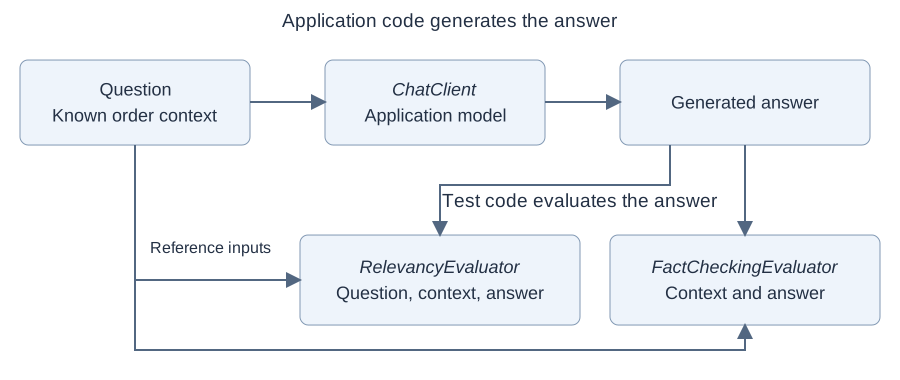
The application generates an answer first. Our test then sends it to each evaluator with the reference inputs. Each evaluation makes another model request, which adds to the test’s execution time.
The complete test class includes the shared setup and imports, and OrderAnswerWriter contains the application code. All methods below belong to that test class. Its EnabledIfEnvironmentVariable annotation requires RUN_LLM_EVAL=true to enable model calls.
3. Running a First LLM Test
Let’s start by checking that we get an answer. We’ll reuse the same question and context in the evaluator tests.
static final String BASELINE   = "Answer the customer's question about orders.";
static final String QUESTION = "How many orders went to Pune?";
static final String CONTEXT   = "Exactly three orders went to Pune. Delivery dates are not provided.";
@Test
void generatesAnAnswer() {
String answer = writer.answer(BASELINE, QUESTION, CONTEXT);
assertThat(answer).isNotBlank(); // Checks for text, not a correct answer.
}“Two orders went to Pune” would satisfy this assertion even though the count is wrong. A nonblank response does not prove that the answer is correct.
With Ollama running, execute this test from the repository root using PowerShell.
$env:RUN_LLM_EVAL = 'true'
mvn -f orderdesk/pom.xml '-Dtest=OrderAnswerEvaluationIT#generatesAnAnswer' test
4. Testing Relevance with RelevancyEvaluator
First, let’s check whether the answer addresses the question in the supplied context. RelevancyEvaluator sends these inputs to a judge model and returns a verdict that we can assert in JUnit.
4.1. Evaluating the Generated Answer
Let’s complete the client() helper used in our setup. Each call creates a builder with its own model configuration.
static ChatClient.Builder client(String model, double temperature) {
    OllamaApi api = OllamaApi.builder()
        .baseUrl(System.getenv().getOrDefault("OLLAMA_BASE_URL", "http://localhost:11434"))
        .build();
    OllamaChatModel chatModel = OllamaChatModel.builder()
        .ollamaApi(api)
        .options(OllamaChatOptions.builder()
            .model(model).temperature(temperature).build())
        .build();
    return ChatClient.builder(chatModel);
}
We use a temperature of 0.7 for generation and 0.0 for evaluation. Keeping the judge’s sampling settings fixed reduces one source of variation, although zero temperature does not guarantee identical or correct verdicts.
The judge also needs its own instructions. Separate builders let each evaluator supply its evaluation prompt without inheriting OrderDesk’s system message, conversation memory, or advisors.
Next, let’s create an EvaluationRequest. It holds the question, reference context, and generated answer. We wrap the context in a Spring AI Document.
static EvaluationRequest request(String question, String context, String answer) {
    return new EvaluationRequest(question, List.of(new Document(context)), answer);
}
We supply the reference facts independently of the answer. Otherwise, an invented count could become the evidence used to approve itself.
Now we can generate an answer and pass it to the evaluator.
@Test
void generatedAnswerIsRelevant() {
    String answer = writer.answer(BASELINE, QUESTION, CONTEXT);
    assertThat(answer).isNotBlank(); // Fails before evaluation if no text is returned.
    var result = relevance.evaluate(request(QUESTION, CONTEXT, answer));
    // Passes only if the judge considers the answer relevant.
    assertThat(result.isPass()).as("Answer was %s", answer).isTrue();
}
evaluate() returns an EvaluationResponse, and isPass() gives us its verdict. We include the answer in the assertion message so a failure shows what the model actually said.
4.2. Testing an Unrelated Answer
We should also check that the evaluator can reject an unrelated answer. Let’s keep the question and context unchanged and replace the response with a statement about Java.
@Test
void unrelatedAnswerIsRejected() {
    String answer = "Java supports interfaces and classes.";
    var result = relevance.evaluate(request(QUESTION, CONTEXT, answer));
    // Passes when the unrelated Java answer is rejected.
    assertThat(result.isPass()).as("Unrelated answer was accepted").isFalse();
}
Because we supply this response ourselves, a failure points to the evaluation rather than answer generation.
Now consider “Two orders went to Pune.” The topic is right, but the count is wrong. The relevance evaluator may reject it because it also considers context. Still, we need an explicit check that the answer’s claims are supported by the order data.
5. Testing Facts with FactCheckingEvaluator
FactCheckingEvaluator checks whether the context supports the answer’s claims. Spring AI calls this grounded factuality. Let’s use it to check the count and any delivery details in the response.
5.1. Checking the Answer Against Known Data
Our setup creates FactCheckingEvaluator with its own judge client. The evaluator supplies the fact-checking prompt, so we can reuse our EvaluationRequest helper and pass in the generated answer.
@Test
void generatedAnswerIsSupported() {
    String answer = writer.answer(BASELINE, QUESTION, CONTEXT);
    assertThat(answer).isNotBlank(); // Fails before evaluation if no text is returned.
    var result = facts.evaluate(request(QUESTION, CONTEXT, answer));
    // Passes only if the judge considers the claims supported by the context.
    assertThat(result.isPass()).as("Answer was %s", answer).isTrue();
}
The evaluator works from the context we give it. It doesn’t query the database to verify that context. A wrong count in our test fixture can therefore lead to a misleading result, just like a wrong expected value in a unit test.
The Spring AI evaluation documentation explains both evaluators and their inputs.
5.2. Detecting Incorrect and Unsupported Claims
To check whether fact checking works as expected, we’ll supply answers with known outcomes. Each answer is paired with the verdict we expect.
record LabeledAnswer(String answer, boolean expected) { }

static Stream<LabeledAnswer> labeledAnswers() {
    return Stream.of(
        new LabeledAnswer("Three orders went to Pune.", true),
        new LabeledAnswer("Pune received 3 orders.", true),
        new LabeledAnswer("Two orders went to Pune.", false),
        new LabeledAnswer("No orders went to Pune.", false),
        new LabeledAnswer("Three orders went to Pune and arrived yesterday.", false));
}
The first two answers are valid paraphrases. The next two contradict the count. The last keeps the count correct but adds an unsupported delivery claim. Checking only for the word “three” would miss that error.
We assign these labels from the reference data. Keeping them independent of the judge gives us a way to check the judge itself.
5.3. Checking the Evaluator Itself
Checking the judge against these labeled examples gives us an initial calibration check. We’ll use a parameterized JUnit test so each answer runs separately and any disagreement is easy to locate.
@ParameterizedTest
@MethodSource("labeledAnswers")
void factJudgeMatchesLabels(LabeledAnswer example) {
    boolean observed = facts.evaluate(request(QUESTION, CONTEXT, example.answer())).isPass();
    System.out.printf("expected=%s observed=%s answer=%s%n",
        example.expected(), observed, example.answer());
    // Passes when the judge agrees with our label; either disagreement fails.
    assertThat(observed).as("Answer was %s", example.answer()).isEqualTo(example.expected());
}
Accepting an unsupported answer is a false positive. Rejecting a supported answer is a false negative. Printing the expected and observed verdicts helps us see which kind of mistake occurred.
When the observed verdict differs from our label, first check the reference data and label. If both are correct, investigate the judge configuration and its response format. Fix the cause before rerunning the test.
We should check the relevance evaluator too. This test supplies one known relevant answer and one unrelated answer without calling the application model.
@Test
void calibrateRelevance() {
    boolean relevant = relevance.evaluate(request(QUESTION, CONTEXT,
        "Three orders went to Pune.")).isPass();
    boolean unrelated = relevance.evaluate(request(QUESTION, CONTEXT,
        "Java supports interfaces and classes.")).isPass();
    assertThat(relevant).as("Known relevant answer").isTrue(); // Must accept the Pune answer.
    assertThat(unrelated).as("Known unrelated answer").isFalse(); // Must reject the Java answer.
}
This is a small calibration set, so it won’t cover every wording. Add reviewed examples as you find mistakes, and rerun calibration whenever the judge model or evaluation prompt changes.
6. Evaluating Repeated Responses
With those checks in place, let’s evaluate fresh responses from our application. Repeating requests helps us find failures that a single successful response would hide.
6.1. Running a Small Evaluation Dataset
We’ll use a small evaluation dataset containing two questions about known counts and one about an unavailable delivery date. Each case carries its own reference context.
record Case(String id, String question, String context) { }

static final List<Case> CASES = List.of(
    new Case("pune-count", QUESTION, CONTEXT),
    new Case("mumbai-count", "How many orders went to Mumbai?",
        "Exactly two orders went to Mumbai. Delivery dates are not provided."),
    new Case("pune-delivery", "When did the Pune orders arrive?", CONTEXT));
For the delivery question, we want the model to say the date isn’t provided. Keeping this case separate helps us spot invented dates even if the model answers the count questions correctly.
We need to retain each answer and its verdicts. Our Sample record holds one attempt. A null verdict means that evaluation didn’t complete, while error records an execution failure.
record Sample(String variant, String caseId, int attempt, String question,
              String context, String answer, Boolean relevant,
              Boolean supported, String error) {
    boolean passed() {
        return error == null && Boolean.TRUE.equals(relevant)
            && Boolean.TRUE.equals(supported);
    }
}
The passed() method combines the two verdicts. Next, we’ll populate this record by generating an answer and running both evaluations.
static Sample evaluate(String variant, String prompt, Case example, int attempt) {
    String answer = null;
    Boolean relevant = null;
    String stage = "generation";
    try {
        answer = writer.answer(prompt, example.question(), example.context());
        if (answer == null || answer.isBlank()) {
            return new Sample(variant, example.id(), attempt, example.question(),
                example.context(), answer, false, false, null);
        }
        var input = request(example.question(), example.context(), answer);
        stage = "relevance evaluation";
        relevant = relevance.evaluate(input).isPass();
        stage = "factual evaluation";
        boolean supported = facts.evaluate(input).isPass();
        return new Sample(variant, example.id(), attempt, example.question(),
            example.context(), answer, relevant, supported, null);
    } catch (RuntimeException failure) {
        return new Sample(variant, example.id(), attempt, example.question(),
            example.context(), answer, relevant, null,
            stage + " / " + failure.getClass().getSimpleName() + " / " + failure.getMessage());
    }
}
We run fact checking even when relevance fails, so the report keeps both verdicts. If fact checking throws an exception, we preserve the answer and relevance result, along with the stage that failed.
Blank answers are rejected before either evaluator runs. For these samples, the false values record our local rejection, not model verdicts.
We can now evaluate each of the three cases three times.
@Test
void repeatedAnswers() throws IOException {
    List<Sample> samples = new ArrayList<>();
    for (Case example : CASES) {
        for (int attempt = 1; attempt <= 3; attempt++) {
            samples.add(evaluate("baseline", BASELINE, example, attempt));
        }
    }
    writeReport("repeated-answers", samples);
    summarize("baseline", samples);
    // Fails on execution errors. Rejected answers are recorded, not asserted here.
    assertThat(samples).allMatch(s -> s.error() == null);
}
This makes nine generation attempts and up to eighteen evaluation calls. Three repetitions keep the example manageable; they are not enough to establish production reliability.
6.2. Recording and Interpreting Failures
A pass rate tells us how often answers were accepted, but not what went wrong. Let’s save the inputs, answer, verdicts, and error for each attempt.
static void writeReport(String name, List<Sample> samples) throws IOException {
    Path directory = Path.of("target", "evaluations");
    Files.createDirectories(directory);
    StringBuilder report = new StringBuilder();
    for (Sample s : samples) {
        report.append("Variant ").append(s.variant()).append(" / case ").append(s.caseId())
            .append(" / attempt ").append(s.attempt()).append('\n')
            .append("Question\n").append(s.question()).append('\n')
            .append("Context\n").append(s.context()).append('\n')
            .append("Answer\n").append(s.answer()).append('\n')
            .append("Relevant ").append(s.relevant())
            .append(" / supported ").append(s.supported())
            .append(" / error ").append(s.error()).append("\n\n");
    }
    Files.writeString(directory.resolve(name + ".txt"), report);
}
The report goes into target/evaluations. Archive it before the next run overwrites it. Since it includes complete inputs and answers, use synthetic or redacted customer data in your fixtures.
With the individual results saved, we can calculate the pass rate.
static void summarize(String variant, List<Sample> samples) {
    var selected = samples.stream().filter(s -> s.variant().equals(variant)).toList();
    long passed = selected.stream().filter(Sample::passed).count();
    long errors = selected.stream().filter(s -> s.error() != null).count();
    long rejected = selected.size() - passed - errors;
    System.out.printf("%s accepted=%d rejected=%d errors=%d total=%d passRate=%.1f%%%n",
        variant, passed, rejected, errors, selected.size(),
        100.0 * passed / selected.size());
}
We divide accepted samples by all attempts for that prompt. Errors remain in the denominator and have their own count, so incomplete requests cannot make the pass rate look better.
When a result looks wrong, inspect the answer against its context. A wrong count may come from generation; a surprising verdict may expose a judge error. A connection failure means the evaluation didn’t complete, so it needs a different fix.
The pass rate applies to this dataset and evaluation configuration. Use representative cases and more samples before drawing broader conclusions, and review judge disagreements manually.
7. Comparing Prompt Changes
We can now use the same tests to compare two prompts. The baseline simply asks for an answer. The revised prompt tells the model to use only the supplied data and explain when information is missing.
static final String BASELINE = "Answer the customer's question about orders.";
static final String REVISED = """
    Answer the customer's question using only the supplied order data.
    Preserve counts and city names. Do not infer delivery status or dates.
    If the data does not answer the question, say that it is not provided.
    Keep the answer to one or two sentences.
    """;
We expect these instructions to help with the missing delivery date, but we need results to check that expectation. We’ll keep the dataset, model settings, evaluator configuration, and repetitions the same for both prompts.
The test below evaluates both prompts for each case. We alternate which runs first across repetitions to reduce ordering bias, and generate a fresh response on every call.
@Test
void comparePrompts() throws IOException {
    List<Sample> samples = new ArrayList<>();
    for (Case example : CASES) {
        for (int attempt = 1; attempt <= 3; attempt++) {
            if (attempt % 2 == 1) {
                samples.add(evaluate("baseline", BASELINE, example, attempt));
                samples.add(evaluate("revised", REVISED, example, attempt));
            } else {
                samples.add(evaluate("revised", REVISED, example, attempt));
                samples.add(evaluate("baseline", BASELINE, example, attempt));
            }
        }
    }
    writeReport("prompt-comparison", samples);
    summarize("baseline", samples);
    summarize("revised", samples);
    // Checks execution only; a pass does not mean the revised prompt is better.
    assertThat(samples).allMatch(s -> s.error() == null);
}
We get nine attempts per prompt. Compare individual cases as well as totals. A prompt could improve the delivery-date answer while making count answers worse, and the overall rate might hide that regression.
Save the model identifiers, options, dataset, and source revision with the report. These details let us check what changed when a later run produces different results.
If the results are close or inconsistent, collect more samples and inspect disagreements. Before adopting the change, also try cases we haven’t used to tune the prompt.
7.1. Running Evaluations in CI
These tests need a model service and take longer than ordinary unit tests. EnabledIfEnvironmentVariable lets us run them explicitly.
@EnabledIfEnvironmentVariable(named = "RUN_LLM_EVAL", matches = "true")
class OrderAnswerEvaluationIT {
    // Shared configuration and the test methods shown above.
}
From the repository root, run calibration first, then the comparison. These commands use PowerShell.
$env:RUN_LLM_EVAL = 'true'
mvn -f orderdesk/pom.xml '-Dtest=OrderAnswerEvaluationIT#factJudgeMatchesLabels+calibrateRelevance' test
if ($LASTEXITCODE -ne 0) { throw 'Evaluator calibration failed' }

mvn -f orderdesk/pom.xml '-Dtest=OrderAnswerEvaluationIT#comparePrompts' test
Separate commands ensure calibration finishes before comparison. JUnit doesn’t guarantee that order when we run all methods together. In CI, make comparison depend on successful calibration and retain both reports.
To turn the comparison into a quality gate, define acceptance criteria from the feature’s requirements. For example, critical cases may need to pass even when the overall rate is acceptable. Keep execution errors visible, and don’t retry rejected responses until one happens to pass.
8. Conclusion
Spring AI evaluators give us useful feedback when the reference data is reliable and the judge handles our labeled examples correctly. Use the recorded answers and verdicts to decide whether a prompt change helps, and keep failures as regression cases for future work.
Happy Learning!
Explore the OrderDesk source on GitHub.
