
While building an application with Spring AI, we usually start by sending a prompt and displaying the model’s response. That works well until a request takes too long or the model returns something our application cannot use. If we’re streaming the answer, the connection might even fail after the user has already read part of it.
Spring AI already helps with some of these failures. It can retry temporary model-request failures and ask the model to correct invalid structured output. Our application still needs to decide how long to wait, what to return when recovery fails, and how to tell the user that a streamed answer is incomplete.
1. Setting up the Demo App
We’ll build a small Spring Boot application that turns order facts into a short explanation. For example, we give the model “Order ORD-1042 has status PACKED” and ask it to explain that status. The model does not look up or modify the order, so retrying the explanation cannot repeat a business action.
Create a project with the Ollama and Spring Reactive Web dependencies. The latter supports the streaming endpoint we’ll use later. Our tests also use MockWebServer, a small HTTP server that lets us return controlled responses instead of depending on a running model.
<dependency>
    <groupId>org.springframework.ai</groupId>
    <artifactId>spring-ai-starter-model-ollama</artifactId>
</dependency>
<dependency>
    <groupId>org.springframework.boot</groupId>
    <artifactId>spring-boot-starter-webflux</artifactId>
</dependency>
<dependency>
    <groupId>org.springframework.boot</groupId>
    <artifactId>spring-boot-starter-test</artifactId>
    <scope>test</scope>
</dependency>
<dependency>
    <groupId>io.projectreactor</groupId>
    <artifactId>reactor-test</artifactId>
    <scope>test</scope>
</dependency>
<dependency>
    <groupId>com.squareup.okhttp3</groupId>
    <artifactId>mockwebserver</artifactId>
    <version>${mockwebserver.version}</version>
    <scope>test</scope>
</dependency>
The complete pom.xml in the source project supplies the Spring Boot parent, Spring AI BOM and dependency versions. Keep those together when running the example rather than copying individual dependencies into an unrelated build.
For a real model call, start Ollama and download the model.
ollama pull qwen2.5:3b
Add the connection settings to application.properties. We disable embeddings because this application only generates text.
spring.ai.ollama.base-url=http://localhost:11434
spring.ai.ollama.chat.model=qwen2.5:3b
spring.ai.model.embedding=none
spring.ai.ollama.init.pull-model-strategy=never
spring.http.clients.imperative.factory=jdk
We select the JDK HTTP client for synchronous requests so the timeout behavior has a known transport. The application starts with an ordinary Spring Boot entry point.
import org.springframework.boot.SpringApplication;
import org.springframework.boot.autoconfigure.SpringBootApplication;

@SpringBootApplication
public class SummaryApplication {
    public static void main(String[] args) {
        SpringApplication.run(SummaryApplication.class, args);
    }
}
Now let’s add the operation we want to protect. SummaryService receives the auto-configured ChatClient.Builder and builds a client once in its constructor.
import org.springframework.ai.chat.client.ChatClient;
import org.springframework.stereotype.Service;

@Service
public class SummaryService {
    private final ChatClient client;

    public SummaryService(ChatClient.Builder builder) {
        this.client = builder.build();
    }

    public String summarize(String facts) {
        return client.prompt()
            .system("Explain the supplied order facts in one sentence. Do not add facts.")
            .user(facts)
            .call()
            .content();
    }
}
Calling summarize() sends the supplied facts to the model and returns the generated text. The system message tells the model how to answer, while the user message supplies the order facts.
Let’s expose this operation so we can try a normal request first. This is the initial SummaryController; the source project also includes the endpoints introduced later.
import org.springframework.web.bind.annotation.GetMapping;
import org.springframework.web.bind.annotation.RequestParam;
import org.springframework.web.bind.annotation.RestController;
import reactor.core.publisher.Mono;
import reactor.core.scheduler.Schedulers;

@RestController
public class SummaryController {
    private final SummaryService summaries;

    public SummaryController(SummaryService summaries) {
        this.summaries = summaries;
    }

    @GetMapping("/summary")
    public Mono<String> summarize(@RequestParam String facts) {
        return Mono.fromCallable(() -> summaries.summarize(facts))
            .subscribeOn(Schedulers.boundedElastic());
    }
}
Mono represents one asynchronous result. Since our service waits for the model, fromCallable() wraps that blocking operation and boundedElastic() runs it on a worker thread. This keeps the WebFlux request-handling thread free.
With Ollama running, start the application using mvn spring-boot:run. In another terminal, send a request. On Windows PowerShell, use curl.exe in place of curl.
curl --get http://localhost:8080/summary --data-urlencode "facts=Order ORD-1042 has status PACKED."
A successful response might look like this. The model’s exact wording can vary.
Your order ORD-1042 is packed.
We now have a request that returns generated text. Next, we’ll control what happens when the model server cannot answer it.
2. Retrying Failed Model Requests
Suppose Ollama briefly returns HTTP 503 because it cannot handle a request. Sending the request again after a short wait may succeed. But if the request fails with HTTP 401, repeating the same credentials is unlikely to help.
Spring AI’s auto-configured error handler distinguishes these cases. Server errors become TransientAiException, which the retry policy can retry. With on-client-errors disabled, ordinary 4xx errors become NonTransientAiException and are not retried. The policy also includes ResourceAccessException for certain HTTP I/O failures.
The retry mechanism already has defaults, including an initial backoff of two seconds and a multiplier of five. Rather than relying on those waits for a customer-facing summary, we’ll choose a smaller retry budget in application.properties.
spring.ai.retry.max-attempts=2
spring.ai.retry.backoff.initial-interval=200ms
spring.ai.retry.backoff.multiplier=2
spring.ai.retry.backoff.max-interval=1s
spring.ai.retry.on-client-errors=false
In the supplied project, max-attempts=2 allows two retries after the initial request. The test below verifies that this produces three HTTP requests. The waits before those retries are 200 and 400 milliseconds. max-interval caps the wait between retries; it does not limit how long the model itself can take to answer.
Despite the property’s name, the implementation used by this project treats its value as the retry count. Keep the request-count test when changing dependencies so a change in that interpretation is visible.
Initial request fails → wait 200 ms → retry 1 fails → wait 400 ms → retry 2 succeeds
These properties configure the RetryTemplate used by OllamaChatModel. Our service still calls ChatClient once. The retries happen below that call, and the service receives either a successful answer or the final exception.
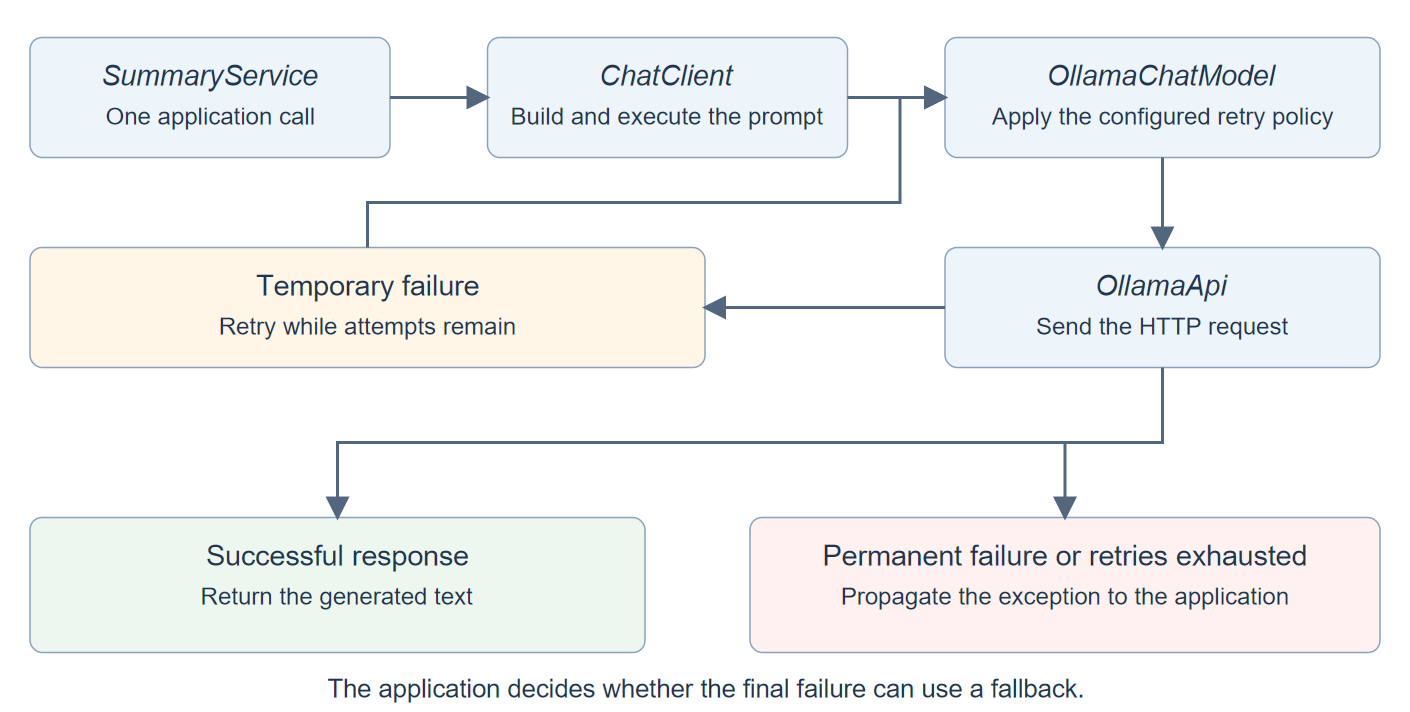
Configure the existing retry policy before adding another retry layer around ChatClient. Otherwise, an outer retry can repeat a model call that has already exhausted its own attempts.
2.1. Setting up the HTTP Tests
We can test the configured policy without making a real Ollama server fail. MockWebServer accepts actual HTTP requests and returns responses we enqueue. Spring Boot still creates the real ChatClient, OllamaChatModel and HTTP client, so these are integration tests of our configuration, not tests of a mocked retry method.
All test methods below belong to SummaryApplicationTest. DynamicPropertySource replaces the real Ollama URL with our test server’s URL before Spring creates the model client. We therefore do not need Ollama running for these tests.
Each outgoing HTTP request consumes the next response added with enqueue(). Since the server counts requests across tests, requestsBeforeTest records the starting count; subtracting it gives us the requests made by the current test. We shorten the retry delay and read timeout only to keep the tests fast.
@SpringBootTest(webEnvironment = SpringBootTest.WebEnvironment.NONE, properties = {
    "spring.ai.retry.backoff.initial-interval=1ms",
    "spring.http.clients.read-timeout=1s"
})
class SummaryApplicationTest {
    static final MockWebServer ollama = new MockWebServer();
    static final String FACTS = "Order ORD-1042 has status PACKED.";
    @Autowired SummaryService summaries;
    int requestsBeforeTest;

    @DynamicPropertySource
    static void modelUrl(DynamicPropertyRegistry properties) {
        properties.add("spring.ai.ollama.base-url", () -> ollama.url("/").toString());
    }

    @BeforeEach
    void recordRequestCount() {
        requestsBeforeTest = ollama.getRequestCount();
    }

    @AfterAll
    static void stopServer() throws IOException {
        ollama.shutdown();
    }

    static MockResponse modelReply(String content) {
        String body = JsonMapper.builder().build().writeValueAsString(Map.of(
            "model", "qwen2.5:3b",
            "message", Map.of("role", "assistant", "content", content),
            "done", true, "done_reason", "stop"));
        return new MockResponse().setHeader("Content-Type", "application/json").setBody(body);
    }
    // Add the test methods shown below inside this class.
}
The modelReply() helper wraps text inside Ollama’s response format. This is important because the HTTP response must first be accepted by OllamaApi before ChatClient can return the assistant’s text. The full test source includes the imports. As we add services later, we’ll add their injected fields beside the corresponding tests.
First, let’s check the normal case with one queued answer. A successful request returns the supplied reply without a retry. The text assertion checks the result, and the request-count assertion checks that the client contacted the server once.
@Test
void returnsNormalSummary() {
    ollama.enqueue(modelReply("Your order is packed."));

    assertThat(summaries.summarize(FACTS)).isEqualTo("Your order is packed."); // The normal response reaches our service.
    assertThat(ollama.getRequestCount() - requestsBeforeTest).isEqualTo(1); // Success needs no retry.
}
2.2. Recovering from a Temporary Failure
Let’s return two HTTP 503 responses followed by a successful answer. We call the SummaryService.summarize() method shown in section 1. No application retry code is needed.
One service call makes three HTTP requests because Spring AI retries the first two failures. The request-count assertion ending in .isEqualTo(3) proves the retry count, while the text assertion confirms that the final request succeeded.
@Test
void retriesTemporaryModelFailures() {
    ollama.enqueue(new MockResponse().setResponseCode(503));
    ollama.enqueue(new MockResponse().setResponseCode(503));
    ollama.enqueue(modelReply("Your order is packed."));

    String answer = summaries.summarize(FACTS);

    assertThat(answer).isEqualTo("Your order is packed."); // The third request succeeded.
    assertThat(ollama.getRequestCount() - requestsBeforeTest).isEqualTo(3); // Initial call plus two retries.
}
2.3. Stopping After a Permanent Failure
Now we’ll change the server response to HTTP 401. The same service method should throw NonTransientAiException after one request because our configuration leaves client-error retries disabled.
An authentication failure stops after the first request. The assertion ending in .isEqualTo(1) matters because receiving an exception alone would not prove that Spring AI skipped retries.
@Test
void doesNotRetryInvalidCredentials() {
    ollama.enqueue(new MockResponse().setResponseCode(401));

    assertThatThrownBy(() -> summaries.summarize(FACTS))
        .isInstanceOf(NonTransientAiException.class); // Spring AI identifies a non-retryable failure.
    assertThat(ollama.getRequestCount() - requestsBeforeTest).isEqualTo(1); // No second HTTP request.
}
Leave authentication and request-validation failures out of the retry policy. Rate limiting is a separate case, discussed in the FAQ, because a provider may require a specific delay before the next attempt.
3. Setting Timeouts for Model Requests
Retries help only after an attempt fails. If the HTTP request keeps waiting for a response, the retry policy has nothing to act on yet. We therefore need timeouts as well as an attempt limit.
Spring AI uses HTTP clients managed by Spring Boot in this application. We can configure their timeouts through Boot properties instead of constructing a custom RestClient. We’ll also explicitly select the JDK client for synchronous requests so the example has a known transport.
spring.http.clients.imperative.factory=jdk
spring.http.clients.connect-timeout=2s
spring.http.clients.read-timeout=20s
The connection timeout limits the wait to establish a connection. The read timeout controls waiting for the response. These settings apply to individual HTTP attempts, not to the complete operation including retries. Twenty seconds is an example value; a model loading for the first time may need longer.
These Spring Boot HTTP client settings apply to auto-configured clients across the application. If a business API needs a different timeout from the model server, configure that client separately. Also, spring.ai.ollama.init.timeout concerns model initialization, such as pulling a model, rather than this chat request.
Our test configuration uses a one-second read timeout. We’ll make the server wait three seconds before sending response headers, then call the same SummaryService method.
The client stops waiting when the response does not arrive within the configured timeout. The .isInstanceOf(ResourceAccessException.class) assertion checks the final failure after the retry policy has exhausted all three requests.
@Test
void responseTimeoutStopsEachAttempt() {
    for (int i = 0; i < 3; i++) {
        ollama.enqueue(modelReply("Late answer").setHeadersDelay(3, TimeUnit.SECONDS));
    }

    assertThatThrownBy(() -> summaries.summarize(FACTS))
        .isInstanceOf(ResourceAccessException.class); // No response arrives within the one-second timeout.
    assertThat(ollama.getRequestCount() - requestsBeforeTest).isEqualTo(3); // Each attempt has its own timeout.
}
This test covers waiting for response headers. It does not prove that the same timeout bounds the entire response body. If a failure occurs while reading or converting the body, the client can report a different exception, which may not be retried. Keep tests for the failure cases your application needs when changing HTTP clients.
A twenty-second request timeout does not give the caller a twenty-second overall deadline. If three attempts each wait twenty seconds, those waits alone total sixty seconds, before backoff and other processing. Reduce the attempts and individual timeouts to fit the caller’s budget. If you require a strict deadline, enforce it around the complete operation as well; the properties above do not provide one, and stopping the caller’s wait does not guarantee that remote generation stops.
4. Returning a Fallback After Retries Fail
If every model request fails, the customer still needs a useful response. Spring AI can report the failure, but it cannot decide whether our application should display cached text, try another model or show an availability message.
For this example, we’ll return a fixed message directing the customer to the order details. A small SummaryFacade calls the existing service and handles only temporary model and resource-access failures. Its SummaryResult record includes a degraded flag so the caller can distinguish a fallback from a generated summary.
import org.springframework.ai.retry.TransientAiException;
import org.springframework.stereotype.Service;
import org.springframework.web.client.ResourceAccessException;

@Service
public class SummaryFacade {
    public record SummaryResult(String text, boolean degraded) {}
    private final SummaryService summaries;

    public SummaryFacade(SummaryService summaries) {
        this.summaries = summaries;
    }

    public SummaryResult summarize(String facts) {
        try {
            return new SummaryResult(summaries.summarize(facts), false);
        } catch (TransientAiException | ResourceAccessException failure) {
            return new SummaryResult(
                "The summary is temporarily unavailable. Please read the order details.", true);
        }
    }
}
The catch block runs after SummaryService.summarize() has finished its model-level retries. We do not catch NonTransientAiException, so invalid credentials still reach the application’s normal error handling. We also avoid returning guessed order facts when generation is unavailable.
Let’s keep returning HTTP 503 and verify the result from the facade.
The caller receives an explicitly marked fallback after all attempts fail. The assertThat(answer.degraded()).isTrue() assertion checks that distinction, so returning a result cannot be mistaken for successful generation.
@Autowired SummaryFacade fallback;

@Test
void returnsFallbackAfterRetryExhaustion() {
    for (int i = 0; i < 3; i++) {
        ollama.enqueue(new MockResponse().setResponseCode(503));
    }

    var answer = fallback.summarize(FACTS);

    assertThat(answer.degraded()).isTrue(); // No model request succeeded.
    assertThat(answer.text()).contains("temporarily unavailable"); // Fixed availability message.
    assertThat(ollama.getRequestCount() - requestsBeforeTest).isEqualTo(3); // Fallback follows the retry limit.
}
The UI should use degraded to show an availability notice instead of displaying the text as an order summary. Use a fallback that preserves the meaning of the response, and keep permanent failures visible to your application’s error monitoring.
5. Handling Invalid Structured Output
A request can succeed at the HTTP level and still return text our application cannot use. Suppose we need an order ID and status as a Java record, but the model responds with a sentence instead of JSON.
The default .entity(OrderSummary.class) call requests a compatible response and converts it into a Java object. A JSON schema describes the expected structure, such as an object with orderId and status string fields. Spring AI derives that schema from our record. It checks structure, not whether the order’s status is true.
For example, our application can use the following JSON, but it cannot convert the sentence “Your order is packed” directly into the same record.
{"orderId":"ORD-1042","status":"PACKED"}
For a simple case, we can enable the built-in correction loop directly on the call. Here, client is a ChatClient built from the injected builder, as in SummaryService.
public record OrderSummary(String orderId, String status) {}

OrderSummary summary = client.prompt()
    .user("Order ORD-1042 has status PACKED.")
    .call()
    .entity(OrderSummary.class, spec -> spec.validateSchema());
validateSchema() registers StructuredOutputValidationAdvisor, a component that checks the response before conversion. When validation fails, it sends the error back to the model and asks for a corrected response. Its default permits three correction attempts after the initial response.
These options have different jobs.
| API | When we use it |
|---|---|
| .entity(OrderSummary.class) | Request structured data and convert the reply into our record. |
| validateSchema() | Check the returned JSON and request corrections using the default validation advisor. |
| StructuredOutputValidationAdvisor | Configure that same validation behavior explicitly, for example to limit corrections. |
| useProviderStructuredOutput() | Send the schema through the provider’s native structured-output API, when supported. This can be combined with response validation. |
For our summary feature, we’ll allow only one correction by configuring the advisor explicitly instead of using the default validateSchema() shortcut. We’ll also ask Ollama for native structured output. The native option controls how we request the format; the advisor checks what actually comes back.
import org.springframework.ai.chat.client.ChatClient;
import org.springframework.ai.chat.client.advisor.StructuredOutputValidationAdvisor;
import org.springframework.stereotype.Service;

@Service
public class StructuredSummaryService {
    public record OrderSummary(String orderId, String status) {}
    private final ChatClient client;

    public StructuredSummaryService(ChatClient.Builder builder) {
        this.client = builder.build();
    }

    public OrderSummary summarize(String facts) {
        return client.prompt()
            .system("Copy the order ID and status exactly from the supplied facts.")
            .user(facts)
            .advisors(StructuredOutputValidationAdvisor.builder()
                .outputType(OrderSummary.class)
                .maxRepeatAttempts(1)
                .build())
            .call()
            .entity(OrderSummary.class, spec -> spec.useProviderStructuredOutput());
    }
}
With maxRepeatAttempts(1), we allow the original response and one corrected response. If both are invalid, the service must report a failure rather than keep generating indefinitely.
To test the correction path, we’ll make the server return invalid content first, even though the request asks for native structured output. The second response contains valid JSON. Both HTTP responses succeed, so any additional request here comes from output validation, not an HTTP error.
One correction turns the invalid response into a usable record. The answer.status() assertion checks the converted value, while the request count of two shows that correction required another model call.
@Autowired StructuredSummaryService structured;

@Test
void correctsInvalidStructuredOutput() {
    ollama.enqueue(modelReply("not JSON"));
    ollama.enqueue(modelReply("""
        {"orderId":"ORD-1042","status":"PACKED"}
        """));

    var answer = structured.summarize(FACTS);

    assertThat(answer.status()).isEqualTo("PACKED"); // The corrected response was converted.
    assertThat(ollama.getRequestCount() - requestsBeforeTest).isEqualTo(2); // One generation plus one correction.
}
The correction loop can still run out of attempts. The advisor returns its last response when it cannot obtain valid output, and converting that response may fail. We can verify that persistent invalid content remains a failure.
Invalid output remains a failure when the correction limit is exhausted. The assertThatThrownBy() assertion makes the test pass precisely because conversion throws; a passing test does not mean generation succeeded.
@Test
void persistentInvalidOutputDoesNotBecomeASuccess() {
    ollama.enqueue(modelReply("not JSON"));
    ollama.enqueue(modelReply("still not JSON"));

    assertThatThrownBy(() -> structured.summarize(FACTS))
        .isInstanceOf(RuntimeException.class); // Final conversion still fails after correction is exhausted.
    assertThat(ollama.getRequestCount() - requestsBeforeTest).isEqualTo(2); // Correction remains bounded.
}
We still need to decide what the API caller receives. Unlike the text fallback, this endpoint promises an order record. Filling its fields with guessed values would misrepresent a failed generation. We’ll return HTTP 502 instead, indicating that our application could not obtain a usable upstream result.
import org.springframework.http.HttpStatus;
import org.springframework.web.bind.annotation.GetMapping;
import org.springframework.web.bind.annotation.RequestParam;
import org.springframework.web.bind.annotation.RestController;
import org.springframework.web.server.ResponseStatusException;
import reactor.core.publisher.Mono;
import reactor.core.scheduler.Schedulers;

@RestController
public class StructuredSummaryController {
    private final StructuredSummaryService summaries;

    public StructuredSummaryController(StructuredSummaryService summaries) {
        this.summaries = summaries;
    }

    @GetMapping("/summary/structured")
    public Mono<StructuredSummaryService.OrderSummary> summarize(@RequestParam String facts) {
        return Mono.fromCallable(() -> summaries.summarize(facts))
            .subscribeOn(Schedulers.boundedElastic())
            .onErrorMap(RuntimeException.class, failure -> new ResponseStatusException(
                HttpStatus.BAD_GATEWAY, "Unable to generate a usable order summary.", failure));
    }
}
onErrorMap() translates a failed service call into ResponseStatusException, which WebFlux turns into the chosen HTTP status. This endpoint uses the same generic failure response for conversion and model-request failures. It retains the original cause for diagnostics and does not return the raw model output as an order. It is an HTTP boundary, not another retry policy.
Let’s send two invalid replies and call this controller through WebTestClient. The test client exercises WebFlux request handling without starting a listening HTTP server.
The API returns HTTP 502 instead of a successful order response. The .expectStatus().isEqualTo(502) assertion checks what the caller receives after correction fails.
@Test
void invalidOutputReturnsBadGateway() {
    ollama.enqueue(modelReply("not JSON"));
    ollama.enqueue(modelReply("still not JSON"));
    var controller = new StructuredSummaryController(structured);
    var http = org.springframework.test.web.reactive.server.WebTestClient
        .bindToController(controller).build();

    http.get().uri(uri -> uri.path("/summary/structured")
            .queryParam("facts", FACTS).build())
        .exchange()
        .expectStatus().isEqualTo(502); // Invalid output never becomes a successful order response.
    assertThat(ollama.getRequestCount() - requestsBeforeTest).isEqualTo(2);
}
Use schema validation to recover from invalid structure; use factual checks to verify the values. Keep the correction limit small because each correction is another model call that can also encounter HTTP retries. The Spring AI validation reference describes the advisor, while testing LLM responses with Spring AI covers relevance and factual evaluation.
6. Handling Streaming Failures
Streaming introduces a different problem. The user may already have read part of the answer when generation fails. If we silently restart the request and append the new text, the user could see duplicated words or two different explanations joined together.
Spring AI’s .stream().content() returns a Flux<String>, a sequence of text chunks delivered over time. A subscriber consumes those chunks as they arrive. The sequence eventually completes or reports an error. The synchronous retry configuration above does not automatically restart an interrupted stream.
We’ll convert the text into explicit events. A delta event carries another piece of text, complete marks a finished answer, and error tells the caller that the answer stopped early. These event names are our application’s contract, not Spring AI constants.
For a successful answer, the caller might receive these events. Chunk boundaries can vary.
{"type":"delta","text":"Your order"}
{"type":"delta","text":" is packed."}
{"type":"complete","text":""}
If generation fails after the first chunk, we want this sequence instead.
{"type":"delta","text":"Your order"}
{"type":"error","text":"The summary stopped before completion. Please try again."}
Now let’s implement those two outcomes. map() wraps each text chunk in a SummaryEvent. We then append a success event on normal completion or supply an error event when the stream fails.
import java.time.Duration;
import org.springframework.ai.chat.client.ChatClient;
import org.springframework.beans.factory.annotation.Value;
import org.springframework.stereotype.Service;
import reactor.core.publisher.Flux;

@Service
public class StreamingSummaryService {
    public record SummaryEvent(String type, String text) {}
    private final ChatClient client;
    private final Duration idleTimeout;

    public StreamingSummaryService(ChatClient.Builder builder,
            @Value("${app.summary.stream-idle-timeout:20s}") Duration idleTimeout) {
        this.client = builder.build();
        this.idleTimeout = idleTimeout;
    }

    public Flux<SummaryEvent> summarize(String facts) {
        return Flux.defer(() -> client.prompt()
                .system("Explain only the supplied order facts.")
                .user(facts).stream().content())
            .timeout(idleTimeout)
            .map(text -> new SummaryEvent("delta", text))
            .concatWithValues(new SummaryEvent("complete", ""))
            .onErrorResume(failure -> Flux.just(new SummaryEvent("error",
                "The summary stopped before completion. Please try again.")));
    }
}
Flux.defer() starts the Spring AI call when the caller subscribes and turns synchronous setup failures into stream errors as well. timeout() limits how long we wait for the first chunk or between later chunks. It is an idle timeout, so a long answer can continue if chunks keep arriving within that interval.
After a normal end, concatWithValues() adds our completion event. After an error, onErrorResume() supplies an error event instead. Previously emitted text stays visible, but the caller knows that the answer is incomplete.
Set the idle limit in application.properties. This application setting controls our Reactor operator; it is separate from the HTTP transport configuration.
app.summary.stream-idle-timeout=20s
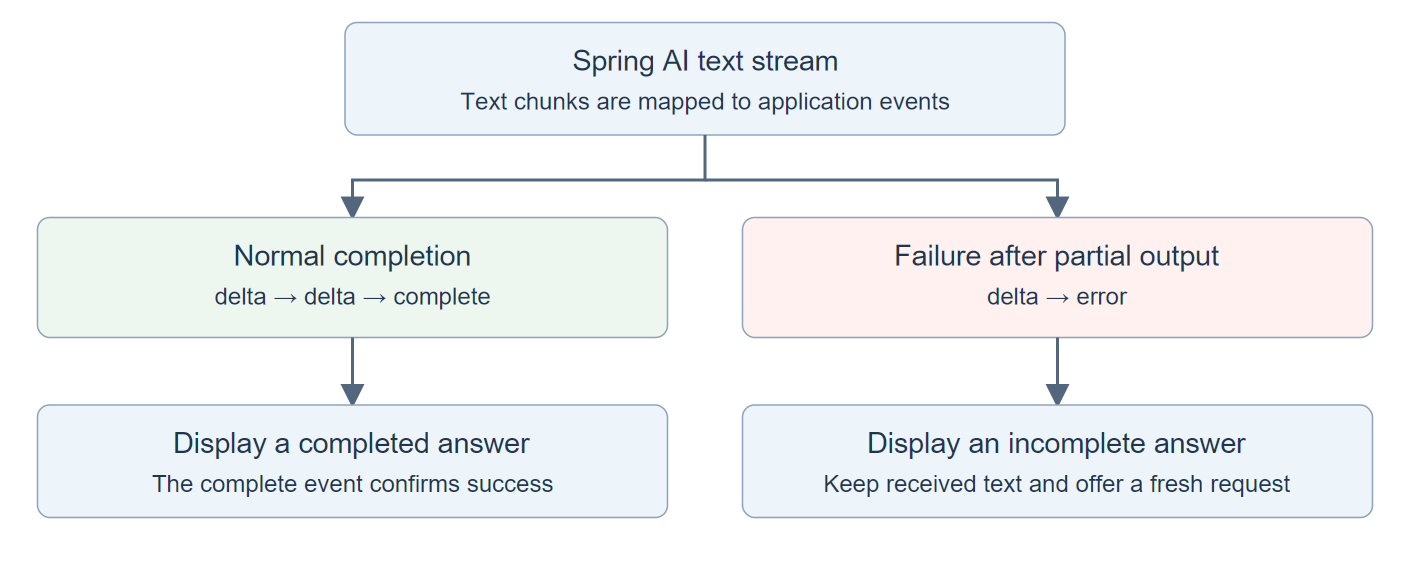
Let’s test a failure after one valid Ollama chunk. The server then sends malformed JSON, causing the real streaming client to fail while decoding the next chunk.
StepVerifier subscribes to the stream and checks each event in order. Each assertNext() checks one emitted value. Here, .expectComplete() checks that the sequence ends after those values; it does not look for an event whose type is complete.
The caller receives partial text followed by an error event, with no success event afterward. The assertion for event type error, followed by .expectComplete(), verifies that exact sequence.
@Autowired StreamingSummaryService streaming;

@Test
void brokenStreamPreservesTextAndReportsFailure() {
    String chunk = """
        {"model":"qwen2.5:3b","message":{"role":"assistant","content":"Your order"},"done":false}
        """;
    ollama.enqueue(new MockResponse().setHeader("Content-Type", "application/x-ndjson")
        .setChunkedBody(chunk + "invalid JSON\n", chunk.length()));

    StepVerifier.create(streaming.summarize(FACTS))
        .assertNext(event -> {
            assertThat(event.type()).isEqualTo("delta"); // First provider chunk remains visible.
            assertThat(event.text()).isEqualTo("Your order");
        })
        .assertNext(event -> assertThat(event.type()).isEqualTo("error")) // Decoding failed after partial output.
        .expectComplete() // No application-level "complete" event was emitted.
        .verify(Duration.ofSeconds(5));
    assertThat(ollama.getRequestCount() - requestsBeforeTest).isEqualTo(1); // We never restart generation silently.
}
The client application must inspect the event type and treat only complete as successful generation. A publisher ending normally does not, by itself, mean the answer is complete.
The source application exposes these events as newline-delimited JSON at /summary/stream. A WebFlux controller can return the Flux directly with MediaType.APPLICATION_NDJSON_VALUE. The other example endpoints use the services already shown; their blocking model calls run on Reactor’s bounded-elastic scheduler rather than a WebFlux event-loop thread.
Preserve partial text, mark the answer incomplete, and let the user request a fresh answer. Do not silently append a restarted generation to text the user has already received.
7. Frequently Asked Questions
7.1. Should We Retry HTTP 429 Responses?
Follow the provider’s rate-limit policy. Spring AI offers spring.ai.retry.on-http-codes for selecting additional retryable status codes, but adding 429 does not by itself implement the provider’s Retry-After guidance. Keep a bounded retry policy and respect the required delay rather than turning on retries for every client error.
7.2. Can We Use the Same Policy for Tool Calls That Change Data?
Not without considering what the tool already did. A cancellation or payment may succeed before the model request fails. Repeating the whole conversation could repeat the action. Our demo only generates text from supplied facts; write tools need idempotency and an authoritative status check before recovery can safely repeat them.
8. Conclusion
For a temporary request failure, configure Spring AI’s retries and the HTTP client’s timeouts. For an invalid structured response, use schema validation with a bounded correction loop. Once an answer is streaming, report an interruption explicitly instead of treating partial text as a completed response.
Run mvn test in the source project to check these behaviors without Ollama. To try real generation, start Ollama, run mvn spring-boot:run, and call /summary, /summary/fallback, /summary/structured or /summary/stream with the facts query parameter.
Explore the Spring AI examples on GitHub.
Happy Learning!
