
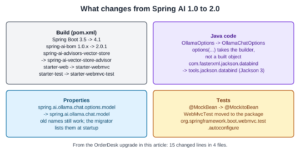
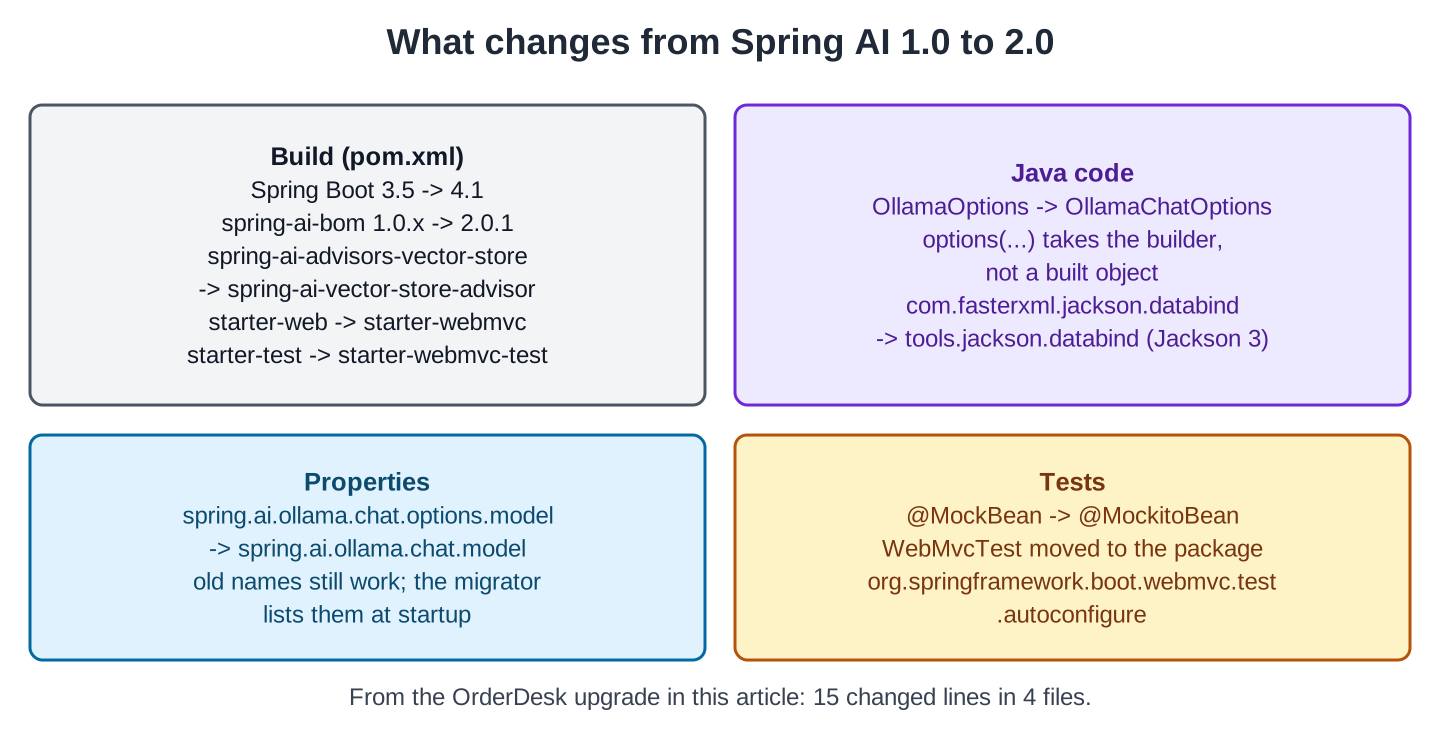
This Spring AI 2.0 migration guide moves a working Spring AI 1.0 application to Spring AI 2.0.1. In this example, we upgrade a small version of OrderDesk, the support assistant of a demo online store. We fix each build error as it appears, and the whole upgrade changes 15 lines in 4 files.
1. Why This Upgrade Is Two Upgrades at Once
Suppose we have a Spring AI 1.0 app that works well, and we want to move it to Spring AI 2.0. The first thing to know is that Spring AI 1.0 runs on Spring Boot 3, and Spring AI 2.0 runs on Spring Boot 4. So we can’t upgrade Spring AI alone, and we upgrade Spring Boot in the same change.
Each of the two upgrades brings its own changes:
- Spring Boot 4 uses Jackson 3, the JSON library (Spring Boot 4.0 Release Notes). Jackson 3 has new package names.
- Spring Boot 4 moves the web test support into its own module and drops @MockBean.
- Spring Boot 4 gives the web starter a new name.
- Spring AI 2.0 renames a module, a class, and some properties (Spring AI Upgrade Notes).
- Spring AI 2.0 also changes how a request takes its options.
The versions in this guide:
| Before | After | |
|---|---|---|
| Spring AI | 1.0.9 | 2.0.1 |
| Spring Boot | 3.5.15 | 4.1.1 |
| Jackson | 2 | 3 |
| Java | 21 | 21 (Spring Boot 4 needs at least 17) |
The official upgrade notes start from Spring AI 1.1, but you don’t need to stop at 1.1 first. We go from 1.0.9 straight to 2.0.1.
2. How the Upgrade Works
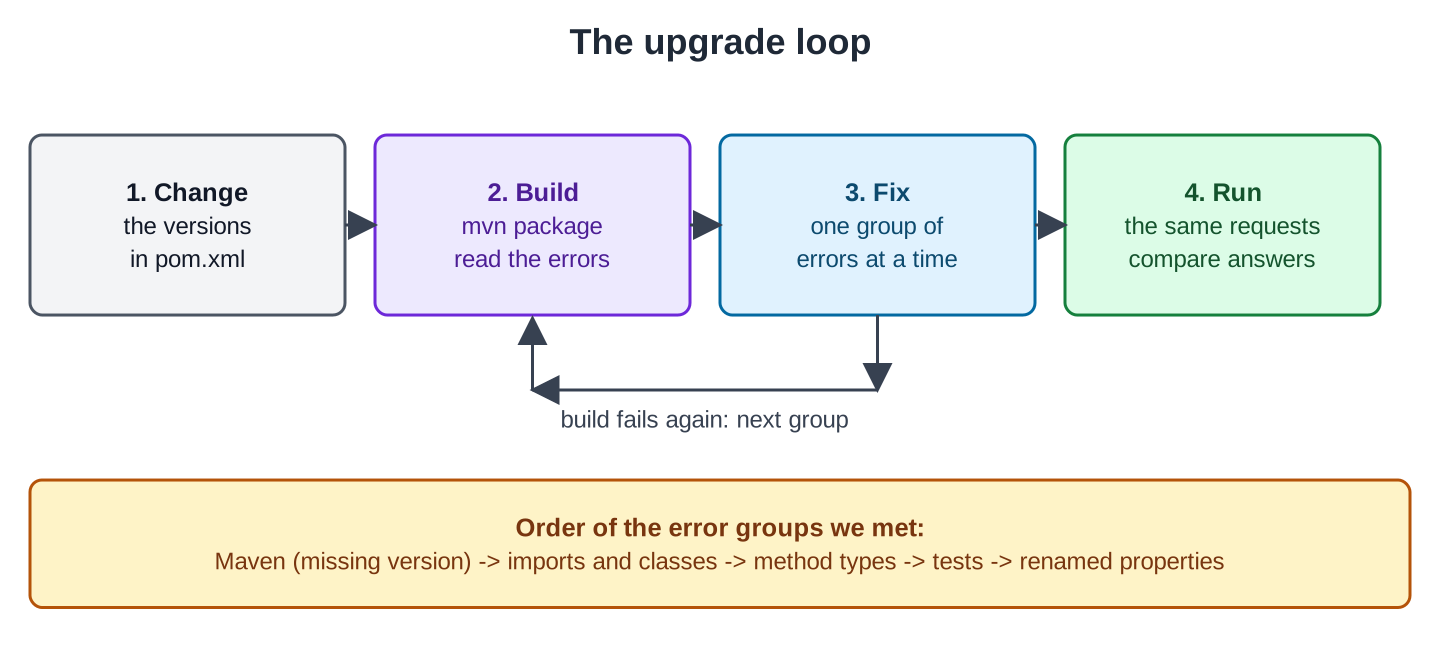
Most of these changes are renamed APIs. When an API name changes, the old code no longer compiles. The compiler errors show us what needs to change, one issue at a time. We can work through the upgrade without reading all the migration notes upfront.
The process is a simple loop: update the versions and build the project. Then fix one group of errors and build again. Repeat until the build passes:
Some changes don’t show up in the build, so the loop can’t find them:
- Old names that still work. The old web starter and the old property names are like this. We look for them on purpose in Steps 6 and 7.
- Changes in behavior. The code compiles, but the app works differently.
For changes in behavior, we record a few requests and their answers before the upgrade. After the upgrade, we send the same requests again. A small model words its answers differently from run to run, so we compare the facts in the answers, not the exact words.
3. The Example App
The 1.0 app uses the Spring AI features that most 1.0 apps have:
- A ChatClient with a system prompt.
- Chat memory, so the app remembers the earlier questions of the same customer.
- RAG (retrieval-augmented generation): the app finds the policy sentence that matches the question and adds it to the prompt.
- A tool that looks up the status of an order.
- A Java record as the answer (structured output).
- Streaming, and a controller test.
The code is on GitHub in two folders: orderdesk-migration/before (Spring AI 1.0.9) and orderdesk-migration/after (Spring AI 2.0.1). To follow along, clone the repository and work in the before folder.
The app runs on Ollama on our own computer, so we don’t need an API key. If you need help installing Ollama, follow the Getting Started with Spring AI tutorial. The app needs two models:
ollama pull qwen2.5:3b
ollama pull nomic-embed-text
The qwen2.5:3b model is the chat model, and nomic-embed-text is an embedding model. The embedding model turns each policy sentence into an array of numbers (a float[] in Java). The app compares these arrays to find the sentence that matches a question.
3.1. The 1.0 Code
Five lines of this pom.xml change during the upgrade: the Spring Boot version, the Spring AI BOM version, the web starter, the vector store advisor module, and the test starter. The BOM (bill of materials) is a pom that sets the versions of all Spring AI modules.
<parent>
  <groupId>org.springframework.boot</groupId>
  <artifactId>spring-boot-starter-parent</artifactId>
  <version>3.5.15</version>
  <relativePath/>
</parent>

<dependencyManagement>
  <dependencies>
    <dependency>
      <groupId>org.springframework.ai</groupId>
      <artifactId>spring-ai-bom</artifactId>
      <version>1.0.9</version>
      <type>pom</type>
      <scope>import</scope>
    </dependency>
  </dependencies>
</dependencyManagement>

<dependencies>
  <dependency>
    <groupId>org.springframework.boot</groupId>
    <artifactId>spring-boot-starter-web</artifactId>
  </dependency>
  <dependency>
    <groupId>org.springframework.ai</groupId>
    <artifactId>spring-ai-starter-model-ollama</artifactId>
  </dependency>
  <dependency>
    <groupId>org.springframework.ai</groupId>
    <artifactId>spring-ai-advisors-vector-store</artifactId>
  </dependency>
  <dependency>
    <groupId>org.springframework.boot</groupId>
    <artifactId>spring-boot-starter-test</artifactId>
    <scope>test</scope>
  </dependency>
</dependencies>
The vector store advisor module brings QuestionAnswerAdvisor and also SimpleVectorStore, an in-memory vector store. A vector store keeps each text together with its array of numbers.
Here’s the application.properties file:
spring.application.name=orderdesk-migration
spring.ai.ollama.base-url=http://localhost:11434
spring.ai.ollama.chat.options.model=qwen2.5:3b
spring.ai.ollama.chat.options.temperature=0.2
spring.ai.ollama.embedding.options.model=nomic-embed-text
The main class is a plain Spring Boot application:
package com.howtodoinjava.orderdesk;

import org.springframework.boot.SpringApplication;
import org.springframework.boot.autoconfigure.SpringBootApplication;

@SpringBootApplication
public class OrderDeskApplication {

    public static void main(String[] args) {
        SpringApplication.run(OrderDeskApplication.class, args);
    }
}
ChatConfig builds the ChatClient. We don’t create ChatClient.Builder, ChatMemory, or EmbeddingModel ourselves, because the Ollama starter auto-configures them.
An advisor is code that runs around each ChatClient call. MessageChatMemoryAdvisor adds the earlier messages of the conversation. QuestionAnswerAdvisor adds the matching policy sentence from the vector store.
package com.howtodoinjava.orderdesk;

import java.util.List;

import org.springframework.ai.chat.client.ChatClient;
import org.springframework.ai.chat.client.advisor.MessageChatMemoryAdvisor;
import org.springframework.ai.chat.client.advisor.vectorstore.QuestionAnswerAdvisor;
import org.springframework.ai.chat.memory.ChatMemory;
import org.springframework.ai.document.Document;
import org.springframework.ai.embedding.EmbeddingModel;
import org.springframework.ai.vectorstore.SimpleVectorStore;
import org.springframework.ai.vectorstore.VectorStore;
import org.springframework.context.annotation.Bean;
import org.springframework.context.annotation.Configuration;

@Configuration
public class ChatConfig {

    @Bean
    VectorStore vectorStore(EmbeddingModel embeddingModel) {
        SimpleVectorStore store = SimpleVectorStore.builder(embeddingModel).build();
        store.add(List.of(
            new Document("Items can be returned within 10 days of delivery."),
            new Document("A damaged item must be reported within 48 hours with a photo.")));
        return store;
    }

    @Bean
    ChatClient chatClient(ChatClient.Builder builder, ChatMemory chatMemory,
                          VectorStore vectorStore, OrderTools orderTools) {
        return builder
            .defaultSystem("You are OrderDesk, the support assistant of an online store. "
                + "Answer in at most three sentences.")
            .defaultAdvisors(
                MessageChatMemoryAdvisor.builder(chatMemory).build(),
                QuestionAnswerAdvisor.builder(vectorStore).build())
            .defaultTools(orderTools)
            .build();
    }
}
OrderTools is the tool. The model calls it when a customer asks about an order:
package com.howtodoinjava.orderdesk;

import java.util.Map;

import org.springframework.ai.tool.annotation.Tool;
import org.springframework.ai.tool.annotation.ToolParam;
import org.springframework.stereotype.Component;

@Component
public class OrderTools {

    private static final Map<String, String> STATUS = Map.of(
        "ORD-1042", "shipped on 14 October, arriving 18 October",
        "ORD-1043", "packed, ships tomorrow");

    @Tool(description = "Find the delivery status of an order")
    String orderStatus(@ToolParam(description = "Order id such as ORD-1042") String orderId) {
        if (orderId == null || orderId.isBlank()) {
            return "no order id given; ask the customer for it";
        }
        return STATUS.getOrDefault(orderId, "no order with this id");
    }
}
Ticket is a plain record:
package com.howtodoinjava.orderdesk;

public record Ticket(String orderId, String category, String summary) {
}
SupportController has three endpoints. Most of the upgrade errors are in this class:
package com.howtodoinjava.orderdesk;

import org.springframework.ai.chat.client.ChatClient;
import org.springframework.ai.chat.memory.ChatMemory;
import org.springframework.ai.ollama.api.OllamaOptions;
import org.springframework.web.bind.annotation.GetMapping;
import org.springframework.web.bind.annotation.RequestParam;
import org.springframework.web.bind.annotation.RestController;

import com.fasterxml.jackson.core.JsonProcessingException;
import com.fasterxml.jackson.databind.ObjectMapper;

import reactor.core.publisher.Flux;

@RestController
public class SupportController {

    private final ChatClient chatClient;
    private final ObjectMapper objectMapper;

    SupportController(ChatClient chatClient, ObjectMapper objectMapper) {
        this.chatClient = chatClient;
        this.objectMapper = objectMapper;
    }

    // A question from one customer; the customer id keeps the conversations apart
    @GetMapping("/ask")
    String ask(@RequestParam String customer, @RequestParam String question) {
        return chatClient.prompt()
            .user(question)
            .advisors(a -> a.param(ChatMemory.CONVERSATION_ID, customer))
            .options(OllamaOptions.builder().temperature(0.0).build())
            .call()
            .content();
    }

    // The same question as a stream of text pieces
    @GetMapping("/ask/stream")
    Flux<String> askStream(@RequestParam String customer, @RequestParam String question) {
        return chatClient.prompt()
            .user(question)
            .advisors(a -> a.param(ChatMemory.CONVERSATION_ID, customer))
            .stream()
            .content();
    }

    // A ticket as a record, also written to the log as JSON
    @GetMapping("/triage")
    Ticket triage(@RequestParam String message) throws JsonProcessingException {
        Ticket ticket = chatClient.prompt()
            .user("Make a support ticket from this message. Category is RETURN, DELIVERY, "
                + "PAYMENT or OTHER: " + message)
            .advisors(a -> a.param(ChatMemory.CONVERSATION_ID, "triage"))
            .call()
            .entity(Ticket.class);
        System.out.println("ticket " + objectMapper.writeValueAsString(ticket));
        return ticket;
    }
}
The test calls /ask without a real model. A Mockito mock takes the place of ChatClient:
package com.howtodoinjava.orderdesk;

import static org.mockito.ArgumentMatchers.any;
import static org.mockito.Mockito.when;
import static org.springframework.test.web.servlet.request.MockMvcRequestBuilders.get;
import static org.springframework.test.web.servlet.result.MockMvcResultMatchers.content;

import org.junit.jupiter.api.Test;
import org.mockito.Answers;
import org.springframework.ai.chat.client.ChatClient;
import org.springframework.beans.factory.annotation.Autowired;
import org.springframework.boot.test.autoconfigure.web.servlet.WebMvcTest;
import org.springframework.boot.test.mock.mockito.MockBean;
import org.springframework.test.web.servlet.MockMvc;

@WebMvcTest(SupportController.class)
class SupportControllerTest {

    @Autowired
    MockMvc mockMvc;

    @MockBean(answer = Answers.RETURNS_DEEP_STUBS)
    ChatClient chatClient;

    @Test
    void askReturnsTheModelAnswer() throws Exception {
        when(chatClient.prompt().user(any(String.class)).advisors(any(java.util.function.Consumer.class))
            .options(any()).call().content()).thenReturn("It ships tomorrow.");

        mockMvc.perform(get("/ask").param("customer", "priya").param("question", "Where is ORD-1043?"))
            .andExpect(content().string("It ships tomorrow."));
    }
}
With RETURNS_DEEP_STUBS, the mock also answers the next calls in the chain, such as user() and call().
3.2. Running the 1.0 App
We build the jar in the before folder and start it on port 8090:
mvn package
java -jar target/orderdesk-migration-1.0.0.jar --server.port=8090
Then we ask two questions as the same customer and send one message to /triage:
curl -G localhost:8090/ask --data-urlencode customer=priya \
  --data-urlencode "question=Where is my order ORD-1042?"
curl -G localhost:8090/ask --data-urlencode customer=priya \
  --data-urlencode "question=Can I still return it next week?"
curl -G localhost:8090/triage \
  --data-urlencode "message=I was charged twice for ORD-1043, please fix it."
Your order ORD-1042 has been shipped and should arrive on 18 October. If you have any issues with the item, please let me know within 48 hours of receiving it.
Based on the context information, you can still return the item next week as the return policy allows for returns within 10 days of delivery. However, if the item is damaged, you need to report it within 48 hours with a photo. Please let me know if you need any further assistance.
{"orderId":"ORD-1043","category":"RETURN","summary":"I was charged twice for ORD-1043, please fix it."}The first answer comes from the tool. The second answer uses chat memory: the app knows that “it” means ORD-1042. It also uses the return policy that RAG found. The third answer is a Ticket record, returned as JSON. We save these answers and compare them after the upgrade.
4. Upgrading OrderDesk Step by Step
We change the before folder until it matches the after folder. Steps 1 to 5 fix the build errors in the order the build printed them. Steps 6 and 7 replace old names that still work. Step 8 compares the answers.
Step 1: Change the Versions
Let’s start with the two versions in pom.xml. We change the Spring Boot parent to 4.1.1:
<parent>
  <groupId>org.springframework.boot</groupId>
  <artifactId>spring-boot-starter-parent</artifactId>
  <version>4.1.1</version>
  <relativePath/>
</parent>
And the spring-ai-bom to 2.0.1:
<artifactId>spring-ai-bom</artifactId>
<version>2.0.1</version>
Change both versions together, because Spring AI 2.0 works only with Spring Boot 4. Then run mvn package again.
Step 2: Rename the Vector Store Advisor Module
The first build stops before it compiles any Java code:
[ERROR] 'dependencies.dependency.version' for org.springframework.ai:spring-ai-advisors-vector-store:jar is missing. @ line 44, column 17The 2.0 BOM has no version for this module, because the module has a new name. QuestionAnswerAdvisor now lives in spring-ai-vector-store-advisor (see the “Advisors” section of the Spring AI Upgrade Notes):
<dependency>
  <groupId>org.springframework.ai</groupId>
  <artifactId>spring-ai-vector-store-advisor</artifactId>
</dependency>
The Java package of QuestionAnswerAdvisor stays the same, so ChatConfig needs no change.
Step 3: Fix the Renamed Class and the Jackson Packages
Next, Maven compiles the Java code, and the compiler fails. This one build prints two groups of errors (paths shortened):
[ERROR] SupportController.java:[5,41] cannot find symbol
  symbol:   class OllamaOptions
  location: package org.springframework.ai.ollama.api
[ERROR] SupportController.java:[10,34] package com.fasterxml.jackson.core does not exist
[ERROR] SupportController.java:[11,38] package com.fasterxml.jackson.databind does not exist
[ERROR] SupportController.java:[19,19] cannot find symbol
  symbol:   class ObjectMapper
  location: class com.howtodoinjava.orderdesk.SupportController
[ERROR] SupportController.java:[21,46] cannot find symbol
  symbol:   class ObjectMapper
  location: class com.howtodoinjava.orderdesk.SupportController
[ERROR] SupportController.java:[49,56] cannot find symbol
  symbol:   class JsonProcessingException
  location: class com.howtodoinjava.orderdesk.SupportController
[ERROR] SupportController.java:[32,22] cannot find symbol
  symbol:   variable OllamaOptions
  location: class com.howtodoinjava.orderdesk.SupportController
The first group is about OllamaOptions (lines 5 and 32). In Spring AI 2.0, this class is OllamaChatOptions, in the same package. We rename it in the import and in the options() call in ask():
import org.springframework.ai.ollama.api.OllamaChatOptions;The second group is about Jackson (lines 10, 11, 19, 21 and 49). Spring Boot 4 uses Jackson 3, and ObjectMapper is now in tools.jackson.databind. We change its import:
import tools.jackson.databind.ObjectMapper;Jackson 3 methods throw unchecked exceptions, so we delete the JsonProcessingException import and the throws clause of triage():
Ticket triage(@RequestParam String message) {The Jackson annotations keep their old package, com.fasterxml.jackson.annotation. So records that use @JsonProperty or @JsonPropertyDescription need no change.
Step 4: Pass the Options Builder
Now we build again, and the compiler stops at the options() call in ask(). Line 31 is that call in the file after the import edits of Step 3:
[ERROR] SupportController.java:[31,13] method options in interface org.springframework.ai.chat.client.ChatClient.ChatClientRequestSpec cannot be applied to given types;
  required: B
  found:    org.springframework.ai.ollama.api.OllamaChatOptions
  reason: inference variable B has incompatible bounds
    upper bounds: org.springframework.ai.chat.prompt.ChatOptions.Builder<?>
In Spring AI 2.0, options() on a ChatClient request takes the options builder. We no longer call .build() ourselves (see “ChatClient Options Now Require a Builder” in the Spring AI Upgrade Notes). The last line of the error says the same thing: the method wants a ChatOptions.Builder.
So we remove .build():
.options(OllamaChatOptions.builder().temperature(0.0))The defaultOptions() method on ChatClient.Builder follows the same rule. This rule applies only to ChatClient. If your code calls ChatModel with a Prompt, keep .build() there.
Step 5: Update the Test
With the main code fixed, the build compiles the tests and fails again:
[ERROR] SupportControllerTest.java:[12,63] package org.springframework.boot.test.autoconfigure.web.servlet does not exist
[ERROR] SupportControllerTest.java:[13,50] package org.springframework.boot.test.mock.mockito does not exist
Spring Boot 4 has two changes here:
- @WebMvcTest moved to its own module. We replace spring-boot-starter-test with spring-boot-starter-webmvc-test, and import WebMvcTest from org.springframework.boot.webmvc.test.autoconfigure.
- @MockBean is gone. We use @MockitoBean from Spring Framework. Its attribute is answers (with an “s”), not answer.
<dependency>
  <groupId>org.springframework.boot</groupId>
  <artifactId>spring-boot-starter-webmvc-test</artifactId>
  <scope>test</scope>
</dependency>
import org.springframework.boot.webmvc.test.autoconfigure.WebMvcTest;
import org.springframework.test.context.bean.override.mockito.MockitoBean; @MockitoBean(answers = Answers.RETURNS_DEEP_STUBS)
ChatClient chatClient;Now mvn package builds the app, and the test passes.
Step 6: Switch to the Web MVC Starter
The build passes, but one starter still uses its old name. In Spring Boot 4.1.1, the pom of spring-boot-starter-web describes it as “deprecated in favor of spring-boot-starter-webmvc”. The old starter still works, so nothing fails. A later version may remove it, so we switch now:
<dependency>
  <groupId>org.springframework.boot</groupId>
  <artifactId>spring-boot-starter-webmvc</artifactId>
</dependency>
The new name matches the test starter from Step 5.
Step 7: Rename the Properties
The app starts now, but three configuration properties still use their old names. The old names continue to work, and Spring Boot doesn’t warn us about them. To find these properties, we add the Spring Boot properties migrator, start the app once, and check the logs:
<dependency>
  <groupId>org.springframework.boot</groupId>
  <artifactId>spring-boot-properties-migrator</artifactId>
  <scope>runtime</scope>
</dependency>
At startup, the migrator printed:
The use of configuration keys that have been renamed was found in the environment:

Property source 'Config resource 'class path resource [application.properties]' via location 'optional:classpath:/'':
	Key: spring.ai.ollama.chat.options.model
		Line: 3
		Replacement: spring.ai.ollama.chat.model
	Key: spring.ai.ollama.chat.options.temperature
		Line: 4
		Replacement: spring.ai.ollama.chat.temperature
	Key: spring.ai.ollama.embedding.options.model
		Line: 5
		Replacement: spring.ai.ollama.embedding.model
In Spring AI 2.0, the property names have no .options. part (see “Options Immutability and Default Values” in the Spring AI Upgrade Notes). We use the new names, then remove the migrator again:
spring.ai.ollama.chat.model=qwen2.5:3b
spring.ai.ollama.chat.temperature=0.2
spring.ai.ollama.embedding.model=nomic-embed-text
Other providers have the same change. For example, spring.ai.openai.embedding.options.model becomes spring.ai.openai.embedding.model.
Step 8: Run the Same Requests
Finally, we build the 2.0.1 app, start it with the same java -jar command and send the same three requests:
Your order ORD-1042 has been shipped and should arrive on 18 October. If you have any issues with the item, please let me know within 48 hours of receiving it.

Based on the context information, you can still return the item next week. The return policy allows for returns within 10 days of delivery. If the item is damaged, you should report it within 48 hours with a photo. Please ensure you follow the return policy to avoid any issues.

{"orderId":"ORD-1043","category":"PAYMENT","summary":"I was charged twice for ORD-1043, please fix it."}
Now we compare the facts with the 1.0 answers:
- The order answer is the same, so the tool works.
- The return answer uses other words, but the facts match. The item can be returned within 10 days. Damage must be reported within 48 hours with a photo. So chat memory and RAG work.
- The ticket has the same order id and summary, so structured output works. The category is PAYMENT this time, where the 1.0 run said RETURN.
PAYMENT is the better category for a double charge. But one run doesn’t prove that 2.0 is better. A small model can pick a different category from run to run, with either version. The /ask/stream endpoint also streamed its answer after the upgrade.
5. Changes OrderDesk Didn’t Hit
OrderDesk is small, so some 2.0 changes didn’t touch it. Here are the ones a 1.0 app is most likely to have. All of them are in the Spring AI Upgrade Notes.
5.1. Removed APIs
These exist in 1.0.9 and are gone in 2.0.1. The compiler shows each one as an error:
- PromptChatMemoryAdvisor: use MessageChatMemoryAdvisor, as ChatConfig does.
- toolNames(…) and defaultToolNames(…): pass the tool object with tools(…) or defaultTools(…), as ChatConfig does with OrderTools.
- ChatOptions.copy(): call mutate() on the options, change the values, then call build().
- The internalToolExecutionEnabled option: remove it from your options.
5.2. Changes That Don’t Break the Build
These compile without errors, so only a test or a run shows them:
- ChatModel.call() no longer runs tools. It returns the model’s tool call to your code. If your code calls ChatModel with tools, use ChatClient instead, which runs them.
- A chat memory advisor needs a conversation id. Without one, it throws IllegalArgumentException. Pass ChatMemory.CONVERSATION_ID on every call, as SupportController does.
- Chat memory now keeps only the question and the final answer, not the tool calls in between.
- The JDBC chat memory table needs a new sequence_id column. Add it before you start the 2.0 app. The upgrade notes give a PostgreSQL script.
- With OpenAI, tool schemas are no longer strict by default. Strict mode makes the model follow the tool’s parameter schema exactly. Call strict(true) on the options builder to turn it back on.
- With Anthropic, maxTokens is now 4096 by default (it was 500). Set it to 500 yourself to keep the old limit.
6. Conclusion
To move to Spring AI 2.0, we also move to Spring Boot 4. The build shows most changes as errors, and we fix them one group at a time. Then we replace the old names that still work, and compare the facts in the answers to a few saved requests.
All articles in order: Spring AI Tutorial
7. References
Drop me your questions related to Spring AI migration in the comments.
Happy Learning !!
