
Structured output lets application code consume a model response as a record, list, or map instead of extracting values from prose. Spring AI’s entity() method combines response formatting with conversion into the requested Java type.
Here, OrderDesk extracts support-ticket details from customer messages. We compare prompt-based formatting, provider-native structured output, and schema validation, while keeping a clear distinction between valid JSON and correct business data.
1. From Model Text to a Java Object
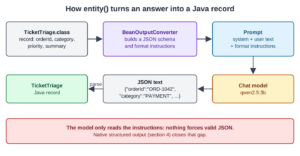
The default conversion path asks the model for structured text, then parses the response. For the record example, it works in four stages:
- BeanOutputConverter builds a JSON schema from our record: the field names, their types, enum values and descriptions.
- It adds format instructions with that schema to the end of the user message.
- The model answers with JSON text.
- The converter removes a surrounding “`json fence if there is one, and Jackson parses the JSON into the record.
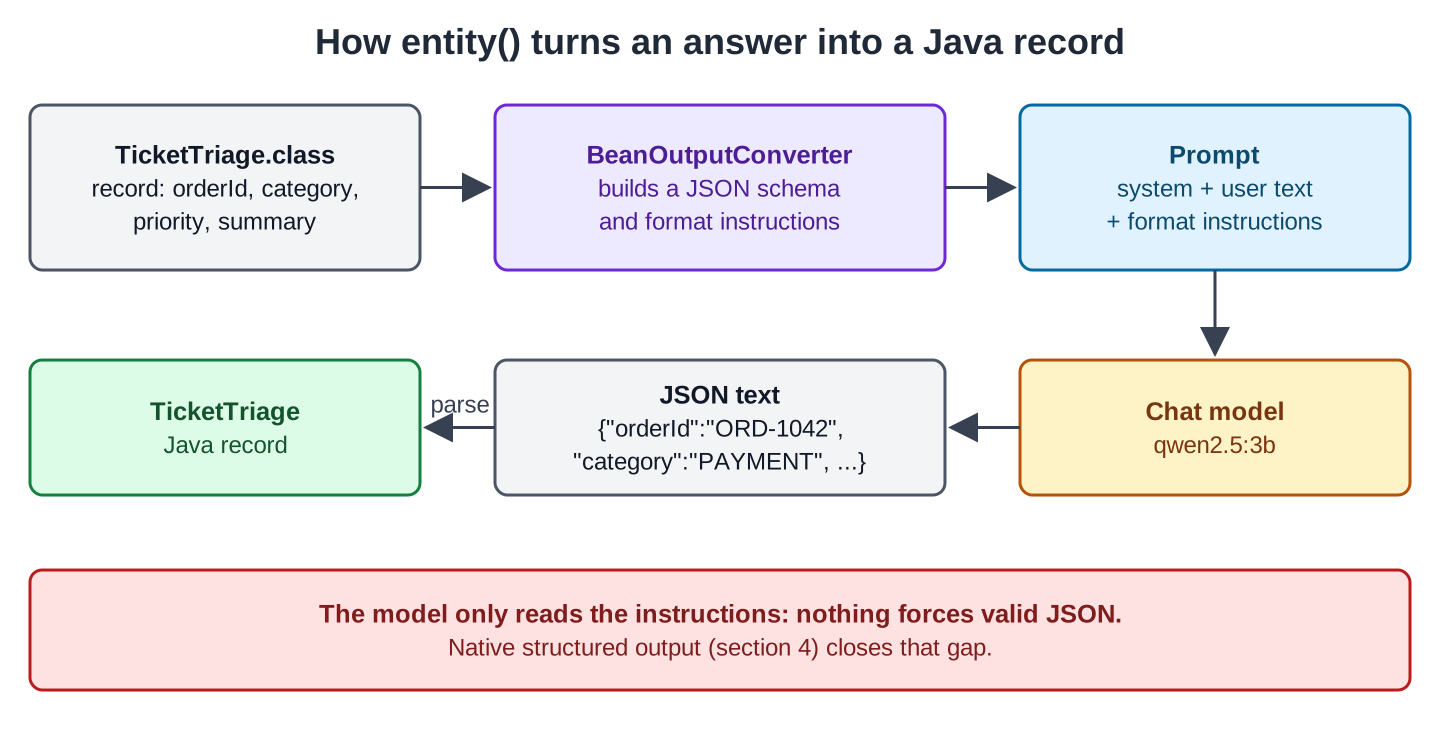
In prompt-based mode, format instructions are part of the message. The model can still produce a different shape, extra prose, or invalid JSON. Conversion failures therefore need an application response, rather than being treated as impossible.
Some integrations support a separate schema parameter for provider-native structured output. Section 4 uses Ollama’s native mode. Check the provider’s supported schema features rather than assuming all integrations constrain generation identically.
2. The Example App
OrderDesk is a Spring Boot 4.1 application that uses Spring AI 2.0 and Java 21. It talks to a local model called qwen2.5:3b through Ollama, so we don’t need an API key. If you need help creating this same OrderDesk project and installing Ollama, follow the Getting Started with Spring AI tutorial. The main class, com.howtodoinjava.orderdesk.OrderDeskApplication, scans every sub-package, so our code goes in com.howtodoinjava.orderdesk.structured.
This article needs only the Ollama starter; BeanOutputConverter and the validation advisor come with it:
<dependency>
  <groupId>org.springframework.ai</groupId>
  <artifactId>spring-ai-starter-model-ollama</artifactId>
</dependency>
The version comes from the spring-ai-bom 2.0.1 in the dependencyManagement section of pom.xml. These lines in application.properties select the server, the model, and a low temperature (0.2), which keeps answers steady between runs:
spring.ai.ollama.base-url=http://localhost:11434
spring.ai.ollama.chat.options.model=qwen2.5:3b
spring.ai.ollama.chat.options.temperature=0.2
Run ollama pull qwen2.5:3b once. Start Ollama and the app as shown in Getting Started, and restart the app after adding the code of each step.
3. Getting Records, Lists and Maps
The four steps add a record and a controller, and then one endpoint each for a record, a list, and a map.
Step 1: Define the Record
Let’s start with the record that the model fills in. TicketTriage holds what the support team needs from a message:
package com.howtodoinjava.orderdesk.structured;

import com.fasterxml.jackson.annotation.JsonPropertyDescription;

// The support ticket that the model fills in from a customer message
public record TicketTriage(
    @JsonPropertyDescription("Order id such as ORD-1042, or NONE if the message has none")
    String orderId,
    Category category,
    Priority priority,
    @JsonPropertyDescription("One sentence of at most 15 words")
    String summary) {

    public enum Category { RETURN, DELIVERY, PAYMENT, WARRANTY, OTHER }

    public enum Priority { LOW, MEDIUM, HIGH }
}
The enums express allowed values in the schema, while @JsonPropertyDescription documents field meaning. Prompt-based formatting exposes the schema text in the message. For native output, provide essential semantic instructions in the system prompt as well; a structurally valid field can still contain the wrong fact.
To see what entity() sends, the controller has an endpoint that prints the format text without calling the model:
package com.howtodoinjava.orderdesk.structured;

import java.util.List;
import java.util.Map;

import org.springframework.ai.chat.client.ChatClient;
import org.springframework.ai.chat.client.advisor.StructuredOutputValidationAdvisor;
import org.springframework.ai.converter.BeanOutputConverter;
import org.springframework.core.ParameterizedTypeReference;
import org.springframework.web.bind.annotation.GetMapping;
import org.springframework.web.bind.annotation.RequestParam;
import org.springframework.web.bind.annotation.RestController;

@RestController
public class StructuredController {

    private static final String TRIAGE = """
        You sort customer messages for the OrderDesk support team.
        Category: RETURN, DELIVERY, PAYMENT, WARRANTY or OTHER.
        Order id: copy it exactly if the message has one, such as ORD-1042, else write NONE.
        Priority HIGH: money lost, damaged or missing items. LOW: questions only.""";

    private final ChatClient chatClient;

    StructuredController(ChatClient.Builder builder) {
        this.chatClient = builder.build();
    }

    // The text that entity() adds to the prompt for TicketTriage
    @GetMapping("/structured/format")
    String format() {
        return new BeanOutputConverter<>(TicketTriage.class).getFormat();
    }
}
ChatClient.Builder is the builder bean that the Ollama starter registers, and TRIAGE is the system prompt that the next steps use. Those steps also use the imports for List, Map, and the rest.
curl localhost:8080/structured/formatYour response should be in JSON format.
Do not include any explanations, only provide a RFC8259 compliant JSON response following this format without deviation.
Do not include markdown code blocks in your response.
Remove the ```json markdown from the output.
Here is the JSON Schema instance your output must adhere to:
```{
"$schema" : "https://json-schema.org/draft/2020-12/schema",
"type" : "object",
"properties" : {
"category" : {
"type" : "string",
"enum" : [ "RETURN", "DELIVERY", "PAYMENT", "WARRANTY", "OTHER" ]
},
"orderId" : {
"type" : "string",
"description" : "Order id such as ORD-1042, or NONE if the message has none"
},
"priority" : {
"type" : "string",
"enum" : [ "LOW", "MEDIUM", "HIGH" ]
},
"summary" : {
"type" : "string",
"description" : "One sentence of at most 15 words"
}
},
"required" : [ "category", "orderId", "priority", "summary" ],
"additionalProperties" : false
}```Every record field is in required, and the enums and descriptions are in the schema. In the default mode, this text goes at the end of the user message on every entity() call.
Step 2: Get One Record
Next, we ask the model for one TicketTriage object. Add this method to StructuredController:
    // 1. One record
    @GetMapping("/structured/triage")
    TicketTriage triage(@RequestParam String message) {
        return chatClient.prompt()
            .system(TRIAGE)
            .user(message)
            .call()
            .entity(TicketTriage.class);
    }
The entity(TicketTriage.class) call replaces content(). It adds the format text, sends the request, and returns the parsed record.
We use two test messages in this article. The first one reports a double payment for order ORD-1042:
curl -G localhost:8080/structured/triage --data-urlencode \
  "message=Hi, I paid for order ORD-1042 twice, INR 12,999 was taken two times from my card! Please fix this today."
{"orderId":"NONE","category":"PAYMENT","priority":"HIGH","summary":"Duplicate payment for INR 12,999"}The second one is a question with no order id:
curl -G localhost:8080/structured/triage --data-urlencode "message=Do you deliver to Shillong?"{"orderId":"NONE","category":"OTHER","priority":"LOW","summary":"Inquiring about delivery location"}Both answers parsed, but each has a wrong value. In the first, the message has ORD-1042 and the model wrote NONE. In the second, a delivery question was filed as OTHER instead of DELIVERY.
The earlier recorded runs differed, so successful parsing does not establish reliable extraction. The native-mode samples in Section 4 perform better on these messages, but the small sample is not a general accuracy guarantee.
Step 3: Get a List
Now we ask for a list. Sometimes a message holds several items, such as the products of an order. A record for one line is enough, in its own file OrderLine.java:
package com.howtodoinjava.orderdesk.structured;

// One product line that the customer mentions
public record OrderLine(String product, int quantity) {
}
Calling entity(OrderLine.class) would return one object. For a list, we pass the full generic type with a ParameterizedTypeReference, a Spring class that keeps the generic type at runtime:
    // 2. A list of records
    @GetMapping("/structured/lines")
    List<OrderLine> lines(@RequestParam String message) {
        return chatClient.prompt()
            .user("List every product and its quantity in this message: " + message)
            .call()
            .entity(new ParameterizedTypeReference<List<OrderLine>>() {
            });
    }
curl -G localhost:8080/structured/lines --data-urlencode \
"message=Please send 2 steel water bottles, one yoga mat and three packs of green tea."[{"product":"steel water bottle","quantity":2},{"product":"yoga mat","quantity":1},{"product":"green tea","quantity":3}]The model turned “one” and “three” into numbers because quantity is an int in the schema.
Step 4: Get a Map
Finally, we ask for a Map, whose keys the model chooses. A map fits when we don’t know the fields in advance:
    // 3. A map, when the keys are not known in advance
    @GetMapping("/structured/details")
    Map<String, Object> details(@RequestParam String message) {
        return chatClient.prompt()
            .user("Extract every detail of this delivery address as key-value pairs: " + message)
            .call()
            .entity(new ParameterizedTypeReference<Map<String, Object>>() {
            });
    }
curl -G localhost:8080/structured/details --data-urlencode \
"message=Flat 4B, Sunrise Apartments, 12 MG Road, near City Mall, Pune 411001. Call Ravi on 98200 12345 before coming."{"FlatNumber":"4B","BuildingName":"Sunrise Apartments","Street":"12 MG Road","LocationDescription":"near City Mall","City":"Pune","ZipCode":"411001"}The map has no phone number and no contact name, although the message has both. Across four runs, the key for 411001 was Postcode, ZipCode, PinCode, and ZipCode, and only one run kept the phone number. So code that reads map.get(“ZipCode”) breaks on the next run. When we know which fields we need, a record is the better choice.
4. Native Structured Output and Validation
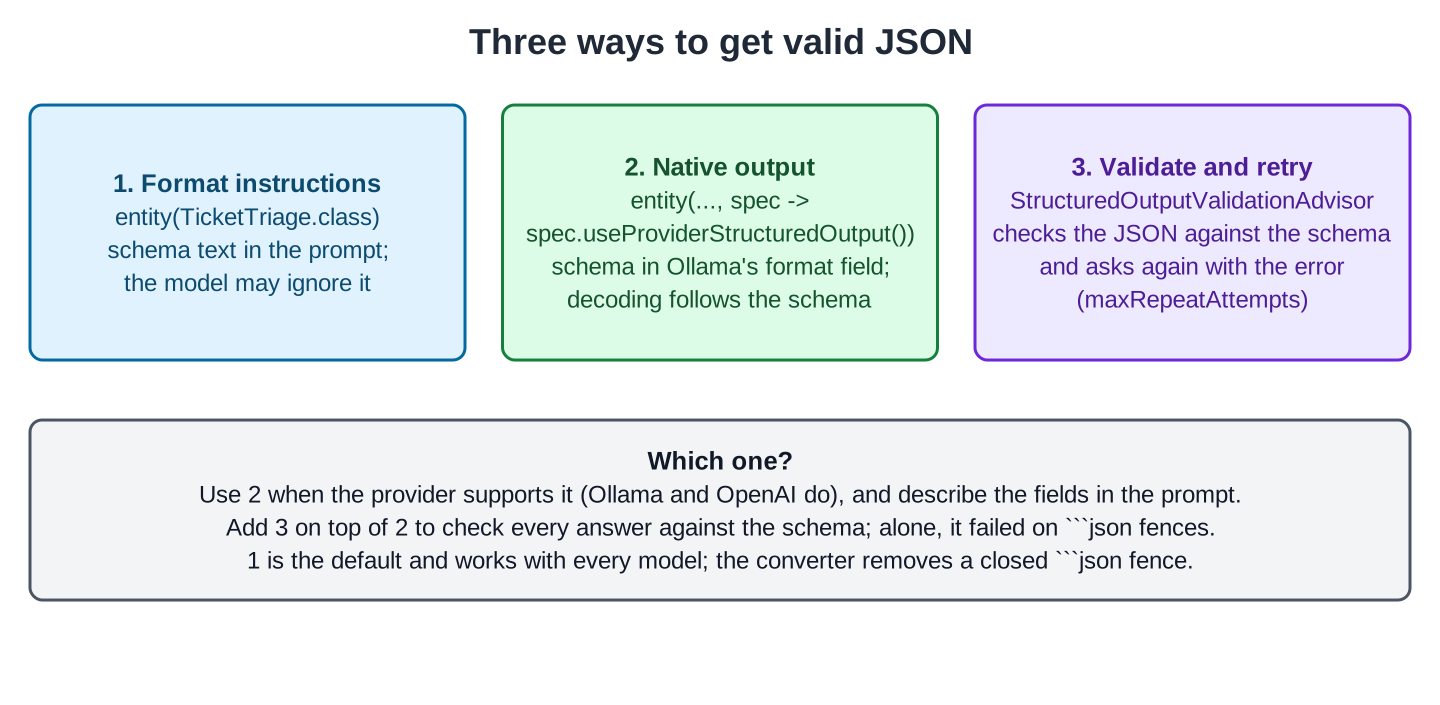
The mode in Step 2 depends on the model reading the instructions. Spring AI 2.0 has two ways to make that safer.
4.1. Native Structured Output
Native structured output sends the schema as a request parameter instead of as prompt text. For Ollama, Spring AI puts the schema into the format field of the /api/chat request. The messages then hold only our system prompt and the customer’s text.
Ollama’s native structured output uses the supplied schema to constrain generation. That helps enforce supported structural requirements such as field names, types, and enum values. It does not validate that an order number was copied correctly, that a category fits the complaint, or that a prose description’s word limit was followed.
We turn it on per call with the second argument of entity():
    // 4. The provider enforces the JSON schema (Ollama's "format" parameter)
    @GetMapping("/structured/triage-native")
    TicketTriage triageNative(@RequestParam String message) {
        return chatClient.prompt()
            .system(TRIAGE)
            .user(message)
            .call()
            .entity(TicketTriage.class, spec -> spec.useProviderStructuredOutput());
    }
We sent both test messages twice. All four answers had the right order id (ORD-1042 or NONE), category, and priority. These are the second two:
{"orderId":"ORD-1042","category":"PAYMENT","priority":"HIGH","summary":"Duplicate payment of INR 12,999"}
{"orderId":"NONE","category":"DELIVERY","priority":"LOW","summary":"Customer inquires about delivery location"}
One answer had a summary of two sentences and 19 words, though. The schema restricts the structure, not the meaning: “at most 15 words” is a description, and nothing enforces it.
To use native mode on every call of a client, pass AdvisorParams.ENABLE_NATIVE_STRUCTURED_OUTPUT to defaultAdvisors() on the builder. The constant is a Consumer<ChatClient.AdvisorSpec> in the org.springframework.ai.chat.client package, and defaultAdvisors() accepts one:
this.chatClient = builder
    .defaultAdvisors(AdvisorParams.ENABLE_NATIVE_STRUCTURED_OUTPUT)
    .build();
4.2. Validate and Ask Again
The StructuredOutputValidationAdvisor checks the model’s JSON against the schema. An advisor wraps a ChatClient call. When the check fails, this one sends the request again with the validation error added, up to maxRepeatAttempts times. We use it together with native mode:
    // 5. Native output plus a schema check that asks again when the JSON doesn't match
    @GetMapping("/structured/triage-validated")
    TicketTriage triageValidated(@RequestParam String message) {
        return chatClient.prompt()
            .system(TRIAGE)
            .user(message)
            .advisors(StructuredOutputValidationAdvisor.builder()
                .outputType(TicketTriage.class)
                .maxRepeatAttempts(2)
                .build())
            .call()
            .entity(TicketTriage.class, spec -> spec.useProviderStructuredOutput());
    }
To see the check in the log, add this line to application.properties:
logging.level.org.springframework.ai.chat.client.advisor=DEBUGEach request then logs one check:
StructuredOutputValidationAdvisor : Validating JSON output against schema. Attempts left: 2Both test messages passed on the first answer, so no second request was needed. The advisor doesn’t support streaming calls. Each retry is a full model call, so a high maxRepeatAttempts can multiply the response time.
4.3. The Three Modes Compared
The first three rows count our runs of the two test messages on qwen2.5:3b with the final code shown above. An answer counts as correct when orderId, category, and priority are right; the summary length isn’t counted. The last row comes from an earlier run of the validated endpoint without native mode.
| Mode | Correct answers | Time per call | What went wrong |
|---|---|---|---|
| Format instructions | 0 of 2 | 12 to 16 s | ORD-1042 replaced by NONE; the delivery question filed as OTHER |
| Native output | 4 of 4 | 7 to 12 s | One summary longer than described |
| Native output + validation | 2 of 2 | 7 to 9 s | Nothing |
| Validation without native output | 1 of 2 | 14 s; HTTP 500 after 29 s | The delivery question failed (Section 5.3) |
5. Common Traps
5.1. In Native Mode, Describe the Fields in the Prompt
The native-mode example still needs clear field semantics. Without category explanations in the system prompt, a delivery question was classified as PAYMENT—a permitted enum value with the wrong meaning. A schema can constrain the set of values without selecting the correct one.
So the fix is in the prompt: the lines “Category: RETURN, DELIVERY, PAYMENT, WARRANTY or OTHER.” and “Order id: copy it exactly …” in TRIAGE. After that change, the category was right in every native run.
5.2. Optional Fields Get Skipped, Required Fields Get Invented
For a message without an order id, the model has to write something in a required field. When the description asked for null, native mode wrote “Not applicable”. Then we made the field optional with @JsonProperty(required = false), which removes it from required in the schema. Native mode then left orderId out of every answer (the response showed null), even for the message with ORD-1042.
The recorded example uses a required orderId field with NONE to represent absence. Choose an absence representation that fits the domain, document it clearly, and validate it after parsing. Do not substitute 0 or -1 for missing numeric data unless those values cannot be mistaken for real values.
5.3. The Validation Advisor Alone and Markdown Fences
Without native mode, qwen2.5:3b often wraps its JSON in a Markdown fence, although the format text says not to. This answer came from an earlier version of the code, where orderId was optional and TRIAGE had no “else write NONE”:
```json
{
  "category" : "OTHER",
  "orderId" : "",
  "priority" : "MEDIUM",
  "summary" : "Inquiry about delivery to Shillong"
}
```
BeanOutputConverter removes such a fence before parsing, so plain entity() works. But StructuredOutputValidationAdvisor checks the raw text, so every fenced answer failed validation. The advisor added this error to the next request:
Output JSON validation failed because of: Invalid JSON: Unexpected character ('`' (code 96)): expected a valid value (JSON String, Number, Array, Object or token 'null', 'true' or 'false')With maxRepeatAttempts(2), the advisor accepts the first answer plus up to 2 more. All three answers were fenced, so it returned the last one. That answer had no closing fence, so the converter could not remove it, and the endpoint failed with HTTP 500. In native mode the model can’t write the fence, which is why Section 4.2 combines the two.
5.4. Wrong Field Names in the Prompt
Use consistent field names in the Java type, schema descriptions, and system instructions. If the prompt calls orderId something else, the model has to infer that the two names mean the same thing. Keep essential extraction rules explicit in either formatting mode.
6. FAQs
6.1. Do I still need the output converter classes?
Rarely. The entity() method builds a BeanOutputConverter for every type we pass: a record, a List, or a Map. The getFormat() method on a converter is still useful to see the instructions, as in Step 1.
6.2. Does native structured output work with every provider?
No. It needs a provider that accepts a JSON schema, such as Ollama or OpenAI. In Spring AI, that provider’s chat options implement StructuredOutputChatOptions, as OllamaChatOptions does. Plain entity() works with every chat model.
6.3. Can I validate the values, not only the structure?
The validation advisor checks the JSON schema: types, required fields, and enum values. A rule such as “the order id must exist in our database” belongs in our code after entity() returns, because only our code can check it.
6.4. Can I stream a structured answer?
The synchronous entity() API needs a complete response to construct the record. You can stream raw JSON text and parse it after completion, but that does not deliver a complete Java record earlier. Do not treat a partially generated object as validated data.
7. Conclusion
Use entity() for typed responses, native output where the integration supports the required schema, and validation for structural checks and bounded retries. The recorded native examples improve extraction, but application code must still validate order IDs, classifications, and other business facts. Keep essential field instructions clear and represent missing values deliberately.
All articles in order: Spring AI Tutorial
8. References
- Spring AI Reference: Structured Output Converter
- Spring AI Reference: ChatClient
- Ollama: Structured Outputs
Drop me your questions related to Spring AI structured output in the comments.
Happy Learning !!
