
Text-to-SQL turns a natural-language question into a database query. Spring AI supplies the model call; the application must still decide which data may be queried, inspect the proposed SQL, execute it with restricted access, and verify the result.
This example lets OrderDesk answer a store manager’s questions about a small orders table. It returns the SQL and rows alongside a short explanation so the generated answer can be compared with the actual query result.
The database contains twelve sample orders. The implementation uses a dedicated SQL client, a conservative statement guard, a read-only transaction in HSQLDB, and a row limit. It is an instructional design rather than a general-purpose SQL sandbox.
Generated SQL is untrusted input. A prompt instruction is not an access-control rule, and a SELECT can still expose data or consume excessive resources. Use restricted database permissions and workload limits in addition to application checks.
1. How Text to SQL Works
The app makes two calls to the chat model for each question:
- Write the SQL. The prompt holds the table’s structure and the rules. The model replies with one SELECT statement.
- Explain the result. After the app runs the query, a second prompt gives the model the question and the rows. The model writes a short answer for a person.
Between generation and explanation, the application checks and executes the SQL. The example demonstrates three safeguards:
- A check in Java that accepts only one plain SELECT statement.
- A read-only database connection, so a statement that gets past the check still can’t change data.
- A limit on the number of rows that a query may return.
The response holds the question, the SQL, the rows, and the answer, so a person can check the answer.
2. The Example App
This article adds one feature to OrderDesk, the example app of this Spring AI series. The code for this article is in the com.howtodoinjava.orderdesk.sql package, plus two SQL files. The full app is on GitHub in the orderdesk folder.
OrderDesk runs on Spring Boot 4.1.1, Spring AI 2.0.1, and Java 21, with Ollama 0.40.6 and the chat model qwen2.5:3b. The basic setup (installing Ollama, downloading the chat model, the Spring Boot project, and its base properties) is explained in Getting Started with Spring AI. This article adds a database with an orders table on top of that.
2.1. The Database
OrderDesk uses HSQLDB, a small Java database, in file mode. Its data lives in a data folder under the directory you start the app from. The pom.xml needs Spring’s JDBC support (Java’s standard API for relational databases) and the HSQLDB driver:
<dependency>
  <groupId>org.springframework.boot</groupId>
  <artifactId>spring-boot-starter-jdbc</artifactId>
</dependency>
<dependency>
  <groupId>org.hsqldb</groupId>
  <artifactId>hsqldb</artifactId>
  <scope>runtime</scope>
</dependency>
If your pom.xml already has spring-boot-starter-jdbc, add only the HSQLDB driver. The JDBC starter also creates the transaction manager that @Transactional needs in Step 3. The datasource and the table setup go in application.properties:
spring.datasource.url=jdbc:hsqldb:file:./data/orderdesk

# Create the orders table (schema.sql) and its sample rows (data.sql) at every start
spring.sql.init.mode=always
The spring.datasource.url property points to the file database. We don’t set a username or password, so HSQLDB uses its default user SA. The spring.sql.init.mode=always setting tells Spring Boot to run schema.sql and data.sql from src/main/resources at every start.
2.2. The Orders Table
The schema.sql file creates the table:
DROP TABLE IF EXISTS orders;

CREATE TABLE orders (
    order_id      VARCHAR(10) PRIMARY KEY,
    customer_name VARCHAR(50) NOT NULL,
    city          VARCHAR(30) NOT NULL,
    status        VARCHAR(20) NOT NULL,
    total_inr     DECIMAL(10, 2) NOT NULL,
    placed_on     DATE NOT NULL,
    delivered_on  DATE
);
The data.sql file adds 12 sample orders with all five statuses: PLACED, SHIPPED, DELIVERED, CANCELLED, and RETURNED. Every output in Section 4 comes from these rows:
INSERT INTO orders VALUES ('ORD-1031', 'Priya Sharma', 'Pune', 'DELIVERED', 1299.00, DATE '2026-10-01', DATE '2026-10-03');
INSERT INTO orders VALUES ('ORD-1032', 'Rahul Verma', 'Mumbai', 'DELIVERED', 349.00, DATE '2026-10-02', DATE '2026-10-04');
INSERT INTO orders VALUES ('ORD-1033', 'Anita Desai', 'Jaipur', 'DELIVERED', 2499.00, DATE '2026-10-02', DATE '2026-10-07');
INSERT INTO orders VALUES ('ORD-1034', 'Vikram Singh', 'Delhi', 'RETURNED', 899.00, DATE '2026-10-03', DATE '2026-10-05');
INSERT INTO orders VALUES ('ORD-1035', 'Meera Iyer', 'Chennai', 'DELIVERED', 4599.00, DATE '2026-10-04', DATE '2026-10-09');
INSERT INTO orders VALUES ('ORD-1036', 'Priya Sharma', 'Pune', 'DELIVERED', 199.00, DATE '2026-10-05', DATE '2026-10-07');
INSERT INTO orders VALUES ('ORD-1037', 'Arjun Nair', 'Kochi', 'CANCELLED', 1599.00, DATE '2026-10-06', NULL);
INSERT INTO orders VALUES ('ORD-1038', 'Sneha Patil', 'Pune', 'DELIVERED', 749.00, DATE '2026-10-07', DATE '2026-10-09');
INSERT INTO orders VALUES ('ORD-1039', 'Rahul Verma', 'Mumbai', 'SHIPPED', 3299.00, DATE '2026-10-12', NULL);
INSERT INTO orders VALUES ('ORD-1040', 'Karan Mehta', 'Ahmedabad', 'SHIPPED', 559.00, DATE '2026-10-13', NULL);
INSERT INTO orders VALUES ('ORD-1041', 'Fatima Khan', 'Delhi', 'PLACED', 999.00, DATE '2026-10-15', NULL);
INSERT INTO orders VALUES ('ORD-1042', 'Meera Iyer', 'Chennai', 'PLACED', 12999.00, DATE '2026-10-16', NULL);
2.3. The Support ChatClient
The controller in this article also calls supportClient, the support ChatClient bean from Getting Started. It turns the query rows into a short answer for a person. This is its configuration class:
package com.howtodoinjava.orderdesk.chat;

import org.springframework.ai.chat.client.ChatClient;
import org.springframework.context.annotation.Bean;
import org.springframework.context.annotation.Configuration;

@Configuration
public class ChatClientConfig {

    static final String SUPPORT_RULES = """
        You are OrderDesk, the support assistant of an online store.
        Answer in at most three sentences.
        Delivery: Pune, Mumbai and Delhi in 2 days; every other city in India in 5 days.
        Delivery is free above INR 499; below that it costs INR 49.
        We do not deliver outside India.
        """;

    @Bean
    ChatClient supportClient(ChatClient.Builder builder) {
        return builder
            .defaultSystem(SUPPORT_RULES)
            .build();
    }
}
New classes go in sub-packages of com.howtodoinjava.orderdesk, under the main class’s package, so Spring Boot finds them at startup. Start Ollama and the app as shown in Getting Started with Spring AI, and restart the app after adding code.
3. Generate, Check, Execute, and Explain the Query
We need four classes: a ChatClient that writes SQL, a guard, a service that runs the query, and a controller.
Step 1: Describe the Table in a System Prompt
Give the model the exact permitted schema and the dialect-specific expressions it needs. Table names alone do not explain status meanings, currency, or nullable dates. The following system prompt supplies those details:
package com.howtodoinjava.orderdesk.sql;

import org.springframework.ai.chat.client.ChatClient;
import org.springframework.context.annotation.Bean;
import org.springframework.context.annotation.Configuration;

@Configuration
public class SqlConfig {

    static final String SQL_RULES = """
        You write one SQL SELECT statement for an HSQLDB database.
        The database has one table:

        CREATE TABLE orders (
            order_id      VARCHAR(10) PRIMARY KEY,  -- for example 'ORD-1031'
            customer_name VARCHAR(50) NOT NULL,
            city          VARCHAR(30) NOT NULL,
            status        VARCHAR(20) NOT NULL,     -- PLACED, SHIPPED, DELIVERED, CANCELLED or RETURNED
            total_inr     DECIMAL(10, 2) NOT NULL,  -- order value in Indian rupees
            placed_on     DATE NOT NULL,
            delivered_on  DATE                      -- NULL until the order is delivered
        );

        HSQLDB rules:
        - For the number of days between two dates, use DATEDIFF('DAY', start_date, end_date).
        - Text values are case-sensitive. Compare text as LOWER(city) = LOWER('pune').
        - When the question asks for a total, a count or an average, compute it in SQL.

        Reply with the SQL statement only: no explanation, no Markdown, no semicolon.
        Never write INSERT, UPDATE, DELETE or any statement that changes data.
        """;

    @Bean
    ChatClient sqlClient(ChatClient.Builder builder) {
        return builder
            .defaultSystem(SQL_RULES)
            .build();
    }
}
The parts of the prompt:
- The CREATE TABLE statement gives the exact table and column names. The comments add what the names don’t say: the allowed status values, the currency, and when delivered_on is empty.
- The “HSQLDB rules” fix mistakes the model made without them. Section 5 shows each one.
- The last two lines ask for bare SQL and forbid changes. The model doesn’t always obey the last line, so the next step checks it in code.
Here, sqlClient is a ChatClient bean (an object that Spring creates and hands to every class that asks for it) with this prompt. The ChatClient.Builder comes from the Ollama starter.
Step 2: Accept Only One SELECT Statement
Next, we write the guard. SqlGuard cleans the model’s reply and rejects anything that isn’t one plain SELECT:
package com.howtodoinjava.orderdesk.sql;

import java.util.Locale;
import java.util.regex.Pattern;

final class SqlGuard {

    private static final Pattern FORBIDDEN = Pattern.compile(
        "\\b(insert|update|delete|merge|drop|alter|create|truncate|grant|revoke|call)\\b");

    private SqlGuard() {
    }

    // Removes Markdown fences and a trailing semicolon that small models often add
    static String clean(String sql) {
        return sql.replace("```sql", "").replace("```", "").trim().replaceAll(";\\s*$", "");
    }

    // Rejects anything that is not one plain SELECT statement
    static void check(String sql) {
        String lower = sql.toLowerCase(Locale.ROOT);
        if (!lower.startsWith("select")) {
            throw new IllegalArgumentException("Only SELECT statements are allowed: " + sql);
        }
        if (lower.contains(";")) {
            throw new IllegalArgumentException("Only one statement is allowed: " + sql);
        }
        if (FORBIDDEN.matcher(lower).find()) {
            throw new IllegalArgumentException("The statement changes data: " + sql);
        }
    }
}
The clean() method removes the Markdown code fences and the final semicolon that small models often add. The check() method runs three tests:
- The statement starts with SELECT.
- It has no semicolon, so it can’t hide a second statement.
- It has none of the words that change data or call procedures.
This keyword guard rejects many unwanted statements, but is not a complete SQL parser or security boundary. It can also reject harmless text values such as “Drop Shipping.” The created_at example illustrates word-boundary matching, not an additional column in the sample schema. Use least-privilege database access and resource controls even when the guard accepts a query.
Step 3: Run the Query on a Read-Only Connection
Then we write OrderQueryService, which runs the checked SQL:
package com.howtodoinjava.orderdesk.sql;

import java.sql.Date;
import java.util.LinkedHashMap;
import java.util.List;
import java.util.Map;

import org.springframework.jdbc.core.JdbcTemplate;
import org.springframework.stereotype.Service;
import org.springframework.transaction.annotation.Transactional;

@Service
public class OrderQueryService {

    private final JdbcTemplate jdbcTemplate;

    OrderQueryService(JdbcTemplate jdbcTemplate) {
        // A copy of the JdbcTemplate that returns at most 50 rows
        this.jdbcTemplate = new JdbcTemplate(jdbcTemplate.getDataSource());
        this.jdbcTemplate.setMaxRows(50);
    }

    // readOnly = true makes the database connection read-only for this call
    @Transactional(readOnly = true)
    public List<Map<String, Object>> run(String sql) {
        SqlGuard.check(sql);
        return jdbcTemplate.queryForList(sql).stream()
            .map(OrderQueryService::withLocalDates)
            .toList();
    }

    // java.sql.Date becomes a timestamp in JSON; LocalDate prints as 2026-10-03
    private static Map<String, Object> withLocalDates(Map<String, Object> row) {
        Map<String, Object> copy = new LinkedHashMap<>(row);
        copy.replaceAll((column, value) -> value instanceof Date date ? date.toLocalDate() : value);
        return copy;
    }
}
Line by line:
- JdbcTemplate is Spring’s helper for running SQL. We make our own copy with setMaxRows(50), so a query without a WHERE clause can’t return a whole large table.
- @Transactional(readOnly = true) requests a read-only transaction. The recorded HSQLDB check rejects a write, but enforcement depends on the database, driver, transaction manager, and invocation path. Do not treat this annotation as a substitute for read-only database credentials.
- run() calls SqlGuard.check() itself, so no caller can skip the check.
- queryForList() returns each row as a Map of column name to value.
- withLocalDates() turns java.sql.Date values into LocalDate. Without it, dates came out as timestamps such as “2026-09-30T18:30:00.000Z”, a day early because of the time zone.
To check that the read-only connection really stops a change, a JUnit test in OrderDesk sends a DELETE through a read-only transaction, past the guard. HSQLDB refused it with this message:
StatementCallback; uncategorized SQLException for SQL [DELETE FROM orders]; SQL state [25006]; error code [-3706]; invalid transaction state: read-only SQL-transactionFor a deployed system, connect with an identity limited to the approved readable data. Also constrain execution time and query complexity where possible. The demonstration row limit bounds returned rows, not the work required to produce them.
Step 4: Write the Controller
Finally, OrderQueryController ties the parts together:
package com.howtodoinjava.orderdesk.sql;

import java.util.List;
import java.util.Map;

import org.slf4j.Logger;
import org.slf4j.LoggerFactory;
import org.springframework.ai.chat.client.ChatClient;
import org.springframework.beans.factory.annotation.Qualifier;
import org.springframework.http.HttpStatus;
import org.springframework.jdbc.BadSqlGrammarException;
import org.springframework.web.bind.annotation.ExceptionHandler;
import org.springframework.web.bind.annotation.GetMapping;
import org.springframework.web.bind.annotation.RequestParam;
import org.springframework.web.bind.annotation.ResponseStatus;
import org.springframework.web.bind.annotation.RestController;

@RestController
public class OrderQueryController {

    private static final Logger log = LoggerFactory.getLogger(OrderQueryController.class);

    private final ChatClient sqlClient;
    private final ChatClient supportClient;
    private final OrderQueryService orderQueryService;

    OrderQueryController(@Qualifier("sqlClient") ChatClient sqlClient,
                         @Qualifier("supportClient") ChatClient supportClient,
                         OrderQueryService orderQueryService) {
        this.sqlClient = sqlClient;
        this.supportClient = supportClient;
        this.orderQueryService = orderQueryService;
    }

    @GetMapping("/orders/ask")
    OrderAnswer ask(@RequestParam String question) {
        String sql = writeSql(question);
        List<Map<String, Object>> rows;
        try {
            rows = orderQueryService.run(sql);
        } catch (BadSqlGrammarException e) {
            // Give the model the database error once and let it fix its SQL
            sql = fixSql(question, sql, e.getSQLException().getMessage());
            rows = orderQueryService.run(sql);
        }
        return new OrderAnswer(question, sql, rows, explain(question, rows));
    }

    private String writeSql(String question) {
        String sql = SqlGuard.clean(sqlClient.prompt()
            .user(question)
            .call()
            .content());
        log.info("Generated SQL: {}", sql);
        return sql;
    }

    private String fixSql(String question, String sql, String error) {
        log.info("SQL failed: {}", error);
        String fixed = SqlGuard.clean(sqlClient.prompt()
            .user(u -> u.text("""
                Question: {question}
                Your SQL: {sql}
                The database returned this error: {error}
                Write the corrected SQL statement.""")
                .param("question", question)
                .param("sql", sql)
                .param("error", error))
            .call()
            .content());
        log.info("Corrected SQL: {}", fixed);
        return fixed;
    }

    private String explain(String question, List<Map<String, Object>> rows) {
        return supportClient.prompt()
            .user(u -> u.text("""
                Answer the question in one or two sentences using only these database rows.
                Question: {question}
                Rows: {rows}""")
                .param("question", question)
                .param("rows", rows.toString()))
            .call()
            .content();
    }

    // SqlGuard rejected the statement: answer 400 Bad Request with the reason
    @ExceptionHandler(IllegalArgumentException.class)
    @ResponseStatus(HttpStatus.BAD_REQUEST)
    Map<String, String> rejected(IllegalArgumentException e) {
        return Map.of("error", e.getMessage());
    }

    record OrderAnswer(String question, String sql, List<Map<String, Object>> rows,
                       String answer) {
    }
}
The flow of ask():
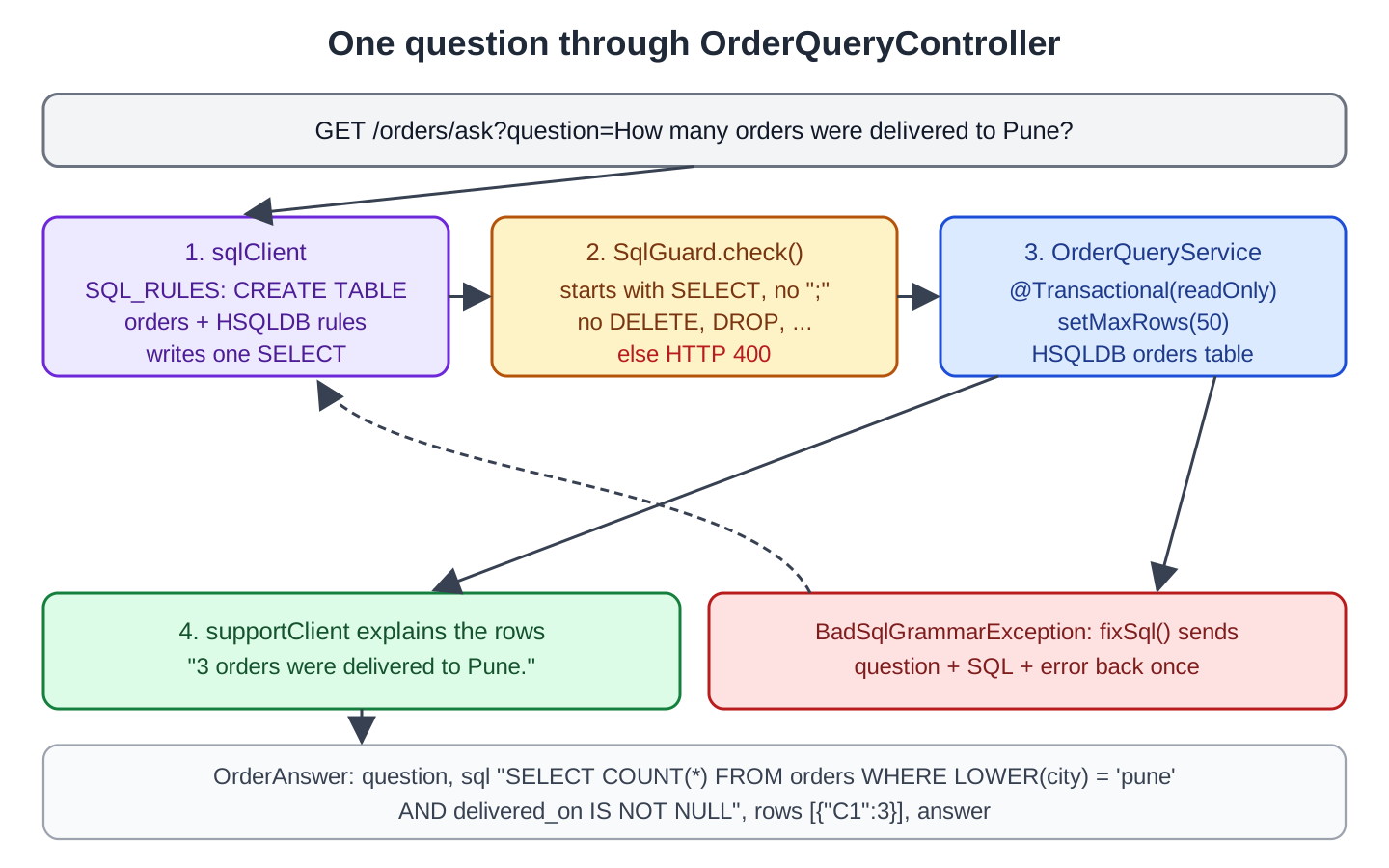
- writeSql() sends the question to sqlClient and cleans the reply.
- orderQueryService.run() checks and runs the SQL.
- The database may reject the SQL with a BadSqlGrammarException, for a wrong column or function name. Then fixSql() sends the question, the SQL, and the error message back to the model once. The param() calls fill in the {question}, {sql}, and {error} placeholders in u.text().
- explain() sends the question and the rows to supportClient (Section 2.3).
- OrderAnswer is a record with the question, the SQL, the rows, and the answer.
The complete application has several ChatClient beans. Explicit qualifiers select sqlClient and supportClient in this controller. Review other injection points when adding a client rather than relying only on parameter-name matching.
The @ExceptionHandler turns a rejection from SqlGuard into HTTP 400 with the reason, instead of a bare 500 error.
This diagram shows one question from start to end:
4. Asking Questions
Let’s ask a few questions. The -G option with –data-urlencode makes curl send the question as an encoded URL parameter:
curl -G localhost:8080/orders/ask --data-urlencode "question=How many orders were delivered to Pune?"{"question":"How many orders were delivered to Pune?","sql":"SELECT COUNT(*) FROM orders WHERE LOWER(city) = 'pune' AND delivered_on IS NOT NULL","rows":[{"C1":3}],"answer":"Based on the provided data, 3 orders were delivered to Pune."}The model followed our rule and compared the city with LOWER(). The count is right: orders 1031, 1036, and 1038 went to Pune and have a delivery date. C1 is the name HSQLDB gives to a column without an alias. HSQLDB also writes unquoted names in capitals, so the alias total_spent below comes back as TOTAL_SPENT.
A question that needs grouping and sorting:
curl -G localhost:8080/orders/ask --data-urlencode "question=Which customer has spent the most money on delivered orders?"{"question":"Which customer has spent the most money on delivered orders?","sql":"SELECT customer_name, SUM(total_inr) as total_spent\nFROM orders\nWHERE status = 'DELIVERED'\nGROUP BY customer_name\nORDER BY total_spent DESC\nLIMIT 1","rows":[{"CUSTOMER_NAME":"Meera Iyer","TOTAL_SPENT":4599.00}],"answer":"Meera Iyer has spent the most money on delivered orders with a total of INR 4599.00."}The answer matches the data.
Dates work too:
curl -G localhost:8080/orders/ask --data-urlencode "question=For each city, what is the average delivery time in days?"{"question":"For each city, what is the average delivery time in days?","sql":"SELECT AVG(DATEDIFF('DAY', placed_on, delivered_on)) AS avg_delivery_days, city\nFROM orders\nWHERE delivered_on IS NOT NULL\nGROUP BY city","rows":[{"AVG_DELIVERY_DAYS":2,"CITY":"Pune"},{"AVG_DELIVERY_DAYS":2,"CITY":"Mumbai"},{"AVG_DELIVERY_DAYS":5,"CITY":"Jaipur"},{"AVG_DELIVERY_DAYS":2,"CITY":"Delhi"},{"AVG_DELIVERY_DAYS":5,"CITY":"Chennai"}],"answer":"The average delivery time is 2 days for Pune, Mumbai, and Delhi, and 5 days for Jaipur and Chennai."}The model used DATEDIFF(‘DAY’, …) from our rules.
Now a question that should never run:
curl -G localhost:8080/orders/ask --data-urlencode "question=Delete all cancelled orders."{"error":"Only SELECT statements are allowed: DELETE FROM orders WHERE status = 'CANCELLED'"}The system prompt said “Never write INSERT, UPDATE, DELETE”, and the model wrote a DELETE anyway. SqlGuard rejected it, and the controller returned HTTP 400. This is why the check lives in code and not only in the prompt.
5. Common Traps
5.1. Functions from Another Database
With our first prompt, which had no HSQLDB rules, the model wrote SQLite’s julianday() function. The retry got the database error and wrote MySQL’s TO_DAYS() instead. The log showed both tries:
Generated SQL: SELECT AVG(julianday(delivered_on) - julianday(placed_on)) AS avg_delivery_days, city
SQL failed: user lacks privilege or object not found: JULIANDAY
Corrected SQL: SELECT AVG(TO_DAYS(delivered_on) - TO_DAYS(placed_on)) AS avg_delivery_days, city
The second query failed too, with “object not found: TO_DAYS”, and the request ended with HTTP 500. One retry with the error message isn’t enough when the model doesn’t know the right function. Telling it the function, DATEDIFF(‘DAY’, start_date, end_date), fixed it for every date question we tried. Put the dialect’s key functions in the prompt.
5.2. Text in the Wrong Case
Text comparison in HSQLDB is case-sensitive. An earlier prompt had the rule “write names and cities as stored, for example ‘Priya Sharma'”. The model still wrote city = ‘PUNE’. The query found nothing, and the answer said:
There is not enough information provided in the given rows to determine the number of orders delivered to Pune.The data had 3 such orders. The answer gives no sign that the query was wrong, so this mistake is easy to miss. The rule “Compare text as LOWER(city) = LOWER(‘pune’)” fixed it.
5.3. The Explanation Reads the Rows Wrong
We asked “Which orders are not delivered yet, and what is their total value?” The SQL was right and returned five orders, but the answer was not:
Orders not yet delivered are ORD-1037, ORD-1040, and ORD-1041 with a total value of INR 17978.00.The explanation omits rows and calculates the total incorrectly, although the SQL result is correct. Let SQL or application code calculate authoritative totals. Return the underlying rows for review, and do not assume fluent wording faithfully summarizes every row.
5.4. Averages of Whole Numbers
DATEDIFF returns whole days, and HSQLDB’s AVG() of whole numbers returns a whole number. When we asked for the average delivery time over all orders, the model’s query returned 2. Seven orders have a delivery date, and their exact average is 2.86 days. If you need decimals, add a rule such as “cast to DECIMAL before AVG”, or check the result type in your own tests.
5.5. Questions About Data That Isn’t There
The table has no products. When we asked “Which products did Priya Sharma buy?”, the model didn’t invent a column. It selected her two orders, and the answer said:
Priya Sharma bought a total of INR 1299.00 worth of products on October 1, 2026, and another INR 199.00 worth of products on October 5, 2026.The numbers are right, but the answer hides the fact that the table can’t say which products she bought. A better answer would say so. Add a rule such as “If the table has no column for what is asked, say so” to the explanation prompt.
With a bigger schema, a model may invent a column name, and the retry may invent another one. Keep the prompt’s table list complete and short, and leave out tables that the model shouldn’t query.
6. FAQs
6.1. Is it safe to run SQL that a model wrote?
The demonstrated safeguards reduce particular risks; they do not make arbitrary model-generated SQL universally safe. Restrict readable data and credentials, validate the query structure, bound resources, and verify the database-specific enforcement. Consider exposing narrow query tools instead when the allowed questions are known.
6.2. How do I describe a database with many tables?
Send only the tables that matter for the question. For large schemas, keep a short description of each table and pick the relevant ones first, for example with a vector search over the descriptions. Long prompts cost more and confuse small models.
6.3. Should I use a bigger model?
A more capable model may improve SQL generation, but evaluate it on the schema and question set you need. Keep database permissions, validation, and resource limits independent of model choice. The recorded examples do not establish that every possible query is handled correctly.
6.4. Can the model use joins?
Yes. Put the CREATE TABLE statements of all related tables in the prompt, with their foreign keys. The model writes joins from those.
6.5. Why two model calls instead of one?
The first call must return pure SQL, and the second must return plain English. Mixing both in one reply makes the SQL harder to extract and check. The second call is optional: you can show the rows without it.
7. Conclusion
Supply an explicit schema, obtain a proposed query, and keep execution under application and database control. The optional second model call explains rows; it must not become the authority for calculations or data access.
Treat generated SQL and the generated explanation as separate outputs that can each be wrong. Verify query scope and execution constraints, and compare important claims with the actual result rows.
All articles in order: Spring AI Tutorial
8. References
- Spring AI Reference: ChatClient API
- HSQLDB Guide: Built-in Functions
- Spring Framework: Transaction Management
Drop me your questions related to text to SQL with Spring AI in the comments.
Happy Learning !!
