
An advisor in Spring AI is a class that runs before and after every ChatClient call, and it can read or change the request and the response. In this example, we chain the built-in advisors in OrderDesk, the support assistant of a demo online store, fix their order, and write our own advisor. We’ll use Spring Boot 4.1, Spring AI 2.0, and Java 21 with a local model in Ollama.
1. How Advisors Work
A ChatClient call doesn’t go straight to the model. It goes through a chain of advisors, and the last link of the chain calls the model. Each advisor gets the request, can change it, passes it to the next advisor, and then gets the response on the way back:
ChatClientResponse response = chain.nextCall(request); // the rest of the chainCode above this line runs before the model call, and code below it runs after. So the first advisor sees the request first and the response last.
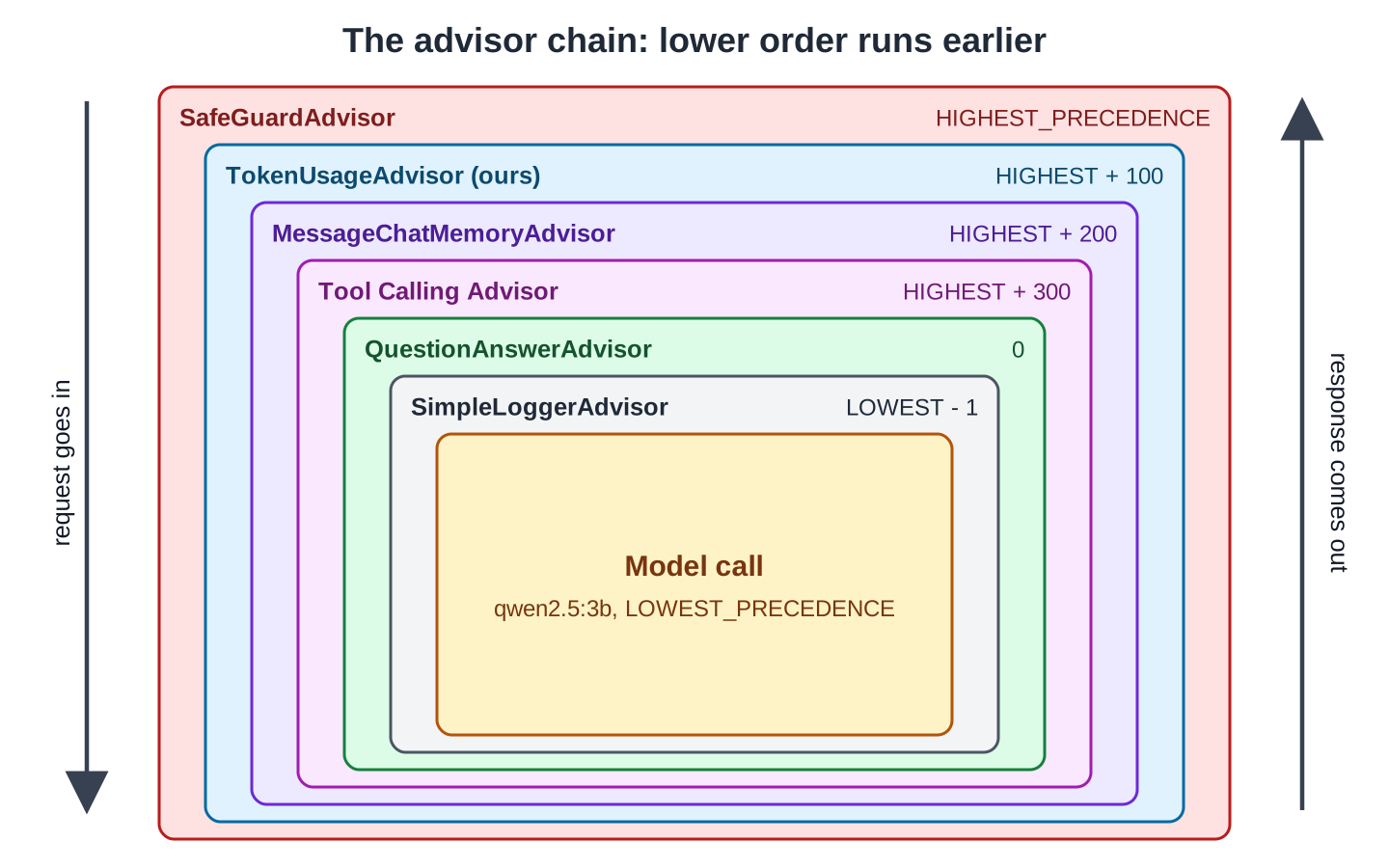
Spring AI decides the order with getOrder(). Advisors implement Spring’s Ordered interface, and an advisor with a lower order value runs earlier. Ordered.HIGHEST_PRECEDENCE is the smallest int, so an advisor with it runs first.
Many Spring AI features are advisors. Chat memory, RAG, and tool calling all work by changing the request before the model sees it. The table shows each advisor’s default order, before we change it:
| Advisor | Module | What it does | Default order |
|---|---|---|---|
| SafeGuardAdvisor | spring-ai-client-chat | Blocks a request that contains a listed word | 0 |
| MessageChatMemoryAdvisor | spring-ai-client-chat | Adds earlier messages of the conversation, saves the new ones | HIGHEST_PRECEDENCE + 200 |
| ToolCallingAdvisor | spring-ai-client-chat | Runs the tool-call loop; added automatically | HIGHEST_PRECEDENCE + 300 |
| QuestionAnswerAdvisor | spring-ai-vector-store-advisor | Adds matching documents from a vector store (RAG) | 0 |
| RetrievalAugmentationAdvisor | spring-ai-rag | Modular RAG: query rewrite, retrieval, augmentation | 0 |
| SimpleLoggerAdvisor | spring-ai-client-chat | Logs the request and the response at DEBUG level | 0 |
2. The Example App
This article adds advisors to OrderDesk, the app built in this series. Its code is in the com.howtodoinjava.orderdesk.advisors package. The full app is on GitHub in the orderdesk folder.
If you need help with the basic setup (Ollama with qwen2.5:3b, the Spring Boot project, the Spring AI BOM, and the Ollama starter), follow the Getting Started with Spring AI tutorial.
2.1. Dependencies and Properties
The advisors in this article need chat memory and a vector store. Add these dependencies to pom.xml; the BOM sets their versions:
<dependency>
  <groupId>org.springframework.ai</groupId>
  <artifactId>spring-ai-starter-model-chat-memory-repository-jdbc</artifactId>
</dependency>
<dependency>
  <groupId>org.hsqldb</groupId>
  <artifactId>hsqldb</artifactId>
  <scope>runtime</scope>
</dependency>
<dependency>
  <groupId>org.springframework.ai</groupId>
  <artifactId>spring-ai-vector-store-advisor</artifactId>
</dependency>
<dependency>
  <groupId>org.springframework.ai</groupId>
  <artifactId>spring-ai-markdown-document-reader</artifactId>
</dependency>- spring-ai-starter-model-chat-memory-repository-jdbc saves chat messages in a database table.
- hsqldb is that database, kept in a file.
- spring-ai-vector-store-advisor holds QuestionAnswerAdvisor. It also brings SimpleVectorStore, a vector store that keeps vectors in memory.
- spring-ai-markdown-document-reader reads the store’s policy files into the vector store.
Then add these lines to application.properties:
# Chat memory is saved in a file database, so it survives a restart
spring.datasource.url=jdbc:hsqldb:file:./data/orderdesk
spring.ai.chat.memory.repository.jdbc.initialize-schema=always

# Embedding model for RAG (ollama pull nomic-embed-text)
spring.ai.ollama.embedding.options.model=nomic-embed-text

# Which vector store is active: simple (default, in memory), chroma, pgvector, redis or qdrant.
# The profiles application-chroma.properties and so on switch it.
spring.ai.vectorstore.type=simple- spring.datasource.url points to the HSQLDB file ./data/orderdesk.
- initialize-schema=always creates the SPRING_AI_CHAT_MEMORY table at startup. It stores each message as a row with a type (USER or ASSISTANT) and its content.
- spring.ai.ollama.embedding.options.model names the model that turns text into vectors. Download it once with ollama pull nomic-embed-text.
- spring.ai.vectorstore.type=simple selects SimpleVectorStore.
To see SimpleLoggerAdvisor‘s output, also add logging.level.org.springframework.ai.chat.client.advisor=DEBUG.
2.2. The Beans the Advisors Use
The advisors wrap supportClient, the ChatClient bean from Getting Started. Its system prompt holds the store’s rules, and they shape every answer in this article:
package com.howtodoinjava.orderdesk.chat;

import org.springframework.ai.chat.client.ChatClient;
import org.springframework.context.annotation.Bean;
import org.springframework.context.annotation.Configuration;

@Configuration
public class ChatClientConfig {

    static final String SUPPORT_RULES = """
        You are OrderDesk, the support assistant of an online store.
        Answer in at most three sentences.
        Delivery: Pune, Mumbai and Delhi in 2 days; every other city in India in 5 days.
        Delivery is free above INR 499; below that it costs INR 49.
        We do not deliver outside India.
        """;

    @Bean
    ChatClient supportClient(ChatClient.Builder builder) {
        return builder
            .defaultSystem(SUPPORT_RULES)
            .build();
    }

    @Bean
    ChatClient summaryClient(ChatClient.Builder builder) {
        return builder
            .defaultSystem("Summarize the customer's message in one line of at most 12 words.")
            .build();
    }
}
MessageChatMemoryAdvisor needs a ChatMemory bean. OrderDesk keeps the last 10 messages of each conversation in the JDBC table:
package com.howtodoinjava.orderdesk.memory;

import org.springframework.ai.chat.memory.ChatMemory;
import org.springframework.ai.chat.memory.MessageWindowChatMemory;
import org.springframework.ai.chat.memory.repository.jdbc.JdbcChatMemoryRepository;
import org.springframework.context.annotation.Bean;
import org.springframework.context.annotation.Configuration;

@Configuration
public class ChatMemoryConfig {

    // Keep the last 10 messages of each conversation (the default is 20)
    @Bean
    ChatMemory chatMemory(JdbcChatMemoryRepository repository) {
        return MessageWindowChatMemory.builder()
            .chatMemoryRepository(repository)
            .maxMessages(10)
            .build();
    }
}
QuestionAnswerAdvisor needs a VectorStore bean that holds the store’s policies. These files from earlier articles provide it; copy them from GitHub:
- SimpleVectorStoreConfig.java: the VectorStore bean, saved to data/vector-store.json. Explained in Spring AI VectorStore Example.
- PolicyIngestion.java: splits the policy files into sections and adds them to the vector store. Explained in Spring AI ETL Pipeline Example.
- IngestController.java: the POST /ingest endpoint that runs PolicyIngestion. Same article.
- The policies folder: returns.md, shipping.md, payments.md, and warranty.md. For example, returns.md says “You can return most items within 10 days of delivery.”
Every new class goes in a sub-package of com.howtodoinjava.orderdesk, so that Spring Boot’s component scan finds it. Start Ollama and the app as shown in Getting Started, and restart the app after adding the code. Then load the policies once:
curl -X POST localhost:8080/ingest3. Using Advisors in OrderDesk
We add four built-in advisors and one of our own to a single endpoint, then fix what went wrong.
Step 1: Write a Custom Advisor
We start with our own advisor, because it prints the chain. TokenUsageAdvisor logs the advisors in the chain, the token counts, and the time of every call:
package com.howtodoinjava.orderdesk.advisors;

import java.util.stream.Collectors;

import org.slf4j.Logger;
import org.slf4j.LoggerFactory;
import org.springframework.ai.chat.client.ChatClientRequest;
import org.springframework.ai.chat.client.ChatClientResponse;
import org.springframework.ai.chat.client.advisor.api.CallAdvisor;
import org.springframework.ai.chat.client.advisor.api.CallAdvisorChain;
import org.springframework.ai.chat.client.advisor.api.StreamAdvisor;
import org.springframework.ai.chat.client.advisor.api.StreamAdvisorChain;
import org.springframework.ai.chat.metadata.Usage;
import org.springframework.ai.chat.model.ChatResponse;

import reactor.core.publisher.Flux;

// Logs the time and the tokens of every ChatClient call that it advises
public class TokenUsageAdvisor implements CallAdvisor, StreamAdvisor {

    private static final Logger log = LoggerFactory.getLogger(TokenUsageAdvisor.class);

    private final int order;

    public TokenUsageAdvisor(int order) {
        this.order = order;
    }

    @Override
    public String getName() {
        return "TokenUsageAdvisor";
    }

    @Override
    public int getOrder() {
        return order;
    }

    @Override
    public ChatClientResponse adviseCall(ChatClientRequest request, CallAdvisorChain chain) {
        log.info("Chain: {}", chain.getCallAdvisors().stream()
            .map(a -> a.getName() + "(" + a.getOrder() + ")")
            .collect(Collectors.joining(" -> ")));
        long start = System.currentTimeMillis();

        ChatClientResponse response = chain.nextCall(request);   // the rest of the chain

        logUsage(response.chatResponse(), System.currentTimeMillis() - start);
        return response;
    }

    @Override
    public Flux<ChatClientResponse> adviseStream(ChatClientRequest request,
                                                 StreamAdvisorChain chain) {
        long start = System.currentTimeMillis();
        return chain.nextStream(request)
            .doOnNext(response -> {
                ChatResponse chatResponse = response.chatResponse();
                // only the last piece of a stream carries the token counts
                if (chatResponse != null && chatResponse.getMetadata().getUsage() != null
                        && chatResponse.getMetadata().getUsage().getTotalTokens() != null
                        && chatResponse.getMetadata().getUsage().getTotalTokens() > 0) {
                    logUsage(chatResponse, System.currentTimeMillis() - start);
                }
            });
    }

    private void logUsage(ChatResponse chatResponse, long millis) {
        Usage usage = chatResponse.getMetadata().getUsage();
        log.info("Tokens: prompt={}, completion={}, total={}, time={} ms",
            usage.getPromptTokens(), usage.getCompletionTokens(), usage.getTotalTokens(), millis);
    }
}
An advisor implements one or both of two interfaces:
- CallAdvisor for call() requests. The adviseCall() method gets the request and the rest of the chain. It must call chain.nextCall(request) and return a response.
- StreamAdvisor for stream() requests. The adviseStream() method returns a Flux, so the after-call code goes into Reactor operators such as doOnNext().
Both interfaces also need getName(), which names the advisor in logs and traces, and getOrder(), which places it in the chain.
The chain.getCallAdvisors() method returns the whole chain, sorted by order, not only the advisors still ahead. It holds the advisors that already ran, the current advisor, and the last link that calls the model.
The call path of logUsage() doesn’t check for a missing ChatResponse, because every call in this article reaches the model. The stream path checks, because most pieces of a stream carry no token counts.
To change the request instead of observing it, build a new one with request.mutate() and pass that to chain.nextCall(). For simple before-and-after logic, the BaseAdvisor interface has before() and after() methods and implements both call and stream for you.
Step 2: Chain the Built-in Advisors
Next, we add four built-in advisors next to ours, in AdvisorChatController. This was our first version of the call, with every built-in advisor left at its default order:
supportClient.prompt()
    .user(question)
    .advisors(safeGuardAdvisor, tokenUsageAdvisor, memoryAdvisor,
        questionAnswerAdvisor, new SimpleLoggerAdvisor())
    .advisors(a -> a.param(ChatMemory.CONVERSATION_ID, customerId))
    .call()
    .content();
The variables are the same advisors that Step 4 builds, with these settings:
- safeGuardAdvisor is new SafeGuardAdvisor(List.of(“password”, “card number”, “CVV”)). It blocks these words with its default message and order 0.
- tokenUsageAdvisor is our advisor with Ordered.HIGHEST_PRECEDENCE + 100.
- memoryAdvisor is MessageChatMemoryAdvisor.builder(chatMemory).build(). It keeps one conversation per customer id.
- questionAnswerAdvisor is QuestionAnswerAdvisor with its default template. It adds the matching policy sections.
- new SimpleLoggerAdvisor() logs the final prompt.
The second advisors() call passes a parameter to the advisors: the conversation id for the memory advisor. Our advisor logged this chain:
Chain: TokenUsageAdvisor(-2147483548) -> MessageChatMemoryAdvisor(-2147483448) -> Tool Calling Advisor(-2147483348) -> SimpleLoggerAdvisor(0) -> QuestionAnswerAdvisor(0) -> SafeGuardAdvisor(0) -> call(2147483647)Spring AI ignores the order of the list and sorts the advisors by getOrder() instead. Three advisors had order 0, and they ran in the reverse order of our list.
The log shows each advisor by its getName(), which isn’t always the class name:
- Tool Calling Advisor is ToolCallingAdvisor. Spring AI 2.0 adds it to every call, so it is in the chain even though we didn’t add it.
- call is ChatModelCallAdvisor, the last link that calls the model.
Step 3: Find the Two Problems
Two answers showed the problems. First, a customer shared a card number. SafeGuardAdvisor answered with its default message:
I'm unable to respond to that due to sensitive content. Could we rephrase or discuss something else?The request was blocked, but the card number was already saved. The memory advisor ran before SafeGuardAdvisor, and it had added the message to the SPRING_AI_CHAT_MEMORY table. The table now held this row (type and content):
USER: My card number is 4111 1111 1111 1111, can you save it?The second problem comes from a template, not from the order. A returning customer, whose earlier conversation was about an order’s delivery and included her name, asked for her name and the return policy:
Based on the context provided, I don't have information about your name or the return policy for your order. The context only mentions your order number and delivery details. I can help you with your order number and delivery status, but for return policies, you should check with the store directly.The history was in the prompt. But QuestionAnswerAdvisor‘s default template says “Given the context and provided history information and not prior knowledge… If the answer is not in the context, inform the user that you can’t answer the question”. The model read this as “use only the policy text” and ignored the history.
Step 4: Set the Order and the Template
Every advisor gets an explicit order, and QuestionAnswerAdvisor gets a template that allows the conversation too. This is the full AdvisorChatController:
package com.howtodoinjava.orderdesk.advisors;

import java.util.List;

import org.springframework.ai.chat.client.ChatClient;
import org.springframework.ai.chat.client.advisor.MessageChatMemoryAdvisor;
import org.springframework.ai.chat.client.advisor.SafeGuardAdvisor;
import org.springframework.ai.chat.client.advisor.SimpleLoggerAdvisor;
import org.springframework.ai.chat.client.advisor.api.Advisor;
import org.springframework.ai.chat.client.advisor.vectorstore.QuestionAnswerAdvisor;
import org.springframework.ai.chat.memory.ChatMemory;
import org.springframework.ai.chat.prompt.PromptTemplate;
import org.springframework.ai.vectorstore.SearchRequest;
import org.springframework.ai.vectorstore.VectorStore;
import org.springframework.beans.factory.annotation.Qualifier;
import org.springframework.core.Ordered;
import org.springframework.web.bind.annotation.GetMapping;
import org.springframework.web.bind.annotation.RequestParam;
import org.springframework.web.bind.annotation.RestController;

import reactor.core.publisher.Flux;

@RestController
public class AdvisorChatController {

    // The default QuestionAnswerAdvisor template says "not prior knowledge",
    // so the model ignored the chat history; this one allows both
    static final PromptTemplate POLICY_AND_HISTORY = new PromptTemplate("""
        {query}

        Answer from the conversation so far and from the policy text below.
        ---------------------
        {question_answer_context}
        ---------------------
        If neither of them has the answer, say that you don't know.
        """);

    private final ChatClient supportClient;
    private final List<Advisor> advisors;
    private final TokenUsageAdvisor tokenUsageAdvisor =
        new TokenUsageAdvisor(Ordered.HIGHEST_PRECEDENCE + 100);

    AdvisorChatController(@Qualifier("supportClient") ChatClient supportClient,
                          ChatMemory chatMemory, VectorStore vectorStore) {
        this.supportClient = supportClient;
        this.advisors = List.of(
            // 1. block sensitive input before anything else sees or stores it
            new SafeGuardAdvisor(List.of("password", "card number", "CVV"),
                "Please don't share payment details or passwords in chat.",
                Ordered.HIGHEST_PRECEDENCE),
            // 2. measure the whole call, including memory and RAG
            tokenUsageAdvisor,
            // 3. add the conversation history (default order HIGHEST_PRECEDENCE + 200)
            MessageChatMemoryAdvisor.builder(chatMemory).build(),
            // 4. add the policy sections that match the question
            QuestionAnswerAdvisor.builder(vectorStore)
                .searchRequest(SearchRequest.builder().topK(3).similarityThreshold(0.5).build())
                .promptTemplate(POLICY_AND_HISTORY)
                .order(0)
                .build(),
            // 5. log the final prompt, just before the model call
            new SimpleLoggerAdvisor(Ordered.LOWEST_PRECEDENCE - 1));
    }

    @GetMapping("/advisors/ask")
    String ask(@RequestParam String customerId, @RequestParam String question) {
        return supportClient.prompt()
            .user(question)
            .advisors(advisors)
            .advisors(a -> a.param(ChatMemory.CONVERSATION_ID, customerId))
            .call()
            .content();
    }

    @GetMapping("/advisors/stream")
    Flux<String> stream(@RequestParam String question) {
        return supportClient.prompt()
            .user(question)
            .advisors(tokenUsageAdvisor)
            .stream()
            .content();
    }
}- SafeGuardAdvisor now takes three arguments: the blocked words, our own message, and the order Ordered.HIGHEST_PRECEDENCE.
- The template must keep two placeholders: {query} for the question and {question_answer_context} for the documents.
- SearchRequest returns at most 3 policy sections (topK), and only those with a similarity score of at least 0.5.
- OrderDesk has more than one ChatClient bean (supportClient, summaryClient, and others), so @Qualifier(“supportClient”) names the one we want.
The chain now matches the comments:
Chain: SafeGuardAdvisor(-2147483648) -> TokenUsageAdvisor(-2147483548) -> MessageChatMemoryAdvisor(-2147483448) -> Tool Calling Advisor(-2147483348) -> QuestionAnswerAdvisor(0) -> SimpleLoggerAdvisor(2147483646) -> call(2147483647)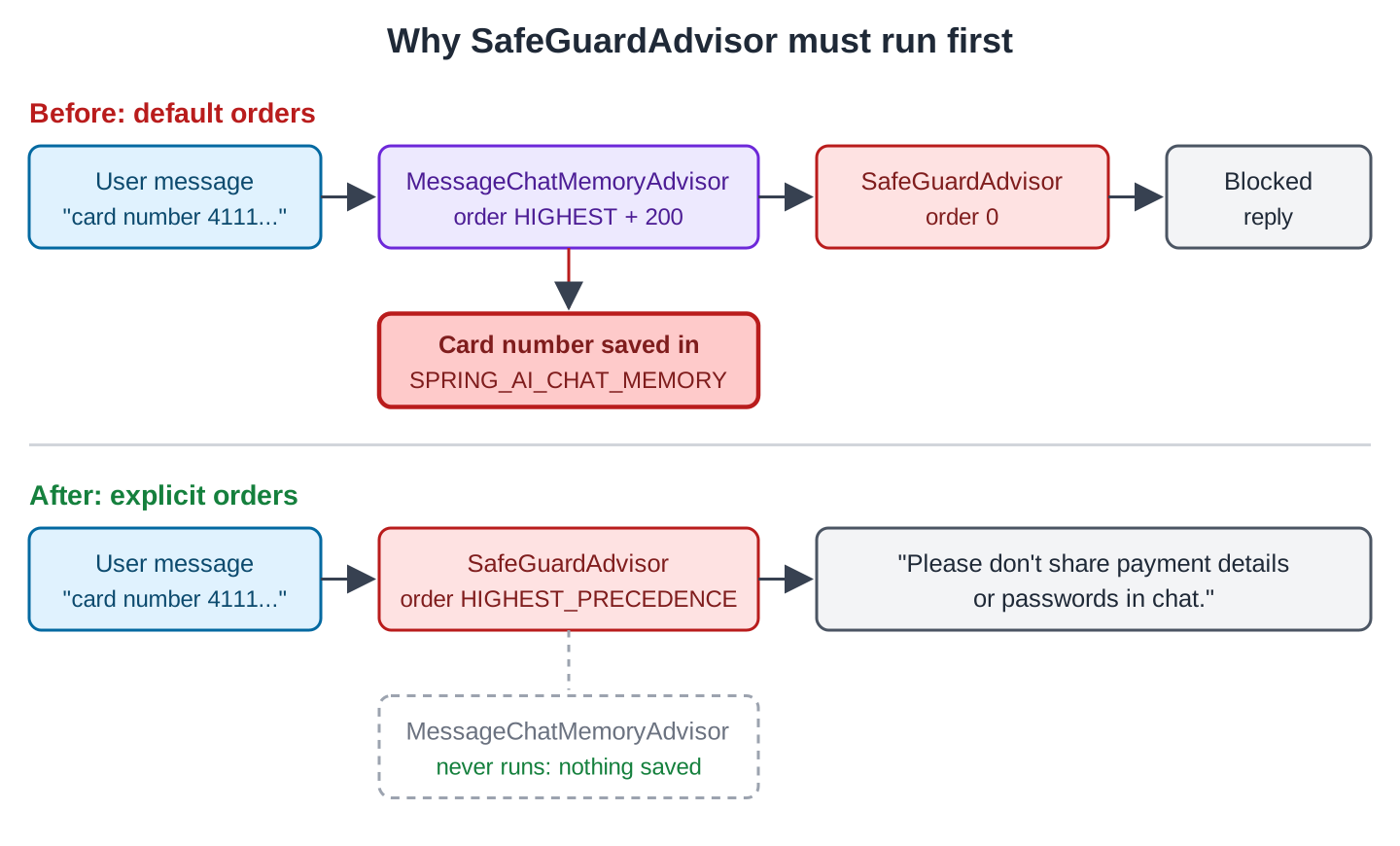
We tested with a new customer, Ravi:
curl -G localhost:8080/advisors/ask --data-urlencode "customerId=ravi" --data-urlencode "question=Hi, I am Ravi. How many days do I have to return a jacket?"
curl -G localhost:8080/advisors/ask --data-urlencode "customerId=ravi" --data-urlencode "question=What is my name, and how long did you say I have?"
curl -G localhost:8080/advisors/ask --data-urlencode "customerId=ravi" --data-urlencode "question=My card number is 4111 1111 1111 1111, can you save it?"
For most items, you have 10 days from the date of delivery to return them. If you need more information, please refer to the specific policies for your order or contact our customer support.
Your name is Ravi. For most items, you have 10 days from the date of delivery to return them. If you need more information, please refer to the specific policies for your order or contact our customer support.
Please don't share payment details or passwords in chat.- The first answer came from the “Return window” policy section that QuestionAnswerAdvisor added.
- The second answer came from the history. The DEBUG log shows qa_retrieved_documents=[]: no policy section scored 0.5 for this question, and the new template let the model use the conversation.
- The third request came back in 13 milliseconds, because the model was never called. SafeGuardAdvisor returned before the memory advisor ran, so the card number was not saved.
Our advisor logged the tokens of each call:
Tokens: prompt=269, completion=41, total=310, time=12156 ms
Tokens: prompt=197, completion=47, total=244, time=10738 ms
The second prompt is smaller even though it carries the history, because it had no policy sections. The blocked request logged nothing, because SafeGuardAdvisor returned before our advisor ran.
Step 5: Advise a Streaming Call
The stream() method of AdvisorChatController (GET /advisors/stream) passes the same tokenUsageAdvisor instance to a stream() call. For a delivery question, the model answered “Yes, we deliver to Pune within 2 days.” and our advisor logged:
Tokens: prompt=89, completion=12, total=101, time=2386 msA stream returns many small responses. Only the last one carries the token counts, which is why adviseStream() checks for a total above zero before logging.
4. Common Traps
4.1. Equal Orders
Advisors with the same order (0 for QuestionAnswerAdvisor, SafeGuardAdvisor, and SimpleLoggerAdvisor) don’t run in list order. Set an order on every advisor whose position matters.
4.2. Guards That Run Too Late
An advisor that blocks or cleans input must run before anything that stores or sends the input. That means before memory, RAG, and logging. Give it Ordered.HIGHEST_PRECEDENCE.
4.3. Blocking Code in a Stream
The adviseStream() method runs on Reactor threads, which must not block. A RAG search or a database call blocks. Spring AI’s own advisors move such work to another thread pool; QuestionAnswerAdvisor has protectFromBlocking() and scheduler() settings on its builder for this. Do the same in your own stream advisors.
4.4. Default Advisors Run Everywhere
The defaultAdvisors() method on a ChatClient builder adds advisors to every request made through that client. A memory advisor in the defaults then needs a conversation id on every call, and a RAG advisor searches the store even for “hello”. Add advisors per request unless every request needs them.
4.5. Templates That Fight Each Other
Each advisor that adds text to the prompt also adds instructions, as Step 3 showed. When you combine advisors, read the final prompt in the SimpleLoggerAdvisor log.
5. FAQs
5.1. What is the difference between an advisor and a Spring AOP aspect?
Both wrap a call. An advisor works on the ChatClientRequest and ChatClientResponse objects, knows the prompt structure, and has a call and a stream variant. AOP works on any method and knows nothing about prompts.
5.2. How do advisors pass data to each other?
Through the advisor context, a Map on the request and the response. QuestionAnswerAdvisor, for example, puts the found documents under QuestionAnswerAdvisor.RETRIEVED_DOCUMENTS. A later advisor reads it from response.context(). In your own code, end the call with .call().chatClientResponse() instead of .content() to get the ChatClientResponse and its context().
5.3. Can an advisor skip the model call?
Yes. If adviseCall() returns a response without calling chain.nextCall(), the model is never called. SafeGuardAdvisor does this, and a cache advisor could do the same.
5.4. How do I see the final prompt?
See Step 4: SimpleLoggerAdvisor at Ordered.LOWEST_PRECEDENCE – 1 plus the DEBUG logging property from Section 2.1.
5.5. Where did the old CallAroundAdvisor go?
Spring AI 1.0 renamed CallAroundAdvisor and StreamAroundAdvisor to CallAdvisor and StreamAdvisor, and AdvisedRequest to ChatClientRequest. Code written for the 1.0 milestones needs these renames.
6. Conclusion
Advisors wrap every ChatClient call in a chain sorted by getOrder(), and memory, RAG, tool calling, and logging are all advisors. The one trap to remember is the order: set it on every advisor whose position matters, and put guards at Ordered.HIGHEST_PRECEDENCE.
All articles in order: Spring AI Tutorial
7. References
Drop me your questions related to Spring AI advisors in the comments.
Happy Learning !!
