
The Spring AI ChatClient is the main API for talking to a chat model from a Spring Boot application. In this example, we use it to send a question, fill a template, get a Java record back, read token usage, change options for one request, and run two clients in one app. We’ll use Spring Boot 4.1, Spring AI 2.0, and Java 21.
1. What Is ChatClient
ChatClient is a fluent API in Spring AI. Fluent means each method returns an object that has the next method, so we write the calls one after another: prompt().user(…).call().content().
Spring AI also has a lower-level interface called ChatModel. Each provider (Ollama, OpenAI, and Anthropic) has its own ChatModel class. We give it a Prompt (the messages and the options), and it returns a ChatResponse. It does nothing else. ChatClient uses a ChatModel internally and adds the things we need in a real app.
| ChatModel | ChatClient | |
|---|---|---|
| Input | A Prompt object that we build ourselves | A chain: system(), user(), options() |
| Output | A ChatResponse | A String, a Java object, a ChatResponse or a Flux |
| Defaults for every request | No | Yes, with defaultSystem(), defaultOptions() and similar |
| Advisors | No | Yes, through the builder and the chain |
| Tools | Only through ToolCallingChatOptions inside the Prompt | Yes, with defaultTools() and tools() |
An advisor is a piece of code that runs around each model call. It can change the request before the call or the answer after it. Chat memory is one example. A tool is a Java method that the model can ask our app to run.
In a Spring Boot app, use ChatClient.
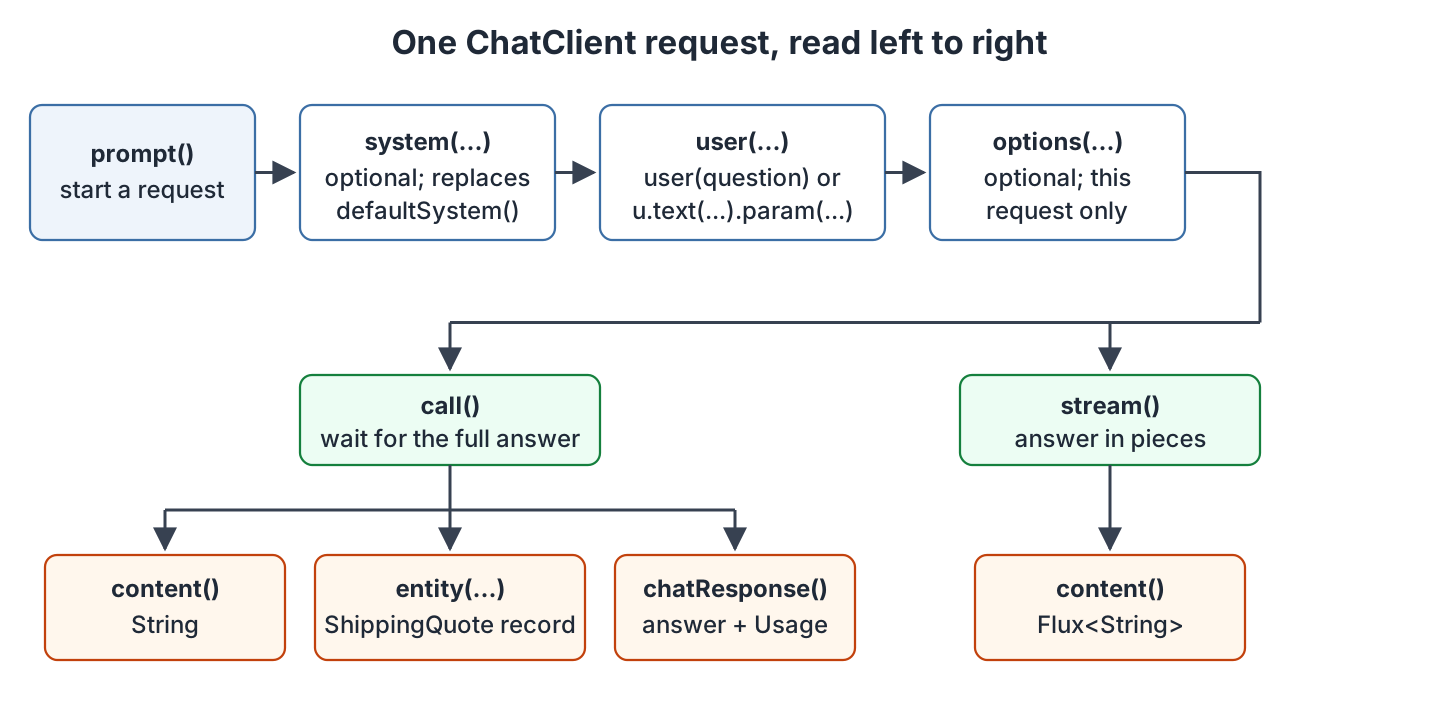
Every request follows the same four parts, in this order. We start with prompt(), add the messages and options we need, send with call() or stream(), and then read the result:
2. Project Setup
This article is part of the OrderDesk series, where each article adds one feature to the support assistant of a demo online store. Getting Started with Spring AI creates the Spring Boot project, the Spring AI dependencies and the Ollama setup. This article adds no dependency and no property.
All classes in this article belong to the com.howtodoinjava.orderdesk.chat package. This package sits under the main class’s package, com.howtodoinjava.orderdesk, so Spring Boot finds the classes at startup.
Getting Started created two classes in this package: ChatClientConfig with the supportClient bean, and ChatController with the /ask endpoint. We replace both classes with the versions in this article. SUPPORT_RULES and the /ask method stay exactly as they were.
The outputs depend on three properties that Getting Started put in application.properties:
spring.ai.ollama.base-url=http://localhost:11434
spring.ai.ollama.chat.options.model=qwen2.5:3b
spring.ai.ollama.chat.options.temperature=0.2
These properties point Spring AI to the local Ollama server and select the qwen2.5:3b model. The low temperature (0.2) keeps answers steady, and Step 5 changes it for one request.
3. Creating a ChatClient Bean with a Default System Prompt
Spring AI creates a ChatClient.Builder bean (a bean is an object that Spring creates and manages), not a ready ChatClient. We use the builder to build our own clients with shared settings.
The most useful default is the system prompt. A system prompt is a message with our instructions for the model, and it goes before the user’s message.
ChatClientConfig creates two ChatClient beans. The supportClient bean comes from Getting Started and answers customer questions. The summaryClient bean is new, and Step 6 uses it. Replace your ChatClientConfig with this version:
package com.howtodoinjava.orderdesk.chat;

import org.springframework.ai.chat.client.ChatClient;
import org.springframework.context.annotation.Bean;
import org.springframework.context.annotation.Configuration;

@Configuration
public class ChatClientConfig {

    static final String SUPPORT_RULES = """
        You are OrderDesk, the support assistant of an online store.
        Answer in at most three sentences.
        Delivery: Pune, Mumbai and Delhi in 2 days; every other city in India in 5 days.
        Delivery is free above INR 499; below that it costs INR 49.
        We do not deliver outside India.
        """;

    @Bean
    ChatClient supportClient(ChatClient.Builder builder) {
        return builder
            .defaultSystem(SUPPORT_RULES)
            .build();
    }

    @Bean
    ChatClient summaryClient(ChatClient.Builder builder) {
        return builder
            .defaultSystem("Summarize the customer's message in one line of at most 12 words.")
            .build();
    }
}
Let’s read the class line by line:
- @Configuration marks a class that declares beans. Spring reads it at startup.
- SUPPORT_RULES is the system prompt, written as a Java text block (a string between triple quotes that keeps its line breaks).
- @Bean on a method tells Spring to call the method and keep its result as a bean. The method name, supportClient, becomes the bean name.
- ChatClient.Builder builder is a method parameter, so Spring passes in a builder. Each @Bean method gets a new, empty builder, so summaryClient doesn’t get the system prompt of supportClient.
- defaultSystem(SUPPORT_RULES) sets the system prompt once. Every request through supportClient then sends SUPPORT_RULES first, and the controller never repeats it.
- summaryClient follows the same pattern with a different system prompt. It writes one-line summaries.
The builder has more defaults of the same kind. defaultOptions() sets model options such as the temperature, defaultAdvisors() adds advisors, and defaultTools() adds tools. For example, this builder call would give every request of a client a temperature of 0.5 (we don’t use it in OrderDesk):
builder.defaultOptions(OllamaChatOptions.builder().temperature(0.5))Pass the options builder to defaultOptions(). Don’t call build() on it; Spring AI does that for you.
In Spring AI 1.x, this method took a built ChatOptions object instead, so 1.x code adds .build().
A request can still replace a default. For example, system() in the chain replaces the default system prompt for that one request.
4. Calling the Model with ChatClient
Now we grow ChatController, a REST controller with one endpoint for each common task. Each step adds one method. The outputs are from a real run with qwen2.5:3b; yours may word things differently.
Start Ollama and the app as shown in Getting Started with Spring AI. Restart the app after adding the code of each step.
Step 1: Send the First Prompt
Let’s start with the controller and the simplest call. Replace your ChatController with this version. It keeps the /ask method from Getting Started and adds the summaryClient field and a constructor that takes both clients:
package com.howtodoinjava.orderdesk.chat;

import java.util.Map;

import org.springframework.ai.chat.client.ChatClient;
import org.springframework.ai.chat.metadata.Usage;
import org.springframework.ai.chat.model.ChatResponse;
import org.springframework.ai.ollama.api.OllamaChatOptions;
import org.springframework.beans.factory.annotation.Qualifier;
import org.springframework.web.bind.annotation.GetMapping;
import org.springframework.web.bind.annotation.RequestParam;
import org.springframework.web.bind.annotation.RestController;

@RestController
public class ChatController {

    private final ChatClient supportClient;
    private final ChatClient summaryClient;

    ChatController(@Qualifier("supportClient") ChatClient supportClient,
                   @Qualifier("summaryClient") ChatClient summaryClient) {
        this.supportClient = supportClient;
        this.summaryClient = summaryClient;
    }

    // 1. The simplest call: a question in, a String out
    @GetMapping("/ask")
    String ask(@RequestParam String question) {
        return supportClient.prompt()
            .user(question)
            .call()
            .content();
    }
}
The imports already cover the methods that later steps add inside this class.
The app now has two ChatClient beans of the same type, so @Qualifier names the bean that Spring should pass into each constructor parameter. Any other class that injects a ChatClient should name its bean the same way.
The chain reads from top to bottom:
- prompt() starts a new request.
- user(question) adds the user message, the text that the customer typed.
- call() sends the request and waits for the full answer.
- content() returns the answer text as a String.
We don’t call system() here, because supportClient adds SUPPORT_RULES by default. Let’s ask a question:
curl -s -G "localhost:8080/ask" --data-urlencode "question=Do you deliver to Pune? How long does it take?"Yes, we deliver to Pune. Delivery to Pune takes 2 days.The model never saw the words “2 days” in the question. It took them from the system prompt.
The -G option with –data-urlencode makes curl send the question as an encoded URL parameter, so spaces and question marks are safe.
Step 2: Fill Template Parameters
Next, we build the user message from a template. A template is text with placeholders in curly braces, such as {name}. Spring AI replaces each placeholder with a value before it sends the message.
The /greet endpoint uses the user() method that takes a lambda. Inside it, text() sets the template and param() fills a placeholder:
    // 2. A user message built from a template and a parameter
    @GetMapping("/greet")
    String greet(@RequestParam String customer) {
        return supportClient.prompt()
            .user(u -> u.text("Greet {name} and ask how you can help today.")
                        .param("name", customer))
            .call()
            .content();
    }
curl -s -G "localhost:8080/greet" --data-urlencode "customer=Priya"Hello Priya! How can I assist you today?The name in param() must match the placeholder in the text, without the braces. A template with param() is easier to read than string joining. The article Spring AI PromptTemplate covers templates in more detail.
Step 3: Return a Java Record with entity()
To get data instead of a sentence, we call entity() in place of content(). Spring AI then turns the answer into a Java object.
First, we create the record that holds a delivery quote:
package com.howtodoinjava.orderdesk.chat;

public record ShippingQuote(String city, boolean delivered, int days, int feeInRupees) {
}
The /quote endpoint fills two template parameters and asks for a ShippingQuote:
    // 3. A Java record instead of a String
    @GetMapping("/quote")
    ShippingQuote quote(@RequestParam String city, @RequestParam int orderValue) {
        return supportClient.prompt()
            .user(u -> u.text("Give the delivery quote for an order of INR {value} to {city}.")
                        .param("value", orderValue)
                        .param("city", city))
            .call()
            .entity(ShippingQuote.class);
    }
The entity() method does two things. Before the call, it adds format instructions to the prompt, with a JSON schema made from the fields of ShippingQuote. After the call, it reads the JSON in the answer and creates the record. Spring MVC then writes the record back as JSON:
curl -s -G "localhost:8080/quote" --data-urlencode "city=Indore" --data-urlencode "orderValue=350"{"city":"Indore","delivered":true,"days":5,"feeInRupees":49}The values follow the rules. Indore is not in the 2-day list, so it takes 5 days. The order is below INR 499, so the fee is INR 49.
There is a trap here. The model computed the fee, and a model can get arithmetic or rules wrong on another run. Use entity() to read what the model says, but compute prices and other values that matter in Java code.
A small model also sometimes returns JSON that doesn’t match the record. In that case, entity() can’t create the record and throws a JacksonException (a runtime exception from Jackson 3, the JSON library that Spring AI 2.0 uses). A low temperature and a clear prompt make this rare. In a real app, catch the exception and ask again or show a friendly error. Spring AI Structured Output Converters explains the converter that does this work.
Step 4: Read Token Usage from ChatResponse
To get more than the answer text, we end the chain with chatResponse(). It returns the full ChatResponse object, which holds the answer and metadata such as the model name and the token usage.
A token is a small piece of text, often part of a word. Hosted providers charge per token. The /ask-with-usage endpoint returns the answer and both token counts:
    // 4. The full ChatResponse, to read token usage
    @GetMapping("/ask-with-usage")
    Map<String, Object> askWithUsage(@RequestParam String question) {
        ChatResponse response = supportClient.prompt()
            .user(question)
            .call()
            .chatResponse();
        Usage usage = response.getMetadata().getUsage();
        return Map.of(
            "answer", response.getResult().getOutput().getText(),
            "promptTokens", usage.getPromptTokens(),
            "completionTokens", usage.getCompletionTokens());
    }
The getResult().getOutput().getText() call gives the same text that content() returns. The getMetadata().getUsage() call returns a Usage object, which holds the token counts of this one request:
curl -s -G "localhost:8080/ask-with-usage" --data-urlencode "question=Do you deliver to London?"{"promptTokens":89,"completionTokens":20,"answer":"No, we do not deliver to London. Our delivery services are currently only available within India."}The prompt tokens are the tokens we sent, and the completion tokens are the tokens the model wrote. The question has only five words, but the prompt used 89 tokens. Most of them come from the default system prompt, which goes with every request.
Map.of() keeps no fixed order, so the JSON keys may come in a different order on your run. It also throws a NullPointerException for a null value. Ollama returns both counts, but a provider that reports no usage would break this method.
Step 5: Change the Options for One Request
To change a setting for one request only, we pass options() in the chain. The /ask-creative endpoint raises the temperature to 0.9:
    // 5. Options for one request only
    @GetMapping("/ask-creative")
    String askCreative(@RequestParam String question) {
        return supportClient.prompt()
            .user(question)
            .options(OllamaChatOptions.builder().temperature(0.9))
            .call()
            .content();
    }
OllamaChatOptions holds the Ollama settings, such as the model and the temperature. As with defaultOptions(), we pass the builder to options() and don’t call build(). Spring AI uses 0.9 for this request and keeps the other settings from application.properties, such as the model name.
curl -s -G "localhost:8080/ask-creative" --data-urlencode "question=Do you deliver to Pune?"Yes, we deliver to Pune within 2 days of placing your order.One answer can’t show the randomness. If you call this endpoint several times, the wording changes more than it does with /ask. The facts stay the same, because they come from the system prompt.
OllamaChatOptions ties this method to Ollama. Each provider has its own options class, so switching to another provider means changing this line.
Step 6: Use a Second ChatClient
Finally, we use summaryClient, which writes one-line summaries of customer messages for the support team. The /summary endpoint calls it:
    // 6. A second ChatClient with its own system prompt
    @GetMapping("/summary")
    String summary(@RequestParam String message) {
        return summaryClient.prompt()
            .user(message)
            .call()
            .content();
    }
curl -s -G "localhost:8080/summary" --data-urlencode "message=Hi, I ordered a blue kettle last week, order ORD-1042, it still has not arrived and the tracking page shows nothing. Can you check?"Order status: Blue kettle, ORD-1042, not delivered, tracking shows nothing.The answer is one line of 10 words, as the system prompt of summaryClient asks.
The same idea works for two different models. Give each ChatClient its own defaultOptions() with a different model name. The article Spring AI Multimodality: Send Images to a Chat Model does this for a vision model.
5. Streaming the Answer
A chat UI often shows the answer while the model is still writing it. For that, we replace call() with stream(), and content() then returns a Flux<String> instead of one String. A Flux is a stream of values that arrive over time (from Project Reactor, already on the classpath), and each value is a small piece of the answer.
OrderDesk has this endpoint in StreamController. It needs the imports reactor.core.publisher.Flux and org.springframework.http.MediaType:
    // For EventSource in the browser, which can only send GET requests
    @GetMapping(value = "/stream", produces = MediaType.TEXT_EVENT_STREAM_VALUE)
    Flux<String> stream(@RequestParam String question) {
        return supportClient.prompt()
            .user(question)
            .stream()
            .content();
    }
The produces value, text/event-stream, makes Spring MVC send each piece as a Server-Sent Event, a data: line, as soon as it arrives. The -N flag stops curl from buffering, so each event prints when it comes:
curl -N "localhost:8080/stream?question=Explain%20your%20delivery%20charges%20in%20two%20sentences."These are the first events of the answer:
data:Our

data: delivery

data: charges

data: are
The article Spring AI Streaming Responses with Server-Sent Events sends these pieces to a browser and covers the traps.
6. FAQs
6.1. When should I use ChatModel instead of ChatClient?
Use ChatModel when you want the provider’s raw API with no extras, for example in a small library. Otherwise use ChatClient.
6.2. Can I create a ChatClient without the auto-configured builder?
Yes. ChatClient.create(chatModel) or ChatClient.builder(chatModel) builds a client from any ChatModel bean. However, this client misses the setup that Spring Boot adds to the injected builder. For example, it doesn’t record metrics or traces for its calls. So in a Spring Boot app, prefer the injected ChatClient.Builder.
6.3. How do I get a list of records instead of one?
Pass a ParameterizedTypeReference (from org.springframework.core) to entity(), such as new ParameterizedTypeReference<List<ShippingQuote>>() {}. Spring AI then asks the model for a JSON array and converts each item.
6.4. Does ChatClient remember earlier messages?
No. Each request is separate, so the model doesn’t know what the user said before. To keep the conversation, add a chat memory advisor to the client. The article Spring AI Chat Memory: Keep Conversation History shows how.
6.5. How do I add tools, advisors or images to a request?
The chain has a method for each. The tools() method adds tools that the model can call, advisors() adds advisors, and user() can attach an image. See Spring AI Function Calling Example, Spring AI Custom CallAdvisor & StreamAdvisor Example, and Spring AI Multimodality: Send Images to a Chat Model.
7. Conclusion
Create one ChatClient bean per job from the injected ChatClient.Builder, and put the shared system prompt and options in its defaults. Then each request is a short chain: prompt(), user(), call(), and content(), entity(), or chatResponse().
Keep default system prompts short because they’re sent with every request. Also remember that entity() returns the model’s answer, not a checked one, so compute prices in Java.
All articles in order: Spring AI Tutorial
8. References
Drop me your questions related to Spring AI ChatClient in the comments.
Happy Learning !!
