
An embedding represents text as a numeric vector that can be compared with other vectors from the same model. This lets an application retrieve related text even when a question uses different wording.
Here, we use Spring AI’s EmbeddingModel with Ollama to compare a customer question against four policy sentences. We inspect the vectors, calculate cosine similarity in Java, and explain what a score does—and does not—tell us.
1. What Does an Embedding Represent?
An embedding model is a model that reads a text and returns a fixed number of decimal numbers. The model we use, nomic-embed-text, always returns 768 numbers, whatever the length of the text. In Java, Spring AI gives us these numbers as a float[].
The vector’s values are useful together as coordinates in the model’s embedding space. Similar text often has nearby representations, but the relationship is learned rather than a guaranteed match to human judgment. Individual coordinates are not directly readable facts.
Cosine similarity compares vector direction. Higher values indicate closer alignment for this metric; a score is not a probability that a policy answers the question correctly.
Semantic search embeds stored texts and the incoming question using the same model, then ranks the texts by a similarity measure. This example calculates the ranking directly so the steps are visible. A vector store handles storage and retrieval for a larger application.
2. The EmbeddingModel Interface
EmbeddingModel is the Spring AI interface for every embedding provider. Our code talks to this interface, and a starter (a Spring Boot dependency that sets everything up) connects it to one provider. These are the methods we use most:
| Method | Returns | Use |
|---|---|---|
| embed(String text) | float[] | Embedding of one text |
| embed(List<String> texts) | List<float[]> | Embeddings of many texts, in the same order |
| embed(Document document) | float[] | Embedding of a Spring AI Document (text plus metadata) |
| call(EmbeddingRequest request) | EmbeddingResponse | Full control: options per request and response metadata |
| dimensions() | int | The size of the arrays this model returns |
Spring AI has an implementation for each provider, for example OllamaEmbeddingModel and OpenAiEmbeddingModel. We use OllamaEmbeddingModel. The Ollama starter creates it as a bean, so our code only asks for an EmbeddingModel.
3. The Example App
This article is part of the OrderDesk series and adds embeddings to OrderDesk, the support assistant of a demo online store. The code for this article is in the com.howtodoinjava.orderdesk.embedding package. The full app is on GitHub in the orderdesk folder.
The example uses Spring Boot 4.1.1, Spring AI 2.0.1, Java 21, and Ollama 0.40.6. The embedding model runs on our own computer in Ollama, so we don’t need an API key. The basic setup (installing Ollama, the Spring Boot project, the Spring AI BOM, and the Ollama starter) is explained in Getting Started with Spring AI. This article adds one model and one property on top of that.
3.1. Downloading the Embedding Model
Embeddings need a separate model, nomic-embed-text. Let’s download it with Ollama:
ollama pull nomic-embed-textThe ollama list command now includes this line:
NAME                       ID              SIZE      MODIFIED
nomic-embed-text:latest    0a109f422b47    274 MB    38 minutes ago
3.2. Choosing the Model in application.properties
The Ollama starter already creates the OllamaEmbeddingModel bean. We add one line to application.properties to pick the model:
# Embedding model for RAG (ollama pull nomic-embed-text)
spring.ai.ollama.embedding.options.model=nomic-embed-text
The spring.ai.ollama.embedding.options.model property is the embedding model’s name in Ollama. It’s separate from spring.ai.ollama.chat.options.model, so the chat model stays qwen2.5:3b. Without this line, Spring AI asks Ollama for mxbai-embed-large, which we haven’t pulled. If a model isn’t pulled, the first call fails with an HTTP 404 error.
New classes go in a sub-package of com.howtodoinjava.orderdesk, under the main class’s package, so Spring Boot finds them at startup. Restart the app after adding code. Start Ollama and the app as shown in Getting Started with Spring AI.
4. Generate Vectors and Compare Policy Text
We create one controller, EmbeddingController, with two endpoints. The first one shows what an embedding looks like. The second one uses embeddings to find the policy sentence that answers a question.
Step 1: Embed One Text
Spring passes the EmbeddingModel bean into the constructor:
package com.howtodoinjava.orderdesk.embedding;

import java.util.Arrays;
import java.util.Map;

import org.springframework.ai.embedding.EmbeddingModel;
import org.springframework.web.bind.annotation.GetMapping;
import org.springframework.web.bind.annotation.RequestParam;
import org.springframework.web.bind.annotation.RestController;

@RestController
public class EmbeddingController {

    private final EmbeddingModel embeddingModel;

    EmbeddingController(EmbeddingModel embeddingModel) {
        this.embeddingModel = embeddingModel;
    }

    @GetMapping("/embed")
    Map<String, Object> embed(@RequestParam String text) {
        float[] vector = embeddingModel.embed(text);
        return Map.of(
            "dimensions", vector.length,
            "firstFive", Arrays.copyOf(vector, 5));
    }
}
The embed(text) method sends the text to nomic-embed-text in Ollama and returns its embedding. The endpoint returns only the size and the first five numbers.
Let’s call it. The -G option with –data-urlencode makes curl send the text as an encoded URL parameter:
curl -G localhost:8080/embed --data-urlencode "text=Can I return my shoes?"{"firstFive":[0.009801908,0.036733013,-0.14798075,0.0013313601,0.017620461],"dimensions":768}The text “Can I return my shoes?” became 768 small decimal numbers. The first call is slower (1.35 seconds here), because Ollama loads the model into memory first.
Step 2: Compare a Question with Policy Sentences
Next, we compare a customer question with four sentences from the store’s policies. We add the sentences, a record for the result, and a second endpoint to the same class. The record SentenceScore holds one sentence and its score:
static final List<String> POLICY_SENTENCES = List.of(
    "You can return most items within 10 days of delivery.",
    "Delivery is free for orders above INR 499.",
    "Electronics come with a 1-year manufacturer warranty.",
    "Cash on delivery is available for orders up to INR 5,000.");

@GetMapping("/similar")
List<SentenceScore> similar(@RequestParam String question) {
    float[] questionVector = embeddingModel.embed(question);
    List<float[]> sentenceVectors = embeddingModel.embed(POLICY_SENTENCES);

    return POLICY_SENTENCES.stream()
        .map(s -> new SentenceScore(s,
            cosineSimilarity(questionVector, sentenceVectors.get(POLICY_SENTENCES.indexOf(s)))))
        .sorted(Comparator.comparingDouble(SentenceScore::score).reversed())
        .toList();
}

record SentenceScore(String sentence, double score) {
}
The method scores each sentence against the question and sorts by score, highest first. The embed(List<String>) method embeds all four sentences in one call and returns the embeddings in input order, so index 0 belongs to the first sentence. This snippet also needs the imports java.util.List and java.util.Comparator.
The scoring itself is a plain Java method, and it goes in EmbeddingController too. Cosine similarity is the dot product of the two arrays divided by the product of their lengths:
static double cosineSimilarity(float[] a, float[] b) {
    double dot = 0, normA = 0, normB = 0;
    for (int i = 0; i < a.length; i++) {
        dot += a[i] * b[i];
        normA += a[i] * a[i];
        normB += b[i] * b[i];
    }
    return Math.round(dot / (Math.sqrt(normA) * Math.sqrt(normB)) * 1000) / 1000.0;
}
The dot product multiplies the numbers at the same position and adds the results. The two square roots are the lengths of the arrays. Dividing by them removes the effect of length, so only the direction counts. The last line rounds the score to three decimals, so the output is easy to read.
Let’s ask with words that don’t appear in any sentence:
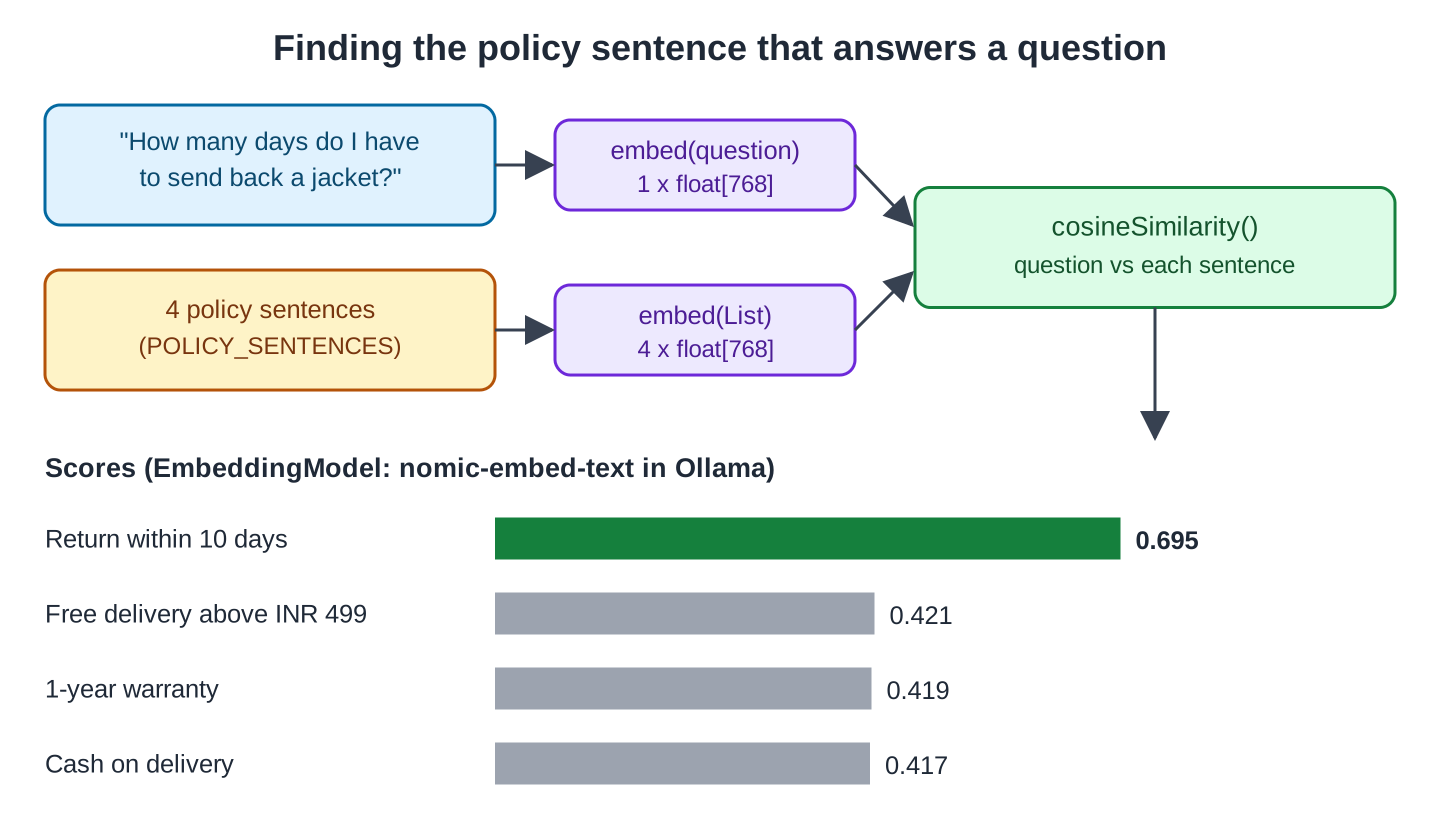
curl -G localhost:8080/similar --data-urlencode "question=How many days do I have to send back a jacket?"[{"sentence":"You can return most items within 10 days of delivery.","score":0.695},{"sentence":"Delivery is free for orders above INR 499.","score":0.421},{"sentence":"Electronics come with a 1-year manufacturer warranty.","score":0.419},{"sentence":"Cash on delivery is available for orders up to INR 5,000.","score":0.417}]The return sentence won with 0.695, and the other three stayed near 0.42. A keyword search would struggle here because, apart from “days”, the question and the sentence share no words.
Now a question about payment:
curl -G localhost:8080/similar --data-urlencode "question=Can I pay in cash when the parcel arrives?"[{"sentence":"Cash on delivery is available for orders up to INR 5,000.","score":0.642},{"sentence":"Delivery is free for orders above INR 499.","score":0.555},{"sentence":"You can return most items within 10 days of delivery.","score":0.536},{"sentence":"Electronics come with a 1-year manufacturer warranty.","score":0.361}]The payment sentence ranks first, but the delivery sentence also receives a substantial score because the question mentions a parcel arriving. Ranking chooses a closest candidate; it does not establish that the candidate is relevant enough to answer.
This diagram shows the whole flow for the first question:
In a real app, we embed the policy sentences once and store them, instead of on every request. The next article does this with a vector store.
5. Common Traps
5.1. Mixing Two Embedding Models
Embedding models can use different dimensions and coordinate spaces. Equal vector length does not make two models compatible. Use the same model and preprocessing strategy for stored documents and queries.
The trap appears when we change the model after storing embeddings. A database column made for one size rejects the other. This is the error from PostgreSQL with pgvector (a PostgreSQL extension that stores embeddings), where the table expected 1024 numbers and nomic-embed-text sent 768:
org.postgresql.util.PSQLException: ERROR: expected 1024 dimensions, not 768When changing the embedding model, regenerate document vectors and use an index configured for the new representation. Keep the old collection available until the new retrieval behavior has been checked.
5.2. A Score Is Not a Probability
A score of 0.695 doesn’t mean “69.5% correct”. Scores are only useful for comparing texts against the same question with the same model. Unrelated sentences still scored about 0.4 in Step 2.
So a fixed cut-off (a threshold, the lowest score we accept) needs testing with your own data and model. The /similar endpoint has no threshold; it returns every sentence. A vector store search takes one, and the next article uses 0.5 to drop results for questions the policies don’t cover. Another model would need another threshold.
5.3. Long Texts Lose Detail
A single vector summarizes the input rather than preserving a separately searchable representation of every fact. Long mixed-topic pages can dilute retrieval, so split documents into coherent sections before embedding and respect the model’s input limit.
So we split long documents into smaller pieces (chunks) before embedding them. Each chunk covers one topic, and its embedding stays sharp. Each embedding model also has a maximum input length, counted in tokens (small pieces of words). By default, Ollama cuts off the text past that length.
6. Using OpenAI Embeddings Instead
The same code works with a hosted model, such as OpenAI’s. We replace the Ollama starter with spring-ai-starter-model-openai in pom.xml, and set the key and the model in application.properties. The starter also brings OpenAI’s chat model, so the rest of OrderDesk then talks to OpenAI too:
spring.ai.openai.api-key=YOUR_OPENAI_API_KEY
spring.ai.openai.embedding.options.model=text-embedding-3-small
EmbeddingController doesn’t change, because it only knows the EmbeddingModel interface. The text-embedding-3-small model returns 1536 numbers instead of 768, so stored embeddings must be created again (see Section 5.1). (Not run here.)
7. FAQs
7.1. Can I use the chat model to create embeddings?
Use a model made for embeddings. Chat models are trained to write text, and embedding models are trained to place texts by meaning. An embedding model is also much smaller and faster: nomic-embed-text is 274 MB, while qwen2.5:3b is 1.9 GB.
7.2. Which embedding model should I pick?
Choose where inference may run, check the required languages and input lengths, then evaluate candidate embedding models on representative queries and documents. Use retrieval quality and operational needs rather than vector size alone to make the choice.
7.3. Do I need a vector database to use embeddings?
No. This article compares them in plain Java. A vector store helps when you have many documents.
7.4. Is cosine similarity the only way to compare embeddings?
No. Vector stores also offer the dot product and the Euclidean distance (the straight-line distance between the two points). Cosine similarity is the usual default for text.
7.5. Does the text leave my computer?
Not with Ollama. The text and its embedding stay on your computer. With a hosted provider, the text is sent to that provider’s servers.
8. Conclusion
EmbeddingModel turns policy text and a question into comparable vectors. The example uses cosine similarity to rank four candidate sentences, illustrating the retrieval step without a database.
Keep the document and query embedding configuration consistent. Rebuild stored vectors after a model change, and tune relevance thresholds against actual questions rather than interpreting scores as confidence percentages.
All articles in order: Spring AI Tutorial
For the idea behind RAG, see RAG Explained: Retrieval Augmented Generation for Java.
9. References
- Spring AI Reference: Embeddings Model API
- Spring AI Reference: Ollama Embeddings
- nomic-embed-text in the Ollama library
Drop me your questions related to the Spring AI EmbeddingModel in the comments.
Happy Learning !!
