

A file-chat feature has two jobs: prepare an uploaded document for retrieval, then answer questions using the relevant parts of that document. Spring AI combines a reader, text splitter, vector store, and RAG advisor for this flow.
In OrderDesk, a customer uploads a kettle manual and asks about its error codes and warranty. The example tags chunks with a file ID, applies that ID as a retrieval filter, and returns an answer from a local Ollama model.
The implementation uses Spring Boot, Spring AI, Java 21, and local chat and embedding models. Its controller and browser page demonstrate the workflow; the demo has no authentication and is not a complete customer-file authorization system.
Pay particular attention to file IDs. Validating their syntax prevents the demonstrated filter-expression injection, while checking file ownership is a separate requirement. A valid ID must not itself grant access.
1. Separate File Ingestion from Question Answering
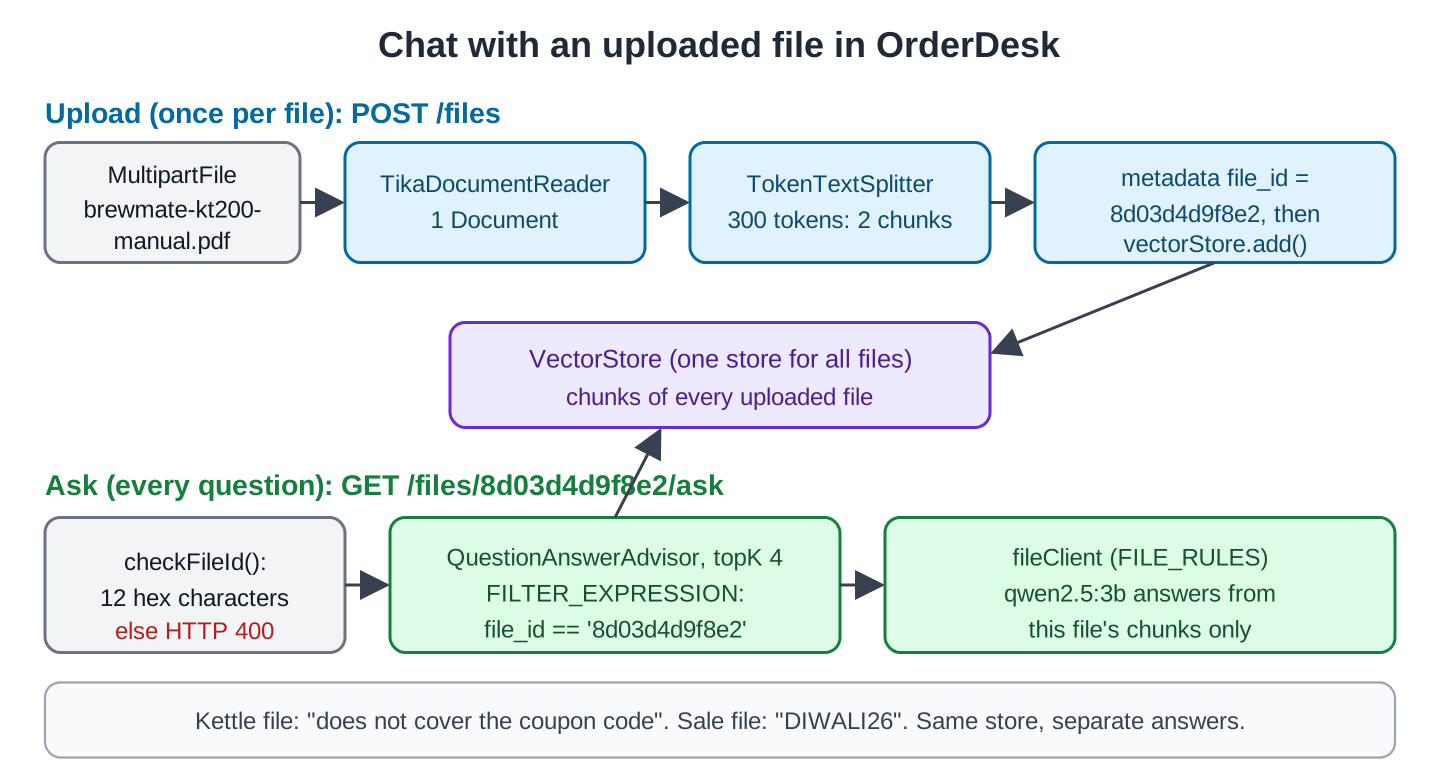
The feature has two flows. Uploading a file runs once per file:
- Read the file’s text with a document reader. Apache Tika, through Spring AI’s TikaDocumentReader, reads PDF, Word, text, HTML, and many other formats.
- Split the text into chunks with TokenTextSplitter, so that each chunk covers a small part of the file.
- Tag every chunk with the file’s id in its metadata (extra key-value pairs on a document).
- Add the chunks to the vector store. The store creates an embedding for each chunk, an array of numbers that stands for its meaning.
Asking a question runs every time:
- Search the vector store for the chunks closest to the question, but only among chunks with this file’s id. A metadata filter (FILTER_EXPRESSION in the code) does that.
- Add the found chunks to the prompt and send it to the chat model. QuestionAnswerAdvisor, a Spring AI advisor, does this search and this step for us.
The advisor adds retrieval around the ChatClient request. A file filter scopes the search to matching chunks, but only server-side authorization can establish whether the caller is allowed to read that file.
This diagram shows both flows as OrderDesk runs them:
2. The Example App
This article adds a feature to OrderDesk, the app of this series. The code for this article is in the com.howtodoinjava.orderdesk.upload package, plus a page in src/main/resources/static. The full app is on GitHub in the orderdesk folder.
OrderDesk runs on Spring Boot 4.1.1, Spring AI 2.0.1, and Java 21, with Ollama 0.40.6 and the chat model qwen2.5:3b. The basic setup (installing Ollama, downloading the chat model, the Spring Boot project, and its base properties) is explained in Getting Started with Spring AI. This article adds an embedding model, a vector store, and two Spring AI modules on top of that.
2.1. The Embedding Model
The vector store needs an embedding model. We use nomic-embed-text in Ollama, which returns 768 numbers per text:
ollama pull nomic-embed-text# Embedding model for RAG (ollama pull nomic-embed-text)
spring.ai.ollama.embedding.options.model=nomic-embed-textThe Ollama starter creates the EmbeddingModel bean (an object that Spring creates and hands to every class that asks for it) from this property.
2.2. The Vector Store
OrderDesk keeps the chunks in a SimpleVectorStore, a vector store that holds them in memory and saves them to a JSON file. The SimpleVectorStoreConfig class in the com.howtodoinjava.orderdesk.vectorstore package creates it:
package com.howtodoinjava.orderdesk.vectorstore;

import java.io.File;

import org.springframework.ai.embedding.EmbeddingModel;
import org.springframework.ai.vectorstore.SimpleVectorStore;
import org.springframework.beans.factory.ObjectProvider;
import org.springframework.boot.autoconfigure.condition.ConditionalOnProperty;
import org.springframework.context.annotation.Bean;
import org.springframework.context.annotation.Configuration;

import io.micrometer.observation.ObservationRegistry;

@Configuration
@ConditionalOnProperty(name = "spring.ai.vectorstore.type", havingValue = "simple")
public class SimpleVectorStoreConfig {

    // SimpleVectorStore keeps vectors in memory; we save them to this file
    public static final File STORE_FILE = new File("data/vector-store.json");

    @Bean
    SimpleVectorStore vectorStore(EmbeddingModel embeddingModel,
                                  ObjectProvider<ObservationRegistry> observationRegistry) {
        SimpleVectorStore store = SimpleVectorStore.builder(embeddingModel)
            // without a registry, searches don't show up in metrics and traces
            .observationRegistry(observationRegistry.getIfUnique(() -> ObservationRegistry.NOOP))
            .build();
        if (STORE_FILE.exists()) {
            store.load(STORE_FILE);
        }
        return store;
    }
}
Line by line:
- @ConditionalOnProperty creates the bean only when spring.ai.vectorstore.type is simple. OrderDesk uses this property to switch to another store with a profile. Add it to application.properties: spring.ai.vectorstore.type=simple.
- STORE_FILE is a public static File, because FileChatController saves to it from another package.
- load() restores saved chunks at startup. The example’s separate in-memory file list is not restored, and the original uploaded bytes are not kept.
- The ObservationRegistry line connects the store to metrics and traces. Without a registry bean, it uses ObservationRegistry.NOOP, which records nothing.
The save() method doesn’t create the data folder, so create it once in the project folder (mkdir data).
The app needs exactly one VectorStore bean. FileChatController uses the VectorStore interface, so you can swap in Chroma, pgvector, or Qdrant without changing it. Only saveIfSimpleStore() knows about SimpleVectorStore. To learn more, see Spring AI VectorStore Example: SimpleVectorStore and ChromaDB.
In the full OrderDesk app, the same store also holds policy sections from another article. Policy chunks have no file_id, so the file filter never finds them.
2.3. The Modules
We add two Spring AI modules to pom.xml. The Spring AI BOM from Getting Started sets their versions:
<dependency>
  <groupId>org.springframework.ai</groupId>
  <artifactId>spring-ai-tika-document-reader</artifactId>
</dependency>
<dependency>
  <groupId>org.springframework.ai</groupId>
  <artifactId>spring-ai-vector-store-advisor</artifactId>
</dependency>
The spring-ai-tika-document-reader module holds TikaDocumentReader. The spring-ai-vector-store-advisor module holds QuestionAnswerAdvisor and brings in spring-ai-vector-store, which holds SimpleVectorStore. TokenTextSplitter is in spring-ai-commons, which the Ollama starter already brings in.
New classes go in sub-packages of com.howtodoinjava.orderdesk. Spring Boot scans the main class’s package and its sub-packages at startup, so it finds them. Start Ollama and the app as shown in Getting Started with Spring AI, and restart the app after adding code.
2.4. The Sample Files
We test with two sample files from the OrderDesk repo:
- brewmate-kt200-manual.pdf is a two-page manual for an electric kettle, with sections on first use, safety, error codes, cleaning, and warranty.
- diwali-sale-terms.txt is a short text file with the terms of a sale, including a coupon code.
Download both into a samples folder in your project folder. The curl commands below run from the project folder.
3. Implement Upload, Retrieval, and Deletion
The whole feature lives in FileChatController. We build it in steps.
Step 1: Create the Controller with Its Own ChatClient
Let’s start with the class, its fields, and its constructor:
package com.howtodoinjava.orderdesk.upload;

import java.util.Collection;
import java.util.List;
import java.util.Map;
import java.util.UUID;
import java.util.concurrent.ConcurrentHashMap;
import java.util.regex.Pattern;

import org.springframework.ai.chat.client.ChatClient;
import org.springframework.ai.chat.client.advisor.vectorstore.QuestionAnswerAdvisor;
import org.springframework.ai.document.Document;
import org.springframework.ai.reader.tika.TikaDocumentReader;
import org.springframework.ai.transformer.splitter.TokenTextSplitter;
import org.springframework.ai.vectorstore.SearchRequest;
import org.springframework.ai.vectorstore.SimpleVectorStore;
import org.springframework.ai.vectorstore.VectorStore;
import org.springframework.core.io.Resource;
import org.springframework.http.HttpStatus;
import org.springframework.http.ResponseEntity;
import org.springframework.web.bind.annotation.DeleteMapping;
import org.springframework.web.bind.annotation.GetMapping;
import org.springframework.web.bind.annotation.PathVariable;
import org.springframework.web.bind.annotation.PostMapping;
import org.springframework.web.bind.annotation.RequestParam;
import org.springframework.web.bind.annotation.RestController;
import org.springframework.web.multipart.MultipartFile;
import org.springframework.web.server.ResponseStatusException;

import com.howtodoinjava.orderdesk.vectorstore.SimpleVectorStoreConfig;

@RestController
public class FileChatController {

    static final String FILE_RULES = """
        You answer questions about one document that a customer uploaded.
        Answer from the document text given with the question.
        If the document has nothing related to the question, say that it does not cover it.
        Answer in at most three sentences.
        """;

    // A file id is 12 hex characters; anything else could change the filter expression
    private static final Pattern FILE_ID = Pattern.compile("[0-9a-f]{12}");

    private final VectorStore vectorStore;
    private final ChatClient fileClient;
    private final QuestionAnswerAdvisor fileAdvisor;
    private final Map<String, UploadedFile> files = new ConcurrentHashMap<>();

    FileChatController(VectorStore vectorStore, ChatClient.Builder builder) {
        this.vectorStore = vectorStore;
        this.fileClient = builder.defaultSystem(FILE_RULES).build();
        this.fileAdvisor = QuestionAnswerAdvisor.builder(vectorStore)
            .searchRequest(SearchRequest.builder().topK(4).build())
            .build();
    }
Line by line:
- FILE_RULES is the system prompt, the instructions sent with every request. It keeps the model on the uploaded document and asks for short answers.
- fileClient is a ChatClient built from the ChatClient.Builder bean that the Ollama starter creates. It has its own system prompt, FILE_RULES, instead of the support prompt of the supportClient bean from Getting Started.
- fileAdvisor is a QuestionAnswerAdvisor that adds the 4 closest chunks (topK(4)) to each question.
- files is a Map of uploaded files by id, used to list them on the page.
- FILE_ID is a pattern for valid file ids. Section 4.1 explains why it is there.
Step 2: Upload, Read and Store a File
Next, we add the upload endpoint. It takes a MultipartFile, Spring’s type for a file sent in a form:
    @PostMapping("/files")
    UploadedFile upload(@RequestParam("file") MultipartFile file) {
        String fileId = UUID.randomUUID().toString().replace("-", "").substring(0, 12);
        Resource resource = file.getResource();

        // Tika reads PDF, Word, text, HTML and many other formats
        List<Document> documents = new TikaDocumentReader(resource).get();
        List<Document> chunks = TokenTextSplitter.builder()
            .withChunkSize(300)
            .build()
            .apply(documents);
        chunks.forEach(chunk -> {
            chunk.getMetadata().put("file_id", fileId);
            chunk.getMetadata().put("file_name", file.getOriginalFilename());
        });
        vectorStore.add(chunks);
        saveIfSimpleStore();

        UploadedFile uploaded = new UploadedFile(fileId, file.getOriginalFilename(), chunks.size());
        files.put(fileId, uploaded);
        return uploaded;
    }
Step by step:
- The file id is 12 hex characters taken from a random UUID.
- TikaDocumentReader returns the whole file as one Document, Spring AI’s class for a text with its metadata.
- TokenTextSplitter cuts it into chunks of at most 300 tokens (pieces of words that models count).
- Each chunk gets file_id and file_name in its metadata.
- vectorStore.add() embeds and stores the chunks. saveIfSimpleStore() writes the JSON file (Step 4 shows it).
- UploadedFile is a record with the id, the name, and the number of chunks.
We also add an endpoint that lists the uploaded files:
    @GetMapping("/files")
    Collection<UploadedFile> list() {
        return files.values();
    }
Let’s upload both sample files. The -F option makes curl send a form with a file:
curl -F "file=@samples/brewmate-kt200-manual.pdf" localhost:8080/files
curl -F "file=@samples/diwali-sale-terms.txt" localhost:8080/files
{"fileId":"8d03d4d9f8e2","fileName":"brewmate-kt200-manual.pdf","chunks":2}
{"fileId":"a4aabf6207e8","fileName":"diwali-sale-terms.txt","chunks":1}The PDF took about 3 seconds.
Step 3: Ask a Question About One File
Then we add the question endpoint. It uses the advisor with a filter for this one file:
    @GetMapping("/files/{fileId}/ask")
    String ask(@PathVariable String fileId, @RequestParam String question) {
        checkFileId(fileId);
        return fileClient.prompt()
            .user(question)
            .advisors(fileAdvisor)
            // search only the chunks of this one file
            .advisors(a -> a.param(QuestionAnswerAdvisor.FILTER_EXPRESSION,
                "file_id == '" + fileId + "'"))
            .call()
            .content();
    }
The advisors(fileAdvisor) call adds the RAG advisor to this request. The a.param() call sets QuestionAnswerAdvisor.FILTER_EXPRESSION for this one request. A filter expression is a condition on metadata, written as text, such as file_id == ‘8d03d4d9f8e2’. Spring AI converts it to the store’s query syntax.
checkFileId() validates the identifier before it reaches the filter. It does not verify that a logged-in user owns the file. Add that authorization check before searching, listing, or deleting uploaded content.
Let’s ask about the kettle. The -G option with –data-urlencode makes curl send the question as an encoded URL parameter:
curl -G localhost:8080/files/8d03d4d9f8e2/ask --data-urlencode "question=My kettle shows E1. What should I do?"
curl -G localhost:8080/files/8d03d4d9f8e2/ask --data-urlencode "question=How often should I descale the kettle, and how?"
You should let the kettle cool for 10 minutes and then fill it with water. This is because the error code E1 indicates that the kettle was switched on with no water, and the manual suggests letting it cool for 10 minutes before refilling.
You should descale the kettle once a month in hard-water areas. For this, fill half the kettle with water and add 1 cup of white vinegar, leave it for 1 hour, then boil it and rinse it two times.Both answers match the manual. Now, here’s the important test. The coupon code is in the sale terms, not in the kettle manual, so we ask the same question against each file:
curl -G localhost:8080/files/8d03d4d9f8e2/ask --data-urlencode "question=What is the coupon code for the Diwali sale?"
curl -G localhost:8080/files/a4aabf6207e8/ask --data-urlencode "question=What is the coupon code for the Diwali sale?"
The context does not cover the coupon code for the Diwali sale.
The coupon code for the Diwali sale is DIWALI26, which gives INR 150 off on orders above INR 999.The recorded coupon question returns different results for the two file IDs, demonstrating retrieval scoping. The six-to-twenty-second timings describe the original CPU setup. This check does not establish multi-user authorization because the demo has no authenticated owner check.
Step 4: Delete a File
Finally, a user should be able to remove a file. The delete endpoint removes all chunks with the file’s id:
    @DeleteMapping("/files/{fileId}")
    ResponseEntity<Void> delete(@PathVariable String fileId) {
        checkFileId(fileId);
        vectorStore.delete("file_id == '" + fileId + "'");
        saveIfSimpleStore();
        files.remove(fileId);
        return ResponseEntity.noContent().build();
    }

    private static void checkFileId(String fileId) {
        if (!FILE_ID.matcher(fileId).matches()) {
            throw new ResponseStatusException(HttpStatus.BAD_REQUEST, "Invalid file id");
        }
    }

    private void saveIfSimpleStore() {
        if (vectorStore instanceof SimpleVectorStore simple) {
            simple.save(SimpleVectorStoreConfig.STORE_FILE);
        }
    }

    record UploadedFile(String fileId, String fileName, int chunks) {
    }
}
The vectorStore.delete() method takes the same kind of filter expression as the search. Then saveIfSimpleStore() writes the JSON file again when the store is a SimpleVectorStore. Other stores save the change on their own.
Each upload gets a new id. For this test, we uploaded the sale file again, and it got the id feb40d0cebe3. We deleted it and asked about the coupon again, with the same file id:
curl -X DELETE localhost:8080/files/feb40d0cebe3
curl -G localhost:8080/files/feb40d0cebe3/ask --data-urlencode "question=What is the coupon code for the Diwali sale?"
The context does not cover the coupon code for the Diwali sale.The delete returned HTTP 204 (no content), so curl prints nothing for it. The file’s chunks were gone.
Step 5: Add a Simple Chat Page
Now let’s add a page for real users. The files.html page goes in src/main/resources/static, where Spring Boot serves it at http://localhost:8080/files.html:
<!DOCTYPE html>
<html lang="en">
<head>
  <meta charset="UTF-8">
  <title>OrderDesk: Chat with a File</title>
  <style>
    body { font-family: sans-serif; max-width: 760px; margin: 30px auto; }
    section { border: 1px solid #ccc; border-radius: 6px; padding: 12px 16px; margin-bottom: 16px; }
    input[type=text] { width: 70%; padding: 6px; }
    #answer { white-space: pre-wrap; background: #f6f6f6; padding: 10px; min-height: 40px; }
  </style>
</head>
<body>
<h2>OrderDesk: Chat with a File</h2>

<section>
  <h3>1. Upload a file</h3>
  <input type="file" id="file">
  <button onclick="upload()">Upload</button>
  <p id="status"></p>
</section>

<section>
  <h3>2. Ask a question</h3>
  <select id="fileId"></select>
  <button onclick="removeFile()">Delete file</button>
  <p><input type="text" id="question" placeholder="Your question">
     <button onclick="ask()">Ask</button></p>
  <div id="answer"></div>
</section>

<script>
  async function loadFiles() {
    const files = await (await fetch('/files')).json();
    document.getElementById('fileId').innerHTML = files
      .map(f => '<option value="' + f.fileId + '">' + f.fileName
        + ' (' + f.chunks + ' chunks)</option>')
      .join('');
  }

  async function upload() {
    const form = new FormData();
    form.append('file', document.getElementById('file').files[0]);
    document.getElementById('status').textContent = 'Uploading...';
    const file = await (await fetch('/files', { method: 'POST', body: form })).json();
    document.getElementById('status').textContent =
      'Saved ' + file.fileName + ' as ' + file.chunks + ' chunks (id ' + file.fileId + ')';
    await loadFiles();
  }

  async function ask() {
    const fileId = document.getElementById('fileId').value;
    const question = encodeURIComponent(document.getElementById('question').value);
    document.getElementById('answer').textContent = 'Thinking...';
    const answer = await (await fetch('/files/' + fileId + '/ask?question=' + question)).text();
    document.getElementById('answer').textContent = answer;
  }

  async function removeFile() {
    await fetch('/files/' + document.getElementById('fileId').value, { method: 'DELETE' });
    await loadFiles();
  }

  loadFiles();
</script>
</body>
</html>
The page has four small functions:
- upload() sends the chosen file to POST /files with a FormData object, the browser’s type for a form with files.
- loadFiles() fills the drop-down list from GET /files.
- ask() sends the question for the selected file and shows the answer.
- removeFile() calls DELETE /files/{fileId}.
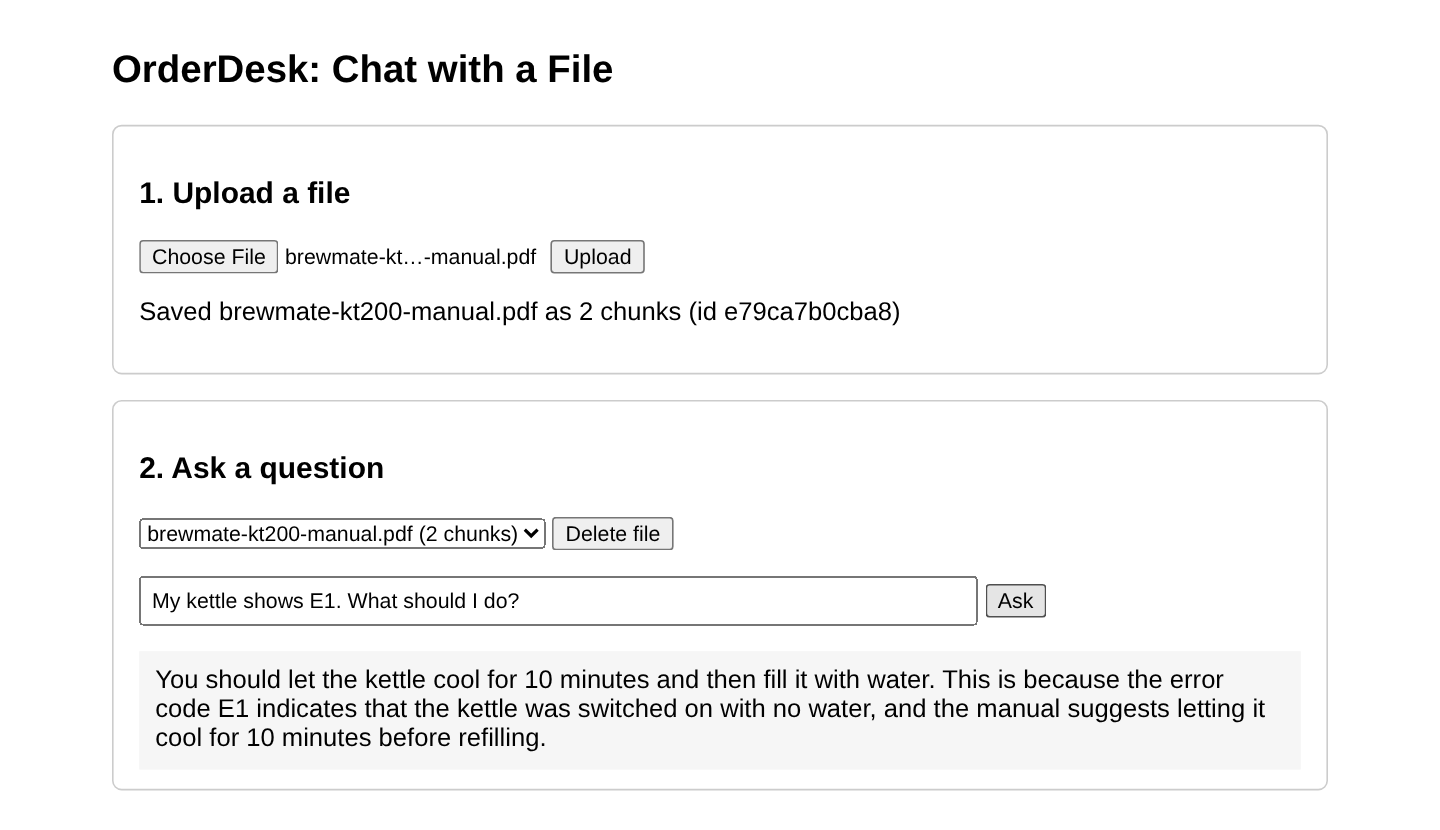
This is the page in Chromium, after we uploaded the kettle manual and asked about E1. This upload got another new id, e79ca7b0cba8:
4. Common Traps
4.1. A File Id That Changes the Filter
Our first version had no checkFileId(). It put the file id from the URL directly into the filter text. In the same run as Step 4, the kettle manual had the id 3acfb0e24e80. As the file id, we sent this text: 3acfb0e24e80′ || file_id != ‘x. Tomcat rejects a raw quote in a URL, so the text is URL-encoded:
curl -G 'localhost:8080/files/3acfb0e24e80%27%20%7C%7C%20file_id%20!=%20%27x/ask' --data-urlencode "question=What is the coupon code for the Diwali sale?"The filter became file_id == ‘3acfb0e24e80’ || file_id != ‘x’. The || means OR, so the filter matches every file. The kettle file answered:
The coupon code for the Diwali sale is DIWALI26, which gives INR 150 off on orders above INR 999.The kettle file returned the sale file’s coupon. In a real app, that’s one customer reading another customer’s upload. The fix is to accept only ids that look like our ids. The checkFileId() method allows exactly 12 hex characters, so the same request now gets HTTP 400:
{"timestamp":"2026-10-19T14:55:19.823Z","status":400,"error":"Bad Request","path":"/files/3acfb0e24e80%27%20%7C%7C%20file_id%20!=%20%27x/ask"}The rule is general: never build a filter expression from raw user input. Check the value against a strict pattern, or build the filter with Spring AI’s FilterExpressionBuilder. Its eq() method takes the key and the value separately, so the value stays data. Also check that the file belongs to the logged-in user before you search it.
4.2. Words the Document Doesn’t Use
A customer asked “How do I clean the white layer inside the kettle?”. The manual calls it “descaling” and never says “white layer”. The answer:
The context provided does not cover how to clean the white layer inside the kettle.The search found the cleaning chunk, but the small chat model didn’t connect “white layer” with descaling. The same question with the word “descale” got the full answer in Step 3. A bigger chat model connects such words more often. You can also rewrite the question before the search. RetrievalAugmentationAdvisor from the spring-ai-rag module does that with a RewriteQueryTransformer.
4.3. Chunks That Cut a Sentence
With a chunk size of 200 tokens, the kettle manual became 3 chunks, and one cut fell inside the warranty sentence. One chunk ended with “The warranty does not”, and the next one started with “cover damage from boiling liquids other than water”. With 300 tokens, the manual became 2 chunks, and the warranty section stayed whole. Check where your chunks end, especially for short documents with important sentences.
4.4. Files Larger Than 1 MB
Spring Boot limits uploads to 1 MB per file by default. A 1.6 MB text file got HTTP 413 (content too large), and the log showed:
Resolved [org.springframework.web.multipart.MaxUploadSizeExceededException: Maximum upload size exceeded]Raise the limit in application.properties, for example with spring.servlet.multipart.max-file-size=10MB and spring.servlet.multipart.max-request-size=10MB. Large files also take longer to embed, so tell the user that the upload is still running.
4.5. The File List Is Lost on Restart
The files map disappears on restart even when saved chunks remain searchable by their IDs. Persist file records with ownership and processing status if the application needs a reliable file list. Keep chunk deletion and file-record deletion consistent.
5. FAQs
5.1. Which file types can I upload?
Tika supports many document formats, but an upload endpoint should accept an explicit set, validate content and size, and inspect extraction failures. Scanned PDFs generally need OCR before text retrieval can work. Supporting a parser format is not the same as choosing to accept it.
5.2. Can a user chat with several files at once?
Yes. A filter can include multiple file IDs, but first validate each ID and authorize every requested file for the current user. Syntax validation alone does not establish ownership.
5.3. Why not send the whole file to the model?
For a short file, you can, and it often works better. RAG helps when files are long, when there are many of them, or when you pay per token, because it sends only the chunks that match the question.
5.4. Where are the uploaded files kept?
The app keeps only their chunks, in the vector store, with the file name in the metadata. It doesn’t save the original file. Keep it in a file store if users need to download it again.
5.5. Do I need Spring Security for this?
A real multi-user file service needs authentication and authorization, whether supplied by Spring Security or another appropriate mechanism. Check the owner for upload records, retrieval, listing, and deletion. In this demo, possession of a file ID is enough to ask about it.
6. Conclusion
Read and split the upload, attach source identifiers, and retrieve relevant chunks with a per-request filter. Check extraction quality and the retrieved context when an answer is wrong. Validate filter inputs and authorize file access separately; neither retrieval scoping nor prompt instructions replaces ownership checks.
All articles in order: Spring AI Tutorial
7. References
- Spring AI Reference: Retrieval Augmented Generation
- Spring AI Reference: ETL Pipeline (Tika reader)
- Spring Boot: Multipart properties
Drop me your questions related to the Spring AI RAG chatbot in the comments.
Happy Learning !!
