
Before a chatbot can retrieve useful evidence, its documents must be read, organized, and indexed. A Spring AI ETL pipeline performs that preparation: extract the content, transform it into searchable chunks, and load the chunks into a vector store.
This article builds OrderDesk’s policy-ingestion pipeline with Markdown readers, metadata, text splitting, and repeatable loading. A recorded example shows why preserving a section heading can matter as much as choosing the embedding model.
1. Understand Readers, Transformers, and Writers
ETL means extract, transform, and load. Spring AI passes Document objects between those stages. Each document contains text and metadata, allowing the pipeline to retain source information while changing how content is split or stored:
- DocumentReader extracts documents from a source. It is a Supplier<List<Document>>, so its get() method returns the list.
- DocumentTransformer changes a list of documents. It is a Function<List<Document>, List<Document>>, so its apply() method takes a list and returns a new one.
- DocumentWriter loads documents somewhere. It is a Consumer<List<Document>>, and every VectorStore is one.
These functional interfaces can be composed directly, but naming intermediate steps makes the data preparation easier to inspect. OrderDesk adds metadata, restores headings, and splits text before writing the resulting documents.
Spring AI provides readers for many formats. Most of them are separate modules, but JsonReader and TextReader are in spring-ai-commons, which the Ollama starter already brings in:
| Reader | Module | Reads |
|---|---|---|
| MarkdownDocumentReader | spring-ai-markdown-document-reader | Markdown, one document per section |
| TikaDocumentReader | spring-ai-tika-document-reader | PDF, Word, PowerPoint, HTML, text and many more, through Apache Tika |
| PagePdfDocumentReader, ParagraphPdfDocumentReader | spring-ai-pdf-document-reader | PDF, per page or per paragraph |
| JsonReader | spring-ai-commons | JSON, with the fields to use as text |
| TextReader | spring-ai-commons | Plain text |
| JsoupDocumentReader | spring-ai-jsoup-document-reader | HTML pages |
The main transformer is TokenTextSplitter, which cuts long text into chunks. The metadata enrichers are transformers too: they ask a chat model for keywords or a summary of each document.
2. The Example App
OrderDesk is the app we use across this Spring AI series. The code for this article belongs to the com.howtodoinjava.orderdesk.etl package. The full app is on GitHub in the orderdesk folder.
OrderDesk runs on Spring Boot 4.1.1, Spring AI 2.0.1, and Java 21, with Ollama 0.40.6. The basic setup (installing Ollama, the Spring Boot project, the Spring AI BOM, and the Ollama starter) is explained in Getting Started with Spring AI. This article adds an embedding model, a vector store, three modules, and the policy files on top of that.
2.1. The Dependencies
We add three modules to pom.xml. The Spring AI BOM sets their versions:
<dependency>
  <groupId>org.springframework.ai</groupId>
  <artifactId>spring-ai-vector-store-advisor</artifactId>
</dependency>
<dependency>
  <groupId>org.springframework.ai</groupId>
  <artifactId>spring-ai-markdown-document-reader</artifactId>
</dependency>
<dependency>
  <groupId>org.springframework.ai</groupId>
  <artifactId>spring-ai-tika-document-reader</artifactId>
</dependency>- spring-ai-vector-store-advisor brings spring-ai-vector-store, which holds the VectorStore interface and SimpleVectorStore. The Ollama starter doesn’t bring them. The same module also contains the QuestionAnswerAdvisor that OrderDesk’s RAG endpoint uses.
- spring-ai-markdown-document-reader holds MarkdownDocumentReader.
- spring-ai-tika-document-reader holds TikaDocumentReader, for Section 4.
TokenTextSplitter is in spring-ai-commons, so it needs no extra module.
2.2. The Embedding Model and the Vector Store
A vector store saves each text with its embedding, an array of numbers that stands for the meaning of the text. It needs an embedding model to create the arrays. We use nomic-embed-text in Ollama, which returns 768 numbers:
ollama pull nomic-embed-text# Embedding model for RAG (ollama pull nomic-embed-text)
spring.ai.ollama.embedding.options.model=nomic-embed-text
# Which vector store is active: simple (default, in memory), chroma, pgvector, redis or qdrant.
# The profiles application-chroma.properties and so on switch it.
spring.ai.vectorstore.type=simpleThe Ollama starter creates the EmbeddingModel bean from the first property. The second property picks the vector store, because the finished OrderDesk app has the starters of several stores.
The pipeline writes to a VectorStore bean (an object that Spring creates and hands to every class that asks for it). OrderDesk’s default store is SimpleVectorStore, which keeps documents in memory and saves them to a JSON file. SimpleVectorStoreConfig creates it:
package com.howtodoinjava.orderdesk.vectorstore;

import java.io.File;

import org.springframework.ai.embedding.EmbeddingModel;
import org.springframework.ai.vectorstore.SimpleVectorStore;
import org.springframework.beans.factory.ObjectProvider;
import org.springframework.boot.autoconfigure.condition.ConditionalOnProperty;
import org.springframework.context.annotation.Bean;
import org.springframework.context.annotation.Configuration;

import io.micrometer.observation.ObservationRegistry;

@Configuration
@ConditionalOnProperty(name = "spring.ai.vectorstore.type", havingValue = "simple")
public class SimpleVectorStoreConfig {

    // SimpleVectorStore keeps vectors in memory; we save them to this file
    public static final File STORE_FILE = new File("data/vector-store.json");

    @Bean
    SimpleVectorStore vectorStore(EmbeddingModel embeddingModel,
                                  ObjectProvider<ObservationRegistry> observationRegistry) {
        SimpleVectorStore store = SimpleVectorStore.builder(embeddingModel)
            // without a registry, searches don't show up in metrics and traces
            .observationRegistry(observationRegistry.getIfUnique(() -> ObservationRegistry.NOOP))
            .build();
        if (STORE_FILE.exists()) {
            store.load(STORE_FILE);
        }
        return store;
    }
}- @ConditionalOnProperty creates the bean only when spring.ai.vectorstore.type is simple.
- STORE_FILE is public and static, because PolicyIngestion saves the store to it. The path data/vector-store.json is relative to the folder you start the app from.
- observationRegistry() lets searches show up in metrics. Without a registry, it uses ObservationRegistry.NOOP, which records nothing.
- load() reads the file back at startup, so the store survives a restart.
The pipeline works the same with Chroma, pgvector, Redis, or Qdrant, because it only uses the VectorStore interface. To learn about vector stores, see Spring AI VectorStore Example: SimpleVectorStore and ChromaDB.
2.3. The Source Files
OrderDesk’s knowledge lives in four Markdown files in src/main/resources/policies: returns.md, shipping.md, warranty.md, and payments.md. Copy them to get the same counts as this article; with your own files, the counts will differ. This is returns.md:
# Returns and Refunds

## Return window

You can return most items within 10 days of delivery. The item must be unused and in its original box with all tags.

## Damaged or wrong items

If an item arrives damaged or is not what you ordered, report it within 48 hours of delivery. Upload a photo of the item and the parcel on the order page. We send a replacement or give a full refund, and you do not pay for the return pickup.

## Items you cannot return

- Earphones and headphones once the seal is opened
- Groceries and other perishable items
- Gift cards

## Refunds

Refunds go back to the original payment method within 5 to 7 working days after we receive the item. If you choose store credit instead, it is added to your OrderDesk wallet at once.
2.4. Files from Earlier Articles
We use the following files to check the pipeline’s result, and we don’t explain them again here:
- PolicySearchController.java: GET /search runs a similarity search with topK, threshold and an optional topic filter, and returns each hit with its score. Explained in Spring AI VectorStore Example: SimpleVectorStore and ChromaDB.
- RagController.java and RagConfig.java: GET /rag/qa searches the store for the 3 best sections, gives them to the chat model and returns the answer with its sources. Explained in Spring AI RAG Advisors: QuestionAnswer vs RetrievalAugmentation.
- ChatClientConfig.java: the supportClient bean that RagController calls. Explained in Getting Started with Spring AI.
New classes go in sub-packages of com.howtodoinjava.orderdesk, the main class’s package, so Spring Boot finds them at startup. If your main class is in another package, use that one. Start Ollama and the app as shown in Getting Started with Spring AI, and restart the app after adding code.
3. Read, Prepare, and Load the Policy Documents
The whole pipeline lives in one class, PolicyIngestion, with one ingest() method. This diagram shows it:
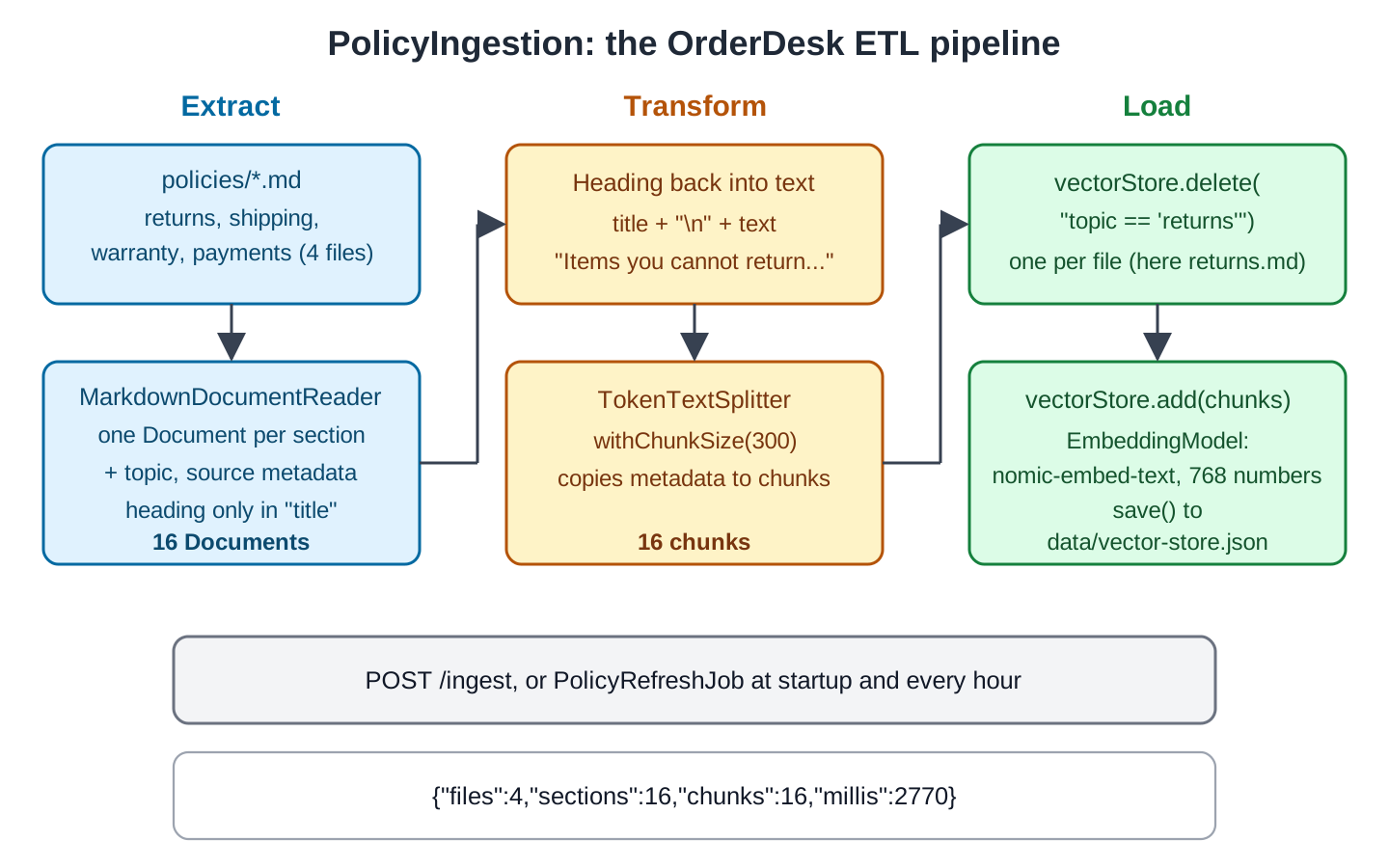
The code blocks in Steps 1 to 4 form one class: each block continues the ingest() method of the block before it.
Step 1: Extract the Policy Files with MarkdownDocumentReader
PathMatchingResourcePatternResolver finds every Markdown file in the policies folder of the classpath, and MarkdownDocumentReader reads each one:
package com.howtodoinjava.orderdesk.etl;

import java.io.IOException;
import java.util.ArrayList;
import java.util.List;

import org.slf4j.Logger;
import org.slf4j.LoggerFactory;
import org.springframework.ai.document.Document;
import org.springframework.ai.reader.markdown.MarkdownDocumentReader;
import org.springframework.ai.reader.markdown.config.MarkdownDocumentReaderConfig;
import org.springframework.ai.transformer.splitter.TokenTextSplitter;
import org.springframework.ai.vectorstore.SimpleVectorStore;
import org.springframework.ai.vectorstore.VectorStore;
import org.springframework.core.io.Resource;
import org.springframework.core.io.support.PathMatchingResourcePatternResolver;
import org.springframework.stereotype.Service;

import com.howtodoinjava.orderdesk.vectorstore.SimpleVectorStoreConfig;

@Service
public class PolicyIngestion {

    private static final Logger log = LoggerFactory.getLogger(PolicyIngestion.class);

    private final VectorStore vectorStore;

    PolicyIngestion(VectorStore vectorStore) {
        this.vectorStore = vectorStore;
    }

    public IngestResult ingest() throws IOException {
        long start = System.currentTimeMillis();

        // Extract: one Document per section of every policy file
        Resource[] files = new PathMatchingResourcePatternResolver()
            .getResources("classpath:policies/*.md");
        List<Document> documents = new ArrayList<>();
        for (Resource file : files) {
            String topic = file.getFilename().replace(".md", "");
            MarkdownDocumentReaderConfig config = MarkdownDocumentReaderConfig.builder()
                .withAdditionalMetadata("topic", topic)
                .withAdditionalMetadata("source", file.getFilename())
                .build();
            documents.addAll(new MarkdownDocumentReader(file, config).get());
        }
MarkdownDocumentReader returns one Document per section. A section starts at a heading and ends at the next one. The “# Returns and Refunds” title has no text of its own, so it doesn’t produce a document. That leaves four documents from returns.md, and 16 from all four files.
MarkdownDocumentReaderConfig sets reader options. The withAdditionalMetadata() method adds our own keys to every document of the file: topic, such as “returns”, and source, the file name. We later use this metadata to filter searches and delete old documents.
The reader adds its own keys too. This is the metadata of one document, the “Failed payments” section, as it ended up in the store:
"metadata": {
  "parent_document_id": "51662816-a0c7-49d3-8165-cc2043ea8cec",
  "category": "header_2",
  "topic": "payments",
  "title": "Failed payments",
  "chunk_index": 0,
  "total_chunks": 1,
  "source": "payments.md"
}
The category key says the section came from a “##” heading, and title holds the heading text. The splitter in Step 3 added parent_document_id, chunk_index, and total_chunks.
Step 2: Put Each Heading Back into the Text
In this reader configuration, section headings are retained as title metadata rather than included in document text. The embedding step therefore misses that heading unless the pipeline explicitly adds it to the text.
For the “Items you cannot return” section, this mattered. Its text is only the three list items, joined into one line. We asked OrderDesk’s GET /rag/qa endpoint (see Section 2.4) about returning earphones:
{"answer":"I'm sorry, but the context provided does not include information about returning earphones or headphones. The context mainly deals with the return policy for specific items like groceries and other perishable items. For earphones, you might want to check the specific return policy of the brand you purchased from, as different sellers or brands may have different return policies.","sources":["returns.md: Earphones and headphones once the seal is opened Groceries and other perishable items Gift cards","returns.md: You can return most items within 10 days of delivery. The item must be unused and in its original box with all tags."]}The store found the right section, but its text didn’t say what the list meant. Without the heading “Items you cannot return”, the chat model didn’t see that these items can’t be returned. So we add a transform step that puts the heading back in front of the text:
        // Transform: put each section's heading back into its text,
        // because MarkdownDocumentReader keeps the heading only in the metadata
        documents = documents.stream()
            .map(d -> new Document(d.getMetadata().get("title") + "\n" + d.getText(),
                d.getMetadata()))
            .toList();
This step creates a new Document for each section with the heading, a line break, and the old text, and the same metadata. Every section in our files has a heading; a section without one would get the word “null” in front. After this change and a fresh load, the store returned the section with its heading, and the answer was right:
{"answer":"I'm sorry, but earphones and headphones are not eligible for return once the seal is opened. Please refer to the context for details. If you have any other questions or need assistance with a different item, feel free to ask.","sources":["returns.md: Items you cannot return\nEarphones and headphones once the seal is opened Groceries and other perishable items Gift cards","returns.md: Return window\nYou can return most items within 10 days of delivery. The item must be unused and in its original box with all tags.","returns.md: Damaged or wrong items\nIf an item arrives damaged or is not what you ordered, report it within 48 hours of delivery. Upload a photo of the item and the parcel on the order page. We send a replacement or give a full refund, and you do not pay for the return pickup."]}Inspect the extracted text and metadata before embedding. A relevant section is not useful evidence if extraction has removed the words that explain its meaning.
Step 3: Split Long Sections with TokenTextSplitter
An embedding model has an input limit, and one embedding for a long text blurs many topics together. TokenTextSplitter cuts each document into chunks of a set number of tokens (pieces of words that models count):
        // Transform: split long sections into chunks the embedding model can take
        TokenTextSplitter splitter = TokenTextSplitter.builder()
            .withChunkSize(300)
            .build();
        List<Document> chunks = splitter.apply(documents);
The withChunkSize(300) call sets the target size of a chunk to 300 tokens. The default is 800. The splitter cuts at the end of a sentence where it can, and it copies the metadata of the original document to every chunk.
The recorded policy files contain short sections, so the splitter leaves sixteen sections as sixteen chunks. For longer documents, evaluate boundaries and context together: smaller chunks can improve focus while also separating a rule from its conditions.
Step 4: Load into the Vector Store without Duplicates
A VectorStore is a DocumentWriter, so add() (or accept()) loads the chunks. Before that, we remove the old chunks of each file:
        // Load: remove the old chunks of each file, then add the new ones
        for (Resource file : files) {
            String topic = file.getFilename().replace(".md", "");
            vectorStore.delete("topic == '" + topic + "'");
        }
        vectorStore.add(chunks);
        if (vectorStore instanceof SimpleVectorStore simple) {
            SimpleVectorStoreConfig.STORE_FILE.getParentFile().mkdirs();
            simple.save(SimpleVectorStoreConfig.STORE_FILE);
        }
The delete() method takes a filter expression, a small text language that Spring AI converts to each store’s query syntax. The expression topic == ‘returns’ removes every chunk of returns.md. Without this step, every run would add a new copy of each chunk, and searches would return the same section twice.
The add() method calls the embedding model for each chunk and saves the text, the metadata, and the embedding. For SimpleVectorStore, save() writes the store to its JSON file.
The example deletes by its controlled topic value, avoiding punctuation-sensitive source filters encountered in Redis. It refreshes only files still present in the input folder. Removed files need explicit cleanup, and a failure between deletion and insertion can leave a source temporarily unavailable.
The method ends by logging and returning the counts:
        long millis = System.currentTimeMillis() - start;
        log.info("Ingested {} files, {} sections, {} chunks in {} ms",
            files.length, documents.size(), chunks.size(), millis);
        return new IngestResult(files.length, documents.size(), chunks.size(), millis);
    }

    public record IngestResult(int files, int sections, int chunks, long millis) {
    }
}
IngestResult is a record with the number of files, sections, and chunks, and the time taken.
Step 5: Run the Pipeline
IngestController calls ingest() on a POST request:
package com.howtodoinjava.orderdesk.etl;

import java.io.IOException;

import org.springframework.web.bind.annotation.PostMapping;
import org.springframework.web.bind.annotation.RestController;

@RestController
public class IngestController {

    private final PolicyIngestion policyIngestion;

    IngestController(PolicyIngestion policyIngestion) {
        this.policyIngestion = policyIngestion;
    }

    @PostMapping("/ingest")
    PolicyIngestion.IngestResult ingest() throws IOException {
        return policyIngestion.ingest();
    }
}
Let’s run it twice:
curl -X POST localhost:8080/ingest
curl -X POST localhost:8080/ingest
{"files":4,"sections":16,"chunks":16,"millis":2770}
{"files":4,"sections":16,"chunks":16,"millis":2022}The first run took 2.8 seconds, most of it for creating 16 embeddings in Ollama. To check that the second run created no copies, we asked the /search endpoint for up to 100 hits:
curl -G localhost:8080/search --data-urlencode "query=policy" --data-urlencode "topK=100"It returned exactly 16 chunks, so the delete step worked.
4. Reading Other Formats with Tika
For PDF and Word files, use TikaDocumentReader (package org.springframework.ai.reader.tika). It reads them through Apache Tika, a library that pulls text out of more than a thousand formats. OrderDesk uses it in FileChatController for files that customers upload. These are the lines that read and split one uploaded file:
// Tika reads PDF, Word, text, HTML and many other formats
List<Document> documents = new TikaDocumentReader(resource).get();
List<Document> chunks = TokenTextSplitter.builder()
    .withChunkSize(300)
    .build()
    .apply(documents);
Here, resource is a Spring Resource, such as a classpath file, a file on disk, or an uploaded file. Tika returns the whole file as one Document, so the splitter does the real work. Our two-page kettle manual, brewmate-kt200-manual.pdf, became 2 chunks this way, and 3 chunks with a chunk size of 200. To build a full upload-and-chat feature, see Spring AI RAG Chatbot: Chat with Uploaded PDF Files.
Text extraction may flatten headings, columns, and tables, so inspect the output for the file formats you accept. Page-based or paragraph-based PDF readers offer different segmentation choices; none should be assumed to preserve every layout detail automatically.
5. Running the Pipeline on a Schedule
When documents change, a scheduled job can reload them. OrderDesk has one, PolicyRefreshJob, that runs only when we turn it on:
package com.howtodoinjava.orderdesk.etl;

import java.io.IOException;
import java.util.concurrent.TimeUnit;

import org.springframework.boot.autoconfigure.condition.ConditionalOnProperty;
import org.springframework.context.annotation.Configuration;
import org.springframework.scheduling.annotation.EnableScheduling;
import org.springframework.scheduling.annotation.Scheduled;

// Loads the policy files at startup and then every hour.
// Turned on with orderdesk.ingest.schedule=true
@Configuration
@EnableScheduling
@ConditionalOnProperty(name = "orderdesk.ingest.schedule", havingValue = "true")
public class PolicyRefreshJob {

    private final PolicyIngestion policyIngestion;

    PolicyRefreshJob(PolicyIngestion policyIngestion) {
        this.policyIngestion = policyIngestion;
    }

    @Scheduled(initialDelay = 0, fixedDelay = 1, timeUnit = TimeUnit.HOURS)
    void refresh() throws IOException {
        policyIngestion.ingest();
    }
}
Line by line:
- @EnableScheduling turns on Spring’s scheduler.
- @ConditionalOnProperty creates the job only when orderdesk.ingest.schedule is true. Without it, the app loads nothing at startup.
- @Scheduled runs refresh() right after startup (initialDelay = 0) and then one hour after each run ends (fixedDelay = 1 with TimeUnit.HOURS).
To turn the job on, add orderdesk.ingest.schedule=true to application.properties, or pass –orderdesk.ingest.schedule=true as a program argument. We used the argument. Three seconds after startup, the log showed the first run, on the scheduler’s thread:
INFO 12296 --- [orderdesk] [ scheduling-1] c.h.orderdesk.etl.PolicyIngestion : Ingested 4 files, 16 sections, 16 chunks in 3195 msThe scheduled example reloads every source. A larger pipeline can track content hashes or modification versions and refresh changed documents only. Preserve enough source metadata to delete removed files and recover from partial loads.
6. FAQs
6.1. What chunk size should I use?
Start with the default of 800 tokens, or a few hundred for short, focused answers. Then test with real questions: if answers miss details, try smaller chunks; if they lack context, try larger ones.
6.2. Can I add metadata that isn’t in the file?
Yes. Add keys with withAdditionalMetadata() in the reader config, or set them on each Document in a transform step. To filter a search by a key, give the SearchRequest a filter expression such as topic == ‘warranty’; PolicySearchController does this for its topic parameter.
6.3. How do I avoid duplicates when I load again?
The example replaces chunks by deleting each controlled topic before adding its current contents. Stable document IDs are another option where the store supports the intended upsert behavior. Neither approach alone makes a multi-step refresh atomic, so define recovery for a failed load.
6.4. Does the pipeline call the chat model?
No. Only the embedding model is called, inside add(). The chat model is used later, when a question comes in. Enrichers such as KeywordMetadataEnricher are the exception: they call the chat model to create metadata.
7. Conclusion
Compose readers, transformations, and a writer around Document objects. Keep source metadata and meaningful headings, choose coherent chunk boundaries, and make refresh behavior explicit.
Inspect what will actually be embedded, not just the source file. The recorded heading example shows how extraction and chunking can change the evidence available to the answering model.
All articles in order: Spring AI Tutorial
8. References
- Spring AI Reference: ETL Pipeline
- Spring AI Reference: Markdown Reader
- Apache Tika supported formats
Drop me your questions related to the Spring AI ETL pipeline in the comments.
Happy Learning !!
