
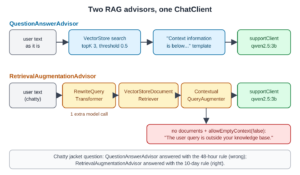
Spring AI supports retrieval-augmented generation (RAG), which lets a chat model answer from our own documents. In Spring AI, two advisors add the matching documents to each prompt: QuestionAnswerAdvisor and RetrievalAugmentationAdvisor. In this example, we add both to OrderDesk, the support assistant of a demo online store, and ask them the same questions.
Without RAG, OrderDesk gets the return window wrong, and both advisors fix it. For chatty questions, pick RetrievalAugmentationAdvisor, because it rewrites the question before the search.
1. How RAG Works in Spring AI
A chat model has never seen our store’s policies, so it guesses. RAG fixes this in three steps:
- Retrieve: search the vector store for the documents that match the question. A vector store saves texts with their embeddings (arrays of numbers that stand for meaning) and finds the closest ones.
- Augment: add those documents to the prompt, with an instruction to answer from them.
- Generate: the chat model writes the answer from the prompt.
In Spring AI, an advisor is a class that runs before and after each ChatClient call, and it can change the request. A RAG advisor does steps 1 and 2 before the call, so our controller code stays a normal ChatClient chain. For the idea behind RAG in more depth, see RAG Explained: Retrieval Augmented Generation for Java.
The two advisors split the work differently:
- QuestionAnswerAdvisor is one class. It searches the vector store with the user’s text as it is, and adds the results with a fixed prompt template.
- RetrievalAugmentationAdvisor is built from small parts, one per step. A query transformer can rewrite the question first, a document retriever searches, and a query augmenter builds the final prompt. Each part can be replaced.
2. The Example App
This article is part of the OrderDesk series, and the demo app grows with each article. The code for this article is in the com.howtodoinjava.orderdesk.rag package. The full app is on GitHub in the orderdesk folder.
OrderDesk runs on Spring Boot 4.1.1, Spring AI 2.0.1, and Java 21, with Ollama 0.40.6. The chat model is qwen2.5:3b. If you need help with the basic setup (installing Ollama, downloading the chat model, the Spring Boot project, and its base properties), follow the Getting Started with Spring AI tutorial. This article adds an embedding model, a vector store with the policies, and two advisor modules on top of that.
New classes go in sub-packages of the main class’s package (com.howtodoinjava.orderdesk in Getting Started), so Spring Boot finds them at startup.
2.1. The Chat Client and Its Rules
The RAG code reuses the supportClient bean from Getting Started. A bean is an object that Spring creates once and hands to every class that asks for it. The supportClient bean is a ChatClient whose default system prompt (the instructions sent with every request) holds a few store rules:
package com.howtodoinjava.orderdesk.chat;

import org.springframework.ai.chat.client.ChatClient;
import org.springframework.context.annotation.Bean;
import org.springframework.context.annotation.Configuration;

@Configuration
public class ChatClientConfig {

    static final String SUPPORT_RULES = """
        You are OrderDesk, the support assistant of an online store.
        Answer in at most three sentences.
        Delivery: Pune, Mumbai and Delhi in 2 days; every other city in India in 5 days.
        Delivery is free above INR 499; below that it costs INR 49.
        We do not deliver outside India.
        """;

    @Bean
    ChatClient supportClient(ChatClient.Builder builder) {
        return builder
            .defaultSystem(SUPPORT_RULES)
            .build();
    }
}
The rules cover delivery, but not returns, warranty, or payments. Those live in the policy files below. The finished OrderDesk app has several ChatClient beans, so the RAG controller asks for this one by name with @Qualifier(“supportClient”).
2.2. The Policies in a Vector Store
OrderDesk’s policies are four Markdown files in src/main/resources/policies: returns, shipping, warranty, and payments. They have 16 sections, such as “Return window” and “Express delivery”. A POST /ingest endpoint loads each section into the vector store as one Document (Spring AI’s class for a text with its metadata). Each one carries two metadata keys: topic (such as “returns”) and source (the file name, such as “returns.md”).
The store needs an embedding model to turn texts into arrays. We use nomic-embed-text in Ollama:
ollama pull nomic-embed-text# Embedding model for RAG (ollama pull nomic-embed-text)
spring.ai.ollama.embedding.options.model=nomic-embed-text
spring.ai.vectorstore.type=simpleThe second property selects SimpleVectorStore, which keeps the documents in memory. Both advisors need a VectorStore bean, and SimpleVectorStoreConfig creates it:
package com.howtodoinjava.orderdesk.vectorstore;

import java.io.File;

import org.springframework.ai.embedding.EmbeddingModel;
import org.springframework.ai.vectorstore.SimpleVectorStore;
import org.springframework.beans.factory.ObjectProvider;
import org.springframework.boot.autoconfigure.condition.ConditionalOnProperty;
import org.springframework.context.annotation.Bean;
import org.springframework.context.annotation.Configuration;

import io.micrometer.observation.ObservationRegistry;

@Configuration
@ConditionalOnProperty(name = "spring.ai.vectorstore.type", havingValue = "simple")
public class SimpleVectorStoreConfig {

    // SimpleVectorStore keeps vectors in memory; we save them to this file
    public static final File STORE_FILE = new File("data/vector-store.json");

    @Bean
    SimpleVectorStore vectorStore(EmbeddingModel embeddingModel,
                                  ObjectProvider<ObservationRegistry> observationRegistry) {
        SimpleVectorStore store = SimpleVectorStore.builder(embeddingModel)
            // without a registry, searches don't show up in metrics and traces
            .observationRegistry(observationRegistry.getIfUnique(() -> ObservationRegistry.NOOP))
            .build();
        if (STORE_FILE.exists()) {
            store.load(STORE_FILE);
        }
        return store;
    }
}
The EmbeddingModel bean comes from the Ollama starter and uses nomic-embed-text. The ingest code saves the store to data/vector-store.json, and this bean loads that file at startup. So we load the policies once, not after every restart. Any other VectorStore (Chroma, pgvector, Redis, or Qdrant) works the same way with both advisors.
These files come from earlier articles. We use them as they are:
- policies: the four policy files, one “## ” heading per section. Explained in Spring AI ETL Pipeline Example for Data Ingestion.
- PolicyIngestion.java: reads each section as a Document, adds the topic and source keys, and saves the documents in the vector store. Explained in the ETL article.
- IngestController.java: the POST /ingest endpoint that calls PolicyIngestion. Explained in the ETL article.
- PolicySearchController.java: a GET /search endpoint that searches the store with a query, topK, and threshold and returns each section with its score. We use it in Section 5.1. Explained in Spring AI VectorStore Example: SimpleVectorStore and ChromaDB.
2.3. The Advisor Modules
The two advisors live in two Spring AI modules. Add them to pom.xml. The Spring AI BOM (bill of materials) from Getting Started sets their versions:
<dependency>
  <groupId>org.springframework.ai</groupId>
  <artifactId>spring-ai-vector-store-advisor</artifactId>
</dependency>
<dependency>
  <groupId>org.springframework.ai</groupId>
  <artifactId>spring-ai-rag</artifactId>
</dependency>
The spring-ai-vector-store-advisor module holds QuestionAnswerAdvisor, and it also brings spring-ai-vector-store with SimpleVectorStore. The spring-ai-rag module holds RetrievalAugmentationAdvisor and its parts. In Spring AI 1.x, the first module was named spring-ai-advisors-vector-store.
Start Ollama and the app as shown in Getting Started with Spring AI. Then load the policies once:
curl -X POST localhost:8080/ingest{"files":4,"sections":16,"chunks":16,"millis":2770}3. Adding RAG to OrderDesk
We ask a policy question without RAG, create both advisors, and ask again through each one.
Step 1: Ask Without RAG
Let’s start with the existing /ask endpoint from Getting Started. It sends the question to supportClient with no documents. The -G option with –data-urlencode makes curl send the question as an encoded URL parameter:
curl -G localhost:8080/ask --data-urlencode "question=How many days do I have to return a jacket?"For most products, you typically have 30 days to return a product from the date you receive it. However, this can vary depending on the specific product and the store's policies. Please check your order confirmation or contact customer support for the exact return policy for your jacket.The model invented “30 days”, but our policy says 10.
Step 2: Create the Two Advisor Beans
Next, we create both advisors as beans in RagConfig:
package com.howtodoinjava.orderdesk.rag;

import org.springframework.ai.chat.client.ChatClient;
import org.springframework.ai.chat.client.advisor.vectorstore.QuestionAnswerAdvisor;
import org.springframework.ai.rag.advisor.RetrievalAugmentationAdvisor;
import org.springframework.ai.rag.generation.augmentation.ContextualQueryAugmenter;
import org.springframework.ai.rag.preretrieval.query.transformation.RewriteQueryTransformer;
import org.springframework.ai.rag.retrieval.search.VectorStoreDocumentRetriever;
import org.springframework.ai.vectorstore.SearchRequest;
import org.springframework.ai.vectorstore.VectorStore;
import org.springframework.context.annotation.Bean;
import org.springframework.context.annotation.Configuration;

@Configuration
public class RagConfig {

    @Bean
    QuestionAnswerAdvisor questionAnswerAdvisor(VectorStore vectorStore) {
        return QuestionAnswerAdvisor.builder(vectorStore)
            .searchRequest(SearchRequest.builder()
                .topK(3)
                .similarityThreshold(0.5)
                .build())
            .build();
    }

    @Bean
    RetrievalAugmentationAdvisor retrievalAugmentationAdvisor(VectorStore vectorStore,
                                                              ChatClient.Builder builder) {
        return RetrievalAugmentationAdvisor.builder()
            .queryTransformers(RewriteQueryTransformer.builder()
                .chatClientBuilder(builder.build().mutate())
                .build())
            .documentRetriever(VectorStoreDocumentRetriever.builder()
                .vectorStore(vectorStore)
                .topK(3)
                .similarityThreshold(0.5)
                .build())
            .queryAugmenter(ContextualQueryAugmenter.builder()
                .allowEmptyContext(false)
                .build())
            .build();
    }
}
QuestionAnswerAdvisor needs only the store and a SearchRequest:
- topK(3) adds the 3 closest sections to the prompt.
- similarityThreshold(0.5) drops sections with a lower score. Scores run up to 1, and higher means closer. In our tests, unrelated sections scored about 0.45.
RetrievalAugmentationAdvisor takes three parts:
- RewriteQueryTransformer asks the chat model to rewrite the question into a short search query before the search. It needs a ChatClient.Builder to call the model. Spring creates a new builder for each injection, so this one has none of supportClient‘s settings, such as the store rules.
- VectorStoreDocumentRetriever searches the store, with the same topK and threshold as the other advisor.
- ContextualQueryAugmenter builds the final prompt from the question and the documents. With allowEmptyContext(false), if the search finds nothing, it tells the model to refuse politely. Section 4.2 shows this.
Other parts can fill the same slots. For example, MultiQueryExpander turns one question into several, and TranslationQueryTransformer translates the question to the language of the documents.
Step 3: Ask with Each Advisor
Then we write RagController, with one endpoint per advisor. Both use supportClient and add the advisor to that one request with advisors():
package com.howtodoinjava.orderdesk.rag;

import java.util.List;

import org.springframework.ai.chat.client.ChatClient;
import org.springframework.ai.chat.client.ChatClientResponse;
import org.springframework.ai.chat.client.advisor.vectorstore.QuestionAnswerAdvisor;
import org.springframework.ai.document.Document;
import org.springframework.ai.rag.advisor.RetrievalAugmentationAdvisor;
import org.springframework.beans.factory.annotation.Qualifier;
import org.springframework.web.bind.annotation.GetMapping;
import org.springframework.web.bind.annotation.RequestParam;
import org.springframework.web.bind.annotation.RestController;

@RestController
public class RagController {

    private final ChatClient supportClient;
    private final QuestionAnswerAdvisor questionAnswerAdvisor;
    private final RetrievalAugmentationAdvisor retrievalAugmentationAdvisor;

    RagController(@Qualifier("supportClient") ChatClient supportClient,
                  QuestionAnswerAdvisor questionAnswerAdvisor,
                  RetrievalAugmentationAdvisor retrievalAugmentationAdvisor) {
        this.supportClient = supportClient;
        this.questionAnswerAdvisor = questionAnswerAdvisor;
        this.retrievalAugmentationAdvisor = retrievalAugmentationAdvisor;
    }

    @GetMapping("/rag/qa")
    RagAnswer askWithQuestionAnswer(@RequestParam String question) {
        ChatClientResponse response = supportClient.prompt()
            .user(question)
            .advisors(questionAnswerAdvisor)
            .call()
            .chatClientResponse();
        List<Document> documents = (List<Document>) response.context()
            .get(QuestionAnswerAdvisor.RETRIEVED_DOCUMENTS);
        return RagAnswer.of(response, documents);
    }

    @GetMapping("/rag/ra")
    RagAnswer askWithRetrievalAugmentation(@RequestParam String question) {
        ChatClientResponse response = supportClient.prompt()
            .user(question)
            .advisors(retrievalAugmentationAdvisor)
            .call()
            .chatClientResponse();
        List<Document> documents = (List<Document>) response.context()
            .get(RetrievalAugmentationAdvisor.DOCUMENT_CONTEXT);
        return RagAnswer.of(response, documents);
    }

    record RagAnswer(String answer, List<String> sources) {

        static RagAnswer of(ChatClientResponse response, List<Document> documents) {
            String answer = response.chatResponse().getResult().getOutput().getText();
            List<String> sources = documents == null ? List.of() : documents.stream()
                .map(d -> d.getMetadata().get("source") + ": " + d.getText())
                .toList();
            return new RagAnswer(answer, sources);
        }
    }
}
The parts that matter:
- .advisors(questionAnswerAdvisor) adds the advisor to this request only. The other supportClient endpoints, such as /ask, keep working without RAG.
- chatClientResponse() returns the answer together with the advisor context, a Map that advisors use to pass data along.
- Each advisor puts the documents it used into that context. QuestionAnswerAdvisor uses the key RETRIEVED_DOCUMENTS, and RetrievalAugmentationAdvisor uses DOCUMENT_CONTEXT.
- RagAnswer is a record with the answer and its sources, so we can see which sections the model got.
- The context is a Map<String, Object>, so the cast to List<Document> compiles with an unchecked warning.
Restart the app after adding the code, and ask the same question through both endpoints:
curl -G localhost:8080/rag/qa --data-urlencode "question=How many days do I have to return a jacket?"
curl -G localhost:8080/rag/ra --data-urlencode "question=How many days do I have to return a jacket?"
{"answer":"The return window for most items is within 10 days of delivery. If you choose to return the item, it must be unused and in its original condition with all tags attached.","sources":["returns.md: Return window\nYou can return most items within 10 days of delivery. The item must be unused and in its original box with all tags.","returns.md: Refunds\nRefunds go back to the original payment method within 5 to 7 working days after we receive the item. If you choose store credit instead, it is added to your OrderDesk wallet at once.","payments.md: Failed payments\nIf money is taken from your account but the order is not placed, it is refunded automatically within 3 working days."]}
{"answer":"You can return most items within 10 days of delivery.","sources":["returns.md: Return window\nYou can return most items within 10 days of delivery. The item must be unused and in its original box with all tags.","returns.md: Refunds\nRefunds go back to the original payment method within 5 to 7 working days after we receive the item. If you choose store credit instead, it is added to your OrderDesk wallet at once.","payments.md: Failed payments\nIf money is taken from your account but the order is not placed, it is refunded automatically within 3 working days."]}Both said 10 days, and both found the same three sections, with “Return window” first.
Step 4: Look at the Prompt Each Advisor Builds
QuestionAnswerAdvisor adds the sections to the user message with this template, taken from Spring AI 2.0.1:
Context information is below, surrounded by ---------------------
---------------------
{question_answer_context}
---------------------
Given the context and provided history information and not prior knowledge,
reply to the user comment. If the answer is not in the context, inform
the user that you can't answer the question.
The {question_answer_context} placeholder becomes the text of the three sections. The user’s question stays in the message above this block, and the system prompt with OrderDesk’s rules stays as it was.
ContextualQueryAugmenter in RetrievalAugmentationAdvisor uses its own template:
Context information is below.
---------------------
{context}
---------------------
Given the context information and no prior knowledge, answer the query.
Follow these rules:
1. If the answer is not in the context, just say that you don't know.
2. Avoid statements like "Based on the context..." or "The provided information...".
Query: {query}
Answer:
Both tell the model to answer from the context only. The second template also asks the model not to start with “Based on the context”, which made its answers shorter. Both advisors let you pass your own template, through promptTemplate() on their builders.
4. Where the Two Advisors Differ
Two other kinds of question gave different results.
4.1. A Chatty Question
Real customers don’t write clean search queries. This one has a story, a complaint, and a question at the end:
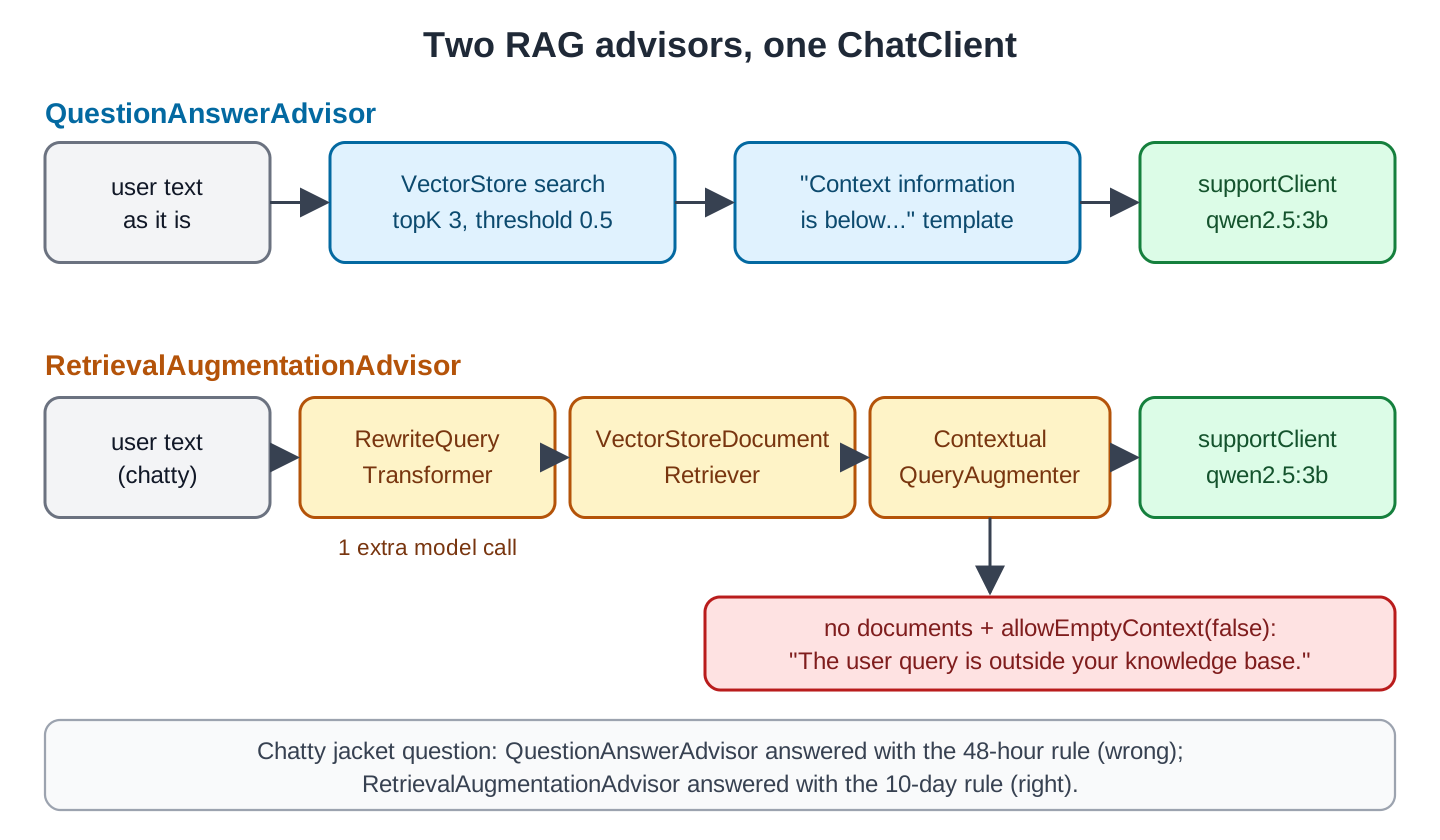
curl -G localhost:8080/rag/qa --data-urlencode "question=Hi! I bought a jacket from you last Monday but the size is wrong and my wife says the colour is ugly too. How long do I have?"{"answer":"I'm sorry to hear about the issues with your order. For damaged or wrong items, you need to report it within 48 hours of delivery. Please upload a photo of the item and the parcel on the order page, and we will send a replacement or provide a full refund. Please note that the 48-hour period starts from the moment you receive the delivery.","sources":["returns.md: Damaged or wrong items\nIf an item arrives damaged or is not what you ordered, report it within 48 hours of delivery. Upload a photo of the item and the parcel on the order page. We send a replacement or give a full refund, and you do not pay for the return pickup.","returns.md: Return window\nYou can return most items within 10 days of delivery. The item must be unused and in its original box with all tags.","returns.md: Refunds\nRefunds go back to the original payment method within 5 to 7 working days after we receive the item. If you choose store credit instead, it is added to your OrderDesk wallet at once."]}QuestionAnswerAdvisor searched with the whole message. The phrase “the size is wrong” pulled “Damaged or wrong items” to the top, and the model answered with the 48-hour rule for wrong items. But a wrong size isn’t a wrong item, and the customer has 10 days.
The same question through RetrievalAugmentationAdvisor:
{"answer":"You have 10 days from the delivery date to return the item. If you choose to return it, you can get a refund or store credit.","sources":["returns.md: Damaged or wrong items\nIf an item arrives damaged or is not what you ordered, report it within 48 hours of delivery. Upload a photo of the item and the parcel on the order page. We send a replacement or give a full refund, and you do not pay for the return pickup.","returns.md: Return window\nYou can return most items within 10 days of delivery. The item must be unused and in its original box with all tags.","returns.md: Refunds\nRefunds go back to the original payment method within 5 to 7 working days after we receive the item. If you choose store credit instead, it is added to your OrderDesk wallet at once."]}The answer is right this time. RewriteQueryTransformer turned the message into a short search query before the search. The rewrite costs one more chat model call.
4.2. A Question the Policies Don’t Cover
We asked “Do you sell pizza?”. No section scored above 0.5, so both advisors found no documents:
{"answer":"I don't sell pizza. This information is not available in the given context.","sources":[]}
{"answer":"I'm sorry to say that I don't have the information you're looking for. This query seems to be about a specific user's order details, which isn't part of my current knowledge base. I recommend checking your order status through the online store's website or app for the most accurate information. How can I assist you further?","sources":[]}
The first line is QuestionAnswerAdvisor. With no documents, its template still told the model to say it can’t answer, and the model did. The second line is RetrievalAugmentationAdvisor. With allowEmptyContext(false), ContextualQueryAugmenter replaced the prompt with this one from Spring AI:
The user query is outside your knowledge base.
Politely inform the user that you can't answer it.
The model said it couldn’t help, but it also made up a reason (“a specific user’s order details”). Neither answer invented a pizza menu, which is the main point. If you set allowEmptyContext(true), the question goes to the model without any context, and the model answers from its own knowledge.
5. Common Traps
5.1. A Threshold That Is Too High
Set the similarity threshold too high, and it drops the right sections too. We searched the store with the /search endpoint and a threshold of 0.7:
curl -G localhost:8080/search --data-urlencode "query=How many days do I have to send back a jacket?" --data-urlencode "threshold=0.7"[]The “Return window” section scored 0.667 for this wording, so nothing passed. With this threshold in the advisor, OrderDesk would say it can’t answer a question that its policies cover. Test the threshold with real questions, worded the way customers write them.
5.2. Answers from Outside the Documents
The templates tell the model to use only the context, but a small model doesn’t always obey. In the chatty question, QuestionAnswerAdvisor added “the 48-hour period starts from the moment you receive the delivery”, which no policy says. Keep the sources in the response, as RagAnswer does, so that someone can check an answer against them.
5.3. The Rewrite Uses the Chat Model
On a hosted model, the extra rewrite call costs money and time. For short, clean questions, skip the transformer or use QuestionAnswerAdvisor.
5.4. RAG on Every Request
We added the advisors per request with advisors(). If you add one with defaultAdvisors() on the ChatClient builder, every request made through that client searches the store, including greetings and small talk. Add RAG where the question needs documents.
6. Which Advisor to Use
| QuestionAnswerAdvisor | RetrievalAugmentationAdvisor | |
|---|---|---|
| Module | spring-ai-vector-store-advisor | spring-ai-rag |
| Setup | Store and a SearchRequest | Retriever, plus optional transformers, expander and augmenter |
| Search query | The user text as it is | The user text, or a rewritten, expanded or translated query |
| No documents found | Template still asks the model to say it can’t answer | allowEmptyContext decides: refuse prompt or plain model answer |
| Documents in the context key | RETRIEVED_DOCUMENTS | DOCUMENT_CONTEXT |
| Chatty question in our test | Wrong rule (48 hours) | Right rule (10 days) |
| Extra model calls | None | One per transformer or expander |
Start with QuestionAnswerAdvisor when questions are short and clear, such as a search box or an internal tool. Use RetrievalAugmentationAdvisor when users write the way they talk, or when you need to change one step of the pipeline.
7. FAQs
7.1. Can I filter the documents per request?
Yes. QuestionAnswerAdvisor takes a filter expression per request through .advisors(a -> a.param(QuestionAnswerAdvisor.FILTER_EXPRESSION, “topic == ‘returns'”)). VectorStoreDocumentRetriever has a filterExpression() setting for the same purpose.
7.2. Does RAG work with chat memory?
Yes. Add MessageChatMemoryAdvisor next to the RAG advisor. For follow-up questions such as “and for shoes?”, add CompressionQueryTransformer to RetrievalAugmentationAdvisor, so that the search uses a complete question.
7.3. Does RAG work with streaming?
Yes. Both advisors also run on stream() calls. The search happens before the first piece of the answer arrives.
7.4. How many documents should topK be?
Start with 3 to 5 for short sections. More documents mean a longer, costlier prompt. Each extra one is also a chance to pick the wrong rule.
8. Conclusion
Both advisors add our documents to the prompt without changing the ChatClient code. Use QuestionAnswerAdvisor for short, clean questions, and RetrievalAugmentationAdvisor when users write the way they talk.
The one trap to remember is the similarity threshold. Set it too high, and the advisor finds nothing, so the app refuses questions that its documents answer.
All articles in order: Spring AI Tutorial
9. References
- Spring AI Reference: Retrieval Augmented Generation
- Spring AI Reference: Advisors API
- RAG Explained: Retrieval Augmented Generation for Java
Drop me your questions related to Spring AI RAG advisors in the comments.
Happy Learning !!
