
Spring AI supports many vector stores behind a single VectorStore interface, so changing the store doesn’t change the code that adds and searches documents. In this example, we run the same Spring AI app on five stores: SimpleVectorStore, Chroma, pgvector, Redis, and Qdrant.
The short answer: with our 16 documents, all five were about equally fast, because creating the embeddings took most of the time. So pick by what you already run and by the features you need, not by speed.
1. What Stays the Same and What Changes
A vector store saves texts with their embeddings and finds the closest ones to a question. An embedding is an array of numbers (a float[] in Java) that stands for the meaning of a text. In Spring AI, every store implements the VectorStore interface, with the same methods:
- add(List<Document> documents) embeds and saves documents. A Document is Spring AI’s class for one piece of text with its metadata (extra key-value pairs).
- similaritySearch(SearchRequest request) returns the closest documents.
- delete(String filterExpression) removes documents that match a filter, such as topic == ‘returns’.
A SearchRequest carries the question and three limits. The topK value is the number of results, and the similarity threshold is the lowest score a result may have. An optional metadata filter keeps only documents whose metadata matches.
The score says how close a document is to the question: in our runs it was between 0 and 1, and higher means closer. Most stores report the cosine similarity of the two embeddings as the score.
OrderDesk’s search code uses only this interface. This is its PolicySearchController, with the GET /search endpoint:
package com.howtodoinjava.orderdesk.vectorstore;

import java.util.List;

import org.springframework.ai.document.Document;
import org.springframework.ai.vectorstore.SearchRequest;
import org.springframework.ai.vectorstore.VectorStore;
import org.springframework.ai.vectorstore.filter.FilterExpressionBuilder;
import org.springframework.web.bind.annotation.GetMapping;
import org.springframework.web.bind.annotation.RequestParam;
import org.springframework.web.bind.annotation.RestController;

@RestController
public class PolicySearchController {

    private final VectorStore vectorStore;

    PolicySearchController(VectorStore vectorStore) {
        this.vectorStore = vectorStore;
    }

    @GetMapping("/search")
    List<SearchHit> search(@RequestParam String query,
                           @RequestParam(defaultValue = "3") int topK,
                           @RequestParam(defaultValue = "0.0") double threshold,
                           @RequestParam(required = false) String topic) {

        SearchRequest.Builder request = SearchRequest.builder()
            .query(query)
            .topK(topK)
            .similarityThreshold(threshold);
        if (topic != null) {
            // the builder treats topic as a value, never as part of the expression
            request.filterExpression(new FilterExpressionBuilder().eq("topic", topic).build());
        }

        List<Document> documents = vectorStore.similaritySearch(request.build());
        return documents.stream()
            .map(d -> new SearchHit(
                Math.round(d.getScore() * 1000) / 1000.0,
                String.valueOf(d.getMetadata().get("topic")),
                d.getText()))
            .toList();
    }

    record SearchHit(double score, String topic, String text) {
    }
}
The loading code, PolicyIngestion, does two things with the same interface. First, it removes the old sections of each policy file with delete(), and then it saves the new ones with add(). Neither class changed for any store.
What changes per store is this:
- The starter dependency and its properties.
- Sometimes a bean of our own, when a setting has no property.
- The server that we run next to the app, if any.
- Small differences in behavior: how filters are set up, the scale of the scores, and what survives a restart.
2. The Example App and the Test
This article is part of the OrderDesk series, where every Spring AI article grows the same app. OrderDesk is the support assistant of a demo online store, and it runs on Spring Boot 4.1.1, Spring AI 2.0.1, and Java 21. The full app is on GitHub in the orderdesk folder, and the store code belongs to the com.howtodoinjava.orderdesk.vectorstore package.
If you need help with the basic setup, follow the Getting Started with Spring AI tutorial. It covers Ollama, the Spring Boot project, and the Spring AI BOM (bill of materials), which sets the versions of all Spring AI dependencies.
2.1. Setup This Article Adds
The embedding model is nomic-embed-text, which returns 768 numbers per text. We download it into Ollama:
ollama pull nomic-embed-textThen two lines in application.properties pick the embedding model and the default store:
# Embedding model for RAG (ollama pull nomic-embed-text)
spring.ai.ollama.embedding.options.model=nomic-embed-text

# Which vector store is active: simple (default, in memory), chroma, pgvector, redis or qdrant.
# The profiles application-chroma.properties and so on switch it.
spring.ai.vectorstore.type=simple
The Ollama starter from Getting Started creates the EmbeddingModel bean from the first property. Every store uses this bean to create embeddings.
Next, we add the four store starters and the Postgres driver to pom.xml. The Spring AI BOM sets their versions:
    <dependency>
      <groupId>org.springframework.ai</groupId>
      <artifactId>spring-ai-starter-vector-store-chroma</artifactId>
    </dependency>
    <dependency>
      <groupId>org.springframework.ai</groupId>
      <artifactId>spring-ai-starter-vector-store-pgvector</artifactId>
    </dependency>
    <dependency>
      <groupId>org.springframework.ai</groupId>
      <artifactId>spring-ai-starter-vector-store-redis</artifactId>
    </dependency>
    <dependency>
      <groupId>org.springframework.ai</groupId>
      <artifactId>spring-ai-starter-vector-store-qdrant</artifactId>
    </dependency>
    <dependency>
      <groupId>org.postgresql</groupId>
      <artifactId>postgresql</artifactId>
      <scope>runtime</scope>
    </dependency>
In your own app, add only the starter of the store you pick. SimpleVectorStore needs no starter of its own: it’s in the spring-ai-vector-store jar, which every store starter brings in. The Redis starter also brings Jedis, a Java client library for Redis.
The spring.ai.vectorstore.type property is defined by Spring AI. Each store’s auto-configuration creates its VectorStore bean only when this value matches its name, so the other starters stay inactive. With the value simple, none of the four runs, and our own SimpleVectorStoreConfig creates the store (Section 4.1).
Each store has a Spring profile, a named set of properties that we turn on at startup. Its file sets spring.ai.vectorstore.type and the store’s connection: application-chroma.properties, application-pgvector.properties, application-redis.properties, and application-qdrant.properties. We start the app with a profile like this:
mvn spring-boot:run -Dspring-boot.run.profiles=chroma2.2. Files from Earlier Articles
The test uses these OrderDesk files without changes:
- PolicyIngestion.java reads the policy files, turns each section into a Document with topic and source metadata, and loads them into the VectorStore. Explained in Spring AI VectorStore Example: SimpleVectorStore and ChromaDB, and its final form in Spring AI ETL Pipeline Example for Data Ingestion.
- IngestController.java calls PolicyIngestion on POST /ingest and returns the number of files, sections, and chunks. Explained in the VectorStore article above.
- policies/*.md, the four policy files (returns, shipping, warranty, payments) with 16 sections. Explained in the VectorStore article above.
2.3. How We Tested
Every store ran in one Docker container on the same machine as the app, with default settings. For each store, a script did the same steps:
- Start the app with the store’s profile.
- Call POST /ingest twice, to check that the second load replaces the first instead of adding copies.
- Search “How many days do I have to send back a jacket?” and compare the top result and its score.
- Search “How long does it take?” with the filter topic == ‘warranty’.
- Run 20 searches and take the average time.
- Restart the app and count the documents again.
A set of 16 documents is small, so these numbers don’t predict how a store behaves with millions of documents.
3. The Results
| Store | First load (16 docs) | Second load | Average search | Docs after app restart | Server memory | Image size |
|---|---|---|---|---|---|---|
| SimpleVectorStore | 3.1 s | 1.9 s | 0.097 s | 16 (from file) | none | none |
| Chroma 1.0.0 | 2.6 s | 2.0 s | 0.102 s | 16 | 20 MiB | 826 MB |
| pgvector 0.8.7 (Postgres 17) | 2.6 s | 1.8 s | 0.097 s | 16 | 66 MiB | 637 MB |
| Redis Stack 7.4.7 | 2.9 s | 2.0 s | 0.084 s | 16 | 31 MiB | 834 MB |
| Qdrant 1.19.2 | 2.8 s | 1.8 s | 0.093 s | 16 | 68 MiB | 291 MB |
The average search took between 0.084 seconds (Redis) and 0.102 seconds (Chroma). Each search first sends the question to Ollama to create its embedding, and only then asks the store. During the timed searches, Ollama’s own log showed each embedding request took 0.06 to 0.07 seconds on average. The rest, about 0.02 to 0.03 seconds, covered the store query, the HTTP call, and the JSON. So the store’s share of a search was small, and the gaps between stores were smaller still.
Loading was the same. Ollama’s log showed 1.5 to 1.9 seconds of each load in the embedding request for the 16 sections. The first load after each start was slower than the second.
The second load replaced the first in every store. Both loads reported 16 sections, and a search with topK=100 found 16 documents, not 32. The warranty filter returned the three warranty sections, and nothing else, in every store.
The jacket search gave the same three sections in every store. This is the pgvector output:
curl -G localhost:8080/search --data-urlencode "query=How many days do I have to send back a jacket?"[{"score":0.667,"topic":"returns","text":"Return window\nYou can return most items within 10 days of delivery. The item must be unused and in its original box with all tags."},{"score":0.644,"topic":"returns","text":"Refunds\nRefunds go back to the original payment method within 5 to 7 working days after we receive the item. If you choose store credit instead, it is added to your OrderDesk wallet at once."},{"score":0.607,"topic":"returns","text":"Damaged or wrong items\nIf an item arrives damaged or is not what you ordered, report it within 48 hours of delivery. Upload a photo of the item and the parcel on the order page. We send a replacement or give a full refund, and you do not pay for the return pickup."}]Four stores gave the “Return window” section a score of 0.667. Redis gave 0.834 for the same section, because it reports scores on another scale (Section 4.4).
Memory is the idle docker stats value with 16 documents.
4. Each Store in Short
4.1. SimpleVectorStore
SimpleVectorStore keeps documents in a Java Map inside the app. It has no server and no auto-configuration, so OrderDesk creates the bean itself:
package com.howtodoinjava.orderdesk.vectorstore;

import java.io.File;

import org.springframework.ai.embedding.EmbeddingModel;
import org.springframework.ai.vectorstore.SimpleVectorStore;
import org.springframework.beans.factory.ObjectProvider;
import org.springframework.boot.autoconfigure.condition.ConditionalOnProperty;
import org.springframework.context.annotation.Bean;
import org.springframework.context.annotation.Configuration;

import io.micrometer.observation.ObservationRegistry;

@Configuration
@ConditionalOnProperty(name = "spring.ai.vectorstore.type", havingValue = "simple")
public class SimpleVectorStoreConfig {

    // SimpleVectorStore keeps vectors in memory; we save them to this file
    public static final File STORE_FILE = new File("data/vector-store.json");

    @Bean
    SimpleVectorStore vectorStore(EmbeddingModel embeddingModel,
                                  ObjectProvider<ObservationRegistry> observationRegistry) {
        SimpleVectorStore store = SimpleVectorStore.builder(embeddingModel)
            // without a registry, searches don't show up in metrics and traces
            .observationRegistry(observationRegistry.getIfUnique(() -> ObservationRegistry.NOOP))
            .build();
        if (STORE_FILE.exists()) {
            store.load(STORE_FILE);
        }
        return store;
    }
}
@ConditionalOnProperty creates this bean only when spring.ai.vectorstore.type is simple, so a store profile never ends up with two VectorStore beans. The observationRegistry line connects the store to Spring Boot’s metrics, but the comparison doesn’t depend on it.
At startup, load() reads the store back from data/vector-store.json. PolicyIngestion writes that file with save() right after add():
vectorStore.add(chunks);
if (vectorStore instanceof SimpleVectorStore simple) {
    SimpleVectorStoreConfig.STORE_FILE.getParentFile().mkdirs();
    simple.save(SimpleVectorStoreConfig.STORE_FILE);
}
That’s why the 16 documents survived the restart. But every search compares the question with every document, and only one app instance can use the file. Use it for learning, tests, and small demos.
4.2. Chroma
Chroma is an open-source vector database that runs as its own server. It needed one container and five properties:
docker run -d --name chroma -p 8000:8000 chromadb/chromaspring.ai.vectorstore.type=chroma
spring.ai.vectorstore.chroma.client.host=http://localhost
spring.ai.vectorstore.chroma.client.port=8000
spring.ai.vectorstore.chroma.collection-name=orderdesk_policies
spring.ai.vectorstore.chroma.initialize-schema=trueA collection is Chroma’s name for one set of documents, much like a table. The initialize-schema=true property lets Spring AI create it at startup. Filters worked on any metadata key without extra setup.
Chroma groups collections in a tenant and a database. Spring AI saves the data in a tenant and database it creates, named SpringAiTenant and SpringAiDatabase. If you open Chroma’s default database, you’ll see nothing, so look in SpringAiDatabase instead. Chroma’s API changes between major versions, so keep the Chroma server and Spring AI versions in step.
4.3. pgvector
pgvector is a PostgreSQL extension. Spring AI’s PgVectorStore uses the app’s normal DataSource, the object that hands out database connections. So it needed the Postgres driver and the usual datasource properties:
docker run -d --name pgvector -p 5432:5432 -e POSTGRES_USER=orderdesk -e POSTGRES_PASSWORD=orderdesk -e POSTGRES_DB=orderdesk pgvector/pgvector:pg17spring.datasource.url=jdbc:postgresql://localhost:5432/orderdesk
spring.datasource.username=orderdesk
spring.datasource.password=orderdesk
spring.ai.vectorstore.type=pgvector
spring.ai.vectorstore.pgvector.initialize-schema=true
spring.ai.vectorstore.pgvector.dimensions=768
spring.ai.vectorstore.pgvector.distance-type=COSINE_DISTANCE
spring.ai.vectorstore.pgvector.index-type=HNSWSpring AI created a vector_store table with a vector(768) column and an HNSW index (a graph index for fast nearest-neighbor search). Filters on any metadata key became SQL JSON path conditions.
Two errors are typical. The error “expected 1024 dimensions, not 768” means that dimensions doesn’t match the model, while “column cannot have more than 2000 dimensions for hnsw index” comes with big embeddings.
OrderDesk also keeps its chat history and an orders table, from earlier articles, in the same DataSource. Without this profile, they live in a local HSQLDB file. With it, the app created them in Postgres at startup, so there was nothing to create by hand. If your app already runs on Postgres, this is the store with the least new infrastructure.
4.4. Redis
Redis Stack is Redis with its JSON and search modules. It took the most work:
docker run -d --name redis-stack -p 6379:6379 redis/redis-stack-serverspring.data.redis.host=localhost
spring.data.redis.port=6379
spring.data.redis.client-type=jedis
spring.ai.vectorstore.type=redis
spring.ai.vectorstore.redis.initialize-schema=true
spring.ai.vectorstore.redis.index-name=orderdesk-policies
spring.ai.vectorstore.redis.prefix=policy:Redis saves each Document as a JSON value under a key that starts with prefix, and searches them through the search index index-name. We hit four problems:
- Without client-type=jedis, the app didn’t start. Jedis and Lettuce are two Java client libraries for Redis. Spring AI’s Redis auto-configuration needs a Jedis connection, and Spring Boot creates a Lettuce one by default.
- Redis filters only on metadata fields declared in its search index. The auto-configuration has no property for them, so the filter topic == ‘returns’ failed with “Not allowed filter identifier name: topic”. So we created our own RedisVectorStore bean (below).
- An index from an earlier run isn’t updated. We dropped it, with its documents, and restarted the app: docker exec redis-stack redis-cli FT.DROPINDEX orderdesk-policies DD. Then POST /ingest loads the documents again.
- A filter on a value with a dot, such as source == ‘returns.md’, matched nothing, because the dot wasn’t escaped. That’s why PolicyIngestion deletes by topic, not by source.
This is the bean, active only with the redis profile:
package com.howtodoinjava.orderdesk.vectorstore;

import org.springframework.ai.embedding.EmbeddingModel;
import org.springframework.ai.vectorstore.redis.RedisVectorStore;
import org.springframework.ai.vectorstore.redis.RedisVectorStore.MetadataField;
import org.springframework.beans.factory.ObjectProvider;
import org.springframework.context.annotation.Bean;
import org.springframework.context.annotation.Configuration;
import org.springframework.context.annotation.Profile;
import org.springframework.core.env.Environment;

import io.micrometer.observation.ObservationRegistry;
import redis.clients.jedis.RedisClient;

@Configuration
@Profile("redis")
public class RedisVectorStoreConfig {

    @Bean
    RedisVectorStore vectorStore(EmbeddingModel embeddingModel, Environment env,
                                 ObjectProvider<ObservationRegistry> observationRegistry) {
        String host = env.getProperty("spring.data.redis.host", "localhost");
        int port = env.getProperty("spring.data.redis.port", Integer.class, 6379);
        return RedisVectorStore.builder(RedisClient.create(host, port), embeddingModel)
            .indexName("orderdesk-policies")
            .prefix("policy:")
            // Redis can filter only on metadata fields declared in the index
            .metadataFields(
                MetadataField.tag("topic"),
                MetadataField.tag("source"))
            .initializeSchema(true)
            .observationRegistry(observationRegistry.getIfUnique(() -> ObservationRegistry.NOOP))
            .build();
    }
}
When our own VectorStore bean exists, Spring AI’s auto-configuration doesn’t create its own, so it doesn’t read the three spring.ai.vectorstore.redis properties either. Our bean sets the same values in code. MetadataField.tag() declares a field that holds exact values, such as returns.
The scores were on another scale. The other four stores report the cosine similarity. Redis reports (1 + cosine similarity) / 2, so the top result’s 0.667 became (1 + 0.667) / 2 = 0.834. This means a similarity threshold tuned on another store doesn’t carry over. With a threshold of 0.5, “Do you sell pizza?” returned nothing in the other stores and three sections in Redis.
Redis also returned the results out of score order: 0.834, 0.804 and 0.822 in the jacket search. If the order matters to you, sort the list by getScore() in your code. Pick Redis when the app already uses it and the data fits in memory.
4.5. Qdrant
Qdrant is an open-source vector database. Spring AI talks to it over gRPC (a binary network protocol), on port 6334, while the REST API and the web console use 6333:
docker run -d --name qdrant -p 6333:6333 -p 6334:6334 qdrant/qdrantspring.ai.vectorstore.type=qdrant
spring.ai.vectorstore.qdrant.host=localhost
spring.ai.vectorstore.qdrant.port=6334
spring.ai.vectorstore.qdrant.collection-name=orderdesk_policies
spring.ai.vectorstore.qdrant.initialize-schema=trueQdrant worked on the first try, with the same results and scores as Chroma and pgvector. Filters worked without extra setup. Qdrant calls each stored embedding with its metadata a point. Don’t worry if its console shows 0 indexed vectors: below 10,000 points, Qdrant searches without an index.
5. Feature Comparison
The real differences are in features and operations.
| Store | Extra server | Filter setup | Data kept in | Spring AI setup in OrderDesk | Problems we hit |
|---|---|---|---|---|---|
| SimpleVectorStore | None | None | App memory, JSON file | Own bean | None; not for production |
| Chroma | Chroma server | None | Chroma server | 5 properties | Data in Spring AI’s own tenant |
| pgvector | PostgreSQL with pgvector | None | Postgres table | Driver, 3 datasource and 5 store properties | Dimension errors, 2000-dimension index limit |
| Redis | Redis Stack | Declare fields in own bean | Memory (persistence optional) | 3 Redis and 4 store properties, own bean | Jedis client, undeclared fields, old index, dots in tags, score scale |
| Qdrant | Qdrant server | None | Qdrant server (disk) | 5 properties | None |
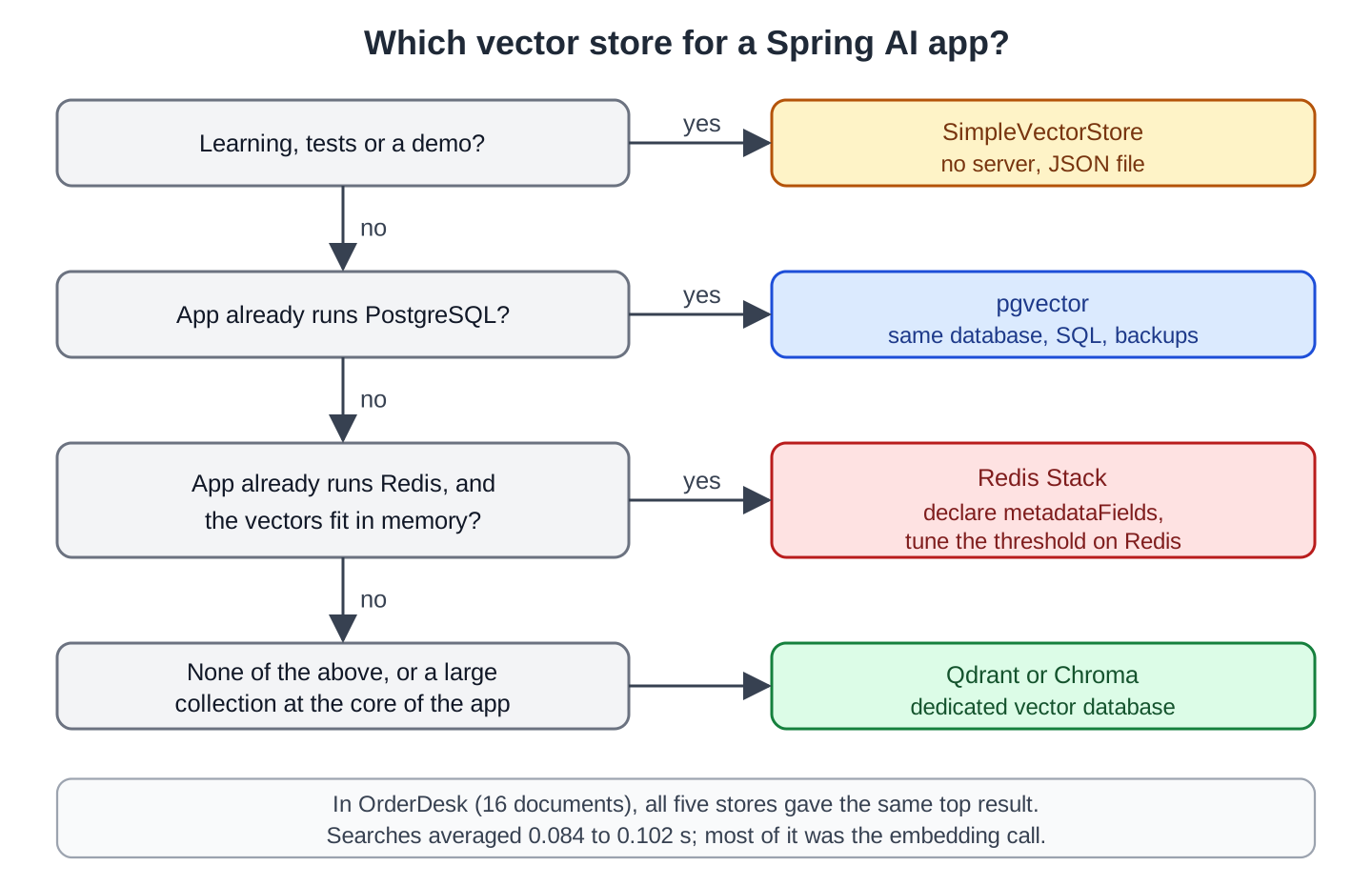
This diagram turns the table into a decision:
6. How to Choose
Use this rule:
- Learning, tests, or a demo: SimpleVectorStore. No server, and the data can live in a JSON file.
- The app already uses PostgreSQL: pgvector. No new server, and backups, access rules, and SQL joins work as before.
- The app already uses Redis, and the vectors fit in memory: Redis Stack. Declare every metadata field you filter on, and tune the threshold on Redis.
- None of the above, or a large collection that is the core of the app: a dedicated vector database such as Qdrant or Chroma. Both worked with properties only.
Speed isn’t on the list: at this size, the store’s share of a search is small. At millions of documents, test with your own data.
7. Switching Stores Later
Because the code uses the VectorStore interface, switching is mostly configuration. These are the steps:
- Add the new starter and its properties, and start its server.
- Load all documents into the new store. In OrderDesk, that is one POST /ingest call. Stores don’t share data.
- Check the filters. Redis needs declared fields, and values with special characters may need care.
- Check the scores and tune the similarity threshold again. Redis showed that scores aren’t always on the same scale.
- Keep the same embedding model, or load everything again with the new one.
8. FAQs
8.1. Which vector store is the fastest in Spring AI?
With small data, the store barely matters because the embedding call takes most of the time. For big collections, test with your own data.
8.2. Can I use two vector stores in one app?
Yes, but not through auto-configuration alone. Create each store as your own bean with a name, and use @Qualifier to pick one. OrderDesk uses one store at a time, picked by spring.ai.vectorstore.type.
8.3. Do I need a vector database for RAG?
No. RAG (retrieval-augmented generation) means the app finds relevant documents and adds them to the model’s prompt. For a few hundred documents, SimpleVectorStore with a JSON file works, and so does pgvector in an existing Postgres. A dedicated vector database helps when the collection is large or central to the app.
8.4. Are filter expressions the same for every store?
The expression language is the same, and Spring AI converts it for each store. The setup isn’t the same: Redis filters only on declared fields. Test your filters after a switch.
8.5. Which stores did you not test?
Spring AI also supports Elasticsearch, OpenSearch, MongoDB Atlas, Milvus, Weaviate, Pinecone, Neo4j, Cassandra, Oracle, MariaDB, Azure AI Search, and others. We tested the four that run as a single local container, plus SimpleVectorStore.
9. Conclusion
The same OrderDesk code ran on all five stores without changes, and all five returned the “Return window” section first. Searches averaged 0.084 to 0.102 seconds, and most of that was the embedding call to Ollama. So choose by what you already run: Postgres means pgvector, Redis means Redis, and otherwise Qdrant or Chroma.
The one trap to remember is that stores aren’t fully interchangeable. Redis needed declared filter fields and reported scores on another scale, so retest filters and thresholds after every switch.
All articles in order: Spring AI Tutorial
10. References
Drop me your questions related to Spring AI vector stores in the comments.
Happy Learning !!
