
Tool calling connects a model’s response to application capabilities such as an order lookup. The model proposes a tool name and arguments; the Java application validates and executes the operation, then returns the result for the model to explain.
This article exposes OrderDesk’s database lookups as Spring AI tools. We inspect their definitions, follow the execution loop, handle errors, and distinguish read-only lookups from actions that need authorization or confirmation.
1. How Tool Calling Works
A chat model only knows what it learned in training and what is in the prompt. It can’t know that order ORD-1039 shipped yesterday. When we asked without tools, OrderDesk said so:
I'm sorry, but I don't have real-time order status information as I don't have access to your specific account details. To check the status of your order, please log in to your account on our website or contact our customer support for assistance.A tool supplies current application data that the prompt does not contain. The model does not execute the Java method itself. For the illustrated lookup, the exchange is:
- Spring AI sends the question together with a description of each tool: its name, what it does, and a JSON schema of its parameters.
- The model decides that it needs a tool and replies with a tool call, such as getOrderStatus with {“orderId”:”ORD-1039″}, instead of an answer.
- Spring AI finds the matching Java method, runs it, and converts the result to JSON.
- Spring AI sends the result back to the model in a second request.
- The model writes the final answer from the result.
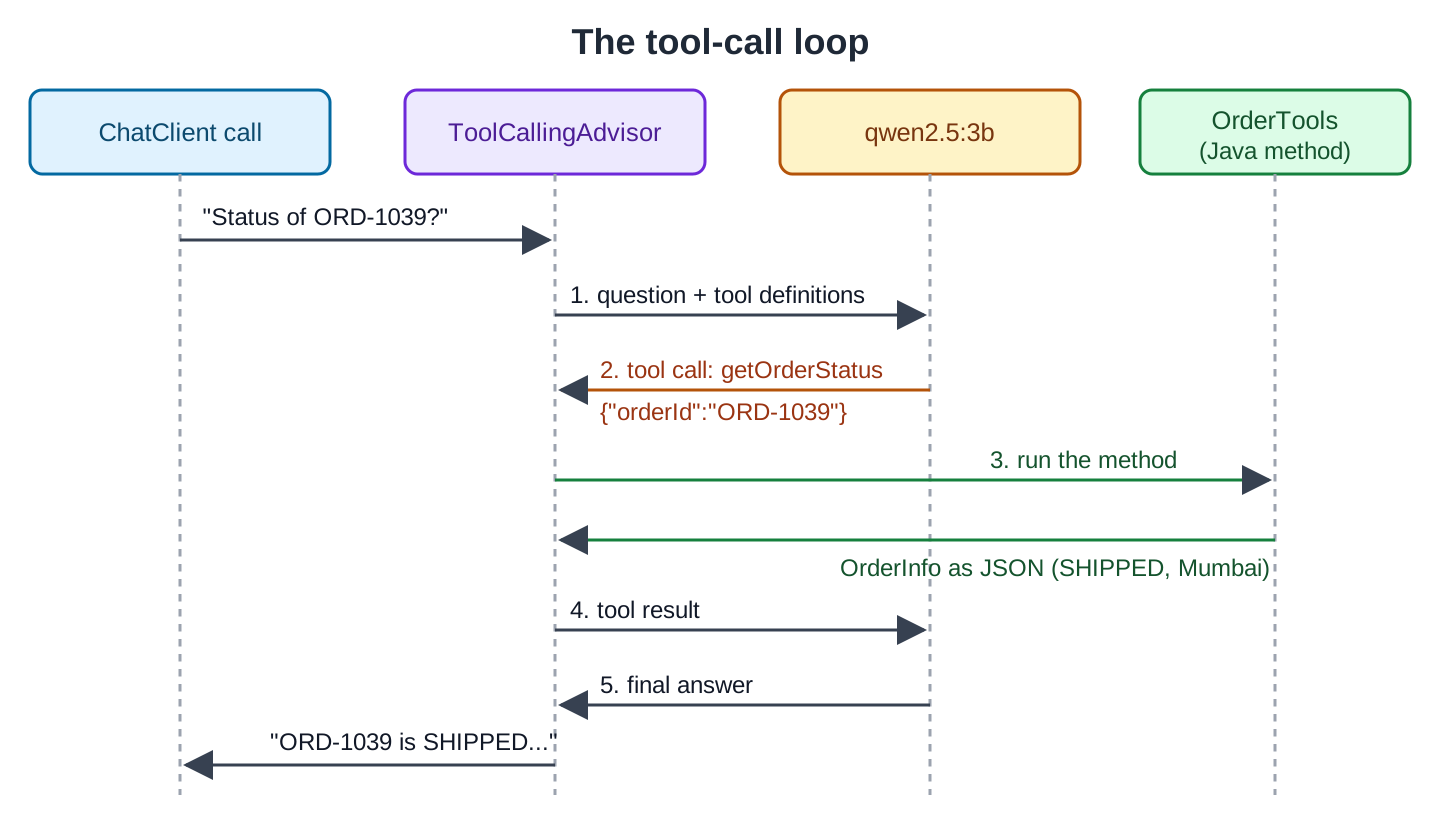
Steps 2 to 4 can repeat. The model may call several tools, or the same tool twice, before it answers.
Spring AI 2.0 moves the ordinary tool-execution loop into ToolCallingAdvisor. A ChatClient request with tool definitions can use the standard orchestration without application code manually resubmitting each tool result. Provider-level behavior and custom execution configurations may differ.
Not every model supports tools. In Ollama, the model page shows a “tools” tag. The qwen2.5 family supports them, and we use qwen2.5:3b.
2. The Example App
This article adds tools to OrderDesk, the app built through this Spring AI series. The code for this article is in the com.howtodoinjava.orderdesk.tools package. Every new class goes in a sub-package of com.howtodoinjava.orderdesk, so Spring Boot finds it from the main class. The full app is on GitHub in the orderdesk folder.
The basic setup (Ollama with qwen2.5:3b, the Spring Boot project, the Spring AI BOM, and the Ollama starter) is explained in Getting Started with Spring AI. Tool calling itself needs no extra dependency. The tools in this article read an orders table, so the app needs a database:
<dependency>
  <groupId>org.springframework.boot</groupId>
  <artifactId>spring-boot-starter-jdbc</artifactId>
</dependency>
<dependency>
  <groupId>org.hsqldb</groupId>
  <artifactId>hsqldb</artifactId>
  <scope>runtime</scope>
</dependency>
spring.datasource.url=jdbc:hsqldb:file:./data/orderdesk
spring.sql.init.mode=alwaysHSQLDB is a small Java database, here in file mode. The JDBC starter auto-configures a JdbcClient bean for this datasource, so we don’t declare one. The spring.sql.init.mode=always setting runs schema.sql and data.sql from src/main/resources at every start.
The schema.sql file drops the orders table and creates it again, so the second start doesn’t fail on an existing table:
DROP TABLE IF EXISTS orders;

CREATE TABLE orders (
    order_id      VARCHAR(10) PRIMARY KEY,
    customer_name VARCHAR(50) NOT NULL,
    city          VARCHAR(30) NOT NULL,
    status        VARCHAR(20) NOT NULL,
    total_inr     DECIMAL(10, 2) NOT NULL,
    placed_on     DATE NOT NULL,
    delivered_on  DATE
);
The data.sql file adds 12 sample orders. The answers below come from these rows:
INSERT INTO orders VALUES ('ORD-1031', 'Priya Sharma', 'Pune', 'DELIVERED', 1299.00, DATE '2026-10-01', DATE '2026-10-03');
INSERT INTO orders VALUES ('ORD-1032', 'Rahul Verma', 'Mumbai', 'DELIVERED', 349.00, DATE '2026-10-02', DATE '2026-10-04');
INSERT INTO orders VALUES ('ORD-1033', 'Anita Desai', 'Jaipur', 'DELIVERED', 2499.00, DATE '2026-10-02', DATE '2026-10-07');
INSERT INTO orders VALUES ('ORD-1034', 'Vikram Singh', 'Delhi', 'RETURNED', 899.00, DATE '2026-10-03', DATE '2026-10-05');
INSERT INTO orders VALUES ('ORD-1035', 'Meera Iyer', 'Chennai', 'DELIVERED', 4599.00, DATE '2026-10-04', DATE '2026-10-09');
INSERT INTO orders VALUES ('ORD-1036', 'Priya Sharma', 'Pune', 'DELIVERED', 199.00, DATE '2026-10-05', DATE '2026-10-07');
INSERT INTO orders VALUES ('ORD-1037', 'Arjun Nair', 'Kochi', 'CANCELLED', 1599.00, DATE '2026-10-06', NULL);
INSERT INTO orders VALUES ('ORD-1038', 'Sneha Patil', 'Pune', 'DELIVERED', 749.00, DATE '2026-10-07', DATE '2026-10-09');
INSERT INTO orders VALUES ('ORD-1039', 'Rahul Verma', 'Mumbai', 'SHIPPED', 3299.00, DATE '2026-10-12', NULL);
INSERT INTO orders VALUES ('ORD-1040', 'Karan Mehta', 'Ahmedabad', 'SHIPPED', 559.00, DATE '2026-10-13', NULL);
INSERT INTO orders VALUES ('ORD-1041', 'Fatima Khan', 'Delhi', 'PLACED', 999.00, DATE '2026-10-15', NULL);
INSERT INTO orders VALUES ('ORD-1042', 'Meera Iyer', 'Chennai', 'PLACED', 12999.00, DATE '2026-10-16', NULL);
We use the tools with supportClient, the ChatClient bean that Getting Started creates in ChatClientConfig. The bean stays unchanged, and its system prompt holds the store’s rules:
package com.howtodoinjava.orderdesk.chat;

import org.springframework.ai.chat.client.ChatClient;
import org.springframework.context.annotation.Bean;
import org.springframework.context.annotation.Configuration;

@Configuration
public class ChatClientConfig {

    static final String SUPPORT_RULES = """
        You are OrderDesk, the support assistant of an online store.
        Answer in at most three sentences.
        Delivery: Pune, Mumbai and Delhi in 2 days; every other city in India in 5 days.
        Delivery is free above INR 499; below that it costs INR 49.
        We do not deliver outside India.
        """;

    @Bean
    ChatClient supportClient(ChatClient.Builder builder) {
        return builder
            .defaultSystem(SUPPORT_RULES)
            .build();
    }
}
Start Ollama and the app as shown in Getting Started, and restart the app after adding the code.
3. Define, Register, and Call the Order Tools
We create OrderTools and ToolChatController in the tools package, then ask questions through the new /tools/ask endpoint.
Step 1: Write the Tools with @Tool
Annotate the methods you intend to expose, then register the containing object with the request. Merely declaring a method does not authorize it for every caller:
package com.howtodoinjava.orderdesk.tools;

import java.time.LocalDate;
import java.util.List;

import org.springframework.ai.tool.annotation.Tool;
import org.springframework.ai.tool.annotation.ToolParam;
import org.springframework.jdbc.core.simple.JdbcClient;
import org.springframework.stereotype.Component;

@Component
public class OrderTools {

    private final JdbcClient jdbcClient;

    OrderTools(JdbcClient jdbcClient) {
        this.jdbcClient = jdbcClient;
    }

    @Tool(description = "Get the status, city, total and dates of one order by its id")
    public OrderInfo getOrderStatus(
            @ToolParam(description = "Order id, for example ORD-1042") String orderId) {
        return jdbcClient.sql("""
                SELECT order_id, customer_name, city, status, total_inr, placed_on, delivered_on
                FROM orders WHERE order_id = ?""")
            .param(orderId.trim().toUpperCase())
            .query(OrderInfo.class)
            .optional()
            .orElseThrow(() -> new IllegalArgumentException("No order with id " + orderId));
    }

    @Tool(description = "List all orders of one customer by the customer's full name")
    public List<OrderInfo> listOrders(
            @ToolParam(description = "Customer's full name, for example Priya Sharma")
            String customerName) {
        return jdbcClient.sql("""
                SELECT order_id, customer_name, city, status, total_inr, placed_on, delivered_on
                FROM orders WHERE LOWER(customer_name) = LOWER(?) ORDER BY placed_on""")
            .param(customerName.trim())
            .query(OrderInfo.class)
            .list();
    }

    @Tool(description = """
        Start the cancellation of an order. It does not cancel the order:
        it returns the text the customer must confirm on the order page.""")
    public String requestCancellation(
            @ToolParam(description = "Order id, for example ORD-1042") String orderId) {
        OrderInfo order = getOrderStatus(orderId);
        if (!order.status().equals("PLACED")) {
            return "Order " + order.orderId() + " is " + order.status()
                + " and can't be cancelled.";
        }
        return "To cancel " + order.orderId() + " (INR " + order.totalInr()
            + "), the customer must click Confirm cancellation on the order page.";
    }

    public record OrderInfo(String orderId, String customerName, String city, String status,
                            double totalInr, LocalDate placedOn, LocalDate deliveredOn) {
    }
}
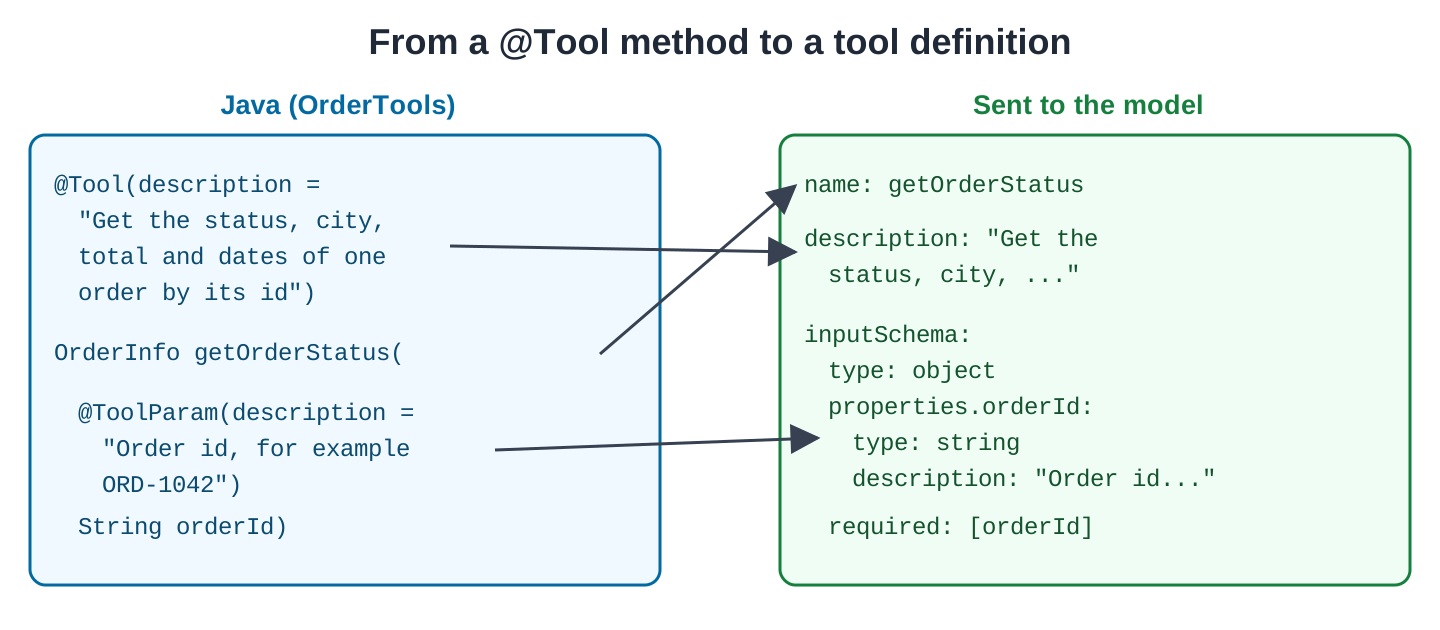
The parts that the model sees:
- @Tool(description = …) tells the model what the tool does and when to use it. The method name becomes the tool name.
- @ToolParam(description = …) describes one parameter. An example value, such as “ORD-1042”, helps a small model pass the right format.
- The return type can be any object; Spring AI sends it as JSON.
JdbcClient is Spring’s fluent API for SQL. The query(OrderInfo.class) call maps each row to the record, matching order_id to orderId.
Cancelling an order changes data, so requestCancellation doesn’t cancel it. It only tells the customer how to confirm the cancellation (see Section 4.3).
Step 2: See What the Model Receives
Spring AI turns each method into a tool definition. A tool definition has three parts: the name, the description, and the input schema. The input schema is a JSON schema of the parameters. This test prints the name and the input schema of each tool:
package com.howtodoinjava.orderdesk.tools;

import static org.assertj.core.api.Assertions.assertThat;

import org.junit.jupiter.api.Test;
import org.springframework.ai.tool.ToolCallback;
import org.springframework.ai.support.ToolCallbacks;

class OrderToolsSchemaTest {

    @Test
    void toolsBecomeJsonSchemas() {
        ToolCallback[] callbacks = ToolCallbacks.from(new OrderTools(null));
        for (ToolCallback callback : callbacks) {
            System.out.println(callback.getToolDefinition().name() + " "
                + callback.getToolDefinition().inputSchema());
        }
        assertThat(callbacks).hasSize(3);
    }
}
ToolCallbacks.from() reads the @Tool methods of an object and returns one ToolCallback per method. Building the definitions runs no SQL, so we pass null for the JdbcClient. The test sits in the same package because the OrderTools constructor is package-private.
This is the input schema of getOrderStatus:
{
  "$schema" : "https://json-schema.org/draft/2020-12/schema",
  "type" : "object",
  "properties" : {
    "orderId" : {
      "type" : "string",
      "description" : "Order id, for example ORD-1042"
    }
  },
  "required" : [ "orderId" ],
  "additionalProperties" : false
}
The property name orderId is the Java parameter name. It survives compilation because the Spring Boot parent POM compiles with the -parameters flag. Parameters are required unless @ToolParam(required = false) says otherwise. The “additionalProperties” : false entry tells the model to send no other arguments.
Step 3: Pass the Tools to a Request
The tools(orderTools) call makes the tools available for this one request:
package com.howtodoinjava.orderdesk.tools;

import org.springframework.ai.chat.client.ChatClient;
import org.springframework.beans.factory.annotation.Qualifier;
import org.springframework.web.bind.annotation.GetMapping;
import org.springframework.web.bind.annotation.RequestParam;
import org.springframework.web.bind.annotation.RestController;

@RestController
public class ToolChatController {

    private final ChatClient supportClient;
    private final OrderTools orderTools;

    ToolChatController(@Qualifier("supportClient") ChatClient supportClient,
                       OrderTools orderTools) {
        this.supportClient = supportClient;
        this.orderTools = orderTools;
    }

    @GetMapping("/tools/ask")
    String ask(@RequestParam String question) {
        return supportClient.prompt()
            .user(question)
            .tools(orderTools)
            .call()
            .content();
    }
}
@Qualifier(“supportClient”) picks the support client, because the finished OrderDesk app has several ChatClient beans. To give every request of a client the same tools, use defaultTools(orderTools) on its builder instead.
Step 4: Ask About Orders
Let’s ask the question that failed without tools. The -G option with –data-urlencode makes curl send it as an encoded URL parameter:
curl -G localhost:8080/tools/ask --data-urlencode "question=What is the status of order ORD-1039?"The status of order ORD-1039 is SHIPPED. It was placed by Rahul Verma from Mumbai, and the total amount is INR 3299.00. The order has not been delivered yet as the 'deliveredOn' field is null.The recorded response uses the returned order data and even mentions deliveredOn by its record name. The result demonstrates successful lookup, but another response can still misinterpret correct tool data.
To see the tool call in the log, add this line to application.properties:
logging.level.org.springframework.ai=DEBUGThe log then shows the call:
o.s.a.m.tool.DefaultToolCallingManager   : Executing tool call: getOrderStatus
o.s.ai.tool.method.MethodToolCallback    : Starting execution of tool: getOrderStatus
o.s.ai.tool.method.MethodToolCallback    : Successful execution of tool: getOrderStatus
o.s.a.t.e.DefaultToolCallResultConverter : Converting tool result to JSON.
DefaultToolCallingManager is the class that ToolCallingAdvisor uses to run tool calls. MethodToolCallback wraps one @Tool method and invokes it.
A question about a customer uses the other tool:
curl -G localhost:8080/tools/ask --data-urlencode "question=Which orders has Meera Iyer placed, and which of them are delivered?"Meera Iyer has placed two orders. The first order with ID ORD-1035 was delivered to Chennai and has a total of INR 4599.0. The second order with ID ORD-1042 is still in the Placed status and has not been delivered yet.The model chose listOrders by itself, from the descriptions. When the question has no order id, it asks for one instead of guessing:
Could you please provide me with the order ID so I can check the status of your order?4. Common Traps
4.1. A Tool Throws an Exception
The getOrderStatus tool throws IllegalArgumentException for an unknown id. By default, Spring AI doesn’t fail the request. It sends the exception message to the model as the tool result, and the model explains it:
curl -G localhost:8080/tools/ask --data-urlencode "question=Where is order ORD-9999?"I'm sorry, but there is no order with the ID ORD-9999 in our system. Please check the order ID and try again.Treat any error text returned to the model as potentially visible to the caller. Return useful domain errors while keeping SQL, credentials, and stack details out of them. Exception-handling policy can be changed with spring.ai.tools.throw-exception-on-error.
4.2. The Model Calls Tools in a Loop
A confused model can call tools again and again, and each call costs time and tokens. Spring AI 2.0 limits the calls in one request with these properties:
- spring.ai.tools.limits.max-total-tool-calls caps all tool calls together. The default is 150.
- spring.ai.tools.limits.max-calls-per-tool-default caps the calls of each single tool. The default is 40.
- spring.ai.tools.limits.max-calls-per-tool overrides the cap for named tools, for example spring.ai.tools.limits.max-calls-per-tool.getOrderStatus=5.
When a limit is hit, Spring AI throws a ToolCallLimitExceededException by default. With spring.ai.tools.limits.on-limit-exceeded=return-error-response, it returns an error response instead. Our three tools never came near these limits, so we have no recorded output for this case.
4.3. Tools That Change Data
A proposed tool call is not sufficient authorization for an action. Decide which operations may execute automatically, which require confirmation, and which must be rejected. The cancellation tool here only prepares guidance rather than changing an order:
To cancel your order ORD-1041, you need to click "Confirm cancellation" on the order page. The order is INR 999.0 and was placed by you.For a delivered order, the tool says no, and the model passes it on:
The order ORD-1031 has already been delivered and cannot be cancelled. Please note that once an order is delivered, it cannot be cancelled. If you need assistance with another order or have any other questions, feel free to ask.The example leaves actual cancellation to a normal authenticated endpoint and customer confirmation. For other side effects, enforce the application’s permission and approval rules inside the execution path rather than relying on model instructions.
4.4. Tools See Only What You Pass Them
The model chooses the arguments. Our getOrderStatus tool would return any order to anyone who knows its id. In a real app, check inside the tool that the order belongs to the logged-in customer. To give the tool the user id, use Spring AI’s ToolContext. Your code passes the id to the tool, and the model never sees it. FAQ 6.4 shows the two calls.
4.5. Small Models and Many Tools
The qwen2.5:3b model handled three tools well. With dozens of tools, small models pick the wrong one more often, and every tool definition adds tokens to each request. Give each request only the tools it needs, and keep descriptions short and specific.
5. Moving from the Old Function API
Older examples may use FunctionCallback and functions(…), while current examples use tool callbacks and @Tool methods. Migrate against the API changes documented for your actual source and target versions rather than assuming all old symbols disappeared in one release:
- Replace a Function<Request, Response> bean with a method annotated with @Tool in a @Component.
- Replace .functions(“getOrderStatus”) with .tools(orderTools).
- Move parameter descriptions from @JsonPropertyDescription on the request record to @ToolParam on the method parameter.
When the logic already exists as a Function, wrap it in a FunctionToolCallback instead. Build it with FunctionToolCallback.builder(“name”, function), then add .description(…) and .inputType(Request.class), and call .build(). Pass the result with .toolCallbacks(…), not .tools(…).
6. FAQs
6.1. Does the model run my Java code?
No. Spring AI runs the method in your application, with your security and database access.
6.2. Which models support tool calling?
Check the specific model’s tool-calling capability and the provider integration. A provider name alone does not establish support. For Ollama, use the model library’s tools capability listing and test the argument formats your operations require.
6.3. Can a tool return the answer directly, without the model?
Yes. @Tool(returnDirect = true) sends the tool’s result straight to the caller and skips the second model call. It suits tools whose result is already the final answer, such as a formatted report.
6.4. How do I pass the logged-in user to a tool?
On the request, pass the values with .toolContext(Map.of(“userId”, id)) (Map is java.util.Map). In the tool method, add a parameter of type ToolContext and read the value with toolContext.getContext().get(“userId”). Spring AI fills that parameter and leaves it out of the input schema.
6.5. How much do tools cost?
Each tool definition is sent with every request that has the tool, and each tool result goes back to the model in a second request. With qwen2.5:3b, the question that needed no tool call took about 4 seconds, and questions with one tool call took 12 to 24 seconds. To see the tokens, call .call().chatResponse() instead of .content() and read getMetadata().getUsage().
7. Conclusion
Expose narrow application methods with clear descriptions, register only the tools a request needs, and let Spring AI coordinate the supported execution loop. The application still owns validation, authorization, side effects, and error disclosure.
Use tool output as evidence for the answer, and check that important facts survive the final model response. Confirmation requirements should follow the action’s consequences and application policy, not the model’s confidence.
All articles in order: Spring AI Tutorial
8. References
Drop me your questions related to Spring AI tool calling in the comments.
Happy Learning !!
