
Spring AI chat memory lets a chatbot remember the earlier messages of a conversation. In this example, we add it to OrderDesk, a support assistant. Each customer gets their own conversation, saved in a file database that survives a restart. We’ll use Spring Boot 4.1, Spring AI 2.0, and a local Ollama model.
1. The Problem: The Chatbot Forgets
OrderDesk already has a /ask endpoint in its ChatController class, from Getting Started with Spring AI. It sends one question to the model and returns the answer as a String:
@GetMapping("/ask")
String ask(@RequestParam String question) {
    return supportClient.prompt()
        .user(question)
        .call()
        .content();
}
Here, supportClient is a ChatClient, Spring AI’s class for sending a prompt to a chat model and reading the answer. The prompt() method starts a request, user() sets the user message, call() sends it, and content() returns the answer text. Section 3 shows how supportClient is created.
Start Ollama and the app as shown in Getting Started with Spring AI. Then we send two questions. The first one gives the order number, and the second one asks for it back. The -G option with –data-urlencode makes curl send the question as an encoded URL parameter:
curl -G localhost:8080/ask --data-urlencode "question=Hi, I am Priya. My order number is ORD-1042."
curl -G localhost:8080/ask --data-urlencode "question=What is my order number?"
Each line below is one answer, in the order of the two questions. The first answer looks fine. The second shows that the model has no idea who we are:
Hello Priya! I can help you track your order ORD-1042. Could you please tell me your delivery address so I can provide you with the most accurate tracking information?
To find your order number, you can log into your account on our website or app, where you should see your order details, including the order number, usually at the top or bottom of the page. If you need further assistance, feel free to ask.
The model didn’t forget the order number. The second request never contained it. A chat model keeps nothing between two calls. Each request holds only the system prompt (a message with our instructions that the app sends first) and the one new question.
So “memory” means our app stores the earlier messages and sends them again with every new question.
2. Chat Memory Terms in Spring AI
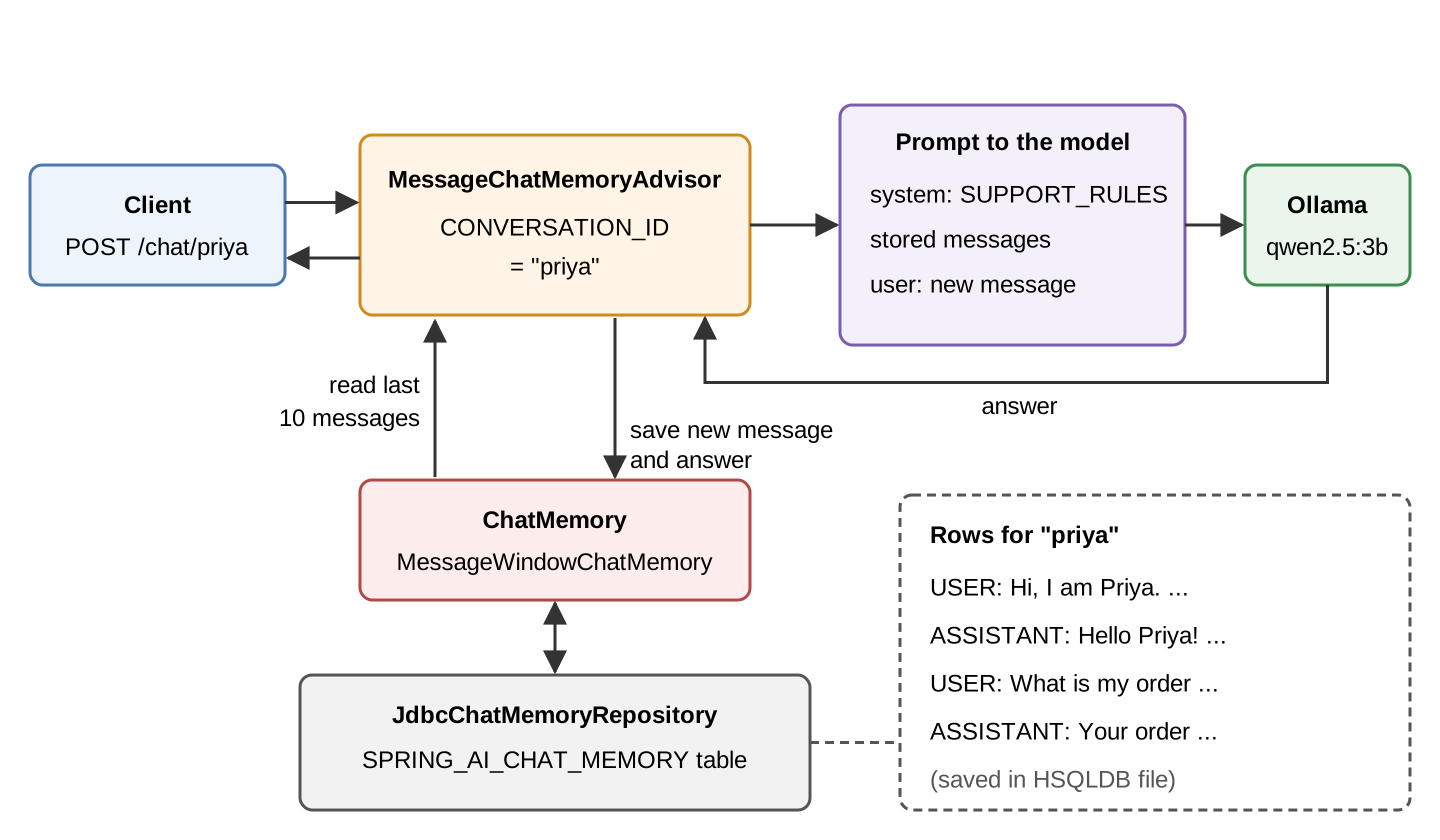
ChatMemory is the Spring AI interface that decides which messages to keep for a conversation. A conversation is all the messages between one customer and the assistant. Its main methods are add(), get(), and clear(), and each one takes a conversation id.
MessageWindowChatMemory is the implementation of ChatMemory that we use. It keeps only the last N messages of each conversation (20 by default). In OrderDesk, a stored message is either a user message or an answer from the model. When the window is full, the memory drops the oldest messages. (A stored system message is a special case; see FAQ 8.4.)
ChatMemoryRepository is the interface that stores the messages. ChatMemory decides what to keep, and the repository decides where it is kept. The default is InMemoryChatMemoryRepository, which keeps messages in a Map inside the app. JdbcChatMemoryRepository is the implementation that keeps them in a database table, through JDBC (Java’s standard API for relational databases).
MessageChatMemoryAdvisor connects the memory to a ChatClient call. An advisor is a class that runs before and after each model call, and it can change the request. Before the call, this advisor reads the stored messages and adds them to the prompt. After the call, it saves the new user message and the answer.
The conversation id is a String that names one conversation. Every message is stored under a conversation id, and the advisor reads only the messages with the same id. We hand the id to the advisor as a request parameter whose key is the constant ChatMemory.CONVERSATION_ID (Step 1 shows the call). In OrderDesk, the conversation id is the customer id, such as “priya”.
The diagram shows one request in the finished app. In Steps 1 and 2, the messages are kept in memory (20 per conversation). Step 3 moves them to a database, and Section 5 changes the window to 10.
3. The Example App
OrderDesk is the app that every Spring AI article in this series adds to. The code for this article belongs to the com.howtodoinjava.orderdesk.memory package. The full app is on GitHub in the orderdesk folder.
The example uses Spring Boot 4.1.1, Spring AI 2.0.1, Java 21, and Ollama 0.40.6 with the qwen2.5:3b model. Getting Started with Spring AI explains the basic setup: installing Ollama, downloading the model, and the Spring Boot project (with spring-boot-starter-parent as its parent) and its base properties.
On top of that, this article adds one controller in Step 1. For the database, it adds two dependencies and two properties in Step 3, and one bean in Section 5. Steps 1 and 2 need only the controller.
New classes go in the com.howtodoinjava.orderdesk.memory package, under the main class’s package, so Spring Boot finds them at startup. Restart the app after adding code.
The memory code reuses the supportClient bean that Getting Started created in ChatClientConfig. The supportClient bean is a ChatClient whose default system prompt holds the store’s rules:
package com.howtodoinjava.orderdesk.chat;

import org.springframework.ai.chat.client.ChatClient;
import org.springframework.context.annotation.Bean;
import org.springframework.context.annotation.Configuration;

@Configuration
public class ChatClientConfig {

    static final String SUPPORT_RULES = """
        You are OrderDesk, the support assistant of an online store.
        Answer in at most three sentences.
        Delivery: Pune, Mumbai and Delhi in 2 days; every other city in India in 5 days.
        Delivery is free above INR 499; below that it costs INR 49.
        We do not deliver outside India.
        """;

    @Bean
    ChatClient supportClient(ChatClient.Builder builder) {
        return builder
            .defaultSystem(SUPPORT_RULES)
            .build();
    }
}
The rules don’t mention order numbers, so any order number in an answer must come from the conversation.
The supportClient has no memory advisor in its defaults. We add the advisor to each request in the memory controller only. So the other endpoints that use supportClient, such as /ask, keep working without a conversation id.
4. Adding Chat Memory to OrderDesk
We first add memory with the default in-memory repository, and then move the messages into a database.
Step 1: Add the Memory Advisor and a Conversation Id
Let’s start with a new controller, MemoryChatController. Its POST /chat/{customerId} endpoint takes the customer’s message as the request body and uses the customer id from the path as the conversation id:
package com.howtodoinjava.orderdesk.memory;

import java.util.List;

import org.springframework.ai.chat.client.ChatClient;
import org.springframework.ai.chat.client.advisor.MessageChatMemoryAdvisor;
import org.springframework.ai.chat.memory.ChatMemory;
import org.springframework.beans.factory.annotation.Qualifier;
import org.springframework.web.bind.annotation.GetMapping;
import org.springframework.web.bind.annotation.PathVariable;
import org.springframework.web.bind.annotation.PostMapping;
import org.springframework.web.bind.annotation.RequestBody;
import org.springframework.web.bind.annotation.RestController;

@RestController
public class MemoryChatController {

    private final ChatClient supportClient;
    private final ChatMemory chatMemory;
    private final MessageChatMemoryAdvisor memoryAdvisor;

    MemoryChatController(@Qualifier("supportClient") ChatClient supportClient,
                         ChatMemory chatMemory) {
        this.supportClient = supportClient;
        this.chatMemory = chatMemory;
        this.memoryAdvisor = MessageChatMemoryAdvisor.builder(chatMemory).build();
    }

    @PostMapping("/chat/{customerId}")
    String chat(@PathVariable String customerId, @RequestBody String message) {
        return supportClient.prompt()
            .user(message)
            .advisors(a -> a.advisors(memoryAdvisor)
                            .param(ChatMemory.CONVERSATION_ID, customerId))
            .call()
            .content();
    }

    // What the model will see from this conversation next time
    @GetMapping("/chat/{customerId}/history")
    List<String> history(@PathVariable String customerId) {
        return chatMemory.get(customerId).stream()
            .map(m -> m.getMessageType() + ": " + m.getText())
            .toList();
    }
}
The finished OrderDesk app has more than one ChatClient bean (supportClient, summaryClient, and visionClient), so @Qualifier(“supportClient”) names the one we want.
The advisors() call does two things for this one request: a.advisors(memoryAdvisor) adds the memory advisor, and param(ChatMemory.CONVERSATION_ID, customerId) tells the advisor which conversation to read and write.
The ChatMemory in the constructor comes from Spring AI’s auto-configuration, the beans that Spring Boot creates for us when a library is on the classpath. If we don’t define a ChatMemory bean, Spring AI creates a MessageWindowChatMemory with the in-memory repository. So Steps 1 and 2 need no new dependency and no extra configuration. We build one advisor in the constructor and reuse it for every request.
Step 2: Keep One Conversation per Customer
Next, we test the memory with two customers. Priya gives her order number and then asks for it:
curl -X POST localhost:8080/chat/priya -H "Content-Type: text/plain" -d "Hi, I am Priya. My order number is ORD-1042."
curl -X POST localhost:8080/chat/priya -H "Content-Type: text/plain" -d "What is my order number?"
Each line below is one answer, in the order of the two requests:
Hello Priya! I can help you with your order details. Please provide your name and the status of your order so I can assist you better.
Your order number is ORD-1042, and I can help you with any questions you have about your order. Please let me know if you need information on your delivery status or any other assistance.
This time, the second answer has the order number. The advisor sent Priya’s first message and the first answer along with the new question. The odd first answer (asking for her name again) comes from the small model, not the memory.
Now Rahul asks the same question in his own conversation:
curl -X POST localhost:8080/chat/rahul -H "Content-Type: text/plain" -d "What is my order number?"To find your order number, you can log into your account on the online store where you made the purchase. The order number is usually visible in the order confirmation email or on the order details page of your account. If you need further assistance, feel free to ask.Rahul doesn’t get ORD-1042. The conversation id “rahul” has no stored messages, so the model sees only his question.
Step 3: Save the Memory in a Database with JDBC
So far, the messages are lost on restart. Now we move them into a database table.
First, we add two dependencies to pom.xml, next to the Ollama starter from the basic setup:
<dependency>
  <groupId>org.springframework.ai</groupId>
  <artifactId>spring-ai-starter-model-chat-memory-repository-jdbc</artifactId>
</dependency>
<dependency>
  <groupId>org.hsqldb</groupId>
  <artifactId>hsqldb</artifactId>
  <scope>runtime</scope>
</dependency>
The two dependencies do different jobs:
- spring-ai-starter-model-chat-memory-repository-jdbc adds JdbcChatMemoryRepository and its auto-configuration. It also brings spring-boot-starter-jdbc, which holds Spring Boot’s data source auto-configuration and the HikariCP connection pool, so we don’t add it ourselves. Its version comes from the Spring AI BOM, which the basic setup already imports. A BOM (bill of materials) is a pom that fixes the versions of a group of libraries.
- hsqldb is the HSQLDB database and its JDBC driver. Its version comes from spring-boot-starter-parent. The runtime scope means our code never imports its classes; only the app needs it when it runs.
We use HSQLDB because it can save its data to files on disk, with no database server to install.
Next, we add two lines to application.properties, below the Ollama properties from the basic setup:
# Chat memory is saved in a file database, so it survives a restart
spring.datasource.url=jdbc:hsqldb:file:./data/orderdesk
spring.ai.chat.memory.repository.jdbc.initialize-schema=always
The first line, spring.datasource.url, tells Spring Boot which database to connect to. From this URL, Spring Boot also picks the HSQLDB driver and creates the data source (the object that hands out database connections).
We don’t need a user name or password, because a new HSQLDB database has a default user with an empty password.
The file part of the URL tells HSQLDB to keep the database in the data folder, under the folder where we start the app.
The second line tells Spring AI to create the SPRING_AI_CHAT_MEMORY table at startup. The default value, embedded, does this only for in-memory databases, and ours is a file. So we set always, which runs the table script on every startup. The script uses CREATE TABLE IF NOT EXISTS, so a restart keeps the rows. The other value is never, for a database where you create the table yourself.
We don’t change MemoryChatController. When the JDBC starter is on the classpath, the auto-configured ChatMemory uses JdbcChatMemoryRepository instead of the in-memory one.
Let’s test it. We start the app, send Priya’s two messages from Step 2 again, and stop the app with Ctrl+C. Then we start it again the same way and ask Priya’s question once more:
curl -X POST localhost:8080/chat/priya -H "Content-Type: text/plain" -d "Remind me, what is my order number?"Your order number is ORD-1042. Please let me know if you need any information about your order or delivery status.After the restart, the order number came from the SPRING_AI_CHAT_MEMORY table.
Step 4: See What the Model Sees
Finally, we call the history() endpoint from Step 1. It calls chatMemory.get(customerId), which returns the same list of messages that the advisor adds to the next prompt:
curl localhost:8080/chat/priya/history["USER: Hi, I am Priya. My order number is ORD-1042.","ASSISTANT: Hello Priya! I can help you with your order details. Please provide your name and the status of your order so I can assist you better.","USER: What is my order number?","ASSISTANT: Your order number is ORD-1042, and I can help you with any questions you have about your order. Please let me know if you need information on your delivery status or any other assistance."]We took this output before the restart test of Step 3. If you ran the restart test, you’ll also see “Remind me, what is my order number?” and its answer.
Two things in this list are worth noticing. There’s no system message, because the defaultSystem() text of supportClient is added to every request and never stored. Also, the odd first answer is stored. The memory saves every answer, good or bad, and the model reads it again on the next call.
Use this endpoint to debug a wrong answer.
5. Choosing the Window Size
MessageWindowChatMemory keeps 20 messages per conversation by default. A turn is one user message plus the model’s answer to it. So 20 messages are 10 turns.
To change the size, we define our own ChatMemory bean. OrderDesk keeps 10 messages:
package com.howtodoinjava.orderdesk.memory;

import org.springframework.ai.chat.memory.ChatMemory;
import org.springframework.ai.chat.memory.MessageWindowChatMemory;
import org.springframework.ai.chat.memory.repository.jdbc.JdbcChatMemoryRepository;
import org.springframework.context.annotation.Bean;
import org.springframework.context.annotation.Configuration;

@Configuration
public class ChatMemoryConfig {

    // Keep the last 10 messages of each conversation (the default is 20)
    @Bean
    ChatMemory chatMemory(JdbcChatMemoryRepository repository) {
        return MessageWindowChatMemory.builder()
            .chatMemoryRepository(repository)
            .maxMessages(10)
            .build();
    }
}
Line by line, the bean does this:
- The JdbcChatMemoryRepository parameter is the repository that the JDBC starter created in Step 3. Spring passes it in.
- MessageWindowChatMemory.builder() starts a new window memory, and chatMemoryRepository(repository) tells it to store messages in the database.
- maxMessages(10) keeps the last 10 messages, which is 5 turns.
Spring AI then skips its own ChatMemory, and MemoryChatController gets this one.
Let’s see the window at work. A customer, Anita, sends six notes. Each note asks the assistant to remember a code:
This loop is for bash. On Windows, send the six requests one by one.
for i in 1 2 3 4 5 6; do curl -X POST localhost:8080/chat/anita -H "Content-Type: text/plain" -d "Note number $i: please remember the code A$i."; doneSix notes and six answers make 12 messages, but the window keeps 10, so GET /chat/anita/history returns 10 entries. The first one is “USER: Note number 2: please remember the code A2.” The memory dropped note 1 and its answer.
Now Anita asks about the first note:
curl -X POST localhost:8080/chat/anita -H "Content-Type: text/plain" -d "What was the code in note number 1?"Note number 1 was not mentioned in your previous messages. Could you please provide more details or the content of note number 1?Note 1 is no longer in the prompt, so the model can’t know it.
The window size is also a cost setting. Models read and bill text in tokens, which are small pieces of text, often a word or part of a word. Every stored message goes to the model again on every call, so the prompt gets longer with each message until the window is full. After that, its length stays about the same, because each new message pushes out an old one.
More tokens mean higher cost on a paid API and slower answers on a local model. A long history can also go past the model’s context size (the most text it can read in one call).
To see the real numbers, end the request with chatResponse() instead of content() and read the token counts from its metadata. OrderDesk’s ChatController does this in its /ask-with-usage endpoint, which the article Spring AI ChatClient API: Fluent Chat Examples explains:
@GetMapping("/ask-with-usage")
Map<String, Object> askWithUsage(@RequestParam String question) {
    ChatResponse response = supportClient.prompt()
        .user(question)
        .call()
        .chatResponse();
    Usage usage = response.getMetadata().getUsage();
    return Map.of(
        "answer", response.getResult().getOutput().getText(),
        "promptTokens", usage.getPromptTokens(),
        "completionTokens", usage.getCompletionTokens());
}
The method needs three imports: java.util.Map, org.springframework.ai.chat.model.ChatResponse, and org.springframework.ai.chat.metadata.Usage. The getPromptTokens() value is the size of the prompt. This endpoint has no memory advisor. To count the tokens of a chat with history, add the advisors() call from Step 1 to the same request.
A support chat like OrderDesk needs only the last few turns, so 10 to 20 messages is a sensible starting point. Raise the window size when customers often refer back to something they said much earlier.
6. Common Traps
6.1. A Missing Conversation Id
Suppose we add the memory advisor but forget the conversation id:
return supportClient.prompt()
    .user(message)
    .advisors(memoryAdvisor)
    .call()
    .content();
The call fails with this exception:
java.lang.IllegalArgumentException: conversationId cannot be nullIn Spring AI 2.0, every memory advisor needs the ChatMemory.CONVERSATION_ID parameter. The fix is the param() call from Step 1.
This is also why OrderDesk adds the advisor per request. If we put memoryAdvisor in defaultAdvisors() of supportClient, every call of that client would need a conversation id. The /ask endpoint from Section 1 sends none, so it would throw this exception.
6.2. JDBC Drops Tool-Call Messages
When a model uses tools, the conversation gets two more kinds of messages. One is the model’s request to call a tool, and the other is the tool’s result. A tool is a Java method that the model can ask our app to run. The article Spring AI Function Calling Example shows tools.
JdbcChatMemoryRepository doesn’t save these two kinds. It skips them on save without an error. The Cassandra and MongoDB repositories do the same. So after a restart, the model sees the final answer but not the tool call that produced it.
OrderDesk has no tools yet, so this doesn’t affect us. If your app uses tools, don’t count on the memory to remember tool results. Load the data again with the tool, or save what you need in your own table.
6.3. The Conversation Id Must Come from the Server
Our demo reads the conversation id from the URL path, /chat/{customerId}. This is not safe in a real app. Anyone can call /chat/priya/history and read Priya’s order number. Anyone can also write into her conversation.
In a real app, the conversation id should come from the logged-in user on the server side, never from a value the client sends. For example, with Spring Security, the controller can take a Principal (java.security.Principal), the object that holds the logged-in user, and use its name:
@PostMapping("/chat")
String chat(Principal principal, @RequestBody String message) {
    return supportClient.prompt()
        .user(message)
        .advisors(a -> a.advisors(memoryAdvisor)
                        .param(ChatMemory.CONVERSATION_ID, principal.getName()))
        .call()
        .content();
}
Without Spring Security or another login setup, principal is null, so this method needs that setup first.
Here is a test for your own design. If a user can change one value in a request and see another user’s chat, the conversation id comes from the wrong place. When one user has several chats, combine the user id with a chat id that your server created and checked for that user.
6.4. Two Copies of the App and One File Database
An HSQLDB file database allows only one app at a time. If the first copy of OrderDesk still runs and we start a second one, the second copy stops at startup with this error:
Caused by: org.hsqldb.HsqlException: Database lock acquisition failure: lockFile: org.hsqldb.persist.LockFile@3a827e70[file =.../orderdesk/data/orderdesk.lck, exists=true, locked=false, valid=false, ] ...The orderdesk.lck file in the data folder belongs to the first copy. The fix is to stop the first copy before starting another one. If your app runs as several copies in production, use a database server such as PostgreSQL instead of a file database.
7. Other Repositories and Long-Term Memory
Spring AI 2.0 has more repositories, each with its own starter. They work the same way as the JDBC one: add the starter, configure the database, and the auto-configured ChatMemory uses it.
| Repository | Starter | Stores messages in |
|---|---|---|
| InMemoryChatMemoryRepository | none, the default | a Map inside the app |
| JdbcChatMemoryRepository | spring-ai-starter-model-chat-memory-repository-jdbc | a relational database table |
| RedisChatMemoryRepository | spring-ai-starter-model-chat-memory-repository-redis | Redis |
| MongoChatMemoryRepository | spring-ai-starter-model-chat-memory-repository-mongodb | MongoDB |
| CassandraChatMemoryRepository | spring-ai-starter-model-chat-memory-repository-cassandra | Apache Cassandra |
| Neo4jChatMemoryRepository | spring-ai-starter-model-chat-memory-repository-neo4j | Neo4j |
The window memory in this article is short-term memory: it keeps only the last few messages. Sometimes, we want the model to recall something from weeks ago. In such cases, Spring AI offers VectorStoreChatMemoryAdvisor. It stores messages in a vector store, a database that finds texts with a similar meaning. On each call, it finds the old messages closest to the new question and adds them to the system message as text. That needs a vector store and an embedding model (a model that turns text into an array of numbers).
8. FAQs
8.1. Where does Spring AI store chat memory by default?
In a Map inside the app (InMemoryChatMemoryRepository). It is lost on restart. Add a repository starter, like the JDBC one in Step 3, to keep it.
8.2. How do I clear a customer’s conversation?
Call chatMemory.clear(conversationId). It deletes all stored messages for that conversation id. A “New chat” button in a chat app would call it.
8.3. Which databases does JdbcChatMemoryRepository support?
In Spring AI 2.0.1, it ships a table script and a dialect for PostgreSQL, MySQL, MariaDB, SQL Server, Oracle, HSQLDB, H2, and SQLite. It picks the dialect from the database that the data source connects to. For another database, implement JdbcChatMemoryRepositoryDialect.
8.4. Does the system prompt count toward maxMessages?
Not in OrderDesk. The system prompt comes from defaultSystem() and is added fresh to every request, so it is never stored. If your code stores a system message in the memory, MessageWindowChatMemory never drops it. When the window is full, it drops older user messages and answers instead.
8.5. Does chat memory work with streaming responses?
Yes. MessageChatMemoryAdvisor works with stream() as well as call(). It saves the full answer when the stream finishes. The article Spring AI Streaming Responses with Server-Sent Events in this series covers streaming.
9. Conclusion
A chat model remembers nothing between calls, so Spring AI chat memory stores the earlier messages and sends them again with each request. MessageChatMemoryAdvisor does that work, JdbcChatMemoryRepository keeps the messages across a restart, and the window size decides how many the model sees.
The one trap to remember is the conversation id. Always pass it, and in a real app, take it from the logged-in user on the server, never from the request.
All articles in order: Spring AI Tutorial
10. References
- Spring AI Reference: Chat Memory
- Spring AI Reference: Advisors API
- HSQLDB: Running and Using HyperSQL
Drop me your questions related to Spring AI chat memory in the comments.
Happy Learning !!
