
Spring AI lets us connect a language model to existing REST APIs through tool calling. We expose a Java method as a tool, and the model can request that method when it needs information from our application. For a store assistant AI chatbot, this means looking up the current order status before answering a customer’s question.
The REST API remains the source of order information, while the assistant explains the result to the customer. Our application controls which operations are available and checks whether the customer can access the requested order.
1. Setting up OrderDesk – Our Demo App
We’ll add an order lookup to OrderDesk. The integration uses three existing components.
- An order REST API that returns the current order status.
- Customer authentication that supplies the signed-in user’s Principal.
- A running Ollama server with a model that supports tool calling.
When Alice asks about ORD-1042, the assistant should retrieve its status from the API. The endpoint accepts a customer ID and an order ID.
GET /customers/alice/orders/ORD-1042
For an order belonging to Alice, the API returns a response such as the following.
{
  "orderId": "ORD-1042",
  "status": "PACKED"
}
We’ll use the signed-in account name as the customer ID. If those identifiers differ in your application, resolve the customer ID from the account before calling the assistant.
The OrderDesk Maven configuration includes the Ollama starter, Spring web client and test dependencies. We need a tool-capable model for the conversation, such as the model downloaded below. The Java and HTTP adapter tests do not need Ollama.
ollama pull qwen2.5:3b
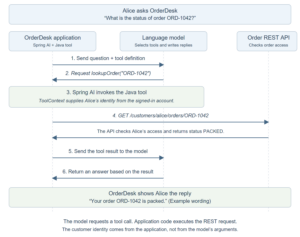
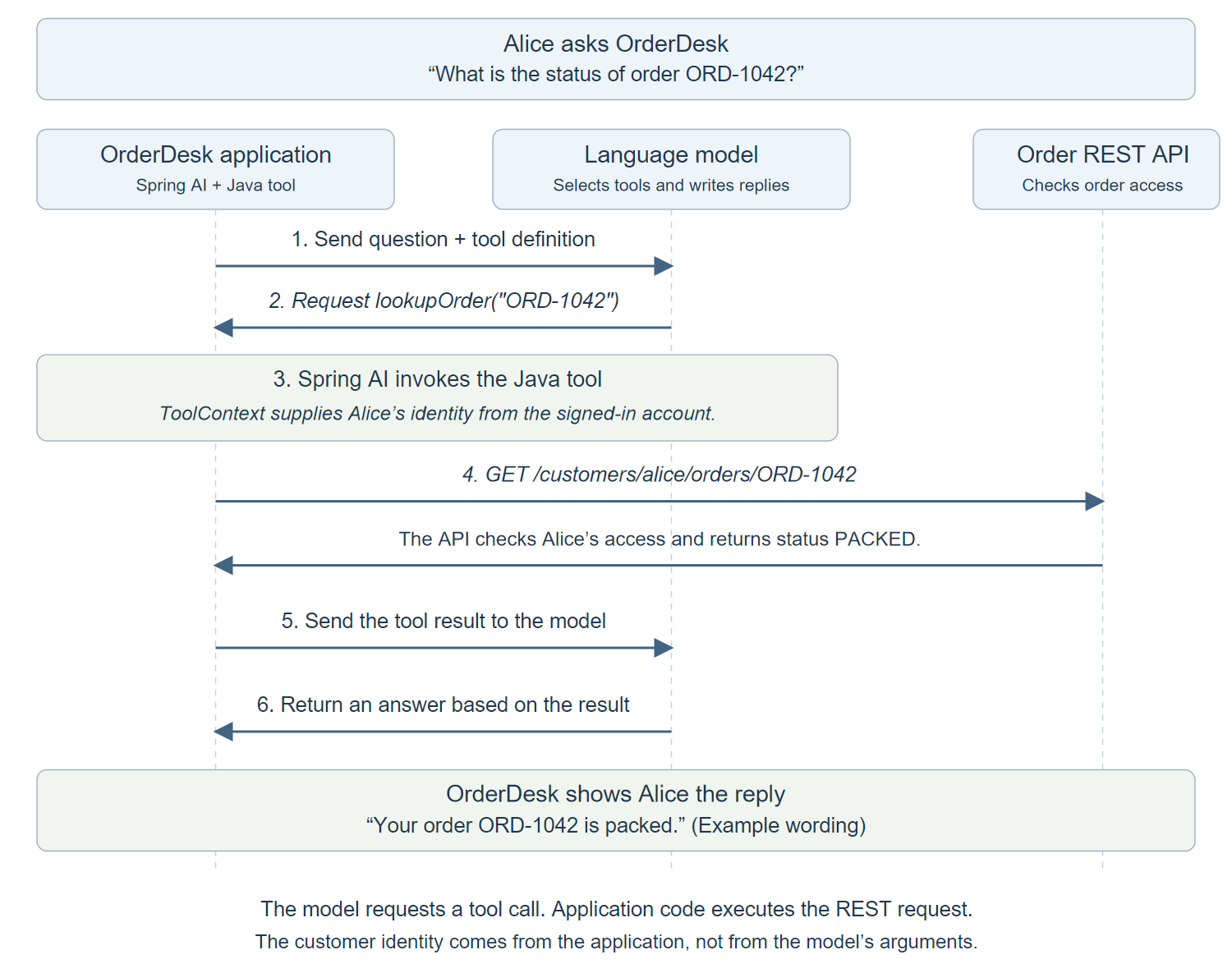
The diagram follows Alice’s question through one successful lookup. Notice the two exchanges with the model. First, the model requests lookupOrder. After our Java code retrieves the order, the model receives that result and writes the reply.
2. Exposing a REST API with @Tool
Create OrderApiTools to adapt the existing REST endpoint into a Spring AI tool. Its lookupOrder() method calls the API and returns a result the model can use.
2.1. Describing the Tool with @Tool and @ToolParam
Add @Tool to the method and describe when the model should use it. Add @ToolParam to explain the order ID argument.
@Tool(description = "Read the current status of one order owned by the signed-in customer")
The method’s orderId parameter uses the following annotation.
@ToolParam(description = "Order ID such as ORD-1042") String orderId
ToolContext is the second parameter. It carries the customer identity supplied by our application, outside the model’s arguments. The model supplies the order ID; our application supplies the signed-in customer.
2.2. Implementing the Annotated Tool
The complete class below contains three methods. orderApi() creates the HTTP client, lookupOrder() performs the lookup, and ask() connects the tool to a conversation. Section 3 shows the registration and context lines separately.
Use the service’s base URL when creating the client. The connection and read timeouts limit how long the lookup waits for the order API.
import java.net.http.HttpClient;
import java.security.Principal;
import java.time.Duration;
import java.util.Map;
import org.springframework.ai.chat.client.ChatClient;
import org.springframework.ai.chat.model.ToolContext;
import org.springframework.ai.tool.annotation.Tool;
import org.springframework.ai.tool.annotation.ToolParam;
import org.springframework.http.client.JdkClientHttpRequestFactory;
import org.springframework.web.client.HttpClientErrorException;
import org.springframework.web.client.ResourceAccessException;
import org.springframework.web.client.RestClient;
import org.springframework.web.client.RestClientResponseException;

public class OrderApiTools {
    public record OrderStatus(String orderId, String status) {}
    public record Lookup(String outcome, OrderStatus order) {}
    private final RestClient api;

    public OrderApiTools(RestClient api) { this.api = api; }

    public static RestClient orderApi(String baseUrl) {
        var http = HttpClient.newBuilder()
            .connectTimeout(Duration.ofSeconds(1)).build();
        var factory = new JdkClientHttpRequestFactory(http);
        factory.setReadTimeout(Duration.ofSeconds(2));
        return RestClient.builder().baseUrl(baseUrl).requestFactory(factory).build();
    }

    @Tool(description = "Read the current status of one order owned by the signed-in customer")
    public Lookup lookupOrder(
            @ToolParam(description = "Order ID such as ORD-1042") String orderId,
            ToolContext context) {
        Object identity = context.getContext().get("customerId");
        if (!(identity instanceof String customerId) || customerId.isBlank()) {
            throw new IllegalStateException("Authenticated customer context is required");
        }
        if (orderId == null || !orderId.matches("ORD-[0-9]{4,10}")) {
            return new Lookup("INVALID_ORDER_ID", null);
        }
        try {
            OrderStatus order = api.get()
                .uri("/customers/{customerId}/orders/{orderId}", customerId, orderId)
                .retrieve().body(OrderStatus.class);
            if (order == null) return new Lookup("UNAVAILABLE", null);
            return new Lookup("FOUND", order);
        } catch (HttpClientErrorException.NotFound failure) {
            return new Lookup("NOT_FOUND", null);
        } catch (ResourceAccessException failure) {
            return new Lookup("UNAVAILABLE", null);
        } catch (RestClientResponseException failure) {
            return new Lookup("UNAVAILABLE", null);
        }
    }

    public String ask(ChatClient client, String question, Principal principal) {
        if (principal == null || principal.getName() == null || principal.getName().isBlank()) {
            throw new IllegalArgumentException("An authenticated principal is required");
        }
        return client.prompt()
            .system("""
                Use lookupOrder for order status questions.
                Explain only the returned order data.
                NOT_FOUND means no accessible order was found.
                UNAVAILABLE means the lookup failed; do not guess its status.
                INVALID_ORDER_ID means ask for an order ID such as ORD-1042.
                """)
            .user(question).tools(this)
            .toolContext(Map.of("customerId", principal.getName()))
            .call().content();
    }
}
2.3. Returning Tool Results the Model Can Interpret
Return a Lookup record with an outcome and optional order data. These outcome names belong to our application. The system message in ask() tells the model how to interpret them.
| Outcome | When the tool returns it | What the assistant should do |
|---|---|---|
| FOUND | The API returns an order. | Explain the returned status. |
| INVALID_ORDER_ID | The ID does not match the expected format. | Ask for an ID such as ORD-1042. |
| NOT_FOUND | The API returns HTTP 404. | Explain that no accessible order was found. |
| UNAVAILABLE | The API times out, returns another handled HTTP error, or returns an empty body. | Explain that the lookup failed without guessing the status. |
For Alice and ORD-1042, the tool calls /customers/alice/orders/ORD-1042. A successful PACKED response becomes Lookup(“FOUND”, order) and is passed back to the model.
Configure any backend credentials on RestClient. Keep credentials and detailed error messages out of the returned Lookup, because that result is sent to the model.
3. Registering and Calling Tools with ChatClient
The tool is implemented. We now need to register it, supply the signed-in customer’s identity, and send the question. The ask() method performs these steps.
3.1. Registering @Tool Methods with tools()
Call .tools(this) to register the @Tool methods on the current OrderApiTools instance. Adding the annotation alone does not make the method available to this request.
The registration line in ask() is the following.
.tools(this) // Register lookupOrder() for this request.
Spring AI sends a tool definition alongside the question. The model uses the following information to decide whether to request the lookup.
| Definition field | Value in this example |
|---|---|
| Name | lookupOrder identifies the operation to request. |
| Description | The @Tool description explains that the operation reads an order’s status. |
| Input schema | orderId is a required string described by @ToolParam. ToolContext is excluded. |
The model receives this definition, not our Java source code.
If the model requests lookupOrder(“ORD-1042”), Spring AI invokes the registered method and sends its result back to the model for the final answer. See the Spring AI tool-calling reference for registration and execution details.
3.2. Passing Trusted Data with ToolContext
Pass the authenticated customer’s name through .toolContext(…). In ask(), principal represents the signed-in account.
.toolContext(Map.of("customerId", principal.getName()))
Read that value inside lookupOrder() using the supplied ToolContext.
Object identity = context.getContext().get("customerId");
The customer ID is available to the Java tool but excluded from the model’s argument schema. The model supplies the order ID; our application supplies the customer identity. Keep the identity validation shown in the complete class so missing context fails before the API call.
3.3. Invoking ChatClient with Registered Tools
Use OrderApiAssistant to assemble the client and tool once. Its answer() method delegates to ask(), which registers the tool and supplies the customer context for each request.
import java.security.Principal;
import org.springframework.ai.chat.client.ChatClient;

public class OrderApiAssistant {
    private final ChatClient client;
    private final OrderApiTools tools;

    public OrderApiAssistant(ChatClient.Builder builder, String orderApiBaseUrl) {
        this.client = builder.build();
        this.tools = new OrderApiTools(OrderApiTools.orderApi(orderApiBaseUrl));
    }

    public String answer(String question, Principal principal) {
        return tools.ask(client, question, principal);
    }
}
Create this service with Spring AI’s ChatClient.Builder and the order API’s base URL. From your authenticated request handler, call answer(question, principal) with the current user’s Principal. Do not build that identity from the question text.
For Alice’s question about ORD-1042, the tool requests /customers/alice/orders/ORD-1042. If the API returns PACKED, the model can explain that status to Alice. Tool selection remains a model decision. If an endpoint must always perform a lookup, call the API directly and give the retrieved result to the model.
4. Enforcing Authorization for Tool Calls
The order API must check ownership before returning data. Passing Alice’s ID in the URL does not prove that ORD-1042 belongs to her. This check belongs in the backend API, not in the model’s prompt.
The code below assumes that the backend has already authenticated the caller. ToolContext does not authenticate the outbound HTTP request; configure the HTTP client to send credentials the backend can validate for that customer.
4.1. Validating Access in the Backend
In the order service, compare the URL’s customer ID with the authenticated Principal. Then compare the stored order’s owner with the same identity. Reject the request if either check fails.
The following AuthorizedOrderLookup class implements those checks. OrderRepository represents the existing database lookup; supply its implementation in the order service.
import java.security.Principal;
import java.util.Optional;
import org.springframework.http.HttpStatus;
import org.springframework.web.server.ResponseStatusException;

public class AuthorizedOrderLookup {
    public record StoredOrder(String orderId, String customerId, String status) {}
    public record OrderStatus(String orderId, String status) {}
    public interface OrderRepository {
        Optional<StoredOrder> findById(String orderId);
    }
    private final OrderRepository orders;

    public AuthorizedOrderLookup(OrderRepository orders) { this.orders = orders; }

    public OrderStatus lookup(String customerId, String orderId, Principal principal) {
        if (principal == null || principal.getName() == null || principal.getName().isBlank()) {
            throw new ResponseStatusException(HttpStatus.UNAUTHORIZED);
        }
        if (!principal.getName().equals(customerId)) {
            throw new ResponseStatusException(HttpStatus.NOT_FOUND);
        }
        StoredOrder order = orders.findById(orderId)
            .filter(found -> found.customerId().equals(principal.getName()))
            .orElseThrow(() -> new ResponseStatusException(HttpStatus.NOT_FOUND));
        return new OrderStatus(order.orderId(), order.status());
    }
}
The ownership check is the filter on the stored order.
.filter(found -> found.customerId().equals(principal.getName()))
Only an order owned by the authenticated customer passes this filter. A missing or inaccessible order raises ResponseStatusException with HTTP 404, so the API need not reveal whether another customer’s order exists.
Call lookup() from the existing authenticated order endpoint. It adds the ownership check; the endpoint’s login or token validation remains part of the backend’s security configuration.
For annotation-based service rules, see Spring Security method authorization.
4.2. Testing the Backend Authorization Check
Return Bob’s order from the repository, then call the service as Alice. The test passes when the service rejects access with HTTP 404.
@Test
void aliceCannotReadBobsOrder() {
    var service = new AuthorizedOrderLookup(id -> Optional.of(
        new AuthorizedOrderLookup.StoredOrder(id, "bob", "PACKED")));
    Principal alice = () -> "alice"; // Controlled identity for this unit test.
    assertThatThrownBy(() -> service.lookup("alice", "ORD-1042", alice))
        .isInstanceOfSatisfying(ResponseStatusException.class, failure ->
            assertThat(failure.getStatusCode()).isEqualTo(HttpStatus.NOT_FOUND));
            // Passes because the stored owner is Bob, even though the URL says Alice.
}
The test’s Principal is a controlled fixture. In the running service, obtain the identity from authentication rather than constructing it from a request parameter. This test exercises the ownership rule directly; testing token validation and HTTP authentication requires the backend’s security integration tests.
5. Testing Spring AI Tools Without an LLM
Before involving a model, let’s check that the Java tool calls the correct API and handles its response. MockRestServiceServer intercepts requests from the configured RestClient and supplies the responses we define. The example URL is not contacted.
Put the following tests in OrderApiToolsTest under the same package as the implementation. Each test creates its own client and mock server.
5.1. Verifying the Request and Returned Status
Expect a request for Alice’s order and return the PACKED response shown earlier. The test passes when the tool uses Alice’s customer scope and returns that status.
@Test
void lookupUsesTrustedCustomerContext() {
    var builder = RestClient.builder().baseUrl("https://orders.example");
    var server = MockRestServiceServer.bindTo(builder).build();
    server.expect(requestTo("https://orders.example/customers/alice/orders/ORD-1042"))
        .andRespond(withSuccess("""
            {"orderId":"ORD-1042","status":"PACKED"}
            """, MediaType.APPLICATION_JSON));
    var tool = new OrderApiTools(builder.build());
    var result = tool.lookupOrder("ORD-1042", new ToolContext(Map.of("customerId", "alice")));
    assertThat(result.order().status()).isEqualTo("PACKED"); // Status comes from the API.
    server.verify(); // The request used Alice's trusted customer scope.
}
This test verifies the HTTP lookup, not the model’s choice of tool. Because the response is supplied by the test, a passing result also says nothing about authorization in the real order service.
5.2. Handling an HTTP 404 Response
Keep the same request but return HTTP 404. The tool should return NOT_FOUND with no order data. The assertion on outcome() checks that the assistant will receive a missing-order result.
@Test
void notFoundIsDifferentFromUnavailable() {
    var builder = RestClient.builder().baseUrl("https://orders.example");
    var server = MockRestServiceServer.bindTo(builder).build();
    server.expect(requestTo("https://orders.example/customers/alice/orders/ORD-1042"))
        .andRespond(withResourceNotFound());
    var tool = new OrderApiTools(builder.build());
    var result = tool.lookupOrder("ORD-1042", new ToolContext(Map.of("customerId", "alice")));
    assertThat(result.outcome()).isEqualTo("NOT_FOUND"); // No accessible order, not an outage.
    assertThat(result.order()).isNull(); // We never invent order details.
    server.verify();
}
5.3. Checking the Tool Schema and Required Context
Inspect the generated schema with ToolCallbacks.from(tool). It reads the annotations and creates the callback Spring AI uses to describe and invoke the method.
Check that the schema includes orderId and excludes customerId. Then call the method without trusted context and verify that it fails before making an HTTP request.
@Test
void customerIdentityIsNotAModelArgument() {
    var tool = new OrderApiTools(RestClient.create());
    var callback = ToolCallbacks.from(tool)[0];
    assertThat(callback.getToolDefinition().inputSchema())
        .contains("orderId").doesNotContain("customerId"); // The model cannot choose a customer.
    assertThatThrownBy(() -> tool.lookupOrder("ORD-1042", new ToolContext(Map.of())))
        .isInstanceOf(IllegalStateException.class); // Missing identity fails before an HTTP call.
}
5.4. Running the Tool and Authorization Tests
Run both test classes from the OrderDesk directory. They do not require Ollama or the real order API.
mvn "-Dtest=OrderApiToolsTest,AuthorizedOrderLookupTest" test
Once the adapter works, test the complete conversation against your model with a known order, an inaccessible order and an unavailable backend. Inspect the actual tool arguments and HTTP request as well as the final wording. For evaluating the response itself, see testing LLM responses with Spring AI.
6. Requiring Confirmation for Tools That Modify Data
If you extend the assistant with cancellation or another write operation, require customer confirmation before executing it. The lookup code remains read-only; the following diagram shows the additional workflow a write feature would need.
Let the assistant propose the action, show its consequences in the application, and submit the customer’s confirmation through an authenticated endpoint.
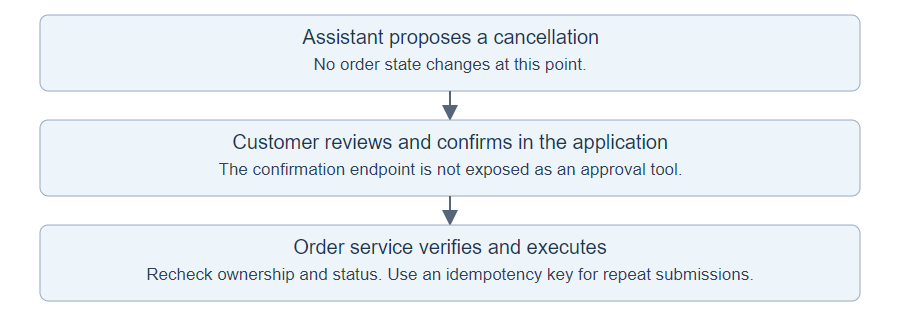
The backend should recheck ownership and current order state at confirmation time. An idempotency key lets a repeated submission refer to the same operation instead of cancelling or refunding twice. The confirmation endpoint should not be registered as a tool that the model can invoke to approve its own proposal.
7. Frequently Asked Questions
7.1. Do We Need an MCP Server to Call a REST API?
No. An in-process @Tool method can call the API through RestClient. MCP is useful when multiple applications need to discover and use a shared tool service. It adds a protocol boundary that this single-application example does not need.
7.2. Can We Expose an Existing Service Without Changing It?
Yes. A small annotated adapter can delegate to the service and apply the application’s access rules. Spring AI also supports programmatic MethodToolCallback definitions. An adapter is often easier to read when we need validation, identity handling or a smaller response than the original service returns.
8. Conclusion
An existing API can remain the source of truth while Spring AI handles the conversation. Keep tool inputs small, obtain identity from the application, and test the HTTP adapter separately from the model’s choice of tool. For writes, preserve the service’s authorization and confirmation workflow.
Explore the Spring AI examples repository.
Happy Learning!
