
Spring AI supports the Model Context Protocol (MCP), which lets a Spring Boot application expose tools that other compatible AI applications can discover and use. In this example, our OrderDesk support application exposes its order lookup tools through an MCP server. A second Spring Boot application connects to that server as an MCP client and calls those tools. We’ll build both sides using Spring AI 2.0.1.
1. The Problem MCP Solves
In the tool calling article, OrderDesk gave a Java method to its chat model. The model asked for the tool getOrderStatus with the id ORD-1042. Spring AI ran the method, and the model used the result in its answer. That works, but only inside OrderDesk, because the tool is a Java method in OrderDesk’s own code.
Now let’s say a store manager uses a second app with its own AI assistant, and this app wants the same order lookup. We could copy the code and give the second app access to the orders database. But then two apps own the same logic and the same data, so every change has to happen twice. Later, someone may want the same tool in Claude Desktop or in an IDE assistant, and these aren’t Java apps.
We want OrderDesk to publish its tools once, so that any AI app can find them and call them over the network. MCP does exactly this. It’s an open standard that defines how one AI app asks another app for its tools, data, and prompts.
1.1. Three Roles
The MCP architecture page of the specification names three roles:
- The host is the AI app the user talks to. It calls a model.
- The client is a connector inside the host. Each client keeps one connection to one server. So a host that uses three servers has three clients.
- The server is the app that owns the data and the actions. Here, it is OrderDesk.
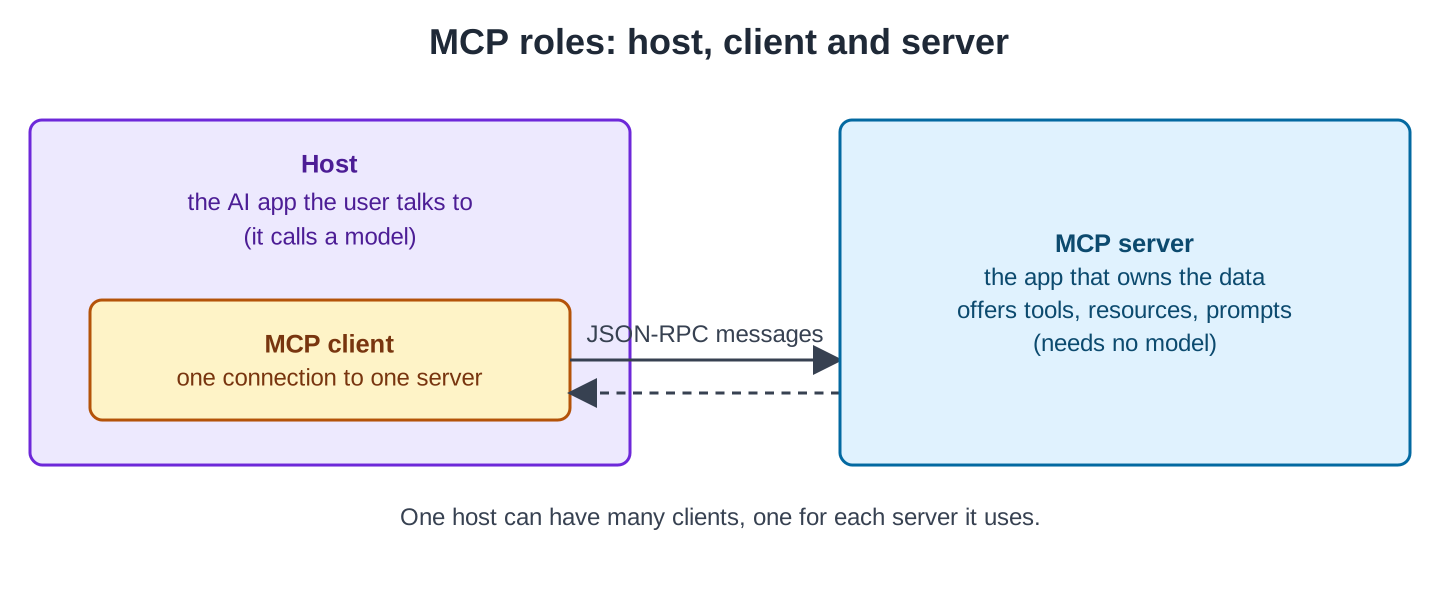
Notice that the model lives in the host, not in the server. OrderDesk doesn’t need a model to be an MCP server. It only answers requests like “list your tools” and “run this tool with these arguments”.
1.2. What a Server Offers
A server can offer three kinds of things. The server features page of the specification describes each one:
- Tools are actions the model can call, such as “get the status of order ORD-1042”.
- Resources are data that the host can read by a URI, such as the returns policy at policy://returns.
- Prompts are ready-made prompt templates with arguments, such as “reply to a customer about one order”. The host shows them to the user, and the user picks one.
We start with tools, because our client app needs only tools. Section 5 adds a resource and a prompt.
1.3. How the Messages Look
MCP messages are JSON-RPC 2.0 messages. JSON-RPC is a simple format in which each request is a JSON object with a method name, parameters, and an id. The response has the same id as its request. Here’s a real tools/call request to OrderDesk:
{"jsonrpc":"2.0","id":3,"method":"tools/call","params":{"name":"get_order_status","arguments":{"orderId":"ORD-1042"}}}The server answers with the tool’s result as text, and the host gives this text to its model. We’ll see a full result in Section 3.3. Other methods, such as tools/list, have the same shape.
The messages travel over a transport. Our server uses Streamable HTTP. The client sends every message as a POST request to one endpoint, /mcp. The server answers with JSON, or with server-sent events (a standard way to send several messages in one HTTP response). Another transport, STDIO, is for local servers that a desktop app starts itself. The base protocol section of the specification describes both.
You don’t write any of this JSON yourself. Spring AI writes and reads it on both sides.
2. The Example App
OrderDesk is the support assistant of a demo online store, and every article in this series grows this same app. It uses Spring Boot 4.1, Spring AI 2.0.1, and Java 21, and it runs a local model, qwen2.5:3b, in Ollama. If you need to install Ollama and create the project, follow Getting Started with Spring AI. OrderDesk runs on the default port 8080.
In this article, we work with two apps:
- OrderDesk becomes the MCP server. Its server code is in the com.howtodoinjava.orderdesk.mcp package.
- The client app (orderdesk-mcp-client) is a new Spring Boot app on port 8081. It is the MCP host: the store manager asks it questions, and its model calls OrderDesk’s tools.
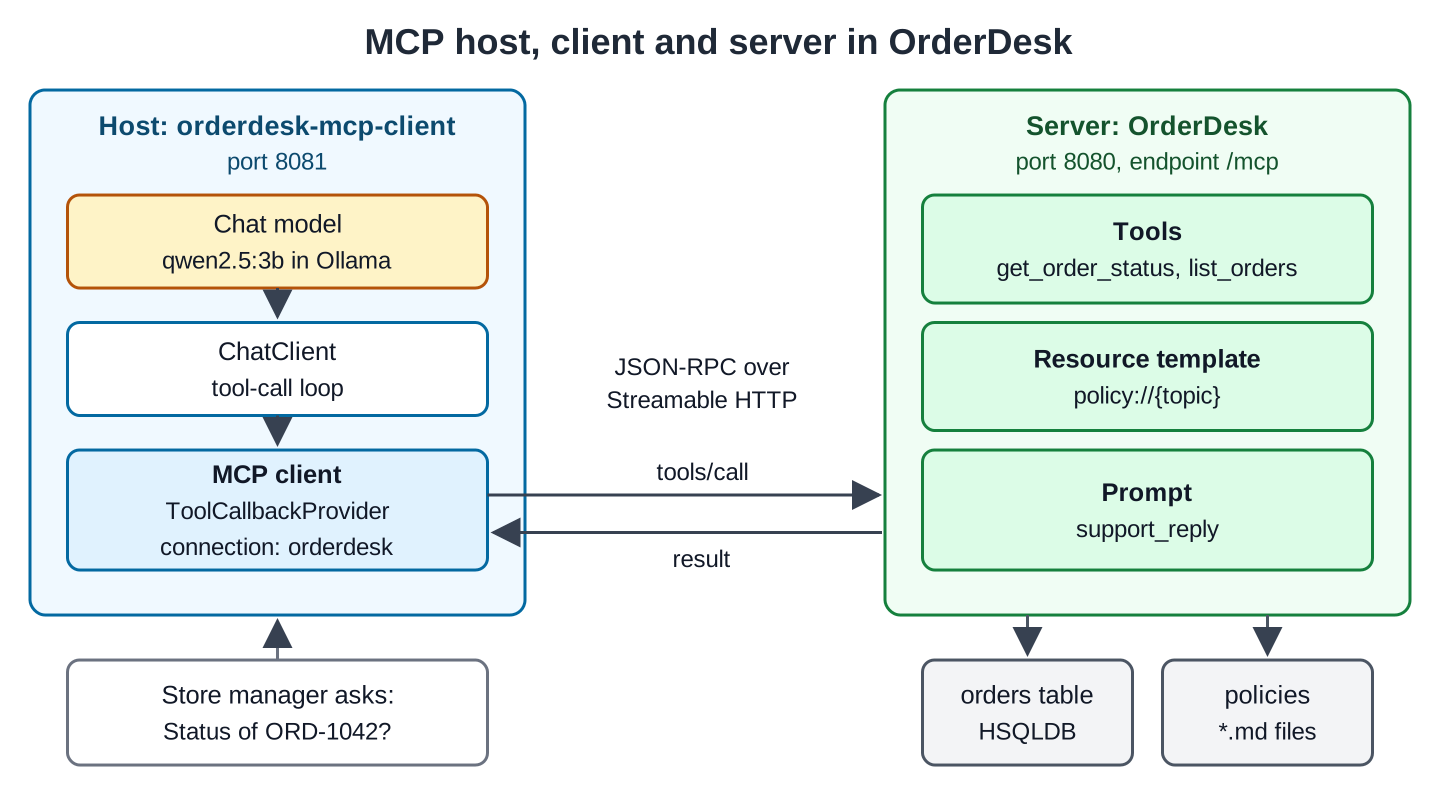
The arrows show the path of one tool request. The model asks for a tool. ChatClient passes this request to the MCP client. The MCP client sends tools/call to OrderDesk, and the result comes back the same way.
The MCP server reuses OrderDesk code from earlier articles. To follow along, clone the orderdesk folder of the repo, or copy these files into your project:
- OrderTools.java reads the orders table with JdbcClient. Its public methods getOrderStatus(String) and listOrders(String) return the public record OrderInfo(orderId, customerName, city, status, totalInr, placedOn, deliveredOn). For an unknown id, getOrderStatus() throws an IllegalArgumentException with the message “No order with id …”. The tool calling article explains this class.
- schema.sql and data.sql create the orders table with 12 sample orders in HSQLDB, a small Java database. OrderDesk’s pom.xml and application.properties already have the HSQLDB setup.
- The policies folder has four Markdown files with the store’s rules: returns.md, shipping.md, warranty.md and payments.md. Section 5 reads them.
3. Building the MCP Server
On the server, we add two things: a starter that creates the /mcp endpoint, and a class whose methods become tools.
3.1. Add the Server Starter
OrderDesk is a Spring MVC app, so we add the WebMVC server starter. We don’t write a version, because the Spring AI BOM (bill of materials) from Getting Started sets it:
<dependency>
  <groupId>org.springframework.ai</groupId>
  <artifactId>spring-ai-starter-mcp-server-webmvc</artifactId>
</dependency>
Then we describe the server in application.properties:
spring.ai.mcp.server.name=orderdesk
spring.ai.mcp.server.version=1.0.0
spring.ai.mcp.server.protocol=streamable
spring.ai.mcp.server.instructions=Look up OrderDesk orders and read the store's policies.
When a client connects, the server shares its name and version with it. The protocol=streamable property selects the Streamable HTTP transport, while the instructions tell the client’s model what the server is intended to do. Spring AI documents all four properties on its Streamable-HTTP server page. Unless you configure a different path, the MCP endpoint defaults to /mcp.
3.2. Turn Methods into MCP Tools
Spring AI scans Spring beans for MCP annotations, as the server annotations page describes. Each method with @McpTool becomes one MCP tool. We put the class in a sub-package of com.howtodoinjava.orderdesk, so that Spring Boot finds it.
Here’s the part of OrderDeskMcpServer with the two tools. The full class on GitHub also has a resource and a prompt, shown in Section 5:
package com.howtodoinjava.orderdesk.mcp;

import java.util.List;

import org.springframework.ai.mcp.annotation.McpTool;
import org.springframework.ai.mcp.annotation.McpToolParam;
import org.springframework.stereotype.Component;

import com.howtodoinjava.orderdesk.tools.OrderTools;
import com.howtodoinjava.orderdesk.tools.OrderTools.OrderInfo;

// Exposes OrderDesk's order lookups, policies and a reply prompt over MCP
@Component
public class OrderDeskMcpServer {

    private final OrderTools orderTools;

    OrderDeskMcpServer(OrderTools orderTools) {
        this.orderTools = orderTools;
    }

    @McpTool(name = "get_order_status",
        description = "Get the status, city, total and dates of one order by its id",
        annotations = @McpTool.McpAnnotations(readOnlyHint = true, destructiveHint = false,
            idempotentHint = true, openWorldHint = false))
    public OrderInfo getOrderStatus(
            @McpToolParam(description = "Order id, for example ORD-1042") String orderId) {
        return orderTools.getOrderStatus(orderId);
    }

    @McpTool(name = "list_orders",
        description = "List all orders of one customer by the customer's full name",
        annotations = @McpTool.McpAnnotations(readOnlyHint = true, destructiveHint = false,
            idempotentHint = true, openWorldHint = false))
    public List<OrderInfo> listOrders(
            @McpToolParam(description = "Customer's full name, for example Priya Sharma")
            String customerName) {
        return orderTools.listOrders(customerName);
    }
}
The class is thin. It calls OrderTools, so the order logic stays in one place.
The MCP tool name is get_order_status because @McpTool sets name. In the tool calling article, the methods of OrderTools carry @Tool without a name, so there the model saw the method name getOrderStatus.
Spring AI builds the JSON schema of the tool’s input from the method parameters and @McpToolParam. Write the descriptions carefully, because the client’s model knows nothing else about the tool. It uses only these descriptions to choose a tool and to fill its arguments.
McpAnnotations are optional hints for the host. Here they say that the tool only reads OrderDesk’s own data. A host can use them to decide whether to ask the user before it runs a tool. Without hints, the defaults assume that the tool may change data.
3.3. Test the Server with MCP Inspector
Before we build a client, let’s check the server on its own. Restart OrderDesk, and the log shows what Spring AI registered. We ran the full class from GitHub, so the log also counts the resource and the prompt from Section 5:
McpServerAutoConfiguration : Registered tools: 2
McpServerAutoConfiguration : Registered resource templates: 1
McpServerAutoConfiguration : Registered prompts: 1
To call the server, we use MCP Inspector, the test tool of the MCP project. It runs with npx, so it needs Node.js 18 or later. First, we list the tools:
npx -y @modelcontextprotocol/inspector --cli http://localhost:8080/mcp --transport http --method tools/list{
"tools": [
{
"name": "get_order_status",
"title": "get_order_status",
"description": "Get the status, city, total and dates of one order by its id",
"inputSchema": {
"type": "object",
"properties": {
"orderId": {
"type": "string",
"description": "Order id, for example ORD-1042"
}
},
"required": [
"orderId"
],
"$schema": "https://json-schema.org/draft/2020-12/schema"
},
"annotations": {
"title": "",
"readOnlyHint": true,
"destructiveHint": false,
"idempotentHint": true,
"openWorldHint": false
}
}
]
}We cut list_orders from the output. This JSON is exactly what a client’s model receives: the name, the description and the input schema built from @McpToolParam.
Next, we call the tool for an existing order and for a missing one:
npx -y @modelcontextprotocol/inspector --cli http://localhost:8080/mcp --transport http --method tools/call --tool-name get_order_status --tool-arg orderId=ORD-1042
npx -y @modelcontextprotocol/inspector --cli http://localhost:8080/mcp --transport http --method tools/call --tool-name get_order_status --tool-arg orderId=ORD-9999
{
"content": [
{
"type": "text",
"text": "{\"orderId\":\"ORD-1042\",\"customerName\":\"Meera Iyer\",\"city\":\"Chennai\",\"status\":\"PLACED\",\"totalInr\":12999.0,\"placedOn\":\"2026-10-16\",\"deliveredOn\":null}"
}
],
"isError": false
}
{
"content": [
{
"type": "text",
"text": "No order with id ORD-9999\nNo order with id ORD-9999"
}
],
"isError": true
}The first call returned the OrderInfo record as JSON text. For the missing order, OrderTools threw an IllegalArgumentException. The server didn’t crash, but sent the exception message back as a normal result with isError: true. The client’s model can read this message and tell the user.
Run the Inspector without –cli to make the same calls in a browser.
4. Building the MCP Client
The client app is a second Spring Boot app on port 8081. It has its own model in Ollama, and no database. All order data comes from OrderDesk over MCP.
4.1. Connect to the Server
Create a new project as in Getting Started, with the Spring Boot parent, the Spring AI BOM, and a main class. Here the main class is McpClientApplication in com.howtodoinjava.orderdesk.mcpclient, and the full pom.xml is on GitHub. The client app needs three starters:
<dependency>
  <groupId>org.springframework.boot</groupId>
  <artifactId>spring-boot-starter-web</artifactId>
</dependency>
<dependency>
  <groupId>org.springframework.ai</groupId>
  <artifactId>spring-ai-starter-model-ollama</artifactId>
</dependency>
<dependency>
  <groupId>org.springframework.ai</groupId>
  <artifactId>spring-ai-starter-mcp-client</artifactId>
</dependency>
The connection to OrderDesk is a few lines in application.properties:
spring.application.name=orderdesk-mcp-client
server.port=8081

spring.ai.ollama.base-url=http://localhost:11434
spring.ai.ollama.chat.options.model=qwen2.5:3b
spring.ai.ollama.chat.options.temperature=0.2

# The OrderDesk MCP server (start OrderDesk first)
spring.ai.mcp.client.name=orderdesk-mcp-client
spring.ai.mcp.client.type=sync
spring.ai.mcp.client.streamable-http.connections.orderdesk.url=http://localhost:8080
A low temperature makes the model’s answers less random. The spring.ai.mcp.client.name property sets the name that the client app sends to the server when it connects. The type=sync property creates blocking clients, which fit a Spring MVC app. The name orderdesk in the last property is our own name for this connection. By default, the client adds the endpoint /mcp to the URL. The MCP client starter page lists all these properties.
To connect to more servers, add more connection lines with other names. But every tool of every connected server goes into each request to the model, so connect only the servers you need. To drop single tools, declare a McpToolFilter bean, as the client starter documentation shows.
At startup, the client app connects to OrderDesk, does the MCP handshake and fetches the tool list. So OrderDesk must run first, or the client app fails to start. The property spring.ai.mcp.client.initialized=false skips this handshake at startup.
4.2. Give the Remote Tools to a ChatClient
On the client side, a remote MCP tool looks like a local tool. The starter creates a ToolCallbackProvider bean that holds the tools of every connected server, and we give it to the ChatClient:
package com.howtodoinjava.orderdesk.mcpclient;

import java.util.Arrays;
import java.util.List;

import org.springframework.ai.chat.client.ChatClient;
import org.springframework.ai.tool.ToolCallbackProvider;
import org.springframework.web.bind.annotation.GetMapping;
import org.springframework.web.bind.annotation.RequestParam;
import org.springframework.web.bind.annotation.RestController;

@RestController
public class AssistantController {

    private final ChatClient chatClient;
    private final ToolCallbackProvider mcpTools;

    // ToolCallbackProvider holds the tools of every connected MCP server
    AssistantController(ChatClient.Builder builder, ToolCallbackProvider mcpTools) {
        this.mcpTools = mcpTools;
        this.chatClient = builder
            .defaultSystem("You help a store manager. Use the tools to look up orders.")
            .defaultToolCallbacks(mcpTools)
            .build();
    }

    @GetMapping("/tools")
    List<String> tools() {
        return Arrays.stream(mcpTools.getToolCallbacks())
            .map(t -> t.getToolDefinition().name())
            .toList();
    }

    @GetMapping("/ask")
    String ask(@RequestParam String question) {
        return chatClient.prompt()
            .user(question)
            .call()
            .content();
    }
}
Each tool callback in the provider is a small adapter. When the model asks for a tool, the callback sends a tools/call message to the server and returns the result. For ChatClient, a remote tool is the same as a local tool. The /tools endpoint only lists the tool names, so we can check the connection.
This diagram follows one question through both apps:
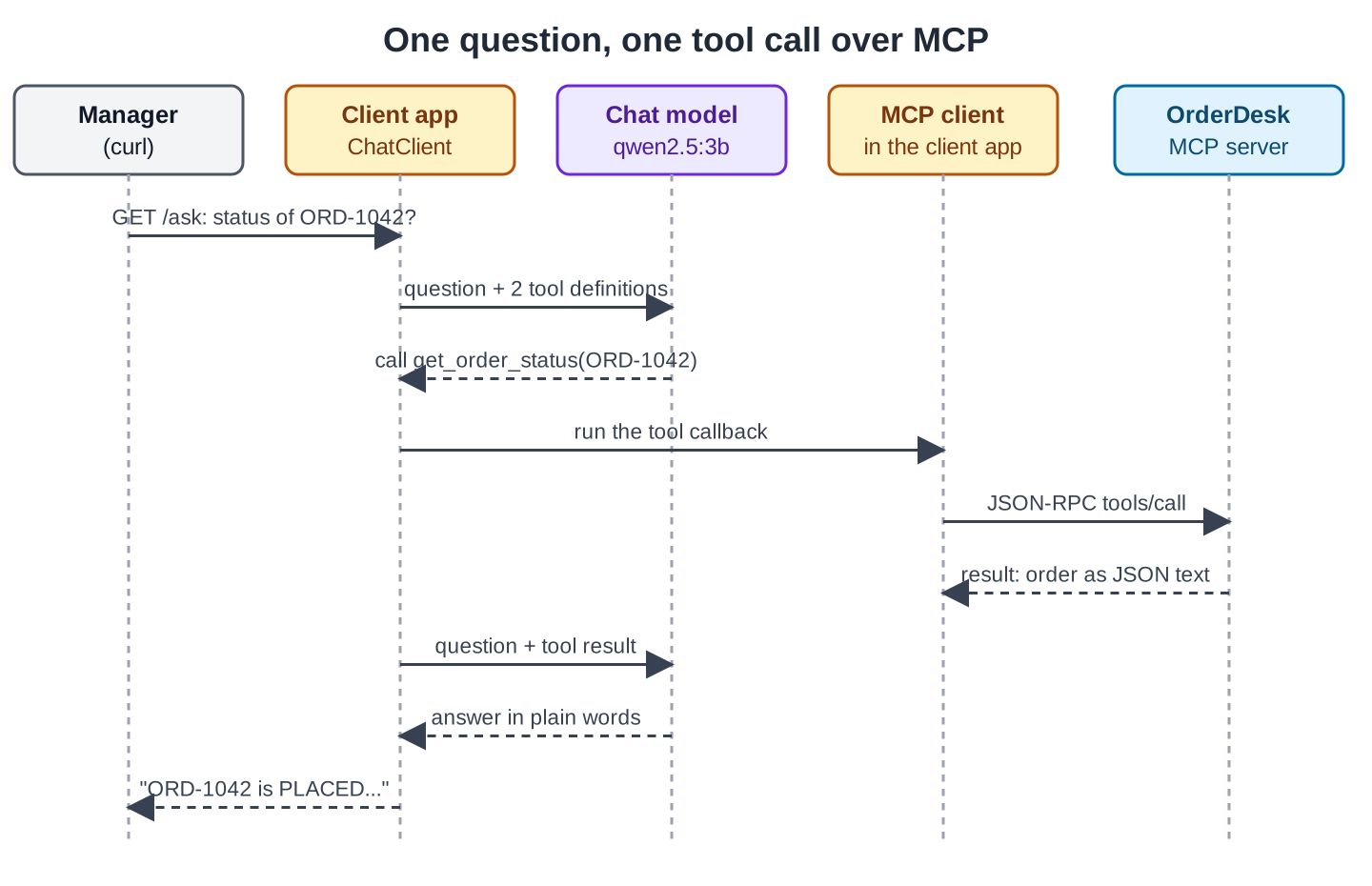
The model is called twice. The first call ends with a request for a tool. The second call has the tool result and ends with the answer. Spring AI runs this loop for us, as it does for local tools.
4.3. Ask a Question
Start OrderDesk first, then the client app. Now we call the client app:
curl localhost:8081/tools
curl -G localhost:8081/ask --data-urlencode "question=What is the status of order ORD-1042?"
curl -G localhost:8081/ask --data-urlencode "question=Which orders does Rahul Verma have, and which are not delivered yet?"
["get_order_status","list_orders"]
The order ORD-1042 has been placed. The status is PLACED. It is from the city Chennai and the total amount is 12999.0 INR. The delivery date is not specified yet.
Rahul Verma has the following orders:
1. **Order ID: ORD-1032**
- Status: DELIVERED
- Total: ₹349.00
- Placed On: 2026-10-02
- Delivered On: 2026-10-04
2. **Order ID: ORD-1039**
- Status: SHIPPED
- Total: ₹3299.00
- Placed On: 2026-10-12
- Delivered On: Not yet delivered
None of the orders are not delivered yet as all are either DELIVERED or SHIPPED.The first answer took 26.5 seconds and the second 41.8 seconds on a laptop CPU. Every order fact in both answers came from OrderDesk and is right.
But look at the last sentence. ORD-1039 is SHIPPED, so it isn’t delivered yet. The model says the opposite. The tool returned the correct data, but the small model (3 billion parameters) read it wrongly. MCP only moves data between apps; it doesn’t make a small model reason better. For such questions, use a larger model, or write a tool that returns the answer directly, such as list_undelivered_orders.
5. Resources and Prompts
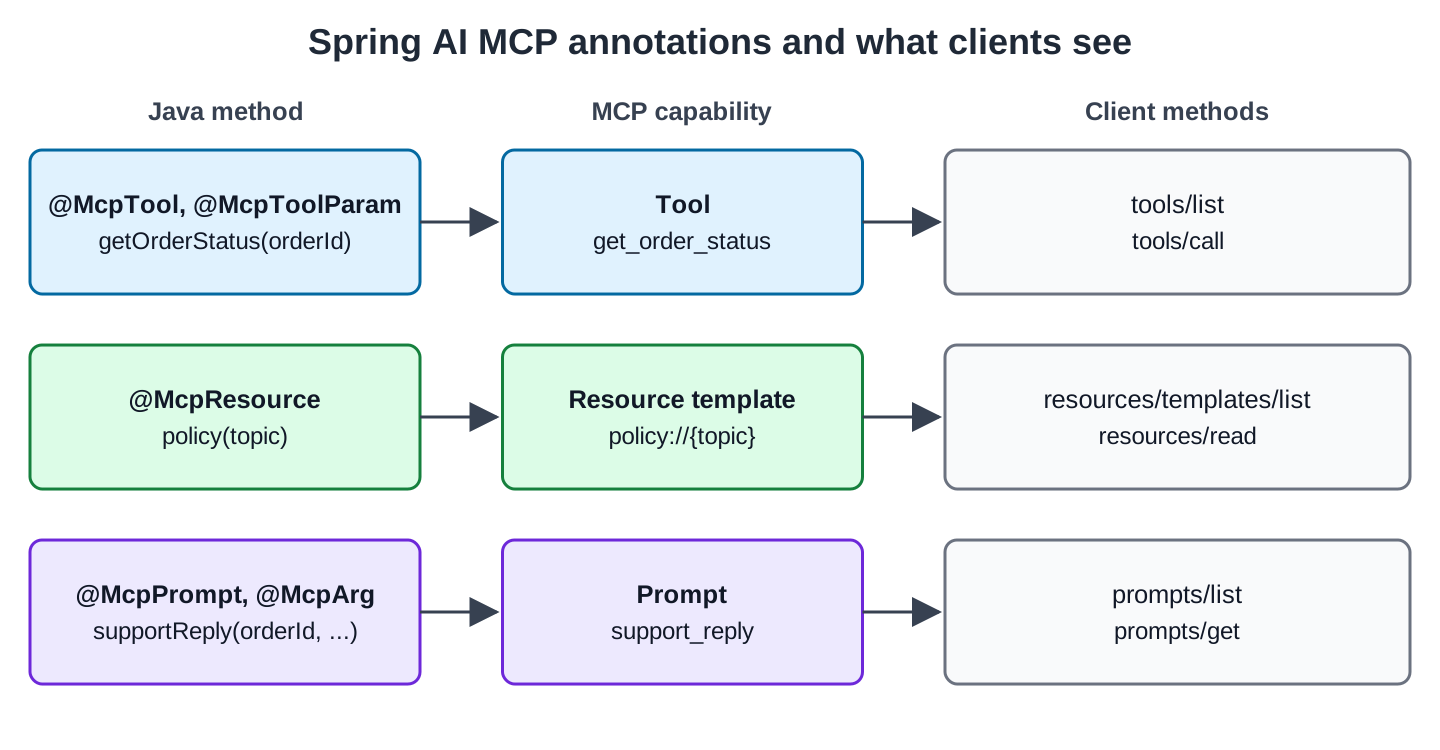
Our client app uses only tools, but a server can also expose data and ready-made prompts. The full OrderDeskMcpServer class on GitHub has one resource and one prompt. Each annotation becomes one MCP capability, and a client lists and uses it with two methods:
5.1. A Resource for the Store’s Policies
A resource is data that a host can read by a URI. The host decides how to use it, for example to show it to the user or to add it to the model’s prompt. Our resource returns one policy file:
    private static final Pattern TOPIC = Pattern.compile("returns|shipping|warranty|payments");

    @McpResource(uri = "policy://{topic}", name = "OrderDesk policy",
        description = "One OrderDesk policy as Markdown: returns, shipping, warranty or payments",
        mimeType = "text/markdown")
    public String policy(String topic) throws IOException {
        if (!TOPIC.matcher(topic).matches()) {
            throw new IllegalArgumentException("Unknown policy: " + topic);
        }
        return new ClassPathResource("policies/" + topic + ".md")
            .getContentAsString(StandardCharsets.UTF_8);
    }
The URI is a template, policy://{topic}. Spring AI fills the topic parameter from the URI, so policy://returns calls policy(“returns”). A client can send any topic, so we check it against a fixed list. Without that check, a request like policy://../application would try to read a file we never meant to share. This code needs five more imports: IOException, StandardCharsets, Pattern, ClassPathResource, and McpResource.
We read the resource with MCP Inspector:
npx -y @modelcontextprotocol/inspector --cli http://localhost:8080/mcp --transport http --method resources/read --uri policy://returnsIt returned the returns policy as Markdown. For policy://secrets, it returned an error with “Unknown policy: secrets”, and no file was read.
5.2. A Prompt for Customer Replies
A prompt is a ready-made prompt template with arguments. The host shows the server’s prompts to the user. The user picks one and fills in the arguments. The host then sends the filled text to its model. Our prompt drafts a reply to a customer:
    @McpPrompt(name = "support_reply",
        description = "Draft a short, polite reply to a customer about one order")
    public GetPromptResult supportReply(
            @McpArg(name = "orderId", description = "Order id", required = true) String orderId,
            @McpArg(name = "complaint", description = "What the customer wrote", required = true)
            String complaint) {
        String text = """
            You are an OrderDesk support agent. A customer wrote about order %s:
            "%s"
            First call get_order_status for this order. Then write a reply of at most
            four sentences that states the order status and the next step.
            """.formatted(orderId, complaint);
        // a String return becomes an assistant message; a prompt should be a user message
        return GetPromptResult.builder(
                List.of(new PromptMessage(Role.USER, TextContent.builder(text).build())))
            .description("Reply to a customer about one order")
            .build();
    }
@McpArg describes each argument. The new imports are McpPrompt, McpArg, GetPromptResult, PromptMessage, Role and TextContent.
The method returns a GetPromptResult with one USER message, because the filled prompt is the user’s request. When we returned a plain String instead, the server sent it with the role assistant, so the host would treat the text as something the model already said.
We called prompts/get with the order ORD-1042 and the complaint “Where is my order?”. Here is the server’s JSON-RPC response:
{"jsonrpc":"2.0","id":2,"result":{"description":"Reply to a customer about one order","messages":[{"role":"user","content":{"type":"text","text":"You are an OrderDesk support agent. A customer wrote about order ORD-1042:\n\"Where is my order?\"\nFirst call get_order_status for this order. Then write a reply of at most\nfour sentences that states the order status and the next step.\n"}}]}}The response holds one user message with the filled text.
6. Securing the MCP Server
Our /mcp endpoint has no authentication, so anyone who can reach port 8080 can list the tools and read every order. The Spring AI MCP server page says the same: the HTTP transports accept all requests by default. Before you deploy, do these things:
- Protect /mcp with Spring Security, like any other endpoint. The MCP specification defines OAuth 2.1 authorization for HTTP servers. The Spring AI MCP security page points to the Spring Security integration.
- Start with read-only tools. A tool that changes data needs its own permission check on the server.
- Validate every argument on the server, as policy() does. The client’s model can send anything.
- On the client, be careful with tools from servers that other people run, because their descriptions go straight into your model’s prompt. The MCP Tool Poisoning article shows how a harmful description attacks a host.
6.1. Sessions and Running More Than One Instance
By default, the server keeps a session for each client, with an id in the Mcp-Session-Id header. This causes a problem when you run several copies of OrderDesk behind a load balancer (a server that spreads requests over several copies), because every request of one session must then reach the same copy. A stateless server keeps no session, so any copy can answer any request. In Spring AI, it’s one property:
spring.ai.mcp.server.protocol=statelessBut a stateless server cannot send requests to the client. For example, it cannot ask the user a question during a tool call. Our read-only tools don’t need that. The stateless server page covers the setup.
7. Summary
MCP lets OrderDesk publish its tools once, and any MCP host can call them. In Spring AI, the server is a starter plus annotated methods, and the client is one MCP client starter plus a few properties. Before anyone else can reach /mcp, secure it.
All articles in order: Spring AI Tutorial
Drop me your questions related to Spring AI MCP in the comments.
Happy Learning !!
