
Spring AI’s RedisVectorStore lets a Spring AI app use Redis Stack as a vector store through the same VectorStore interface as any other store. In this example, we move the policy documents of OrderDesk, the support assistant of a demo online store, into Redis. The default setup fails at startup and then again on metadata filters, and we’ll fix each error as it shows up.
1. How Redis Stores Vectors
An embedding is an array of numbers that stands for the meaning of a text. Texts with a similar meaning get arrays that sit close to each other. A vector store saves texts with their embeddings and finds the closest ones to a question.
Plain Redis is a key-value store. Redis Stack is Redis with extra modules, and two of them matter here:
- RedisJSON stores a JSON document under a key. Spring AI saves each document as JSON with its text, its metadata, and its embedding.
- RediSearch (the Redis Query Engine) builds a search index over those JSON documents. The index lists the fields it can search: the text, the vector, and any metadata fields that we declare.
That last point is the key to this article: Redis can filter only on metadata fields that are part of the index. Other stores, such as Chroma or pgvector, filter on any metadata key, but in Redis, we must name the fields when we create the index.
Newer Redis versions (Redis 8 and later) include these modules in the main server. We use the redis/redis-stack-server image, which gave us Redis 7.4.7 with both modules.
2. The Example App
This article adds Redis to OrderDesk, the example app of this Spring AI series. The new code is in the com.howtodoinjava.orderdesk.vectorstore package and in a profile file. The full app is on GitHub in the orderdesk folder.
OrderDesk runs on Spring Boot 4.1.1, Spring AI 2.0.1, and Java 21, with Ollama 0.40.6. If you need help with the basic setup (installing Ollama, the Spring Boot project, the Spring AI BOM, and the Ollama starter), follow the Getting Started with Spring AI tutorial. The app listens on port 8080, Spring Boot’s default.
2.1. The Embedding Model
RedisVectorStore calls an embedding model to turn each text into an array. We use nomic-embed-text in Ollama, which returns 768 numbers. Let’s pull it and name it in application.properties:
ollama pull nomic-embed-text# Embedding model for RAG (ollama pull nomic-embed-text)
spring.ai.ollama.embedding.options.model=nomic-embed-textThe Ollama starter creates the EmbeddingModel bean from this property.
2.2. The Code That Loads and Searches the Policies
OrderDesk’s knowledge lives in four Markdown files: returns, shipping, warranty, and payments. They have 16 sections in total, such as “Return window” and “Cash on delivery”. A Document is Spring AI’s class for one piece of text with its metadata (extra key-value pairs). Each section becomes one Document with a topic, such as “returns”, and a source, such as “returns.md”.
These files come from earlier articles, and we use them unchanged:
- policies: the four policy files in src/main/resources/policies. They are explained in Spring AI ETL Pipeline Example for Data Ingestion.
- PolicyIngestion.java: reads the files, makes one Document per section with topic and source, and writes them to the VectorStore. Also explained in the ETL article.
- SimpleVectorStoreConfig.java: the default in-memory store, used when spring.ai.vectorstore.type=simple. PolicyIngestion imports it. It is explained in Spring AI VectorStore Example: SimpleVectorStore and ChromaDB.
Only the last part of PolicyIngestion matters for Redis, the part that writes to the store. Here files is the array of policy files, and chunks is the list of Document objects built from them:
// Load: remove the old chunks of each file, then add the new ones
for (Resource file : files) {
    String topic = file.getFilename().replace(".md", "");
    vectorStore.delete("topic == '" + topic + "'");
}
vectorStore.add(chunks);
The delete() method takes a filter expression, a small text language that Spring AI converts to each store’s query syntax. It removes the old sections of each file, so a second run doesn’t add copies. The add() method embeds the sections and saves them.
IngestController runs the class on POST /ingest:
package com.howtodoinjava.orderdesk.etl;

import java.io.IOException;

import org.springframework.web.bind.annotation.PostMapping;
import org.springframework.web.bind.annotation.RestController;

@RestController
public class IngestController {

    private final PolicyIngestion policyIngestion;

    IngestController(PolicyIngestion policyIngestion) {
        this.policyIngestion = policyIngestion;
    }

    @PostMapping("/ingest")
    PolicyIngestion.IngestResult ingest() throws IOException {
        return policyIngestion.ingest();
    }
}
IngestResult is a record with four numbers: files, sections, chunks, and millis.
The PolicySearchController class handles searching. It turns the request parameters into a SearchRequest:
package com.howtodoinjava.orderdesk.vectorstore;

import java.util.List;

import org.springframework.ai.document.Document;
import org.springframework.ai.vectorstore.SearchRequest;
import org.springframework.ai.vectorstore.VectorStore;
import org.springframework.ai.vectorstore.filter.FilterExpressionBuilder;
import org.springframework.web.bind.annotation.GetMapping;
import org.springframework.web.bind.annotation.RequestParam;
import org.springframework.web.bind.annotation.RestController;

@RestController
public class PolicySearchController {

    private final VectorStore vectorStore;

    PolicySearchController(VectorStore vectorStore) {
        this.vectorStore = vectorStore;
    }

    @GetMapping("/search")
    List<SearchHit> search(@RequestParam String query,
                           @RequestParam(defaultValue = "3") int topK,
                           @RequestParam(defaultValue = "0.0") double threshold,
                           @RequestParam(required = false) String topic) {

        SearchRequest.Builder request = SearchRequest.builder()
            .query(query)
            .topK(topK)
            .similarityThreshold(threshold);
        if (topic != null) {
            // the builder treats topic as a value, never as part of the expression
            request.filterExpression(new FilterExpressionBuilder().eq("topic", topic).build());
        }

        List<Document> documents = vectorStore.similaritySearch(request.build());
        return documents.stream()
            .map(d -> new SearchHit(
                Math.round(d.getScore() * 1000) / 1000.0,
                String.valueOf(d.getMetadata().get("topic")),
                d.getText()))
            .toList();
    }

    record SearchHit(double score, String topic, String text) {
    }
}
The topK value is the number of results, and the similarity threshold drops results with a lower score. The optional topic parameter adds a filter, for example topic == ‘warranty’.
Start Ollama as shown in Getting Started with Spring AI. We start the app in Step 3, after Redis is running.
3. Moving OrderDesk to Redis
Steps 2 and 3 use Spring AI’s auto-configuration, which can’t declare metadata fields, so the filter fails. Step 4 replaces it with our own bean, and Step 5 cleans up the index that Step 3 left behind.
Step 1: Start Redis Stack in Docker
We run Redis Stack in Docker, a tool that runs packaged applications in containers. If you don’t have it, install Docker first. The -p option publishes Redis’s port 6379 on our computer:
docker run -d --name redis-stack -p 6379:6379 redis/redis-stack-serverThen we check that the search module is there. The redis-cli tool is Redis’s command-line client, and FT._LIST lists the search indexes:
docker exec redis-stack redis-cli FT._LISTAn empty answer means the module works and has no index yet. Plain Redis without the module answers “ERR unknown command”.
Step 2: Add the Starter and the Properties
Next, we add the Redis vector store starter to pom.xml. The Spring AI BOM sets its version:
<dependency>
  <groupId>org.springframework.ai</groupId>
  <artifactId>spring-ai-starter-vector-store-redis</artifactId>
</dependency>
The starter brings RedisVectorStore, its auto-configuration, and two Redis client libraries: Jedis, and Lettuce through Spring Boot’s Redis starter.
Then we put the settings in a Spring profile, a named set of properties that we turn on at startup. The file is src/main/resources/application-redis.properties:
# docker run -d --name redis-stack -p 6379:6379 redis/redis-stack-server
spring.data.redis.host=localhost
spring.data.redis.port=6379
# Spring AI's Redis store needs a Jedis connection; Spring Boot picks Lettuce by default
spring.data.redis.client-type=jedis

spring.ai.vectorstore.type=redis
spring.ai.vectorstore.redis.initialize-schema=true
spring.ai.vectorstore.redis.index-name=orderdesk-policies
spring.ai.vectorstore.redis.prefix=policy:
Line by line:
- spring.data.redis.host and port are Spring Boot’s normal Redis settings.
- client-type=jedis tells Spring Boot to create a Jedis connection. Section 4.1 shows what happens without it.
- spring.ai.vectorstore.type=redis turns on the Redis store. OrderDesk’s base application.properties sets it to simple, and this profile overrides it. Without the redis profile, OrderDesk keeps using SimpleVectorStore.
- initialize-schema=true lets Spring AI create the search index at startup. It is off by default.
- index-name names the index, and prefix starts every document key, such as policy:ae555a2c-…. The index covers only keys with this prefix.
Step 3: Load the Policies and See the Filter Fail
Now we start the app with the redis profile and load the policies:
mvn spring-boot:run -Dspring-boot.run.profiles=redis
curl -X POST localhost:8080/ingest
{"timestamp":"2026-10-19T14:39:18.520Z","status":500,"error":"Internal Server Error","path":"/ingest"}The app log shows why:
java.lang.IllegalArgumentException: Not allowed filter identifier name: topicAt startup, the auto-configuration created the index orderdesk-policies with only two fields, content and embedding. PolicyIngestion then deletes the old sections with the filter topic == ‘returns’. Because topic isn’t an index field, RedisVectorStore refuses the filter. A search with the topic parameter fails the same way.
The auto-configuration has no property for metadata fields, so we create the RedisVectorStore bean ourselves.
Step 4: Declare the Metadata Fields in Our Own Bean
Next, we write RedisVectorStoreConfig. If we create our own VectorStore bean, Spring AI doesn’t create one:
package com.howtodoinjava.orderdesk.vectorstore;

import org.springframework.ai.embedding.EmbeddingModel;
import org.springframework.ai.vectorstore.redis.RedisVectorStore;
import org.springframework.ai.vectorstore.redis.RedisVectorStore.MetadataField;
import org.springframework.beans.factory.ObjectProvider;
import org.springframework.context.annotation.Bean;
import org.springframework.context.annotation.Configuration;
import org.springframework.context.annotation.Profile;
import org.springframework.core.env.Environment;

import io.micrometer.observation.ObservationRegistry;
import redis.clients.jedis.RedisClient;

@Configuration
@Profile("redis")
public class RedisVectorStoreConfig {

    @Bean
    RedisVectorStore vectorStore(EmbeddingModel embeddingModel, Environment env,
                                 ObjectProvider<ObservationRegistry> observationRegistry) {
        String host = env.getProperty("spring.data.redis.host", "localhost");
        int port = env.getProperty("spring.data.redis.port", Integer.class, 6379);
        return RedisVectorStore.builder(RedisClient.create(host, port), embeddingModel)
            .indexName("orderdesk-policies")
            .prefix("policy:")
            // Redis can filter only on metadata fields declared in the index
            .metadataFields(
                MetadataField.tag("topic"),
                MetadataField.tag("source"))
            .initializeSchema(true)
            .observationRegistry(observationRegistry.getIfUnique(() -> ObservationRegistry.NOOP))
            .build();
    }
}
Line by line:
- @Profile(“redis”) creates this bean only when the redis profile is active.
- Environment is Spring’s view of all properties. getProperty() reads the host and port from Step 2, with a default value for each.
- RedisClient.create(host, port) creates a client from the Jedis library (Jedis 7.4.1 in this app). RedisVectorStore.builder() takes it with the EmbeddingModel bean.
- indexName() and prefix() repeat the values from the properties, because the builder doesn’t read them.
- metadataFields() adds topic and source to the index as TAG fields. A TAG field holds exact values, such as “returns”, and supports == and in filters.
- initializeSchema(true) creates the index if it doesn’t exist.
- observationRegistry() makes the store’s calls show up in metrics and traces. getIfUnique() falls back to a no-op registry when the app has none.
MetadataField has three kinds: tag() for exact values, text() for full-text search on words, and numeric() for numbers with > and < filters.
With this bean in place, the auto-configuration no longer runs, so client-type and the three spring.ai.vectorstore.redis lines from Step 2 are no longer read. They do no harm, and OrderDesk keeps them. The lines that still matter are spring.ai.vectorstore.type=redis and the host and port.
Step 5: Drop the Old Index and Load Again
The index from Step 3 is still in Redis, without a topic field. initializeSchema(true) creates an index only when none exists, and it never changes an old one. With the old index, the delete filter matches nothing, so each /ingest call adds a second copy of every section. In our run, two calls left 32 documents instead of 16. Every topic came back as “null”, and a search filtered by topic returned an empty list.
So we drop the index and its documents. FT.DROPINDEX with the DD option deletes the documents too:
docker exec redis-stack redis-cli FT.DROPINDEX orderdesk-policies DDThen restart the app so that RedisVectorStore creates the new index. Until you restart, every call fails with “No such index orderdesk-policies”. After the restart, we load and search again:
curl -X POST localhost:8080/ingest
curl -G localhost:8080/search --data-urlencode "query=How many days do I have to send back a jacket?"
{"files":4,"sections":16,"chunks":16,"millis":2529}
[{"score":0.834,"topic":"returns","text":"Return window\nYou can return most items within 10 days of delivery. The item must be unused and in its original box with all tags."},{"score":0.804,"topic":"returns","text":"Damaged or wrong items\nIf an item arrives damaged or is not what you ordered, report it within 48 hours of delivery. Upload a photo of the item and the parcel on the order page. We send a replacement or give a full refund, and you do not pay for the return pickup."},{"score":0.822,"topic":"returns","text":"Refunds\nRefunds go back to the original payment method within 5 to 7 working days after we receive the item. If you choose store credit instead, it is added to your OrderDesk wallet at once."}]The 10-day return window came first, the topic is filled in, and each section appears once. A second /ingest call kept 16 documents. The -G option with –data-urlencode makes curl send the query as an encoded URL parameter.
The filter works now too:
curl -G localhost:8080/search --data-urlencode "query=How long does it take?" --data-urlencode "topic=warranty"[{"score":0.728,"topic":"warranty","text":"OrderDesk Care\nOrderDesk Care adds one more year of warranty for INR 299. You can buy it only within 30 days of delivery."},{"score":0.771,"topic":"warranty","text":"How to claim\nOpen the order page, choose the item and click Claim Warranty. A pickup is arranged within 3 working days."},{"score":0.718,"topic":"warranty","text":"Standard warranty\nElectronics sold on OrderDesk come with a 1-year manufacturer warranty from the date of delivery. Keep the invoice from the order page; the service centre asks for it."}]All three results are warranty sections. In both searches, the scores are higher than in other stores, and the results aren’t sorted by score. Section 4.3 explains both.
Step 6: Look Inside Redis
Finally, let’s look at what Spring AI created. FT.INFO describes the index:
docker exec redis-stack redis-cli FT.INFO orderdesk-policiesThe part of the answer that lists the fields reads like this (joined into one line):
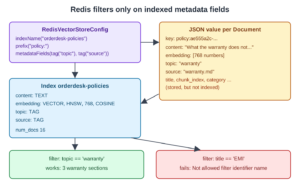
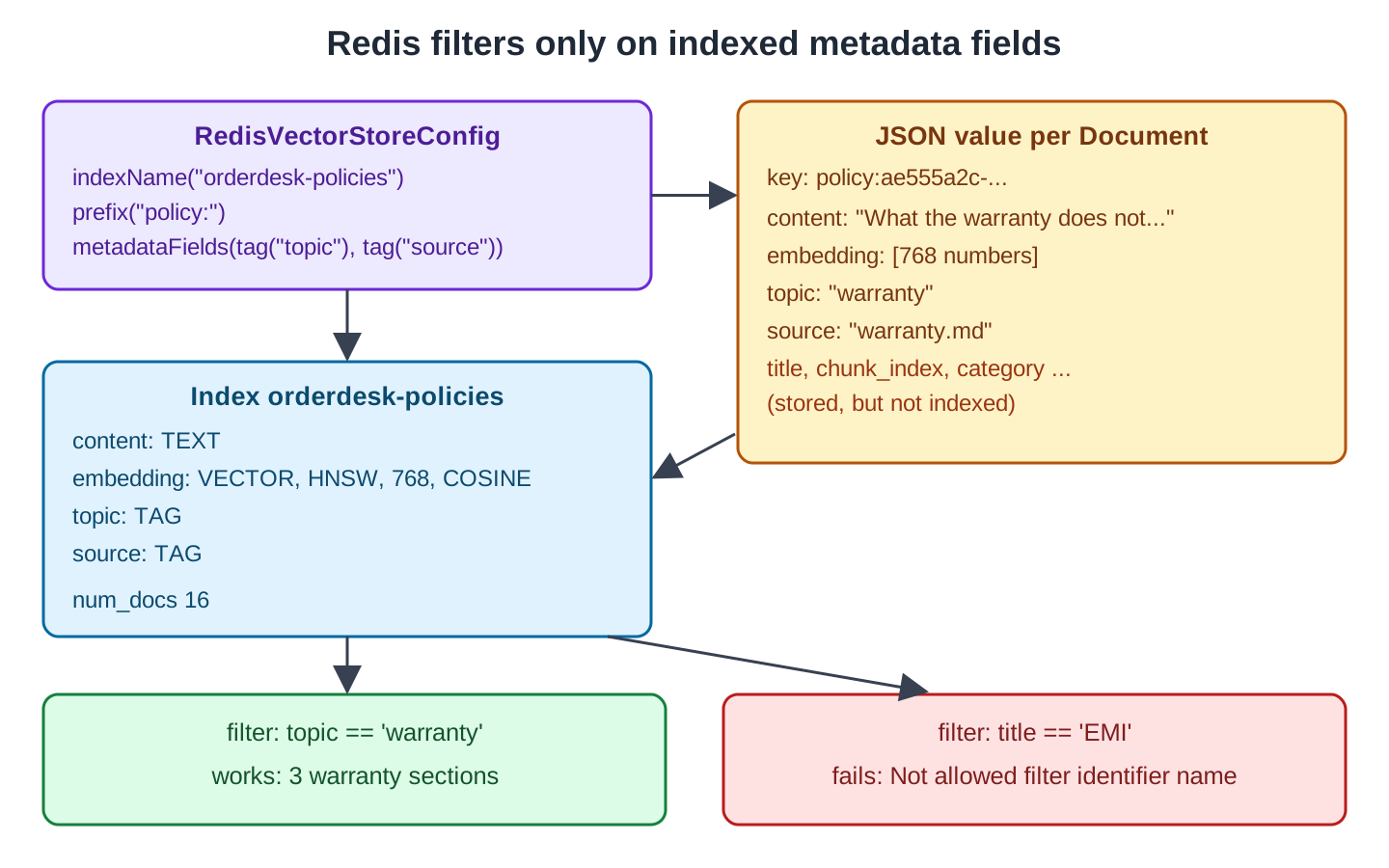
attributes identifier $.content attribute content type TEXT WEIGHT 1 identifier $.embedding attribute embedding type VECTOR algorithm HNSW data_type FLOAT32 dim 768 distance_metric COSINE M 16 ef_construction 200 identifier $.topic attribute topic type TAG SEPARATOR identifier $.source attribute source type TAG SEPARATOR num_docs 16Besides content (TEXT) and embedding (VECTOR, 768 numbers, cosine distance), the index has our two TAG fields. HNSW is the graph-based index type that Redis uses to find close vectors fast. The num_docs 16 value is one document per policy section.
Each document is a JSON value under a key with our prefix. JSON.GET reads parts of one:
docker exec redis-stack redis-cli JSON.GET policy:ae555a2c-2a3c-48c1-9108-33b1f6bd340e '$.content' '$.topic' '$.source'{"$.source":["warranty.md"],"$.content":["What the warranty does not cover\nThe warranty does not cover water damage, a cracked screen, or damage from a fall. It also does not cover items repaired by an unauthorised shop."],"$.topic":["warranty"]}The JSON value also holds the embedding and the other metadata keys, such as title, category, and chunk_index. Redis stores them but doesn’t index them, so we can’t filter on them. A filter such as title == ‘EMI’ fails with the same “Not allowed filter identifier name” error as in Step 3.
This diagram puts the pieces together:
4. Common Traps
4.1. JedisConnectionFactory Not Found
Our first start, before we added client-type=jedis, failed at once:
Parameter 2 of method vectorStore in org.springframework.ai.vectorstore.redis.autoconfigure.RedisVectorStoreAutoConfiguration required a bean of type 'org.springframework.data.redis.connection.jedis.JedisConnectionFactory' that could not be found.Spring AI’s Redis auto-configuration builds its client from a JedisConnectionFactory. Spring Boot prefers Lettuce when both clients are present, so it created a Lettuce connection and no Jedis factory. The spring.data.redis.client-type=jedis property makes Spring Boot create the Jedis one. With our own bean from Step 4, the auto-configuration steps back, so this property matters only before that step.
4.2. Filters on Fields That Are Not Indexed
Redis filters only on indexed fields, and an existing index is never updated. Whenever you change metadataFields(), drop the index with FT.DROPINDEX and restart the app.
4.3. Scores on Another Scale
The search for the jacket question gave 0.834 in Redis but 0.667 in the other stores. Redis reports cosine distance, and Spring AI turns it into a score with its own formula. The numbers fit (1 + 0.667) / 2 = 0.834 for every result we compared.
This breaks thresholds that were tuned on another store. An unrelated question (“Do you sell pizza?”) scored 0.72 to 0.741 in Redis. A 0.5 threshold blocked it in SimpleVectorStore, but lets it through in Redis. A threshold of 0.8 returned nothing for it. So tune the threshold on the store you run in production.
The results also weren’t sorted by score: 0.834, 0.804, 0.822 in the jacket search. If the order matters to you, sort the list by getScore() in your code.
4.4. A Dot in a Tag Value
A filter such as source == ‘returns.md’ matches nothing. RediSearch treats the dot in a TAG query as a separator, so the query needs it escaped. We ran both forms in redis-cli:
docker exec redis-stack redis-cli FT.SEARCH orderdesk-policies '@source:{returns.md}' LIMIT 0 0
docker exec redis-stack redis-cli FT.SEARCH orderdesk-policies '@source:{returns\.md}' LIMIT 0 0
0
4The first query found 0 documents, and the escaped one found all 4 return sections. Spring AI 2.0.1 doesn’t escape the dot, so OrderDesk filters on topic instead. Keep TAG values to letters, digits, and underscores when you plan to filter on them.
4.5. Data Lives in Memory
Redis keeps data in memory and writes it to disk only if persistence is turned on. Our container kept the documents across app restarts, but a removed container loses them. For real use, mount a volume and turn on Redis persistence (RDB snapshots or the append-only file).
5. FAQs
5.1. Do I need Redis Stack, or does plain Redis work?
Plain Redis 7 can’t run vector searches. Use Redis Stack or Redis 8 (see Section 1).
5.2. Why does Spring AI use Jedis and not Lettuce?
RedisVectorStore is written on top of Jedis’s search commands. Lettuce can stay in the app for other Redis work.
5.3. Can I filter on numbers or dates?
Yes, with MetadataField.numeric(). Store dates as numbers, such as epoch seconds, and filter with > and <.
5.4. Is Redis a good choice for a vector store?
It’s a good fit when the app already uses Redis and the data fits in memory. Searches are fast, and the setup is one container. For data much larger than memory, a disk-based store such as pgvector costs less.
5.5. What happens to the documents when I drop the index?
Without DD, the JSON documents stay, and a new index covers them again, because they keep the same prefix. With DD, they are deleted, so load them again.
6. Conclusion
Redis Stack works as a vector store through its JSON and search modules, and Spring AI’s RedisVectorStore gives it the usual VectorStore methods. OrderDesk needed three fixes: the Jedis client type, our own bean with metadataFields(), and a fresh index.
The one trap to remember is the index. Redis filters only on fields declared in the index, and an existing index isn’t updated, so drop it whenever the fields change.
All articles in order: Spring AI Tutorial
7. References
Drop me your questions related to the Spring AI Redis vector store in the comments.
Happy Learning !!
