
OrderDesk, the support assistant of our demo online store, runs its model locally in Ollama. But many teams already use Docker on every laptop, and for them one more tool is extra work. In this example, we connect the same Spring Boot app to a model in Docker Model Runner, and the app keeps its Ollama model too. We’ll use Spring AI 2.0.
1. What Docker Model Runner Does
Docker Model Runner (DMR) is a part of Docker that runs AI models on your own machine. You don’t start a container for it. Docker runs the model for you and serves it over HTTP on a local port.
Docker treats models much like container images. You pull them by name, and Docker Hub has an ai namespace with ready-to-use models such as ai/gemma3. After you pull a model, it stays on your disk. When you call it, no data leaves your machine.
Here’s the important part for Java developers. DMR doesn’t invent its own API; it serves an OpenAI-compatible API. This means it uses the same request and response format as OpenAI’s chat completions endpoint. A client sends a POST request to a path that ends with /chat/completions. The body holds the model name and a list of messages, and each message has a role such as system or user.
Any client that can talk to OpenAI can talk to DMR, and you only change the address and the model name.
That’s why Spring AI has no DMR module. We use Spring AI’s OpenAI module, spring-ai-starter-model-openai, and point its base URL at DMR. The Spring AI Docker Model Runner page describes this setup.
One word about what we ran. We didn’t run DMR for this article because our test machine had no Docker. The outputs in Section 5 come from the same code, called against Ollama’s OpenAI-compatible endpoint instead. If you don’t have Docker Desktop, you can try the code the same way (Section 5.1 shows how).
1.1. DMR or Ollama?
Both run models on your machine. Both are free to call, and both keep your data local. The main difference is which tools you already use:
- Ollama is a separate program with its own model library. The other OrderDesk articles use it, and Spring AI has a dedicated Ollama module for it.
- DMR comes with Docker Desktop. It suits teams that use Docker every day.
In this article, we use both in one app.
2. Setting Up Docker Model Runner
You need Docker Desktop. The prerequisites on the Spring AI DMR page name Docker Desktop for Mac 4.40.0. That page doesn’t mention Windows or Linux.
First, turn on DMR and open it on TCP port 12434. Then apps on your machine can call it:
docker desktop enable model-runner --tcp 12434DMR must also have the model on your machine. We use ai/gemma3 from Docker Hub’s ai namespace. You can add a tag such as ai/gemma3:4B-F16 (the Spring AI documentation uses it) to pick a size and format. Whatever name you use, put the same name in the properties in Section 3.2.
For integration tests, the Spring AI documentation also shows a Testcontainers option, DockerModelRunnerContainer, which we didn’t run.
3. Setting Up the App
The example is a Spring Boot app called orderdesk-dmr. You can find it in the spring-ai-examples repository on GitHub. The app uses the qwen2.5:3b model in Ollama as its second model. If you need help installing Ollama and downloading the model, follow the Getting Started with Spring AI tutorial.
The app uses Spring Boot 4.1, Spring AI 2.0.1, and Java 21, with all classes in the com.howtodoinjava.orderdesk.dmr package.
3.1. Dependencies
Here is the full pom.xml. It imports the Spring AI BOM (bill of materials), which sets the version of every Spring AI module:
<?xml version="1.0" encoding="UTF-8"?>
<project xmlns="http://maven.apache.org/POM/4.0.0"
  xmlns:xsi="http://www.w3.org/2001/XMLSchema-instance"
  xsi:schemaLocation="http://maven.apache.org/POM/4.0.0 https://maven.apache.org/xsd/maven-4.0.0.xsd">
  <modelVersion>4.0.0</modelVersion>

  <parent>
    <groupId>org.springframework.boot</groupId>
    <artifactId>spring-boot-starter-parent</artifactId>
    <version>4.1.1</version>
    <relativePath/>
  </parent>

  <groupId>com.howtodoinjava</groupId>
  <artifactId>orderdesk-dmr</artifactId>
  <version>1.0.0</version>

  <properties>
    <java.version>21</java.version>
  </properties>

  <dependencyManagement>
    <dependencies>
      <dependency>
        <groupId>org.springframework.ai</groupId>
        <artifactId>spring-ai-bom</artifactId>
        <version>2.0.1</version>
        <type>pom</type>
        <scope>import</scope>
      </dependency>
    </dependencies>
  </dependencyManagement>

  <dependencies>
    <dependency>
      <groupId>org.springframework.boot</groupId>
      <artifactId>spring-boot-starter-webmvc</artifactId>
    </dependency>
    <dependency>
      <groupId>org.springframework.ai</groupId>
      <artifactId>spring-ai-starter-model-ollama</artifactId>
    </dependency>
    <dependency>
      <groupId>org.springframework.ai</groupId>
      <artifactId>spring-ai-starter-model-openai</artifactId>
    </dependency>
  </dependencies>

  <build>
    <plugins>
      <plugin>
        <groupId>org.springframework.boot</groupId>
        <artifactId>spring-boot-maven-plugin</artifactId>
      </plugin>
    </plugins>
  </build>
</project>
The spring-boot-starter-webmvc dependency is the Spring MVC web starter in Spring Boot 4. The spring-ai-starter-model-openai starter creates the OpenAiChatModel bean, and this bean calls DMR.
3.2. Properties
Here is the full application.properties:
spring.application.name=orderdesk-dmr
server.port=8087

# Two chat models in one app, so we build the ChatClients ourselves
spring.ai.chat.client.enabled=false

# The local model, as in the other OrderDesk articles
spring.ai.ollama.base-url=http://localhost:11434
spring.ai.ollama.chat.model=qwen2.5:3b
spring.ai.ollama.chat.temperature=0.2

# Docker Model Runner speaks the OpenAI API on localhost; any key works
spring.ai.openai.api-key=test
spring.ai.openai.base-url=http://localhost:12434/engines/v1
spring.ai.openai.chat.model=ai/gemma3
# Model Runner has no embedding model here; use Ollama's
spring.ai.model.embedding=ollama
spring.ai.openai.chat.temperature=0.2
Let’s go through the DMR lines one by one. The Spring AI DMR chat properties list them all.
- spring.ai.openai.api-key=test. The OpenAI module requires a key, but DMR doesn’t check it, so any string works. The Spring AI documentation uses “test” too.
- spring.ai.openai.base-url is the DMR address. It ends with /engines/v1, and that part matters. We come back to it in Section 5.
- spring.ai.openai.chat.model is the name of the model in DMR, ai/gemma3.
- spring.ai.model.embedding=ollama is about embeddings, not chat. An embedding is a list of numbers that represents the meaning of a text, and an embedding model creates it. According to the Spring AI documentation, DMR doesn’t support embeddings, so we tell Spring AI to take the embedding model from Ollama, not from the OpenAI module. This app never uses embeddings, so the line only keeps the embedding model away from DMR. The Spring AI sample uses none here instead.
The line spring.ai.chat.client.enabled=false needs a word too. Usually an app has one ChatModel, and Spring AI creates a ChatClient.Builder for it. Our app has two ChatModel beans, so we turn this builder off and create both clients ourselves.
4. Two ChatClients in One App
The code that asks a question is the same for every model. In Spring AI, each provider is a ChatModel, and a ChatClient uses one ChatModel. Our app has two ChatModel beans, so it has two ChatClient beans:
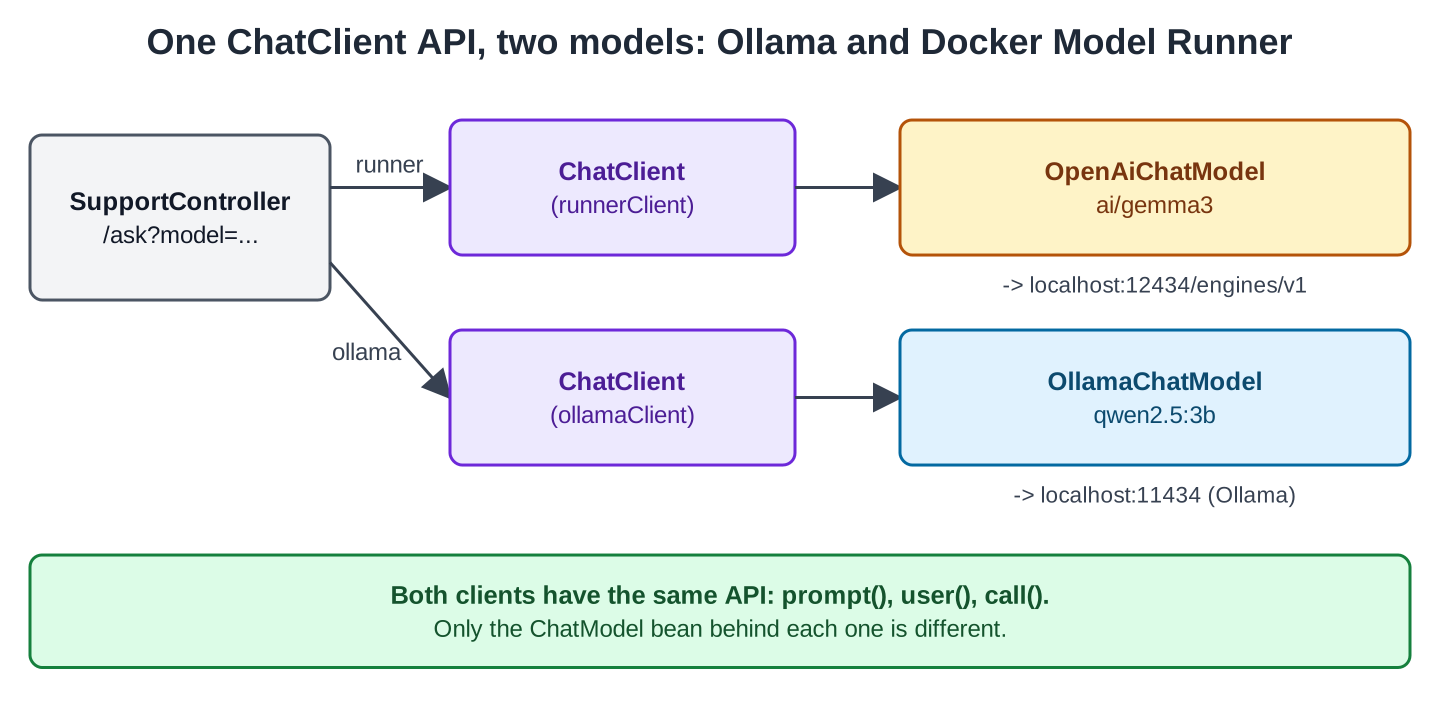
ChatConfig creates one client per model, with the same system prompt:
package com.howtodoinjava.orderdesk.dmr;

import org.springframework.ai.chat.client.ChatClient;
import org.springframework.ai.ollama.OllamaChatModel;
import org.springframework.ai.openai.OpenAiChatModel;
import org.springframework.context.annotation.Bean;
import org.springframework.context.annotation.Configuration;

@Configuration
public class ChatConfig {

    static final String SUPPORT = "You are OrderDesk, the support assistant of an online store. "
        + "Answer in at most three sentences.";

    // The model in Docker Model Runner, reached through the OpenAI API
    @Bean
    ChatClient runnerClient(OpenAiChatModel chatModel) {
        return ChatClient.builder(chatModel).defaultSystem(SUPPORT).build();
    }

    // The model in Ollama, as in the other OrderDesk articles
    @Bean
    ChatClient ollamaClient(OllamaChatModel chatModel) {
        return ChatClient.builder(chatModel).defaultSystem(SUPPORT).build();
    }
}
The DMR client takes an OpenAiChatModel. This looks strange because we never call OpenAI, but the class name only tells you the API format. The base URL in application.properties decides where the requests go. This means you can switch between DMR, Ollama’s OpenAI endpoint, or a hosted OpenAI-compatible service by changing three properties: the base URL, the key, and the model name.
We ask for the concrete classes, not for the ChatModel interface. With two beans of the same interface, Spring wouldn’t know which one to inject.
The controller picks a client from the model request parameter. It returns the answer with the model name and the token counts:
package com.howtodoinjava.orderdesk.dmr;

// The answer plus the facts that differ between models
public record Reply(String model, String answer, Integer inputTokens, Integer outputTokens) {
}
package com.howtodoinjava.orderdesk.dmr;
import org.springframework.ai.chat.client.ChatClient;
import org.springframework.ai.chat.metadata.ChatResponseMetadata;
import org.springframework.ai.chat.model.ChatResponse;
import org.springframework.beans.factory.annotation.Qualifier;
import org.springframework.web.bind.annotation.GetMapping;
import org.springframework.web.bind.annotation.RequestParam;
import org.springframework.web.bind.annotation.RestController;
@RestController
public class SupportController {
private final ChatClient runnerClient;
private final ChatClient ollamaClient;
SupportController(@Qualifier("runnerClient") ChatClient runnerClient,
@Qualifier("ollamaClient") ChatClient ollamaClient) {
this.runnerClient = runnerClient;
this.ollamaClient = ollamaClient;
}
// model=runner (default) or model=ollama
@GetMapping("/ask")
Reply ask(@RequestParam String question,
@RequestParam(defaultValue = "runner") String model) {
ChatClient client = "ollama".equals(model) ? ollamaClient : runnerClient;
ChatResponse response = client.prompt().user(question).call().chatResponse();
ChatResponseMetadata metadata = response.getMetadata();
return new Reply(metadata.getModel(), response.getResult().getOutput().getText(),
metadata.getUsage().getPromptTokens(), metadata.getUsage().getCompletionTokens());
}
}@Qualifier tells Spring which bean to inject when multiple beans match the required type. In this example, it identifies the bean by the name of the @Bean method. The chatResponse() method returns the full response, and its getMetadata() gives us the model name and the token counts (Usage).
The main class is the usual Spring Boot one:
package com.howtodoinjava.orderdesk.dmr;

import org.springframework.boot.SpringApplication;
import org.springframework.boot.autoconfigure.SpringBootApplication;

@SpringBootApplication
public class DmrApplication {

    public static void main(String[] args) {
        SpringApplication.run(DmrApplication.class, args);
    }
}
5. Running It
Start Ollama, then start the app with mvn spring-boot:run. Ask a question. Without a model parameter, it goes to the DMR client:
curl -G localhost:8087/ask --data-urlencode "question=Can I return a kettle after 5 days?"With DMR running, the answer would come from ai/gemma3. We have no DMR output to show here. The next section shows the stand-in run.
5.1. Trying It with Ollama Instead of DMR
Ollama also serves an OpenAI-compatible API at http://localhost:11434/v1, so we built the jar with mvn package and started the same app with two overrides on the command line:
java -jar target/orderdesk-dmr-1.0.0.jar \
  --spring.ai.openai.base-url=http://localhost:11434/v1 \
  --spring.ai.openai.chat.model=qwen2.5:3b
Stand-in run, default runner path (OpenAiChatModel calling Ollama’s /v1 endpoint):
{"model":"qwen2.5:3b","answer":"Yes, you can return a kettle within 5 days, but it's best to check your store's specific return policy as some policies may vary.","inputTokens":43,"outputTokens":31}Stand-in run, model=ollama path (OllamaChatModel):
{"model":"qwen2.5:3b","answer":"Yes, you can return a kettle within 5 days of receiving it, as many online stores offer a 7-day return policy, which typically includes the first 5 days. Please check your specific store's return policy for any variations.","inputTokens":43,"outputTokens":49}Both answers come from the same model, once through the OpenAI API and once through Ollama’s own API. This shows that the OpenAI module works with a local OpenAI-compatible server, but it tells us nothing about DMR’s speed or answers.
Neither answer knows OrderDesk’s real return window (10 days), because this small app gives the model no store rules.
5.2. The Request Spring AI Sends to DMR
This is the request Spring AI sends to POST /engines/v1/chat/completions. We captured it with a small fake server that records the request:
{"messages":[{"content":"You are OrderDesk, the support assistant of an online store. Answer in at most three sentences.","role":"system"},{"content":"Can I return a kettle after 5 days?","role":"user"}],"model":"ai/gemma3","temperature":0.2}Notice two things. First, the OpenAI module adds /chat/completions to the base URL, which is why the base URL must end with /engines/v1 for DMR.
Second, Spring AI sends the system prompt as the first message, with the role system. The model name and the temperature come from application.properties.
5.3. When DMR Isn’t Running
The app starts fine without DMR, because nothing connects at startup. The first request fails:
com.openai.errors.OpenAIIoException: Request failed
...
java.net.ConnectException: Connection refused
The package is com.openai, because the Spring AI OpenAI module uses the official openai-java SDK (Spring AI OpenAI chat page). Connection refused means nothing is listening on port 12434. Check that DMR is turned on with the –tcp 12434 option from Section 2.
5.4. A Base URL Without /v1 Gives a 404
We saw this error in the Ollama stand-in. If the base URL is missing /v1 (for example http://localhost:11434), the call fails even though the server is running:
com.openai.errors.NotFoundException: 404The OpenAI module sent the request to /chat/completions, but that path doesn’t exist on the server at the URL it was given. The DMR base URL from the Spring AI documentation already ends with /v1, so make sure you configure the base URL correctly and let the client build the rest of the path. Don’t accidentally duplicate or omit part of the URL.
The error message also helps narrow down the problem. Connection refused means the port is wrong or the server is off. A 404 means the path is wrong.
All articles in order: Spring AI Tutorial
Drop me your questions related to Spring AI with Docker Model Runner in the comments.
Happy Learning !!
