
OrderDesk, the support assistant of our demo online store, runs on a small local model in Ollama. Many teams already use AWS and want their AI calls in the same account, with one bill and one set of access rules. In this example, we add Amazon Bedrock to OrderDesk, and each request chooses either the local model or Bedrock. We’ll use Spring AI 2.0.
1. What Bedrock and Converse Are
Anthropic hosts its own models, and you call Anthropic’s API. Amazon Bedrock is an AWS service that hosts models from several companies: Anthropic’s Claude, Amazon’s own Nova models, Meta’s Llama, Mistral, and others. You call all of them through one AWS API, inside your AWS account. So Bedrock isn’t one model provider; it offers models from many providers.
But each model family has its own request format. Claude expects the system prompt in one place, while Llama expects it in another. If your code had to build a different request for each family, switching models would mean changing code.
This is the problem that Converse solves. Converse is Bedrock’s one request format for chat, the same for every model family it supports. You send messages, a system prompt, and settings (like the token limit) in the same format, and Bedrock converts them for the model. So to switch from Claude to Nova, you mostly change the model id. AWS describes the Converse API in the Amazon Bedrock User Guide.
A few AWS details are different from a local model in Ollama:
- Credentials, not an API key. AWS checks every request with AWS credentials. Section 3.2 explains them.
- Model access. You may need to enable a model in the Bedrock console for your account before you can call it.
- Region. Bedrock runs per AWS region, and not every model is offered in every region. The region you call must have the model.
- Model ids. Ids look like anthropic.claude-… or amazon.nova-…. Some ids start with an area prefix such as us.. AWS calls these cross-region inference profiles. With such an id, Bedrock can answer your request from any of several regions in that area. The AWS docs on inference profiles list the ids.
One thing to know before we start: we didn’t have an AWS account for this article. The Bedrock part compiles, and we tested it only up to the point where AWS rejected our fake keys. The local model part runs fully, with real output.
2. How Spring AI Fits In
Spring AI defines a common interface for chat models called ChatModel, and each provider module implements it with its own class. For Bedrock Converse, the implementation is BedrockProxyChatModel. We don’t call ChatModel directly. Instead, we call ChatClient, the fluent API from Getting Started, which uses a ChatModel internally. So the code that asks a question doesn’t change when the model behind it changes:
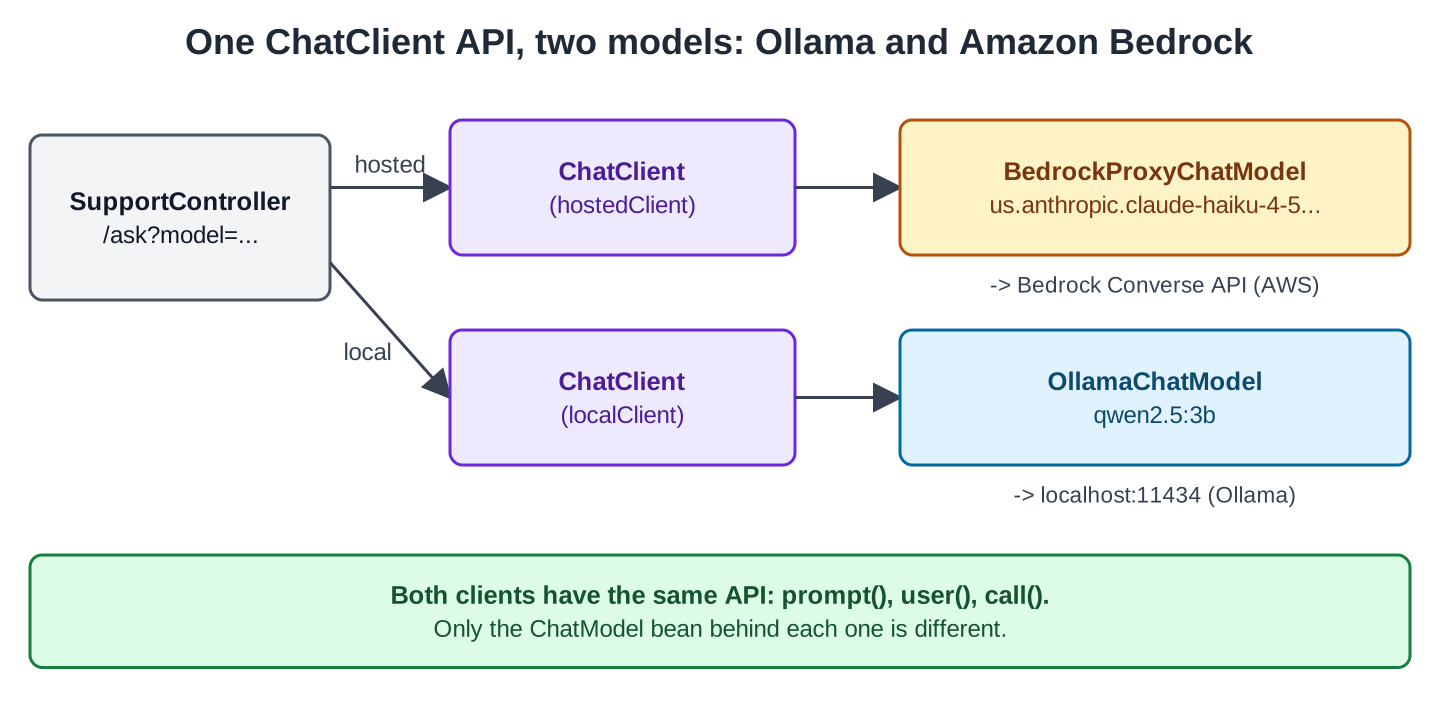
So there are two levels of hiding here. Spring AI’s ChatModel hides the difference between Ollama and Bedrock. Inside Bedrock, Converse hides the difference between Claude, Nova, and Llama. The Spring AI Bedrock Converse page covers the Spring AI side.
3. Setting Up the App
The example is a separate Spring Boot project in the OrderDesk series called orderdesk-bedrock. You can find the project in the spring-ai-examples repository on GitHub. If you need help installing Ollama and downloading the qwen2.5:3b model, follow the Getting Started with Spring AI tutorial.
The project uses Spring Boot 4.1, Spring AI 2.0.1, and Java 21, with all classes in the com.howtodoinjava.orderdesk.bedrock package.
3.1. Dependencies
Here is the full pom.xml. It uses the Spring Boot 4.1.1 parent and imports the Spring AI BOM (bill of materials), which sets the version of every Spring AI module:
<?xml version="1.0" encoding="UTF-8"?>
<project xmlns="http://maven.apache.org/POM/4.0.0"
  xmlns:xsi="http://www.w3.org/2001/XMLSchema-instance"
  xsi:schemaLocation="http://maven.apache.org/POM/4.0.0 https://maven.apache.org/xsd/maven-4.0.0.xsd">
  <modelVersion>4.0.0</modelVersion>

  <parent>
    <groupId>org.springframework.boot</groupId>
    <artifactId>spring-boot-starter-parent</artifactId>
    <version>4.1.1</version>
    <relativePath/>
  </parent>

  <groupId>com.howtodoinjava</groupId>
  <artifactId>orderdesk-bedrock</artifactId>
  <version>1.0.0</version>

  <properties>
    <java.version>21</java.version>
  </properties>

  <dependencyManagement>
    <dependencies>
      <dependency>
        <groupId>org.springframework.ai</groupId>
        <artifactId>spring-ai-bom</artifactId>
        <version>2.0.1</version>
        <type>pom</type>
        <scope>import</scope>
      </dependency>
    </dependencies>
  </dependencyManagement>

  <dependencies>
    <dependency>
      <groupId>org.springframework.boot</groupId>
      <artifactId>spring-boot-starter-webmvc</artifactId>
    </dependency>
    <dependency>
      <groupId>org.springframework.ai</groupId>
      <artifactId>spring-ai-starter-model-ollama</artifactId>
    </dependency>
    <dependency>
      <groupId>org.springframework.ai</groupId>
      <artifactId>spring-ai-starter-model-bedrock-converse</artifactId>
    </dependency>
  </dependencies>

  <build>
    <plugins>
      <plugin>
        <groupId>org.springframework.boot</groupId>
        <artifactId>spring-boot-maven-plugin</artifactId>
      </plugin>
    </plugins>
  </build>
</project>
The spring-ai-starter-model-bedrock-converse starter adds the BedrockProxyChatModel bean and the AWS SDK it uses. Both chat starters are enabled by default, so this app needs no extra property.
Don’t set spring.ai.model.chat in this app. That property selects one chat model for the whole app. With spring.ai.model.chat=bedrock-converse, the Ollama auto-configuration switches off, so there’s no OllamaChatModel bean and localClient has no model to use.
3.2. AWS Credentials, Model Access and Cost
Ollama needs no key. Most hosted providers use one API key. AWS works differently.
AWS signs every request with AWS credentials: an access key id and a secret access key. These keys belong to an IAM user in your AWS account. You create them in the IAM console, or your AWS admin gives them to you. That user also needs permission to call Bedrock models. The Bedrock security pages in the AWS docs list the exact IAM permissions.
Your code doesn’t pass these keys around, because the AWS SDK finds them itself. It checks several places in a fixed order, which AWS calls the default credentials provider chain (see the AWS SDK for Java documentation). Two of those places are the AWS_ACCESS_KEY_ID and AWS_SECRET_ACCESS_KEY environment variables, and the ~/.aws/credentials file.
So we don’t set any credential properties in Spring AI. Spring AI has them (spring.ai.bedrock.aws.access-key, spring.ai.bedrock.aws.secret-key, and a few profile properties), but this app doesn’t need them. On your machine, export the two standard AWS variables:
export AWS_ACCESS_KEY_ID=your-access-key-id
export AWS_SECRET_ACCESS_KEY=your-secret-access-key
If you’ve already set up the AWS CLI, the SDK uses that setup, and you don’t need the variables. Either way, the secret stays out of your code and your Git repository.
Next, enable the model. The Spring AI documentation says:
“Go to Amazon Bedrock and from the Model Access menu on the left, configure access to the models you are going to use.”
Do this in the same region your app will call. If the Bedrock console looks different, follow the model access steps in the Bedrock docs.
Also keep cost in mind. The local model is free, but each Bedrock call costs money. AWS bills by the number of input and output tokens.
To check that the app picks up the environment variables, we started it with fake values for AWS_ACCESS_KEY_ID and AWS_SECRET_ACCESS_KEY. The app started, and the first call to the Bedrock model failed with this error:
software.amazon.awssdk.services.bedrockruntime.model.BedrockRuntimeException: The security token included in the request is invalid. (Service: BedrockRuntime, Status Code: 403, Request ID: 4f7a52a0-94f7-4ff6-bc30-c8f7dfad9887)This error came from AWS, which means the app read the keys from the environment, signed the request, and sent it to Bedrock. AWS then rejected the fake keys. With real keys and model access, the call should return an answer, but we couldn’t test this.
3.3. Properties
Here is the full application.properties:
spring.application.name=orderdesk-bedrock
server.port=8086

# Two chat models in one app, so we build the ChatClients ourselves
spring.ai.chat.client.enabled=false

# The local model, as in the other OrderDesk articles
spring.ai.ollama.base-url=http://localhost:11434
spring.ai.ollama.chat.model=qwen2.5:3b
spring.ai.ollama.chat.temperature=0.2

# AWS credentials come from the default AWS chain: environment variables
# AWS_ACCESS_KEY_ID and AWS_SECRET_ACCESS_KEY, or ~/.aws/credentials
spring.ai.bedrock.aws.region=us-east-1
spring.ai.bedrock.converse.chat.model=us.anthropic.claude-haiku-4-5-20251001-v1:0
spring.ai.bedrock.converse.chat.max-tokens=500
spring.ai.bedrock.converse.chat.temperature=0.2
Let’s go through the Bedrock lines.
The spring.ai.bedrock.aws.region property is the AWS region to call (us-east-1 is also the default).
The spring.ai.bedrock.converse.chat.model property has no default. The Spring AI documentation tells you to “Select your modelId from the AWS Bedrock console”. We use the id from the documentation’s own example, us.anthropic.claude-haiku-4-5-20251001-v1:0, which is Anthropic’s small, fast Claude model. The us. prefix makes it a cross-region inference profile for US regions, so it fits us-east-1.
The last two lines limit each answer to 500 tokens. The low temperature makes the answers more consistent.
4. Two ChatClients in One App
Normally, Spring AI auto-configures one ChatClient.Builder, and that builder expects one ChatModel. Our app has two ChatModel beans, so we switch the auto-configured builder off with spring.ai.chat.client.enabled=false. This way, no class gets it by mistake, and we build our two clients ourselves.
ChatConfig creates one client per model. Each client gets the same system prompt:
package com.howtodoinjava.orderdesk.bedrock;

import org.springframework.ai.chat.client.ChatClient;
import org.springframework.ai.ollama.OllamaChatModel;
import org.springframework.ai.bedrock.converse.BedrockProxyChatModel;
import org.springframework.context.annotation.Bean;
import org.springframework.context.annotation.Configuration;

@Configuration
public class ChatConfig {

    static final String SUPPORT = "You are OrderDesk, the support assistant of an online store. "
        + "Answer in at most three sentences.";

    // The hosted model: for questions that need a stronger model
    @Bean
    ChatClient hostedClient(BedrockProxyChatModel chatModel) {
        return ChatClient.builder(chatModel).defaultSystem(SUPPORT).build();
    }

    // The local model in Ollama: free, for simple questions
    @Bean
    ChatClient localClient(OllamaChatModel chatModel) {
        return ChatClient.builder(chatModel).defaultSystem(SUPPORT).build();
    }
}
There are two ChatModel beans, so we ask for each one by its exact class: BedrockProxyChatModel and OllamaChatModel. ChatClient.builder(chatModel) then wraps each model in its own client.
The controller picks a client from the model request parameter. There’s no automatic routing: the caller decides, and the default is hosted. The controller returns the answer, the model name and the token counts. These values differ between models:
package com.howtodoinjava.orderdesk.bedrock;

// The answer plus the facts that differ between models
public record Reply(String model, String answer, Integer inputTokens, Integer outputTokens) {
}
package com.howtodoinjava.orderdesk.bedrock;
import org.springframework.ai.chat.client.ChatClient;
import org.springframework.ai.chat.metadata.ChatResponseMetadata;
import org.springframework.ai.chat.model.ChatResponse;
import org.springframework.beans.factory.annotation.Qualifier;
import org.springframework.web.bind.annotation.GetMapping;
import org.springframework.web.bind.annotation.RequestParam;
import org.springframework.web.bind.annotation.RestController;
@RestController
public class SupportController {
private final ChatClient hostedClient;
private final ChatClient localClient;
SupportController(@Qualifier("hostedClient") ChatClient hostedClient,
@Qualifier("localClient") ChatClient localClient) {
this.hostedClient = hostedClient;
this.localClient = localClient;
}
// model=hosted (default) or model=local
@GetMapping("/ask")
Reply ask(@RequestParam String question,
@RequestParam(defaultValue = "hosted") String model) {
ChatClient client = "local".equals(model) ? localClient : hostedClient;
ChatResponse response = client.prompt().user(question).call().chatResponse();
ChatResponseMetadata metadata = response.getMetadata();
return new Reply(metadata.getModel(), response.getResult().getOutput().getText(),
metadata.getUsage().getPromptTokens(), metadata.getUsage().getCompletionTokens());
}
}@Qualifier tells Spring which bean to inject when multiple beans match the required type. In this example, it identifies the bean by the name of the @Bean method. The chatResponse() method returns the whole response instead of only the text. This lets us read getMetadata(): the model that answered and the Usage with the token counts.
The main class is a plain Spring Boot application:
package com.howtodoinjava.orderdesk.bedrock;

import org.springframework.boot.SpringApplication;
import org.springframework.boot.autoconfigure.SpringBootApplication;

@SpringBootApplication
public class BedrockApplication {

    public static void main(String[] args) {
        SpringApplication.run(BedrockApplication.class, args);
    }
}
5. Calling the Endpoint
Start Ollama as shown in Getting Started. Then start the app with mvn spring-boot:run in the orderdesk-bedrock folder. It listens on port 8086.
You don’t need an AWS account to try the local model. We recorded this request with the app started with fake AWS keys:
curl -G localhost:8086/ask --data-urlencode "question=Can I return a kettle after 5 days?" \
  --data-urlencode model=local
{"model":"qwen2.5:3b","answer":"Yes, you can return a kettle within 5 days of receiving it, as many online stores offer a 7-day return policy, which typically includes the first 5 days. Please check the specific return policy of the retailer you purchased the kettle from for any additional details or requirements.","inputTokens":43,"outputTokens":58}The local model took about 10.6 seconds to answer.
The same question without model=local goes to Bedrock. With the fake keys, that’s the 403 error from Section 3.2. SupportController doesn’t catch the exception, so the caller gets Spring Boot’s default error response, an HTTP 500.
Notice the local answer. The model guesses a “7-day return policy” from general knowledge. OrderDesk’s real return window is 10 days. A model can’t know your store’s rules unless you give it those rules, with RAG or tools as in the other OrderDesk articles.
6. Switching the Model Family
This is where Converse helps. Suppose you want to try Amazon’s own Nova model instead of Claude, for example to compare the answers. With Converse, the request format stays the same, so the change is one line in application.properties:
spring.ai.bedrock.converse.chat.model=us.amazon.nova-lite-v1:0The Java code doesn’t change. BedrockProxyChatModel still sends a Converse request, and Bedrock passes it to Nova instead of Claude. The same goes for a Meta Llama or Mistral model.
Two things still need care. First, take the exact id from the Bedrock console for your region, and enable access to that model as in Section 3.2. This id shows the format; we didn’t test it.
The other thing is feature support. Not every model supports every Converse feature, such as a system prompt or tool calling. The Bedrock documentation lists which features each model supports, so check before you switch.
You can also set the model for one request instead of the whole app, with BedrockChatOptions. The Runtime Options section of the Spring AI Bedrock Converse page shows how.
7. Before You Go to Production
A few things change when real customers start using a model on Bedrock:
- When the app runs on AWS, give it an IAM role. Don’t put permanent keys in environment variables. The default credentials provider chain can also find role credentials, as the AWS SDK for Java docs describe.
- Give that role only the Bedrock permissions it needs, and only for the models you use.
- Cost grows with tokens. Log the token counts from Usage, as our Reply does. Keep max-tokens set, so one answer can’t use too many tokens.
- Bedrock requests can fail in ways a local model can’t: bad credentials (403, as above), a model without access, or request limits. In those cases, our controller returns an HTTP 500. Decide what the user should see. One option is to catch the exception and ask localClient instead.
- Keep the model id in application.properties. Model versions change over time, and with Converse a new version or even a new family is a configuration change.
Bedrock is one more ChatModel in Spring AI, so memory, RAG, tools, and advisors work with it without changes.
All articles in order: Spring AI Tutorial
Drop me your questions related to Spring AI with Amazon Bedrock in the comments.
Happy Learning !!
