
OrderDesk, the support assistant of our demo online store, runs on a small local model in Ollama. The local model is free, but it’s small, so it sometimes gets simple facts wrong. In this example, we add DeepSeek to the same Spring Boot app, and the caller picks which model answers each question. We’ll use Spring AI 2.0.
1. One Interface, Many Model Providers
A local model and a hosted model like DeepSeek do the same job: they take a list of messages and return an answer. The difference is where they run, what they cost, and how good the answers are.
- A local model runs on your own machine. There is no charge per request, and your data stays on the machine. But small local models make more mistakes.
- A hosted model runs on the provider’s servers. You pay for every token. A token is a small piece of text, about three-quarters of an English word. Your prompts also travel to the provider over the internet. In return, the answers are usually much better.
Because of this, many apps use both. They send simple questions to the cheap model and important questions to the strong one.
Without a common API, you’d write the same code twice, once for each provider. Spring AI avoids that by defining a common interface called ChatModel. Each provider module implements this interface with its own class, such as OllamaChatModel or DeepSeekChatModel. ChatClient wraps a ChatModel, and our controllers call ChatClient. So the code that asks a question looks the same for every provider:
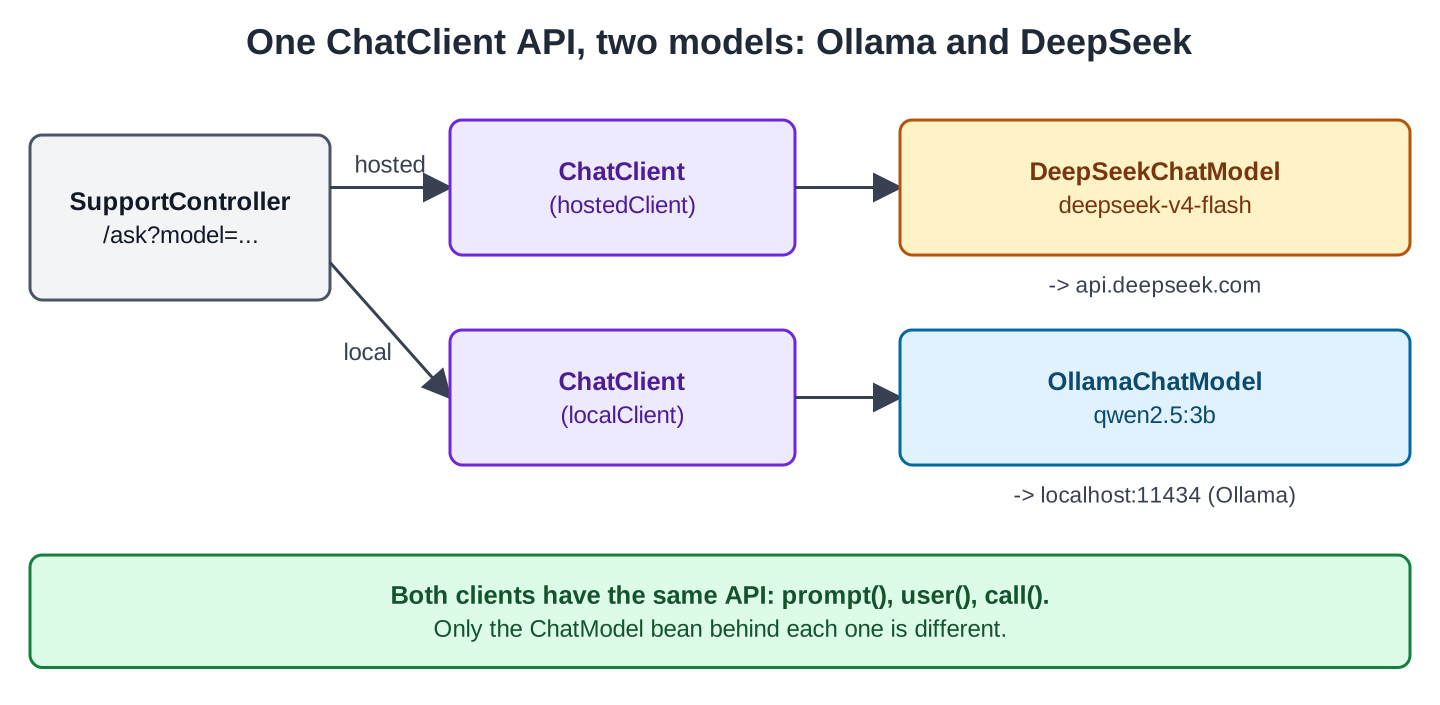
We had no real DeepSeek key while writing this article, so you’ll see real answers from the local model and the real requests that Spring AI sends to DeepSeek, but no answers from DeepSeek.
2. Setting Up the App
This article is part of the OrderDesk series. Its code is a separate module called orderdesk-deepseek. It uses Spring Boot 4.1.1, Spring AI 2.0.1, and Java 21, with all classes in the com.howtodoinjava.orderdesk.deepseek package.
If you need help installing Ollama, downloading the qwen2.5:3b model, and creating the Spring Boot project, follow the Getting Started with Spring AI tutorial.
2.1. Dependencies
Here is the complete pom.xml. It uses the Spring Boot 4.1.1 parent and imports the Spring AI BOM (bill of materials), which sets the version of every Spring AI module:
<?xml version="1.0" encoding="UTF-8"?>
<project xmlns="http://maven.apache.org/POM/4.0.0"
  xmlns:xsi="http://www.w3.org/2001/XMLSchema-instance"
  xsi:schemaLocation="http://maven.apache.org/POM/4.0.0 https://maven.apache.org/xsd/maven-4.0.0.xsd">
  <modelVersion>4.0.0</modelVersion>

  <parent>
    <groupId>org.springframework.boot</groupId>
    <artifactId>spring-boot-starter-parent</artifactId>
    <version>4.1.1</version>
    <relativePath/>
  </parent>

  <groupId>com.howtodoinjava</groupId>
  <artifactId>orderdesk-deepseek</artifactId>
  <version>1.0.0</version>

  <properties>
    <java.version>21</java.version>
  </properties>

  <dependencyManagement>
    <dependencies>
      <dependency>
        <groupId>org.springframework.ai</groupId>
        <artifactId>spring-ai-bom</artifactId>
        <version>2.0.1</version>
        <type>pom</type>
        <scope>import</scope>
      </dependency>
    </dependencies>
  </dependencyManagement>

  <dependencies>
    <dependency>
      <groupId>org.springframework.boot</groupId>
      <artifactId>spring-boot-starter-webmvc</artifactId>
    </dependency>
    <dependency>
      <groupId>org.springframework.ai</groupId>
      <artifactId>spring-ai-starter-model-ollama</artifactId>
    </dependency>
    <dependency>
      <groupId>org.springframework.ai</groupId>
      <artifactId>spring-ai-starter-model-deepseek</artifactId>
    </dependency>
  </dependencies>

  <build>
    <plugins>
      <plugin>
        <groupId>org.springframework.boot</groupId>
        <artifactId>spring-boot-maven-plugin</artifactId>
      </plugin>
    </plugins>
  </build>
</project>
The spring-boot-starter-webmvc dependency is the Spring Boot 4 name of the web starter. The new dependency is spring-ai-starter-model-deepseek, which adds the DeepSeekChatModel bean. The Spring AI DeepSeek page documents this starter and all its properties.
2.2. The API Key
Create a key on the DeepSeek Platform. DeepSeek bills each call by tokens, so check the pricing in the DeepSeek API docs first.
The key is a secret, so keep it out of your code and your Git repository. Put it in an environment variable instead:
export SPRING_AI_DEEPSEEK_API_KEY=your-deepseek-keyOn Windows PowerShell, use $env:SPRING_AI_DEEPSEEK_API_KEY=”your-deepseek-key”. Spring Boot reads this variable as the property spring.ai.deepseek.api-key.
If the key is missing, the app does not start. The DeepSeek module checks the key when it creates the DeepSeekChatModel bean:
Caused by: java.lang.IllegalArgumentException: DeepSeek API key must be setSo you can’t use even the local model without a key. However, the module only checks that a value is set, so any placeholder value lets the app start. That’s how we ran the local examples in this article.
With a placeholder or wrong key, the first call to DeepSeek fails:
org.springframework.ai.retry.NonTransientAiException: HTTP 401 - {"error":{"message":"Authentication Fails, Your api key: ****lder is invalid ...DeepSeek shows only the last characters of the key; ours ended in “lder” (from “placeholder”). The request reached DeepSeek; only the key was wrong. Spring AI throws a NonTransientAiException. “Non-transient” means the error will not go away if you try again.
2.3. Properties
Here is the full application.properties:
spring.application.name=orderdesk-deepseek
server.port=8085

# Two chat models in one app, so we build the ChatClients ourselves
spring.ai.chat.client.enabled=false

# The local model, as in the other OrderDesk articles
spring.ai.ollama.base-url=http://localhost:11434
spring.ai.ollama.chat.model=qwen2.5:3b
spring.ai.ollama.chat.temperature=0.2

# The key comes from the environment variable SPRING_AI_DEEPSEEK_API_KEY
spring.ai.deepseek.chat.model=deepseek-v4-flash
spring.ai.deepseek.chat.max-tokens=500
spring.ai.deepseek.chat.temperature=0.2
The DeepSeek lines pick the model and limit each answer to 500 tokens. The temperature property controls how random the answers are; a low value like 0.2 gives more predictable answers. According to the Spring AI DeepSeek documentation, deepseek-v4-flash is already the default model. We still write it here so that moving to a newer model later is a configuration change, not a code change.
Now let’s look at spring.ai.chat.client.enabled=false. Usually, Spring AI creates a ChatClient.Builder for you, the builder you injected in Getting Started. That builder expects one ChatModel, but our app has two. So we switch the builder off and create our two clients ourselves. That way, no class gets that builder by mistake. The Spring AI ChatClient reference covers apps with several chat models.
3. Two ChatClients in One App
ChatConfig creates one client per model. Both clients get the same system prompt, an instruction the model reads before every user question:
package com.howtodoinjava.orderdesk.deepseek;

import org.springframework.ai.chat.client.ChatClient;
import org.springframework.ai.ollama.OllamaChatModel;
import org.springframework.ai.deepseek.DeepSeekChatModel;
import org.springframework.context.annotation.Bean;
import org.springframework.context.annotation.Configuration;

@Configuration
public class ChatConfig {

    static final String SUPPORT = "You are OrderDesk, the support assistant of an online store. "
        + "Answer in at most three sentences.";

    // The hosted model: for questions that need a stronger model
    @Bean
    ChatClient hostedClient(DeepSeekChatModel chatModel) {
        return ChatClient.builder(chatModel).defaultSystem(SUPPORT).build();
    }

    // The local model in Ollama: free, for simple questions
    @Bean
    ChatClient localClient(OllamaChatModel chatModel) {
        return ChatClient.builder(chatModel).defaultSystem(SUPPORT).build();
    }
}
We ask for the concrete classes, DeepSeekChatModel and OllamaChatModel, not for the ChatModel interface. There are two ChatModel beans, so Spring cannot choose one for us. ChatClient.builder(chatModel) then wraps each model in its own client.
The controller picks a client from the model request parameter. It returns the answer, the model name and the token counts. These values are different for each provider, so we put them in a small record:
package com.howtodoinjava.orderdesk.deepseek;

// The answer plus the facts that differ between models
public record Reply(String model, String answer, Integer inputTokens, Integer outputTokens) {
}
package com.howtodoinjava.orderdesk.deepseek;
import org.springframework.ai.chat.client.ChatClient;
import org.springframework.ai.chat.metadata.ChatResponseMetadata;
import org.springframework.ai.chat.model.ChatResponse;
import org.springframework.beans.factory.annotation.Qualifier;
import org.springframework.web.bind.annotation.GetMapping;
import org.springframework.web.bind.annotation.RequestParam;
import org.springframework.web.bind.annotation.RestController;
@RestController
public class SupportController {
private final ChatClient hostedClient;
private final ChatClient localClient;
SupportController(@Qualifier("hostedClient") ChatClient hostedClient,
@Qualifier("localClient") ChatClient localClient) {
this.hostedClient = hostedClient;
this.localClient = localClient;
}
// model=hosted (default) or model=local
@GetMapping("/ask")
Reply ask(@RequestParam String question,
@RequestParam(defaultValue = "hosted") String model) {
ChatClient client = "local".equals(model) ? localClient : hostedClient;
ChatResponse response = client.prompt().user(question).call().chatResponse();
ChatResponseMetadata metadata = response.getMetadata();
return new Reply(metadata.getModel(), response.getResult().getOutput().getText(),
metadata.getUsage().getPromptTokens(), metadata.getUsage().getCompletionTokens());
}
}@Qualifier tells Spring which bean to inject when multiple beans match the required type. In this example, there are two ChatClient beans, and it identifies the one we want by the name of the @Bean method. There is no automatic routing: the caller chooses with model=local, and DeepSeek is the default.
The chatResponse() method returns the whole response instead of only the text. This lets us read getMetadata(), which holds the model that answered and the Usage with the token counts.
The main class is a plain Spring Boot application:
package com.howtodoinjava.orderdesk.deepseek;

import org.springframework.boot.SpringApplication;
import org.springframework.boot.autoconfigure.SpringBootApplication;

@SpringBootApplication
public class DeepSeekApplication {

    public static void main(String[] args) {
        SpringApplication.run(DeepSeekApplication.class, args);
    }
}
4. Asking Both Models
Start Ollama, set the key, and start the app with mvn spring-boot:run. It listens on port 8085. Ask the local model first:
curl -G localhost:8085/ask --data-urlencode "question=Can I return a kettle after 5 days?" \
  --data-urlencode model=local
{"model":"qwen2.5:3b","answer":"Yes, you can return a kettle within 5 days if the item is still in its original condition and packaging. Please contact customer service for the specific return process and any return shipping instructions.","inputTokens":43,"outputTokens":39}This answer came from the local qwen2.5:3b model, and it took 13.5 seconds. We started the app with a placeholder key, so the local model worked. The same question without model=local goes to DeepSeek, and with our placeholder key it failed with the 401 from Section 2.2.
To see the request that Spring AI sends, we pointed spring.ai.deepseek.base-url at a small fake server that records requests. The app sent this body to POST /chat/completions:
{"messages":[{"content":"You are OrderDesk, the support assistant of an online store. Answer in at most three sentences.","role":"system"},{"content":"Can I return a kettle after 5 days?","role":"user"}],"model":"deepseek-v4-flash","max_tokens":500,"stream":false,"temperature":0.2}According to the DeepSeek API docs, this request has the same format as the OpenAI API. It has a model, a max_tokens limit, and a messages list. The system prompt is the first message, with the role system. The model, the token limit, and the temperature come straight from application.properties.
The local model doesn’t know OrderDesk’s real return window, which is 10 days. A model only knows your store’s rules if you give them to it. Other OrderDesk articles show how, with retrieval (RAG) and tools.
5. Reasoning Mode: Thinking Before Answering
Some questions need several steps to answer. Take our kettle question from Section 4. A good answer compares 5 days with the return window and checks the conditions for a return. A model that answers right away may skip a step.
A reasoning model works differently from a standard chat model. It performs additional reasoning to work through a problem before producing its final answer. This behavior is often associated with the term chain of thought (CoT).
DeepSeek refers to this capability as thinking mode. Depending on the model and API, the response may include the reasoning separately from the final answer, so your app can handle those fields separately.
In Spring AI, thinking is a chat option. We turn it on for a single request with DeepSeekChatOptions:
package com.howtodoinjava.orderdesk.deepseek;

import org.springframework.ai.chat.client.ChatClient;
import org.springframework.ai.chat.model.ChatResponse;
import org.springframework.ai.deepseek.DeepSeekAssistantMessage;
import org.springframework.ai.deepseek.DeepSeekChatOptions;
import org.springframework.beans.factory.annotation.Qualifier;
import org.springframework.web.bind.annotation.GetMapping;
import org.springframework.web.bind.annotation.RequestParam;
import org.springframework.web.bind.annotation.RestController;

@RestController
public class ReasoningController {

    private final ChatClient hostedClient;

    ReasoningController(@Qualifier("hostedClient") ChatClient hostedClient) {
        this.hostedClient = hostedClient;
    }

    // The model thinks first; the reasoning text comes back next to the answer
    @GetMapping("/ask/reason")
    Reasoned reason(@RequestParam String question) {
        ChatResponse response = hostedClient.prompt()
            .user(question)
            .options(DeepSeekChatOptions.builder().enableThinking())
            .call()
            .chatResponse();
        DeepSeekAssistantMessage message =
            (DeepSeekAssistantMessage) response.getResult().getOutput();
        return new Reasoned(message.getReasoningContent(), message.getText());
    }

    record Reasoned(String reasoning, String answer) {
    }
}
Three parts of this code matter.
- enableThinking() is a short way to set the Thinking option to ENABLED. The options(…) call applies it to this request only, so the /ask endpoint isn’t affected.
- In Spring AI 2.0, options(…) takes the options builder, so there is no build() call (Spring AI upgrade notes).
- The output of a DeepSeek call is a DeepSeekAssistantMessage, a subclass of the usual AssistantMessage. We cast to it because it has one extra method, getReasoningContent(), which returns the reasoning. The getText() method returns the final answer, as for any other message.
The cast and getReasoningContent() come from the Spring AI DeepSeek page. We didn’t run them because we had no real key.
You call the endpoint like this:
curl -G localhost:8085/ask/reason --data-urlencode "question=Can I return a kettle after 5 days?"The endpoint returns a JSON object with two fields, reasoning and answer. We have no real response to show, but the fake server recorded the request for this call:
{"messages":[{"content":"You are OrderDesk, the support assistant of an online store. Answer in at most three sentences.","role":"system"},{"content":"Can I return a kettle after 5 days?","role":"user"}],"model":"deepseek-v4-flash","max_tokens":500,"stream":false,"temperature":0.2,"thinking":{"type":"enabled"}}Compare it with the request in Section 4. Everything is the same, except one new field at the end: “thinking”:{“type”:”enabled”}. This is the only change in the HTTP request.
The app also logged this warning from DeepSeekChatModel:
WARN ... o.s.ai.deepseek.DeepSeekChatModel : Thinking mode does not support the temperature parameter(s). Please note that, for compatibility with existing software, setting these parameters will not trigger an error but will also have no effect.So in thinking mode, our temperature=0.2 has no effect. We saw the same warning for the plain /ask request, which sends no thinking field.
To turn thinking on or off for the whole app instead of one request, set the property spring.ai.deepseek.chat.thinking.type to enabled or disabled. When thinking is disabled, the model produces no reasoning content.
DeepSeek has one rule for conversations: it does not use the reasoning from earlier turns. Only the earlier answers go back to the model as history. So if you store chat history, store the answer, and keep the reasoning for logs or debugging.
6. Before You Go to Production
A few things change when real customers start using the hosted model:
- Cost grows with tokens. Log the token counts from Usage, as our Reply does, and watch them. Set max-tokens to limit the length of each answer. Reasoning mode makes the model write more text before it answers, so use it only for questions that need it.
- Set the key in every environment where the app runs. Without it, the app doesn’t start, even for the local model.
- A hosted model can fail in ways a local model can’t: a wrong key (the 401 above), too many requests, or a provider outage. Decide what the user sees then. One option is to fall back to the local client.
- Customer messages leave your machine. Check that you are allowed to send this data. Send only what the model needs.
All articles in order: Spring AI Tutorial
Drop me your questions related to Spring AI with DeepSeek in the comments.
Happy Learning !!
