
Spring AI lets a Spring Boot app call Google’s Gemini models with the same Java API it uses for a local model in Ollama. In this example, we build an OrderDesk app that uses both. The caller picks Gemini or the local model for each question with a request parameter. We’ll use Spring AI 2.0.
1. One Interface, Many Model Providers
OrderDesk is the support assistant of our demo online store. In the other articles of this series, it uses a small local model in Ollama. The local model is free, but a small model (3 billion parameters) sometimes gets simple facts wrong.
A local model and a hosted model like Gemini do the same job: they take messages and return an answer. They differ in three ways: where they run, what they cost, and how good their answers are.
- A local model runs on your own computer. Each request is free, and your data stays on your computer. But small local models make more mistakes.
- A hosted model runs on the provider’s servers. You pay for each token (a token is a piece of a word). Your prompts are sent to the provider over the internet. In return, the answers are usually better.
So some apps use both: a cheap model for simple questions and a stronger model where quality matters.
If each provider had its own Java API, you’d write the same code twice for two providers. Spring AI avoids this by defining a common interface called ChatModel. Each provider module implements this interface with its own class: GoogleGenAiChatModel for Gemini and OllamaChatModel for Ollama. The Spring AI Chat Model API page describes this interface.
Our controllers don’t call ChatModel directly; they call ChatClient, which uses a ChatModel internally. ChatClient is a fluent API: we chain calls like prompt(), user(…), and call() to build and send one request. This code stays the same for every provider:
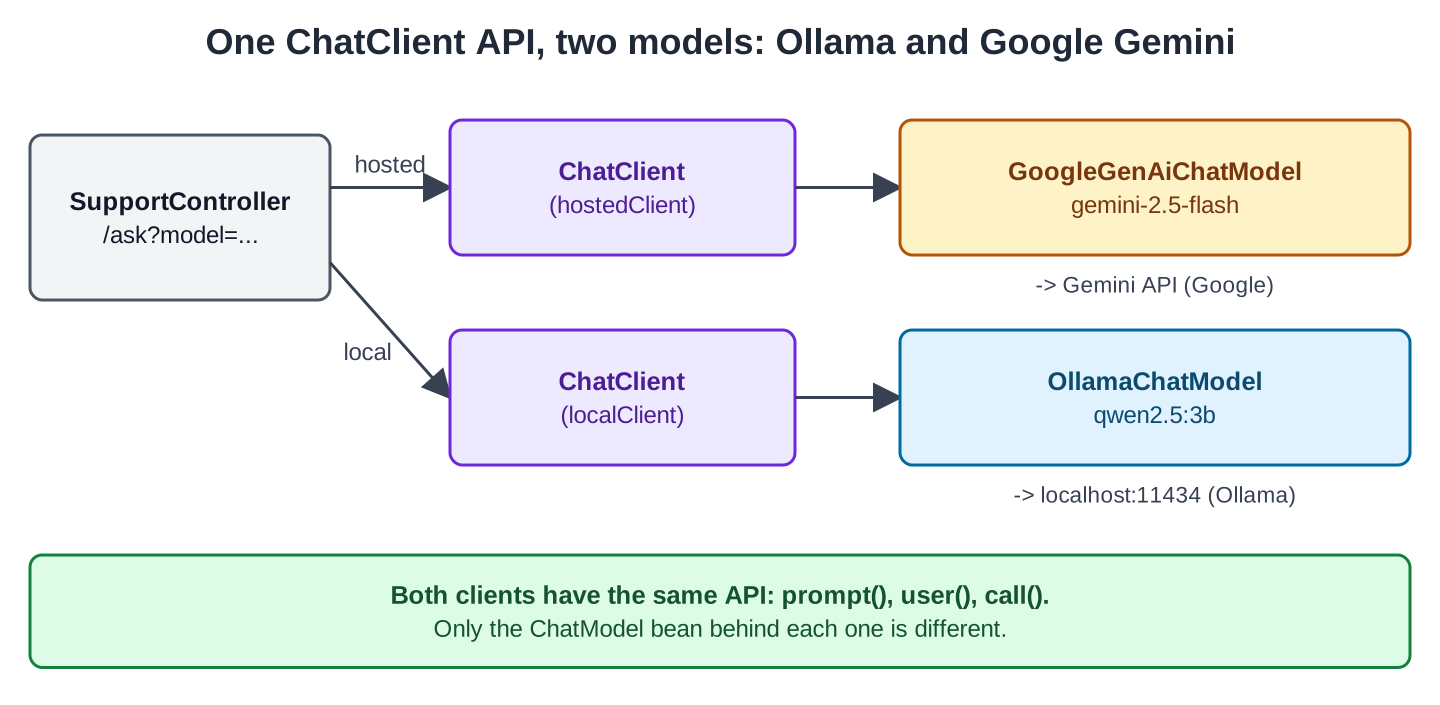
In our app, the caller chooses the model with model=hosted or model=local. There is no automatic routing between the two.
We ran the local half of the app and recorded Google’s error messages. We didn’t call Gemini with a real API key, so this article shows no Gemini answer and no Gemini token counts.
2. Setting Up the App
This example is a separate module in the OrderDesk series called orderdesk-gemini. It isn’t part of the main OrderDesk app, so you can either create a new Spring Boot project or clone the module from the spring-ai-examples repository.
All classes belong to the com.howtodoinjava.orderdesk.gemini package. The module uses Spring Boot 4.1.1, Spring AI 2.0.1, and Java 21.
The local model needs Ollama running with the qwen2.5:3b model. If you need help installing both, follow the Getting Started with Spring AI tutorial.
2.1. Dependencies
Here is the full pom.xml. The Spring AI BOM (bill of materials) sets the version of every Spring AI module, so the starters need no version:
<?xml version="1.0" encoding="UTF-8"?>
<project xmlns="http://maven.apache.org/POM/4.0.0"
  xmlns:xsi="http://www.w3.org/2001/XMLSchema-instance"
  xsi:schemaLocation="http://maven.apache.org/POM/4.0.0 https://maven.apache.org/xsd/maven-4.0.0.xsd">
  <modelVersion>4.0.0</modelVersion>

  <parent>
    <groupId>org.springframework.boot</groupId>
    <artifactId>spring-boot-starter-parent</artifactId>
    <version>4.1.1</version>
    <relativePath/>
  </parent>

  <groupId>com.howtodoinjava</groupId>
  <artifactId>orderdesk-gemini</artifactId>
  <version>1.0.0</version>

  <properties>
    <java.version>21</java.version>
  </properties>

  <dependencyManagement>
    <dependencies>
      <dependency>
        <groupId>org.springframework.ai</groupId>
        <artifactId>spring-ai-bom</artifactId>
        <version>2.0.1</version>
        <type>pom</type>
        <scope>import</scope>
      </dependency>
    </dependencies>
  </dependencyManagement>

  <dependencies>
    <dependency>
      <groupId>org.springframework.boot</groupId>
      <artifactId>spring-boot-starter-webmvc</artifactId>
    </dependency>
    <dependency>
      <groupId>org.springframework.ai</groupId>
      <artifactId>spring-ai-starter-model-ollama</artifactId>
    </dependency>
    <dependency>
      <groupId>org.springframework.ai</groupId>
      <artifactId>spring-ai-starter-model-google-genai</artifactId>
    </dependency>
  </dependencies>

  <build>
    <plugins>
      <plugin>
        <groupId>org.springframework.boot</groupId>
        <artifactId>spring-boot-maven-plugin</artifactId>
      </plugin>
    </plugins>
  </build>
</project>
The spring-boot-starter-webmvc dependency is the Spring Boot 4 starter for REST controllers. The spring-ai-starter-model-ollama starter adds the OllamaChatModel bean, and spring-ai-starter-model-google-genai adds the GoogleGenAiChatModel bean.
2.2. Two Ways to Reach Gemini
You can use Gemini in two ways, and the Spring AI starter supports both:
- Gemini Developer API: you create an API key and send it with each request. This is the quick way to start, and we use it here.
- Vertex AI: Gemini runs in your Google Cloud project. Instead of a key, you set a project ID and a location, and the app logs in with Google Cloud credentials.
The Java code is the same for both, and only the properties change. The Spring AI Google GenAI page lists the Vertex AI properties.
2.3. The API Key
Create a key in Google AI Studio. Before you use it, check the free limits and prices on Google’s Gemini API pricing page. The key is a secret, so keep it out of your code and your Git repository. Put it in an environment variable, in the same terminal where you start the app:
export SPRING_AI_GOOGLE_GENAI_API_KEY=your-gemini-keyOn Windows PowerShell, use $env:SPRING_AI_GOOGLE_GENAI_API_KEY=”your-gemini-key”. Spring Boot binds this environment variable to the property spring.ai.google.genai.api-key.
The app needs this key even if you only want to try the local model. Without a key (and without a Vertex AI project and location), the app doesn’t start:
Caused by: java.lang.IllegalStateException: Incomplete Google GenAI configuration: Provide 'api-key' for Gemini API or 'project-id' and 'location' for Vertex AI.This is good: you find a missing key when the app starts, not later when a customer asks a question.
If you don’t have a key yet, you can still try the local model. Set the variable to any placeholder text, such as dummy-key. At startup, Spring AI only checks that a key is present. Google checks the key on the first Gemini call, so that call fails:
com.google.genai.errors.ClientException: 400 . API key not valid. Please pass a valid API key.The requests with model=local still work because they never reach Google. We recorded the local answer in Section 4 this way.
2.4. Properties
Here is the full application.properties:
spring.application.name=orderdesk-gemini
server.port=8084

# Two chat models in one app, so we build the ChatClients ourselves
spring.ai.chat.client.enabled=false

# The local model, as in the other OrderDesk articles
spring.ai.ollama.base-url=http://localhost:11434
spring.ai.ollama.chat.model=qwen2.5:3b
spring.ai.ollama.chat.temperature=0.2

# The key comes from the environment variable SPRING_AI_GOOGLE_GENAI_API_KEY
spring.ai.google.genai.chat.model=gemini-2.5-flash
spring.ai.google.genai.chat.max-output-tokens=500
spring.ai.google.genai.chat.temperature=0.2
The Ollama lines point to the local Ollama server and pick the qwen2.5:3b model. A temperature of 0.2 makes the answers less random. The Gemini lines pick the model and limit each answer to 500 tokens.
The gemini-2.5-flash model is Google’s fast, low-cost option, and it’s also the default model in Spring AI. You can also use a larger model such as gemini-2.5-pro for harder tasks, or a smaller one such as gemini-2.5-flash-lite for cheaper calls. Google’s Gemini models page lists the current names.
We explain the line spring.ai.chat.client.enabled=false in the next section.
3. Two ChatClients in One App
Now let’s look at why we set spring.ai.chat.client.enabled=false. Normally, Spring AI auto-configures one ChatClient.Builder, and that builder expects exactly one ChatModel. Our app has two ChatModel beans, one per provider, so we switch the auto-configured builder off and build the two clients ourselves. That way, no class can get the auto-configured builder by mistake. The Spring AI ChatClient reference shows more ways to work with several chat models.
ChatConfig creates one client per model. Both clients get the same system prompt (the instructions the model gets before each question):
package com.howtodoinjava.orderdesk.gemini;

import org.springframework.ai.chat.client.ChatClient;
import org.springframework.ai.ollama.OllamaChatModel;
import org.springframework.ai.google.genai.GoogleGenAiChatModel;
import org.springframework.context.annotation.Bean;
import org.springframework.context.annotation.Configuration;

@Configuration
public class ChatConfig {

    static final String SUPPORT = "You are OrderDesk, the support assistant of an online store. "
        + "Answer in at most three sentences.";

    // The hosted model: for questions that need a stronger model
    @Bean
    ChatClient hostedClient(GoogleGenAiChatModel chatModel) {
        return ChatClient.builder(chatModel).defaultSystem(SUPPORT).build();
    }

    // The local model in Ollama: free, for simple questions
    @Bean
    ChatClient localClient(OllamaChatModel chatModel) {
        return ChatClient.builder(chatModel).defaultSystem(SUPPORT).build();
    }
}
We ask for the concrete classes, GoogleGenAiChatModel and OllamaChatModel, not for the ChatModel interface. With two beans of the same interface, Spring wouldn’t know which one to inject. ChatClient.builder(chatModel) then wraps each model in its own client.
Next, the Reply record holds what we return: the answer, the model name, and the token counts. These are the values that differ between providers:
package com.howtodoinjava.orderdesk.gemini;

// The answer plus the facts that differ between models
public record Reply(String model, String answer, Integer inputTokens, Integer outputTokens) {
}
The controller picks a client from the model request parameter. The default is hosted:
package com.howtodoinjava.orderdesk.gemini;

import org.springframework.ai.chat.client.ChatClient;
import org.springframework.ai.chat.metadata.ChatResponseMetadata;
import org.springframework.ai.chat.model.ChatResponse;
import org.springframework.beans.factory.annotation.Qualifier;
import org.springframework.web.bind.annotation.GetMapping;
import org.springframework.web.bind.annotation.RequestParam;
import org.springframework.web.bind.annotation.RestController;

@RestController
public class SupportController {

    private final ChatClient hostedClient;
    private final ChatClient localClient;

    SupportController(@Qualifier("hostedClient") ChatClient hostedClient,
                      @Qualifier("localClient") ChatClient localClient) {
        this.hostedClient = hostedClient;
        this.localClient = localClient;
    }

    // model=hosted (default) or model=local
    @GetMapping("/ask")
    Reply ask(@RequestParam String question,
              @RequestParam(defaultValue = "hosted") String model) {
        ChatClient client = "local".equals(model) ? localClient : hostedClient;
        ChatResponse response = client.prompt().user(question).call().chatResponse();
        ChatResponseMetadata metadata = response.getMetadata();
        return new Reply(metadata.getModel(), response.getResult().getOutput().getText(),
            metadata.getUsage().getPromptTokens(), metadata.getUsage().getCompletionTokens());
    }
}
@Qualifier tells Spring which bean to inject when multiple beans match the required type. In this example, it identifies the bean by the name of the @Bean method.
The chatResponse() method returns the full response rather than just the text. Its getMetadata() method gives us the model name and a Usage object with the token counts.
The main class is a plain Spring Boot application:
package com.howtodoinjava.orderdesk.gemini;

import org.springframework.boot.SpringApplication;
import org.springframework.boot.autoconfigure.SpringBootApplication;

@SpringBootApplication
public class GeminiApplication {

    public static void main(String[] args) {
        SpringApplication.run(GeminiApplication.class, args);
    }
}
4. Asking Both Models
Start Ollama. Then start the app with mvn spring-boot:run in the terminal where you set the key. Let’s ask the local model first:
curl -G localhost:8084/ask --data-urlencode "question=Can I return a kettle after 5 days?" \
  --data-urlencode model=local
{"model":"qwen2.5:3b","answer":"Yes, you can return a kettle within 5 days if it meets the store's return policy, which typically allows for quick exchanges or refunds for items received within a short timeframe. Please check the specific return policy on the product page or contact customer service for detailed instructions.","inputTokens":43,"outputTokens":55}The local model took 9.9 seconds on a laptop CPU.
The answer sounds helpful, but the model doesn’t know OrderDesk’s return policy, so it tells the customer to check the policy. A model doesn’t know a store’s own rules unless we give them to it. That’s not a provider problem. Other OrderDesk articles add the rules with RAG (retrieval-augmented generation: the app finds the right policy text and adds it to the prompt).
Without model=local, the question goes to Gemini. With a real key, the response has the same JSON fields. We didn’t run that call, so we can’t show its answer here.
5. The Thinking Budget: a Gemini Feature
Some newer models can “think” before they answer. The model first reasons about the problem in steps that you don’t see. Then it writes the answer. This helps with questions that need several steps, such as planning or calculations.
But thinking isn’t free. The reasoning is made of tokens, too. More tokens mean a slower response and a higher bill. A question like “Can I return a kettle after 5 days?” needs no reasoning steps. For such questions, thinking only costs time and money.
You can control this with a thinking budget: the maximum number of tokens the model may use for thinking. The Spring AI Google GenAI page lists three cases:
- A positive number sets the maximum number of thinking tokens.
- 0 turns thinking off.
- If you don’t set it, the model decides how much to think.
For simple support answers, we turn thinking off for one request. GoogleGenAiChatOptions holds the Gemini-specific options:
package com.howtodoinjava.orderdesk.gemini;

import org.springframework.ai.chat.client.ChatClient;
import org.springframework.ai.google.genai.GoogleGenAiChatOptions;
import org.springframework.beans.factory.annotation.Qualifier;
import org.springframework.web.bind.annotation.GetMapping;
import org.springframework.web.bind.annotation.RequestParam;
import org.springframework.web.bind.annotation.RestController;

@RestController
public class ThinkingController {

    private final ChatClient hostedClient;

    ThinkingController(@Qualifier("hostedClient") ChatClient hostedClient) {
        this.hostedClient = hostedClient;
    }

    // Gemini 2.5 Flash thinks by default; a budget of 0 turns thinking off for this call
    @GetMapping("/ask/fast")
    String fast(@RequestParam String question) {
        return hostedClient.prompt()
            .user(question)
            .options(GoogleGenAiChatOptions.builder().thinkingBudget(0))
            .call()
            .content();
    }
}
The .options(…) method changes the options for this request only. Settings we don’t pass here, like the model and the temperature, come from application.properties. The /ask endpoint doesn’t set a budget, so Gemini may still think there.
In Spring AI 2.0, options(…) takes the options builder, so we don’t call build() (see the Spring AI upgrade notes).
Two more points from the same Spring AI page:
- The Gemini 3 models use a different option, thinkingLevel, instead of thinkingBudget. You can’t set both in one request. If you switch to a Gemini 3 model, change the option, too.
- gemini-2.5-flash-lite doesn’t think by default. With that model, set a positive budget if you want thinking.
We didn’t run /ask/fast with a real key, so we can’t show what it saves.
6. Before You Go to Production
A few things change when real customers use the hosted model:
- Cost grows with tokens. Return or log the token counts from Usage and watch them. Our Reply returns them in the JSON. Set max-output-tokens to limit the length of each answer. Turn thinking on only where it helps.
- A hosted model can fail in ways a local model can’t. Think of a wrong key (as in Section 2.3), rate limits when you send too many requests, or a provider outage. Decide what the user sees then. One option is to fall back to the local client.
- Customer messages leave your computer. Check that this is allowed for your data, and don’t send what you don’t need.
- Model names change over time. Keep the model in application.properties, so switching to a newer Gemini model is a configuration change, not a code change.
The other OrderDesk articles build features such as chat memory and tools on top of ChatClient, so they don’t depend on the provider. Only the bean you pass to ChatClient.builder() changes.
All articles in order: Spring AI Tutorial
Drop me your questions related to Spring AI with Google Gemini in the comments.
Happy Learning !!
