
Spring AI observability means measuring every model call, vector search, and tool call of an app with Micrometer, the metrics and tracing library of Spring Boot. In this example, we turn on metrics and traces in OrderDesk, the support assistant of a demo online store. Then we read the token counts and see where one RAG request spends its time. We’ll use Spring Boot 4.1, Spring AI 2.0.1, and Java 21, with a local model in Ollama and Zipkin in Docker.
1. How Spring AI Observability Works
Spring AI wraps each step of a request in an observation: a named, timed unit of work with tags, such as the model name or the token counts. Micrometer turns every observation into two kinds of data:
- A metric: a counter or timer that adds up all calls, for example the total input tokens since startup.
- A span: one timed piece of one request. All spans of a request form a trace, which shows the steps in order.
We don’t write any code for this. The ChatClient, the advisors, the chat and embedding models, the vector store, and the tools all create their observations on their own. An advisor is a component that wraps a ChatClient call: it can change the prompt before the model call and read the answer after it.
Each signal answers a different question:
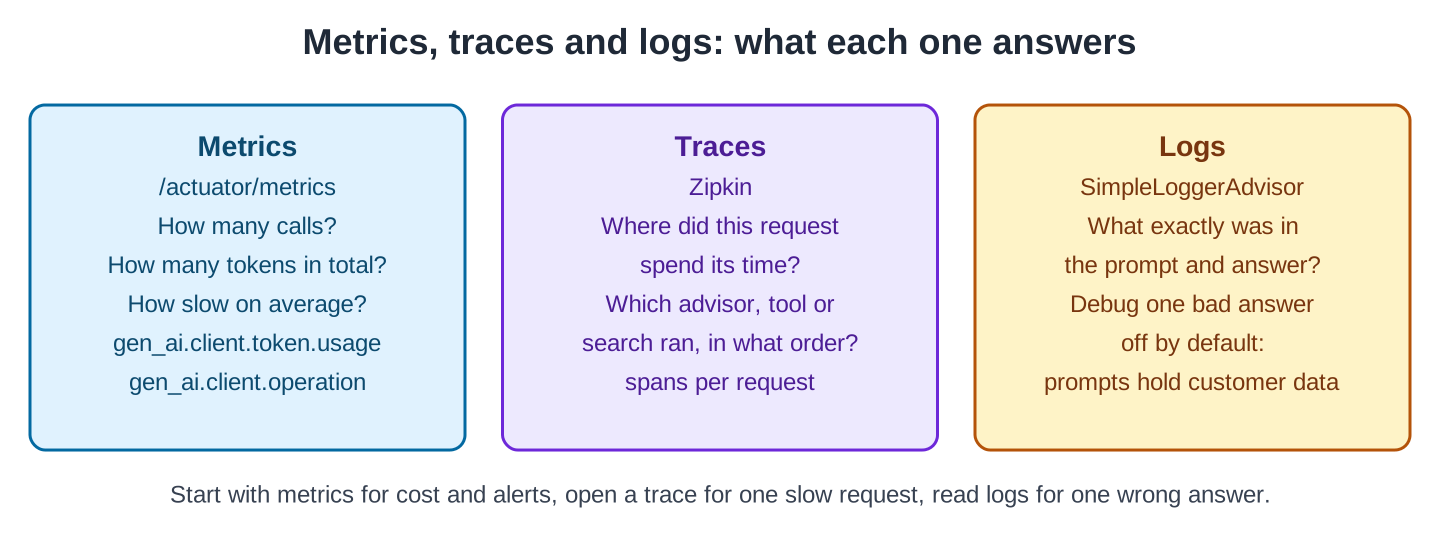
These are the observations that OrderDesk produced:
| Observation (metric name) | Created by | Key tags |
|---|---|---|
| gen_ai.client.operation | Chat and embedding models | gen_ai.operation.name (chat, embedding), gen_ai.request.model, error |
| gen_ai.client.token.usage | Chat and embedding models | gen_ai.token.type (input, output, total) |
| spring.ai.chat.client | ChatClient | spring.ai.chat.client.stream |
| spring.ai.advisor | Each advisor | spring.ai.advisor.name |
| spring.ai.tool | Each tool call | spring.ai.tool.definition.name (on the span) |
| db.vector.client.operation | The vector store | db.system, db.operation.name |
The gen_ai names follow the OpenTelemetry standard for AI apps, so standard dashboards work with them.
2. The Example App
This article adds observability to OrderDesk, the app of this series; the full app is on GitHub in the orderdesk folder. The basic setup (Ollama with qwen2.5:3b, the Spring Boot project, the Spring AI BOM, and the Ollama starter) is explained in Getting Started with Spring AI. This article’s only Java class is SimpleVectorStoreConfig in the com.howtodoinjava.orderdesk.vectorstore package.
We measure three requests, from three earlier articles:
- GET /ask: one plain ChatClient call, from Getting Started.
- GET /rag/qa: a RAG answer. Retrieval-augmented generation (RAG) means the app first searches its own documents and adds the best matches to the prompt. Here the QuestionAnswerAdvisor searches a SimpleVectorStore that holds the store’s policy files.
- GET /tools/ask: an answer that calls the getOrderStatus tool, a Java method that the model can ask the app to run.
The /ask request alone is enough to see the chat metrics. The RAG request also needs an embedding model, which turns text into vectors for the search:
ollama pull nomic-embed-textspring.ai.ollama.embedding.options.model=nomic-embed-text
spring.ai.vectorstore.type=simpleThe second property activates SimpleVectorStoreConfig, shown in Section 4. After the first start, we fill the vector store once:
curl -X POST localhost:8080/ingestThese files come from earlier articles, and we don’t explain them again:
- ChatClientConfig.java: the supportClient bean and its system prompt (Getting Started with Spring AI).
- ChatController.java: GET /ask (Getting Started with Spring AI).
- PolicyIngestion.java and IngestController.java: POST /ingest splits the files in policies/ into chunks, stores them in the vector store, and saves it to a file (Spring AI ETL Pipeline Example).
- RagConfig.java and RagController.java: the QuestionAnswerAdvisor bean (top 3 matches) and GET /rag/qa (Spring AI RAG Advisors).
- OrderTools.java, ToolChatController.java, schema.sql, and data.sql: the getOrderStatus tool, GET /tools/ask, and the orders table it reads (Spring AI Tool Calling).
3. Read the Metrics
Step 1: Add Actuator and Expose the Metrics
Spring Boot Actuator adds management endpoints, such as /actuator/metrics, to an app. The Spring Boot parent POM manages its version:
<dependency>
  <groupId>org.springframework.boot</groupId>
  <artifactId>spring-boot-starter-actuator</artifactId>
</dependency>
Actuator exposes only health over HTTP by default, so we add metrics in application.properties:
management.endpoints.web.exposure.include=health,metricsStep 2: List the AI Metrics
After a restart and the three requests, the list of metric names includes the AI ones:
curl localhost:8080/actuator/metrics"gen_ai.client.operation","gen_ai.client.operation.active","gen_ai.client.token.usage",
"spring.ai.advisor","spring.ai.advisor.active","spring.ai.chat.client","spring.ai.chat.client.active",
"spring.ai.tool","spring.ai.tool.active",We trimmed the JVM, HTTP, and database metrics from the output. The vector search metric, db.vector.client.operation, is missing from this list. OrderDesk builds its vector store bean itself, and that bean records nothing until it gets the change in Section 4, Step 2.
Step 3: Read the Token Counts
Each metric has its own URL, and tag=name:value filters it. The token metric counts input, output, and total tokens under one name, so we always add a token-type filter, or the number is twice the real one:
curl "localhost:8080/actuator/metrics/gen_ai.client.token.usage?tag=gen_ai.token.type:input&tag=gen_ai.operation.name:chat"
curl "localhost:8080/actuator/metrics/gen_ai.client.token.usage?tag=gen_ai.token.type:output&tag=gen_ai.operation.name:chat"
curl "localhost:8080/actuator/metrics/gen_ai.client.operation?tag=gen_ai.operation.name:chat"
Each answer is JSON with name, availableTags, and measurements. We reformatted the three answers to show only the name and the measurements:
gen_ai.client.token.usage [{'statistic': 'COUNT', 'value': 1173.0}]
gen_ai.client.token.usage [{'statistic': 'COUNT', 'value': 142.0}]
gen_ai.client.operation [{'statistic': 'COUNT', 'value': 4.0}, {'statistic': 'TOTAL_TIME', 'value': 43.198048743}, {'statistic': 'MAX', 'value': 12.666572848}]- The three requests used 1,173 input tokens and 142 output tokens. Input tokens are the prompt: system prompt, RAG context, and tool results. They were 89% of the total.
- The chat model ran 4 times for 3 requests. The tool request needed two model calls: one to ask for the tool and one to answer with its result.
- The 4 chat calls took 43.2 seconds together, and the slowest took 12.7 seconds.
Section 4, Step 5 splits these numbers by chat call.
4. Follow One Request in a Trace
Metrics add up all requests. To see where one request spent its time, we export its spans to Zipkin, an open-source trace viewer.
Step 1: Add Zipkin Export
The Zipkin starter brings Micrometer Tracing and sends the spans to Zipkin over HTTP. The Spring Boot parent POM manages its version too:
<dependency>
  <groupId>org.springframework.boot</groupId>
  <artifactId>spring-boot-starter-zipkin</artifactId>
</dependency>
OrderDesk keeps the export off in application.properties, so the other articles run without a Zipkin server:
management.tracing.export.enabled=falseA profile file, application-observability.properties, turns it on:
# docker run -d --name zipkin -p 9411:9411 openzipkin/zipkin
management.tracing.export.enabled=true
management.tracing.sampling.probability=1.0
management.tracing.export.zipkin.endpoint=http://localhost:9411/api/v2/spans- management.tracing.sampling.probability=1.0 records every request. The default, 0.1, records one request in ten, which hides requests while testing.
- management.tracing.export.zipkin.endpoint is where the spans go.
These are the Spring Boot 4 property names. Guides for Spring Boot 3 use other names, such as management.zipkin.tracing.endpoint, which Spring Boot 4 ignores.
Step 2: Fix the Missing Vector Store Span
Without one change, the trace has no span for the vector search. The ObservationRegistry is the object that records observations, and Spring Boot gives it to the beans it creates. OrderDesk creates its SimpleVectorStore itself, so we must pass the registry to it. This is the full SimpleVectorStoreConfig class:
package com.howtodoinjava.orderdesk.vectorstore;

import java.io.File;

import org.springframework.ai.embedding.EmbeddingModel;
import org.springframework.ai.vectorstore.SimpleVectorStore;
import org.springframework.beans.factory.ObjectProvider;
import org.springframework.boot.autoconfigure.condition.ConditionalOnProperty;
import org.springframework.context.annotation.Bean;
import org.springframework.context.annotation.Configuration;

import io.micrometer.observation.ObservationRegistry;

@Configuration
@ConditionalOnProperty(name = "spring.ai.vectorstore.type", havingValue = "simple")
public class SimpleVectorStoreConfig {

    // SimpleVectorStore keeps vectors in memory; we save them to this file
    public static final File STORE_FILE = new File("data/vector-store.json");

    @Bean
    SimpleVectorStore vectorStore(EmbeddingModel embeddingModel,
                                  ObjectProvider<ObservationRegistry> observationRegistry) {
        SimpleVectorStore store = SimpleVectorStore.builder(embeddingModel)
            // without a registry, searches don't show up in metrics and traces
            .observationRegistry(observationRegistry.getIfUnique(() -> ObservationRegistry.NOOP))
            .build();
        if (STORE_FILE.exists()) {
            store.load(STORE_FILE);
        }
        return store;
    }
}- ObservationRegistry comes from Micrometer (io.micrometer.observation), not from Spring AI.
- ObjectProvider makes the registry optional: without Actuator, getIfUnique() returns ObservationRegistry.NOOP, which records nothing.
- STORE_FILE holds the vectors that /ingest saved, so a restart doesn’t need a new ingest.
The same rule holds for any Spring AI bean that we build ourselves.
Step 3: Start Zipkin and the App
Zipkin runs in Docker:
docker run -d --name zipkin -p 9411:9411 openzipkin/zipkinThe Zipkin UI is at http://localhost:9411. Next, we start the app with the profile:
mvn spring-boot:run -Dspring-boot.run.profiles=observabilityStep 4: Read the Trace of a RAG Request
We sent the RAG question and opened its trace in Zipkin:
curl -G localhost:8080/rag/qa --data-urlencode "question=How many days do I have to return a jacket?"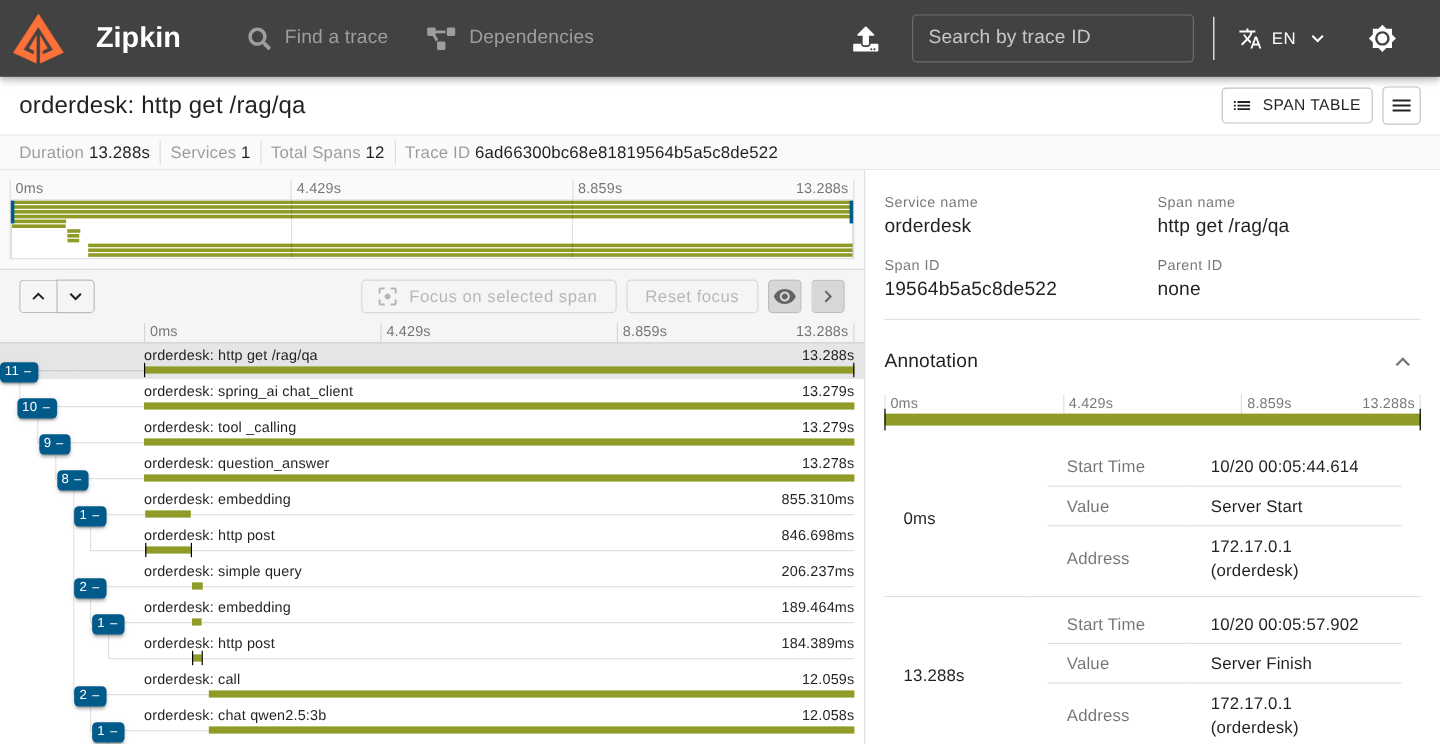
The same spans, drawn as a timeline:
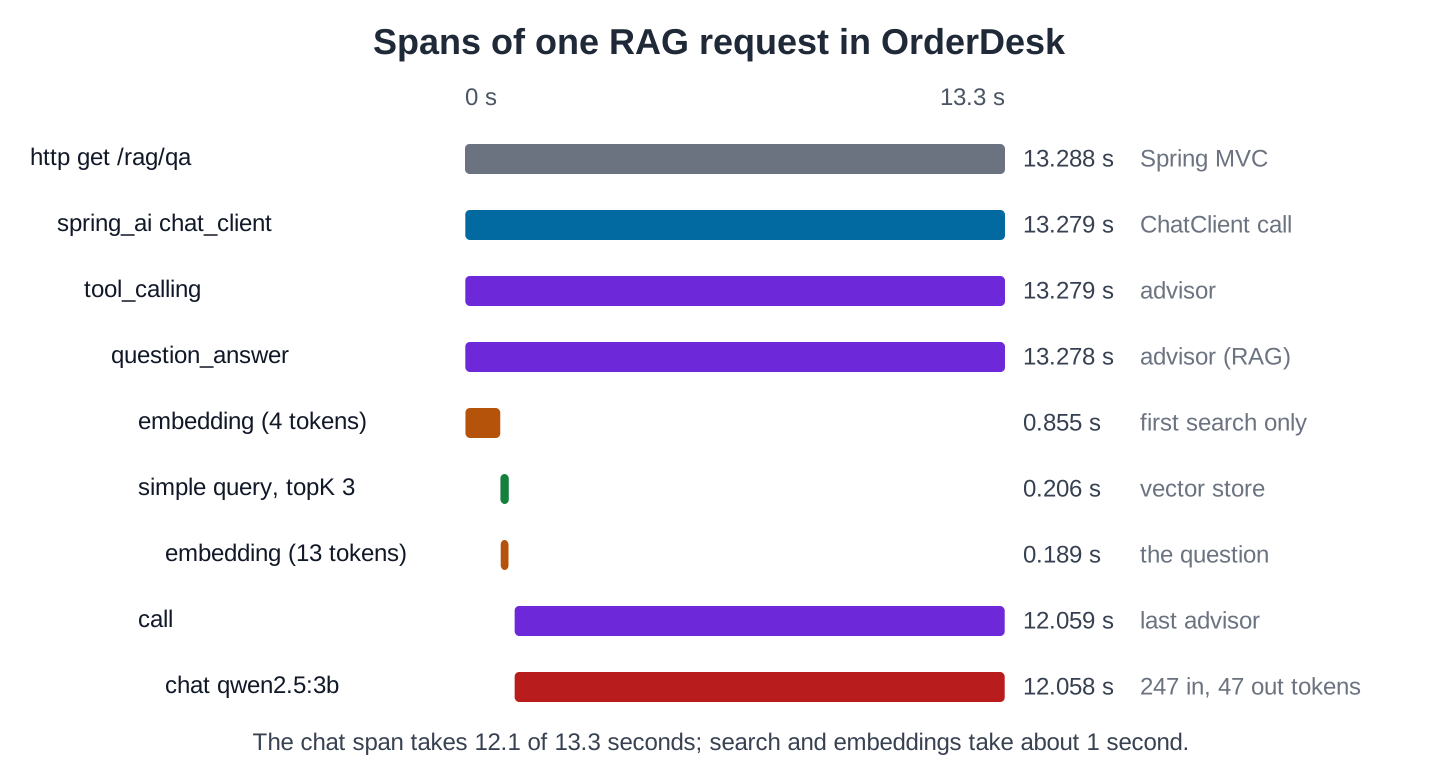
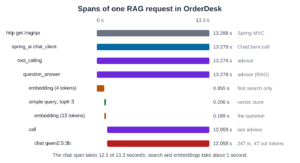
- Every ChatClient call runs through two built-in advisors. Tool Calling Advisor runs a tool when the model asks for one. call is the last advisor, and it sends the prompt to the chat model.
- Spring AI names each advisor span after its advisor. So Tool Calling Advisor shows up as tool _calling (with a space), even in this request without tools, and QuestionAnswerAdvisor as question_answer.
- The spans nest like the advisor chain: tool _calling wraps question_answer, which wraps the search and the call span.
- The vector search (simple query) took 0.2 seconds, including 0.19 seconds to embed the 13-token question.
- The chat qwen2.5:3b span took 12.1 of the 13.3 seconds. It carries the token counts as tags: 247 input and 47 output.
- The first embedding span (4 tokens, 0.86 seconds) runs once, on the first search after startup. A second RAG request had only one embedding call.
So OrderDesk is slow because of the chat model, not RAG.
With the registry in place, the vector search has its own metric too:
curl localhost:8080/actuator/metrics/db.vector.client.operation{"availableTags":[{"tag":"db.system","values":["simple"]},{"tag":"spring.ai.kind","values":["vector_store"]},{"tag":"error","values":["none"]},{"tag":"db.operation.name","values":["query"]}],"baseUnit":"seconds","measurements":[{"statistic":"COUNT","value":1.0},{"statistic":"TOTAL_TIME","value":0.205879585},{"statistic":"MAX","value":0.205879585}],"name":"db.vector.client.operation"}The one search took 0.206 seconds, the same as the simple query span.
Step 5: Read the Tokens of Each Chat Call
Each chat span carries its own token counts. These are the chat spans of the three traces, read from Zipkin and reformatted to one line per span:
TRACE 6ad662f86cf38bc28c64c539cd10d2e8 http get /ask 8.432725
    chat qwen2.5:3b 8.323 s {'gen_ai.request.model': 'qwen2.5:3b', 'gen_ai.usage.input_tokens': '89', 'gen_ai.usage.output_tokens': '12', 'gen_ai.usage.total_tokens': '101'}
TRACE 6ad66300bc68e81819564b5a5c8de522 http get /rag/qa 13.288309
    chat qwen2.5:3b 12.058 s {'gen_ai.request.model': 'qwen2.5:3b', 'gen_ai.usage.input_tokens': '247', 'gen_ai.usage.output_tokens': '47', 'gen_ai.usage.total_tokens': '294'}
TRACE 6ad663171343d01137f243fd93bc7444 http get /tools/ask 22.938451
    chat qwen2.5:3b 10.151 s {'gen_ai.request.model': 'qwen2.5:3b', 'gen_ai.usage.input_tokens': '367', 'gen_ai.usage.output_tokens': '26', 'gen_ai.usage.total_tokens': '393'}
    execute_tool getorderstatus 0.068 s {'spring.ai.tool.definition.name': 'getOrderStatus'}
chat qwen2.5:3b 12.667 s {'gen_ai.request.model': 'qwen2.5:3b', 'gen_ai.usage.input_tokens': '470', 'gen_ai.usage.output_tokens': '57', 'gen_ai.usage.total_tokens': '527'}- The 4 chat calls used 89, 247, 367, and 470 input tokens. They add up to the 1,173 input tokens of the metric in Section 3, because all numbers in this article come from one run.
- The output tokens add up the same way: 12 + 47 + 26 + 57 = 142.
- A tool question needs two model calls. The second call sends the whole first prompt again, plus the tool result: 470 input tokens instead of 367.
5. Turn Tokens into Cost
A hosted model bills input and output tokens at different prices per million tokens. The token metrics give both numbers, so the cost is simple arithmetic:
cost = input tokens / 1,000,000 x input price + output tokens / 1,000,000 x output priceTake example prices of USD 0.40 per million input tokens and USD 1.60 per million output tokens. Then OrderDesk’s three requests cost 1,173 / 1,000,000 x 0.40 + 142 / 1,000,000 x 1.60, about USD 0.0007. LLM Token Costs explains what drives the numbers.
Two things in OrderDesk’s numbers drive cost more than the answers do:
- Input tokens were 89% of the total. You pay for a long system prompt or a large RAG context on every call.
- The tool question paid for two model calls, and the second one was the bigger one.
6. Log Prompts Only Where Allowed
Prompts and answers aren’t part of the observations by default, because they hold customer data. Spring AI has opt-in properties for them, all false by default in 2.0.1: spring.ai.chat.client.observations.log-prompt, spring.ai.chat.client.observations.log-completion, and the same pair under spring.ai.chat.observations.
To read one prompt while debugging, we use SimpleLoggerAdvisor on that request with logging.level.org.springframework.ai.chat.client.advisor=DEBUG, as the advisors article shows. In production, keep prompt logging off, or mask personal data first.
7. Alerts Worth Having
The metrics above support a few alerts that catch real problems:
- Errors: gen_ai.client.operation with error not equal to none. A provider outage or a wrong model name shows up here first.
- Latency: the average or the maximum of gen_ai.client.operation for chat. A model that slows down hurts every request.
- Token spend: the rise of gen_ai.client.token.usage per hour against a budget. A prompt change or a retry loop can multiply it overnight.
- Tool calls per request: the count of spring.ai.tool divided by the count of spring.ai.chat.client. A model stuck in a tool loop raises this ratio.
Actuator only exposes the numbers. A monitoring system such as Prometheus with Grafana stores them over time and sends the alerts. The Micrometer reference covers the registries.
8. Common Traps
8.1. A ChatClient Without the Registry
ChatClient.create(chatModel) builds a client without the ObservationRegistry, so its spring.ai.chat.client and spring.ai.advisor observations are missing. Build the client from the auto-configured ChatClient.Builder, as the supportClient bean does, or pass the registry with ChatClient.create(chatModel, observationRegistry).
8.2. Sampling Everything in Production
A sampling probability of 1.0 sends every request to the trace server. In production, sample a part of the traffic; the metrics still count every request.
9. FAQs
9.1. Do I need OpenTelemetry?
No. Micrometer with the Zipkin starter is enough, as in OrderDesk. To send the data to an OpenTelemetry collector instead, use Spring Boot’s OpenTelemetry starter; the Spring AI observations stay the same.
9.2. Does streaming change the metrics?
The spring.ai.chat.client metric has a spring.ai.chat.client.stream tag, so you can tell streamed and blocking calls apart. With Ollama, the token counts arrive with the last piece of a stream.
9.3. Can I see the cost per user?
Not with the built-in tags: they carry the model and the operation, not the user. A user or tenant tag needs your own code, for example a Micrometer ObservationFilter, and OrderDesk doesn’t have one. Keep the number of tag values small, because each value creates a new time series.
10. Conclusion
Spring AI creates observations for the ChatClient, the advisors, the models, the vector store, and the tools. Actuator and Zipkin make them visible with two starters and a few properties. In OrderDesk, the token metrics showed where the cost comes from, and one trace showed that the chat model, not RAG, makes a request slow.
All articles in order: Spring AI Tutorial
11. References
- Spring AI Reference: Observability
- Spring Boot Reference: Observability
- OpenTelemetry: Semantic Conventions for Generative AI
Drop me your questions related to Spring AI observability in the comments.
Happy Learning !!
