
Suppose we want to add a support assistant to a Java application. It needs to answer questions, look up a customer’s ticket, and perhaps pass a difficult case to another service. We need a way to connect the language model to our Java code.
A model is the AI service that reads our request and produces an answer, such as Claude or a model running locally in Ollama. The frameworks in this article connect that model to the application; they are not models themselves.
Spring AI, LangChain4j, Embabel, and AgentScope Java can help with connecting our application to these LLM models, but they offer different ways to organize it.
- Spring AI and LangChain4j are useful starting points for calling models and exposing Java methods as tools.
- Embabel adds planning on top of Spring AI.
- AgentScope Java provides agents that can call tools and delegate work to other agents. An agent uses a model to choose what to do next, such as looking up a ticket or asking a helper to investigate it.
Our LLM glossary explains the terms we will use in this article.
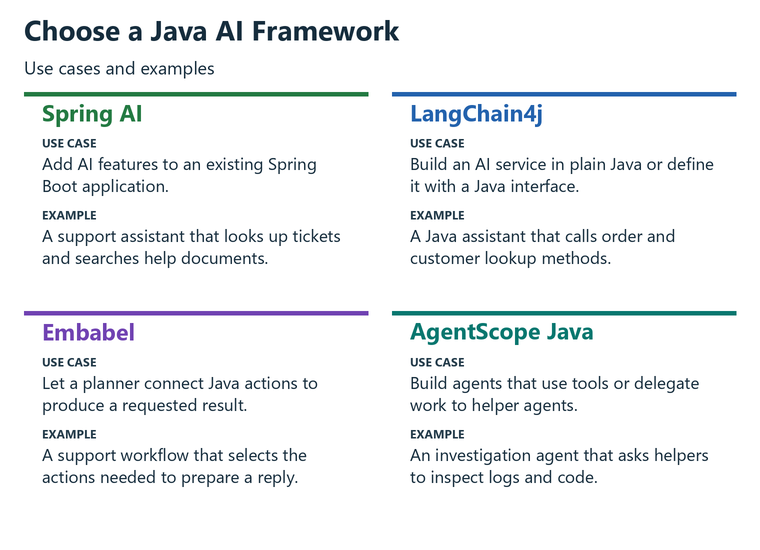
The first question we should ask what our application needs to do. We can start with the choices below, then compare the code and requirements before adding a dependency. The versions in this article were checked on October 25, 2026.
1. The Four Frameworks at a Glance
Spring AI fits the way Spring applications are configured. We can put model settings in properties, inject a client into a service, and use the application’s existing monitoring setup.
LangChain4j can be used directly in Java without starting Spring Boot. One of its main features is AI Services. We declare a Java interface, and the library creates an implementation that sends requests to a model. It also has integrations for Spring Boot, Quarkus, Helidon, and Micronaut.
Embabel runs on Spring AI. We write Java methods for the available actions, describe their inputs and outputs, and declare the result we want. Its planner can work out which actions are needed to produce that result.
AgentScope Java provides an agent runtime with model integrations and tools. Its ReActAgent can choose a tool, use the result, and continue until it has an answer. Its HarnessAgent supports broader tasks with a workspace, memory, and helper agents.
Before comparing APIs, we check whether each version fits our Java and Spring Boot versions. The table also shows which parts handle tool calls, planning, and work shared among agents.
| Spring AI | LangChain4j | Embabel | AgentScope Java | |
|---|---|---|---|---|
| Version compared | 2.0.2 | 1.22.0 | 1.5.3 | 2.0.4 |
| Current major version since | 2.0 in June 2026 (1.0 in May 2025) | 1.0 in May 2025 | 1.0 in July 2026 | 2.0 in July 2026 |
| Minimum Java | 17 | 17 | 21 | 17 |
| Spring Boot | Needed for the starters, Boot 4.0 or 4.1 | Optional starters | Required, Boot 4.1 | Optional starter |
| Main API | ChatClient | AI Services (an interface LangChain4j implements for us) | @Agent, @Action, @AchievesGoal | ReActAgent, HarnessAgent |
| How an agent runs | A tool-calling loop inside ChatClient | A tool-calling loop inside the AI Service, or agentic workflows | Goal-oriented planning selects actions by their input and output types; other planners are available | A repeated cycle of choosing a tool, using its result, and continuing |
| Multi-agent support | No dedicated API | langchain4j-agentic (beta, experimental) | Supervisor planner and subagents | Subagents in HarnessAgent |
| Maintainer | Spring team at Broadcom | LangChain4j project | Embabel, led by Rod Johnson | AgentScope project |
| License | Apache 2.0 | Apache 2.0 | Apache 2.0 | Apache 2.0 |
All four methods can use a model running locally in Ollama. The examples therefore do not require an account key for a hosted model.
A stable core release does not mean every optional module is stable. For example, LangChain4j’s core version here is 1.22.0, while its langchain4j-agentic and langchain4j-mcp modules use 1.22.0-beta32. The agentic module is described as experimental by the project. We check the status of the module we intend to use, not just the main project’s version.
3. Integration Frameworks vs Agent Frameworks
The framework names can make this look like a choice among four replacements for the same library. That is not quite how they fit together.
Spring AI and LangChain4j handle the connection to the model. They can send questions, convert answers into Java objects, include earlier conversation messages, and run tools requested by the model. The application can also retrieve relevant documents and send them with a question. That approach is called retrieval-augmented generation, or RAG.
We can build an agent using these capabilities. For example, the model might look up a ticket, inspect the result, and then request a delivery lookup. Tool calling already allows the next step to depend on what the model finds.
A planning framework gives us another way to organize a larger task. In Embabel, we describe actions with Java input and output types. Its goal-oriented action planner, or GOAP, uses those available types to find actions that can produce the requested result. Embabel also offers other planners, including a model-driven supervisor.
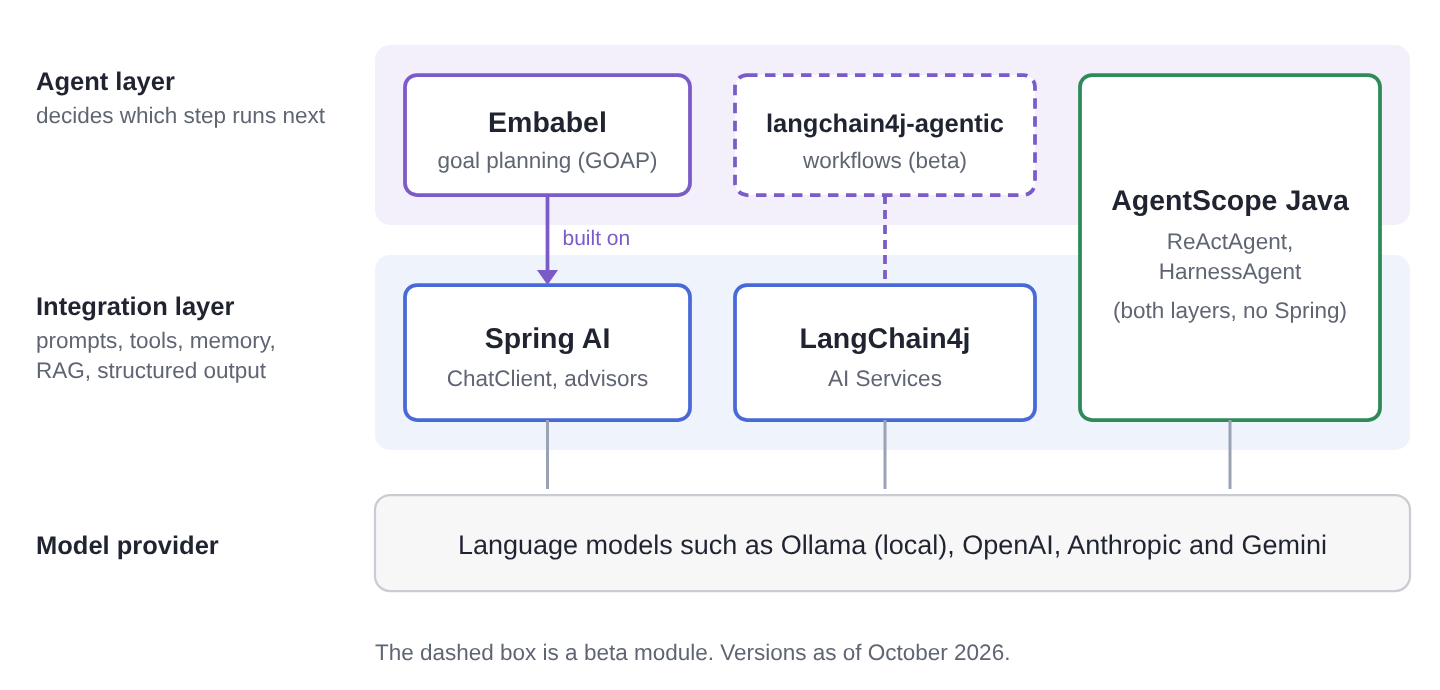
Embabel uses Spring AI for the model connection, so choosing Embabel does not mean replacing Spring AI. We use the two together.
LangChain4j also goes beyond individual model calls. Its optional langchain4j-agentic module provides ways to combine agents in sequences, loops, parallel work, and model-directed coordination. AgentScope includes its own model integrations and agent runtime without requiring Spring.
Evaluate Spring AI and LangChain4j first when the main job is adding model calls, tools, or document-based answers to an application. Then consider whether we need more help organizing the work. Embabel’s planning, LangChain4j’s agentic module, and AgentScope’s agent features are options to evaluate for that next requirement.
4. How the Same Tool Call Looks in Each Framework
We can see the programming differences by implementing the same small task in each framework. The user asks, “What is the status of ticket T-1001?” Our Java method, getTicketStatus(), returns “Waiting for the courier” for that ticket and “Unknown ticket” for any other value.
This is a demonstration method. It returns a fixed value rather than querying a real ticket system. Each version connects it to the same local Ollama model, qwen2.5:7b.
The examples show how each framework registers a tool and asks the model a question. The snippets were compiled against the stated versions, but they were not run against a model for this article. They do not compare answer quality, speed, or reliability.
Imports and some project setup are omitted from the snippets. The complete projects on GitHub contain that code. This one-tool task makes the APIs easier to compare; it does not demonstrate multi-step planning or collaboration among agents.
4.1. Spring AI
For Spring AI, we add spring-ai-starter-model-ollama. We use spring-ai-bom version 2.0.2 to select matching dependency versions.
The SupportTools class contains the method the model can request. Spring AI’s @Tool annotation describes what that method does.
public class SupportTools {

    @Tool(description = "Get the status of a support ticket")
    public String getTicketStatus(String ticketId) {
        return "T-1001".equals(ticketId) ? "Waiting for the courier" : "Unknown ticket";
    }
}
Spring Boot creates a ChatClient.Builder from the model settings in application.properties. We use the builder to create a client, supply the question, and register SupportTools with tools().
The call() method runs the request, and content() returns the text answer. We run this code at application startup through a CommandLineRunner.
@Bean
CommandLineRunner askAboutTicket(ChatClient.Builder builder) {
    return args -> {
        String answer = builder.build()
                .prompt("What is the status of ticket T-1001?")
                .tools(new SupportTools())
                .call()
                .content();
        System.out.println(answer);
    };
}
spring.ai.ollama.base-url=http://localhost:11434
spring.ai.ollama.chat.model=qwen2.5:7b
If the model requests the ticket lookup, Spring AI runs the Java method and sends its result back to the model. In Spring AI 2.0, ToolCallingAdvisor manages that loop through ChatClient. An advisor is a component that participates in processing a model request, and this one is registered automatically when tools are present.
The Spring AI getting-started guide shows how to create the project and configure the model.
4.2. LangChain4j
For LangChain4j, we add langchain4j and langchain4j-ollama, both version 1.22.0. Its @Tool annotation serves the same purpose as Spring AI’s annotation, but it comes from a different package.
We also declare a SupportAgent interface with a chat() method. AiServices creates the implementation for us. When we call chat(), that implementation contacts the model and handles any requests to use the registered tools.
public class SupportTools {

    @Tool("Get the status of a support ticket")
    public String getTicketStatus(String ticketId) {
        return "T-1001".equals(ticketId) ? "Waiting for the courier" : "Unknown ticket";
    }
}

public interface SupportAgent {

    String chat(String question);
}
ChatModel model = OllamaChatModel.builder()
.baseUrl("http://localhost:11434")
.modelName("qwen2.5:7b")
.build();
SupportAgent agent = AiServices.builder(SupportAgent.class)
.chatModel(model)
.tools(new SupportTools())
.build();
System.out.println(agent.chat("What is the status of ticket T-1001?"));This example runs in plain Java. We create the model with a builder and pass it to AiServices; Spring Boot is not required.
If we use Spring Boot, the appropriate LangChain4j starter can create the AI Service as a bean using @AiService. The LangChain4j Spring Boot tutorial explains that setup. The starter version and Boot compatibility need to match our application.
4.3. Embabel
For Embabel, we add embabel-agent-starter and embabel-agent-starter-ollama, both version 1.5.3. This version uses Java 21 and Spring Boot 4.1.
Our agent class is SupportDeskAgent. The @Agent annotation identifies it as an agent, and @Action identifies a step the framework can run. Here, there is only one step. @AchievesGoal marks it as the action that produces the final result.
That result is SupportReply, a Java record containing ticketId, status, and message. The action receives the user’s question in UserInput. It uses OperationContext to access the model and request a SupportReply object. withToolObject() makes the ticket lookup available to the model.
@Agent(description = "Answers questions about support tickets")
public class SupportDeskAgent {

    @AchievesGoal(description = "The customer's ticket question is answered")
    @Action
    public SupportReply answer(UserInput input, OperationContext context) {
        return context.ai()
                .withDefaultLlm()
                .withToolObject(new SupportTools())
                .createObject("Answer the customer: " + input.getContent(), SupportReply.class);
    }
}
The Embabel project has its own SupportTools class. It uses the same lookup method as the Spring AI example, but marks it with Embabel’s @LlmTool annotation.
The starter creates an AgentPlatform bean, which runs agents. We pass that bean to AgentInvocation, ask for a SupportReply, and supply the user’s question.
SupportReply reply = AgentInvocation.builder(agentPlatform)
        .build(SupportReply.class)
        .invoke(new UserInput("What is the status of ticket T-1001?"));
For this one-step task, Embabel adds more structure than we need. Its planning becomes more relevant when several actions are available and the required order depends on the information we have.
For example, one action could look up a ticket and return a ticket record. Another could use that record to prepare a reply. By declaring the input and output types, we give the planner information about how the actions can connect. Our Embabel tutorial explores a multi-step example.
4.4. AgentScope Java
For AgentScope Java, we add agentscope-core and agentscope-extensions-model-ollama, both version 2.0.4. The provider-specific module supplies the Ollama connection.
We mark the lookup method with AgentScope’s @Tool annotation. @ToolParam describes the ticketId parameter so the model knows what to provide. A Toolkit holds the tools available to the agent.
public class SupportTools {

    @Tool(name = "get_ticket_status", description = "Get the status of a support ticket")
    public String getTicketStatus(
            @ToolParam(name = "ticketId", description = "The ticket id, such as T-1001") String ticketId) {
        return "T-1001".equals(ticketId) ? "Waiting for the courier" : "Unknown ticket";
    }
}
Toolkit toolkit = new Toolkit();
toolkit.registerTool(new SupportTools());
ReActAgent agent = ReActAgent.builder()
.name("SupportDesk")
.sysPrompt("You answer questions about support tickets.")
.model(OllamaChatModel.builder()
.baseUrl("http://localhost:11434")
.modelName("qwen2.5:7b")
.build())
.toolkit(toolkit)
.build();
Msg question = Msg.builder().textContent("What is the status of ticket T-1001?").build();
Msg reply = agent.call(question).block();
System.out.println(reply.getTextContent());We create a ReActAgent with the model, instructions, and toolkit. ReAct means the agent can choose a tool, inspect the result, and choose what to do next. In this example, the only tool looks up the ticket.
We put the question in a Msg message and pass it to call(). The result is a Reactor Mono, which represents a value that becomes available when the operation completes. Calling block() waits for the reply so this small example can print it.
For larger tasks, HarnessAgent adds facilities such as a workspace and helper agents. The AgentScope Java documentation covers those features. Version 2.0 removed the older message-hub and pipeline classes, so examples written for 1.x may need changes before they work with 2.x.
4.5. A Quick Comparison
All four examples make the same Java lookup available to a model. The main differences are how we configure the model, register the method, and receive the reply.
| Spring AI | LangChain4j | Embabel | AgentScope Java | |
|---|---|---|---|---|
| Dependencies | 1 starter (plus the BOM) | 2 | 2 starters | 2 |
| Where the model is configured | application.properties | A builder in code | application.properties | A builder in code |
| How the tool is registered | Passed to the request with tools() | Passed to the AI Service builder | Passed to the operation with withToolObject() | Registered in a Toolkit |
| What the call returns | A String (or a typed object with entity()) | Whatever the interface method declares | A typed result returned by the selected action | A Mono of Msg |
5. What Is the Difference Between Spring AI and LangChain4j?
Both frameworks can call models, run tools, remember conversation messages, retrieve documents for RAG, and return Java objects. The choice is usually about how those capabilities fit the application.
Spring AI fits Spring Boot’s configuration and monitoring conventions. LangChain4j lets us describe an AI service as a Java interface and use it with or without Spring.
Chat memory means keeping earlier conversation messages available for later questions. Structured output means asking for an answer that can be read as a Java object, rather than only as text. MCP, the Model Context Protocol, lets an application use tools exposed by another program.
| Feature | Spring AI 2.0.2 | LangChain4j 1.22.0 |
|---|---|---|
| Programming style | Fluent calls on ChatClient | Declarative interfaces (AI Services) |
| Configuration | application.properties and auto-configuration | Builders in code, or framework starters |
| Spring Boot starter | Stable, part of the project | langchain4j-spring-boot4-starter, versioned beta |
| Tools | @Tool, run by ToolCallingAdvisor | @Tool, run by the AI Service |
| Chat memory | ChatMemory with MessageChatMemoryAdvisor | ChatMemory, such as MessageWindowChatMemory |
| RAG | QuestionAnswerAdvisor, RetrievalAugmentationAdvisor, an ETL pipeline for documents | ContentRetriever, a retrieval augmentor, document loaders |
| Structured output | entity(Class) | The return type of the interface method |
| MCP | Client and server starters | Client module (beta) |
| Monitoring model requests | Micrometer observations built in | Listeners and integrations |
| Testing | Evaluators and Spring Boot test support | Plain JUnit tests |
| Multi-agent | No dedicated API | langchain4j-agentic (beta) |
Spring AI is convenient when the application already uses Spring Boot. We can configure model providers, vector stores, and MCP clients with properties. A vector store holds representations of documents that help us find relevant text for a question. MCP clients connect to those external tools.
Spring AI also uses Micrometer, the monitoring library commonly used in Spring applications, to record information about model requests. Our ChatClient guide explains its request-building API in more detail.
LangChain4j is a useful option outside Spring, or when the team prefers Java interfaces for AI features. Its framework integrations help create and configure those services, while the plain Java API remains available.
Its langchain4j-agentic module is also worth evaluating if we want built-in ways to combine several agents. That module is experimental, so we account for possible API changes when deciding whether to depend on it.
The version matters when copying tool-calling examples. In Spring AI 2.0, the model implementation no longer runs Java tools internally. ChatClient manages that work through its advisor. Calling ChatModel directly returns tool requests for our code to handle; it does not automatically execute them.
The Spring AI upgrade notes explain the change. Our Spring AI migration guide shows how to update existing code.
6. Which Framework Should You Use to Build AI Agents in Java?
We can narrow the choice by looking at the application we already have and the work we want the model to do. These recommendations are places to start a small evaluation, rather than claims that only one framework can handle each situation.
| Your situation | Pick | Why |
|---|---|---|
| A Spring Boot application that needs chat, tools, or document-based answers | Spring AI | Configuration, testing, and observability work the Spring way |
| Plain Java, Quarkus, or Micronaut | LangChain4j | No Spring dependency, with integrations for those frameworks |
| A Spring Boot application where typed actions and goal-based planning help organize the work | Embabel on Spring AI | Typed, testable actions, with a planner that chains them |
| Several agents in an explicit order, such as a sequence, a loop, or parallel work | LangChain4j agentic | Ready-made workflow builders, but the module is beta |
| Long-running agents that start subagents, outside Spring | AgentScope Java | HarnessAgent gives an agent a workspace, memory, and subagents |
| A team that is new to AI | Spring AI or LangChain4j | Start with model calls and tools; evaluate planning when the task needs it |
Combining frameworks can be appropriate, but it should solve a specific problem. Embabel uses Spring AI for model access. Spring AI and LangChain4j can also coexist, although using both for the same model calls gives the team two APIs and configurations to maintain.
Before adopting a planning or multi-agent feature, we try one representative task. We check whether the model uses the right tools, what happens when a tool fails, and whether the final result meets the application’s requirements. The examples in this article establish compilation only; those runtime checks still need to be done.
7. Other Java AI Tools Worth Considering
The four frameworks above cover many Java applications, but other projects offer different ways to organize agents. The versions below were checked on October 25, 2026.
7.1. Google Agent Development Kit (ADK) for Java
Google’s Agent Development Kit, or ADK, provides tools for building, evaluating, and deploying agents. It is designed around Gemini models. Its google-adk-langchain4j module also connects it to model providers supported by LangChain4j, including Ollama.
The Java version compared here is 1.13.0 and requires Java 17. Its README labels it as a preview under Google’s pre-GA terms. The ADK Java documentation describes the setup.
7.2. Spring AI Alibaba
Spring AI Alibaba builds agent and workflow features on Spring AI. Its Graph module helps run connected steps and provides support for saving progress and streaming results.
The stable 1.1.2.3 release uses Spring AI 1.1. Its 2.0 line is still a milestone release, so we do not assume the stable release can be added to a Spring AI 2.0 project. The project repository lists the supported versions.
7.3. Semantic Kernel for Java
Semantic Kernel is Microsoft’s SDK for connecting models to application code through plugins. The Java release compared here is 1.5.0, published in April 2026.
Microsoft continues to support Semantic Kernel 1.x and describes Microsoft Agent Framework as its successor for new agent capabilities. That does not by itself establish a Java migration path. We check Java-specific support before choosing it for a new application. The Semantic Kernel documentation covers the Java SDK.
7.4. Koog
Koog is JetBrains’ agent framework. It is written in Kotlin and provides a Java API. We can describe an agent as connected steps, including branches and repeated work.
Version 1.3.0 requires JDK 17 on the JVM. The project also targets JavaScript, WebAssembly, and iOS. It is an option to evaluate when the team already uses Kotlin or wants to define the workflow explicitly. See the Koog documentation.
7.5. LangGraph4j
LangGraph4j is a community project for workflows that keep state between steps. It represents the workflow as a graph, where steps can branch or loop. It has integrations for both LangChain4j and Spring AI.
Version 1.9.7 includes experimental features, while the 1.8 line is the long-term support version. The LangGraph4j repository explains the available versions.
8. FAQs
8.1. Is Spring AI worth it?
Spring AI is worth considering when we already use Spring Boot and need features such as tool calling, document retrieval, or monitoring model requests. It lets us use those features within the application’s existing configuration.
If the requirement is one simple call to a single provider, that provider’s SDK may be enough. We choose the extra framework when its features remove work we would otherwise implement ourselves.
8.2. Can I build AI agents in Java without Python?
Yes. We can write the application and its tools in Java with any of these frameworks. The model can run locally through Ollama or be accessed through a hosted API. Python is not required to use an existing model from Java.
8.3. Is Python or Java better for AI?
Python has a larger ecosystem for training models and experimenting with machine learning. Java is a practical choice for adding model-based features to an existing Java application.
For the applications compared here, we use existing models rather than train new ones. The useful question is which language and framework fit the team’s application, skills, and deployment process.
8.4. Is AgentScope free to use?
AgentScope Java is open source under the Apache 2.0 license, with no framework usage fee. A hosted model provider can charge for requests. Running a local model also uses our own computing resources.
8.5. How is Embabel different from Spring AI?
Embabel adds planning and agent features on top of Spring AI. We declare actions and the result we want, and Embabel can work out how to connect those actions. Spring AI provides the model connection and related application features.
We can also build tool-calling agents directly with Spring AI. Embabel becomes relevant when its approach to planning helps organize the task. Section 3 explains that distinction.
9. Conclusion
For a Spring Boot application that needs chat, tools, or document-based answers, Spring AI is a sensible first option. LangChain4j is a useful alternative when we prefer its interface-based API or work outside Spring.
We consider Embabel when we want to describe Java actions and let a planner connect them. AgentScope is an option when its agent loop, workspace, and helper-agent features match the task. LangChain4j’s experimental agentic module offers another way to organize work among agents.
The choice does not follow from a feature count alone. We use the same representative task to check model support, tool failures, result handling, and how easily the code fits our application.
We also check the exact module versions before copying an example. Embabel here requires Java 21, some LangChain4j modules are beta, and AgentScope changed its agent APIs in 2.0. The snippets in this article show the programming differences. They are not a runtime performance or answer-quality comparison.
10. References
You can share questions about choosing a Java AI framework in the comments.
Happy Learning!
