
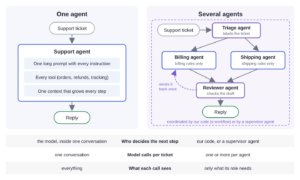
In muti-agent AI application, multiple agents coordinate to complete a task; and each agent has its own instructions and a specific part of the task to complete. The agents can use the same language model or different.
Suppose we want to build an AI assistant for a bookstore’s support desk. Customers ask about duplicate charges, refunds, missing deliveries, and damaged books. One AI assistant can definitely handle all these questions, though quality may be questionable. Another approach is to divide the work among multiple AI assistants with smaller, clearly defined jobs. One agent identifies the kind of question, another agent writes a reply, and a third agent checks the reply before we use it. This is called a multi-agent application.
1. Single-Agent vs Multi-Agent Application
In a single-agent application, one AI agent handles the complete task. For example, we give our support agent the bookstore’s billing and shipping policies along with the customer’s question. The agent decides which policy applies and writes a reply. This approach is simple to set up because we keep the instructions and response generation in one place.
In a multi-agent application, we divide the same task among agents with different responsibilities. For our support desk, one agent identifies whether the question is about billing or shipping. The selected specialist agent then writes a reply using the relevant policy, and a reviewer agent checks the reply. We also need to decide how these agents pass work to one another. We can define that order in Java code or let a supervisor agent choose which agent runs next.
2. Demo App: Building the Support Desk with LangChain4j
Our demo application accepts a support ticket containing an ID and the customer’s question. Suppose a customer says they were charged twice for an order. We want the application to recognize that this is a billing question and write a reply using the bookstore’s refund policy. Before returning that reply, we also want to check that it does not promise a refund amount or delivery date that we cannot guarantee.
We create five agents to handle this work. The triage agent reads the question and identifies the department. The billing agent answers payment and refund questions, while the shipping agent answers delivery and damaged-parcel questions. Each ticket goes to only one of these specialists. The remaining two agents review the specialist’s reply and revise it when necessary, as shown below.
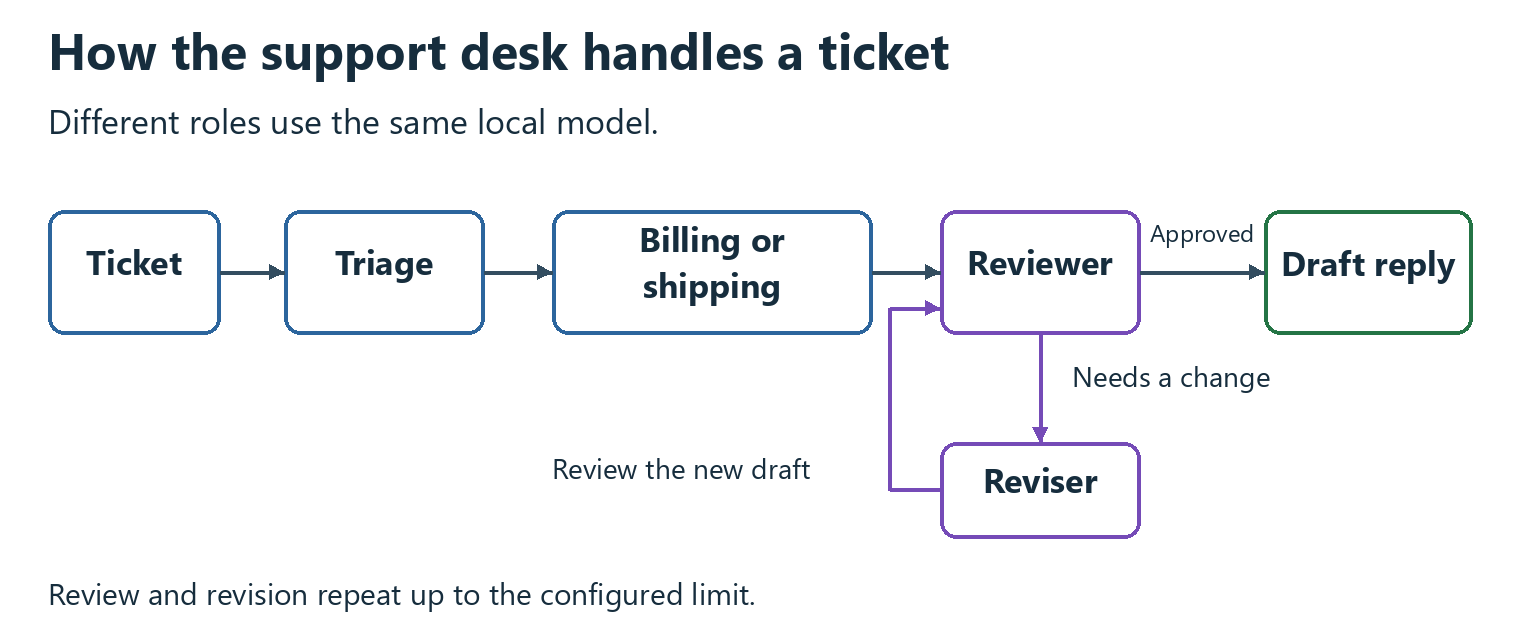
The reviewer reads the specialist’s reply and checks for an exact refund amount or a specific delivery date. If it finds neither, it approves the reply and the application returns the draft. If it finds a promise that needs removing, the reviser changes the wording and the reviewer checks the new draft. We limit this cycle so that a disagreement between the agents cannot keep the application running indefinitely. Reaching that limit can leave us with a draft that has not been approved, which we discuss in Step 4.
All five agents run inside the same Java application and use the same model through Ollama. Java code decides which agent runs next and passes along the ticket, draft, and review result. The demo prepares replies only. It does not send them to customers or perform refunds.
The complete project includes the agent interfaces, workflow, and recorded results. To run the demo, we must install Ollama and download the model with ollama pull qwen2.5:7b. Our local-model guide explains the setup.
Step 1. Maven
We need three libraries for this example. The core langchain4j library lets us define AI services as Java interfaces. The langchain4j-ollama integration connects those services to our local model. Finally, langchain4j-agentic provides the builders that connect the agents into a workflow.
We add the following dependencies to pom.xml. The core library and Ollama integration use version 1.22.0. The agentic module has its own beta version, 1.22.0-beta32, so its version number is different from the other two.
<dependency>
  <groupId>dev.langchain4j</groupId>
  <artifactId>langchain4j</artifactId>
  <version>1.22.0</version>
</dependency>
<dependency>
  <groupId>dev.langchain4j</groupId>
  <artifactId>langchain4j-ollama</artifactId>
  <version>1.22.0</version>
</dependency>
<dependency>
  <groupId>dev.langchain4j</groupId>
  <artifactId>langchain4j-agentic</artifactId>
  <version>1.22.0-beta32</version>
</dependency>
Step 2. Defining Agents
We start with the triage agent. It needs to read a customer’s question and return one of two departments, BILLING or SHIPPING. We represent those choices with a Department enum and define the agent as a Java interface. LangChain4j creates the implementation that sends the instructions and ticket text to the model.
The triage agent’s answer needs to reach the specialist that runs next. LangChain4j handles this through an AgenticScope, which stores named values for one run of the workflow. We supply ticketId and ticket when we start the application. The triage agent then adds department, the specialist adds draft, and the reviewer adds review. Each agent reads the values it needs from this shared storage. These names connect the inputs and outputs in the interfaces below.
public enum Department {
  BILLING, SHIPPING
}

public interface TriageAgent {

  @UserMessage("""
      Decide which department handles this support ticket.
      BILLING handles payments, invoices, refunds and charges.
      SHIPPING handles deliveries, couriers, tracking and damaged parcels.
      Ticket: {{ticket}}
      """)
  @Agent(description = "Labels a ticket as BILLING or SHIPPING", outputKey = "department")
  Department classify(@V("ticket") String ticket);
}
The billing agent below has a different job from triage. It returns reply text rather than an enum, and its instructions contain the bookstore’s sample refund policy. The @SystemMessage holds those standing instructions. The @UserMessage supplies the particular ticket being answered.
public interface BillingAgent {

  @SystemMessage("""
      You answer billing questions for the OrderDesk bookstore.
      Refunds are possible within 30 days of payment and take 5 business days.
      Never promise an exact refund amount.
      Start the reply with the ticket id and end it with the line "OrderDesk Support".
      """)
  @UserMessage("Write a short reply (at most 80 words) to ticket {{ticketId}}: {{ticket}}")
  @Agent(description = "Writes replies to billing tickets", outputKey = "draft")
  String reply(@V("ticketId") String ticketId, @V("ticket") String ticket);
}
The shipping agent in the complete project follows the same structure, with instructions about deliveries and damaged parcels. Its sample policy allows 3 to 5 business days for delivery and free replacement of damaged parcels. Both specialists store their answer under draft. This lets the reviewer read the selected specialist’s reply without needing to know which department produced it.
We now have a draft, but it may contain a promise the bookstore cannot make. For example, the billing specialist might invent a refund amount even though its instructions say not to do so. We give the reviewer this one task to check. It reads draft and returns either APPROVED or a sentence quoting the promise that needs removing. LangChain4j stores that result under review.
The reviser has a separate job. It reads both the original draft and the reviewer’s note, then writes a corrected reply back to draft. Updating the same entry means the next review sees the latest text. The reviser’s instructions also tell it to leave the internal note out of the customer’s reply. Without that instruction, it may explain the review process instead of simply correcting the answer.
public interface ReviewerAgent {

  @UserMessage("""
      You review support replies before they are sent.
      Check one thing only: does the reply promise an exact money amount for a refund
      (for example "$25.99") or an exact calendar date for a delivery (for example "on 3 November")?
      Saying "within 5 business days" or "3 to 5 business days" is fine and is not an exact date.
      If the reply makes no exact promise, answer with only the word APPROVED.
      Otherwise, answer with one sentence that quotes the exact promise to remove.
      Reply: {{draft}}
      """)
  @Agent(description = "Checks that a draft reply makes no exact refund or delivery promise", outputKey = "review")
  String review(@V("draft") String draft);
}

public interface ReviserAgent {

  @UserMessage("""
      Rewrite this customer support reply so it no longer makes the promise named in the note.
      Keep the ticket id at the start and the line "OrderDesk Support" at the end.
      The customer must not see the note, so never mention it, a reviewer or any rules.
      Return only the corrected reply.
      Note: {{review}}
      Reply: {{draft}}
      """)
  @Agent(description = "Rewrites a draft reply to remove an exact promise", outputKey = "draft")
  String revise(@V("review") String review, @V("draft") String draft);
}
We also want every reply to start with the ticket ID and end with “OrderDesk Support.” We can check both requirements with ordinary Java string comparisons. We use the reviewer agent for the wording of refund and delivery promises, where a simple text comparison is less useful. Even then, the reviewer can make a mistake. The example in Step 4 shows what happens when the reviser follows incorrect feedback.
These interfaces describe the jobs, but we still need to create the agents that call the model. We first build an OllamaChatModel pointing to the local Ollama server. We then pass that model and each interface to agentBuilder(). All five roles use the same model connection; their different instructions give them different jobs.
Creating the agents does not run the support desk. In the next steps, we connect them and decide when each one runs. The builder methods in these snippets are static imports from dev.langchain4j.agentic.AgenticServices.
OllamaChatModel model = OllamaChatModel.builder()
    .baseUrl("http://localhost:11434")
    .modelName("qwen2.5:7b")
    .temperature(0.0)
    .timeout(Duration.ofMinutes(5))
    .build();

TriageAgent triage = agentBuilder(TriageAgent.class).chatModel(model).build();
BillingAgent billing = agentBuilder(BillingAgent.class).chatModel(model).build();
ShippingAgent shipping = agentBuilder(ShippingAgent.class).chatModel(model).build();
ReviewerAgent reviewer = agentBuilder(ReviewerAgent.class).chatModel(model).build();
ReviserAgent reviser = agentBuilder(ReviserAgent.class).chatModel(model).build();
Step 3. Route Tickets to a Specialist
We have two specialists, but each ticket needs only one of them. We use conditionalBuilder() to create a routing step called specialists. It reads the department value produced by triage and runs the matching agent. For the duplicate-charge question, the value is BILLING, so only the billing specialist writes a reply.
The conditions below are ordinary Java expressions. Selecting a branch therefore adds no model request. The earlier triage step uses the model to classify the ticket; this step uses that result to choose what runs next. The builder runs every branch whose condition matches, so we keep the conditions separate to ensure that only one specialist answers.
UntypedAgent specialists = conditionalBuilder()
    .subAgents(scope -> scope.readState("department", Department.BILLING) == Department.BILLING, billing)
    .subAgents(scope -> scope.readState("department", Department.BILLING) == Department.SHIPPING, shipping)
    .build();
Notice the second argument of readState(). It supplies a value to use when department is missing. Our example uses Department.BILLING, so a missing value sends the ticket to billing. This keeps the sample small, but it is a choice we need to revisit for a real support desk. We may want the application to stop and ask for clarification instead of choosing a department without a classification.
Step 4. Review the Reply in a Loop
After the specialist writes a draft, we need to decide whether to keep it or revise it. We place the reviewer and reviser in a loop, with the reviewer first. The exit condition reads review and checks whether it starts with APPROVED. If it does, the loop stops and leaves the draft unchanged. If it does not, the reviser updates the draft before the next review.
LangChain4j checks the exit condition after each agent by default. This matters because an approved draft should leave the loop immediately, without going through the reviser. We keep that default behavior. Setting testExitAtLoopEnd(true) would delay the check until both roles had run.
UntypedAgent reviewLoop = loopBuilder()
    .subAgents(reviewer, reviser)
    .exitCondition(scope -> scope.readState("review", "").strip().startsWith("APPROVED"))
    .maxIterations(2)
    .build();
We set maxIterations() to prevent the review process from continuing indefinitely. With a limit of two, the loop can run the reviewer and reviser twice, making at most four model calls. The order is review, revise, review, revise. This means the final revision may not receive another review. We therefore cannot treat a returned draft as proof of approval. Before sending a real reply, the application needs to check whether the reviewer approved it or the loop simply reached its limit.
Step 5. Run the Whole Desk as a Sequence
We can now assemble the support desk. We already have three parts that do the work we need, in order. Triage identifies the department, specialists runs the selected writer, and reviewLoop checks the reply and revises it when needed. We pass these parts to sequenceBuilder() to run them one after another. The complete workflow is in SupportDesk.java.
A step in the sequence can be a single agent or a group of agents. That is why we can place the routing step and review loop alongside triage. They share the same workflow state, so the department and draft written by earlier steps remain available to later ones. We set outputKey(“draft”) to return the final draft when the sequence finishes.
UntypedAgent desk = sequenceBuilder()
    .subAgents(triage, specialists, reviewLoop)
    .outputKey("draft")
    .build();

ResultWithAgenticScope<String> result = desk.invokeWithAgenticScope(
    Map.of("ticketId", "T-1001", "ticket", "I was charged twice for order 5521. Please fix it."));

System.out.println(result.agenticScope().readState("department"));
System.out.println(result.result());
We start the workflow by passing a ticket ID and the customer’s question to invokeWithAgenticScope(). For the duplicate-charge example above, triage selects billing, the billing agent writes the reply, and the review loop checks it. The method returns both the final reply and the shared values from that run. We can therefore print the selected department as well as the answer. If we only need the answer, we can call invoke() instead.
We also want to know how much work the model does for each ticket. We count its responses and the tokens it reports using. Tokens are the small units of text that a model processes and generates. Our CallCounter collects these numbers through ChatModelListener. We attach it to the model builder with .listeners(List.of(counter)). Whenever a response finishes, the listener increases the response count and adds the reported token usage to the total.
public class CallCounter implements ChatModelListener {

  final AtomicInteger calls = new AtomicInteger();
  final AtomicInteger tokens = new AtomicInteger();

  @Override
  public void onResponse(ChatModelResponseContext context) {
    calls.incrementAndGet();
    TokenUsage usage = context.chatResponse().tokenUsage();
    if (usage != null && usage.totalTokenCount() != null) {
      tokens.addAndGet(usage.totalTokenCount());
    }
  }
}
The project README includes the setup and run instructions. We run the following Bash commands from the multi-agent-ai-java folder. The application entry point is SupportDeskApp.java. The final command selects the multi-agent version and processes the sample tickets.
mvn compile
mvn dependency:build-classpath -Dmdep.outputFile=cp.txt
java -cp target/classes:$(cat cp.txt) com.howtodoinjava.supportdesk.SupportDeskApp multi
The following output comes from three sample tickets in the first run with the revised reviewer and reviser prompts. It shows the selected department, model-call count, and final reply.
T-1001 | BILLING | 3 model calls
T-1001: We apologize for the double charge on your order 5521. We will process a refund for the duplicate charge within 5 business days. Thank you for your patience. OrderDesk Support

T-1004 | SHIPPING | 3 model calls
T-1004: We're sorry to hear about the damage to your books. We will replace them for free. Please let us know your address so we can arrange this. OrderDesk Support

T-1009 | BILLING | 5 model calls
T-1009: We apologize for the issue you encountered. Please let us know the order details, and we'll review the charge. We will provide an update on the status as soon as possible. OrderDesk Support
For nine of the ten tickets, the application makes three model calls. The first classifies the question, the second writes the reply, and the third reviews it. T-1009 needs five calls because the reviewer requests a revision and then checks the revised draft.
When we inspect T-1009, we find that the extra work made the answer less useful. The original draft said the refund would be processed “within 5 business days.” The reviewer’s instructions allow that wording, but it rejected it anyway, and the reviser removed it. This is an important reason to inspect the agents’ decisions as well as their final replies. Adding a reviewer gives us another check, but that check can also be wrong.
3. Let a Supervisor Decide the Order
So far, Java code has decided which agent runs next. We know that triage comes first and review comes after the specialist writes a reply. Another option is to ask a supervisor agent to make these decisions. With supervisorBuilder(), the supervisor reads the available agents’ descriptions, chooses an agent, and supplies its inputs. After receiving the result, it decides whether more work is needed.
For this alternative, we give the supervisor only the billing and shipping agents. We leave out the separate triage and review steps so we can see how it chooses between the specialists. The complete example is in SupervisorDemo.java.
SupervisorAgent supervisor = supervisorBuilder()
    .chatModel(model)
    .subAgents(billing, shipping)
    .responseStrategy(SupervisorResponseStrategy.LAST)
    .maxAgentsInvocations(3)
    .build();

String reply = supervisor.invoke("Answer support ticket T-1001: I was charged twice for order 5521. Please fix it.");
We set responseStrategy(LAST) because we want to return the last specialist’s answer. The supervisor does not write another summary after the specialist finishes. This is already the default in the version used here, but including it in the code makes the choice clear.
We also set maxAgentsInvocations(3) so the supervisor can call specialists at most three times. This does not limit the whole application to three model calls. The supervisor uses the model to decide what to do, and the specialists use it to write their replies. We need to count both. The following output shows what happened with the first three sample tickets.
T-1001 | 3 model calls | 1213 tokens
T-1001: We apologize for the double charge on your order 5521. We will process a refund for the duplicate charge within 5 business days. Thank you for your patience. OrderDesk Support

T-1002 | 6 model calls | 2247 tokens
T-1002, Standard delivery typically takes 3 to 5 business days. If your parcel hasn't arrived, please check its tracking status or contact us for assistance. OrderDesk Support

T-1003 | 3 model calls | 1201 tokens
T-1003, refunds are available within 30 days of payment. Since your return was last week, you may be eligible. Processing takes 5 business days. Please check your order details for specifics. OrderDesk Support
The supervisor chooses the correct specialist for all three tickets, but it does not always know when to stop. For T-1001 and T-1003, it chooses a specialist, receives the answer, and finishes, using three model calls. For T-1002, it asks the shipping specialist the same question three times. The invocation limit eventually stops it after six calls. Raising that limit would let the repetition continue longer.
The supervisor version uses 1,201 to 2,247 tokens per ticket in these three attempts. For the same tickets, that is roughly three to five times the tokens used by our predefined workflow. The supervisor version even leaves out the separate triage and review agents. Its decisions about which specialist to call add work of their own, and repeatedly calling the same specialist adds still more. These three tickets illustrate that behavior; they are not enough to establish how a supervisor would perform on every support request.
The log also names the specialists reply$0 and reply$1, because both interface methods are named reply. We should give agents distinct names and clear descriptions when a supervisor needs to choose between them. That makes their roles easier to distinguish in both the instructions and the logs.
4. Compare Single-Agent and Multi-Agent Applications
We compare the same ten sample tickets using two versions of the support desk. Both use the same local model.
- Single-agent application. A single AI service with all the billing and shipping rules in one system prompt. It returns a record with the department and the reply, using Ollama’s JSON mode.
- Multi-agent application. The support desk from Section 2.
We check whether each application chooses the expected department. We also use Java code to check that the reply begins with the ticket ID and ends with “OrderDesk Support.” These checks give us specific results to compare. They do not tell us whether every piece of advice in the reply is correct or whether the answer would satisfy the customer.
We run each application three times with temperature set to zero. The recorded results show that the replies, model-call counts, and token counts repeat exactly in these runs. The time taken varies, so the analysis script calculates the median time for the ten tickets in each run and then takes the median of those three values. A median is the middle value after sorting the measurements.
The table also reports the median tokens per ticket. Those counts repeat across the runs. The model-call figure uses an average instead. The multi-agent application makes 32 calls for ten tickets, giving an average of 3.2 calls per ticket.
| Single-agent | Multi-agent | |
|---|---|---|
| Model calls per ticket | 1 | 3.2 (3 for nine tickets, 5 for one) |
| Tokens per ticket (median) | 242 | 433 |
| Tokens for all 10 tickets | 2,412 | 4,678 |
| Time per ticket (median of three runs, CPU only) | 14.1 s | 18.0 s |
| Correct department | 10 of 10 | 10 of 10 |
| Reply starts with the ticket id | 0 of 10 | 10 of 10 |
| Reply ends with “OrderDesk Support” | 8 of 10 | 10 of 10 |
The multi-agent application uses 4,678 tokens to handle all ten tickets, compared with 2,412 tokens for the single-agent application. That is about 1.9 times as many tokens. It also takes longer on our machine. The median time per ticket increases from 14.1 seconds to 18.0 seconds, or about 1.3 times. Across the three runs, those medians range from 13.6 to 14.4 seconds for the single-agent application and from 17.6 to 18.3 seconds for the multi-agent application. These timings describe this model running on this CPU-only machine. They do not isolate how much time each part of a request adds.
Both applications choose the correct department for all ten tickets. The multi-agent application also includes the ticket ID and closing signature in every reply. The single-agent application misses the ticket ID in all ten replies and omits the signature twice. However, we have changed more than the number of agents. The single-agent application returns a JSON object containing the department and reply, while each specialist writes reply text. The prompts also differ. We therefore cannot conclude that adding agents alone caused the formatting improvement.
We can add the ticket ID and closing signature in Java without calling another agent. That would solve these two formatting requirements while leaving the reply text to the model. The more important question is whether separate agents help us give useful, correct support advice. Our automated checks do not establish that. For another application, we need to define what a good answer means and evaluate the replies against those requirements.
5. Other Ways to Connect Agents
Our support desk uses three ways of connecting agents. A sequence runs the main steps in order, routing chooses a specialist, and a loop allows the reply to be reviewed and revised. We can combine these patterns because each handles a different part of the work. Other applications may need agents to work in parallel or a supervisor to decide the next step. The diagram and table below summarize these options.
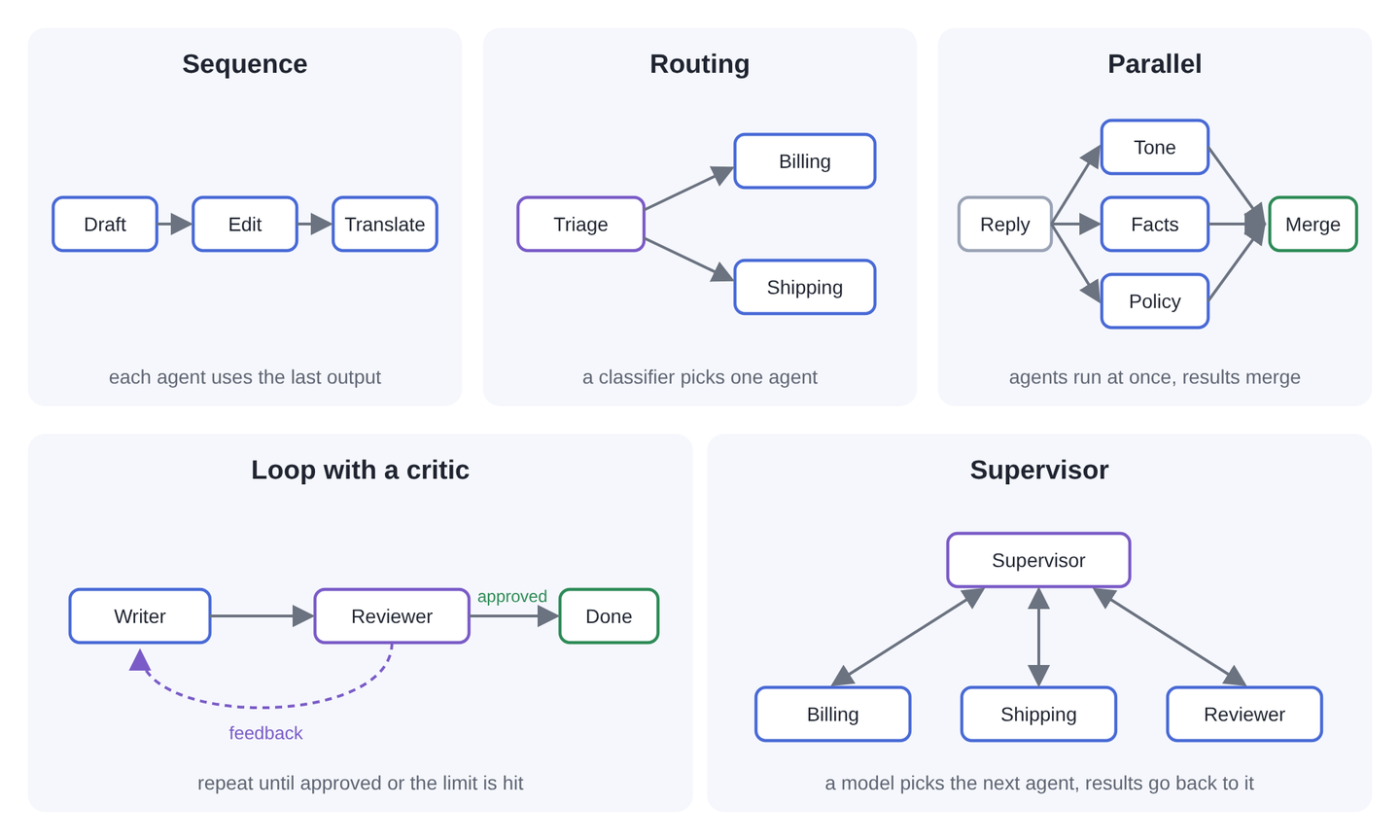
Routing and supervision may look similar because both select an agent, but the decision happens differently. In our routing example, the model classifies the ticket and Java conditions select the matching specialist. With a supervisor, the model itself chooses which available agent to call next.
| Pattern | What happens | Use it for | LangChain4j agentic |
|---|---|---|---|
| Sequence | Agents run one after another, each using the previous output | Draft, then edit, then translate | sequenceBuilder() |
| Routing | A classifier picks which agent handles the input | Send billing questions to a billing agent | conditionalBuilder() |
| Parallel | Several agents work at the same time, and the results are combined | Check one reply for tone, facts, and policy at once | parallelBuilder() |
| Loop with a critic | A draft is reviewed and revised until it is accepted or the limit is reached | Improve a reply until it follows the rules | loopBuilder() with an exit condition |
| Supervisor | A coordinating agent decides which agent to call next | Open-ended tasks where the order isn’t known in advance | supervisorBuilder() |
With sequence, routing, parallel work, and loops, our code defines the rules for running the agents. The models still carry out the individual jobs, but they do not choose the overall workflow. A supervisor gives the model that additional responsibility. Our Spring AI workflow guide shows how to implement similar patterns in a Spring application.
Anthropic’s Building effective agents explains when predefined workflows and model-directed agents can be useful. We can apply the same reasoning to our own application. If two tasks can run independently, parallel agents may help. If the order is already known, a sequence may be enough. We choose the pattern to solve a particular problem in the task.
6. Multi-Agent Support in Java Frameworks
Several Java frameworks can help us build multi-agent applications, but they organize the work differently. Some provide builders for explicit workflows, while others provide planning or agents that can start other agents. The table summarizes the versions covered here, checked in October 2026. We also include their release status because beta and preview APIs may change.
| Framework | Multi-agent support | Status |
|---|---|---|
| LangChain4j | langchain4j-agentic module with sequence, parallel, loop, conditional, supervisor, planner, and A2A agents | Beta (1.22.0-beta32), documented as experimental |
| Spring AI | No dedicated multi-agent API. Agents are wired as tools, or with the community agent utilities | Patterns only |
| Embabel | Goal-based planning, a supervisor planner, and subagents | Stable (1.5.3) |
| AgentScope Java | Agents that start subagents, and A2A | 2.0. The older message hub and pipelines were removed in 2.0 |
| Google ADK for Java | SequentialAgent, ParallelAgent, LoopAgent, and sub-agents | Preview (1.13.0) |
We use LangChain4j in this demo because its langchain4j-agentic module provides the routing, sequence, and loop builders we need, and it works with Ollama. Each agent returns a department or reply, and our Java workflow passes that result to the next step. The model does not need to select a Java tool to transfer work between these roles.
The Java AI framework comparison explains when Spring AI, LangChain4j, Embabel, or AgentScope Java may fit an application.
7. Agents Across Services With A2A
In our demo, every agent runs inside one Java application. A larger system may be different. For example, a shipping specialist could run in a separate service managed by another team. Our application would then need to send it a request and receive its result over the network. Agent2Agent, usually called A2A, provides a protocol for communication between agents in different services. It originated at Google and became a Linux Foundation project in June 2025.
The A2A Java SDK provides the code needed to build A2A clients and servers in Java. The version covered here is 1.4.0.Final, published under the org.a2aproject.sdk group.
LangChain4j provides a2aBuilder() to call a remote agent as a subagent. For Spring applications, the community spring-ai-a2a project can expose a Spring AI agent as an A2A server. These integrations help when an agent belongs to another application and we need to communicate with it across that boundary.
Our support desk does not need A2A because its Java interfaces already run in the same process. Adding separate services would introduce network requests and deployment work without helping this example. When agents do need to communicate across services, the A2A specification describes the protocol they use.
8. FAQs
8.1. Is multi-agent better than single agent?
A multi-agent application can help when different parts of a task need separate instructions, tools, or independent work. It also introduces more model calls and more decisions that can go wrong. In our ten-ticket example, the multi-agent application follows two formatting rules more consistently but uses about 1.9 times as many tokens. We could enforce those formatting rules in Java. We therefore need to check what the additional agents contribute to the actual task before deciding that they are worthwhile.
8.2. Why do multi-agent systems fail?
An agent can make a poor decision when it receives incomplete information or trusts an incorrect result from another agent. It may also repeat an action without completing the task. We see both problems in our example. The reviser follows an incorrect review note, and the supervisor repeatedly calls the shipping agent. We reduce these risks by giving each agent the information it needs and checking results in Java where possible. We also set limits with maxIterations() or maxAgentsInvocations() and decide what the application should do when it reaches those limits.
8.3. What is the best multi-agent framework for Java?
The best choice depends on the application and how we want its agents to work together. LangChain4j provides the workflow builders used in this article, although its agentic module is experimental. Embabel offers planning and subagents on top of Spring AI. AgentScope Java and Google ADK provide other ways to organize agents. We compare the features and release status of the modules we need, along with how well they fit our existing application. The framework comparison linked earlier explains these differences.
8.4. Can you make AI agents with Java?
Yes. We can write an agent’s application code, tools, and workflow in Java while using a local or hosted model. The frameworks listed in Section 5 provide different ways to do this.
9. Conclusion
We built a support desk that divides a customer’s question among agents with specific jobs. LangChain4j’s builders control the order, while AgenticScope carries the ticket and each agent’s result through the workflow. This separation makes each role easier to describe, but it also adds model calls. In our recorded runs, the multi-agent application uses more tokens and takes longer than the single-agent application.
The results also show why we need to inspect the intermediate decisions. A reviewer can reject an acceptable reply, and a supervisor can keep requesting work that is already complete. We begin with a simple application, add agents when they have a useful job, and compare the resulting answers. The goal is to improve how the application completes the task, so we keep the additional roles only when they help.
10. References
You can share questions about multi-agent AI in Java in the comments.
Happy Learning!
