

Fine-tuning, RAG, and prompt engineering are three ways to improve an LLM application. Prompt engineering changes the instructions we send to the model. RAG gives it relevant information to use when answering. Fine-tuning changes the model itself.
This article compares all three using the same example: a Recipe Box assistant. You’ll build a Java 17 client that works with any OpenAI-compatible API and test it locally with a small model running in Ollama.
In general, the best approach is to start with prompt engineering. Use RAG when the model needs access to your data or up-to-date information. Consider fine-tuning when you need to change the model’s style, output format, or behavior in ways that prompts alone cannot reliably achieve.
1. The Three Approaches on One Recipe Box Assistant
Suppose we have a Recipe Box app where people save recipes and ask a chat assistant what to cook. Here the assistant is an LLM (large language model, a model trained on a large amount of text to predict the next word). We want three things from it:
- a fixed three-line answer format
- answers that use the user’s saved recipes
- a refusal for anything that isn’t about cooking
Prompt engineering is writing the request to the model with care. We add a system prompt (instructions the model reads before every user message) and few-shot examples (a few sample questions with the exact answers we want). Nothing else changes, so we can edit the prompt and test again in minutes.
RAG (Retrieval-Augmented Generation) adds a search step before the call. The app turns the question into an embedding (a list of numbers that represents the meaning of a text), finds the closest saved recipes in a vector store (a database that searches by those numbers), and pastes them into the prompt. The model stays the same.
Fine-tuning trains an existing model further on our own examples, so the model’s weights (the numbers it learned in training) change.

2. Fine-Tuning vs RAG vs Prompt Engineering Compared
The table orders the three from the cheapest change to the most expensive one. A token in the cost row is a piece of a word, and hosted APIs bill by the number of tokens read and written.
| Prompt engineering | RAG | Fine-tuning | |
|---|---|---|---|
| What it changes | The text we send | The text we send, plus facts found at request time | The model’s weights |
| Data needed | None, or 2 to 5 examples inside the prompt | Your documents, split into chunks and indexed | At least 10 training examples, 50 or more to see an effect |
| Cost | Tokens per call | An embedding model and a vector store, plus longer prompts | A training job on GPUs, plus hosting the trained model |
| Setup time | Minutes to hours | Days | Days to weeks, most of it writing the training data |
| Facts stay fresh | No, the model knows only its training data | Yes, update a document and the next answer uses it | No, frozen when training ends |
| Skills needed | Writing clear instructions and test questions | Embeddings, a vector store, chunking | Preparing data, running training, evaluating models |
Two rows decide most cases. The “Facts stay fresh” row sends every requirement about your own or changing data to RAG, because the other two can’t see data the model never saw. The “What it changes” row is why fine-tuning comes last: every change to a fine-tuned model needs a new training run, while a prompt change is a code change.
3. Prompt Engineering with a System Prompt and Few-Shot Examples
The Recipe Box example project sends the same question to a model twice, once as a plain prompt and once with a system prompt and few-shot examples, and prints both answers.
It runs on Java 17 or newer (tested on Java 25), Maven 3.9.11 and Jackson 2.22.4. The model is qwen2.5:0.5b in Ollama 0.40.6 (a tool that downloads open models and serves them on your own computer). It has half a billion parameters (another name for weights), about 400 MB, so it runs on a laptop CPU.
3.1. Set Up the Project
The project has one dependency, Jackson, which turns the request into JSON and reads the reply. The HTTP call uses java.net.http.HttpClient from the JDK, and the exec-maven-plugin starts the class from Maven:
<?xml version="1.0" encoding="UTF-8"?>
<project xmlns="http://maven.apache.org/POM/4.0.0"
         xmlns:xsi="http://www.w3.org/2001/XMLSchema-instance"
         xsi:schemaLocation="http://maven.apache.org/POM/4.0.0
                             https://maven.apache.org/xsd/maven-4.0.0.xsd">
  <modelVersion>4.0.0</modelVersion>

  <groupId>com.howtodoinjava</groupId>
  <artifactId>fine-tuning-vs-rag-vs-prompt-engineering</artifactId>
  <version>1.0</version>

  <properties>
    <maven.compiler.release>17</maven.compiler.release>
    <project.build.sourceEncoding>UTF-8</project.build.sourceEncoding>
  </properties>

  <dependencies>
    <dependency>
      <groupId>com.fasterxml.jackson.core</groupId>
      <artifactId>jackson-databind</artifactId>
      <version>2.22.4</version>
    </dependency>
  </dependencies>

  <build>
    <plugins>
      <plugin>
        <groupId>org.apache.maven.plugins</groupId>
        <artifactId>maven-compiler-plugin</artifactId>
        <version>3.16.0</version>
      </plugin>
      <plugin>
        <groupId>org.codehaus.mojo</groupId>
        <artifactId>exec-maven-plugin</artifactId>
        <version>3.6.4</version>
        <configuration>
          <mainClass>com.howtodoinjava.recipebox.RecipeBoxAssistant</mainClass>
        </configuration>
      </plugin>
    </plugins>
  </build>
</project>
Ollama exposes an OpenAI-compatible API, which means the same /v1/chat/completions endpoint and JSON as OpenAI’s API, on http://localhost:11434/v1. After installing Ollama (Run LLMs Locally for Java covers the setup), download the model:
ollama pull qwen2.5:0.5b3.2. Write the System Prompt and Few-Shot Examples
The class keeps the prompt in two constants. SYSTEM_PROMPT holds the role, the output format and the refusal rule. FEW_SHOT holds two example conversations, one recipe question and one off-topic question, each with the answer we want. The chat() method sends a list of messages and returns the text of the reply:
package com.howtodoinjava.recipebox;

import java.io.IOException;
import java.net.URI;
import java.net.http.HttpClient;
import java.net.http.HttpRequest;
import java.net.http.HttpResponse;
import java.time.Duration;
import java.util.ArrayList;
import java.util.List;
import java.util.Map;

import com.fasterxml.jackson.databind.JsonNode;
import com.fasterxml.jackson.databind.json.JsonMapper;

public class RecipeBoxAssistant {

    // Any OpenAI-compatible server: Ollama, OpenAI, Azure OpenAI, vLLM
    static final String BASE_URL = env("LLM_BASE_URL", "http://localhost:11434/v1");
    static final String MODEL = env("LLM_MODEL", "qwen2.5:0.5b");
    static final String API_KEY = env("LLM_API_KEY", "");

    // The instructions: role, output format and one rule
    static final String SYSTEM_PROMPT = """
            You are the Recipe Box assistant. Answer only cooking questions.
            Reply in exactly this format and nothing else:
            Dish: <name>
            Time: <minutes> min
            Steps: <at most three short steps, separated by semicolons>
            If the question is not about cooking, reply exactly:
            Sorry, Recipe Box answers cooking questions only.""";

    // Few-shot examples: one question and the answer we want for it
    static final List<Map<String, String>> FEW_SHOT = List.of(
            message("user", "I have rice and peas. What can I cook?"),
            message("assistant", """
                    Dish: Pea pulao
                    Time: 25 min
                    Steps: Fry onion; add rice, peas and water; cook covered"""),
            message("user", "Who won the cricket match yesterday?"),
            message("assistant", "Sorry, Recipe Box answers cooking questions only."));

    static final HttpClient HTTP = HttpClient.newBuilder()
            .connectTimeout(Duration.ofSeconds(10))
            .build();
    static final JsonMapper JSON = JsonMapper.builder().build();

    public static void main(String[] args) throws IOException, InterruptedException {
        String question = "I have eggs, tomatoes and an onion. What can I cook?";

        // 1. The question alone
        String plain = chat(List.of(message("user", question)));
        System.out.println("--- Plain prompt ---\n" + plain);

        // 2. System prompt + few-shot examples + the same question
        String engineered = chat(engineered(question));
        System.out.println("\n--- Engineered prompt ---\n" + engineered);

        // 3. The rule in the system prompt, tested with an off-topic question
        String offTopic = chat(engineered("Write a poem about Mondays."));
        System.out.println("\n--- Off-topic question ---\n" + offTopic);
    }

    static List<Map<String, String>> engineered(String question) {
        List<Map<String, String>> messages = new ArrayList<>();
        messages.add(message("system", SYSTEM_PROMPT));
        messages.addAll(FEW_SHOT);
        messages.add(message("user", question));
        return messages;
    }

    static String chat(List<Map<String, String>> messages)
            throws IOException, InterruptedException {
        String body = JSON.writeValueAsString(Map.of(
                "model", MODEL,
                "messages", messages,
                "temperature", 0,
                "seed", 42));

        HttpRequest.Builder request = HttpRequest.newBuilder()
                .uri(URI.create(BASE_URL + "/chat/completions"))
                .timeout(Duration.ofSeconds(120))
                .header("Content-Type", "application/json")
                .POST(HttpRequest.BodyPublishers.ofString(body));
        if (!API_KEY.isBlank()) {
            request.header("Authorization", "Bearer " + API_KEY);
        }

        HttpResponse<String> response =
                HTTP.send(request.build(), HttpResponse.BodyHandlers.ofString());
        if (response.statusCode() != 200) {
            throw new IOException("HTTP " + response.statusCode()
                    + ": " + response.body());
        }
        JsonNode root = JSON.readTree(response.body());
        return root.path("choices").path(0).path("message").path("content").asText();
    }

    static Map<String, String> message(String role, String content) {
        return Map.of("role", role, "content", content);
    }

    static String env(String name, String defaultValue) {
        String value = System.getenv(name);
        return value == null || value.isBlank() ? defaultValue : value;
    }
}
Each message has a role and a content. The system role carries instructions, user is the person asking, and assistant is the model. The few-shot examples are ordinary user and assistant messages placed before the real question.
We set temperature to 0 (always pick the most likely next word) and a fixed seed to keep repeated runs close. For OpenAI, set LLM_BASE_URL to https://api.openai.com/v1, LLM_MODEL to a model such as gpt-4.1-mini, and LLM_API_KEY to your key.
3.3. Run It and Compare the Answers
Now we compile and run the class. The first call takes a few seconds longer while Ollama loads the model:
mvn compile exec:javaThe three answers print one after the other:
--- Plain prompt ---
You can cook a variety of dishes with eggs, tomatoes, and an onion. Here are a few ideas:

1. Egg and Tomato Soup: Mix eggs, tomatoes, and onion in a pot and simmer for a few
   minutes until the eggs are set.

2. Egg and Tomato Stir-Fry: Cook eggs, tomatoes, and onion in a pan with a little oil
   until the eggs are set.

--- Engineered prompt ---
Dish: Tomato and onion soup
Time: 15 min
Steps: Peel onion; dice tomatoes; add onion, tomatoes, and water; cook covered for 15 min.

--- Off-topic question ---
Dish: Monday
Time: 15 min
Steps: Start with a cup of coffee; write a poem about Mondays; end with a cup of tea;
  add a few lines about the day's events; end with a cup of coffee again.
A small model’s output varies between runs, even with temperature 0 and a seed, so your answers won’t match these word for word. In our own runs, the Steps line changed from run to run while the other answers stayed the same.
The plain answer goes on to ten ideas, and items 5 to 10 are the same line repeated six times, which the app can’t parse. The engineered answer follows the Dish, Time and Steps lines, so the app can split it on line breaks.
The same output shows the limits. The engineered answer has four steps, although the system prompt says at most three. The off-topic question got “Dish: Monday” instead of the refusal, so the model copied the format and ignored the rule. A system prompt is a request to the model, not a guarantee.
3.4. When to Pick Prompt Engineering
For a failure like the off-topic answer above, the first thing to try is a larger model with the same prompt (LLM_MODEL=qwen2.5:7b in Ollama, or a hosted model).
Pick prompt engineering if the model already knows what it needs to know and the problem is how it answers. It fits these cases:
- The answer must follow a format, a length or a tone that you can describe in a few sentences.
- The task is general knowledge the model was trained on, such as cooking, grammar or common code.
- You need to change the behavior often, since a prompt change needs no training.
4. RAG: Adding Your Own Data to the Prompt
RAG fixes what no prompt wording can: facts the model never saw. Let’s say a user saves “Grandma’s dal” with a 40-minute cook time. The model has never seen that recipe, so it answers from general dal recipes with the wrong time.
4.1. What RAG Adds to the Recipe Box
With RAG, the app searches the user’s saved recipes for the ones closest to the question and adds the top two or three to the request, under an instruction such as “Answer using only these recipes”. The system prompt and few-shot examples from section 3 stay as they are, so the answer keeps the three-line format.
The whole pipeline, from splitting documents into chunks to the vector search and the final prompt, is covered in RAG Explained: Retrieval Augmented Generation for Java.
The problem with RAG is that the answer is only as good as the search. If the search returns the wrong recipe, the model gives a confident answer from the wrong recipe, so a RAG app needs test questions for the search step too.
4.2. When to Pick RAG
Pick RAG if the model gives wrong answers because it doesn’t have the facts. It fits these cases:
- The answer depends on your own data: user records, product catalogs, internal documents or support tickets.
- The facts change after the model was trained: prices, stock, schedules, this week’s offers.
- The answer must name its source, because the app knows which documents it put in the prompt.
5. Fine-Tuning: What It Involves
Fine-tuning is the one approach that can fix a behavior the prompt can’t hold, such as the refusal our 0.5b model ignored. It takes three things: training data in the provider’s format, a training run on GPUs (graphics cards, the hardware models are trained on), and a way to compare the new model with the old one on the same test questions.
5.1. Prepare the Training Data in JSONL
Training data for a chat model is a JSONL file (JSON Lines, a text file with one complete JSON object on each line). In the OpenAI chat fine-tuning format, each line holds one example conversation in a messages array, with the same system, user and assistant roles that our Java code sends.
The project’s fine-tuning/recipe-box-training.jsonl has 10 lines: 7 recipe questions answered in our format and 3 off-topic questions answered with the refusal. One of those records, spread over several lines so it can be read, looks like this:
{
  "messages": [
    {
      "role": "system",
      "content": "You are the Recipe Box assistant."
    },
    {
      "role": "user",
      "content": "Quick snack with bread and cheese?"
    },
    {
      "role": "assistant",
      "content": "Dish: Cheese toast\nTime: 8 min\nSteps: Butter bread; add cheese; toast"
    }
  ]
}
In the real file, each record sits on one line, and the \n inside content is the line break between Dish, Time and Steps. OpenAI requires at least 10 examples and recommends starting with 50 well-written ones. Hugging Face TRL’s SFTTrainer accepts the same messages format for open models, so the file isn’t tied to one provider.
5.2. LoRA in Plain Words
Full fine-tuning updates every weight in the model, which for a model with billions of weights needs a lot of GPU memory. LoRA (Low-Rank Adaptation), from the 2021 paper by Hu et al., keeps the original weights unchanged and trains a small add-on for them instead. For each weight matrix W it adapts, LoRA trains two thin matrices, B and A, and multiplying them gives the change that is added to W.
The rank is the short side of those thin matrices, so a small rank means few numbers to train. For example, a 4096 x 4096 weight matrix has about 16.8 million numbers, and with a rank of 8 LoRA trains B (4096 x 8) and A (8 x 4096), which is 65,536 numbers.

The paper reports 10,000 times fewer trainable numbers than full fine-tuning on GPT-3.
The result of a LoRA run is a small adapter file next to the unchanged base model. The Hugging Face PEFT library can merge the adapter into the base model after training, and the merged model runs no slower than the original.
5.3. Why We Don’t Run a Training Job Here
We stop at the training file. Training needs a GPU with enough memory for the base model, which a laptop CPU doesn’t have, and hosted training is billed per run. OpenAI’s deprecations page also states that its existing customers can’t create new fine-tuning jobs from January 6, 2027, so a new project today usually means LoRA on an open model with Hugging Face PEFT and TRL.
5.4. When to Pick Fine-Tuning
Pick fine-tuning if a larger model and a better prompt still miss the format, style or behavior, and you have at least 50 good examples. It fits these cases:
- A small, cheap model has to follow a strict format or a rule every time, at high volume.
- The style or tone is hard to describe in a prompt but easy to show in many examples.
- The prompt has grown so long with instructions and examples that it costs too much on every call.
6. How to Choose Between Fine-Tuning, RAG and Prompt Engineering
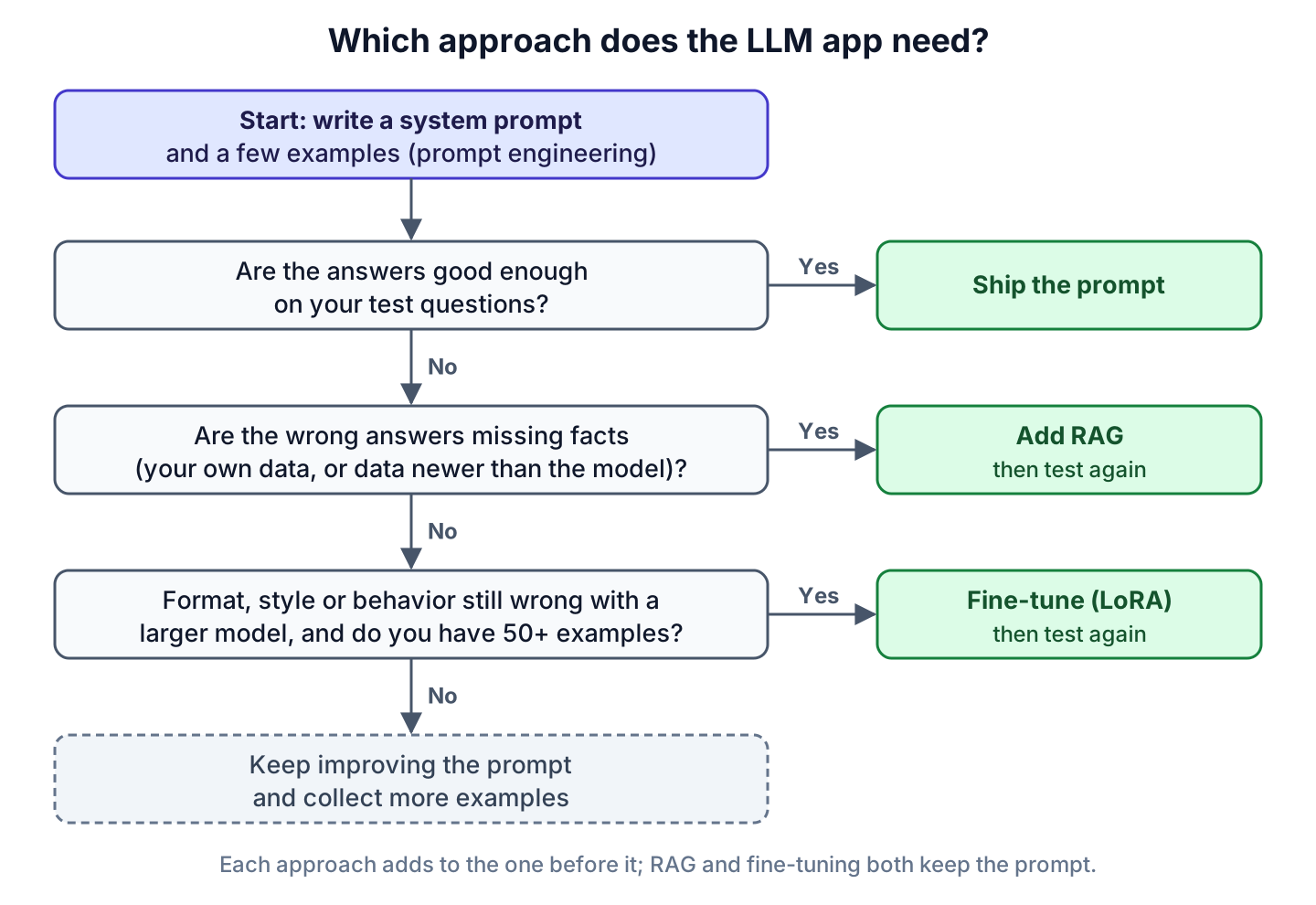
Each step runs only when the one before it failed, and keeps the work of the steps before it.
- Write a system prompt with two to five few-shot examples, plus 20 to 30 test questions with the answers you expect. Run them. If the answers are good enough, ship the prompt.
- Look at the wrong answers. If they are missing facts (your own data, or anything newer than the model), add RAG and run the same tests again.
- If the facts are right but the format, style or behavior is still wrong, try a larger model with the same prompt. If that is still wrong and you have 50 or more good examples, fine-tune with LoRA and test again. With fewer examples, keep improving the prompt and collect examples first.
7. Combining Prompt Engineering, RAG and Fine-Tuning
The three approaches stack rather than compete. A RAG app is a prompt plus retrieved facts, and a fine-tuned model still receives a system prompt and retrieved facts. The common setup is prompt engineering plus RAG.
The table maps each Recipe Box requirement to the approach that meets it, using what we saw in section 3.3.
| Recipe Box requirement | Approach | Why |
|---|---|---|
| Answer in the Dish, Time, Steps format | Prompt engineering | Two few-shot examples were enough, even on the 0.5b model |
| Use the recipes the user saved | RAG | The model has never seen them, and users edit them every day |
| Show this week’s offers from a grocery partner | RAG | The facts change weekly |
| Refuse non-cooking questions on a small, cheap model | Fine-tuning, after trying a larger model | The 0.5b model ignored the rule in the system prompt |
8. FAQs
8.1. Can I use RAG and fine-tuning together?
Yes. A fine-tuned model accepts the same messages as the base model, so the app adds retrieved documents to the prompt the same way. The usual split is fine-tuning for the format or tone and RAG for the facts.
8.2. Does fine-tuning add new knowledge to an LLM?
It can, but it is the wrong tool for facts. The facts are frozen at training time, the model can’t tell you which example an answer came from, and changing one fact means another training run.
8.3. What is the difference between LoRA and QLoRA?
QLoRA is LoRA trained on top of a base model whose weights are compressed to 4 bits, which cuts the GPU memory needed again. The QLoRA paper (Dettmers et al., 2023) reports fine-tuning a 65 billion parameter model on a single 48 GB GPU. The output is the same kind of small adapter as with LoRA.
8.4. Can I fine-tune a model with Ollama?
No. Ollama downloads and runs models, and it has no command for training. You train the adapter with a tool such as Hugging Face PEFT on a GPU, and then serve the result with Ollama or another server.
9. Conclusion
The decision rule is short: start with prompt engineering, add RAG when the wrong answers are missing facts, and fine-tune only for format, style or behavior that a larger model with a better prompt still gets wrong. In our run, a prompt with two examples fixed the format on a 0.5b model, and the same model ignored the refusal rule. The trap is to fine-tune facts into a model: they go stale the day the data changes.
10. References
- OpenAI: Supervised fine-tuning
- OpenAI: Fine-tuning best practices
- OpenAI: Deprecations
- Hu et al., LoRA: Low-Rank Adaptation of Large Language Models (2021)
- Dettmers et al., QLoRA: Efficient Finetuning of Quantized LLMs (2023)
- Hugging Face PEFT: LoRA
- Hugging Face TRL: Dataset formats
- Ollama: OpenAI compatibility
- Java 25 API: HttpClient
Drop me your questions related to fine-tuning vs RAG vs prompt engineering in the comments.
Happy Learning !!
