

Context bloat is the growth of one LLM request with tokens the model doesn’t need for the current step, such as unused tool definitions, old tool output and whole files pasted in for one question. The context window is the amount of text, measured in tokens, that a model can read in one request. A token is a piece of text, often a word or a part of a word, that the tokenizer of the model produces.
We care about this in coding agents and in every app where a model calls tools, because those apps resend the same material on every step of the agent loop. That material is the fixed instructions at the top of the request (the system prompt), the descriptions of the tools the model may call, and the whole conversation so far. A bloated request costs more input tokens, starts the response later, and can lower the accuracy of the answer.
The example below counts the request of a coding agent that works on a library catalog service. The agent has already run a failing test, listed 120 loan rows, and pasted five source files into the conversation to answer one question about a renewal rule.
from ctx import tokens, tokens_json
from catalog_tools import TOOLS
from scenario import SYSTEM_PROMPT, pasted_files, test_log, loans_response

system_prompt = tokens(SYSTEM_PROMPT)        # 104
tool_defs = tokens_json(TOOLS)               # 1456, all 20 tool definitions
files = sum(tokens(t) for t in pasted_files().values())  # 55315, five files
results = tokens(test_log()) + tokens_json(loans_response())  # 10663
system_prompt: 104 tool_defs: 1456 files: 55315 results: 10663Files and tool results alone are 95.9 percent of the request, and the question they answer is one sentence about one function. Six techniques reduce a request like this one, and section 8 says which one to apply first.
- Trim tool output, which cuts what the tools return, such as a test log or a list of rows.
- Retrieve chunks instead of pasting files, which cuts the code we add ourselves.
- Compact the conversation history, which replaces old messages with one summary.
- Load tools and skills on demand, which keeps a short index in the request and pulls in a full definition only when the model asks for it.
- Run a subagent with its own context, which keeps a large read out of the main agent’s request.
- Cache the stable prefix, which removes no tokens at all and makes the repeated start of the request cheaper.
This article measures a real request built from a small Python example, applies the first four techniques to it, and gives the documented cost of the other two. Section 2 explains what a token is and how this article counts one. Section 3 covers cost, latency and accuracy, with sources. Section 4 counts an MCP server’s tool definitions on their own. Section 5 covers all six techniques with code and real output. Section 6 totals the four techniques that shrink a request; subagents and caching are measured on their own in that same section, because neither one makes the request itself smaller.
1. Why a Request Grows on Every Turn of an Agent Loop
An LLM doesn’t remember earlier requests. Everything the model reads arrives in that one request, and the model returns the next tokens from it. Anthropic documents that its Messages API is stateless: the app always sends the full conversation history, because the API itself keeps none of it between calls.
The agent loop is the cycle an agent runs: the model asks for a tool, the app runs it and sends the result back as the next message, and the model either answers or asks for another tool. Because the API is stateless, the second request holds everything from the first one plus that tool call and its result, and the third request adds the next pair. Nothing leaves the context unless the app removes it, so a session that runs for 30 turns sends something close to the sum of all 30 requests, not just the last one.
1.1. What Goes Into the Context on Every Turn
Anthropic’s context window documentation states that everything in the request counts toward the context window: the system prompt, every message including tool results, images and documents, and the tool definitions. The output the model generates for the turn counts too. We group the input side into five parts, and the example agent of this article sends all five on every turn.
- The system prompt holds the fixed instructions of the agent, such as the code style and the rule to run tests after a change. It sits at the top of every request and doesn’t change during a session.
- The tool definitions describe every tool the model may call, with a name, a description and a parameter schema. In the Model Context Protocol (MCP), an open protocol that connects an app to tool servers, they are the entries of the tools/list result.
- The conversation history holds the earlier user messages and model replies, including the tool calls the model made.
- The tool results are the outputs of those tool calls, such as a test log or a list of database rows.
- Files and documents are the code or text the app pastes into the request itself, rather than a tool returning it.
Counting those five parts on the example request gives the chart below.
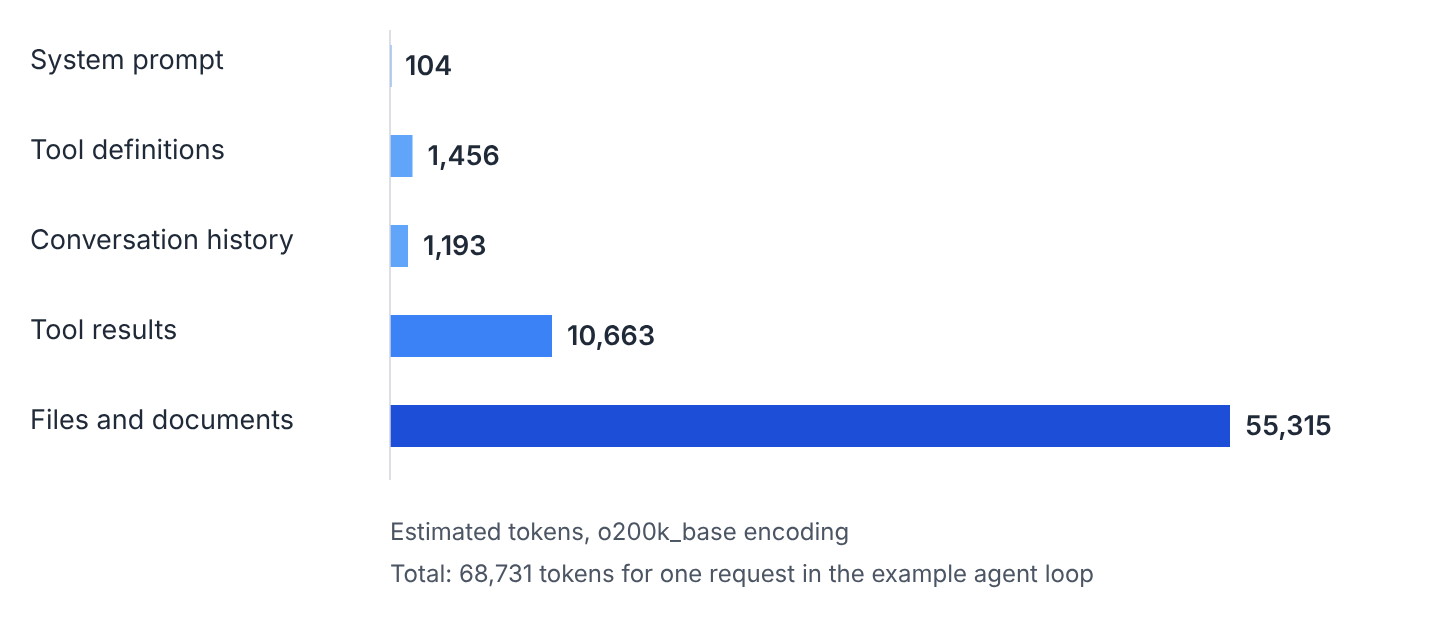
2. Tokens and Tokenizers
Counting those five parts needs a tokenizer. A tokenizer breaks text into pieces called tokens before the model reads it, and providers charge for a request and limit its size by how many tokens it holds, not by its character count. Every model family has its own tokenizer, so the same text gives a different count on each one.
For offline work, tiktoken is a Python library from OpenAI (MIT license) that carries the tokenizers of OpenAI’s own models. Its function tiktoken.get_encoding() returns an encoding such as o200k_base, and the encode() method of that encoding returns the list of token ids. Its counts are estimates when applied to another provider’s model, so they won’t match a bill from that provider, but they still show the relative size of each part of a request, which is what this article uses them for.
The following example counts one sentence with o200k_base, the encoding every count in this article uses. The library downloads the vocabulary file of an encoding once on first use and works offline after that.
text = "Context bloat makes every agent turn slower and more expensive."

encoding = tiktoken.get_encoding("o200k_base")  # downloads the vocabulary once
ids = encoding.encode(text)                     # a list of token ids
count = len(ids)                                # count = 12
pieces = [encoding.decode([i]) for i in ids]
count 12
pieces ['Context', ' b', 'loat', ' makes', ' every', ' agent', ' turn', ' slower', ' and', ' more', ' expensive', '.']01_count_tokens.py then encodes that English sentence, a German one and a Japanese one with similar meaning, each with o200k_base and with the older cl100k_base.
english o200k_base: 12 cl100k_base: 12
german o200k_base: 16 cl100k_base: 19
japanese o200k_base: 26 cl100k_base: 29
The English sentence costs the same in both encodings, while German and Japanese cost fewer tokens in the newer encoding, because o200k_base holds more whole words and characters of those two languages. So a token count is valid only for the tokenizer that produced it, and every number in this article, including the five parts of the request in section 1.1, is an estimate from o200k_base.
3. What Context Bloat Costs
A bloated request costs in three ways, and each one has a documented source.
3.1. Cost
Providers charge per input token, and Anthropic’s prompt caching documentation states its cache prices as multiples of the base input price, which only makes sense if the base price itself is per token. Since the API is stateless, every request of an agent loop pays for the whole context again, not only for the newest message.
In the example, a request of 68,731 tokens sent 20 times in a session adds up to 1,374,620 input tokens. We give token counts and not money, because the rate per million tokens differs by model and provider and changes often; multiply by the rate on your own provider’s pricing page. This arithmetic also keeps the request size constant across the 20 sends, while a real session’s context keeps growing with every turn, so it understates a real bill.
3.2. Latency
Latency is documented here and not measured, because it depends on the model, the provider and the load at the time, and this article has no fixed infrastructure to measure it on. Anthropic’s prompt caching documentation and OpenAI’s prompt caching guide both describe caching as reducing the time spent processing the input before the response starts, which implies the opposite is also true: a longer, uncached input takes longer to process before the first output token.
3.3. Accuracy
A long context can lower the quality of the answer even when it fits inside the window. Anthropic’s context window documentation names this context rot: “as token count grows, accuracy and recall degrade.” The documentation gives no token count at which this starts; it varies by model and task, so we measure our own agent’s tasks rather than assume a number.
Three independent studies measure that drop on different tasks. Read the finding column as a direction, not as a number to copy into your own estimate, because each study used its own models and its own benchmark.
| Source | What it tested | Finding |
|---|---|---|
| Lost in the Middle, Liu et al., arXiv 2023, TACL 2024 | Multi-document question answering and key-value retrieval | Performance is often highest when the relevant information sits at the start or the end of the context, and it degrades when the model has to find that information in the middle, including for models built for long contexts. |
| RULER, Hsieh et al., 2024 | 17 long-context models on tasks harder than a single needle search | All 17 models claim a context of 32K tokens or more, but only half of them keep satisfactory performance at that length. |
| Context Rot, Chroma, 2025 | 18 LLMs on tasks of growing input length | Models become less reliable as the input grows. On LongMemEval, a benchmark of long chat histories, models score higher on a focused prompt of about 300 tokens than on the full prompt of about 113,000 tokens. |
Each study used specific models and tasks, so a result from one study doesn’t transfer to another model or task without checking. The direction agrees across all three: more tokens are not automatically better, and a request can be accurate at 10,000 tokens and unreliable at 100,000 on the same model.
4. Measuring a Request in Tokens
Cost, latency and accuracy all follow the token count, so the work starts with counting each part of the request. Three ways give us that count.
- The usage field of a provider API response reports the tokens of a request that already ran.
- Anthropic’s messages.count_tokens() endpoint counts a request before it is sent, for free, with an API key.
- An offline tokenizer such as tiktoken needs no key at all, so it runs inside a unit test or a CI job.
Everything in this article uses the third one. The example project is nine Python scripts and one shell script in the context-bloat-tokens folder on GitHub, run on Python 3.13.16 with tiktoken 0.14.0. Install the library with pip install tiktoken and run one script with python3 09_before_after.py, or run every script in order with ./run_all.sh. The helper module ctx.py has two functions, tokens() for a text and tokens_json() for the compact JSON of a value, and each snippet below is the part of the named script that does the work.
4.1. The Cost of 20 MCP Tool Definitions
Tool definitions are the one part we can measure without running the agent at all, because they are identical in every request of a session. An MCP client discovers them by sending a tools/list request, and the server answers with the definitions. Each definition has the fields name, description and inputSchema, a JSON Schema for the tool’s parameters.
Most MCP clients put every definition of every connected server into the model’s request, as Anthropic’s code execution with MCP article describes: “most MCP clients load all tool definitions upfront directly into context.” Anthropic’s tool search documentation gives about 55,000 tokens of definitions for a setup with five connected services (GitHub, Slack, Sentry, Grafana and Splunk). That figure is for tool definitions specifically; section 1.1 measured a separate part, the pasted code, at a similar 55,315 tokens in this article’s own example.
The example server is a library catalog with 20 tools, such as search_books, create_loan and renew_loan. The module catalog_tools.py holds them as the list TOOLS in the shape of a tools/list result, and 02_tool_definitions.py measures them.
total = tokens_json(TOOLS)       # total = 1456, all 20 definitions as compact JSON
per_tool = {t["name"]: tokens_json(t) for t in TOOLS}
largest = max(per_tool, key=per_tool.get)   # largest = "add_book", 108 tokens
pretty = tokens(json.dumps(TOOLS, indent=2))  # pretty = 2308, same list, indented
param_text = sum(tokens(p["description"])
for t in TOOLS for p in t["inputSchema"]["properties"].values()) # 268| What we measured | Estimated tokens |
|---|---|
| All 20 definitions, compact JSON | 1,456 |
| Average of one definition | 73 |
| Largest definition (add_book) | 108 |
| Parameter descriptions only | 268 |
| The same list, pretty-printed with indentation | 2,308 |
The 20 definitions add 1,456 estimated tokens to every request in the session, even when a task calls only one tool. The pretty-printed version in the last row costs 58 percent more for the same information, so a client that logs or sends indented JSON pays for the whitespace on every turn.
A real provider formats the tools in its own way and adds a short tool-use system prompt, the fixed text that tells the model how to call a tool at all, so a provider’s own count comes out a little higher than this compact-JSON estimate.
5. Six Ways to Reduce Context Bloat
Counting tells us which part to attack. Every technique below has a cost, usually the risk that a detail the model needed is now gone, so we check the agent’s own answers after applying it and not just the smaller token count. Anthropic calls this practice context engineering, the set of strategies for curating and maintaining the tokens a model reads; its guiding principle is finding the smallest set of high-signal tokens that still lets the model finish the task. Section 8 says which technique to start with.
5.1. Trim Tool Output
A tool result enters the context once and stays in every later request of the session, so one large result is paid for on every turn after it. Trimming means the code around the tool, not the model, removes what the model doesn’t need before the result is added to the context. Typical cuts are selecting fields, limiting rows, and keeping the failed tests while dropping the passed ones. The trimmed output still says how much was left out, so the model knows it isn’t seeing everything.
The script 03_trim_output.py has two trimmers. trim_test_log() keeps the failure section and the final summary line of a pytest run, and trim_rows() keeps selected fields of the first rows and adds the counts omitted and total. It takes log from test_log() and rows from loans_response(), both defined in scenario.py.
def trim_rows(rows: list, fields: list, limit: int = 5) -> str:
    kept = [{f: row[f] for f in fields} for row in rows[:limit]]
    omitted = len(rows) - len(kept)
    return json.dumps({"rows": kept, "omitted": omitted, "total": len(rows)}, separators=(",", ":"))

log_trimmed = trim_test_log(log)   # 4036 tokens -> 82
slim = trim_rows(rows, ["id", "member_id", "due", "status"])  # 6627 -> 140
The test log shrinks from 316 lines to the 9 that say what broke.
================================== FAILURES ==================================
______________________________ test_renew_with_hold ______________________________
    def test_renew_with_hold():
        loan = make_loan(hold=True)
> renew_loan(loan.id)
E RenewalError: loan 17 has an active hold
tests/test_loans.py:208: RenewalError
=========== 1 failed, 311 passed in 14.21s ===========
The trimmer drops 307 lines, almost all of them PASSED, and the summary line keeps their counts, so the model still knows the whole suite ran, not just the failing test. The problem with any trimmer is that the model can’t see what it removed. If the model needs row 40 of the loan list, the tool needs a parameter such as offset or a filter to fetch it, because trimming only shrinks what already came back. Anthropic’s API also offers context editing, which clears old tool results out of a request automatically, as the context window documentation describes.
5.2. Retrieve Chunks Instead of Pasting Files
Trimming works on what a tool hands back. Retrieval works on what we paste in ourselves. Retrieval means the app searches the code or the documents for the current question and adds only the best matching chunks to the request, instead of the whole file. Anthropic’s context engineering article describes a just-in-time variant where the agent keeps cheap identifiers, such as file paths, in the context and loads the actual content with a tool call only when it needs it, alongside the precomputed kind of retrieval used here, and notes that a hybrid of the two (loading a few files up front, then fetching more as needed) often works best in practice.
The script 05_retrieve_instead_of_paste.py has two functions. chunks() splits a file into blocks of 30 lines that remember the file name and the first line number, and top_chunks() ranks those chunks by TF-IDF overlap with the question. TF-IDF scores a chunk by how often the question’s words appear in it, weighted down for words that appear in almost every chunk. A production system would use embeddings, numeric vectors that place text of similar meaning close together, or a prebuilt code index; TF-IDF needs neither, so this example runs without one.
The corpus is five files of the Python standard library, standing in for the repository of the catalog service, because they are large, real code every reader already has on disk. The question is how csv.Sniffer detects the delimiter of a file, and whole is the dict of file name to file text.
corpus =   # 5 files -> small chunks
best = top_chunks(question, corpus)  # the 3 best matching chunks
retrieved = sum(tokens(text) for _, text in best)  # retrieved = 801, pasted files = 55315
files: 5 pasted: 55315 retrieved: 801
chunks: ['csv.py:211', 'csv.py:31', 'csv.py:1']The chunk csv.py:211 reaches the start of the Sniffer class, where sniff() is declared a few lines later at line 244, but the chunk boundary at line 241 cuts it off: the method’s own body sits in the next 30-line chunk, which TF-IDF ranked lower and didn’t return. So keyword retrieval can find the right class and still miss the method inside it. When the chunks aren’t enough, the agent needs a tool that reads more of the same file around a chunk it already has, rather than trusting that three chunks always cover the answer.
5.3. Compact the Conversation History
Files and tool results are usually the largest parts at the start of a session. History is the part that keeps growing as the session continues. Compaction replaces the old messages with a summary and keeps the last few messages word for word. Anthropic’s context engineering article describes it as summarizing a conversation nearing its limit and continuing from that summary, which keeps decisions, open bugs and implementation details while dropping redundant tool output. A related technique is structured note-taking, where the agent writes facts to a file such as NOTES.md outside the context and reads them back later instead of carrying them in every message.
Anthropic offers server-side compaction for some models as a beta, and an app can also implement its own. The function compact() in 04_compact_history.py takes the messages, the number of recent messages to keep, and a summarize callable that turns the old messages into text. In a real agent, summarize calls a model; the example passes summarize_with_notes(), which returns fixed text, so the script needs no API key.
def compact(messages: list, keep_last: int, summarize: Callable[[list], str]) -> list:
    if len(messages) <= keep_last:
        return messages
    old, recent = messages[:-keep_last], messages[-keep_last:]
    summary = {"role": "user", "content": "Summary of the earlier conversation.\n" + summarize(old)}
    return [summary] + recent

compacted = compact(messages, keep_last=6, summarize=summarize_with_notes)  # 60 messages -> 7
messages 60 -> 7
tokens 1193 -> 175That 175-token result is the fixed summary plus the six kept messages. A model writing the same summary from a real conversation would likely produce a longer one, so this count is closer to a floor than to a typical result.
Compaction has three failure modes, and the second one breaks a request outright instead of quietly degrading an answer.
- A summary can drop a detail a later step needs, so we re-run the agent’s own tasks after turning compaction on, not just read the summary and assume it’s complete.
- The value of keep_last has to land on a clean turn boundary. A cut between a tool call and its tool result, or a summary with role “user” sitting right before another user message, can give a request the Messages API rejects.
- Compaction rewrites the start of the message list, which resets prompt cache reuse, as OpenAI’s prompt caching guide points out and section 5.6 covers.
5.4. Load Tools and Skills on Demand
The three techniques above cut material after it has already entered the context. Loading on demand keeps it out in the first place. The request carries only a short index of the available tools, and the full definition of one tool enters the context only when the model asks for it.
Anthropic implements this pattern in its tool search tool. A tool marked with defer_loading, a flag on the tool definition, stays out of the context until it is searched for. The model then searches the catalog with a regular expression or a BM25 query, a keyword ranking method, and only the matching tools are loaded into context.
The tool search documentation gives three figures.
- A typical request loads 3 to 5 tools.
- The reduction is more than 85 percent for the five-service, 55,000-token setup from section 4.1.
- Tool search is recommended from 10 tools on, or once definitions pass 10,000 tokens; under that, Anthropic recommends standard tool calling instead.
Skills use the same pattern for instructions. A skill is a folder with a SKILL.md file whose frontmatter, the YAML block at the top of the file, carries the fields name and description. According to the Agent Skills documentation, every installed skill’s name and description load at startup and cost about 100 tokens per skill, and the body of SKILL.md, kept under 5,000 tokens, loads only once that skill is triggered.
Two functions in 06_load_on_demand.py apply the same idea to the catalog server. tool_index() returns the name and the first sentence of each tool’s description, and search_tools() returns the full definitions of the tools whose name or description shares at least two words with the query. A dict named SKILLS carries the one-line description of four small skills the catalog agent has installed.
index = tokens_json(tool_index())              # index = 557, one short line per tool
loaded = search_tools("renew a loan for a member")  # 5 tools matched on 2+ shared words
on_demand = index + tokens_json(loaded)         # on_demand = 944 instead of 1456
names: ['create_loan', 'renew_loan', 'return_loan', 'list_loans', 'list_overdue']
all tools: 1456 index only: 557 index + loaded: 944
skills in full: 309 descriptions only: 65 descriptions + 1 loaded: 126Problem with the index is that the match is plain word overlap. The query “renew a loan for a member” correctly loads renew_loan, but it also pulls in create_loan, return_loan, list_loans and list_overdue, because each shares two or more words with the query without being the tool the task needs. So some of the loaded definitions are paid for and never called, and a query whose words match nothing loads no tool at all, which means the model never calls that tool. The index’s own descriptions have to carry the words a real task would use, or a better ranking method than plain overlap has to replace it.
5.5. Use Subagents With Separate Contexts
Loading on demand keeps text out of the main request. A subagent moves the reading into a different request entirely. A subagent is a second model session that works on one sub-task with its own empty context and returns a short report to the main agent, which never sees the files or tool output the subagent read. Anthropic’s context engineering article states that subagents often return summaries of 1,000 to 2,000 tokens, and the Claude Code subagents documentation states that the subagent’s own verbose output stays inside its own context and never reaches the main one.
The class Context in 07_subagent_context.py keeps a list of messages and sums their tokens. run_subagent() stands in for a subagent, reading five files into its own Context and returning a fixed 42-token report, the kind of result a model would write from a real conversation with those files.
main = Context("main agent")
main.add(task)                        # the question of the user
report, sub_size = run_subagent(task, FILES)
main.add(report)                      # only the report enters the main context
single agent context: 55324 tokens
subagent context: 55324 tokens
main agent context: 44 tokensThe single agent and the subagent both hold the task text plus the same five files, which is why both read 55,324 tokens and not the 55,315 of pasted code alone from section 5.2 (the 9-token question adds the rest). The main agent holds only the task plus the 42-token report, so its 44 tokens are a floor: a real subagent’s report, at 1,000 to 2,000 tokens, would still leave the main agent’s context dramatically smaller than reading the files directly.
Total tokens don’t shrink with a subagent, because the subagent still reads 55,324 tokens and the provider bills for that call too. What shrinks is the main agent’s own context, which is what every later request of the main agent sends again.
5.6. Cache the Stable Prefix
The five techniques above remove tokens from the request. Caching keeps them and changes only what they cost. Prompt caching lets the provider reuse its earlier work on the start of a request it has processed before, so that start is billed at a lower rate and the response can begin sooner. Anthropic’s context window documentation states that cached prefixes still occupy the context window, so caching changes the price of a request and not its size.
Both Anthropic and OpenAI match the cache on the exact start of a request, the prefix, compared byte for byte. Anthropic documents the values below.
| What the documentation gives | Value |
|---|---|
| Order the prefix is matched in | Tools, then the system prompt, then the messages |
| Effect of a change inside the prefix | That level and everything after it misses the cache |
| Cache read | 0.1 times the base input price for most models; some models price it lower (for example 0.05 or 0.025 times base), so check your own model’s page |
| Cache write, five-minute cache | 1.25 times the base input price |
| Cache write, one-hour cache | 2 times the base input price |
| Lifetime of an entry | Five minutes by default, refreshed on each use, or one hour with the longer option |
OpenAI’s prompt caching guide matches prefixes the same way and advises putting stable instructions first, dynamic content at the end, and keeping tool definitions themselves stable. Its own discount and cache lifetime differ by model, so check the current numbers on OpenAI’s pricing page before reusing Anthropic’s factors above for an OpenAI model.
The example in 08_prompt_caching.py hashes the stable part of the request, the tool definitions plus the system prompt, and shows that one added space in one tool’s description changes the hash and misses the cache. stable is the token count of that prefix, changed is the same tool list with one space added to the first tool’s description, turns is 20, and WRITE and READ are the 1.25 and 0.1 multipliers from the table above. The script compares 20 sends of the prefix at the full input price against 20 sends with caching on: one send pays the write price, and the other 19 pay the read price, so the two sums below are in input-token equivalents, meaning each cached token is counted as the fraction of a full-price token it’s actually billed at.
key = prefix_key(TOOLS, SYSTEM_PROMPT)           # a hash of the stable prefix
same = key == prefix_key(TOOLS, SYSTEM_PROMPT)   # True, the cache can be hit
edited = key == prefix_key(changed, SYSTEM_PROMPT)  # False, one space changed one description
cached = stable * WRITE + stable * READ * (turns - 1)  # one write, then 19 reads
stable prefix: 1560 tokens
same prefix: True
one space added to one description: False
20 turns without cache: 31200 with cache: 4914Caching turns 31,200 input-token equivalents into 4,914 across the 20 sends, because 19 of them pay the 0.1x read price instead of the full price. This isn’t a measured bill, and it ignores the lifetime: an entry expires after minutes of no use, and the next request after that writes the cache again from scratch at the higher 1.25x price.
6. Before and After, One Request Measured
Four of the six techniques make the request itself smaller, so the before-and-after script applies those four. In 09_before_after.py the same request is built twice: before, with all 20 tool definitions, the full 60-message history, the untrimmed test log and loan rows, and five whole files pasted in; after, with tools loaded on demand, history compacted, tool output trimmed and files replaced by three retrieved chunks.
| Part of the request | Before (tokens) | After (tokens) | Reduction |
|---|---|---|---|
| System prompt | 104 | 104 | 0.0 percent |
| Tool definitions (20 tools before, index plus loaded after) | 1,456 | 944 | 35.2 percent |
| Conversation history (60 messages before, summary plus 6 after) | 1,193 | 175 | 85.3 percent |
| Tool results (test log and loan rows) | 10,663 | 222 | 97.9 percent |
| Code context (5 files before, 3 chunks after) | 55,315 | 801 | 98.6 percent |
| Total | 68,731 | 2,246 | 96.7 percent |

Two things the table doesn’t say. The baseline is larger than a typical project’s, because it deliberately pastes five whole standard-library files and a full 316-line test log, so 96.7 percent isn’t a reduction to expect on your own agent. And the history row uses the fixed summary from section 5.3 rather than one a model actually wrote from the real conversation, which makes that row the most optimistic of the five.
The table also measures size and not whether the answer survives the cuts. Section 5.2 already found one loss, where the chunk holding the sniff() method’s body wasn’t among the three retrieved. So after each change, we run the agent’s own tasks again against the smaller request, compare the answers with the ones from the full request, and keep the change only when the answers still hold.
7. Comparing the Six Techniques
Running the tasks again is easier once we know what each technique puts at risk. Four of the six shrink the request itself, one moves the reading into a separate request, and one changes the price rather than the size, so they aren’t alternatives to each other; most of them combine. The counts come from this article’s own example.
| Technique | Reduces | In the example | Cost or risk | Use when |
|---|---|---|---|---|
| Trim tool output | Tool results | 10,663 to 222 | The model can’t see what was removed and needs a way to request more | Tool outputs are large or repetitive |
| Retrieve chunks | Files and documents | 55,315 to 801 | Retrieval can miss code related to the chunks it does find | The answer needs a few parts of a large code base |
| Compact history | Conversation history | 1,193 to 175, with a fixed summary | A summary can drop a detail, the summarization call itself costs tokens, and the cache prefix changes | The session runs for many turns |
| Load on demand | Tool definitions and skills | 1,456 to 944 | The model has to find a tool through the index, and word overlap can load the wrong one | 10 or more tools, or definitions above 10,000 tokens |
| Subagent | Main agent’s context | 55,324 to 44, with a 42-token report | Total tokens billed stay the same; a real report runs 1,000 to 2,000 tokens, not the 42 used here | A sub-task reads a lot and the main agent only needs the result |
| Prompt caching | Price and latency of the stable prefix | 31,200 to 4,914 input-token equivalents | The context doesn’t shrink, cache entries expire, and the prefix has to stay byte-identical | The same prefix repeats within minutes |
You can use trimming, retrieval and subagents together with caching, because all three work on material that sits after the cached prefix and don’t touch it. Caching is the one technique that can fight the others: Anthropic matches the prefix in the order tools, then system prompt, then messages, so loading a new tool definition mid-session changes the tools block and costs the cache for the rest of that request, and compaction rewrites the start of the message list and costs the cache from the first changed message onward. So a team either keeps the tool list and the early messages fixed and caches them, or loads and compacts freely and accepts a cache miss on the turns where that happens.
8. Which Technique to Apply First
Before any of the six, two changes cost nothing and need no code. Disable the MCP servers and tools the current task doesn’t use, which removes their definitions from every request in the session, and start a new session once the old one has drifted off the task, which empties the history outright. Both are a setting or a command in the agent, not code we write.
After that, the size of each part decides the order, because the largest part has the most tokens to give back for the same effort. A prefix that repeats across many requests is a candidate for caching regardless of its size. After every change, count again, and drop a change that saves little or costs more in lost detail than it saves in tokens.

| Largest part of the request | First technique | Where it’s covered |
|---|---|---|
| Files and documents | Retrieve chunks instead of pasting files | Section 5.2 |
| Tool results | Trim tool output | Section 5.1 |
| Conversation history | Compact the history | Section 5.3 |
| Tool definitions | Load tools and skills on demand | Section 5.4 |
| One sub-task reads most of the tokens | Run that sub-task in a subagent | Section 5.5 |
| No single part dominates, but the start repeats | Cache the stable prefix | Section 5.6 |
9. Context Bloat FAQs
Why Does More Context Make an AI Agent Worse?
More context can lower accuracy because the model has to find the relevant tokens among a larger number of irrelevant ones, and a transformer relates every token to every other token in the request, so the model has more relations to weigh as the context grows. The three studies in section 3.3 all measured lower accuracy or reliability as input length grew, on different models and different tasks.
What Is the Lost in the Middle Problem?
Lost in the Middle is the finding that models use information at the start and the end of a long input better than information placed in the middle. Liu et al. measured it with multi-document question answering and key-value retrieval, and the drop appeared for models built specifically for long contexts too, not only smaller-context ones.
How Much Context Is Too Much for an AI Coding Agent?
There’s no fixed number. Anthropic’s documentation names context rot without giving a token threshold for it, and RULER found that only half of 17 models kept satisfactory performance at 32,000 tokens even though all 17 claim to support 32K or more. So we measure our own agent’s tasks with a short request and a long one on the model we actually use, rather than borrow a number from a different model’s benchmark.
Does a Bigger Context Window Solve Context Bloat?
No. A bigger window raises the limit for one request, but every token inside it is still billed, still processed, and can still distract the model from the part of the context that answers the question. Prompt caching doesn’t solve it either: cached prefixes still occupy the context window, so caching changes the price of the tokens and not how many there are.
How Can We Count Tokens Without an API Key?
Use an offline tokenizer such as tiktoken, which needs no key once it has downloaded its vocabulary file once. Its counts are estimates when the target model uses a different tokenizer. For the exact count a provider will bill, use that provider’s own counting endpoint or the usage field returned with its response.
How Many MCP Tools Are Too Many?
Anthropic’s tool search documentation states that Claude’s ability to pick the right tool degrades once more than 30 to 50 tools are available, and recommends tool search from 10 tools on. Token cost matters on its own too, since every connected server adds its definitions to every request regardless of whether a task calls them. So measure the definitions of your own servers the way section 4.1 does, and disable the servers a given task doesn’t use.
10. Conclusion
Context bloat is a measurable property of a request, so the work starts with counting, not guessing. Count the system prompt, the tool definitions, the history, the tool results and the files, and the largest of the five tells you which technique to apply first.
In the example here, files and tool results alone were 95.9 percent of the 68,731-token total, and the four techniques in section 6 removed nearly all of both. That baseline was built large on purpose by pasting whole files and a full test log, so what carries over to your own agent is the order of the parts, not the 96.7 percent figure itself.
Provider documentation and three independent studies agree on the direction: longer requests cost more, start the response later, and can lower the accuracy of the answer even inside the context window. Each technique trades tokens for a specific risk, such as a missed code chunk or a summary that drops a detail. Run the agent’s own tasks again after every change, and keep the change only when the answers still hold.
11. References
- Context windows (Anthropic)
- Working with the Messages API (Anthropic)
- Prompt caching (Anthropic)
- Prompt caching (OpenAI)
- Tool search tool (Anthropic)
- Agent Skills overview (Anthropic)
- Effective context engineering for AI agents (Anthropic)
- Code execution with MCP (Anthropic)
- Subagents (Claude Code documentation)
- Lost in the Middle (arXiv 2307.03172)
- RULER (arXiv 2404.06654)
- Context Rot (Chroma Research)
- tiktoken (GitHub)
Drop me your questions related to context bloat in the comments.
Happy Learning !!
