
Mockito is a Java library that creates mocks, which are fake versions of a class’s dependencies that return the values we choose and record every call made on them. Mockito 5 is the current major version. With it, we can mock final classes and static methods using only the mockito-core dependency.
We use Mockito to unit test one class without its real database or mail server. The test stays fast, and it fails only when the class under test has a bug.
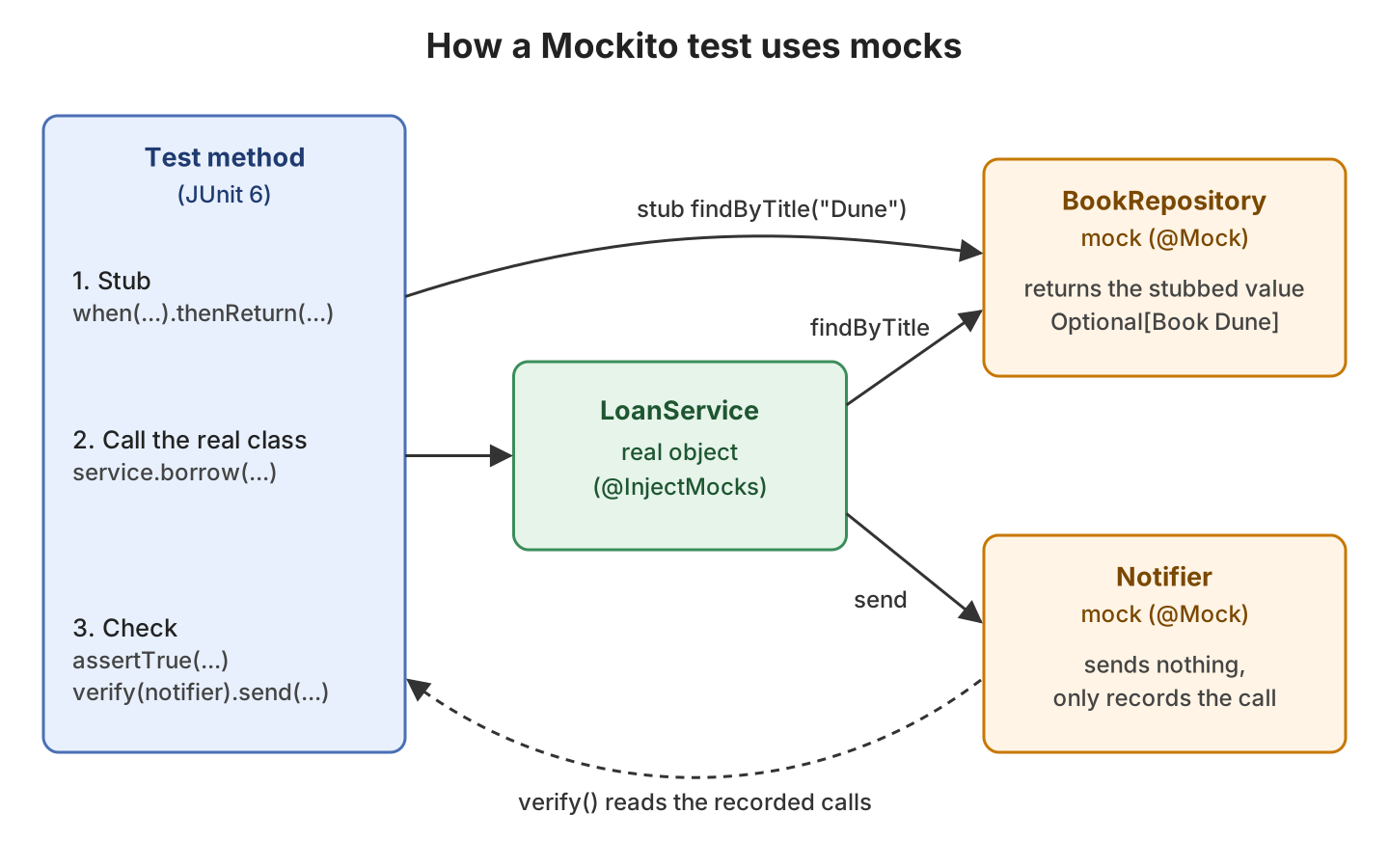
The following example tests a LoanService that lends library books. The service needs a BookRepository and a Notifier, so we mock both and pass them to the real service.
// 1. Create mocks for the dependencies
BookRepository repository = mock(BookRepository.class);
Notifier notifier = mock(Notifier.class);

// 2. Stub: tell the mock what to return
when(repository.findByTitle("Dune")).thenReturn(Optional.of(new Book("Dune", true)));

// 3. Call the real class under test
LoanService service = new LoanService(repository, notifier);
boolean borrowed = service.borrow("Lokesh", "Dune");          // true

// 4. Check the result and the calls made on the mocks
assertTrue(borrowed);
verify(notifier).send("Lokesh", "You borrowed Dune");         // passes
Notice that LoanService is a real object, and only its two dependencies are mocks. Next, we set up Mockito 5 with JUnit 6 on Java 25. After that, we go through each step of this test in more detail and end with the two errors that strict stubbing reports.
1. Mockito 5 Setup With Maven and JUnit 6
We need two Mockito artifacts. The mockito-core artifact contains the API, and mockito-junit-jupiter adds MockitoExtension for JUnit. The examples use Mockito 5.24.0, JUnit 6.1.3, Java 25 and Maven 3.9.16, and the complete project is on GitHub.
The mockito-junit-jupiter 5.24.0 artifact brings in an older JUnit API, version 5.13.4. So we also import the junit-bom, which sets one version for all JUnit artifacts and keeps them on 6.1.3.
<dependencyManagement>
  <dependencies>
    <dependency>
      <groupId>org.junit</groupId>
      <artifactId>junit-bom</artifactId>
      <version>6.1.3</version>
      <type>pom</type>
      <scope>import</scope>
    </dependency>
  </dependencies>
</dependencyManagement>

<dependencies>
  <dependency>
    <groupId>org.junit.jupiter</groupId>
    <artifactId>junit-jupiter</artifactId>
    <scope>test</scope>
  </dependency>
  <dependency>
    <groupId>org.mockito</groupId>
    <artifactId>mockito-core</artifactId>
    <version>5.24.0</version>
    <scope>test</scope>
  </dependency>
  <dependency>
    <groupId>org.mockito</groupId>
    <artifactId>mockito-junit-jupiter</artifactId>
    <version>5.24.0</version>
    <scope>test</scope>
  </dependency>
</dependencies>
1.1. Running Mockito 5 on Java 25 With the Java Agent
On Java 21 and later, every Mockito 5 test run prints a few warnings. To mock final classes and static methods, Mockito adds a Java agent (a small library that is allowed to change loaded classes) to the JVM after it has started. The JDK warns about agents added this way, and a future JDK will block them (JEP 451).
Mockito is currently self-attaching to enable the inline-mock-maker. This will no longer work in future releases of the JDK. Please add Mockito as an agent to your build ...
WARNING: A Java agent has been loaded dynamically (.../byte-buddy-agent-1.17.7.jar)
...
WARNING: Dynamic loading of agents will be disallowed by default in a future release
The fix is to load Mockito as an agent when the test JVM starts. We need two plugins for that. The Maven Dependency Plugin, with its properties goal, stores the path of the Mockito jar in a property. Surefire reads that property and passes the jar to the -javaagent JVM option.
<plugin>
  <groupId>org.apache.maven.plugins</groupId>
  <artifactId>maven-dependency-plugin</artifactId>
  <version>3.11.0</version>
  <executions>
    <execution>
      <goals>
        <goal>properties</goal>
      </goals>
    </execution>
  </executions>
</plugin>
<plugin>
  <groupId>org.apache.maven.plugins</groupId>
  <artifactId>maven-surefire-plugin</artifactId>
  <version>3.6.0</version>
  <configuration>
    <argLine>-javaagent:@{org.mockito:mockito-core:jar}</argLine>
  </configuration>
</plugin>
The @{…} syntax tells Surefire to read the property late, after the dependency plugin has set it. With this setup, the warnings are gone. If JaCoCo (a code coverage tool) also sets argLine in our build, we start the value with @{argLine} so that both agents load.
2. What Changed in Mockito 5 vs Mockito 4
Most Mockito 4 tests run on Mockito 5 without code changes. The big change is how Mockito creates a mock. Mockito 4 created a subclass of the mocked type, and a final class cannot have a subclass. Mockito 5 changes the mocked class itself instead, so final classes work too. Mockito calls this the inline mock maker.
| Topic | Mockito 4 | Mockito 5 |
|---|---|---|
| How mocks are created | Subclass of the mocked type | Inline, changes the mocked class |
| Final classes and static methods | Need the extra mockito-inline artifact | Work with mockito-core alone |
| Minimum Java version | Java 8 | Java 11 (JUnit 6 needs Java 17) |
When we upgrade, we remove mockito-inline from the build, because its last release is 5.2.0. An old mockito-inline next to a newer mockito-core can cause the MockMaker initialization error.
3. Creating Mocks With @Mock and @InjectMocks
Calling mock() for every dependency gets long, so we let MockitoExtension do it. Before each test, it creates a new mock for every field marked with the @Mock annotation. It also creates the class under test from the @InjectMocks field and passes the mocks to its constructor.
The following example is the test class for LoanService. The service gets a BookRepository, which finds a Book by title, and a Notifier, which sends a message to a member. When the book is available, borrow() saves it as lent and sends a message to the member.
@ExtendWith(MockitoExtension.class)
class AnnotationsTest {

  @Mock
  BookRepository repository;

  @Mock
  Notifier notifier;

  @InjectMocks
  LoanService service;   // created with new LoanService(repository, notifier)

  @Test
  void lendsAvailableBook() {
    when(repository.findByTitle("Dune")).thenReturn(Optional.of(new Book("Dune", true)));

    boolean borrowed = service.borrow("Lokesh", "Dune");          // true

    assertTrue(borrowed);
    verify(repository).save(new Book("Dune", false));
  }
}
Every Mockito test follows the same flow. The test stubs the mocks before calling the real class, and checks the calls that the mocks recorded after it.
4. Stubbing Return Values and Exceptions
Stubbing tells a mock what to return for a given call. A method that we did not stub returns a default value, such as null, 0, false, an empty collection or an empty Optional. A stub matches only the arguments we gave it.
Optional<Book> before = repository.findByTitle("Dune");           // Optional.empty, not stubbed yet

when(repository.findByTitle("Dune")).thenReturn(Optional.of(new Book("Dune", true)));

Optional<Book> dune = repository.findByTitle("Dune");             // Optional[Book[title=Dune, available=true]]
Optional<Book> emma = repository.findByTitle("Emma");             // Optional.empty, other argument
To test error handling, we make the mock throw. For a method that returns a value, we use thenThrow(). A void method such as send() cannot go inside when(), so we use doThrow() instead, and we check the exception with assertThrows().
when(repository.findByTitle("Dune")).thenReturn(Optional.of(new Book("Dune", true)));
doThrow(new IllegalStateException("Mail server down"))
    .when(notifier).send("Lokesh", "You borrowed Dune");

IllegalStateException ex = assertThrows(IllegalStateException.class,
    () -> service.borrow("Lokesh", "Dune"));                      // message "Mail server down"
5. Verifying Calls With verify()
Stubbing controls what a mock returns. Verification checks what the class under test did with a mock, for example that it sent one message or never saved a book. We need it for void methods, because they have no return value to assert.
verify(repository).findByTitle("Dune");                           // called once
verify(repository, times(1)).save(new Book("Dune", false));       // same as verify(repository)
verify(notifier).send("Lokesh", "You borrowed Dune");
verifyNoMoreInteractions(repository, notifier);                   // no other calls

// When the book is out
verify(repository, never()).save(any());                          // nothing saved
verifyNoInteractions(notifier);                                   // no message sent
We can also verify several calls with different arguments on the same mock.
6. Argument Matchers
An argument matcher accepts a group of values instead of one exact value. We use matchers when the exact argument does not matter to the test.
when(repository.findByTitle(anyString())).thenReturn(Optional.of(new Book("Any", true)));

boolean dune = service.borrow("Lokesh", "Dune");                  // true
boolean emma = service.borrow("Lokesh", "Emma");                  // true

verify(notifier).send(eq("Lokesh"), contains("Dune"));
verify(repository).save(argThat(book -> book.title().equals("Emma") && !book.available()));
If one argument of a call uses a matcher, every argument of that call must use a matcher. That is why the code wraps “Lokesh” in eq(). Writing send(“Lokesh”, contains(“Dune”)) throws InvalidUseOfMatchersException with the message “Invalid use of argument matchers! 2 matchers expected, 1 recorded”.
7. Capturing Arguments With ArgumentCaptor
Sometimes the class under test creates an object and passes it to a mock, like the Book that borrow() saves. An ArgumentCaptor stores that argument, so we can run assertions on it.
@Captor
ArgumentCaptor<Book> bookCaptor;

@Test
void captureSavedBook() {
  when(repository.findByTitle("Dune")).thenReturn(Optional.of(new Book("Dune", true)));

  service.borrow("Lokesh", "Dune");

  verify(repository).save(bookCaptor.capture());
  Book saved = bookCaptor.getValue();                             // Book[title=Dune, available=false]

  assertEquals("Dune", saved.title());
  assertFalse(saved.available());
}
Without the annotation, we create the captor inside the test method with ArgumentCaptor.forClass(Book.class). For larger objects, AssertJ makes the checks on the captured value shorter.
8. Spies vs Mocks
A spy wraps a real object. Calls on a spy run the real code unless we stub them, whereas a mock runs no real code at all. We use a mock for dependencies, and a spy only when we need a real object with one method changed.
FeeCalculator mocked = mock(FeeCalculator.class);                 // final class, works in Mockito 5
FeeCalculator spied = spy(new FeeCalculator());

int mockFee = mocked.lateFee(3);                                  // 0, a mock runs no real code
int spyFee = spied.lateFee(3);                                    // 6, the real method: 3 days * 2

doReturn(5).when(spied).perDay();                                 // replace only perDay()
int newFee = spied.lateFee(3);                                    // 15, real lateFee() calls stubbed perDay()
On a spy, stub with doReturn().when(spy).method(), not when(spy.method()). The when() form calls the real method once while stubbing, which can fail or change state.
9. Mocking Static Methods With mockStatic()
The receipt() method of LoanService calls the static LoanIds.next(), which returns a random UUID. A test cannot assert a random value, so we mock the static method with mockStatic().
try (MockedStatic<LoanIds> ids = mockStatic(LoanIds.class)) {
  ids.when(LoanIds::next).thenReturn("42");

  String receipt = service.receipt("Dune");                       // "Loan 42 for Dune"
  ids.verify(LoanIds::next);
}

String after = service.receipt("Dune");                           // random id again
The static mock works only inside the try block and only on the current thread. When the block closes, LoanIds.next() runs the real code again. We always use try-with-resources, because a static mock that is never closed makes the next mockStatic() call for the same class throw a MockitoException with the message “static mocking is already registered in the current thread”.
10. Common Mockito 5 Errors
Most Mockito failures in a JUnit 6 test come from strict stubs, which MockitoExtension turns on by default (Strictness.STRICT_STUBS). With strict stubs, Mockito fails a test in two cases. Either a stub is never used, or the code calls a stubbed method with other arguments. Both cases point to a mistake in the test.
10.1. UnnecessaryStubbingException
In this test, the second stub is for a title that borrow() never looks up. After the test, MockitoExtension fails it with UnnecessaryStubbingException.
when(repository.findByTitle("Dune")).thenReturn(Optional.of(new Book("Dune", true)));
when(repository.findByTitle("Emma")).thenReturn(Optional.empty());      // never used

service.borrow("Lokesh", "Dune");
org.mockito.exceptions.misusing.UnnecessaryStubbingException:
...
Following stubbings are unnecessary (click to navigate to relevant line of code):
1. -> at com.howtodoinjava.mockito.CommonErrorsTest$UnusedStubExample.stubNeverUsed(CommonErrorsTest.java:46)
Please remove unnecessary stubbings or use 'lenient' strictness. ...The fix is to delete the unused stub. A stub in a shared @BeforeEach method may be unused by some tests on purpose. For that case, we mark only that stub as lenient, which means it may stay unused.
lenient().when(repository.findByTitle("Emma")).thenReturn(Optional.empty()); // may stay unusedTo relax a whole test class, we annotate it with @MockitoSettings(strictness = Strictness.LENIENT). We keep that for old test classes, because it also hides the mistakes from section 10.2.
10.2. PotentialStubbingProblem
The second strict-stubs error appears when the code calls a stubbed method with a different argument. Here the test stubs “Dune”, but the service gets “dune”.
when(repository.findByTitle("Dune")).thenReturn(Optional.of(new Book("Dune", true)));

service.borrow("Lokesh", "dune");                                       // lowercase title
org.mockito.exceptions.misusing.PotentialStubbingProblem:
Strict stubbing argument mismatch. Please check:
- this invocation of 'findByTitle' method:
repository.findByTitle("dune");
- has following stubbing(s) with different arguments:
1. repository.findByTitle("Dune"); ...The fix is to correct the argument, either in the test or in the code. Strict stubs help here, because without them the mock returns an empty Optional for “dune”. The service then throws IllegalArgumentException for an unknown book, which hides the real cause. When the code calls the method with different arguments on purpose, we stub it with a matcher such as anyString().
11. Conclusion
Mockito 5 mocks final classes and static methods with mockito-core alone. On Java 21 and later, we load Mockito as a -javaagent in Surefire, so the test run prints no agent warnings.
In a JUnit 6 test, MockitoExtension creates the mocks and turns on strict stubs. When a strict-stubs error fails a test, the message names the stub line. We delete or correct that stub instead of making the whole class lenient.
12. References
- Mockito Javadoc
- MockitoExtension Javadoc
- Strictness Javadoc
- Mockito 5.0.0 release notes
- JEP 451: Prepare to Disallow the Dynamic Loading of Agents
- JUnit User Guide
- Maven Surefire FAQ
Happy Learning !!
