
Spring Security 7 is the major release of Spring Security that comes with Spring Boot 4 and Spring Framework 7. It removes old configuration methods such as and() and AntPathRequestMatcher, and it adds built-in multi-factor authentication (MFA), which asks for a second login step such as a one-time code. The latest version is 7.1.1. It needs Java 17 or later, and Spring Boot 4.1.1 adds it through spring-boot-starter-security.
We meet Spring Security 7 during a Spring Boot 4 upgrade, because the security configuration class is often the first file that fails to compile. We fix the removed APIs first. The new features are optional, so we can add them later, one page at a time.
A summary table comes first, then one short section per change, and a migration checklist at the end.
1. Summary of Spring Security 7 Changes
Version 7.0 was released in November 2025, and 7.1 followed in June 2026. In the Status column, Removed means the build breaks, whereas a new feature changes nothing until we turn it on.
| Change | Status | What it means for our code | Details |
|---|---|---|---|
| and() and authorizeRequests() | Removed | Configure every part with a lambda | 2.1 |
| HttpSecurity.build() | Changed | No more throws Exception | 2.1 |
| AntPathRequestMatcher, MvcRequestMatcher | Removed | Use PathPatternRequestMatcher | 2.2 |
| AccessDecisionManager and voters | Moved | Add spring-security-access or use AuthorizationManager | 2.3 |
| hasAllRoles(), hasAllAuthorities() | New | Require every listed role in one rule | 2.3 |
| Login redirect | Changed | Location: /login instead of a full URL | 2.4 |
| Jackson support | Moved | SecurityJacksonModules for Jackson 3 | 2.5 |
| Multi-factor authentication | New | @EnableMultiFactorAuthentication and factor authorities | 3.1 |
| One-time token and passkey login | Improved | Work as second factors | 3.2 |
| CSRF for single-page apps | New | csrf.spa() | 3.3 |
| Null annotations | New | IDE warnings when we pass null | 3.4 |
| Spring Authorization Server | Moved | Part of Spring Security 7 | 3.5 |
| OAuth2 password grant, OpenSAML 4 | Removed | Use the authorization code grant and OpenSAML 5 | 3.5 |
| withAuthorities() test matcher | New | Check authorities in MockMvc tests | 4 |
2. Breaking Changes When Upgrading From 6.x
The following example is a small expense API built with Spring Boot 4.1.1 (Spring Security 7.1.1) and Java 25. It has two users in an in-memory UserDetailsService, lokesh with the role USER and anna with the role ADMIN. The complete project with 14 tests is in the spring-security-7 folder on GitHub.
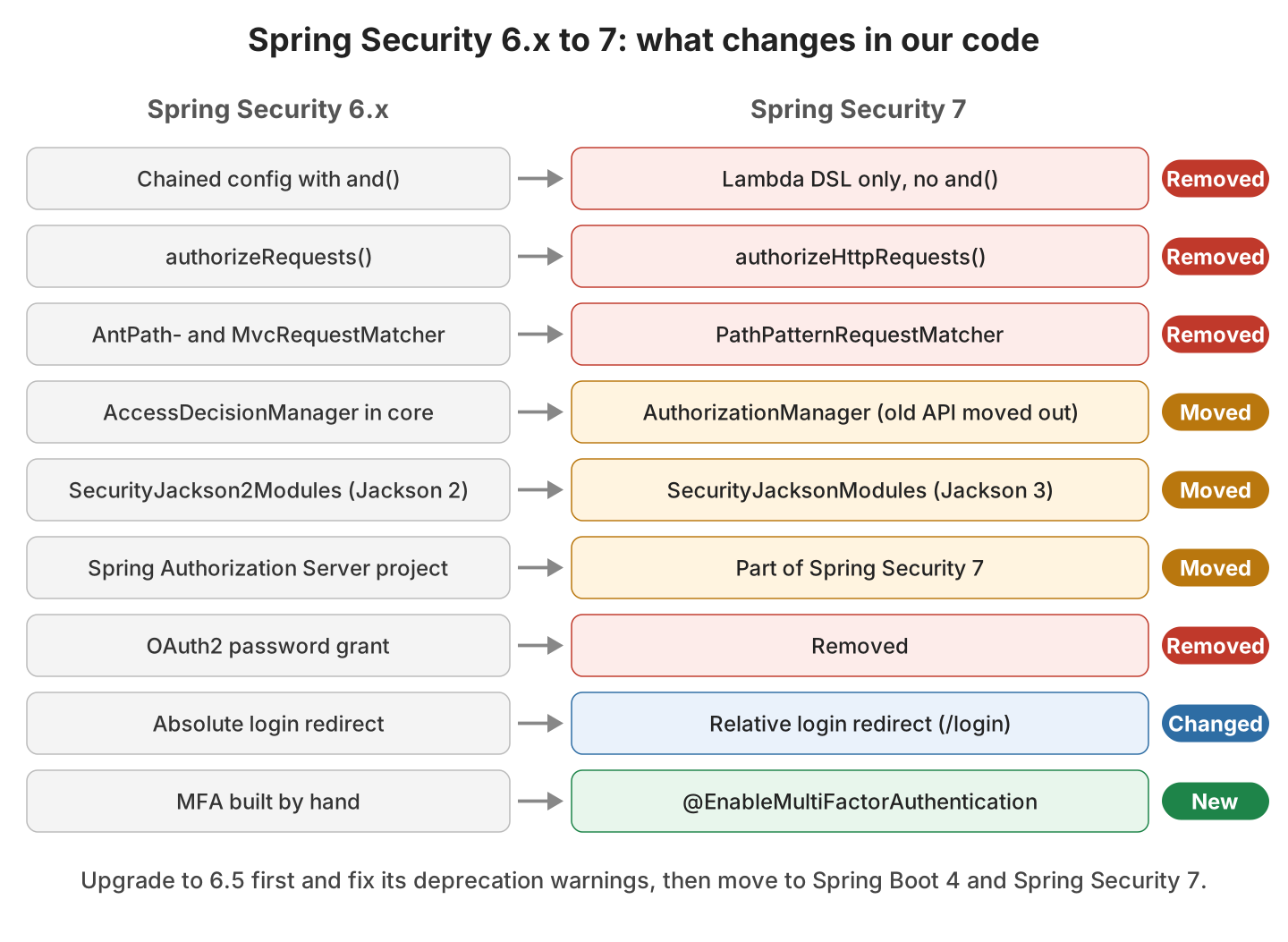
The image maps each 6.x API to its replacement in Spring Security 7. The red rows break the build, so we fix them first.
2.1. Lambdas Replace and() Chaining
In 6.x, we could call formLogin() without arguments and go back to HttpSecurity with and(). Spring Security 7 removes these methods and authorizeRequests(). Every part of the configuration takes a lambda, a style the docs call the lambda DSL. Many apps written after the WebSecurityConfigurerAdapter removal use it already.
The compiler error for an old chained call does not mention and(), which makes it confusing at first.
[ERROR] OldStyle.java:[8,9] method authorizeHttpRequests in class HttpSecurity cannot be applied to given types;The fixed version is the filter chain of our expense API. Notice that the bean method has no throws Exception clause, because HttpSecurity.build() no longer declares a checked exception.
@Bean
SecurityFilterChain securityFilterChain(HttpSecurity http) {
  http
      .authorizeHttpRequests(auth -> auth
          .requestMatchers("/public/**").permitAll()
          .requestMatchers(deleteExpense).hasRole("ADMIN")              // section 2.2
          .requestMatchers("/reports/**").access(mfa.hasRole("ADMIN"))  // section 3.1
          .requestMatchers("/audit/**").hasAllRoles("ADMIN", "AUDITOR")
          .anyRequest().authenticated())
      .formLogin(withDefaults())
      .httpBasic(withDefaults())
      .oneTimeTokenLogin(withDefaults())
      .csrf(csrf -> csrf.spa());
  return http.build();
}
2.2. PathPatternRequestMatcher Replaces AntPathRequestMatcher
A request matcher decides whether a security rule applies to a request. Spring Security 7 deletes AntPathRequestMatcher and MvcRequestMatcher, and PathPatternRequestMatcher takes their place. The new matcher reads paths with the same syntax as our @GetMapping paths, so a security rule and a controller agree on which URL they mean.
String rules such as *requestMatchers(“/public/**”)* keep working. Only code that creates a matcher object needs a change.
PathPatternRequestMatcher deleteExpense = PathPatternRequestMatcher.withDefaults()
    .matcher(HttpMethod.DELETE, "/expenses/{name}");

boolean delete = deleteExpense.matches(new MockHttpServletRequest("DELETE", "/expenses/taxi"));   // true
boolean get    = deleteExpense.matches(new MockHttpServletRequest("GET", "/expenses/taxi"));      // false
boolean nested = deleteExpense.matches(new MockHttpServletRequest("DELETE", "/expenses/taxi/1")); // false
If Spring MVC runs under a path prefix such as /mvc, we add the prefix once with PathPatternRequestMatcher.withDefaults().basePath(“/mvc”).
2.3. Authorization API Changes
Old apps may decide access with an AccessDecisionManager and a list of voters. These classes have been deprecated since Spring Security 5, and in 7.0 they moved to a separate spring-security-access module. If our app still uses voters, we either add that dependency or rewrite each voter as an AuthorizationManager. Custom AuthorizationManager classes also need one rename, from check() to authorize().
Spring Security 7 also adds rules that need every listed role. The older hasAnyRole() passes when one role matches, whereas hasAllRoles() passes only when the user has all of them. In our tests, a user with only ADMIN gets 403 on /audit/log, and a user with ADMIN and AUDITOR gets 200.
2.4. Login Redirects Use Relative URLs
When an anonymous user opens a protected page, form login redirects the browser to the login page. Spring Security 6 put a full URL in the Location header, and Spring Security 7 puts only the path. A path works better for apps behind a proxy with a different host name.
In a Spring Boot app, the browser may still get a full URL. Embedded Tomcat turns every relative redirect into a full URL by default.
MockMvc (what Spring Security sends)   Location: /login
Embedded Tomcat, default settings      Location: http://localhost:8080/login
To send the path to the browser unchanged, we set one Spring Boot property.
server.tomcat.use-relative-redirects=true2.5. Jackson 3 for Saved Logins
Some apps save the logged-in user as JSON, for example when Spring Session stores sessions in Redis. Spring Security 7 uses Jackson 3 for that, so SecurityJacksonModules replaces SecurityJackson2Modules. The JSON format stays the same, so sessions saved before the upgrade can still be read.
JsonMapper mapper = JsonMapper.builder()
    .addModules(SecurityJacksonModules.getModules(getClass().getClassLoader()))
    .build();

String json = mapper.writeValueAsString(auth);                       // {"@class":"...UsernamePasswordAuthenticationToken",...}
Authentication back = mapper.readValue(json, Authentication.class);  // back.getName() = "lokesh"
3. What’s New in Spring Security 7
An upgraded app works without any of the new features. The biggest one is multi-factor authentication.
3.1. Built-In Multi-Factor Authentication
Say every employee sees their own expenses after a password login, but the monthly report shows the totals of the whole team. For that page, we want a second proof of identity, such as a one-time code sent by email. Before 7.0, we had to build this ourselves, as in our 2FA with JWT example.
In 7.0, each login method adds a factor authority to the user. A factor authority works like a role and records how the user logged in, for example FACTOR_PASSWORD after a password login and FACTOR_OTT after a one-time token login. The annotation @EnableMultiFactorAuthentication(authorities = {}) turns MFA support on without forcing it on every URL. With AuthorizationManagerFactories, we require both factors only for the report URLs.
DefaultAuthorizationManagerFactory<Object> mfa = AuthorizationManagerFactories.multiFactor()
    .requireFactors(FactorGrantedAuthority.PASSWORD_AUTHORITY, FactorGrantedAuthority.OTT_AUTHORITY)
    .build();

http.authorizeHttpRequests(auth -> auth
    .requestMatchers("/reports/**").access(mfa.hasRole("ADMIN"))
    .anyRequest().authenticated());
When anna logs in with only her password, Spring Security does not return 403. It sends her back to the login page and names the missing factor in the URL.
anna with password only -> 302 Location: /login?factor.type=ott&factor.reason=missing
anna with password + ott -> 200
Spring Security 7.1 adds when() to the same builder, so we can ask only some users for the second factor.
3.2. One-Time Token and Passkey Login as Second Factors
One-time token login and passkeys arrived in Spring Security 6.4, and in 7.0 both work as a second factor. The default login page reads factor.type from the redirect, so anna sees only the “Request a One-Time Token” form. A OneTimeTokenGenerationSuccessHandler bean sends the token to the user, and our demo writes the login link to the log.
Passkeys let users log in with a fingerprint or a phone instead of a password. In 7.1, we can ask for MFA only from users who registered a passkey.
3.3. CSRF Setup for Single-Page Apps
A CSRF token is a random value that the server checks on every POST, PUT and DELETE, so another site cannot send these requests in the user’s name. A React or Angular app reads the token from a cookie and sends it back in a header. In 6.x, that setup took several lines of code, and in 7.0 csrf.spa() does it in one call.
http.csrf(csrf -> csrf.spa()); // XSRF-TOKEN cookie, X-XSRF-TOKEN headerAfter the first GET, the response sets the XSRF-TOKEN cookie. In our tests, a POST without the matching header gets 403, and a POST with it gets 201.
3.4. Null Annotations on Spring Security APIs
Spring Security 7 marks its code with JSpecify annotations, which say whether a parameter or return value can be null. A value is non-null unless it carries @Nullable. IntelliJ IDEA reads these annotations and warns us when we pass null where Spring Security does not accept it.
3.5. OAuth2, Authorization Server and SAML Changes
These changes matter only for apps that use OAuth2 or SAML single sign-on, so other apps can skip them.
- Spring Authorization Server is part of Spring Security 7, as spring-security-oauth2-authorization-server with the Spring Security version. Our OAuth2 authorization server example shows the setup.
- The OAuth2 password grant is removed, because it gives the user’s password to the client app. Clients use the authorization code grant instead, as in our Keycloak login example.
- SAML 2.0 login needs the OpenSAML 5 library, because OpenSAML 4 support is removed.
- New password encoders based on the Password4j library cover Argon2, BCrypt, SCrypt and PBKDF2.
4. Spring Security 7 Migration Checklist
The official migration guide recommends a stop at Spring Security 6.5, the last 6.x release. On 6.5, we can switch on the 7.0 behavior one setting at a time and see a deprecation warning for each line that will break. Spring Boot 3.5 brings Spring Security 6.5, so the first step is a Spring Boot 3.5 upgrade.
- Upgrade to Spring Boot 3.5 and fix every Spring Security deprecation warning, using the 6.5 preparation steps.
- Rewrite every and() chain with lambdas, and replace authorizeRequests() with authorizeHttpRequests().
- Replace AntPathRequestMatcher and MvcRequestMatcher with PathPatternRequestMatcher.withDefaults().matcher(…).
- Add spring-security-access if the app uses voters, and rename check() to authorize() in custom AuthorizationManager classes.
- Upgrade to Spring Boot 4.1 and replace SecurityJackson2Modules with SecurityJacksonModules.
- Run the security tests, with extra checks for login redirects and CSRF on POST requests.
For step 6, the new withAuthorities() matcher checks the exact authorities of the logged-in user in a MockMvc test. The following test checks that a password login adds the FACTOR_PASSWORD authority next to the role.
MvcTestResult result = mvc.get().uri("/expenses").with(httpBasic("lokesh", "secret")).exchange();

assertThat(result).hasStatusOk();
assertThat(result).matches(authenticated().withAuthorities("ROLE_USER", "FACTOR_PASSWORD"));
5. Conclusion
For existing apps, Spring Security 7 is mostly a cleanup release. The removed and() chaining and AntPathRequestMatcher break the build, so we fix them first, on Spring Security 6.5 if we can.
After the build compiles, we test the behavior changes, such as relative login redirects and Jackson 3 sessions, because the compiler does not catch them. The new features, including built-in MFA, can come later, one URL at a time.
6. References
- What’s New in Spring Security 7.0
- What’s New in Spring Security 7.1
- Migrating to Spring Security 7.0
- Preparing for 7.0 (Spring Security 6.5)
- Multi-Factor Authentication
- One-Time Token Login
- Cross Site Request Forgery (CSRF)
Happy Learning !!
