
A Java 25 migration moves an application from JDK 21 to JDK 25, the next long-term support (LTS) release of Java. In most projects, our own Java code compiles on Java 25 without a change, so the work is in the build file. We switch the JDK and the compiler release to 25. After that, we upgrade the tools that read or change our compiled classes, to at least Lombok 1.18.40, Mockito 5.18.0, JaCoCo 0.8.14 and Spring Boot 3.5.
We migrate to keep getting free updates and to use the features added in Java 22 to 25. Oracle JDK 21 updates under Oracle’s free-use license end in September 2026, whereas Eclipse Temurin, a free OpenJDK build, gets Java 25 updates until at least September 2031.
We start with the support dates and a checklist. After that, we upgrade a small Maven project and fix each real error it hits on the way.
1. Java 25 LTS Support Dates
Java 25 was released in September 2025 and is the current LTS release. An LTS release gets security fixes for years, so we go from Java 21 straight to Java 25 and skip Java 22 to 24. How long we get updates depends on who builds our JDK, for example Oracle or the Adoptium project that builds Temurin.
| Vendor and plan | Java 21 | Java 25 |
|---|---|---|
| Oracle JDK, free-use license (NFTC) | Until September 2026 | Until September 2028 |
| Oracle Premier Support (paid) | Until September 2028 | Until September 2030 |
| Oracle Extended Support (paid) | Until September 2031 | Until September 2033 |
| Eclipse Temurin (free) | At least until December 2029 | At least until September 2031 |
Oracle plans to release Oracle JDK 21 updates from the October 2026 quarterly security update under the Java SE OTN license, not the free-use license. Oracle already uses the OTN license for Java 8, 11 and 17 updates, and it tells users who want to stay on a free-use license to upgrade to Oracle JDK 25. Temurin users still get Java 21 updates, so for them the reason to upgrade is the Java 25 features added since Java 21.
2. Java 25 Migration Checklist
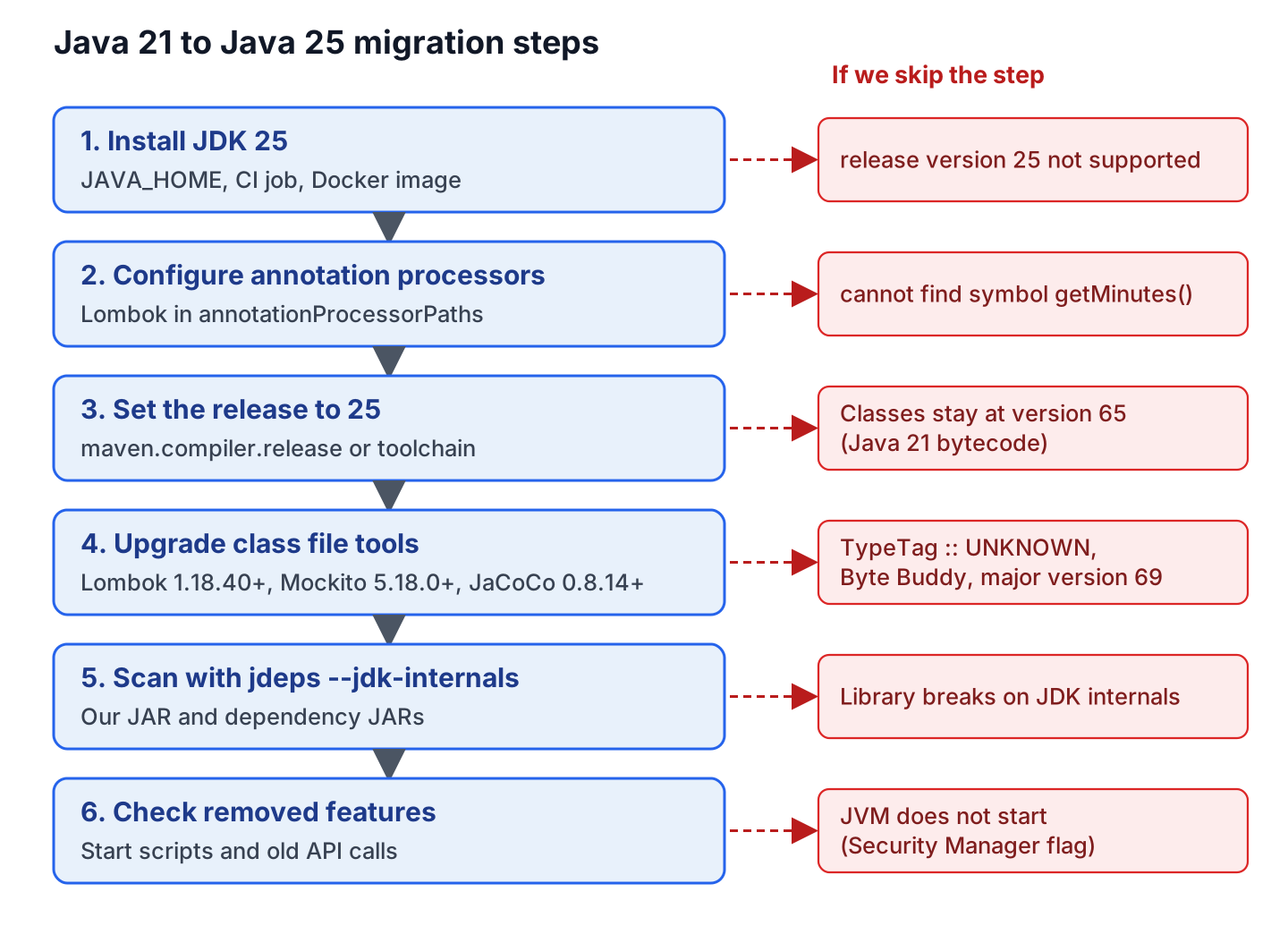
Most of the migration is version changes in the build file. The order matters, because each step makes the next error easier to read.
| Step | What we change | Done when |
|---|---|---|
| 1. Install JDK 25 | JAVA_HOME, the CI job, the Docker base image | java -version prints 25 |
| 2. Configure annotation processors | Lombok in annotationProcessorPaths | Lombok getters compile |
| 3. Set the release to 25 | maven.compiler.release or the Gradle toolchain | Classes have major version 69 |
| 4. Upgrade the tools that read class files | Lombok, Mockito, JaCoCo, Spring Boot, Gradle | mvn verify passes |
| 5. Scan for JDK internals | Nothing, we run jdeps –jdk-internals | No “JDK removed internal API” lines |
| 6. Check removed features | Start scripts and old API calls | The app starts without errors |
The diagram adds the error we see when a step is skipped.
3. Installing JDK 25
We install JDK 25, for example Eclipse Temurin, next to JDK 21, so we can switch back while we test. The commands for each OS are in Installing OpenJDK.
openjdk version "25.0.4.1" 2026-08-18 LTS
OpenJDK Runtime Environment Temurin-25.0.4.1+1 (build 25.0.4.1+1-LTS)
The CI job and the Docker base image need the same change, for example eclipse-temurin:25-jre instead of eclipse-temurin:21-jre.
4. Building the Java 21 Project on JDK 25
The following example is a small recipe service. The Recipe class uses Lombok’s @Value and @Builder to generate its getters and builder, and a JUnit 6 test mocks the RecipeRepository with Mockito. On Java 21, it uses Lombok 1.18.30, Mockito 5.8.0, JaCoCo 0.8.11, JUnit 6.1.3 and maven-compiler-plugin 3.11.0. We build it on Temurin 25.0.4.1 with Maven 3.9.16, and it fails before we change anything.
[INFO] Compiling 3 source files with javac [debug release 21] to target/classes
[ERROR] /.../RecipeService.java:[16,33] cannot find symbol
  symbol:   method getMinutes()
  location: variable recipe of type com.howtodoinjava.migration.Recipe
4.1. Annotation Processing Is Off by Default Since JDK 23
Lombok is an annotation processor, a compiler plugin that generates code such as getters. Up to JDK 22, javac ran every processor it found on the classpath. Since JDK 23, it runs processors only when the build asks for them (JDK-8321314), so Lombok never ran.
We name Lombok in the annotationProcessorPaths of the maven-compiler-plugin. Gradle builds already declare Lombok as annotationProcessor, so they are not affected.
<plugin>
  <groupId>org.apache.maven.plugins</groupId>
  <artifactId>maven-compiler-plugin</artifactId>
  <version>3.16.0</version>
  <configuration>
    <annotationProcessorPaths>
      <path>
        <groupId>org.projectlombok</groupId>
        <artifactId>lombok</artifactId>
        <version>1.18.48</version>
      </path>
    </annotationProcessorPaths>
  </configuration>
</plugin>
4.2. Old Lombok Versions Fail on JDK 25
Lombok generates code with internal classes of javac, and these classes change in every JDK release. So each Lombok version works only with the JDKs that existed when it came out. Once Lombok 1.18.30 runs as a processor on JDK 25, the compiler crashes.
[ERROR] Failed to execute goal org.apache.maven.plugins:maven-compiler-plugin:3.16.0:compile ...
  Fatal error compiling: java.lang.ExceptionInInitializerError: com.sun.tools.javac.code.TypeTag :: UNKNOWN
Lombok supports JDK 25 from 1.18.40, so we use 1.18.40 or newer. The Lombok NoSuchFieldError on Java 21 had the same cause and the same fix.
5. Setting the Release to 25 in Maven and Gradle
With release 25, javac writes class files with major version 69, the number that older tools reject. Our full pom.xml change is the release, the tool versions and the processor path from section 4.1.
-    <maven.compiler.release>21</maven.compiler.release>
+    <maven.compiler.release>25</maven.compiler.release>
       <artifactId>lombok</artifactId>
-      <version>1.18.30</version>
+      <version>1.18.48</version>
       <artifactId>mockito-core</artifactId>
-      <version>5.8.0</version>
+      <version>5.24.0</version>
         <artifactId>maven-compiler-plugin</artifactId>
-        <version>3.11.0</version>
+        <version>3.16.0</version>
+        <configuration> ... Lombok 1.18.48 in annotationProcessorPaths ... </configuration>
         <artifactId>jacoco-maven-plugin</artifactId>
-        <version>0.8.11</version>
+        <version>0.8.15</version>
If Maven still runs on JDK 21, javac stops with release version 25 not supported. A Maven Enforcer rule in our example gives a clearer message on an old JDK.
In Gradle, we set a Java toolchain of 25, which needs Gradle 9.1.0 or newer.
java {
    toolchain {
        languageVersion = JavaLanguageVersion.of(25)
    }
}
6. Upgrading the Tools That Read Class Files
Each class file starts with a version number, and release 25 writes 69. Tools that read or generate compiled classes accept only the versions they know. On a newer version, they fail with Unsupported class file major version 69 or a similar error. We compare our versions with the first release of each tool that supports Java 25.
| Tool | First version for Java 25 | Latest (October 2026) |
|---|---|---|
| Lombok | 1.18.40 | 1.18.48 |
| Mockito (bundles Byte Buddy) | 5.18.0 (Byte Buddy 1.17.5) | 5.24.0 |
| JaCoCo | 0.8.14 | 0.8.15 |
| Spring Boot | 3.5.x (system requirements) | 4.1.1 |
| Gradle | 9.1.0 | 9.8.0 |
Spring Boot 3.4 supports Java only up to 24, so a Spring Boot 3.4 app moves to 3.5 or to Spring Boot 4.
6.1. Mockito Cannot Mock With an Old Byte Buddy
Mockito creates mocks at runtime with Byte Buddy, a library that generates classes. With release 25, every test that creates a mock fails on Mockito 5.17.0 or older.
Mockito cannot mock this class: interface com.howtodoinjava.migration.RecipeRepository.
Caused by: java.lang.IllegalArgumentException: Java 25 (69) is not supported by the current version
  of Byte Buddy which officially supports Java 22 (66) - update Byte Buddy or set
  net.bytebuddy.experimental as a VM property
We upgrade Mockito to 5.18.0 or newer and leave the experimental flag out. A related failure is Could not initialize plugin MockMaker.
6.2. JaCoCo Cannot Read Version 69
With JaCoCo 0.8.11, the tests pass, but the JaCoCo report cannot read our classes.
[ERROR] Failed to execute goal org.jacoco:jacoco-maven-plugin:0.8.11:report (report) ...
  Error while analyzing .../Recipe$RecipeBuilder.class with JaCoCo 0.8.11.202310140853/f33756c.
  Unsupported class file major version 69
JaCoCo supports Java 25 from 0.8.14. With all upgrades from section 5, the build passes.
[INFO] Compiling 3 source files with javac [debug release 25] to target/classes
[INFO] Tests run: 2, Failures: 0, Errors: 0, Skipped: 0
[INFO] BUILD SUCCESS
7. Finding JDK Internal API Use With jdeps
Some libraries use internal JDK classes, which can change in any release. The jdeps tool lists them. For our own JAR, jdeps –jdk-internals prints nothing, whereas for the old Lombok JAR it shows why Lombok broke.
lombok -> JDK removed internal API
   lombok.javac.apt.Processor -> com.sun.tools.javac.processing.JavacFiler   JDK removed internal API
   lombok.javac.apt.Processor -> com.sun.tools.javac.util.Context            JDK removed internal API
We also run jdeps on the JARs that mvn dependency:copy-dependencies copies to target/dependency. Every library with “JDK removed internal API” lines needs a newer version.
8. What Changed Between Java 22 and Java 25
Moving from Java 21 to 25 brings the changes of Java 22 to 24 too. Most are new features, but a few remove an API or change a default, so old code or old start scripts can fail at runtime.
| Change | Since | What we do |
|---|---|---|
| Annotation processing off by default | 23 | Configure annotationProcessorPaths, or pass -proc:full |
| Thread.suspend(), Thread.resume() and ThreadGroup.stop() removed | 23 | Stop threads with interruption instead |
| Security Manager, an old sandbox for untrusted code, permanently disabled (JEP 486) | 24 | Remove -Djava.security.manager and setSecurityManager() calls |
| Warning when code calls the memory methods of sun.misc.Unsafe (JEP 498) | 24 | Upgrade the library named in the warning |
| Warning when Java code loads native C code through JNI (JEP 472) | 24 | Allow that code with –enable-native-access |
| 32-bit x86 port removed (JEP 503) | 25 | Run on a 64-bit OS |
8.1. Security Manager Flags Stop the JVM
Old start scripts sometimes pass -Djava.security.manager or -Djava.security.manager=allow. On Java 25, the JVM does not start with either flag.
Error occurred during initialization of VM
java.lang.Error: A command line option has attempted to allow or enable the Security Manager.
  Enabling a Security Manager is not supported.
In code, System.getSecurityManager() always returns null, and System.setSecurityManager() throws UnsupportedOperationException.
9. Common Java 25 Upgrade Errors and Fixes
We search the build log for the text in the first column, and the second column has the fix that worked in our example.
| Error message | Fix |
|---|---|
| cannot find symbol for a Lombok getter | Add Lombok to annotationProcessorPaths |
| TypeTag :: UNKNOWN | Upgrade Lombok to 1.18.40 or newer |
| release version 25 not supported | Run Maven or the IDE on JDK 25 (section 5) |
| Unsupported class file major version 69 | Upgrade the tool in the stack trace, e.g. JaCoCo to 0.8.14+ (section 6) |
| Java 25 (69) is not supported by the current version of Byte Buddy | Upgrade Mockito to 5.18.0 or newer |
| UnsupportedClassVersionError … class file version 69.0 | Run the app on Java 25, also in CI and Docker |
| sun.misc.Unsafe::objectFieldOffset has been called by lombok.permit.Permit (warning) | Nothing for now, the build passes; watch for a Lombok update |
| Mockito is currently self-attaching (warning) | Add Mockito as a Java agent, as the Mockito docs show |
10. Conclusion
A Java 21 to Java 25 migration is mostly a build change. For our example, that meant release 25, Lombok 1.18.48 in annotationProcessorPaths, Mockito 5.24.0 and JaCoCo 0.8.15.
After the build passes, jdeps –jdk-internals and the table in section 8 catch the problems that show up only at runtime, such as the disabled Security Manager.
11. References
- JDK 25 project page
- Oracle Java SE Support Roadmap
- JDK 23 Release Notes
- JEP 486: Permanently Disable the Security Manager
- JEP 498: Warn upon Use of Memory-Access Methods in sun.misc.Unsafe
- jdeps command reference
- Gradle Java compatibility matrix
Happy Learning !!
