
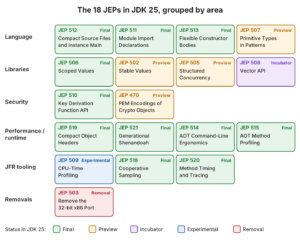
Java 25 is the long-term support (LTS) release of the JDK, released on 16 September 2025 with compact source files, scoped values, flexible constructor bodies and compact object headers among its new features. The Java 25 features come from 18 JEPs. Oracle gives Java 25 Premier Support until September 2030, and Java 26 and Java 27 are short-term releases, so Java 25 is the current LTS and the usual upgrade target after Java 21.
We move to Java 25 to write less boilerplate (no class around a small program, imports by module, validation before super(…)) and to pass context between methods and threads without ThreadLocal. The new JVM options also cut heap usage and startup time with no code changes.
The following example is a complete Java 25 program in a file named Library.java. It has no class declaration, no static main(String[] args), and it uses a scoped value, which needed –enable-preview in Java 21.
static final ScopedValue<String> MEMBER = ScopedValue.newInstance();

void main() {
    ScopedValue.where(MEMBER, "Lokesh").run(() -> greet());   // Hello, Lokesh
    boolean bound = MEMBER.isBound();                         // false (outside run())
    IO.println("Bound after run(): " + bound);                // Bound after run(): false
}

void greet() {
    IO.println("Hello, " + MEMBER.get());
}
Notice that IO, ScopedValue and the instance main() method are no longer previews in Java 25, so the file runs on any JDK 25 with no flags. The sections below cover every JEP in JDK 25 by area, with runnable code for the final features and the preview ones, followed by a table of what became final between Java 21 and 25 and a migration checklist.
1. Java 25 Features at a Glance
The Java 25 compiler writes class files with major version 69 for Java 25, which is why older JVMs and tools fail with “Unsupported class file major version 69” after an upgrade.
A JEP marked final is a permanent part of Java SE or the JDK. A preview feature compiles and runs only with –enable-preview, an incubator module needs –add-modules, and an experimental feature can change or go away in a later release.
| JEP | Feature | Area | Status in JDK 25 |
|---|---|---|---|
| 512 | Compact Source Files and Instance Main Methods | Language | Final |
| 511 | Module Import Declarations | Language | Final |
| 513 | Flexible Constructor Bodies | Language | Final |
| 507 | Primitive Types in Patterns, instanceof, and switch | Language | Third preview |
| 506 | Scoped Values | Libraries | Final |
| 502 | Stable Values | Libraries | Preview |
| 505 | Structured Concurrency | Libraries | Fifth preview |
| 508 | Vector API | Libraries | Tenth incubator |
| 510 | Key Derivation Function API | Security | Final |
| 470 | PEM Encodings of Cryptographic Objects | Security | Preview |
| 519 | Compact Object Headers | Performance | Final (opt-in flag) |
| 521 | Generational Shenandoah | Performance | Final (opt-in flag) |
| 514 | Ahead-of-Time Command-Line Ergonomics | Performance | Final |
| 515 | Ahead-of-Time Method Profiling | Performance | Final |
| 509 | JFR CPU-Time Profiling | Tooling | Experimental, Linux only |
| 518 | JFR Cooperative Sampling | Tooling | Final |
| 520 | JFR Method Timing and Tracing | Tooling | Final |
| 503 | Remove the 32-bit x86 Port | Removal | Final |
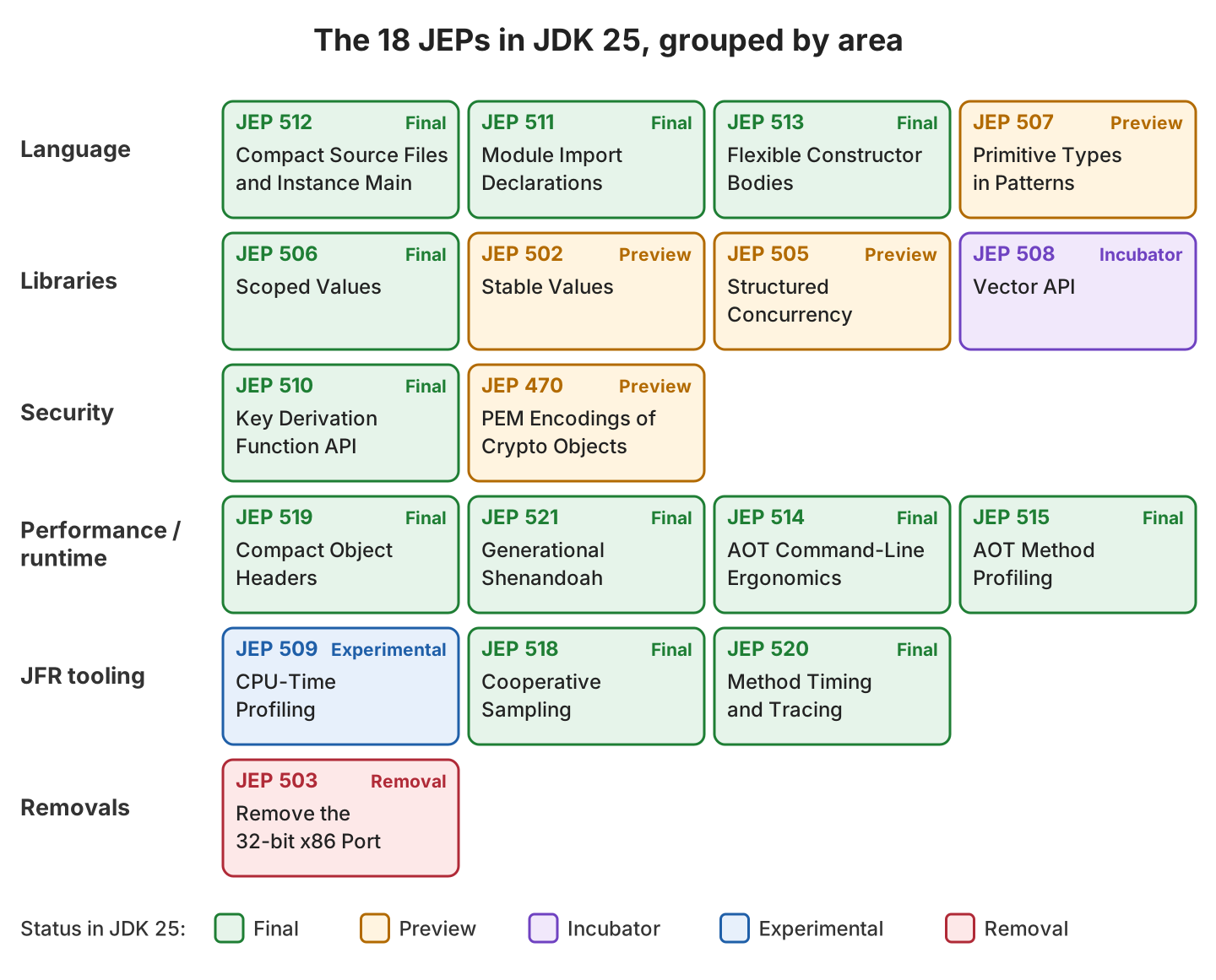
All examples run on Temurin 25.0.4.1 with Maven 3.9.16, JUnit 6.1.3 and AssertJ 3.27.7, and the complete project is on GitHub. The preview and incubator classes need the flags twice, once for javac in the compiler plugin and once for the JVM that runs the tests.
<properties>
  <maven.compiler.release>25</maven.compiler.release>
</properties>

<!-- maven-compiler-plugin -->
<configuration>
  <compilerArgs>
    <arg>--enable-preview</arg>
    <arg>--add-modules</arg>
    <arg>jdk.incubator.vector</arg>
  </compilerArgs>
</configuration>

<!-- maven-surefire-plugin -->
<configuration>
  <argLine>--enable-preview --add-modules jdk.incubator.vector</argLine>
</configuration>
2. Java 25 Language Features
Three language features that went through two to four previews since Java 21 are final in Java 25. The three features remove boilerplate from small programs, imports and constructors, and none of them changes how existing code compiles.
2.1. Compact Source Files and Instance Main Methods (JEP 512)
A compact source file is a .java file whose methods and fields are not inside a class declaration. The compiler wraps them in an implicitly declared final class, so we write void main() and run the file with the source launcher (java Greeting.java, no javac step). Java 21 offered this feature as unnamed classes and instance main methods, behind –enable-preview.
The final version in JEP 512 differs from the Java 21 preview in three details.
- The new class java.lang.IO has print(), println() and readln(). The class belongs to the java.lang package, so every source file can use it without an import.
- The IO methods are not imported as static methods, so we write IO.println(“…”), not println(“…”).
- A compact source file imports the whole java.base module, so List, Map, Path and the other common classes need no import statement.
The launcher picks a main(String[] args) method when the class has one, and otherwise a main() method without parameters. The classic main() method still works everywhere.
void main() {
    String name = IO.readln("Your name: ");                // reads one line from System.in
    List<String> books = List.of("Dune", "Emma", "Ulysses");
    IO.println("Hello " + name + ", we have " + books.size() + " books");
}
Your name: Hello Lokesh, we have 3 booksThe method IO.readln() returns null at the end of the input, so a program that reads in a loop stops on null. A compact source file can’t be referenced by name from other classes, so it fits scripts, demos and small tools.
2.2. Module Import Declarations (JEP 511)
A module import declaration imports every public type of every package that a module exports. The line import module java.base; replaces dozens of single imports such as java.util.List, java.util.stream.Collectors and java.nio.file.Path. Our own code doesn’t have to be in a module, as described in the JPMS tutorial, to use it.
import module java.base;      // java.util, java.util.function, java.util.stream, java.nio.file, ...

List<String> titles = List.of("Ulysses", "Dune", "Emma");
Map<String, Integer> pages = titles.stream()
    .collect(Collectors.toMap(Function.identity(), String::length, (a, b) -> a, TreeMap::new));
                                                       // {Dune=4, Emma=4, Ulysses=7}
Path file = Path.of("catalog", "books.csv");           // catalog/books.csv
When two imported modules export a type with the same simple name, the compiler stops with an ambiguity error. For example, java.desktop exports java.awt.List, and java.base exports java.util.List.
AmbiguousImports.java:5: error: reference to List is ambiguous
    List<String> books = List.of("Dune", "Emma");
    ^
  both class java.awt.List in java.awt and interface java.util.List in java.util match
A single-type import wins over a module import, so adding import java.util.List; below the two module imports fixes the error and the program prints [Dune, Emma].
2.3. Flexible Constructor Bodies (JEP 513)
Before Java 25, super(…) or this(…) had to be the first statement of a constructor. JEP 513 allows statements before that call. The statements before it form the prologue, and they may validate arguments and assign fields of the class being created, but they can’t read fields or call instance methods.
The rule about assigning fields fixes a common bug. Say a library app has a Book class whose constructor calls an overridable describe() method, and an EBook subclass adds a format field. In Java 21, EBook could assign format only after super(…) returned, so the overridden describe() saw null.
public EBook(String title, int pages, String format) {
    Objects.requireNonNull(format, "format");                 // 1. validate before super()
    if (pages <= 0) {
        throw new IllegalArgumentException("pages must be positive: " + pages);
    }
    this.format = format.strip().toUpperCase();               // 2. assign own field before super()
    super(title, pages);                                      // 3. Book calls describe()
}

EBook dune = new EBook("Dune", 412, " epub ");
String summary = dune.summary();                              // Dune (EPUB)
String old = new OldStyleEBook("Dune", 412, "epub").summary();   // Dune (null), field set after super()
EBook bad = new EBook("Emma", 0, "pdf");                      // IllegalArgumentException: pages must be positive: 0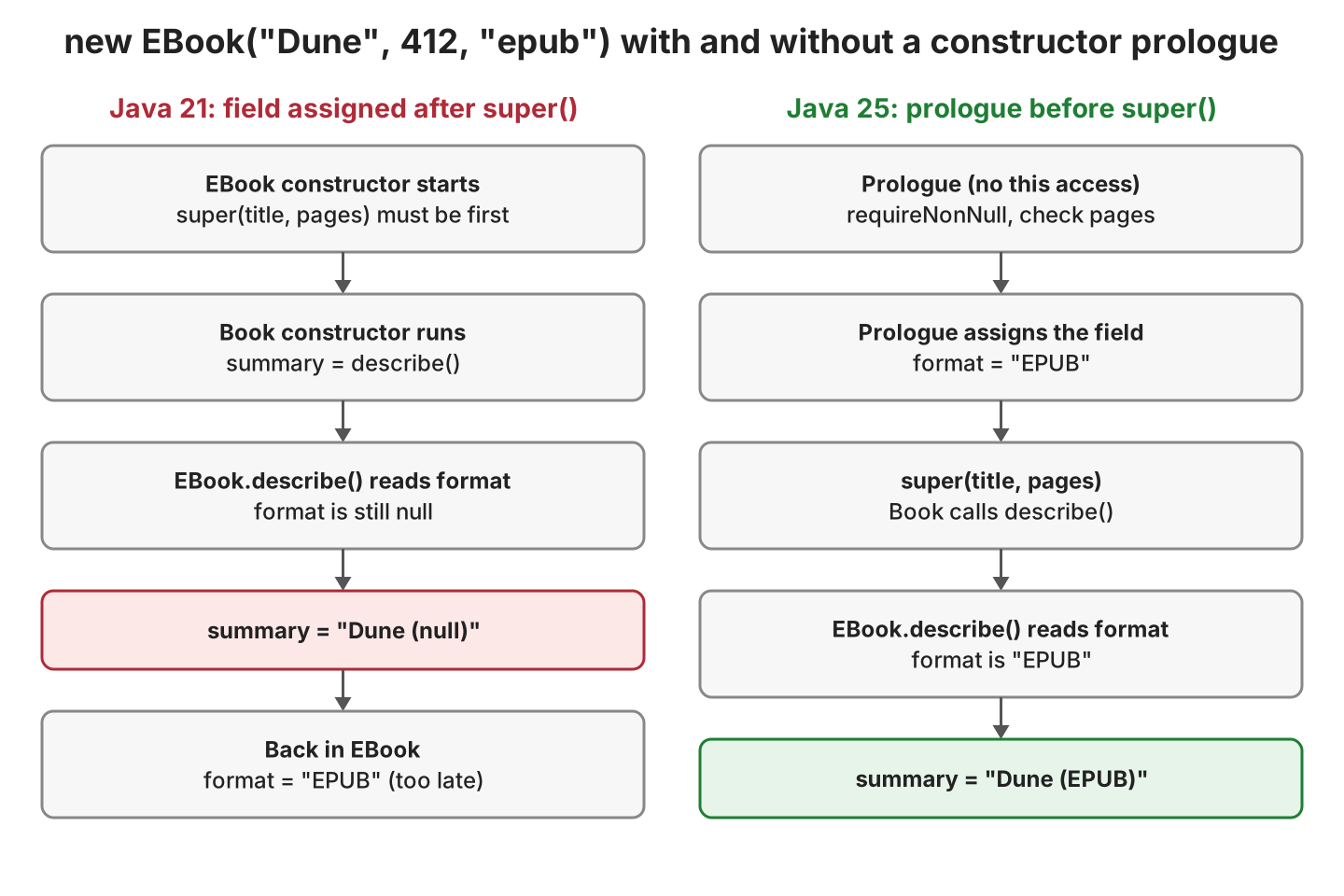
The same EBook class doesn’t compile on JDK 21, which rejects any statement before super(…).
EBook.java:16: error: call to super must be first statement in constructor
    super(title, pages);
         ^
Validation in the prologue also means that an invalid argument fails before the superclass constructor runs, so no half-built object exists.
2.4. Primitive Types in Patterns (JEP 507, Third Preview)
Pattern matching in Java 21 worked only with reference types. JEP 507 allows primitive type patterns in switch and instanceof, and switch on boolean, long, float and double. The feature is a preview in Java 25, so it needs –enable-preview on both javac and java.
String size = switch (pages) {                    // pages is an int
    case 0 -> "empty";
    case int p when p < 100 -> "short";
    case int p when p < 500 -> "medium";
    case int p -> "long (" + p + " pages)";
};                                                // 412 -> medium, 1225 -> long (1225 pages)

String label = switch (inStock) {                 // switch on boolean
    case true -> "ready to borrow";
    case false -> "join the waiting list";
};

long copiesSold = 3_000_000_000L;
String result = (copiesSold instanceof int copies)
    ? "fits in int: " + copies
    : "too large for int: " + copiesSold;         // too large for int: 3000000000
boolean fits = 300 instanceof byte;               // false, 300 doesn't fit in a byte
The instanceof int test is a safe cast. It matches only when the conversion loses no information, so we no longer write range checks before casting a long to an int. Without the flag, javac stops with “primitive patterns are a preview feature and are disabled by default”.
3. Java 25 Library Features
The library group has one final API, scoped values, and three APIs that are still previews or incubating. The preview APIs are the ones most likely to change, so we keep them out of production code until they are final.
3.1. Scoped Values (JEP 506)
A scoped value is a value that a method binds for the duration of one call, and every method called inside that call can read it. We use it to pass request context, such as the current user, through layers of code without adding a parameter to every method. Our scoped values post covers the preview in Java 21, and Java 25 makes the API final.
Compared with ThreadLocal, a scoped value is immutable inside its scope and has no remove() method that we could forget to call, because the binding ends when run() or call() returns.
static final ScopedValue<String> MEMBER = ScopedValue.newInstance();

ScopedValue.where(MEMBER, "Lokesh").run(() -> checkout("Dune"));
// inside checkout():
String who = MEMBER.get();                                     // Lokesh
ScopedValue.where(MEMBER, "Librarian").run(() -> stamp());     // MEMBER.get() is Librarian inside stamp()
String after = MEMBER.get();                                   // Lokesh again

// outside any binding:
int discount = ScopedValue.where(MEMBER, "Lokesh")
    .call(() -> MEMBER.get().length() * 2);                    // 12
String member = MEMBER.orElse("guest");                        // guest
boolean bound = MEMBER.isBound();                              // false
String fails = MEMBER.get();                                   // NoSuchElementException: ScopedValue not bound
The final API has one change from the last preview, namely orElse() no longer accepts null. Child threads forked in a StructuredTaskScope inherit the bindings, as the example in section 3.3 shows.
3.2. Stable Values (JEP 502, Preview)
A stable value is a holder that is set at most once, and the JVM treats its content as a constant after that, the same as a final field. We use it for lazy initialization of expensive objects, such as a catalog loaded from a database or a logger, without double-checked locking.
private final StableValue<Map<String, Integer>> pages = StableValue.of();

Map<String, Integer> catalog = pages.orElseSet(this::loadPages);   // loads once, thread-safe
boolean loaded = pages.isSet();                                    // true

Supplier<String> banner = StableValue.supplier(() -> "Library opened");   // computed on first get()
List<String> shelves = StableValue.list(3, i -> "Shelf-" + (char) ('A' + i));
String before = shelves.toString();                                // [.unset, .unset, .unset]
String first = shelves.get(0);                                     // Shelf-A
String after = shelves.toString();                                 // [Shelf-A, .unset, .unset]
When 100 virtual threads call pages() at the same time, loadPages() still runs once. Stable values were renamed to LazyConstant in Java 26 (JEP 526), and the low-level methods orElseSet(), trySet() and setOrThrow() were dropped, so code written against the Java 25 preview has to change.
3.3. Structured Concurrency (JEP 505, Fifth Preview)
Structured concurrency treats a group of related subtasks as one unit of work, so when one subtask fails, the others are cancelled and no thread outlives the block that started it. Java 25 changes the API again. The ShutdownOnFailure and ShutdownOnSuccess classes from Java 21 are gone, and we open a scope with StructuredTaskScope.open() and an optional Joiner policy.
For example, a book page needs the price from one service and the number of copies from another. The open() method without arguments waits until all subtasks succeed or one fails, and forks each subtask in a new virtual thread.
try (var scope = StructuredTaskScope.open()) {
    Subtask<Integer> price = scope.fork(() -> findPrice(title));     // 100 ms
    Subtask<Integer> copies = scope.fork(() -> findCopies(title));   // 150 ms
    scope.join();                                    // waits for both, about 150 ms in total
    return new Offer(title, price.get(), copies.get());   // Offer[title=Dune, price=12, copies=2]
}
When findCopies() throws, join() cancels the price subtask and throws StructuredTaskScope.FailedException with the original exception as the cause. A remote call that hangs needs a timeout, which we set through the configuration function of open().
try (var scope = StructuredTaskScope.open(Joiner.<Integer>awaitAllSuccessfulOrThrow(),
        cf -> cf.withTimeout(Duration.ofMillis(300)))) {
    Subtask<Integer> price = scope.fork(() -> findPrice(title));
    Subtask<Integer> copies = scope.fork(() -> findCopies(title));   // takes 5 seconds
    scope.join();                                    // StructuredTaskScope.TimeoutException after 300 ms
    return new Offer(title, price.get(), copies.get());
}
Offer[title=Dune, price=12, copies=2]
FailedException caused by java.lang.IllegalStateException: stock service unavailable
TimeoutException after 300 ms
subtask sees: LokeshThe last line comes from a subtask that reads MEMBER inside ScopedValue.where(MEMBER, “Lokesh”).call(…), which shows that forked subtasks inherit scoped values. The services in the example wait with a pause(Duration) helper to simulate network calls. Other built-in policies are Joiner.anySuccessfulResultOrThrow() for the first result that succeeds, Joiner.allSuccessfulOrThrow() for a stream of all subtasks, and Joiner.awaitAll().
3.4. Vector API (JEP 508, Tenth Incubator)
The Vector API expresses calculations that the JIT compiler turns into SIMD instructions, which process several array elements per CPU instruction. The API stays in the jdk.incubator.vector module until the value classes of Project Valhalla are available, so it needs –add-modules jdk.incubator.vector, and the JVM prints “WARNING: Using incubator modules” at startup.
VectorSpecies<Float> species = FloatVector.SPECIES_PREFERRED;   // 16 float lanes on an AVX-512 CPU
int i = 0;
for (; i < species.loopBound(prices.length); i += species.length()) {
    FloatVector p = FloatVector.fromArray(species, prices, i);
    FloatVector q = FloatVector.fromArray(species, quantities, i);
    p.mul(q).intoArray(totals, i);
}
for (; i < prices.length; i++) {                                // tail that doesn't fill a vector
    totals[i] = prices[i] * quantities[i];
}
// prices {5, 3, 8, 2, 7} x quantities {2, 4, 1, 3, 2} = [10.0, 12.0, 8.0, 6.0, 14.0]
4. Java 25 Security Features
Java 25 adds one final cryptography API and previews a second one. Both replace code that we used to write with Bouncy Castle or by hand.
4.1. Key Derivation Function API (JEP 510)
A key derivation function (KDF) creates one or more cryptographic keys from secret input material, such as a shared secret from a key exchange. The new class javax.crypto.KDF supports HKDF (RFC 5869) with HKDF-SHA256, HKDF-SHA384 and HKDF-SHA512. Before Java 25, the JDK had no public HKDF API.
KDF hkdf = KDF.getInstance("HKDF-SHA256");
HKDFParameterSpec params = HKDFParameterSpec.ofExtract()
    .addIKM(sharedSecret)                                    // input key material
    .addSalt(salt)
    .thenExpand("loan-records".getBytes(UTF_8), 32);         // context info, 32 bytes
SecretKey key = hkdf.deriveKey("AES", params);               // AES, 256 bits

// same inputs and info: same key; info "member-emails": a different key
AES 256 bits 238909ed11fb6a3cd56f55bb5a3b7a1a527208a2268e57b1865440976453ba18
same inputs, same key: true
other purpose, same key: falseThe info bytes let us derive separate keys for separate purposes from one secret. HKDF expects input with high entropy, so a user password still goes through PBKDF2 (SecretKeyFactory.getInstance(“PBKDF2WithHmacSHA256”)) instead.
4.2. PEM Encodings of Cryptographic Objects (JEP 470, Preview)
PEM is the Base64 text format with —–BEGIN …—– lines that OpenSSL, certificates and most key files use. The preview classes java.security.PEMEncoder and java.security.PEMDecoder convert keys, certificates and certificate revocation lists (CRLs) to and from PEM text, so we no longer strip header lines and call Base64 and KeyFactory ourselves.
KeyPair pair = KeyPairGenerator.getInstance("Ed25519").generateKeyPair();

String pem = PEMEncoder.of().encodeToString(pair.getPublic());          // -----BEGIN PUBLIC KEY----- ...
PublicKey decoded = PEMDecoder.of().decode(pem, PublicKey.class);       // equals pair.getPublic()

char[] password = "s3cret".toCharArray();
String encrypted = PEMEncoder.of().withEncryption(password)
    .encodeToString(pair.getPrivate());                                 // -----BEGIN ENCRYPTED PRIVATE KEY----- ...
PrivateKey restored = PEMDecoder.of().withDecryption(password)
    .decode(encrypted, PrivateKey.class);                               // same key bytes as pair.getPrivate()
-----BEGIN PUBLIC KEY-----
MCowBQYDK2VwAyEATpd0vpuS3fsDNaAZljxTxKlZ1gepqUiN5zU9ndylG/I=
-----END PUBLIC KEY-----
round trip equal: true
-----BEGIN ENCRYPTED PRIVATE KEY-----
private key restored: truePassing the expected class to decode() gives a typed result. Without it, decode() returns a DEREncodable, and we check the type with instanceof.
5. Performance and Runtime Changes
The performance JEPs need no code changes. We turn them on with JVM options, so they also help apps that we can’t recompile.
5.1. Compact Object Headers (JEP 519)
Every Java object starts with a header. On 64-bit HotSpot, the header takes 12 bytes by default, and JEP 519 makes the 8-byte layout from Project Lilliput a product option. Small objects shrink the most, because their header is a large part of their size.
java -XX:+UseCompactObjectHeaders -jar app.jarThe example project creates one million records of type Page(int number, int words) and measures the heap after a GC. Each record takes 24 bytes with the default header and 16 bytes with compact headers.
UseCompactObjectHeaders=false
Heap for 1,000,000 Page objects: 24 MB
Bytes per Page object: 24

UseCompactObjectHeaders=true
Heap for 1,000,000 Page objects: 16 MB
Bytes per Page object: 16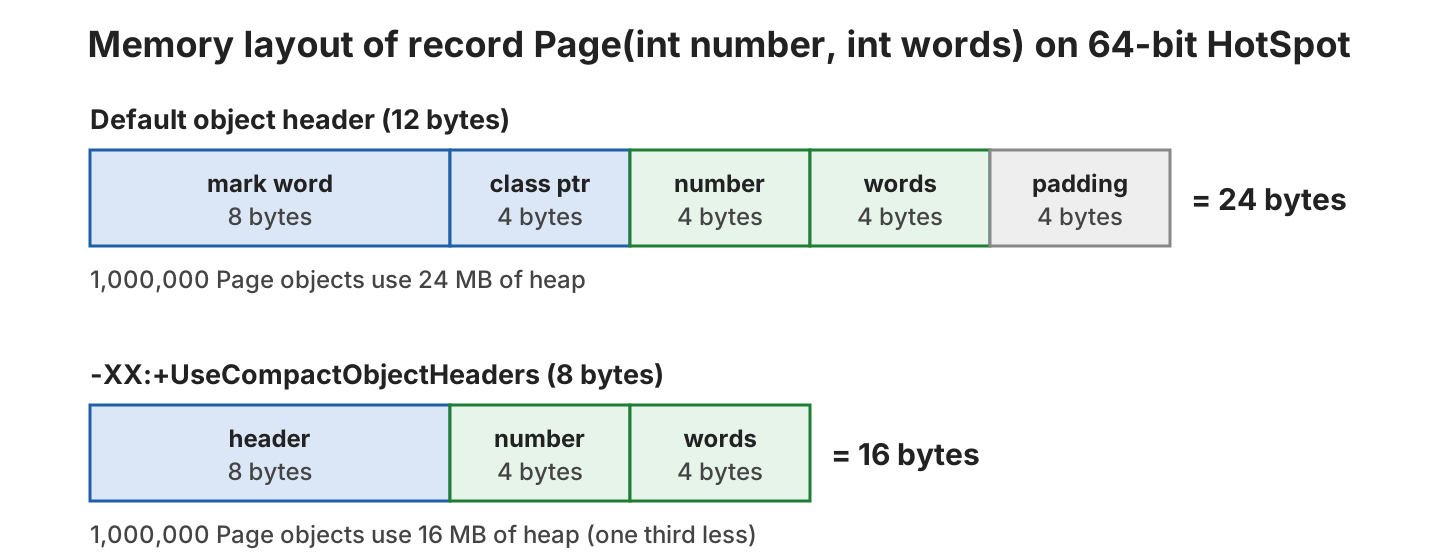
In the JEP, SPECjbb2015 used 22% less heap and 8% less CPU time with compact headers. In Java 25 the option is off by default; JEP 534 makes it the default in Java 27. On JDK 21, the JVM rejects the flag with “Unrecognized VM option ‘UseCompactObjectHeaders'”.
5.2. Generational Shenandoah (JEP 521)
Shenandoah is a low-pause garbage collector that does most of its work concurrently with the app. Its generational mode splits the heap into a young and an old generation, so it collects short-lived objects more often and with less work. Java 24 shipped the mode as experimental, and Java 25 makes it a product option, so -XX:+UnlockExperimentalVMOptions is no longer needed.
java -XX:+UseShenandoahGC -XX:ShenandoahGCMode=generational -Xlog:gc -cp app.jar com.howtodoinjava.java25.runtime.AllocationLoad[0.253s][info][gc] Using Shenandoah
[0.382s][info][gc] Trigger (Young): Learning 1 of 5. Free (178M) is below initial threshold (179M)
[0.383s][info][gc] GC(0) Pause Init Mark (Young) 0.028ms
[0.396s][info][gc] GC(0) Concurrent marking (Young) 10.776ms
[0.396s][info][gc] GC(0) Pause Final Mark (Young) 0.157ms
[0.421s][info][gc] GC(0) Concurrent cleanup (Young) 88M->24M(117M) 0.033msThe pauses stay below 1 ms while the marking runs concurrently. G1 is still the default collector, and Shenandoah without ShenandoahGCMode still runs in single-generation mode. Shenandoah is part of OpenJDK builds such as Temurin, and java -XX:+UseShenandoahGC -version shows whether another vendor’s build includes it.
5.3. Ahead-of-Time Cache in One Command (JEP 514 and JEP 515)
An ahead-of-time (AOT) cache stores classes that a training run of the app loaded and linked, so the next start skips that work. Java 24 needed two commands to create the cache. With JEP 514, the option -XX:AOTCacheOutput runs the training run and creates the cache in one command. JEP 515 also stores method profiles in the cache, so the JIT compiler starts compiling hot methods earlier.
java -XX:AOTCacheOutput=app.aot -cp app.jar com.howtodoinjava.java25.runtime.StartupApp   # training run + cache
java -XX:AOTCache=app.aot -cp app.jar com.howtodoinjava.java25.runtime.StartupApp         # production run
Reading AOTConfiguration app.aot.config and writing AOTCache app.aot
AOTCache creation is complete: app.aot 12734464 bytesThe small app in the example loads logging, regex, streams and java.time classes. We started it 7 times with and without the cache on our machine.
| Run | Median process time | Time inside main() |
|---|---|---|
| Without AOT cache | 194 ms | 38 ms |
| With -XX:AOTCache=app.aot | 108 ms | 15 ms |
The cache cuts the start time by about 44%, and the code in main() runs faster too, because its classes are already loaded and linked. The classpath must contain JAR files, because the JVM refuses a non-empty directory such as target/classes with “Cannot have non-empty directory in paths”. All runs must use the same JDK release, operating system and CPU architecture, and a classpath consistent with the training run.
6. JDK Flight Recorder (JFR) Additions
JDK Flight Recorder records events from a running JVM with low overhead. Java 25 adds three JEPs to JFR, and we use them with command-line options and the jfr tool, not with code.
6.1. JFR Method Timing and Tracing (JEP 520)
The new jdk.MethodTiming and jdk.MethodTrace events instrument the methods that we pick with a filter, and record exact invocation counts and times instead of samples. We use them in production when we suspect one method, without adding logging and redeploying.
java '-XX:StartFlightRecording:jdk.MethodTiming#filter=com.howtodoinjava.java25.runtime.CatalogSearch::search,filename=timing.jfr' -cp app.jar com.howtodoinjava.java25.runtime.CatalogSearch
jfr view method-timing timing.jfr
Method Timing
Timed Method Invocations Minimum Time Average Time Maximum Time
------------------------------------------------------------- ----------- ------------ ------------ ------------
com.howtodoinjava.java25.runtime.CatalogSearch.search(String) 2,000 0.132000 ms 0.259000 ms 68.800000 msWith jdk.MethodTrace instead, JFR records each call with its duration and stack trace, and jfr print –events jdk.MethodTrace trace.jfr prints them. A filter can also name a whole class or an annotation, such as @jakarta.ws.rs.GET.
6.2. JFR CPU-Time Profiling (JEP 509)
The experimental jdk.CPUTimeSample event samples threads by the CPU time they use, through the Linux CPU-time timer, instead of at fixed wall-clock intervals. A thread that waits on I/O no longer shows up as busy. The event works only on Linux in Java 25.
java -XX:StartFlightRecording=jdk.CPUTimeSample#enabled=true,filename=cpu.jfr -cp app.jar com.howtodoinjava.java25.runtime.CatalogSearch
jfr view cpu-time-hot-methods cpu.jfr
Java Methods that Execute the Most from CPU Time Sampler (Experimental)
Method Samples Percent
----------------------------------------------------------------------- ------- -------
jdk.internal.util.ArraysSupport.mismatch(byte[], int, byte[], int, int) 71 78.02%
com.howtodoinjava.java25.runtime.CatalogSearch.search(String) 12 13.19%
java.util.ArrayList$Itr.next() 3 3.30%6.3. JFR Cooperative Sampling (JEP 518)
JEP 518 changes how the JFR method sampler walks thread stacks. The old sampler parsed stacks of suspended threads at any code location with heuristics that could crash the JVM, whereas the new one walks a stack only at a safepoint (a point where the JVM knows the exact state of every frame) and records the sample position to keep the profile accurate. Nothing changes in our commands or recordings, so we get the more stable sampler by upgrading.
7. Removal of the 32-bit x86 Port (JEP 503)
JEP 503 removes the source code and build support for 32-bit x86, after Java 24 removed the Windows 32-bit port. There is no Java 25 build for 32-bit x86 Linux, so an app on such a machine stays on Java 24 or older. Other 32-bit platforms, such as ARM32, are not affected.
The JDK 25 release notes list other removals that are not JEPs. The ones a Java 21 app can hit are the Baltimore CyberTrust and two Camerfirma root certificates in cacerts, the old JMX compatibility system properties such as jmx.invoke.getters, and the java.net.Socket constructors that created datagram sockets, which throw IllegalArgumentException in Java 25.
8. Why Upgrade from Java 21 to Java 25
An upgrade from Java 21 brings every feature that became final in Java 22, 23, 24 and 25, not only the 12 final JEPs of Java 25. Several Java 21 previews are final, and virtual threads no longer pin their carrier thread (the platform thread that runs them) inside synchronized blocks, which was the main limitation of virtual threads in Java 21.
| Release | JEPs final since Java 21 | What we get |
|---|---|---|
| Java 22 | 423 Region Pinning for G1, 454 Foreign Function and Memory API, 456 Unnamed Variables and Patterns, 458 Launch Multi-File Source-Code Programs | _ for unused variables, native calls without JNI, java Main.java with several source files |
| Java 23 | 467 Markdown Documentation Comments, 474 ZGC Generational Mode by Default | Javadoc in Markdown with ///, generational ZGC without a flag |
| Java 24 | 483 AOT Class Loading and Linking, 484 Class-File API, 485 Stream Gatherers, 491 Synchronize Virtual Threads without Pinning, 496 ML-KEM, 497 ML-DSA, 486 Permanently Disable the Security Manager, 493 Linking Run-Time Images without JMODs | Stream.gather(), post-quantum key exchange and signatures, faster startup, virtual threads with synchronized |
| Java 25 | The 12 final JEPs from section 1 | Scoped values, compact source files, module imports, flexible constructors, KDF API, compact headers, JFR method timing |
String templates, which Java 21 previewed, were withdrawn in Java 23 and don’t exist in Java 25, so code from the string templates preview has to go back to formatted() or StringBuilder.
9. Migration Checklist from Java 21 to Java 25
Most Java 21 code compiles and runs on Java 25 without changes. The failures come from build tools that don’t know class file version 69, from the removed Security Manager, and from the new warnings for JNI and sun.misc.Unsafe. We go through the following steps before switching production.
- Upgrade the build tools first. Gradle 9.1.0, maven-compiler-plugin 3.14.1, Spring Framework 6.2.5 (Spring Boot 3.4.4), Lombok 1.18.40, Mockito 5.18.0 and JaCoCo 0.8.14 are the first versions that work with Java 25 class files, and Spring Boot 4.1.1 is the current release.
- Set the release to 25 with maven.compiler.release in Maven or a toolchain in Gradle, and change the Docker base image to a JDK 25 or JRE 25 image.
- Configure annotation processors explicitly. Since Java 23, javac doesn’t run processors found on the classpath, such as Lombok or MapStruct, unless we list them in annotationProcessorPaths or pass -proc:full.
- Remove the Security Manager. Since Java 24, System.setSecurityManager() throws UnsupportedOperationException: Setting a Security Manager is not supported, and -Djava.security.manager stops the JVM at startup.
- Read the startup warnings. A library that calls System.loadLibrary() prints “WARNING: A restricted method in java.lang.System has been called”, which –enable-native-access=ALL-UNNAMED silences. A library that uses the memory methods of sun.misc.Unsafe prints “WARNING: A terminally deprecated method in sun.misc.Unsafe has been called”, and the fix is a newer library version (–sun-misc-unsafe-memory-access=allow hides the warning until then).
- Remove calls to Thread.suspend(), Thread.resume(), ThreadGroup.suspend() and ThreadGroup.resume(), which Java 23 removed.
- Replace Java 21 preview code. Structured concurrency needs the new open() API, string templates are gone, and preview class files compiled with JDK 21 don’t load on JDK 25.
- Check the behavior changes in the release notes, such as File.delete() no longer deleting read-only files on Windows, CLDR 47 locale data changing some date and number formats, and file: URLs with a remote host name no longer falling back to FTP.
- Run the test suite on JDK 25, then try -XX:+UseCompactObjectHeaders and an AOT cache in a staging environment and compare heap usage and start time.
Preview features are tied to one JDK release. A class compiled with –enable-preview gets class file version 69.65535, and running it without the flag fails with UnsupportedClassVersionError: Preview features are not enabled for … (class file version 69.65535). Try running with ‘–enable-preview’. A newer JDK refuses to load it, so we keep preview APIs out of libraries that others use.
10. Java 25 FAQs
Java 25 follows the six-month release cadence, and since Java 17 every fourth release, one every two years, is an LTS release.
10.1. Is Java 25 an LTS Release?
Yes. Java 25 is an LTS release, like Java 8, 11, 17 and 21. Oracle offers Premier Support until September 2030 and Extended Support until September 2033, and vendors such as Eclipse Temurin, Amazon Corretto and Azul publish free LTS updates. The next LTS release is Java 29, planned for September 2027.
10.2. Do Scoped Values Still Need –enable-preview in Java 25?
No. Scoped values, compact source files, module imports, flexible constructor bodies and the KDF API are final in Java 25. Structured concurrency, stable values, primitive patterns and PEM encodings are previews and need –enable-preview, and the Vector API needs –add-modules jdk.incubator.vector.
10.3. Can Java 25 Run Code Compiled with Java 21?
Yes. A Java 25 JVM loads class files from any older release, so JARs compiled for Java 8, 17 or 21 run unchanged unless they use removed APIs, the Security Manager or internal JDK classes. The reverse doesn’t work, because a Java 21 JVM rejects class file version 69.
10.4. What Is the Latest Version of Java 25?
The latest update at the time of writing is 25.0.4 (Temurin build 25.0.4.1+1), from the July 2026 quarterly update cycle. Updates come every January, April, July and October, so we check the Adoptium releases before pinning a Docker image.
11. Conclusion
Java 25 finalizes several features that Java 21 introduced as previews. Compact source files, module imports, flexible constructor bodies and scoped values change the code we write, while compact object headers, generational Shenandoah and the one-command AOT cache improve memory use and startup without code changes.
Structured concurrency, stable values, primitive patterns and PEM encodings are still previews, and they changed again in Java 26, so we try them in tests and keep them out of production code. For an upgrade from Java 21, the build tools and the removed Security Manager cause most of the work, and the Java versions series covers the releases in between.
12. References
- JDK 25 project page and JEP list
- JEPs integrated since JDK 21
- JDK 25 release notes
- Oracle Java SE Support Roadmap
- JEP 505: Structured Concurrency (Fifth Preview)
- JEP 502: Stable Values (Preview)
- JEP 507: Primitive Types in Patterns, instanceof, and switch (Third Preview)
- JEP 470: PEM Encodings of Cryptographic Objects (Preview)
- JEP 520: JFR Method Timing and Tracing
- Java SE 25 API documentation
Happy Learning !!
