
A Java module is a named set of packages with a descriptor file, module-info.java, that declares which packages the module exports to other code and which other modules it requires. The Java Platform Module System (JPMS), also known as Project Jigsaw, checks those declarations when the code compiles and again when the JVM starts.
We use Java modules to hide the internal packages of a library, so that other code can call only its public API, and to find a missing dependency at startup instead of in the middle of a request. Modules are also the basis for jlink, which builds a small Java runtime that contains only the modules an app needs.
The following example is the descriptor of a small book catalog module. It exports one package and offers an implementation of the Catalog service from a second package that stays hidden.
// src/com.howtodoinjava.catalog/module-info.java
module com.howtodoinjava.catalog {
    exports com.howtodoinjava.catalog.api;      // public API, readable by other modules
    provides com.howtodoinjava.catalog.api.Catalog
        with com.howtodoinjava.catalog.internal.InMemoryCatalog;
}
Notice that the package com.howtodoinjava.catalog.internal is not exported, so no other module can import its classes, even the public ones. We build the catalog and an app module that uses it, look at the errors that the module system reports, and cover services, packaging, migration of old code and the module import declarations of Java 25.
1. What Is a Java Module?
Before modules, Java had two levels of grouping. A class groups fields and methods, and a package groups classes. A module adds a third level and groups packages, together with a name and a list of dependencies. The JDK itself is split into modules, such as java.base, java.sql and java.net.http, and a JDK 25 build lists 69 of them with java –list-modules.
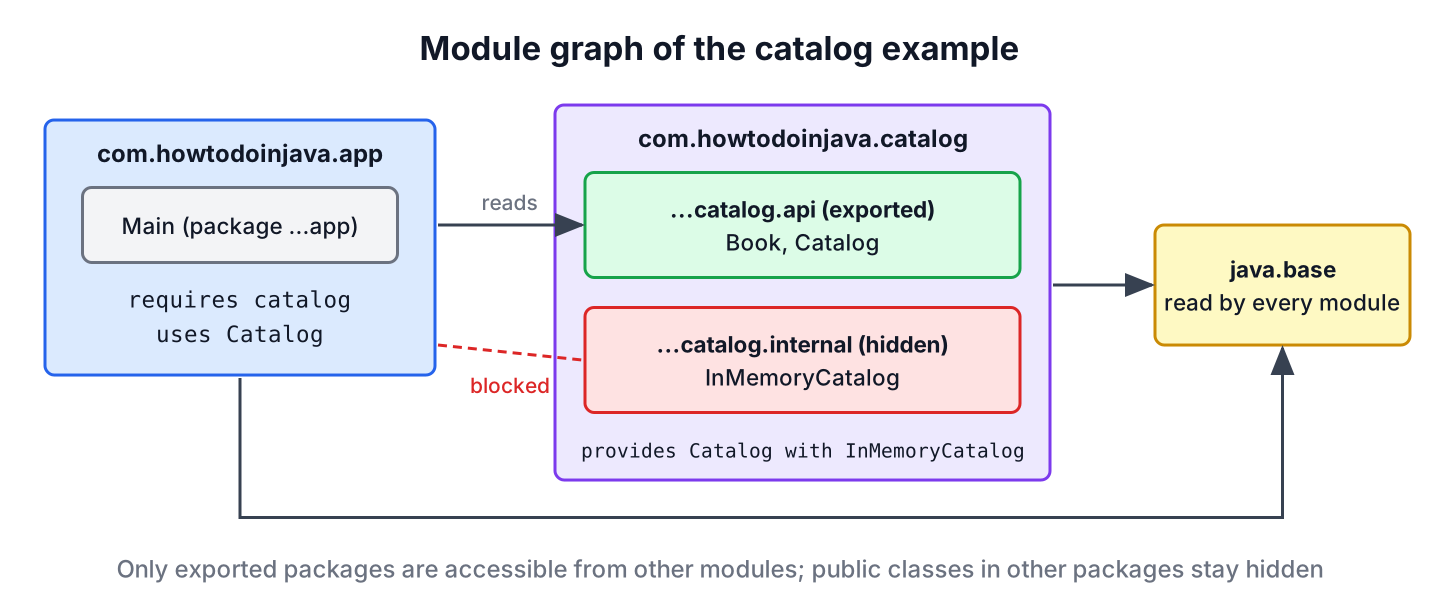
Every module reads java.base without declaring it, because java.base contains java.lang, java.util and the other core packages. Everything else must be declared with requires.
Two changes follow from the descriptor. The first is strong encapsulation, which means that a public class is accessible to other modules only when its package is exported. The second is reliable configuration, which means that the JVM checks at startup that every required module is present and that no package comes from two modules.
Say a payment library ships a com.acme.pay.internal package with public helper classes. On the class path, customers start calling those helpers, and the library team can no longer change them without breaking someone. As a module, the library exports only com.acme.pay, and customer code that imports the internal package does not compile.
| Class path | Module path |
|---|---|
| JARs are a flat list of classes | Each JAR is a module with a name and a descriptor |
| Any public class is accessible from anywhere | A public class is accessible only if its package is exported |
| A missing JAR shows up as NoClassDefFoundError when a class is first used | A missing module stops the JVM at startup |
| Two JARs can contain the same package | A package can belong to one module only |
| java -cp app.jar com.example.Main | java -p mods -m com.example.app/com.example.Main |
2. The module-info.java Descriptor
The descriptor is a source file named module-info.java in the root folder of the module’s sources. It compiles to module-info.class, which sits at the root of the JAR. Module names follow the same reverse-domain style as package names, and the name of the main package is the common choice.
Each line inside the declaration is a directive. The words module, requires, exports and the others are contextual keywords, so they remain legal as variable names in normal code.
| Directive | Meaning |
|---|---|
| requires m; | Our module reads module m and can use its exported packages |
| requires transitive m; | Modules that require us also read m, which is needed when our API returns types from m |
| requires static m; | m is needed at compile time and is optional at runtime |
| exports p; | Public types in package p are accessible to all modules |
| exports p to m1, m2; | Only modules m1 and m2 can access package p |
| opens p; or opens p to m; | Allows deep reflection on package p at runtime, including private members |
| open module m { } | Opens every package of the module for reflection |
| uses S; | Our module looks up implementations of service S with ServiceLoader |
| provides S with Impl; | Our module offers class Impl as an implementation of service S |
The descriptor of java.sql shows several of these directives at once. It exports two packages, passes three modules on to its users with requires transitive, and looks up JDBC drivers as a service.
$ java --describe-module java.sql
java.sql@25.0.4.1
exports java.sql
exports javax.sql
requires java.xml transitive
requires java.logging transitive
requires java.transaction.xa transitive
requires java.base mandated
uses java.sql.Driver
3. Building a Two-Module App With javac and java
The example has two modules. The com.howtodoinjava.catalog module holds a Book record, a Catalog interface and a hidden implementation, and the com.howtodoinjava.app module looks up the catalog and prints the books of one year. The source code builds with JDK 25 and needs no build tool.
src/
  com.howtodoinjava.catalog/
    module-info.java
    com/howtodoinjava/catalog/api/Book.java
    com/howtodoinjava/catalog/api/Catalog.java
    com/howtodoinjava/catalog/internal/InMemoryCatalog.java
  com.howtodoinjava.app/
    module-info.java
    com/howtodoinjava/app/Main.java
Each module has its own folder named after the module. The catalog’s descriptor is the one from the start of the article, and the API package contains two small types.
// src/com.howtodoinjava.catalog/com/howtodoinjava/catalog/api/Book.java
package com.howtodoinjava.catalog.api;

public record Book(String title, int year) {}
// src/com.howtodoinjava.catalog/com/howtodoinjava/catalog/api/Catalog.java
package com.howtodoinjava.catalog.api;
import java.util.List;
public interface Catalog {
List<Book> findByYear(int year);
}// src/com.howtodoinjava.catalog/com/howtodoinjava/catalog/internal/InMemoryCatalog.java
package com.howtodoinjava.catalog.internal;
import com.howtodoinjava.catalog.api.Book;
import com.howtodoinjava.catalog.api.Catalog;
import java.util.List;
public class InMemoryCatalog implements Catalog {
private final List<Book> books = List.of(
new Book("Dune", 1965), new Book("Emma", 1815), new Book("Ubik", 1969));
@Override
public List<Book> findByYear(int year) {
return books.stream().filter(b -> b.year() == year).toList();
}
}The app module requires the catalog and declares that it uses the Catalog service. It never names the implementation class.
// src/com.howtodoinjava.app/module-info.java
module com.howtodoinjava.app {
    requires com.howtodoinjava.catalog;
    uses com.howtodoinjava.catalog.api.Catalog;
}
// src/com.howtodoinjava.app/com/howtodoinjava/app/Main.java
package com.howtodoinjava.app;
import com.howtodoinjava.catalog.api.Catalog;
import java.util.ServiceLoader;
public class Main {
public static void main(String[] args) {
Catalog catalog = ServiceLoader.load(Catalog.class).findFirst().orElseThrow();
System.out.println(catalog.findByYear(1965));
System.out.println(Main.class.getModule().getName());
}
}The –module-source-path option tells javac that each subfolder of src is one module, so one command compiles both. The java launcher takes the module path with -p (short for –module-path) and the module and main class with -m.
javac -d out --module-source-path src -m com.howtodoinjava.app,com.howtodoinjava.catalog
java -p out -m com.howtodoinjava.app/com.howtodoinjava.app.Main
[Book[title=Dune, year=1965]]
com.howtodoinjava.appThe second line confirms that Main runs inside the named module com.howtodoinjava.app. On the class path, the same call returns null, because the class belongs to the unnamed module.
4. What Strong Encapsulation Blocks
The module system turns access mistakes into compile errors, and javac names the module and the package that cause each one. Two errors show up most often in practice.
If the app imports a class from the hidden package, javac reports that the package is not exported.
src/com.howtodoinjava.app/com/howtodoinjava/app/Main.java:3: error: package com.howtodoinjava.catalog.internal is not visible
import com.howtodoinjava.catalog.internal.InMemoryCatalog;
                                ^
  (package com.howtodoinjava.catalog.internal is declared in module com.howtodoinjava.catalog, which does not export it)
If the app’s descriptor forgets requires com.howtodoinjava.catalog;, even the exported package is invisible, because the app module does not read the catalog module.
src/com.howtodoinjava.app/com/howtodoinjava/app/Main.java:3: error: package com.howtodoinjava.catalog.api is not visible
import com.howtodoinjava.catalog.api.Catalog;
                                ^
  (package com.howtodoinjava.catalog.api is declared in module com.howtodoinjava.catalog, but module com.howtodoinjava.app does not read it)
4.1. Reflection and the opens Directive
Exporting a package gives access to its public members at compile time and at runtime. Reflection that reaches non-exported packages or private members needs the package to be open. Without it, loading the hidden class by name works, but creating an instance fails.
Exception in thread "main" java.lang.IllegalAccessException: class com.howtodoinjava.app.Main (in module com.howtodoinjava.app) cannot access class com.howtodoinjava.catalog.internal.InMemoryCatalog (in module com.howtodoinjava.catalog) because module com.howtodoinjava.catalog does not export com.howtodoinjava.catalog.internal to module com.howtodoinjava.appFrameworks such as Hibernate and Jackson create objects and set private fields with reflection, so an entity or DTO package must be open to them. We open the package only to the module that needs it, with a qualified opens.
// module-info.java of the catalog, with reflective access for the app
module com.howtodoinjava.catalog {
    exports com.howtodoinjava.catalog.api;
    opens com.howtodoinjava.catalog.internal to com.howtodoinjava.app;
    provides com.howtodoinjava.catalog.api.Catalog
        with com.howtodoinjava.catalog.internal.InMemoryCatalog;
}
With that line, getDeclaredConstructor().newInstance() succeeds, while a normal import of the package still fails at compile time, because opens grants runtime reflection only.
5. Services With uses and provides
A service is an interface, and a provider is a class that implements it. With ServiceLoader, the app asks for any implementation of Catalog and gets the one that the catalog module declared with provides. The app compiles against the interface only, so we can swap InMemoryCatalog for a database-backed module without touching the app.
JDBC works the same way. The java.sql descriptor declares uses java.sql.Driver, and every JDBC driver JAR declares itself as a provider, which is why we never call Class.forName() for a driver class anymore.
A provider declared only in module-info.java is invisible when the same JARs run on the class path. In that mode, ServiceLoader reads META-INF/services files instead, finds none, and findFirst() returns an empty Optional.
$ java -cp mlib/app.jar:mlib/catalog.jar com.howtodoinjava.app.Main
Exception in thread "main" java.util.NoSuchElementException: No value present
Libraries that must work in both modes ship the provides directive and a META-INF/services/com.howtodoinjava.catalog.api.Catalog file with the class name of the provider.
6. Modular JARs, jdeps and jlink
A modular JAR is a normal JAR file with module-info.class at its root. The jar tool can record the main class, so the launcher needs only the module name.
jar --create --file mlib/catalog.jar -C out/com.howtodoinjava.catalog .
jar --create --file mlib/app.jar --main-class com.howtodoinjava.app.Main -C out/com.howtodoinjava.app .
java -p mlib -m com.howtodoinjava.app
Three JDK tools read the descriptors. The –describe-module option prints a module’s directives, jdeps lists the modules a JAR depends on, and jlink builds a runtime image.
$ jar --describe-module --file mlib/catalog.jar
exports com.howtodoinjava.catalog.api
requires java.base mandated
provides com.howtodoinjava.catalog.api.Catalog with com.howtodoinjava.catalog.internal.InMemoryCatalog
contains com.howtodoinjava.catalog.internal

$ jdeps --module-path mlib -s mlib/app.jar
com.howtodoinjava.app -> com.howtodoinjava.catalog
com.howtodoinjava.app -> java.base
The jlink tool copies only the modules in the dependency graph into a new folder with its own bin/java. For the catalog app, the image contains three modules.
jlink --module-path mlib --add-modules com.howtodoinjava.app \
      --launcher catalog=com.howtodoinjava.app --output image
./image/bin/catalog
On Linux x64, the image is about 61 MB, compared with about 300 MB for the full JDK 25, and image/bin/java –list-modules prints only com.howtodoinjava.app, com.howtodoinjava.catalog and java.base. Container images built on such a runtime start from a smaller base layer.
7. Running Non-Modular Code With Unnamed and Automatic Modules
Most applications, including most Spring Boot applications, still run on the class path, and that remains fully supported. The module system handles such code with two special kinds of modules, so modular and non-modular JARs can be mixed during a migration.
| Module type | How it is created | What it can read | What it exports |
|---|---|---|---|
| Named module | A JAR with module-info.class on the module path | Only the modules it requires | Only the packages it exports |
| Automatic module | A plain JAR on the module path | All modules, including the unnamed module | All of its packages |
| Unnamed module | All JARs and classes on the class path | All modules | All packages, but named modules cannot require it |
An automatic module gets its name from the Automatic-Module-Name entry in the JAR manifest. Without that entry, the name comes from the file name, so text-utils-2.1.0.jar becomes text.utils with version 2.1.0. Library authors add the manifest entry so that the name stays stable before they write a full descriptor.
For old code that reflects on JDK internals, the launcher options –add-opens and –add-exports open a package from the command line, for example –add-opens java.base/java.lang=ALL-UNNAMED. Since Java 17, these options are the only way, because the JDK no longer has the –illegal-access switch.
8. Importing a Whole Module With import module
Since Java 25, a source file can import all packages that a module exports with one module import declaration. The declaration works in any source file, modular or not. A compact source file imports java.base this way even without the line, so the declaration matters most in normal class files and for other modules such as java.sql.
// Words.java, a compact source file, run with: java Words.java
import module java.base;            // optional here, a compact source file imports java.base implicitly

void main() {
    List<String> words = Stream.of("pear", "fig", "plum").sorted().toList();
    IO.println(words);                  // [fig, pear, plum]
}
When two imported modules export a class with the same simple name, the name becomes ambiguous. Importing both java.base and java.desktop makes List fail with “reference to List is ambiguous”, because java.awt.List and java.util.List both match. A single-type import such as import java.util.List; resolves the conflict, since it wins over module imports. The JShell tool runs import module java.base; at startup for the same reason, so its sessions see every java.base package.
9. How the Module System Evolved After Java 9
The module system arrived in Java 9, and the JDK closed its internal packages step by step in later releases. Each row links the JEP, and Java new features covers the remaining changes per release.
| Java version | Change | JEP |
|---|---|---|
| Java 9 | Module system, modular JDK, jlink | JEP 261, JEP 200, JEP 282 |
| Java 16 | Strong encapsulation of JDK internals by default | JEP 396 |
| Java 17 | –illegal-access removed; internals open only with –add-opens | JEP 403 |
| Java 25 | import module declarations; JShell imports java.base at startup | JEP 511 |
10. Java Modules FAQs
Moving an existing codebase to modules raises questions about build tools and package layout before any code changes.
10.1. Do We Need module-info.java in Every Project?
No. Code without a descriptor runs on the class path in the unnamed module, as it did before Java 9. Modules pay off for libraries that want to hide internals and for apps that ship a custom runtime with jlink.
10.2. What Is the Difference Between exports and opens?
The exports directive gives compile-time and runtime access to the public types of a package. The opens directive gives runtime access through reflection to all members of a package, including private ones, but no compile-time access. A package can be both exported and opened.
10.3. Can Two Modules Contain the Same Package?
No, not when one module reads both. Such a split package fails with an error such as “module c reads package com.x from both a and b”. We move the classes into one module or rename one of the packages.
10.4. Can Java Modules Have Cyclic Dependencies?
No. The module graph must not contain cycles, so module a requiring b while b requires a fails with a “cyclic dependence” compile error. We move the shared types into a third module, or let one side depend only on a service interface.
10.5. Do Maven and Gradle Support Modules?
Yes. When src/main/java/module-info.java exists, the Maven Compiler Plugin and Gradle put the dependencies on the module path. Dependencies without a descriptor become automatic modules, and the Maven dependency setup does not change.
11. Conclusion
A Java module groups packages under a name and declares in module-info.java what it exports and what it requires. The compiler and the JVM enforce those declarations, so internal packages stay hidden and a missing dependency stops the app at startup.
We met the main directives, built and ran two modules with javac –module-source-path and java -p … -m, and saw the errors for a missing requires, a missing exports and a missing opens. Services connect modules through interfaces, and jlink turns the module graph into a small runtime.
Class path applications keep working through the unnamed module, and automatic modules help with step-by-step migration. Since Java 25, import module brings the same module names into everyday source files. More core topics are listed in the Java tutorial.
12. References
- JEP 261, Module System
- The State of the Module System
- JLS 25, Module Declarations
- Module Javadoc (Java 25)
- The jlink Command (JDK 25)
- JEP 511, Module Import Declarations
Happy Learning !!

Hi Lokesh,
Nice to see that you have started to come up with the tutorials on Java 9.
The tutorial is good as a starter.
I have not downloaded Netbeans for JDK9 support will give it a try soon.
I was just going through the example to get the concept.
I would suggest you to elaborate a bit more as how to export Module and import packages.