

A statement in Java is one complete instruction that the program runs, such as declaring a variable or calling a method. Simple statements end with a semicolon, whereas statements that contain other statements, such as if and for, end with the closing brace of their body. The types of statements in Java are declaration, expression, control flow and jump statements, plus block, empty, try, synchronized, labeled and assert statements.
Every method body is a list of statements, so we use them in every line of code we write. Knowing the types helps when we read a compiler error such as “not a statement” or “unreachable statement”, or when we choose between a switch statement and a switch expression.
The following example shows every type of statement in a small coffee order program.
// Declaration statement
int cups = 2;

// Expression statements
cups = 3;                                   // assignment
cups++;                                     // increment
System.out.println(cups);                   // method call, prints 4
new StringBuilder("tea");                   // object creation

// Control flow statements
if (cups > 3) {
  System.out.println("big order");          // big order
}
switch (cups) {
  case 4 -> System.out.println("four");     // four
  default -> System.out.println("other");
}
for (int i = 0; i < 2; i++) {
  System.out.println("pour " + i);          // pour 0, pour 1
}

// Jump statements: break, continue, return, throw, yield
while (true) {
  break;                                    // leaves the loop
}

// Block statement
{
  int milk = 1;
  System.out.println("milk " + milk);       // milk 1
}

// Empty statement
;

// try statement
try {
  Integer.parseInt("two");
} catch (NumberFormatException e) {
  System.out.println("not a number");       // not a number
}

// synchronized statement
synchronized (lock) {
  cups--;                                   // cups = 3
}

// Labeled statement
outer:
for (int i = 0; i < 3; i++) {
  for (int j = 0; j < 3; j++) {
    if (j == 1) {
      continue outer;                       // jumps to the next i
    }
  }
}
Notice that each statement either ends with a semicolon or wraps other statements in braces, and the comments either name the kind of statement or show what the line prints.
Next, we put all statement types in one table and show each group with a small example. We also see why price + 1; fails with “not a statement” and how a switch expression differs from a switch statement, including yield and pattern matching in switch (Java 21).
1. What Is a Statement in Java?
A method body is a list of statements, and the JVM runs them one after another, from top to bottom. Control flow statements and jump statements change that order, so the program can skip code or repeat it, and a method can end early.
Each statement does one complete action, for example “add 1 to cups” or “print cups“. Every statement type has its formal definition in chapter 14 of the Java Language Specification.
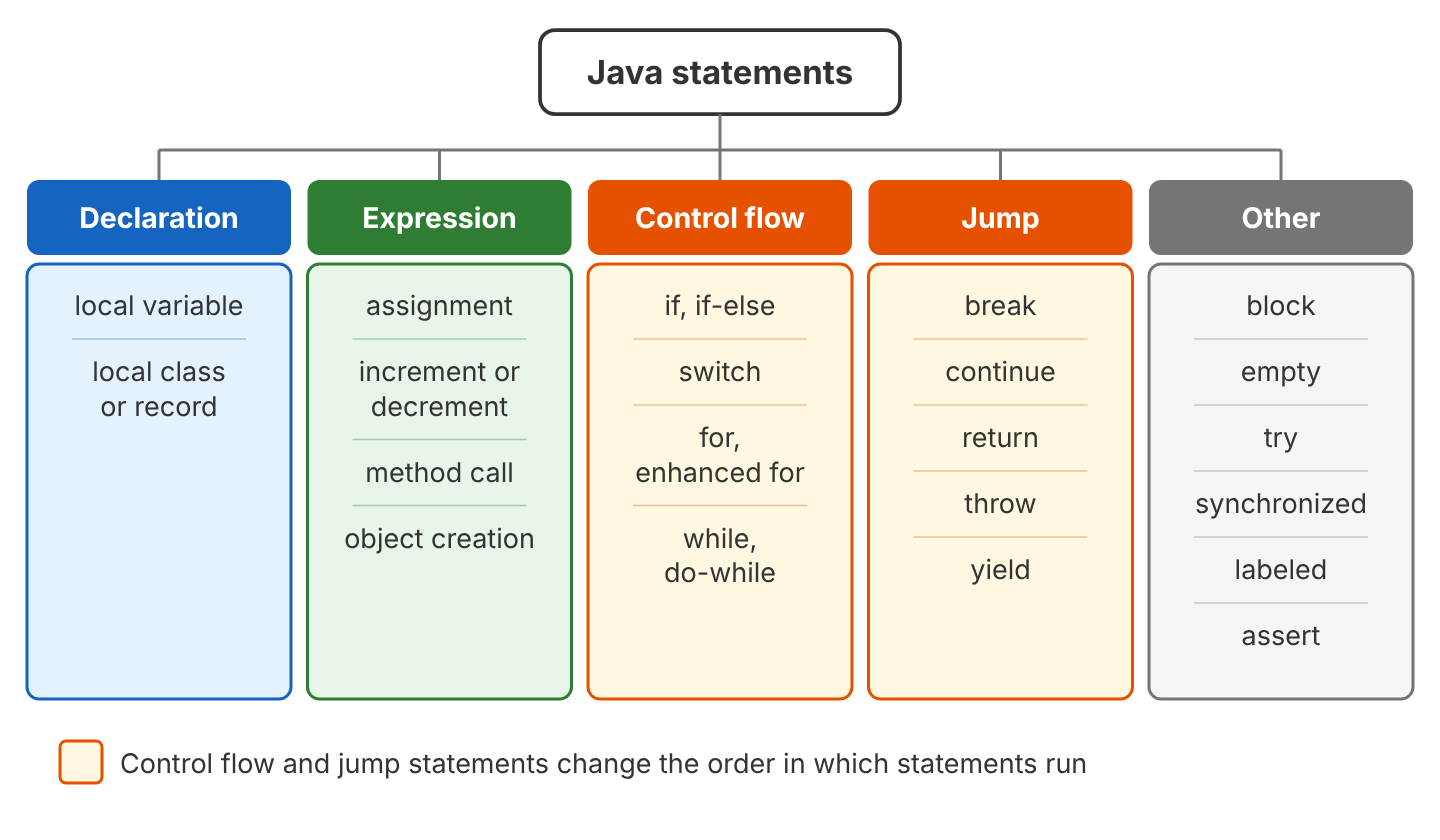
2. Table of All Types of Statements in Java
Java has 21 statement types, which fall into five groups. The last column says in plain words what the statement does when it runs.
| Group | Statement | Example | What it does |
|---|---|---|---|
| Declaration | Local variable declaration | int cups = 2; | Creates a variable |
| Declaration | Local class or record declaration | record Tea(int cups) {} | Creates a type inside a method |
| Expression | Assignment | cups = 3; | Stores a new value |
| Expression | Increment or decrement | cups++; | Adds or subtracts 1 |
| Expression | Method call | System.out.println(cups); | Runs a method |
| Expression | Object creation | new StringBuilder(“tea”); | Creates an object |
| Control flow | if / if-else | if (cups > 3) { … } | Runs code only when a condition is true |
| Control flow | switch | switch (day) { … } | Picks one branch from many |
| Control flow | for, enhanced for | for (int i = 0; i < 3; i++) { … } | Repeats code a known number of times |
| Control flow | while, do-while | while (left > 0) { … } | Repeats code while a condition is true |
| Jump | break | break; | Leaves a loop or switch |
| Jump | continue | continue; | Skips to the next loop round |
| Jump | return | return cups / 2; | Leaves the method, optionally with a value |
| Jump | throw | throw new IllegalArgumentException(); | Throws an exception |
| Jump | yield | yield “medium”; | Gives the value of a switch expression case |
| Other | Block | { int milk = 1; } | Groups statements in braces |
| Other | Empty | ; | Does nothing |
| Other | try | try { … } catch (Exception e) { … } | Handles exceptions |
| Other | synchronized | synchronized (lock) { … } | Lets one thread at a time run the block |
| Other | Labeled | outer: for (…) { … } | Names a loop for break or continue |
| Other | assert | assert cups == 3 : “cups must be 3”; | Checks a condition when run with java -ea |
3. Declaration Statements
A declaration statement creates a variable, so we write the type and the name, optionally followed by a first value. Since Java 10, we can write var instead of the type, and the compiler takes the type from the value on the right side.
int cups;                 // declared, no value yet
int price = 10;           // declared with a value
String drink = "tea";
var total = price * 2;    // the compiler picks int
A local variable must get a value before we read it. When we print cups from the declaration snippet before assigning it, javac stops with “variable cups might not have been initialized”. Fields work differently, because Java variables declared in a class get a default value.
4. Expression Statements
An expression is a piece of code that produces a value, for example price + 5 produces 15 when price is 10. When we put a semicolon after certain expressions, they become expression statements.
int price = 10;
price = price + 5;          // assignment
price += 5;                 // compound assignment
price++;                    // increment
--price;                    // decrement
System.out.println(price);  // 20
new StringBuilder("tea");   // object creation, result is thrown away
The JLS allows only four kinds of expressions to stand alone as a statement, because each of them does something besides producing a value.
- An assignment, such as price = 15 or price += 5.
- An increment or decrement, such as price++ or –price.
- A method call, such as System.out.println(price).
- An object creation with new, such as new StringBuilder(“tea”).
4.1. Expression vs Statement
An expression gives us a value, whereas a statement performs an action. The expression price + 1 computes a new number, but on its own line nothing stores or uses that number. Because price + 1 is none of the four allowed kinds, the compiler rejects it with the error “not a statement”.
int price = 10;
price + 1;
A.java:4: error: not a statement
price + 1;
^
1 errorA plain value such as “tea”; fails with the same not a statement error. To fix the error, we use the value, for example by storing it in a variable or passing it to a method. With price at 20 from the earlier example, total becomes 21.
int total = price + 1;      // the expression is now part of a declaration
System.out.println(total);  // 21
5. Control Flow Statements
By default, the statements in a method run in the order they appear. Control flow statements change that order, so we can choose which code runs or run the same code many times.
5.1. Decision Statements
The if-else statement runs one branch when the condition is true and the other branch when the condition is false. When we need to pick one branch out of many values, the switch statement reads better than a long if-else chain (see section 7).
int cups = 3;

if (cups > 2) {
  System.out.println("large");    // large
} else {
  System.out.println("small");
}
5.2. Loop Statements
A loop statement repeats a block of code until its condition becomes false. Java has four loops, and each fits a different case.
- The for loop repeats code a known number of times.
- The enhanced for loop visits each element of an array or a collection.
- The while loop repeats code as long as a condition is true, so the body may never run.
- The do-while loop checks the condition after the body, so the body runs at least once.
for (int i = 1; i <= 3; i++) {
  System.out.print(i + " ");        // 1 2 3
}

for (String drink : List.of("tea", "coffee")) {
  System.out.print(drink + " ");    // tea coffee
}

int left = 2;
while (left > 0) {
  left--;
}
System.out.println(left);           // 0

do {
  left++;
} while (left < 1);
System.out.println(left);           // 1
6. Jump Statements
A jump statement moves the program to another place right away instead of running the next line. Java has five of them, namely break, continue, return, throw and yield (see section 8 for yield).
- The break statement leaves the loop or switch.
- The continue statement skips the rest of the current loop round and starts the next round.
- The return statement leaves the method and gives a value back to the caller.
- The throw statement stops the method with an exception.
for (int i = 1; i <= 5; i++) {
  if (i == 2) {
    continue;                 // skips 2
  }
  if (i == 4) {
    break;                    // stops at 4
  }
  System.out.print(i + " ");  // 1 3
}
static int half(int cups) {
if (cups < 0) {
throw new IllegalArgumentException("cups cannot be negative");
}
return cups / 2;
}
int halfCups = half(10); // halfCups = 5
int bad = half(-2); // IllegalArgumentException: cups cannot be negativeCode after return or throw in the same block can never run, so the compiler rejects it. When we add System.out.println(“done”); right after return cups / 2;, javac reports an unreachable statement.
C.java:4: error: unreachable statement
    System.out.println("done");
    ^
1 error
6.1. Labeled Statements
A labeled statement puts a name and a colon before a loop. A break or continue with that name acts on the labeled outer loop, whereas a plain break leaves only the inner loop.
int[][] shelves = {{1, 2}, {3, 4}};
search:
for (int[] shelf : shelves) {
  for (int item : shelf) {
    if (item == 3) {
      System.out.println("found 3");  // found 3
      break search;                   // leaves both loops
    }
  }
}
7. Switch Statement vs Switch Expression
A switch statement runs the code of the matching case, whereas a switch expression, added in Java 14, also produces a value that we assign to a variable or return. Say a coffee shop app adds a weekend surcharge, so it must decide whether a day is a weekend day. The two versions that follow make that decision, so we can compare them line by line.
String day = "SAT";
String type1;
switch (day) {
  case "SAT":
  case "SUN":
    type1 = "weekend";
    break;
  default:
    type1 = "weekday";
}
System.out.println(type1);  // weekend
String type2 = switch (day) {
case "SAT", "SUN" -> "weekend";
default -> "weekday";
};
System.out.println(type2); // weekendThe statement version needs a variable declared before the switch and a break in each case, because the old case “SAT”: labels fall through (that is, without break, the program keeps running into the next case). The switch expression uses arrow cases (case … ->), which never fall through, so the code is shorter and safer.
| switch statement | switch expression | |
|---|---|---|
| Produces a value | No | Yes |
| Ends with a semicolon | No | Yes, after the closing brace |
| Needs break | Yes, with case … : labels | No |
| Must cover every value | No (yes when it uses patterns or case null, Java 21) | Yes, often with default |
| Gives a value from a block | Not possible | yield |
A switch expression must cover every possible value of its selector. For an int, that means a default case, and leaving it out stops the build with the error “does not cover all possible input values”.
B.java:3: error: the switch expression does not cover all possible input values
    return switch (cups) {
           ^
1 error
8. The yield Statement
An arrow case with a single value needs no extra keyword. When a case needs several statements, we put them in a block, and the yield statement gives the value of that case.
int cups = 3;
String size = switch (cups) {
  case 1 -> "small";
  case 2, 3 -> {
    String label = "medium";
    yield label + " (" + cups + ")";   // the value of this case
  }
  default -> "large";
};
System.out.println(size);   // medium (3)
A switch expression can also use the old colon labels. In that case every case gives its value with yield, because a colon label cannot use the arrow form.
String sizeOld = switch (cups) {
  case 1:
    yield "small";
  default:
    yield "not small";
};
System.out.println(sizeOld);  // not small
We use yield only inside a switch expression. A switch statement keeps using break and return as before.
9. Pattern Matching in Switch (Java 21)
Since Java 21, a switch can test the type of a value, not only compare it with constants. Each case names a type and a variable, and when the type matches, Java casts the value and stores the result in that variable.
static String describe(Object o) {
  return switch (o) {
    case null -> "nothing";
    case Integer n when n > 10 -> "big number " + n;
    case Integer n -> "number " + n;
    case String s -> "text " + s;
    default -> "something else";
  };
}

String big = describe(42);       // big number 42
String small = describe(7);      // number 7
String text = describe("tea");   // text tea
String none = describe(null);    // nothing
String other = describe(2.5);    // something else
The when part is called a guard, and it adds an extra condition to a case. The case null label handles null. Without case null, any switch throws a NullPointerException when the value is null.
A sealed interface lists all its allowed subtypes, so the compiler knows every possible case and the switch needs no default. A record pattern such as Juice(String fruit) also takes the record’s fields apart, so we can use fruit without calling fruit().
sealed interface Drink permits Tea, Coffee, Juice {}
record Tea(int cups) implements Drink {}
record Coffee(int shots) implements Drink {}
record Juice(String fruit) implements Drink {}

static String price(Drink drink) {
  return switch (drink) {
    case Tea t -> "tea x" + t.cups();
    case Coffee c -> "coffee, " + c.shots() + " shots";
    case Juice(String fruit) -> fruit + " juice";
  };
}

String tea = price(new Tea(2));            // tea x2
String coffee = price(new Coffee(1));      // coffee, 1 shots
String juice = price(new Juice("apple"));  // apple juice
10. Block, Empty and Other Statements
A block statement is a group of statements inside braces, and Java treats the whole block as one statement. A variable declared inside a block exists only inside that block, so using sugar after the closing brace fails with “cannot find symbol”.
int cups = 2;
{
  int sugar = 1;            // visible only inside the block
  cups = cups + sugar;
}
// sugar++;                 // compile error: cannot find symbol
System.out.println(cups);   // 3
An empty statement is a single semicolon, and it does nothing. We sometimes use one as the body of a loop that does all its work in the condition.
int i = 0;
while (i++ < 3)
  ;                         // empty statement as the loop body
System.out.println(i);      // 4
A semicolon right after if (…) is an empty statement, so the block after it always runs. Beginners often make this mistake, and javac does not report it by default. When we compile with javac -Xlint:empty, the compiler prints the warning “empty statement after if”.
int cups = 1;
if (cups > 5);              // the semicolon ends the if statement
{
  System.out.println("always runs");  // always runs
}
The remaining statements each solve one specific problem.
- The try statement runs code and catches exceptions in catch blocks, and the try-with-resources form also closes files and connections.
- The synchronized statement lets only one thread at a time run its block.
- The assert statement checks a condition, but the JVM runs assert statements only when we start the program with java -ea.
assert cups == 3 : "cups must be 3"; // checked only with java -ea11. Types of Statements FAQs
11.1. How many types of statements are there in Java?
The table in section 2 lists 21 statement types, named as in chapter 14 of the Java Language Specification. Many tutorials name only three main groups (declaration, expression and control flow statements), and they count jump, block, empty, try, synchronized, labeled and assert statements as extras.
11.2. What is the difference between an expression and a statement in Java?
An expression produces a value, such as price + 1, whereas a statement performs an action, such as total = price + 1;. Only assignments, increments, decrements, method calls and object creations become statements when we add a semicolon.
11.3. Why does Java say “not a statement”?
The compiler reports not a statement when a line holds an expression whose result nobody uses, such as price + 1; or “tea”;. We fix it by using the result, for example by storing it in a variable or passing it to a method.
11.4. Is if a statement or an expression in Java?
The if construct is a statement in Java, so it produces no value. When we need a value, we use the conditional operator, as in cups > 2 ? “large” : “small”, or a switch expression.
12. Conclusion
Every line of a Java method is one of a small set of statements. Declaration and expression statements do the work, whereas control flow and jump statements decide which work runs and how often.
For new code, we prefer switch expressions with arrow cases over switch statements with break, because arrow cases never fall through and the compiler checks that every value is covered. We use yield only for a case that needs a block, and pattern matching when the switch must check types.
13. References
- Java Language Specification, Chapter 14. Blocks, Statements, and Patterns
- Oracle Java Tutorial: Expressions, Statements, and Blocks
- JEP 361: Switch Expressions
- JEP 441: Pattern Matching for switch
Happy Learning !!
