
Spring Boot virtual threads let every web request, @Async method and scheduled task run on a virtual thread, a lightweight thread that the JVM manages instead of the operating system. When a virtual thread waits for a database or a remote service, it releases the OS thread under it, so a blocking app can serve many more requests at the same time. In Spring Boot 4.1 on Java 25, one property turns it on.
spring.threads.virtual.enabled=trueWe use virtual threads in Spring Boot apps that spend most of each request waiting, such as a REST API that calls slow services or a database.
The following example is a blocking controller of a weather API that calls two slow services, and with the property set, Tomcat runs it on a virtual thread.
@GetMapping("/weather/{city}")
public WeatherReport weather(@PathVariable String city) {
  Forecast forecast = client.forecast(city);         // waits 250 ms, the OS thread is free meanwhile
  AirQuality airQuality = client.airQuality(city);   // waits 250 ms
  return WeatherReport.of(forecast, airQuality);
}
// Thread.currentThread()  = VirtualThread[#35,tomcat-handler-0]/runnable@ForkJoinPool-1-worker-1
// isVirtual()             = true
Notice that the controller has no reactive types, and the thread name starts with VirtualThread.
With a weather API as the running example in this post, we cover what virtual threads are, when they help, how to enable and verify them in Spring Boot, how they compare with platform threads and Spring WebFlux under load, and how to find pinned threads with jcmd and JDK Flight Recorder.
1. What Are Virtual Threads?
A platform thread is the classic java.lang.Thread, a thin wrapper around one operating system thread. OS threads are expensive, so servers keep a fixed pool of them. Tomcat’s pool has 200 threads by default, and a request that waits for a slow service holds one pool thread the whole time.
Virtual threads, final since Java 21 (JEP 444), are also Thread objects, but the JVM schedules them on a few carrier threads (the platform threads of an internal ForkJoinPool, with one worker per CPU core). When a virtual thread blocks on I/O, the JVM unmounts it, which moves its stack to the heap so the carrier can pick up another virtual thread. When the answer arrives, the JVM mounts the virtual thread again, on any free carrier.
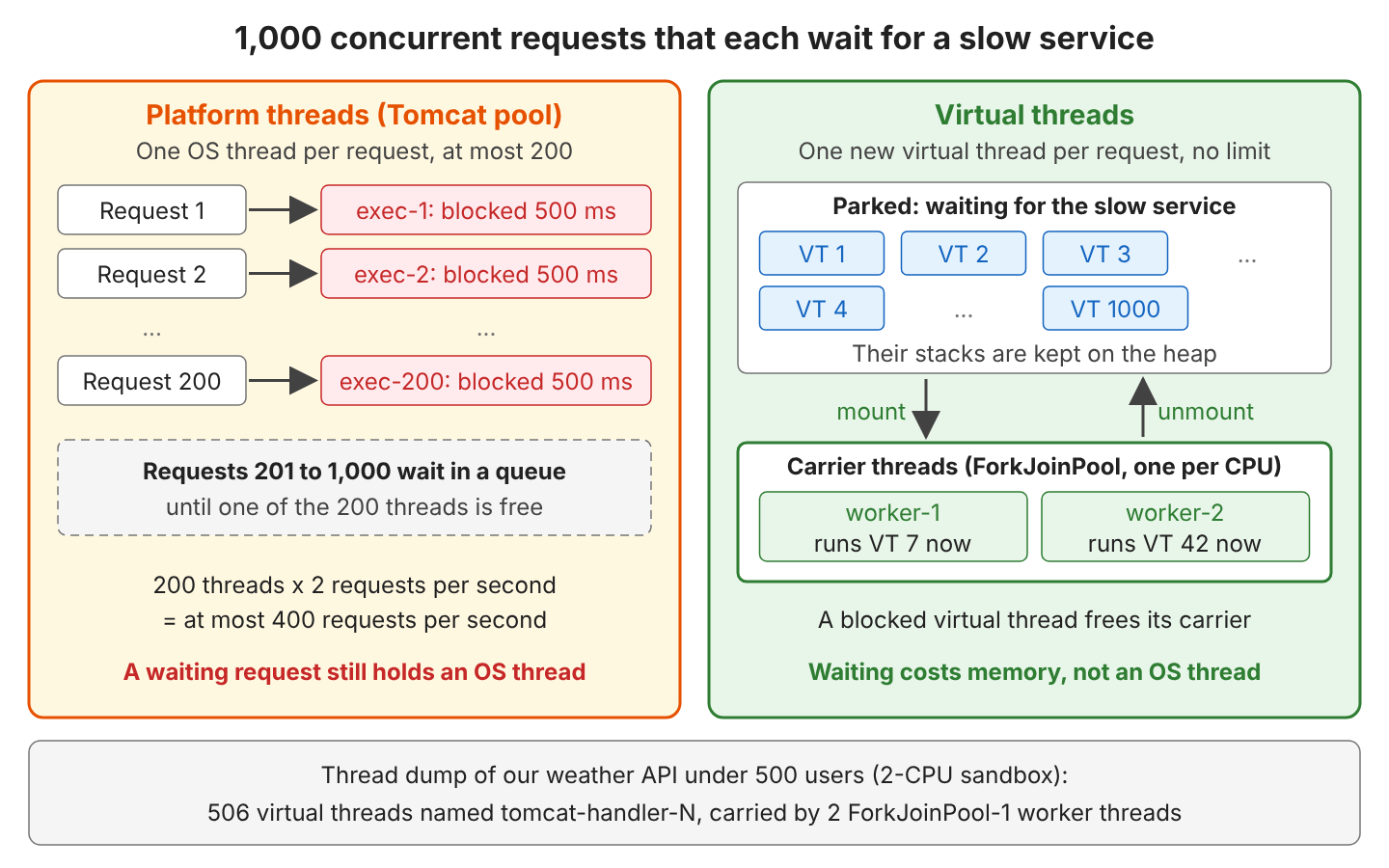
Both kinds of thread run the same Java code, and the difference is in what a blocked thread costs.
| Platform thread | Virtual thread | |
|---|---|---|
| Scheduled by | The operating system | The JVM, on carrier threads |
| Created with | new Thread(), Thread.ofPlatform() | Thread.ofVirtual(), Executors.newVirtualThreadPerTaskExecutor() |
| Cost of a blocked thread | One OS thread | A stack on the heap |
| How many | Hundreds to a few thousand | Millions |
| Pooled? | Yes, because platform threads are expensive | Never; one new thread per task |
| Thread.currentThread().isVirtual() | false | true |
Virtual threads do not run code faster; they let more tasks wait at the same time. A request that takes 500 ms on a platform thread still takes 500 ms on a virtual thread.
1.1. When Do Virtual Threads Help?
Virtual threads help when the number of requests waiting at the same time is larger than the thread pool. For example, a travel site whose search calls several airline APIs spends most of each request waiting. Our load test in section 2.6 shows both cases.
| Workload | Virtual threads help? | Why |
|---|---|---|
| REST API calling slow services or a database, many concurrent users | Yes | Waiting requests no longer hold pool threads |
| Fewer concurrent requests than server.tomcat.threads.max | No | The pool never runs out; same numbers in our test |
| CPU-bound work (image resizing, report calculation) | No | The CPU is the limit, not the threads |
| An app already written with WebFlux | No need | The event loop already does not block |
| Blocking code inside synchronized on Java 21 to 23 | Risky | The thread is pinned to its carrier (section 4.2); fixed in Java 24 |
2. Spring Boot Virtual Threads Example
The following example is a weather API, where GET /weather/{city} calls two slow services (a forecast service and an air quality service) and combines their answers. The complete project uses Spring Boot 4.1.1 (Spring Framework 7.0.9, Tomcat 11.0.24), Java 25 and JUnit 6.1.3, and checks the results with 15 tests (mvn test).
2.1. The Weather API and Its Slow Services
A small stub server simulates both downstream services and answers every call after a fixed delay, which we set in the stub’s own properties file.
server.port=9090
stub.delay=250ms
The stub is a WebFlux app, so it can hold thousands of waiting calls without becoming the bottleneck in a load test. The operator delayElement() sends the answer later without blocking a thread.
@GetMapping("/forecast/{city}")
public Mono<Forecast> forecast(@PathVariable String city) {
  return Mono.just(new Forecast(city, 18, "cloudy"))
      .delayElement(delay);   // 250 ms
}
mvn spring-boot:run -Dspring-boot.run.main-class=com.howtodoinjava.virtualthreads.stub.StubApplication
curl localhost:9090/forecast/london # {"city":"london","temperature":18,"sky":"cloudy"}The weather API needs the Spring MVC starter and the RestClient starter, and the project also has the WebFlux starters for the comparison in section 3.
<dependency>
  <groupId>org.springframework.boot</groupId>
  <artifactId>spring-boot-starter-webmvc</artifactId>
</dependency>
<dependency>
  <groupId>org.springframework.boot</groupId>
  <artifactId>spring-boot-starter-restclient</artifactId>
</dependency>
2.2. Turning On Virtual Threads
Virtual threads need Java 21 or later, and the Spring Boot docs strongly recommend Java 24 or later because of the pinning fix in section 4.2. After that, we set one property.
spring.threads.virtual.enabled=true

# Kept the same for both runs of the load test (ignored with virtual threads)
server.tomcat.threads.max=200

# RestClient on the JDK HttpClient (WebFlux puts Reactor Netty on the classpath too)
spring.http.clients.imperative.factory=jdk

weather.stub-url=http://localhost:9090
weather.air-quality-limit=50
The spring.threads.virtual.enabled property switches four components of our Spring Boot 4.1.1 app to virtual threads.
| Component | virtual.enabled=false | virtual.enabled=true |
|---|---|---|
| Tomcat request threads | Pool http-nio-8080-exec-N, max 200 | New virtual thread tomcat-handler-N per request |
| applicationTaskExecutor (@Async) | ThreadPoolTaskExecutor | SimpleAsyncTaskExecutor, virtual thread task-N |
| taskScheduler (@Scheduled) | ThreadPoolTaskScheduler | SimpleAsyncTaskScheduler |
| JDK HttpClient behind RestClient | The JDK client’s default executor | Virtual threads named httpclient-N |
With virtual threads on, pool properties such as server.tomcat.threads.max and spring.task.execution.pool.max-size have no effect, because there is no pool left to size. The HttpClient row applies only when RestClient uses the JDK client, which is why we set spring.http.clients.imperative.factory=jdk.
2.3. A Blocking Controller With RestClient
The client is ordinary blocking code. The method body() waits until the stub answers, and the virtual thread unmounts during that wait.
public Forecast forecast(String city) {
  return restClient.get()
      .uri("/forecast/{city}", city)
      .retrieve()
      .body(Forecast.class);           // waits 250 ms
}
The controller calls both services one after the other. WeatherReport.of() also records the current thread, so we can see it in the response.
@GetMapping("/weather/{city}")
public WeatherReport weather(@PathVariable String city) {
  Forecast forecast = client.forecast(city);
  AirQuality airQuality = client.airQuality(city);
  return WeatherReport.of(forecast, airQuality);
}

// WeatherReport.of(): thread = Thread.currentThread().toString(), virtual = isVirtual()
mvn spring-boot:run
curl localhost:8080/weather/london{"city":"london","temperature":18,"sky":"cloudy","aqi":42,
"thread":"VirtualThread[#35,tomcat-handler-0]/runnable@ForkJoinPool-1-worker-1","virtual":true}We read the thread name as virtual thread number 35, named tomcat-handler-0 by Tomcat, currently mounted on carrier ForkJoinPool-1-worker-1.
2.4. Checking That a Request Runs on a Virtual Thread
A test makes the check repeatable. We start the app on a random port, call the endpoint and read the virtual flag that Thread.currentThread().isVirtual() set on the server.
@SpringBootTest(classes = WeatherApplication.class, webEnvironment = WebEnvironment.RANDOM_PORT)
class VirtualThreadsTest {

  @Test
  void requestRunsOnVirtualThread() {
    WeatherReport report = api().get().uri("/weather/london").retrieve().body(WeatherReport.class);

    assertThat(report.virtual()).isTrue();
    assertThat(report.thread()).contains(",tomcat-handler-");
  }

  @Test
  void asyncMethodRunsOnVirtualThread() throws Exception {
    Thread thread = auditService.audit(report).get();   // an @Async method that returns its thread
    assertThat(thread.isVirtual()).isTrue();
  }
}
The same tests with spring.threads.virtual.enabled=false show the platform threads.
virtual.enabled=true
  Request thread: VirtualThread[#75,tomcat-handler-0]/runnable@ForkJoinPool-1-worker-1
  @Async thread:  VirtualThread[#126,task-1]/terminated
  HttpClient executor thread: VirtualThread[#125,httpclient-42]/terminated

virtual.enabled=false
  Request thread: Thread[#50,http-nio-auto-1-exec-1,5,main]
  @Async thread:  Thread[#65,task-1,5,main]
The name http-nio-auto-1 is what Tomcat uses for a random port, whereas on port 8080 the name is http-nio-8080-exec-1.
2.5. Calling Both Services in Parallel
The two calls do not depend on each other, so we can run them at the same time. For example, the weather page shows the forecast and the air quality side by side, and neither call needs the other’s result. For a short task, we create a new virtual thread instead of borrowing one from a pool. The executor from Executors.newVirtualThreadPerTaskExecutor() starts one virtual thread per submit(), and closing the executor in try-with-resources waits for both tasks.
@GetMapping("/weather/{city}/parallel")
public WeatherReport weatherParallel(@PathVariable String city) throws Exception {
  try (ExecutorService executor = Executors.newVirtualThreadPerTaskExecutor()) {
    Future<Forecast> forecast = executor.submit(() -> client.forecast(city));
    Future<AirQuality> airQuality = executor.submit(() -> client.airQuality(city));
    return WeatherReport.of(forecast.get(), airQuality.get());
  }
}
Each wait parks only its own virtual thread, so the two waits overlap.
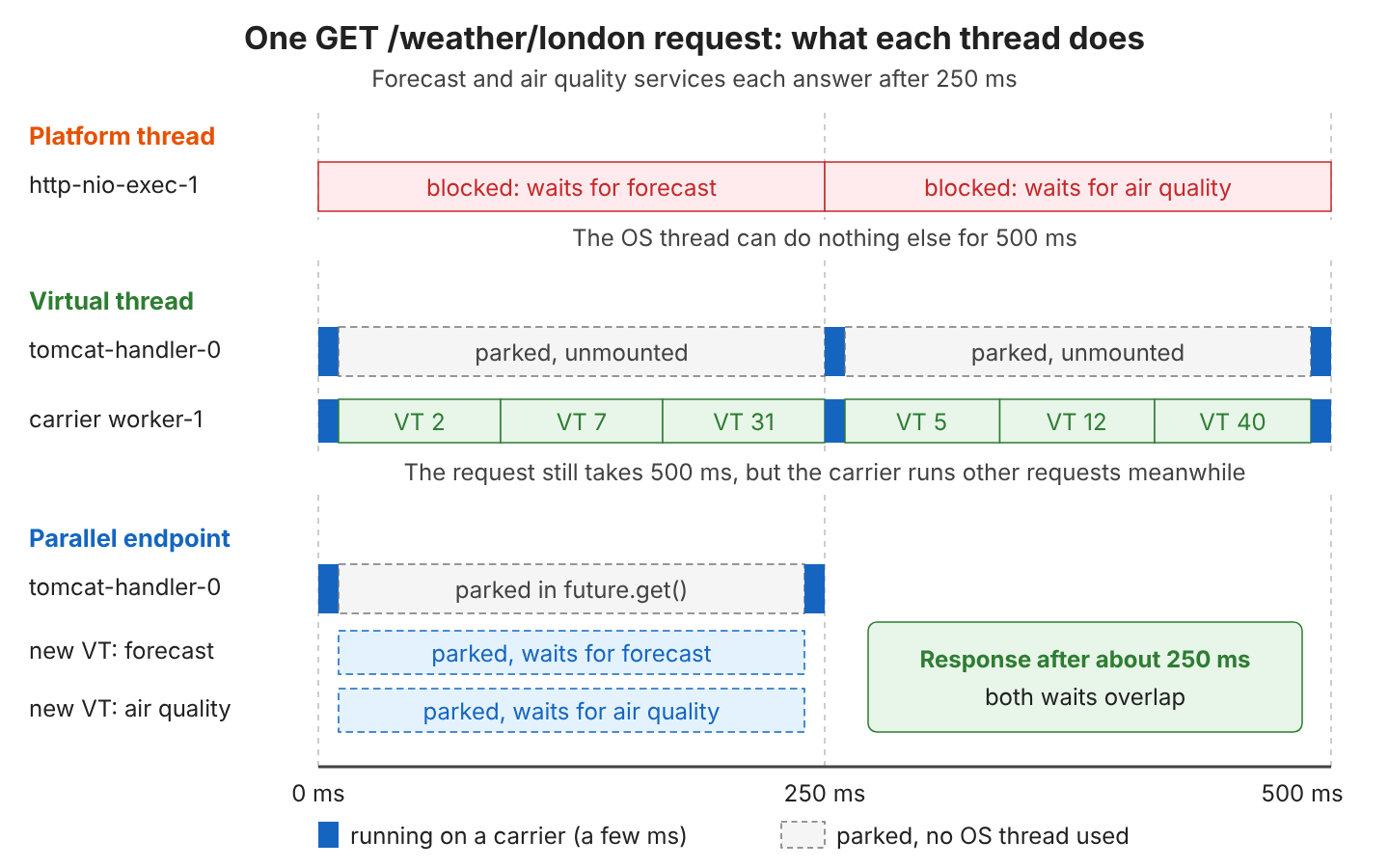
sequential 555 ms, parallel 287 msJava 25 also has StructuredTaskScope for this pattern, but structured concurrency is still a preview API (JEP 505).
2.6. Load Testing Platform vs Virtual Threads
We sent the same load to two copies of the weather API, one with spring.threads.virtual.enabled=false and one with true, both with server.tomcat.threads.max=200. The load tool is hey, a small HTTP load generator, where -c is the number of concurrent users and -n the total number of requests.
go install github.com/rakyll/hey@latest

hey -n 2000 -c 200 http://localhost:8080/weather/london     # warm-up, result ignored
hey -n 10000 -c 1000 http://localhost:8080/weather/london
Summary:
Total: 14.0603 secs
Requests/sec: 711.2200
Latency distribution:
50%% in 1.2192 secs
99%% in 2.4161 secs
Status code distribution:
[200] 10000 responsesEvery request waits 2 x 250 ms, so with 200 threads, the platform version can finish at most 200 / 0.5 s = 400 requests per second. During the load tests, we raised weather.air-quality-limit to 10,000, so the semaphore from section 5.2 did not limit the results.
The numbers are measurements on a small sandbox with 2 CPUs shared with other jobs, and hey, the stub and the app run on the same machine. Each value is the median of three runs.
| Load | Platform threads | Virtual threads | |
|---|---|---|---|
| 100 users, 3,000 requests | Requests/s | 188 | 180 |
| Median latency | 0.52 s | 0.53 s | |
| 1,000 users, 10,000 requests | Requests/s | 374 (342 to 382) | 506 (425 to 1,154) |
| Median latency | 2.63 s | 1.74 s | |
| 99th percentile | 2.94 s | 4.34 s | |
| CPU time per request | 0.58 to 0.72 ms | 0.40 to 0.47 ms |
With 100 users, both versions are the same, because 100 waiting requests fit in 200 threads. With 1,000 users, the platform version stays under its 400 req/s limit, and requests queue for a thread. The virtual thread version passed that limit in every run, but its numbers varied, because our two shared CPUs, not the threads, became the limit (we read the CPU time of each process from /proc/PID/stat before and after a run).
The 99th percentile of the virtual thread version also moved a lot between runs, from 2.42 s to 4.88 s, so we do not draw conclusions from it.
3. Virtual Threads vs Spring WebFlux
Spring WebFlux solves the same problem in another way. WebFlux never blocks a thread. Each call returns a Mono (a value that arrives later), and a few Netty event loop threads run all the callbacks. Virtual threads keep blocking code and make the blocking cheap.
3.1. The Same Endpoint in WebFlux
The WebFlux version uses WebClient. The two sequential calls become a flatMap() chain, and the parallel version uses Mono.zip().
@GetMapping("/weather/{city}")
public Mono<WeatherReport> weather(@PathVariable String city) {
  return forecast(city)
      .flatMap(forecast -> airQuality(city)
          .map(airQuality -> WeatherReport.of(forecast, airQuality)));
}

@GetMapping("/weather/{city}/parallel")
public Mono<WeatherReport> weatherParallel(@PathVariable String city) {
  return Mono.zip(forecast(city), airQuality(city), WeatherReport::of);
}

private Mono<Forecast> forecast(String city) {
  return webClient.get().uri("/forecast/{city}", city).retrieve().bodyToMono(Forecast.class);
}
{"city":"london","temperature":18,"sky":"cloudy","aqi":42,
"thread":"Thread[#30,reactor-http-epoll-4,5,main]","virtual":false}Netty builds the report on an event loop thread, not on a virtual thread. The WebFlux test measured sequential 531 ms, parallel 277 ms, the same pattern as in section 2.5.
3.2. Performance Comparison
We ran the same hey commands against the WebFlux app on the same sandbox. With 1,000 users, WebFlux reached 883 requests per second (699 to 899) with a median latency of 1.08 s and a 99th percentile of 1.35 s.
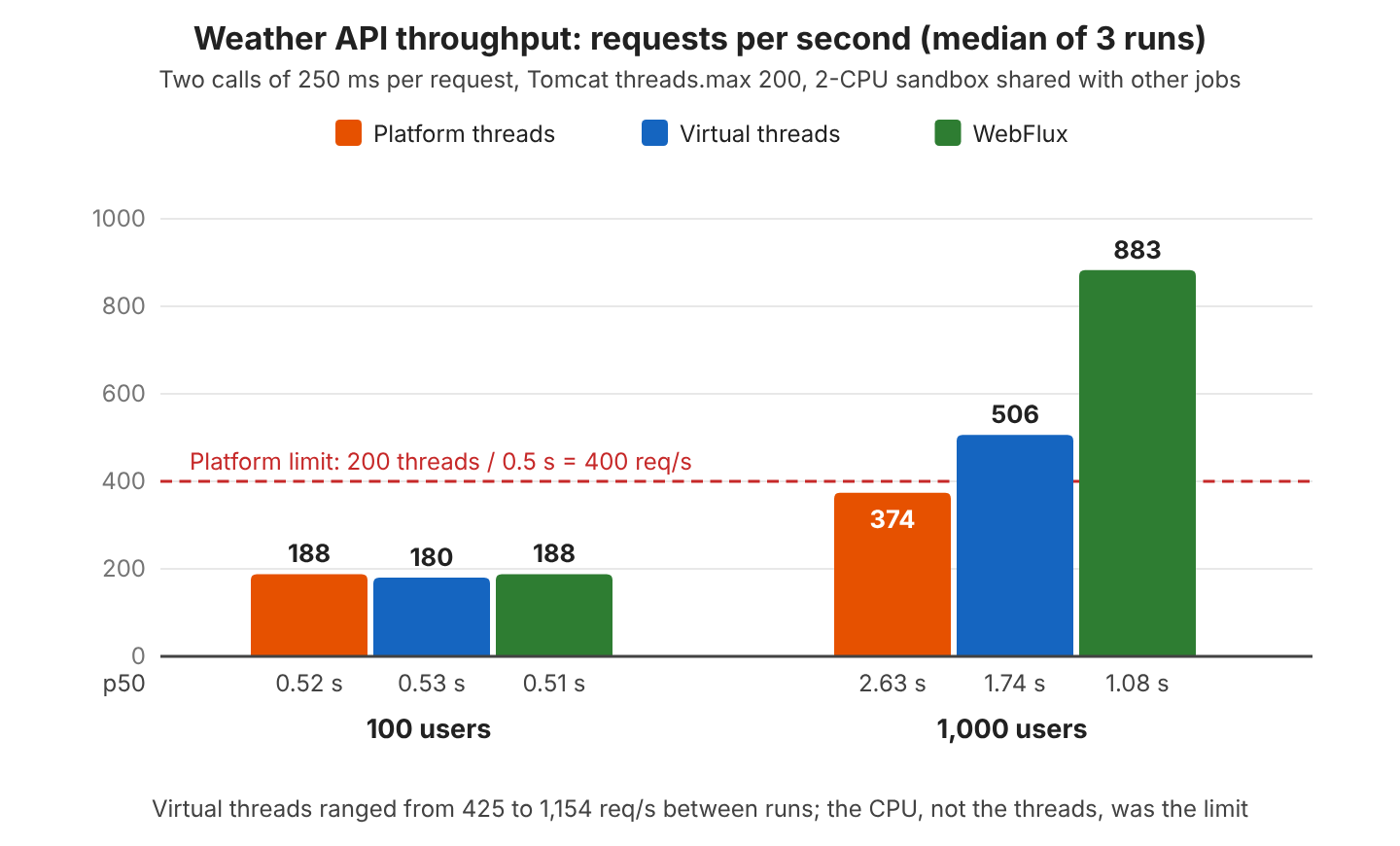
WebFlux used 0.28 to 0.33 ms of CPU time per request in our runs, less than both MVC versions, and on a machine where the CPU is the limit, less CPU per request means more requests per second. The waits alone would allow 1,000 users / 0.5 s = 2,000 requests per second, but on our sandbox the CPU ran out first for every version.
3.3. Which One Should We Choose?
For a new blocking-style Spring MVC app, we enable virtual threads first and measure. WebFlux fits better when the app streams data with back-pressure (a slow client slows down the producer), or when CPU per request matters most. For example, a stock price feed that pushes updates to thousands of browsers fits WebFlux.
| Question | Virtual threads (Spring MVC) | Spring WebFlux |
|---|---|---|
| Code style | Plain blocking code, normal stack traces | Mono/Flux chains, operators to learn |
| Existing code and libraries | JDBC, JPA, RestClient work as they are | Needs reactive drivers (R2DBC, WebClient) |
| Debugging | Thread dumps and debuggers show the request | Stack traces show the event loop, not the request |
| Streaming, back-pressure, server-sent events | Possible, but not the strength | Built in |
| CPU per request in our test | 0.40 to 0.47 ms | 0.28 to 0.33 ms |
| Migration cost | One property | Rewrite of the I/O code |
4. Debugging and Monitoring Virtual Threads
Virtual threads are real Thread objects, so the JDK tools see them. Two tools cover most questions. A thread dump shows what each request is waiting for, and JDK Flight Recorder (JFR) records pinning.
4.1. Thread Dumps With jcmd
The classic jstack thread dump lists only platform threads. The command jcmd Thread.dump_to_file lists virtual threads too, in plain text or JSON.
jcmd <pid> Thread.dump_to_file -format=json threads.json
jcmd <pid> Thread.dump_to_file threads.txt
We took a dump while hey sent 500 concurrent users, and each request was a virtual thread parked in RestClient, waiting for the stub.
#2069 "tomcat-handler-525" virtual WAITING 2026-10-03T17:39:01.179774508Z
    at java.base/java.lang.VirtualThread.park(VirtualThread.java:745)
    - parking to wait for <java.util.concurrent.CompletableFuture$Signaller@10183f17>
    ...
    at java.base/java.util.concurrent.CompletableFuture.get(CompletableFuture.java:2093)
    at org.springframework.http.client.JdkClientHttpRequest.executeInternal(JdkClientHttpRequest.java:126)
    ...
The JSON file groups threads by container. In our dump the root container held 506 tomcat-handler and 42 httpclient virtual threads, and the ForkJoinPool-1 container held 2 carrier threads, one per CPU.
4.2. Pinning After JDK 24
A virtual thread is pinned when it cannot unmount while it blocks, so it keeps its carrier busy. With only one carrier per CPU, a few pinned threads can stall every other request. On Java 21 to 23, blocking inside a synchronized block or method pinned the thread, but JEP 491 in JDK 24 removed that case, so on Java 25 synchronized is fine again.
Some cases still pin. We ran each case on a virtual thread that blocks for 50 ms and recorded the JFR events (PinningTest in the project).
| Virtual thread blocks while … | Pinned on Java 25? | pinnedReason in JFR |
|---|---|---|
| Inside synchronized (lock) | No | No event |
| Holding a ReentrantLock | No | No event |
| Inside a Java callback called from native code (FFM qsort upcall) | Yes | Native or VM frame on stack |
| Inside a static initializer (static { } block) | Yes | VM call to PinningTest$SlowInit.<clinit> on stack |
The FFM (Foreign Function and Memory) API lets Java call C functions, and in an upcall, the C function calls back into Java. Few Spring apps do either in their own code, but a library with native code can.
static class SlowInit {
  static final String VALUE;

  static {
    pause();          // blocks 50 ms: jdk.VirtualThreadPinned, the carrier is held
    VALUE = "ready";
  }
}
The old -Djdk.tracePinnedThreads option that many tutorials show has no effect since JDK 24, so we use JFR instead.
4.3. Recording Pinned Threads With JFR
JFR writes a jdk.VirtualThreadPinned event when a virtual thread stays pinned longer than 20 ms. The event is on by default, so we only start a recording and print the events.
java -XX:StartFlightRecording=filename=recording.jfr -jar target/spring-boot-virtual-threads-1.0.0.jar
jfr print --events jdk.VirtualThreadPinned recording.jfr
jdk.VirtualThreadPinned {
startTime = 23:14:27.143 (2026-10-03)
duration = 67.6 ms
blockingOperation = "LockSupport.park"
pinnedReason = "Native or VM frame on stack"
carrierThread = "ForkJoinPool-1-worker-2" (javaThreadId = 79)
eventThread = "" (javaThreadId = 644, virtual)
stackTrace = [ ... ]
}The stackTrace shows the code that blocked, and pinnedReason says why the thread could not unmount. The weather API itself recorded no jdk.VirtualThreadPinned event while hey sent it 5,000 requests from 500 users. JFR has three more virtual thread events, namely jdk.VirtualThreadStart and jdk.VirtualThreadEnd (off by default, because they are frequent) and jdk.VirtualThreadSubmitFailed (on).
5. Spring Boot Virtual Threads FAQs
5.1. Should We Pool Virtual Threads?
No. Thread pools exist because platform threads are expensive, whereas a virtual thread is cheap, so each task gets a new one. Both versions compile, but only the second one creates a new virtual thread for each task.
// Wrong: a pool of virtual threads
ExecutorService pool = Executors.newFixedThreadPool(50, Thread.ofVirtual().factory());

// Right: one new virtual thread per task
try (ExecutorService executor = Executors.newVirtualThreadPerTaskExecutor()) {
  executor.submit(() -> client.forecast(city));
}
The same applies to Spring beans. Any Executor bean of our own switches off the virtual applicationTaskExecutor that Spring Boot creates. In our test, a ThreadPoolTaskExecutor bean with the prefix report- did not even run the @Async method on it. Spring found two task executors (ours and the scheduler bean, which is also a TaskExecutor), could not pick one, and fell back to a new platform thread. We let Spring Boot create the executor instead.
@Async thread with a custom pool: Thread[#652,SimpleAsyncTaskExecutor-1,5,main]5.2. How Do We Limit Calls to a Slow Downstream Service?
A thread pool used to limit concurrency as a side effect, because 50 threads meant at most 50 calls, whereas with virtual threads, 1,000 requests make 1,000 calls at once. When a downstream service allows only a few calls at a time, we use a Semaphore, not a pool. A semaphore holds a fixed number of permits, and a thread without a permit waits.
private final Semaphore airQualityPermits = new Semaphore(properties.airQualityLimit());

public AirQuality airQuality(String city) {
  airQualityPermits.acquireUninterruptibly();   // a virtual thread waits here cheaply
  try {
    return restClient.get().uri("/air-quality/{city}", city).retrieve().body(AirQuality.class);
  } finally {
    airQualityPermits.release();
  }
}
30 requests, max air quality calls at the same time: 5A database connection pool already limits the concurrent queries, so with virtual threads, the pool size, not the thread count, decides how many queries run at once.
5.3. Is ThreadLocal Safe With Virtual Threads?
Yes, a ThreadLocal works the same way, and Spring still uses ThreadLocal for the security context and transactions. The problem is caching, because code that keeps an expensive object in a ThreadLocal to reuse it across tasks gets no reuse, because each task has a new thread. The fix is a shared, thread-safe object instead of a per-thread cache.
// Creates a new SimpleDateFormat for every request on virtual threads
static final ThreadLocal<SimpleDateFormat> FORMAT = ThreadLocal.withInitial(SimpleDateFormat::new);

// Thread-safe and shared by all threads
static final DateTimeFormatter FORMATTER = DateTimeFormatter.ISO_LOCAL_DATE;
Large values in thread locals also multiply the memory per request, and there can be thousands of requests at once.
5.4. Does server.tomcat.threads.max Still Matter?
No. With virtual threads, Tomcat starts a new virtual thread for every request and ignores server.tomcat.threads.max, and our thread dump in section 4.1 showed 506 request threads while the property was 200. The limits that still apply are the connection settings.
| Property | Default | Meaning with virtual threads |
|---|---|---|
| server.tomcat.threads.max | 200 | Ignored |
| server.tomcat.max-connections | 8192 | Open connections Tomcat accepts; the real cap on concurrent requests |
| server.tomcat.accept-count | 100 | Queue for connections above max-connections |
5.5. Why Does the Application Stop Right After Startup?
Virtual threads are daemon threads, threads that do not keep the JVM running, and the JVM exits when only daemon threads are left. An app without a web server, for example one that only runs @Scheduled jobs, can stop right after startup. For that case, we set one more property, which keeps the JVM running.
spring.main.keep-alive=true6. Conclusion
The property spring.threads.virtual.enabled=true moves Tomcat requests, @Async methods, scheduled tasks and the JDK HttpClient to virtual threads, and our tests confirmed the switch with Thread.currentThread().isVirtual(). Virtual threads remove the thread pool limit for I/O-bound apps without changing the code, but they do not make a single request faster or add CPU.
On Java 25, synchronized no longer pins, whereas native callbacks and class initializers still pin, and JFR shows those cases. We create a new virtual thread per task, limit downstream calls with a Semaphore, and keep WebFlux for streaming or for apps where CPU per request is the main cost.
7. References
- Spring Boot 4.1 Reference: Virtual Threads
- Spring Boot 4.1 Reference: Task Execution and Scheduling
- JEP 444: Virtual Threads
- JEP 491: Synchronize Virtual Threads without Pinning
- Java 25 Core Libraries: Virtual Threads
- The jcmd Command (Java 25)
- The jfr Command (Java 25)
- Spring Framework Reference: Spring WebFlux
- hey HTTP load generator
Happy Learning !!
