
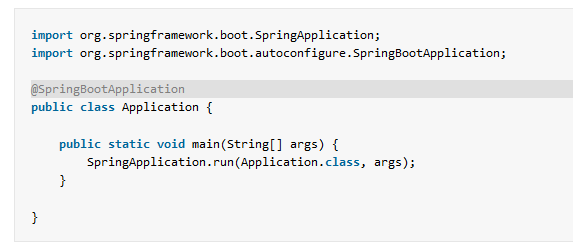
Use @SpringBootApplication to start an application; use @AutoConfiguration when a reusable library contributes beans conditionally. These annotations have different jobs. An application declares its own behavior, while auto-configuration supplies defaults that should back off when the application provides a replacement. The example below shows the distinction in Spring Boot 4.1.2 and checks three runtime outcomes.
1. Choose the Annotation for the Job
The table separates ordinary application code from auto-configuration code. Many lists put these annotations side by side without saying who should use each one.
| Annotation | Typical place | What it does |
|---|---|---|
@SpringBootApplication |
Application entry point | Enables auto-configuration and component scanning and allows application bean definitions. |
@Configuration and @Bean |
Application configuration | Declare beans owned by the application. |
@AutoConfiguration |
Reusable library or starter | Declares beans that Boot may load as defaults. |
@ConditionalOnProperty |
Conditional configuration or bean | Applies configuration only when a property meets the condition. |
@ConditionalOnMissingBean |
Auto-configured default bean | Lets an application-defined bean take precedence. |
Our example has a GreetingService interface, a default implementation supplied by auto-configuration, and an optional application implementation. A controller reports whichever implementation is available:
package com.howtodoinjava.annotations;

public interface GreetingService {
    String greeting();
}
The simple service keeps the bean-selection behavior visible. In a real starter, the default could be a client or integration that depends on a library and its settings. The same conditional mechanism applies.
2. Start the Application with @SpringBootApplication
Place the main class in the application’s root package. Here com.howtodoinjava.annotations is the package scanned for application components:
package com.howtodoinjava.annotations;

import org.springframework.boot.SpringApplication;
import org.springframework.boot.autoconfigure.SpringBootApplication;

@SpringBootApplication
public class AnnotationsApplication {
    public static void main(String[] args) {
        SpringApplication.run(AnnotationsApplication.class, args);
    }
}
@SpringBootApplication includes @EnableAutoConfiguration, @ComponentScan, and @SpringBootConfiguration. The last annotation is a Boot-specific form of Spring’s @Configuration. Component scanning discovers the controller and application configuration in this package and its subpackages. Auto-configuration candidates are found through Boot’s separate import mechanism, which we set up next. See the Spring Boot auto-configuration explanation for the complete startup path.
3. Register a Default with @AutoConfiguration
The default configuration lives in com.howtodoinjava.autoconfigure, outside the application’s component-scan package. That placement matters: it ensures the class is loaded through auto-configuration registration rather than accidentally discovered as an ordinary component.
package com.howtodoinjava.autoconfigure;

import com.howtodoinjava.annotations.GreetingService;
import org.springframework.boot.autoconfigure.AutoConfiguration;
import org.springframework.boot.autoconfigure.condition.ConditionalOnMissingBean;
import org.springframework.boot.autoconfigure.condition.ConditionalOnProperty;
import org.springframework.context.annotation.Bean;

@AutoConfiguration
@ConditionalOnProperty(prefix = "greeting", name = "enabled",
        havingValue = "true", matchIfMissing = true)
public class GreetingAutoConfiguration {
    @Bean
    @ConditionalOnMissingBean(GreetingService.class)
    GreetingService greetingService() {
        return () -> "Hello from auto-configuration";
    }
}
The class has two conditions. @ConditionalOnProperty controls whether this configuration applies; the default is enabled when the property is absent because matchIfMissing=true. @ConditionalOnMissingBean controls the bean method: it creates the default only if no GreetingService bean has already been defined. These are separate checks, so turning the feature off and supplying an application replacement produce different outcomes.
Boot looks for candidate names in META-INF/spring/org.springframework.boot.autoconfigure.AutoConfiguration.imports. The project file contains one fully qualified class name:
com.howtodoinjava.autoconfigure.GreetingAutoConfiguration
The imports file is part of the packaged JAR. In a reusable library it lets an application discover the configuration without adding @Import to its main class. Merely annotating a class with @AutoConfiguration is not enough if the class is outside component scanning and has no registration entry. The official guide to creating auto-configuration documents this file and the supported conditions.
4. Observe the Property Condition at Runtime
The controller receives an ObjectProvider so it can handle the case where the property condition prevents a GreetingService bean from existing. A mandatory constructor parameter would make startup fail when the feature is deliberately disabled.
package com.howtodoinjava.annotations;

import org.springframework.beans.factory.ObjectProvider;
import org.springframework.web.bind.annotation.GetMapping;
import org.springframework.web.bind.annotation.RestController;

@RestController
public class GreetingController {
    private final ObjectProvider<GreetingService> service;

    public GreetingController(ObjectProvider<GreetingService> service) {
        this.service = service;
    }

    @GetMapping("/greeting")
    String greeting() {
        GreetingService available = service.getIfAvailable();
        return available == null ? "Greeting is disabled" : available.greeting();
    }
}
The project uses the MVC starter and listens at 127.0.0.1:9093. Build and start it without a greeting property, then request the endpoint:
mvn package
java -jar target/spring-boot-annotations-demo-1.0.0.jar
curl http://127.0.0.1:9093/greeting
# Hello from auto-configuration
The missing property matches the default in @ConditionalOnProperty, and no application bean exists, so Boot creates the auto-configured service. Stop the process and restart with --greeting.enabled=false:
java -jar target/spring-boot-annotations-demo-1.0.0.jar --greeting.enabled=false
curl http://127.0.0.1:9093/greeting
# Greeting is disabled
Now the property condition prevents the auto-configuration from contributing a service. The controller still starts because it asks ObjectProvider for the bean only when the request arrives, then handles its absence. This is a useful check when a starter feature should be optional.
5. Let Application Configuration Override the Default
An application can supply its own GreetingService. The sample enables this configuration only when greeting.custom=true, allowing us to compare it with the default in the same project:
package com.howtodoinjava.annotations;

import org.springframework.boot.autoconfigure.condition.ConditionalOnProperty;
import org.springframework.context.annotation.Bean;
import org.springframework.context.annotation.Configuration;

@Configuration
@ConditionalOnProperty(prefix = "greeting", name = "custom", havingValue = "true")
public class CustomGreetingConfiguration {
    @Bean
    GreetingService customGreetingService() {
        return () -> "Hello from the application";
    }
}
Run the application with the custom setting:
java -jar target/spring-boot-annotations-demo-1.0.0.jar --greeting.custom=true
curl http://127.0.0.1:9093/greeting
# Hello from the application
Boot sees the application bean, so @ConditionalOnMissingBean prevents the default greetingService() bean from being created. This is the intended relationship between application configuration and a library’s defaults. In ordinary application code, use @Configuration for your own bean; do not turn it into auto-configuration simply to make the class load.
6. When Are Import and Ordering Annotations Needed?
@ImportAutoConfiguration explicitly imports selected auto-configuration classes, typically in specialized tests or focused configuration. It is not required for this application because the .imports file already registers the candidate. Likewise, @AutoConfigureBefore, @AutoConfigureAfter, and @AutoConfigureOrder concern the order in which auto-configuration classes are considered. They do not order the runtime use of the beans those classes create.
# Candidate registration used by this example:
META-INF/spring/org.springframework.boot.autoconfigure.AutoConfiguration.imports
Start with registration and conditions. Add an ordering annotation only when one auto-configuration’s bean condition depends on another auto-configuration being processed first. In current Boot code, @AutoConfiguration also has before and after attributes for declaring that relationship. The running example needs no explicit order because its application bean is considered before the fallback condition.
7. FAQs
7.1. Does @SpringBootApplication scan every package?
No. Its component scan begins at the package of the annotated class and includes subpackages. The example’s com.howtodoinjava.autoconfigure package is a sibling of com.howtodoinjava.annotations, so the scan does not pick it up. The .imports file makes the auto-configuration available instead.
com.howtodoinjava.annotations.AnnotationsApplication  # component scan root
com.howtodoinjava.autoconfigure.GreetingAutoConfiguration  # imported candidate
7.2. What happens if the property is absent?
The example’s condition explicitly sets matchIfMissing=true, so an absent greeting.enabled property matches. Without that attribute, a missing property does not match by default. Choose the default based on whether the feature should be active in a new application.
@ConditionalOnProperty(prefix = "greeting", name = "enabled",
        havingValue = "true", matchIfMissing = true)
8. Conclusion
Use @SpringBootApplication for the application entry point and @Configuration for its own beans. A library’s @AutoConfiguration class belongs in Boot’s imports file and should use conditions to provide defaults only when appropriate. Verify those conditions by running the application with the relevant properties and an application-defined replacement.
Happy Learning!
The complete runnable example is in the Spring Boot annotations project folder.
