
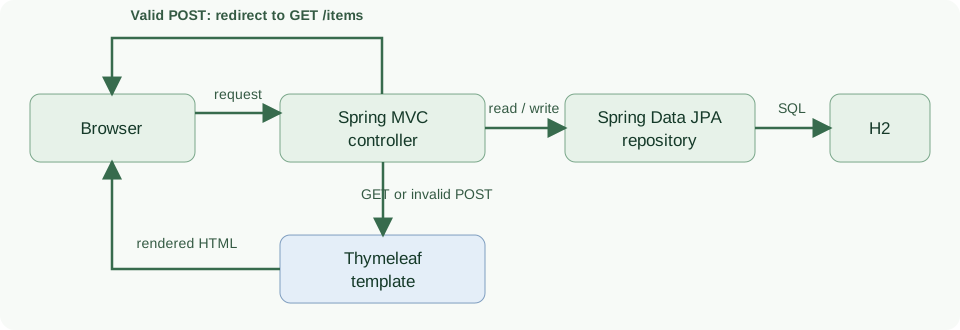
A Spring Boot application can serve HTML pages that let users create, view, edit, and delete database records. Spring MVC routes each browser request to a controller, Thymeleaf renders the response, and Spring Data JPA reads or writes the records. The browser sends form data to the controller; the controller validates it before saving through the repository.
This tutorial builds a small inventory page with Spring Boot 4.1.2 and an embedded H2 database. The code shows the normal create, edit, and delete paths, plus the response to invalid input and a missing item.
1. How the CRUD Request Flows
An inventory clerk needs to see the current items, add a new item, correct its quantity, and remove an item that is no longer stocked. Each item has a name and a nonnegative quantity. The application handles one browser request at a time and renders a new page after each action.
The browser sends a request to the controller. For a list, edit, or valid write, the controller uses the repository to read or change an H2 row. A GET request or an invalid POST renders a Thymeleaf template; a successful POST redirects the browser to the list.
| Browser action | Request | Controller result |
|---|---|---|
| Open the list | GET /items |
Load records and render the list template |
| Open the add form | GET /items/new |
Render an empty form |
| Add an item | POST /items |
Validate, save, then redirect to the list |
| Open an edit form | GET /items/{id}/edit |
Load the item and render the form |
| Save an edit | POST /items/{id} |
Validate, update, then redirect to the list |
| Delete an item | POST /items/{id}/delete |
Delete the item and redirect to the list |
The redirect after a successful POST makes the browser request the list with GET. If the form has errors, the controller returns the form view directly, keeping the entered values and errors on screen. If an edit or delete URL refers to an ID that does not exist, the controller returns 404.
2. Create the Spring Boot Project
The following Maven project uses Spring MVC for routes, Thymeleaf for HTML, Spring Data JPA for persistence, Jakarta Bean Validation for input checks, and H2 as a local database. Spring Boot manages compatible versions through its parent POM.
<!-- pom.xml -->
<?xml version="1.0" encoding="UTF-8"?>
<project xmlns="http://maven.apache.org/POM/4.0.0" xmlns:xsi="http://www.w3.org/2001/XMLSchema-instance" xsi:schemaLocation="http://maven.apache.org/POM/4.0.0 https://maven.apache.org/xsd/maven-4.0.0.xsd">
  <modelVersion>4.0.0</modelVersion>
  <parent><groupId>org.springframework.boot</groupId><artifactId>spring-boot-starter-parent</artifactId><version>4.1.2</version><relativePath/></parent>
  <groupId>com.howtodoinjava</groupId><artifactId>spring-boot-thymeleaf-crud</artifactId><version>1.0.0</version>
  <properties><java.version>17</java.version></properties>
  <dependencies>
    <dependency><groupId>org.springframework.boot</groupId><artifactId>spring-boot-starter-webmvc</artifactId></dependency>
    <dependency><groupId>org.springframework.boot</groupId><artifactId>spring-boot-starter-thymeleaf</artifactId></dependency>
    <dependency><groupId>org.springframework.boot</groupId><artifactId>spring-boot-starter-data-jpa</artifactId></dependency>
    <dependency><groupId>org.springframework.boot</groupId><artifactId>spring-boot-starter-validation</artifactId></dependency>
    <dependency><groupId>com.h2database</groupId><artifactId>h2</artifactId><scope>runtime</scope></dependency>
    <dependency><groupId>org.springframework.boot</groupId><artifactId>spring-boot-starter-webmvc-test</artifactId><scope>test</scope></dependency>
  </dependencies>
  <build><plugins><plugin><groupId>org.springframework.boot</groupId><artifactId>spring-boot-maven-plugin</artifactId></plugin></plugins></build>
</project>
Put Thymeleaf files under src/main/resources/templates. Spring Boot’s template engine reference describes that default location. The H2 URL and schema setting are deliberately scoped to this local demo:
spring.datasource.url=jdbc:h2:mem:inventory;DB_CLOSE_DELAY=-1
spring.jpa.hibernate.ddl-auto=create-drop
spring.jpa.open-in-view=false
create-drop creates the schema when the application starts and removes it when it stops. The in-memory database loses its data between runs; use a persistent database and a migration tool for an application that must retain inventory. The Spring Boot DataSource configuration guide shows how to configure a persistent connection.
Start the application with a class annotated with @SpringBootApplication:
package com.howtodoinjava.inventory;

import org.springframework.boot.SpringApplication;
import org.springframework.boot.autoconfigure.SpringBootApplication;

@SpringBootApplication
public class InventoryApplication {
  public static void main(String[] args) {
    SpringApplication.run(InventoryApplication.class, args);
  }
}
3. Define the Item and Repository
The InventoryItem entity maps one Java instance to a database row. Its generated id identifies the row. The name must contain text and fit within 80 characters; the quantity must not be negative. These constraints are checked when the controller uses @Valid on a submitted form.
package com.howtodoinjava.inventory;

import jakarta.persistence.Entity;
import jakarta.persistence.GeneratedValue;
import jakarta.persistence.GenerationType;
import jakarta.persistence.Id;
import jakarta.validation.constraints.Min;
import jakarta.validation.constraints.NotBlank;
import jakarta.validation.constraints.Size;

@Entity
public class InventoryItem {
  @Id @GeneratedValue(strategy = GenerationType.IDENTITY)
  private Long id;

  @NotBlank @Size(max = 80)
  private String name;

  @Min(0)
  private int quantity;

  public Long getId() { return id; }
  public String getName() { return name; }
  public void setName(String name) { this.name = name; }
  public int getQuantity() { return quantity; }
  public void setQuantity(int quantity) { this.quantity = quantity; }
}
The repository gives the controller findAll(), findById(), save() and delete() without a handwritten DAO. The entity is the data model; the repository is the database access boundary.
package com.howtodoinjava.inventory;

import org.springframework.data.jpa.repository.JpaRepository;

public interface InventoryRepository extends JpaRepository<InventoryItem, Long> {}
4. Handle List, Form, Save, and Delete Requests
The controller connects each URL in the route table to a repository operation and a view name. A view name such as items/list resolves to templates/items/list.html; redirect:/items instructs the browser to request the list URL after a write.
package com.howtodoinjava.inventory;

import jakarta.validation.Valid;
import org.springframework.http.HttpStatus;
import org.springframework.stereotype.Controller;
import org.springframework.ui.Model;
import org.springframework.validation.BindingResult;
import org.springframework.web.bind.annotation.GetMapping;
import org.springframework.web.bind.annotation.ModelAttribute;
import org.springframework.web.bind.annotation.PathVariable;
import org.springframework.web.bind.annotation.PostMapping;
import org.springframework.web.bind.annotation.RequestMapping;
import org.springframework.web.server.ResponseStatusException;

@Controller
@RequestMapping("/items")
public class InventoryController {
  private final InventoryRepository repository;

  public InventoryController(InventoryRepository repository) {
    this.repository = repository;
  }

  @GetMapping
  public String list(Model model) {
    model.addAttribute("items", repository.findAll());
    return "items/list";
  }

  @GetMapping("/new")
  public String newForm(Model model) {
    model.addAttribute("item", new InventoryItem());
    return "items/form";
  }

  @GetMapping("/{id}/edit")
  public String editForm(@PathVariable Long id, Model model) {
    model.addAttribute("item", findItem(id));
    model.addAttribute("itemId", id);
    return "items/form";
  }

  @PostMapping
  public String create(@Valid @ModelAttribute("item") InventoryItem item,
                       BindingResult errors) {
    if (errors.hasErrors()) return "items/form";
    repository.save(item);
    return "redirect:/items";
  }

  @PostMapping("/{id}")
  public String update(@PathVariable Long id,
                       @Valid @ModelAttribute("item") InventoryItem input,
                       BindingResult errors, Model model) {
    InventoryItem existing = findItem(id);
    if (errors.hasErrors()) {
      model.addAttribute("itemId", id);
      return "items/form";
    }
    existing.setName(input.getName());
    existing.setQuantity(input.getQuantity());
    repository.save(existing);
    return "redirect:/items";
  }

  @PostMapping("/{id}/delete")
  public String delete(@PathVariable Long id) {
    repository.delete(findItem(id));
    return "redirect:/items";
  }

  private InventoryItem findItem(Long id) {
    return repository.findById(id)
        .orElseThrow(() -> new ResponseStatusException(HttpStatus.NOT_FOUND, "Item not found"));
  }
}
The POST methods put BindingResult immediately after the validated item. Spring MVC’s model binding reference specifies this arrangement for handling validation errors in the controller. On an invalid create, no repository method runs. On an invalid edit, the controller loads the existing row to confirm that the ID exists but does not change that row.
For an update, the controller copies permitted fields from the submitted input to the existing entity. The submitted form cannot choose a different database ID. The shared findItem() method converts an unknown ID into a 404 response for edit and delete requests.
5. Render the List and Form with Thymeleaf
The list view reads the items model attribute populated by list(). th:each creates one table row per item, while th:text places the item’s values into the cells. Each row supplies its own ID in the edit and delete URLs.
<!doctype html>
<html lang="en" xmlns:th="http://www.thymeleaf.org">
<head><meta charset="utf-8"><title>Inventory items</title></head>
<body>
<h1>Inventory items</h1>
<p><a th:href="@{/items/new}">Add item</a></p>
<table>
  <thead><tr><th>Name</th><th>Quantity</th><th>Actions</th></tr></thead>
  <tbody>
  <tr th:each="item : ${items}">
    <td th:text="${item.name}">Notebook</td>
    <td th:text="${item.quantity}">5</td>
    <td>
      <a th:href="@{/items/{id}/edit(id=${item.id})}">Edit</a>
      <form th:action="@{/items/{id}/delete(id=${item.id})}" method="post">
        <button type="submit">Delete</button>
      </form>
    </td>
  </tr>
  </tbody>
</table>
<p th:if="${#lists.isEmpty(items)}">No items yet.</p>
</body>
</html>
The same form handles adding and editing. The controller supplies itemId only for an edit; the form chooses POST /items for a new row and POST /items/{id} for an existing row. th:field binds each input to the InventoryItem model attribute, and th:errors displays any validation message returned by the POST handler.
<!doctype html>
<html lang="en" xmlns:th="http://www.thymeleaf.org">
<head><meta charset="utf-8"><title>Inventory item</title></head>
<body>
<h1 th:text="${itemId == null} ? 'Add item' : 'Edit item'">Item</h1>
<form th:object="${item}" th:action="${itemId == null} ? @{/items} : @{/items/{id}(id=${itemId})}" method="post">
  <p>
    <label for="name">Name</label>
    <input id="name" type="text" th:field="*{name}">
    <span th:if="${#fields.hasErrors('name')}" th:errors="*{name}">Name error</span>
  </p>
  <p>
    <label for="quantity">Quantity</label>
    <input id="quantity" type="number" min="0" th:field="*{quantity}">
    <span th:if="${#fields.hasErrors('quantity')}" th:errors="*{quantity}">Quantity error</span>
  </p>
  <button type="submit">Save</button>
</form>
<p><a th:href="@{/items}">Back to list</a></p>
</body>
</html>
The delete control uses POST because it changes database state. A browser following the edit link sends GET, which only loads a form. The example does not include authentication or CSRF protection; add those before exposing write actions to untrusted users.
6. Run and Verify the CRUD Flow
From the source project directory, run:
mvn spring-boot:run
Open http://localhost:8080/items. The list initially shows “No items yet.” Choose Add item, enter Notebook and 5, and submit. The controller saves the row and redirects; the list then shows Notebook with quantity 5. Edit it to Planner and 7, then delete it. The list returns to the empty state.
Try a blank name or a negative quantity. Validation returns the form with an error and does not save the row. The automated tests exercise these cases, the full create/edit/delete sequence, and missing IDs:
mvn test
The tests make HTTP requests through MockMvc and inspect the repository after each write. They verify the actual controller, templates and H2 database together; they do not assert that data survives a process restart.
7. Frequently Asked Questions
7.1. Why does the controller redirect after saving?
The redirect changes the browser’s next request from POST to GET. Reloading the list page then reads the saved state rather than submitting the same form again.
7.2. Why is the ID absent from the editable form fields?
The URL identifies the row to edit. The controller loads that row and copies only the allowed name and quantity values from the submitted form. This prevents a submitted id field from selecting another row.
7.3. Why do records disappear after restarting the example?
The JDBC URL uses an in-memory H2 database and the demo creates its schema on startup. When the process ends, that database is gone. Configure a persistent database and schema migrations for retained data.
8. Conclusion
Spring MVC handles the browser routes, Thymeleaf renders model data and form errors, and a Spring Data JPA repository performs the database operations. Keep validation on writes, return 404 for missing records, and replace the in-memory database when the data must survive restarts.
Happy Learning!
The complete runnable example is in the Spring Boot Thymeleaf CRUD project.

hi,
I am getting an error
Whitelabel Error Page
This application has no explicit mapping for /error, so you are seeing this as a fallback.
Tue Apr 21 14:16:06 IST 2020
There was an unexpected error (type=Not Found, status=404).
No message available
how to solve this
Hi,
I am getting an error while running the code as spring-boot application, Error is
I tried to lower the version to 2.1.4 ,but it didnt work. Can you help?