
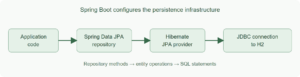
Spring Boot configures Hibernate when an application includes the Spring Data JPA starter and a JDBC driver. Jakarta Persistence API (JPA) defines the mapping and persistence interfaces, Hibernate implements them, and Spring Data JPA supplies repository implementations. For a single database, Boot normally creates the DataSource, EntityManagerFactory, and transaction manager; application code does not need to declare them.
The example below stores warehouse stock items in H2. It uses a repository test to prove that the entity mapping, Hibernate configuration, and configured database work together. It then shows the schema and SQL logging settings that are useful while developing the application.
1. Understand the Roles Before Configuring Them
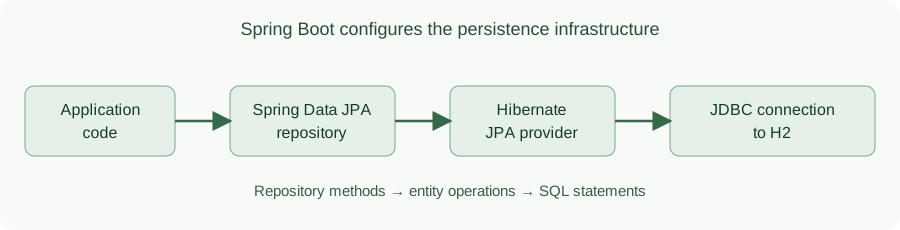
The four names in this stack have distinct jobs. When the application calls a repository method, Spring Data JPA provides the repository implementation. That implementation uses the JPA API, and Hibernate translates the entity operation into SQL for the configured database.
| Part | Responsibility in this example |
|---|---|
| Spring Boot | Detects dependencies and configures the persistence infrastructure |
| Spring Data JPA | Implements StockItemRepository and its CRUD methods |
| JPA | Defines @Entity, @Id, and persistence contracts |
| Hibernate | Maps StockItem to a table and generates SQL |
| H2 | Stores the rows during this local run |
The call path shows how these responsibilities connect. Boot configures the infrastructure around the path; it is not another layer that each repository call passes through.
The calls below are what the rest of the tutorial makes possible. saveAndFlush() persists the new StockItem and flushes the pending SQL. Clearing the EntityManager removes the managed instance from the current persistence context, so findById() must read the row from H2 rather than return that same in-memory instance.
StockItem saved = repository.saveAndFlush(new StockItem("SKU-100", 12));
entityManager.clear();
StockItem loaded = repository.findById(saved.getId()).orElseThrow();
2. Add the Starter and Database Configuration
The Spring Data JPA starter brings in Spring Data, the JPA API and Hibernate. The H2 driver gives Boot a local JDBC database. The test starter supplies the JPA test slice used below. No web starter is needed because this example verifies database configuration without an HTTP endpoint.
<?xml version="1.0" encoding="UTF-8"?>
<project xmlns="http://maven.apache.org/POM/4.0.0" xmlns:xsi="http://www.w3.org/2001/XMLSchema-instance" xsi:schemaLocation="http://maven.apache.org/POM/4.0.0 https://maven.apache.org/xsd/maven-4.0.0.xsd">
  <modelVersion>4.0.0</modelVersion>
  <parent><groupId>org.springframework.boot</groupId><artifactId>spring-boot-starter-parent</artifactId><version>4.1.2</version><relativePath/></parent>
  <groupId>com.howtodoinjava</groupId><artifactId>spring-boot-hibernate-configuration</artifactId><version>1.0.0</version>
  <properties><java.version>17</java.version></properties>
  <dependencies>
    <dependency><groupId>org.springframework.boot</groupId><artifactId>spring-boot-starter-data-jpa</artifactId></dependency>
    <dependency><groupId>com.h2database</groupId><artifactId>h2</artifactId><scope>runtime</scope></dependency>
    <dependency><groupId>org.springframework.boot</groupId><artifactId>spring-boot-starter-data-jpa-test</artifactId><scope>test</scope></dependency>
  </dependencies>
</project>
Boot reads the datasource and JPA settings from application.properties:
spring.datasource.url=jdbc:h2:mem:warehouse;DB_CLOSE_DELAY=-1
spring.datasource.username=sa
spring.datasource.password=
spring.jpa.hibernate.ddl-auto=create-drop
The spring.datasource.url value names an in-memory database. spring.jpa.hibernate.ddl-auto=create-drop tells Hibernate to create the schema on startup and drop it on shutdown. The data is temporary. For a database that must retain rows, configure a persistent connection as shown in the Spring Boot DataSource guide and manage schema changes with migrations.
The application entry point only needs @SpringBootApplication. Boot discovers the repository and entity because they are in the package of this class or its subpackages.
package com.howtodoinjava.warehouse;

import org.springframework.boot.SpringApplication;
import org.springframework.boot.autoconfigure.SpringBootApplication;

@SpringBootApplication
public class WarehouseApplication {
  public static void main(String[] args) {
    SpringApplication.run(WarehouseApplication.class, args);
  }
}
3. Map an Entity and Define a Repository
The warehouse tracks a stock-keeping unit, or SKU, and its current quantity. @Entity marks StockItem as a JPA entity. The generated id is the primary key, while the protected no-argument constructor lets Hibernate instantiate the class when it reads a row.
package com.howtodoinjava.warehouse;

import jakarta.persistence.Entity;
import jakarta.persistence.GeneratedValue;
import jakarta.persistence.GenerationType;
import jakarta.persistence.Id;

@Entity
public class StockItem {
  @Id @GeneratedValue(strategy = GenerationType.IDENTITY)
  private Long id;
  private String sku;
  private int quantity;

  protected StockItem() {}

  public StockItem(String sku, int quantity) {
    this.sku = sku;
    this.quantity = quantity;
  }

  public Long getId() { return id; }
  public String getSku() { return sku; }
  public int getQuantity() { return quantity; }
}
JpaRepository already declares methods such as saveAndFlush() and findById(). Extending it is enough for Spring Data JPA to create the repository implementation at startup.
package com.howtodoinjava.warehouse;

import org.springframework.data.jpa.repository.JpaRepository;

public interface StockItemRepository extends JpaRepository<StockItem, Long> {}
There is no manual EntityManagerFactory or Hibernate dialect bean here. Those are useful when an application needs a custom arrangement, such as multiple persistence units. For this single-database case, Boot uses the JDBC connection to determine the database dialect.
4. Verify the Configuration with a Repository Test
This test saves a stock item, clears the current persistence context, and reads the row back. @DataJpaTest loads the JPA slice; @AutoConfigureTestDatabase(replace = NONE) keeps the configured jdbc:h2:mem:warehouse datasource instead of replacing it with another embedded test database. That distinction matters when the point of the test is to verify the settings in application.properties.
package com.howtodoinjava.warehouse;

import static org.assertj.core.api.Assertions.assertThat;

import jakarta.persistence.EntityManager;
import org.junit.jupiter.api.Test;
import org.springframework.beans.factory.annotation.Autowired;
import org.springframework.boot.data.jpa.test.autoconfigure.DataJpaTest;
import org.springframework.boot.jdbc.test.autoconfigure.AutoConfigureTestDatabase;

@DataJpaTest
@AutoConfigureTestDatabase(replace = AutoConfigureTestDatabase.Replace.NONE)
class StockItemRepositoryTest {
  @Autowired StockItemRepository repository;
  @Autowired EntityManager entityManager;

  @Test void savesAndReadsAnItem() {
    StockItem saved = repository.saveAndFlush(new StockItem("SKU-100", 12));
    assertThat(saved.getId()).isNotNull();
    entityManager.clear();
    assertThat(repository.findById(saved.getId())).get()
        .extracting(StockItem::getSku, StockItem::getQuantity)
        .containsExactly("SKU-100", 12);
  }
}
Run the test from the project folder:
mvn test
The test passes when Hibernate creates the stock_item table and the repository returns SKU-100 with quantity 12. In the startup log, the JDBC URL is jdbc:h2:mem:warehouse; that confirms the test used the configured database. The test is transactional and Spring rolls it back afterward, so it does not demonstrate persistence across application restarts.
5. Choose Who Manages the Database Schema
The example uses create-drop to make a throwaway H2 schema for each run. Spring Boot also accepts none, validate, update, and create. The setting changes schema behavior, not the entity or repository API:
# Local example: recreate tables on each application run
spring.jpa.hibernate.ddl-auto=create-drop

# With a migration-managed persistent database, check mappings against its schema
# spring.jpa.hibernate.ddl-auto=validate
Use one schema-management mechanism. The Spring Boot database-initialization reference documents these values and recommends using Flyway or Liquibase alone when those tools manage a production schema. Boot’s default is create-drop for an embedded database without a schema manager, and none otherwise. Setting the value explicitly in this example makes its behavior clear even if dependencies change.
For a persistent database, validate checks that the mapped tables and columns exist without changing them; a migration tool applies the changes before the application starts. update attempts to alter the schema from entity mappings during startup. It is convenient for a throwaway project, but it does not give a reviewed, repeatable history of production schema changes.
6. Inspect Hibernate SQL and Bound Parameters
When a mapping or query behaves unexpectedly, enable Hibernate’s SQL logger. The example keeps these settings in a separate sql-debug profile so ordinary runs do not print every query:
logging.level.org.hibernate.SQL=DEBUG
logging.level.org.hibernate.orm.jdbc.bind=TRACE
spring.jpa.properties.hibernate.format_sql=true
org.hibernate.SQL at DEBUG shows the SQL statement. org.hibernate.orm.jdbc.bind at TRACE also shows the values bound to placeholders. spring.jpa.properties.hibernate.format_sql passes the native hibernate.format_sql property to Hibernate, making statements easier to read. These logger names agree with the Hibernate 7 logging guide.
Run the same test with the profile:
mvn test -Dspring.profiles.active=sql-debug
The verified test log contains an insert statement for stock_item and parameter values 12 and SKU-100. Keep bind-value logging out of normal production logs because those values may contain personal or secret data. The default test run also prints SQL through @DataJpaTest; the profile demonstrates logger-based SQL and parameter logging that can be used in the application itself.
insert into stock_item (quantity,sku,id) values (?,?,default)
binding parameter (1:INTEGER) <- [12]
binding parameter (2:VARCHAR) <- [SKU-100]
This excerpt omits timestamps and the multiline formatting introduced by hibernate.format_sql. The values establish which input reached the SQL parameters; the later select establishes that the test read the row after clearing the persistence context.
7. Frequently Asked Questions
7.1. Do I need @EnableJpaRepositories or a custom EntityManagerFactory?
Not for this project’s single datasource. Boot finds the repository and entity under the application package and configures the persistence infrastructure. Spring Data JPA’s manual configuration is for cases where you need to take control of that wiring.
7.2. Should I set the Hibernate dialect explicitly?
Usually no. Hibernate detects the dialect from the JDBC connection. If detection cannot work because the database is unavailable during startup or the application needs a specific dialect, Boot accepts the spring.jpa.database-platform property. Do not copy a version-specific dialect class from an old tutorial without verifying that it exists in the Hibernate version used by the application.
7.3. Why does the H2 table disappear when the application stops?
The JDBC URL selects an in-memory database and the schema mode is create-drop. Both choices are intentional for this local example. For retained data, use a persistent database and a schema migration tool. The Thymeleaf CRUD tutorial shows a browser UI built on the same JPA ideas.
7.4. Why does this example have no H2 browser console?
This module has no web starter; it verifies the database through a repository test. A browser console would add an HTTP server to a configuration example that does not need one. The tested repository result and JDBC URL in the startup log are enough to check this setup.
8. Conclusion
For one datasource, start with the Spring Data JPA starter, a database driver, an entity, and a repository. Set schema generation deliberately, verify the actual JDBC connection with a repository test, and enable Hibernate SQL logging only when investigating database behavior.
Happy Learning!
The complete runnable source is in the Spring Boot Hibernate configuration project.

Can we set hibernate 6.x connection without jpa repository for spring boot 3.x application.
You mean using the SessionFactory API? I do not see any problem? Did you tried it and faced any issue?
@Repository
should not be used for the Interface it should be used for class
In your code u have used it for Interface
@Repository
public interface EmployeeRepository extends JpaRepository {
}
Hi. Should my Entity class always has Getter and Setter method? Because when I don’t put getter and setter. The localhost always shows the empty json, which has nothing inside that ” { } ” .
when i am trying to hit the url “http://localhost:8080/employees” as post method i am getting error as below:
“status”: 500,
“error”: “Internal Server Error”,
“message”: “The given id must not be null!; nested exception is java.lang.IllegalArgumentException: The given id must not be null!”,”
in body i am passing the value as below :
{
“id”:3,
“firstName”:”Arun”,
“lastName”:”Khatei”,
“email”:”arun.khatei@gmail.com”
}
For a new entity the id mst always be null because the @Id generates a unique ID according to the sequence generator mentioned in the annotation.