
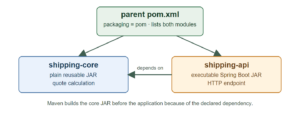
A multi-module Maven project builds several related modules from one root project. In a Spring Boot application, this lets us put reusable Java code in a library JAR and keep HTTP and application startup code in a separate executable JAR. Maven builds the modules together and resolves their dependencies in the right order.
The example below uses Spring Boot 4.1.2 and Java 17 or later. A shipping library calculates a quote, while a Boot application exposes that quote through an HTTP endpoint. The library has no web dependency, so another application could use the same calculation without starting a server.
1. How the Modules Fit Together
The root project has pom packaging and lists two modules. shipping-core contains the calculation and produces an ordinary JAR. shipping-api depends on that JAR and produces the executable Boot application. The dependency is declared in the application’s POM; listing both modules at the root does not by itself make one module’s classes available to the other.
spring-boot-multi-module-maven/
├── pom.xml
├── shipping-core/
│   ├── pom.xml
│   └── src/main/java/.../ShippingQuoteCalculator.java
└── shipping-api/
    ├── pom.xml
    └── src/main/java/.../ShippingController.java
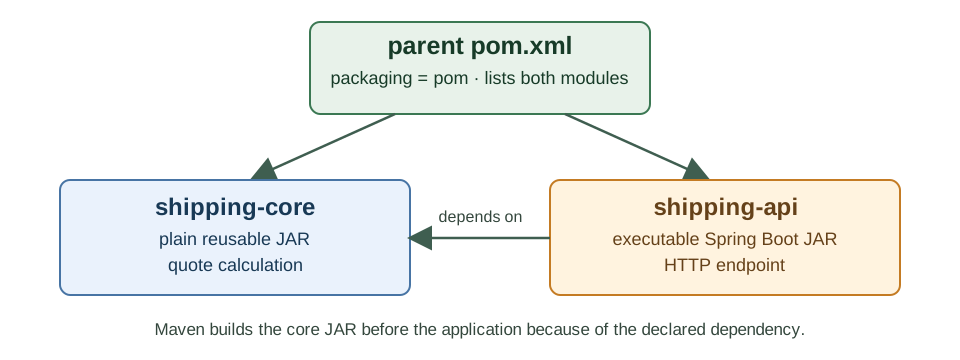
There are three different Maven relationships here. The root <modules> list makes Maven aggregate both projects into one build. Each child <parent> points back to the root and inherits its shared version and configuration. Finally, the dependency in shipping-api makes it use the classes from shipping-core. The Maven reactor sees that dependency and builds the core module before the application, regardless of their order in the module list.
2. Configure the Root POM
The root pom.xml inherits dependency and plugin management from spring-boot-starter-parent. Its own packaging is pom because it coordinates the build and does not contain an application class. We keep the Boot version and Java version here so both children inherit the same values.
<project xmlns="http://maven.apache.org/POM/4.0.0"
         xmlns:xsi="http://www.w3.org/2001/XMLSchema-instance"
         xsi:schemaLocation="http://maven.apache.org/POM/4.0.0 https://maven.apache.org/xsd/maven-4.0.0.xsd">
  <modelVersion>4.0.0</modelVersion>

  <parent>
    <groupId>org.springframework.boot</groupId>
    <artifactId>spring-boot-starter-parent</artifactId>
    <version>4.1.2</version>
    <relativePath/>
  </parent>

  <groupId>com.howtodoinjava</groupId>
  <artifactId>spring-boot-multi-module-maven</artifactId>
  <version>1.0.0</version>
  <packaging>pom</packaging>

  <modules>
    <module>shipping-core</module>
    <module>shipping-api</module>
  </modules>
  <properties><java.version>17</java.version></properties>
</project>
The root POM does not put spring-boot-starter-webmvc in a shared <dependencies> section. If it did, both children would inherit a web dependency even though the calculation library does not use Spring MVC. Each child declares only the dependencies it needs.
3. Build the Reusable Library
The shipping-core POM names the root as its parent. Maven finds the parent pom.xml one directory above by default. The child needs no Spring Boot Maven plugin because its JAR is a regular library, not an application to launch with java -jar.
<project xmlns="http://maven.apache.org/POM/4.0.0">
  <modelVersion>4.0.0</modelVersion>
  <parent>
    <groupId>com.howtodoinjava</groupId>
    <artifactId>spring-boot-multi-module-maven</artifactId>
    <version>1.0.0</version>
  </parent>
  <artifactId>shipping-core</artifactId>
  <dependencies>
    <dependency>
      <groupId>org.springframework.boot</groupId>
      <artifactId>spring-boot-starter-test</artifactId>
      <scope>test</scope>
    </dependency>
  </dependencies>
</project>
The library accepts a parcel weight from 1 to 20 kilograms. Its quote() method returns the weight and a fee: 40 base units plus 12 for each kilogram. A small range check makes invalid input visible instead of quietly returning a nonsensical quote.
ShippingQuote.java:
package com.howtodoinjava.shipping.core;

public record ShippingQuote(int weightKg, int fee) {}
ShippingQuoteCalculator.java:
package com.howtodoinjava.shipping.core;

public class ShippingQuoteCalculator {
  public ShippingQuote quote(int weightKg) {
    if (weightKg < 1 || weightKg > 20) {
      throw new IllegalArgumentException("weightKg must be between 1 and 20");
    }
    return new ShippingQuote(weightKg, 40 + 12 * weightKg);
  }
}
Neither class imports Spring. The unit test checks both the normal calculation and its boundary before any HTTP code is involved.
class ShippingQuoteCalculatorTest {
  private final ShippingQuoteCalculator calculator = new ShippingQuoteCalculator();

  @Test
  void calculatesFee() {
    assertThat(calculator.quote(3)).isEqualTo(new ShippingQuote(3, 76));
  }

  @Test
  void rejectsOutOfRangeWeight() {
    assertThatThrownBy(() -> calculator.quote(0))
        .isInstanceOf(IllegalArgumentException.class)
        .hasMessage("weightKg must be between 1 and 20");
  }
}
The result for 3 kilograms is 76 because 40 + 12 * 3 is 76. These tests prove the library’s calculation; they do not yet prove that the application has included the library or exposed the correct route.
4. Add the Spring Boot Application Module
The shipping-api POM declares shipping-core as a dependency using the version inherited from the root. This is the line that puts the library’s classes on the application’s compile and runtime classpaths. The web starter belongs only here. We also declare the Spring Boot Maven plugin only here so Maven repackages this JAR as an executable application.
<project xmlns="http://maven.apache.org/POM/4.0.0">
  <modelVersion>4.0.0</modelVersion>
  <parent>
    <groupId>com.howtodoinjava</groupId>
    <artifactId>spring-boot-multi-module-maven</artifactId>
    <version>1.0.0</version>
  </parent>
  <artifactId>shipping-api</artifactId>
  <dependencies>
    <dependency>
      <groupId>com.howtodoinjava</groupId>
      <artifactId>shipping-core</artifactId>
      <version>${project.version}</version>
    </dependency>
    <dependency>
      <groupId>org.springframework.boot</groupId>
      <artifactId>spring-boot-starter-webmvc</artifactId>
    </dependency>
    <dependency>
      <groupId>org.springframework.boot</groupId>
      <artifactId>spring-boot-starter-webmvc-test</artifactId>
      <scope>test</scope>
    </dependency>
  </dependencies>
  <build><plugins><plugin>
    <groupId>org.springframework.boot</groupId>
    <artifactId>spring-boot-maven-plugin</artifactId>
  </plugin></plugins></build>
</project>
The application creates a ShippingQuoteCalculator bean explicitly. The library classes live in a different package from the application, so this example does not depend on widening component scanning to find them. The controller receives that calculator through its constructor and returns the library’s ShippingQuote record as JSON.
ShippingApplication.java:
@SpringBootApplication
public class ShippingApplication {
  public static void main(String[] args) {
    SpringApplication.run(ShippingApplication.class, args);
  }

  @Bean
  ShippingQuoteCalculator shippingQuoteCalculator() {
    return new ShippingQuoteCalculator();
  }
}
ShippingController.java:
@RestController
public class ShippingController {
  private final ShippingQuoteCalculator calculator;

  public ShippingController(ShippingQuoteCalculator calculator) {
    this.calculator = calculator;
  }

  @GetMapping("/shipping/quote")
  public ShippingQuote quote(@RequestParam int weightKg) {
    return calculator.quote(weightKg);
  }
}
The two public classes are in separate files in shipping-api. When a request supplies weightKg=3, the controller calls the library method and Spring MVC serializes the returned record. The endpoint has no copy of the fee formula; changing the formula in the library affects the application after the next build.
5. Build, Run, and Verify the Application
Run Maven from the root directory. The reactor build tests shipping-core and shipping-api, then packages both JARs. The application JAR includes the dependency it needs to run, while the core JAR remains an ordinary reusable artifact.
mvn clean package
java -jar shipping-api/target/shipping-api-1.0.0.jar
In another terminal, request a quote:
curl "http://localhost:8080/shipping/quote?weightKg=3"
{"weightKg":3,"fee":76}
The application test checks the same route through MockMvc. It starts the Boot application context, so it also catches a missing dependency or a missing calculator bean that the library’s unit test would not catch.
@SpringBootTest
@AutoConfigureMockMvc
class ShippingControllerTest {
  @Autowired MockMvc mvc;

  @Test
  void returnsQuoteFromLibrary() throws Exception {
    mvc.perform(get("/shipping/quote").param("weightKg", "3"))
        .andExpect(status().isOk())
        .andExpect(jsonPath("$.weightKg").value(3))
        .andExpect(jsonPath("$.fee").value(76));
  }
}
For a faster build of the application and the modules it needs, run the command below from the root. The -pl option selects shipping-api; -am tells Maven to build the required shipping-core module too. Running mvn package inside shipping-api alone can fail if the sibling library has not already been installed in the local Maven repository.
mvn -pl shipping-api -am package
6. FAQs
6.1. Does <modules> Make One Module’s Classes Available to Another?
No. <modules> tells Maven which projects belong to the reactor build. The application still needs a normal <dependency> on shipping-core to compile against ShippingQuoteCalculator. Without it, the import fails even though the root POM lists both modules.
6.2. Should the Library Use the Spring Boot Maven Plugin?
No, not for this plain library. The plugin’s repackage goal creates an executable archive layout for an application. A normal JAR is the suitable artifact for classes another module compiles against. Add the plugin to the application module that has the main() method.
6.3. Are Maven Modules Separate Microservices?
No. This example has one running application and one library loaded into that application. A module is a build unit. If two modules each contain an independently launched Boot application, they can be separate services, but merely splitting source into modules does not create a network boundary or independent deployment.
7. Conclusion
The root POM aggregates the build, child POMs inherit shared configuration, and the application explicitly depends on the reusable library. Keep the Boot Maven plugin on the runnable module so the library remains a normal JAR. Build from the root, or use -pl shipping-api -am when only the application and its required modules need to be built.
Happy Learning!

Hi,
How can you manage version in the SpringBoot Multi Module Project ? If you change version in one of the module, then you need to update the other module that depends on the changed module? Specially, how do you handle the situation in the production environment ?
I was getting issue like “child module of pom.xml does not exist” in the command at POINT 2, with the below command
$ mvn archetype:generate -DgroupId=com.howtodoinjava
-DartifactId=HelloWorldApp-ear
-DarchetypeArtifactId=maven-archetype-quickstart
-DinteractiveMode=false
But it got resolved when I enveloped in the parent pom.xml by “”
How can i launch multi-module application?
When i use “mvn spring-boot:run” it gives me below error
[ERROR] Failed to execute goal org.springframework.boot:spring-boot-maven-plugin:2.2.0.RELEASE:run (default-cli) on project multi-module-library: Unable to find a suitable main class, please add a ‘mainClass’ property -> [Help 1]
However when i execute “mvn clean install” it works fine and all modules shows success. what am i missing something here?
After creating the parent project, it you try to create child project it will fail, so change parent project packaging to pom
Hi, can you elaborate more about spring container behavior in this structure. I have same requirement in my project where a child project bean is getting used in my parent project. Now I am unsure how to do such configuration so that same bean will be useful for both parent and child project. Let me know any more details required. and Thank you so much for this post, it really helps!