

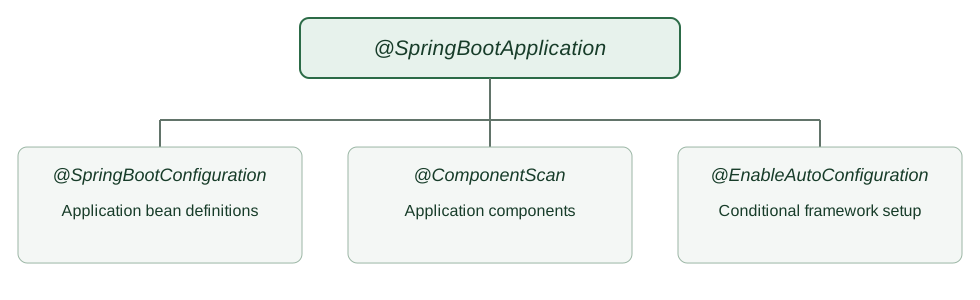
@SpringBootApplication combines application configuration, component scanning, and Spring Boot auto-configuration. Component scanning finds application components in the relevant packages. Auto-configuration adds framework configuration when its conditions match the classpath, application type, properties, and existing beans. These are separate mechanisms, even though the same annotation enables both.
The code uses Spring Boot 4.1.2, the latest stable release at the time of writing.
1. What the Annotation Enables
@SpringBootApplication is a convenience annotation equivalent to applying three annotations to the application class. Their responsibilities are different:
| Annotation | Responsibility |
|---|---|
| @SpringBootConfiguration | Marks the class as a source of application configuration and @Bean definitions. |
| @ComponentScan | Discovers application components from the class’s package and its subpackages by default. |
| @EnableAutoConfiguration | Imports Spring Boot configuration whose conditions match the application. |
For example, these annotations express what the single annotation on CatalogApplication enables. Section 2 uses @SpringBootApplication so the runnable class needs only one annotation:
import org.springframework.boot.SpringBootConfiguration;
import org.springframework.boot.autoconfigure.EnableAutoConfiguration;
import org.springframework.context.annotation.ComponentScan;

@SpringBootConfiguration
@EnableAutoConfiguration
@ComponentScan
class CatalogApplicationConfiguration {
}
The @SpringBootApplication API defines this composition. Adding a starter does not mean every configuration in that starter runs. Spring Boot evaluates each auto-configuration’s conditions first. For example, a web MVC configuration needs a servlet web application, not merely a web library on the classpath.
2. A Small Catalog Application
An order application exposes a catalog status endpoint so an operator can check whether the catalog service is running. The application class starts Spring Boot; a controller supplies the HTTP response. Place the application class above the controller’s package:
src/main/java/com/howtodoinjava/demo/
├── CatalogApplication.java
└── catalog/
    └── CatalogController.java
The application class uses @SpringBootApplication and starts the context. The final line prints whether the catalog controller was registered, making the scanning result visible in both runs below.
package com.howtodoinjava.demo;

import org.springframework.boot.SpringApplication;
import org.springframework.boot.autoconfigure.SpringBootApplication;

@SpringBootApplication
public class CatalogApplication {
    public static void main(String[] args) {
        var context = SpringApplication.run(CatalogApplication.class, args);
        System.out.println("catalogController registered = "
            + context.containsBean("catalogController"));
    }
}
The controller lives in com.howtodoinjava.demo.catalog, a subpackage of the application class. @RestController makes it a component candidate, and @GetMapping maps one HTTP path:
package com.howtodoinjava.demo.catalog;

import org.springframework.web.bind.annotation.GetMapping;
import org.springframework.web.bind.annotation.RestController;

@RestController
public class CatalogController {
    @GetMapping("/catalog/status")
    public String status() {
        return "Catalog ready";
    }
}
The Maven build declares spring-boot-starter-webmvc and the Spring Boot Maven plugin. The starter puts Spring MVC and an embedded servlet server on the classpath; it does not scan the application’s controller. The application annotation supplies component scanning and enables auto-configuration. For the complete build file, see the starter parent setup guide.
3. Run the Normal Web Application
From the sample project directory, package and start the application:
mvn package
java -jar target/boot-configuration-demo-1.0.0.jar
Startup prints the scanning check:
catalogController registered = true
In another terminal, request the endpoint:
curl http://localhost:8080/catalog/status
Catalog ready
The first result shows that component scanning registered the controller. The HTTP response additionally requires web infrastructure: Spring Boot configures an embedded server and Spring MVC because this is a servlet web application with the web MVC starter present. These two results establish different things; finding a controller bean by itself does not prove that an HTTP server is running.
4. Inspect Why Auto-Configuration Matched
Run the same JAR with --debug to ask Spring Boot for its condition evaluation report:
java -jar target/boot-configuration-demo-1.0.0.jar --debug
The report has positive and negative matches. In this sample, the positive matches include:
Positive matches:
   DispatcherServletAutoConfiguration matched:
   WebMvcAutoConfiguration matched:
The report gives the condition details below each heading. The exact ordering and the rest of the report can change between releases and as dependencies change, so search for the auto-configuration you are investigating instead of copying the entire report into a test. The Spring Boot auto-configuration reference recommends --debug when you need to see what was applied and why.
5. Change One Condition Without Moving the Controller
Stop the normal process and run the JAR as a non-web application. The web MVC starter remains in the build, and the package structure is unchanged; only the application type changes:
java -jar target/boot-configuration-demo-1.0.0.jar \
  --spring.main.web-application-type=none --debug
This run exits instead of starting an HTTP server. It still prints:
catalogController registered = true
The condition report now contains a negative match:
WebMvcAutoConfiguration:
   Did not match:
      - not a servlet web application (OnWebApplicationCondition)
@ComponentScan still discovers the controller in the application’s subpackage. WebMvcAutoConfiguration does not match because the application is no longer a servlet web application. The controller therefore exists as a bean, but there is no HTTP server to receive GET /catalog/status. This is why component scanning and auto-configuration should not be described as the same operation.
6. Customize Auto-Configuration Deliberately
The normal run in Section 4 includes WebMvcAutoConfiguration in its positive matches. The web MVC starter makes that auto-configuration available, and the servlet application satisfies its conditions. There is no general include attribute on @SpringBootApplication that forces an auto-configuration to run. An eligible configuration still has to pass its conditions.
To exclude one candidate in this sample without editing the application class, stop the running process and launch the JAR with this property:
java -jar target/boot-configuration-demo-1.0.0.jar --debug \
  --spring.autoconfigure.exclude=org.springframework.boot.webmvc.autoconfigure.WebMvcAutoConfiguration
The condition report now lists the class under Exclusions rather than Positive matches:
Exclusions:
    org.springframework.boot.webmvc.autoconfigure.WebMvcAutoConfiguration
This exclusion prevents that particular auto-configuration class from contributing its configuration. It does not remove the web MVC starter, stop component scanning, or necessarily disable every HTTP endpoint. In this sample, GET /catalog/status still returns Catalog ready, because other web configuration remains active. Use the condition report to identify the exact configuration you intend to exclude, and check the resulting application behavior separately.
If the exclusion is a permanent application decision, put it on the main class instead of passing the property on every launch. This is the complete CatalogApplication with that change:
package com.howtodoinjava.demo;

import org.springframework.boot.SpringApplication;
import org.springframework.boot.autoconfigure.SpringBootApplication;
import org.springframework.boot.webmvc.autoconfigure.WebMvcAutoConfiguration;

@SpringBootApplication(exclude = WebMvcAutoConfiguration.class)
public class CatalogApplication {
    public static void main(String[] args) {
        var context = SpringApplication.run(CatalogApplication.class, args);
        System.out.println("catalogController registered = "
            + context.containsBean("catalogController"));
    }
}
Spring Boot auto-configuration can also back away when the application supplies a bean that replaces a default. That is different from an explicit exclusion: the configuration is considered, but a conditional bean definition does not apply. Do not exclude a class merely to hide a startup error without understanding which capability it supplied.
Keep the main application class in a root package above application components. The Spring Boot code-structure guide recommends that layout because it gives component scanning a predictable package boundary. The scanBasePackages setting changes component scanning only; it does not automatically change JPA entity or Spring Data repository scanning.
7. FAQs
7.1. Does @SpringBootApplication scan every class on the classpath?
No. Its component scan starts at the package of the annotated class and includes subpackages by default. Keep the main class above application components or configure the scan explicitly. A class outside that boundary is not found simply because its JAR is on the classpath.
7.2. Does a starter automatically create every related bean?
No. A starter adds dependencies. Auto-configuration evaluates conditions such as class presence, application type, properties, and existing beans. The condition report shows which configurations matched in a particular run.
7.3. Can an application have several @SpringBootApplication classes?
Spring Boot recommends only one @SpringBootApplication or @EnableAutoConfiguration on the primary configuration class. Additional configuration classes can use @Configuration without enabling auto-configuration again.
8. Conclusion
@SpringBootApplication starts three related but distinct configuration paths. The catalog example shows why that distinction matters: changing the application type leaves the scanned controller in the context while preventing web MVC auto-configuration from matching. Use the condition report to inspect the actual decision before changing configuration.
Happy Learning!
The complete runnable sample on GitHub contains the application, controller, and Maven build.
