
JUnit is the standard testing framework for Java, in which we write test methods marked with @Test, check the results with assertions, and let JUnit run the methods and report which ones pass or fail. JUnit 6 is the current major version, and this JUnit 6 tutorial uses JUnit 6.1.3, which needs Java 17 or later.
With JUnit, we test a class in isolation from the rest of the app, for example the price calculation of a shopping cart. The build runs the same checks again on every change, so a later edit that breaks the behavior fails the build.
The following example is a complete JUnit 6 test method. It adds two items to a cart and checks the total.
@Test
void totalOfTwoItems() {
    cart.add("apple", new BigDecimal("0.50"), 4);
    cart.add("bread", new BigDecimal("2.25"), 1);

    assertEquals(new BigDecimal("4.25"), cart.total());   // passes, 4 x 0.50 + 2.25 = 4.25
}
Notice that the test method is a plain method without public and without a return value. JUnit finds it through the @Test annotation. We start with the parts JUnit 6 is made of, set up a Maven project, write and run the tests, and read a failure report line by line.
1. The Three Parts of JUnit 6
JUnit 6 is not a single jar. It consists of three projects, namely JUnit Platform, JUnit Jupiter and JUnit Vintage. We write tests against Jupiter, and the build tool or the IDE starts the tests through the Platform.
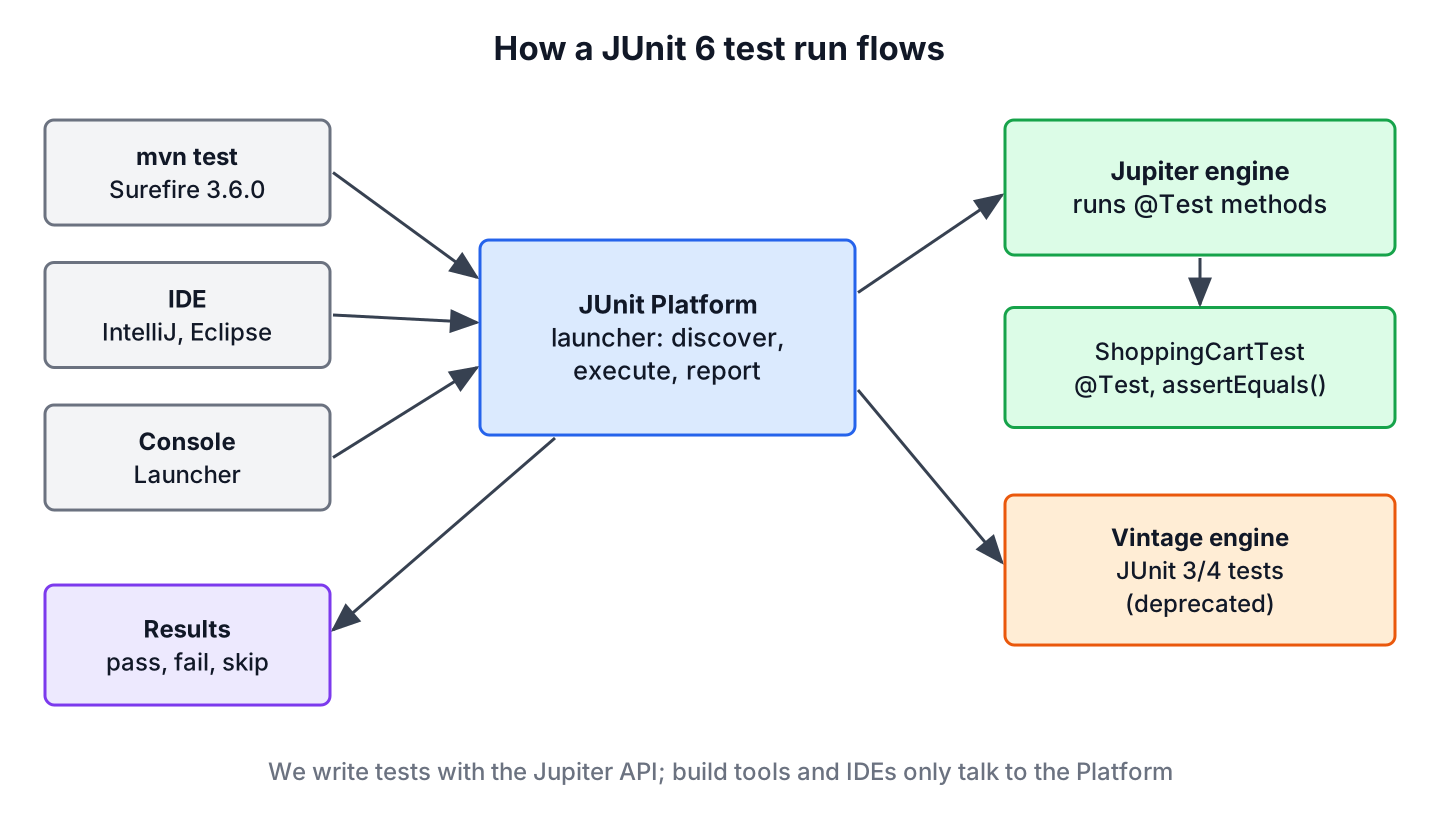
- The JUnit Platform starts test frameworks on the JVM. It discovers the tests, runs them through a test engine and passes the results to Maven, Gradle or the IDE.
- JUnit Jupiter is the API we write tests with (@Test, @BeforeEach, Assertions) plus the test engine that runs those tests.
- JUnit Vintage is a test engine that runs old JUnit 3 and JUnit 4 tests on the Platform. It is deprecated in JUnit 6 and meant only for the time of a migration.
The annotations and assertions live in the package org.junit.jupiter.api, in JUnit 5 and in JUnit 6. So a test written for JUnit 5.x compiles unchanged on JUnit 6 in most cases, and most examples in this tutorial also run on JUnit 5.
2. Setting Up a Maven Project for JUnit 6
A JUnit project needs three things in pom.xml. The junit-bom manages the versions of all JUnit artifacts, the junit-jupiter dependency brings the API and the engine, and the Maven Surefire plugin runs the tests in the test phase. JUnit 6 does not support Surefire versions below 3.0.0, so we pin a current version.
<properties>
  <maven.compiler.release>25</maven.compiler.release>
  <project.build.sourceEncoding>UTF-8</project.build.sourceEncoding>
</properties>

<dependencyManagement>
  <dependencies>
    <dependency>
      <groupId>org.junit</groupId>
      <artifactId>junit-bom</artifactId>
      <version>6.1.3</version>
      <type>pom</type>
      <scope>import</scope>
    </dependency>
  </dependencies>
</dependencyManagement>

<dependencies>
  <dependency>
    <groupId>org.junit.jupiter</groupId>
    <artifactId>junit-jupiter</artifactId>
    <scope>test</scope>
  </dependency>
</dependencies>

<build>
  <plugins>
    <plugin>
      <groupId>org.apache.maven.plugins</groupId>
      <artifactId>maven-surefire-plugin</artifactId>
      <version>3.6.0</version>
    </plugin>
  </plugins>
</build>
Notice that the junit-jupiter dependency has no version. The BOM supplies 6.1.3, so every JUnit module in the project stays on the same version. The example project uses Java 25, Maven 3.9 or later, the compiler plugin 3.16.0 and Surefire 3.6.0. Other ways to declare the dependency, such as single artifacts without the BOM, are covered in JUnit Maven dependency, and Gradle builds in JUnit Gradle dependency.
Maven keeps production code and test code in separate folders. Classes in src/test/java are compiled and run during the build but never end up in the jar, so the test class sits in the same package as the class it tests and can call its package-private methods.
./pom.xml
./src/main/java/com/howtodoinjava/junit/cart/CartItem.java
./src/main/java/com/howtodoinjava/junit/cart/ShoppingCart.java
./src/test/java/com/howtodoinjava/junit/cart/ShoppingCartFailingTest.java
./src/test/java/com/howtodoinjava/junit/cart/ShoppingCartTest.java
3. Writing the First JUnit Test
Say an online grocery store computes the cart total before checkout. A rounding bug or a wrong quantity there charges customers the wrong amount, so the total is a good first candidate for a unit test. The class under test keeps a list of items and adds up price times quantity.
public class ShoppingCart {

    private final List<CartItem> items = new ArrayList<>();

    public void add(String product, BigDecimal price, int quantity) {
        if (quantity <= 0) {
            throw new IllegalArgumentException("Quantity must be positive: " + quantity);
        }
        items.add(new CartItem(product, price, quantity));
    }

    public BigDecimal total() {
        return items.stream()
                .map(item -> item.price().multiply(BigDecimal.valueOf(item.quantity())))
                .reduce(BigDecimal.ZERO, BigDecimal::add);
    }
}
A test class is a normal class in src/test/java whose name ends with Test, because Surefire includes classes named *Test, Test*, *Tests and *TestCase by default. Each test follows the same three steps. We prepare the object, call the method and check the result with an assertion.
class ShoppingCartTest {

    private ShoppingCart cart;

    @BeforeEach
    void createEmptyCart() {
        cart = new ShoppingCart();
    }

    @Test
    void newCartIsEmpty() {
        assertTrue(cart.isEmpty());
    }

    @Test
    @DisplayName("Total adds price times quantity of every item")
    void totalOfTwoItems() {
        cart.add("apple", new BigDecimal("0.50"), 4);
        cart.add("bread", new BigDecimal("2.25"), 1);

        assertEquals(new BigDecimal("4.25"), cart.total());
    }
}
JUnit creates a new instance of ShoppingCartTest for every test method, and the @BeforeEach method runs before each of them, so every test starts with an empty cart. The static methods assertTrue() and assertEquals() come from org.junit.jupiter.api.Assertions. The expected value goes first and the actual value second, which matters for the failure message in section 5.
A first test needs only a few annotations and assertion methods, and all of them come from the org.junit.jupiter.api package.
| Element | Package or class | Purpose |
|---|---|---|
| @Test | org.junit.jupiter.api | Marks a method as a test |
| @BeforeEach | org.junit.jupiter.api | Runs before every test method, for shared setup |
| @DisplayName | org.junit.jupiter.api | Readable name in IDE and report views |
| assertEquals(), assertTrue() | Assertions | Fail the test when the value is not the expected one |
| assertThrows() | Assertions | Pass only when the code throws the given exception |
| assertAll() | Assertions | Run several checks and report every failure together |
Test classes, test methods and lifecycle methods do not need to be public, but they must not be private, and test methods must not return a value. Writing them package-private keeps the test code short.
3.1. Testing an Exception and Several Values
A cart must reject a quantity of zero. The method assertThrows() runs the lambda, checks that it throws the given exception type and returns the exception, so we can also check the message.
@Test
void rejectsZeroQuantity() {
    IllegalArgumentException ex = assertThrows(IllegalArgumentException.class,
            () -> cart.add("apple", new BigDecimal("0.50"), 0));

    assertEquals("Quantity must be positive: 0", ex.getMessage());
}
When one test checks several related values, assertAll() runs every assertion even if the first one fails, and the report lists all failures at once.
assertAll(
        () -> assertEquals(5, cart.itemCount()),
        () -> assertEquals(new BigDecimal("4.25"), cart.total()));
Every assertion of the Assertions class, including timeouts and iterable checks, is covered in JUnit assertions, and exception testing in depth in JUnit assertThrows().
4. Running the Tests with Maven
The command mvn test compiles both source folders and runs every test class through Surefire. Surefire detects the JUnit Platform provider from the junit-jupiter dependency, so it needs no extra configuration.
mvn test[INFO] T E S T S
[INFO] -------------------------------------------------------
[INFO] Running com.howtodoinjava.junit.cart.ShoppingCartTest
[INFO] Tests run: 4, Failures: 0, Errors: 0, Skipped: 0, Time elapsed: 0.230 s -- in com.howtodoinjava.junit.cart.ShoppingCartTest
[INFO]
[INFO] Results:
[INFO]
[INFO] Tests run: 4, Failures: 0, Errors: 0, Skipped: 0
[INFO]
[INFO] ------------------------------------------------------------------------
[INFO] BUILD SUCCESSWe can see one line per test class and a summary at the end. A failure is an assertion that did not hold, an error is an unexpected exception, and a skipped test is one that was disabled or aborted by an assumption. Surefire also writes a text and an XML report per class into target/surefire-reports, which CI servers read.
While we work on one feature, we run a single class or a single method with the -Dtest property.
mvn test -Dtest=ShoppingCartTest
mvn test -Dtest=ShoppingCartTest#totalOfTwoItems
[INFO] Running com.howtodoinjava.junit.cart.ShoppingCartTest
[INFO] Tests run: 1, Failures: 0, Errors: 0, Skipped: 0, Time elapsed: 0.203 s -- in com.howtodoinjava.junit.cart.ShoppingCartTestIn IntelliJ IDEA, Eclipse and VS Code, the green run icon next to the class or method runs the same tests through the JUnit Platform, and the test view shows the @DisplayName text instead of the method name. The Eclipse menus are covered in running JUnit tests in Eclipse.
5. Reading a Failed Test Report
A failing test tells us three things, which are the test that failed, the expected and the actual value, and the line of the assertion. The following example expects the wrong total for four apples at 0.50 each.
@Test
void totalWithWrongExpectation() {
    ShoppingCart cart = new ShoppingCart();
    cart.add("apple", new BigDecimal("0.50"), 4);

    assertEquals(new BigDecimal("2.50"), cart.total());   // fails, the total is 2.00
}
[ERROR] Tests run: 1, Failures: 1, Errors: 0, Skipped: 0, Time elapsed: 0.357 s <<< FAILURE! -- in com.howtodoinjava.junit.cart.ShoppingCartFailingTest
[ERROR] com.howtodoinjava.junit.cart.ShoppingCartFailingTest.totalWithWrongExpectation -- Time elapsed: 0.224 s <<< FAILURE!
org.opentest4j.AssertionFailedError: expected: <2.50> but was: <2.00>
at org.junit.jupiter.api.Assertions.assertEquals(Assertions.java:1199)
at com.howtodoinjava.junit.cart.ShoppingCartFailingTest.totalWithWrongExpectation(ShoppingCartFailingTest.java:17)
[ERROR] Failures:
[ERROR] ShoppingCartFailingTest.totalWithWrongExpectation:17 expected: <2.50> but was: <2.00>
[INFO]
[ERROR] Tests run: 1, Failures: 1, Errors: 0, Skipped: 0
[INFO]
[INFO] ------------------------------------------------------------------------
[INFO] BUILD FAILUREJUnit throws AssertionFailedError from the opentest4j library, and the message reads expected first, actual second. The stack trace line ShoppingCartFailingTest.java:17 points to the assertion. When the expected and actual values look swapped in a report, the arguments of assertEquals() are in the wrong order. The build ends with BUILD FAILURE, so a CI pipeline stops before the broken code is deployed.
If the code throws an exception that no assertion expects, for example a NullPointerException, Surefire counts the test under Errors instead of Failures and prints the stack trace of that exception.
6. What Changed from JUnit 5 to JUnit 6
For a new project, the difference between JUnit 5 and JUnit 6 is small, because the Jupiter API keeps its package and its annotations. The 6.0 release raised the baseline to Java 17, gave all modules one version number, added JSpecify nullability annotations to the API, switched @CsvSource parsing to FastCSV and removed APIs that were deprecated in 5.x. The full list, with upgrade steps, is in JUnit 5 vs JUnit 6.
| Item | JUnit 5 | JUnit 6 |
|---|---|---|
| Java at runtime | 8 or later | 17 or later |
| Version numbers | Platform 1.x, Jupiter and Vintage 5.x | 6.x for all modules |
| Package of @Test | org.junit.jupiter.api | org.junit.jupiter.api |
| Vintage engine | Supported | Deprecated |
| Lowest Maven Surefire | 2.22.0 | 3.0.0 |
7. JUnit 6 Tutorial FAQs
Version requirements and tests that Maven does not find come up again and again in a first JUnit 6 project.
7.1. What Is the Latest Version of JUnit?
JUnit 6.1.3 is the latest release as of October 2026. All JUnit modules share this version, so one BOM version is enough. The last JUnit 4 release is 4.13.2.
7.2. Which Java Version Does JUnit 6 Need?
JUnit 6 needs Java 17 or later at runtime. Projects on Java 8 or 11 stay on JUnit 5.14.x until they upgrade the JDK.
7.3. Is JUnit Jupiter the Same as JUnit 6?
No. Jupiter is the part of JUnit 6 that we write tests with, the API and its test engine. JUnit 6 also contains the Platform, which launches the engines, and the deprecated Vintage engine for JUnit 4 tests.
7.4. Why Does Maven Not Find My JUnit Tests?
In most cases the class name or the folder is the cause. Surefire runs only classes in src/test/java whose names match *Test, Test*, *Tests or *TestCase. A test method that is private or returns a value is not a test either, and Surefire versions below 3.0.0 do not work with JUnit 6.
7.5. Do We Still Need JUnit If We Use Spring Boot?
Yes. Spring Boot does not replace JUnit. The spring-boot-starter-test starter brings JUnit Jupiter together with Mockito and AssertJ, and Spring’s test support runs as a JUnit extension, as shown in JUnit with Spring Boot.
8. Conclusion
A JUnit 6 project needs the junit-bom, the junit-jupiter dependency and a Surefire version from 3.0.0 on. Tests are package-private methods annotated with @Test that call the code and check the result with the static methods of Assertions.
The command mvn test runs them, -Dtest narrows the run to one class or method, and a failure report names the method, the expected and actual values and the line. From here, the JUnit tutorial lists the topics in a sensible reading order, starting with lifecycle methods and assertions.
9. References
- JUnit 6.1.3 User Guide – Overview
- JUnit 6.1.3 User Guide – Writing Tests
- JUnit 6.1.3 User Guide – Build Support
- Assertions Javadoc
- JUnit 6.0.0 Release Notes
- Maven Surefire Plugin
Happy Learning !!
