
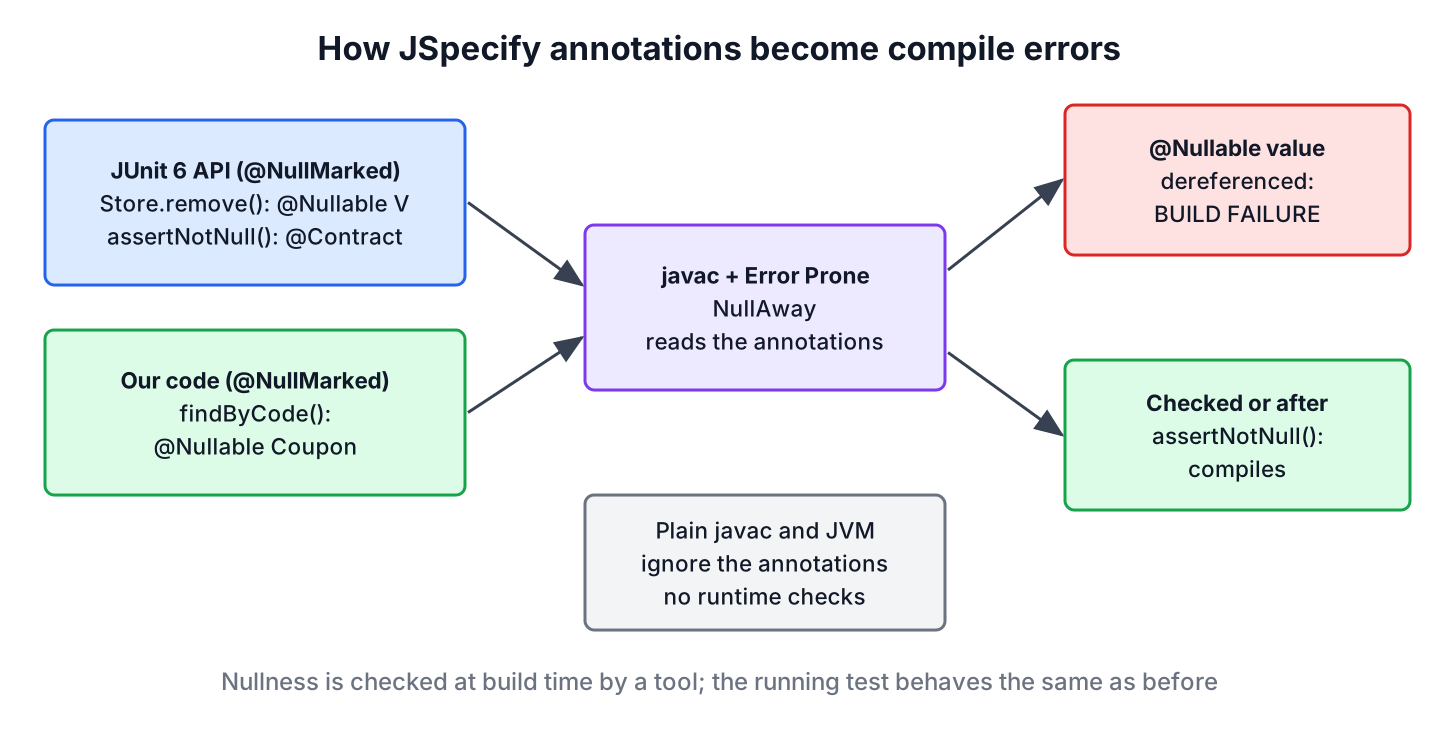
JUnit 6 nullability means that every public JUnit API is annotated with JSpecify annotations, so a tool such as NullAway, IntelliJ IDEA or the Kotlin compiler knows which parameters and return values can be null. The JUnit packages are @NullMarked, so every type without @Nullable is non-null.
JUnit 6 nullability helps in two ways. A null checker warns us when test or extension code ignores a @Nullable result of the JUnit API, and we can apply the same JSpecify annotations to our own production code so the checker covers it as well.
The following example tests a method annotated with @Nullable. The JUnit 6 method assertNotNull() carries a contract that tells NullAway the value is non-null on the next line.
Coupon coupon = service.findByCode(" welcome10 ");   // findByCode() returns @Nullable Coupon
assertNotNull(coupon);                                // @Contract("null -> fail")
assertEquals(10, coupon.percentOff());                 // compiles under NullAway, 10
Notice that the annotations change nothing at runtime. They only give a checker the information to report a possible NullPointerException at compile time. We look at what JUnit 6 annotated, the four JSpecify annotations, a @NullMarked example with NullAway checking it, and an extension that handles a @Nullable value from the JUnit API.
1. What JUnit 6 Annotated
In JUnit 5, the Javadoc described when a method could return null, and no tool read it. Since JUnit 6.0, all JUnit modules use JSpecify annotations to declare the nullability of method parameters, return types and fields. The junit-jupiter-api artifact depends on org.jspecify:jspecify, so the annotations are on the test classpath of every JUnit 6 project.
A few signatures from JUnit 6.1.3 show what changed for test and extension authors.
| JUnit 6.1.3 API | Nullability | What it means for us |
|---|---|---|
| Assertions.assertNull(@Nullable Object actual) | Parameter nullable | Accepts null, as expected |
| Assertions.assertNotNull(@Nullable Object actual) | Parameter nullable, @Contract(“null -> fail”) | Checkers treat the value as non-null after the call |
| Assertions.fail(@Nullable String message) | Message nullable | A missing message is allowed |
| ExtensionContext.Store.get(Object key, Class<V> type) | Returns @Nullable V | An extension must handle a missing value |
| ParameterResolver.resolveParameter(…) | Returns @Nullable Object | A resolver may inject null |
| ConditionEvaluationResult.disabled(@Nullable String reason) | Reason nullable | Declared officially in 6.0 |
| ExtensionContext.getTestMethod() | Returns non-null Optional<Method> | Never null, an empty Optional instead |
The examples run on JUnit 6.1.3 with Java 25, JSpecify 1.0.1, Error Prone 2.50.0 and NullAway 0.14.2. On JUnit 5.x, our own JSpecify annotations work the same, but the JUnit API itself is not annotated, so a checker treats JUnit calls as unspecified.
2. The JSpecify Annotations
JSpecify is a set of four annotations that the major Java tools agreed on, published as org.jspecify:jspecify. Two of them, @Nullable and @NonNull, describe a type, and the other two, @NullMarked and @NullUnmarked, switch the default on or off for a whole scope.
| Annotation | Target | Meaning |
|---|---|---|
| @NullMarked | Module, package, class or method | Types without an annotation in this scope are non-null |
| @Nullable | Type use | A value of this type can be null |
| @NonNull | Type use | A value of this type must not be null; rarely needed inside @NullMarked code |
| @NullUnmarked | Package, class or method | Turns @NullMarked off again, for code that is not migrated yet |
Outside a @NullMarked scope, unannotated types have unspecified nullness, which is the same as code without JSpecify. Because @Nullable is a type-use annotation, four rules about placement and scope catch new users.
- For arrays, @Nullable String[] means the elements can be null, whereas String @Nullable [] means the array reference can be null.
- For nested types, the annotation goes before the simple name, as in Map.@Nullable Entry.
- A type parameter that may hold null needs a nullable bound, such as <T extends @Nullable Object>.
- Packages are not hierarchical, so @NullMarked on com.shop does not cover com.shop.coupon.
3. Marking Our Code with @NullMarked
Say a shop looks up discount coupons by the code a customer types in the checkout form. An unknown code is a normal case, not an error, so the lookup returns null for it, and every caller has to handle that. JSpecify turns this rule into a declaration that a checker can enforce.
We add jspecify as a normal dependency, because the production code uses the annotations, and mark the package in package-info.java.
<dependency>
  <groupId>org.jspecify</groupId>
  <artifactId>jspecify</artifactId>
  <version>1.0.1</version>
</dependency>
@NullMarked
package com.howtodoinjava.junit.coupon;
import org.jspecify.annotations.NullMarked;Inside the package, only the nullable parts get an annotation. The coupon note is optional, and the lookup can miss.
public record Coupon(String code, int percentOff, @Nullable String note) {
}
public @Nullable Coupon findByCode(String code) {
return coupons.get(code.strip().toUpperCase());
}
public int discountedPrice(int price, String code) {
Coupon coupon = findByCode(code);
if (coupon == null) {
return price;
}
return price - price * coupon.percentOff() / 100;
}The parameter code is non-null because of @NullMarked, so findByCode() calls strip() without a check. The method discountedPrice() must check the result, and the checker accepts coupon.percentOff() only after the null check. The test package carries its own package-info.java with @NullMarked, because packages in src/test/java are separate scopes as well.
@Test
void unknownCodeReturnsNull() {
    assertNull(service.findByCode("NOPE"));
}

@Test
void unknownCodeKeepsFullPrice() {
    assertEquals(200, service.discountedPrice(200, "NOPE"));
    assertEquals(150, service.discountedPrice(200, "spring25"));
}
4. Checking the Annotations with NullAway
The Java compiler ignores JSpecify annotations, so plain javac compiles code that dereferences a @Nullable value. NullAway is an Error Prone plugin that reads the annotations during compilation and fails the build on a possible NullPointerException. With OnlyNullMarked=true, it checks only @NullMarked code, and JSpecifyMode=true turns on the full JSpecify semantics, including generics.
<plugin>
  <groupId>org.apache.maven.plugins</groupId>
  <artifactId>maven-compiler-plugin</artifactId>
  <version>3.16.0</version>
  <configuration>
    <compilerArgs>
      <arg>-XDcompilePolicy=simple</arg>
      <arg>--should-stop=ifError=FLOW</arg>
      <arg>-Xplugin:ErrorProne -XepDisableAllChecks -Xep:NullAway:ERROR -XepOpt:NullAway:OnlyNullMarked=true -XepOpt:NullAway:JSpecifyMode=true</arg>
    </compilerArgs>
    <annotationProcessorPaths>
      <path>
        <groupId>com.google.errorprone</groupId>
        <artifactId>error_prone_core</artifactId>
        <version>2.50.0</version>
      </path>
      <path>
        <groupId>com.uber.nullaway</groupId>
        <artifactId>nullaway</artifactId>
        <version>0.14.2</version>
      </path>
    </annotationProcessorPaths>
  </configuration>
</plugin>
Error Prone uses internal compiler classes, so on JDK 17 and later Maven needs –add-exports options for the jdk.compiler module in .mvn/jvm.config. The file is in the example project. The -XepDisableAllChecks flag keeps the other Error Prone checks out of the way, so the build reports only nullness problems.
The following test code makes three common mistakes. It reads a field of a lookup result without a check, passes null to a non-null parameter, and unboxes a @Nullable value from the JUnit extension store.
// does not compile: NullAway reports three errors
@Test
void readsPercentWithoutCheck() {
    Coupon coupon = service.findByCode("WELCOME10");
    assertEquals(10, coupon.percentOff());
}

@Test
void passesNullCode() {
    service.findByCode(null);
}

long startOf(ExtensionContext context) {
    long start = context.getStore(ExtensionContext.Namespace.GLOBAL).remove("start", Long.class);
    return start;
}
[ERROR] /home/dev/app/src/test/java/com/howtodoinjava/junit/coupon/BrokenNullTest.java:[15,32] [NullAway] dereferenced expression 'coupon' is @Nullable
[ERROR] /home/dev/app/src/test/java/com/howtodoinjava/junit/coupon/BrokenNullTest.java:[20,28] [NullAway] passing @Nullable parameter 'null' where @NonNull is required
[ERROR] /home/dev/app/src/test/java/com/howtodoinjava/junit/coupon/BrokenNullTest.java:[24,80] [NullAway] unboxing of a @Nullable expression 'context.getStore(ExtensionContext.Namespace.GLOBAL).remove("start", Long.class)'
[INFO] BUILD FAILUREWe can see that the third error comes from the JUnit API, not from our code. NullAway knows that Store.remove() returns @Nullable V only because JUnit 6 declares it. With JUnit 5, the same line compiles without a warning and throws a NullPointerException when the key is missing.
5. Why assertNotNull() Satisfies the Checker
Test code often asserts that a value exists and reads it on the next line. A checker would flag every such read without extra information. In JUnit 6, Assertions.assertNotNull() carries the annotation @Contract(“null -> fail”) from org.junit.platform.commons.annotation, which says that the method fails when the argument is null.
@Test
void findsCouponIgnoringCase() {
    Coupon coupon = service.findByCode(" welcome10 ");

    assertNotNull(coupon);
    assertEquals(10, coupon.percentOff());
}
NullAway recognizes contract annotations by their simple name Contract, so it treats coupon as non-null after assertNotNull(coupon) and compiles the test. Other assertions carry contracts too, for example assertTrue() with false -> fail. The @Contract annotation is marked INTERNAL in JUnit, so we read it as information for tools and never put it on our own methods.
[INFO] Running com.howtodoinjava.junit.coupon.CouponServiceTest
[INFO] Tests run: 3, Failures: 0, Errors: 0, Skipped: 0, Time elapsed: 0.212 s -- in com.howtodoinjava.junit.coupon.CouponServiceTest
[INFO]
[INFO] Results:
[INFO]
[INFO] Tests run: 3, Failures: 0, Errors: 0, Skipped: 0
6. Handling @Nullable Values in a JUnit Extension
Extensions use the JUnit API much more than tests do, so most nullness findings show up there. The following extension measures how long each test runs. It stores the start time in the extension store before the test and reads it back afterward.
public class TimingExtension implements BeforeTestExecutionCallback, AfterTestExecutionCallback {

    private static final ExtensionContext.Namespace NAMESPACE =
            ExtensionContext.Namespace.create(TimingExtension.class);

    @Override
    public void beforeTestExecution(ExtensionContext context) {
        context.getStore(NAMESPACE).put("start", System.nanoTime());
    }

    @Override
    public void afterTestExecution(ExtensionContext context) {
        Long start = context.getStore(NAMESPACE).remove("start", Long.class);
        if (start == null) {
            return;
        }
        long millis = (System.nanoTime() - start) / 1_000_000;
        context.publishReportEntry("durationMs", String.valueOf(millis));
    }
}
The result of remove() goes into a Long, not a long, and the null check comes before the arithmetic. The start time is missing when another extension removed it or when beforeTestExecution() did not run, and the extension skips the report entry in that case instead of failing the test. The test class registers the extension with @ExtendWith(TimingExtension.class).
7. JUnit 6 Nullability FAQs
The JSpecify annotations raise a few questions during a JUnit 6 upgrade.
7.1. Do JSpecify Annotations Change How Tests Run?
No. The annotations are metadata for tools, and neither javac nor the JVM inserts null checks for them. A test that passes null to a non-null parameter compiles with plain javac and fails only when the method dereferences the value.
7.2. Do We Need to Add the jspecify Dependency?
Only for production code. The junit-jupiter-api artifact brings jspecify into the test classpath, so test classes can use @Nullable without a new dependency. Production classes compile against the main classpath, so they need org.jspecify:jspecify with the default compile scope.
7.3. Is @NonNull the Same as @NotNull?
No. The JSpecify @NonNull describes a type for static analysis. The Jakarta Validation @NotNull is a runtime constraint that a validator checks, for example on a request body. A field can carry both when it needs both.
7.4. Can We Upgrade to JUnit 6 Without Fixing Nullness Warnings?
Yes. Nothing changes until we run a checker. IntelliJ IDEA 2025.3 reads JSpecify annotations, so new warnings can appear in the editor after the upgrade, but the build stays green unless NullAway or another checker fails it. The other upgrade topics are in JUnit 5 vs JUnit 6.
8. Conclusion
JUnit 6 declares the nullability of its whole API with JSpecify, and its packages are @NullMarked. A checker such as NullAway uses that information to reject code that ignores a @Nullable result, for example from ExtensionContext.Store, and the contract on assertNotNull() keeps ordinary test code free of false warnings.
For our own code, we add @NullMarked per package and @Nullable where null is a valid value. Extensions are the place where the nullable JUnit API matters most, as the @AutoClose extension and custom test listeners show. The JUnit tutorial lists the other JUnit 6 topics.
9. References
- JUnit 6.0.0 Release Notes
- JUnit 6.1.3 Assertions Javadoc
- ExtensionContext.Store Javadoc
- JSpecify Nullness User Guide
- NullAway on GitHub
- Error Prone Installation
Happy Learning !!
