
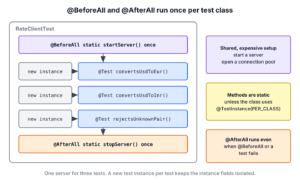
In JUnit, a method annotated with @BeforeAll runs once before all tests of a class, and a method annotated with @AfterAll runs once after all of them. We use the pair for setup that is too slow to repeat for every test, such as starting a stub server, opening a connection pool or loading a large test data file, and for stopping or releasing it at the end.
The following example starts one stub HTTP server for all tests of RateClientTest and stops it after the last test.
static HttpServer server;

@BeforeAll
static void startServer() throws IOException {
  server = HttpServer.create(new InetSocketAddress("localhost", 0), 0);
  server.start();
  System.out.println("@BeforeAll: rate server started");
}

@AfterAll
static void stopServer() {
  server.stop(0);
  System.out.println("@AfterAll: rate server stopped");
}
@BeforeAll: rate server started
@Test convertsUsdToEur
@Test convertsUsdToInr
@Test rejectsUnknownPair
@AfterAll: rate server stoppedNotice that both methods are static and that each one printed its line once for three tests. We run every example on JUnit 6.1.3 with Java 25, and JUnit 5 projects can copy the code unchanged.
We start with the rules and the full test class and look at why the methods must be static. After that, we cover what happens when one of them throws, the order in class hierarchies and the behavior in @Nested classes.
1. What @BeforeAll and @AfterAll Do
JUnit calls an @BeforeAll method once, before the first @Test, @RepeatedTest, @ParameterizedTest or @TestFactory method of the class. It calls an @AfterAll method once, after the last of them. Between the two calls, JUnit runs every test of the class, each on its own test instance.
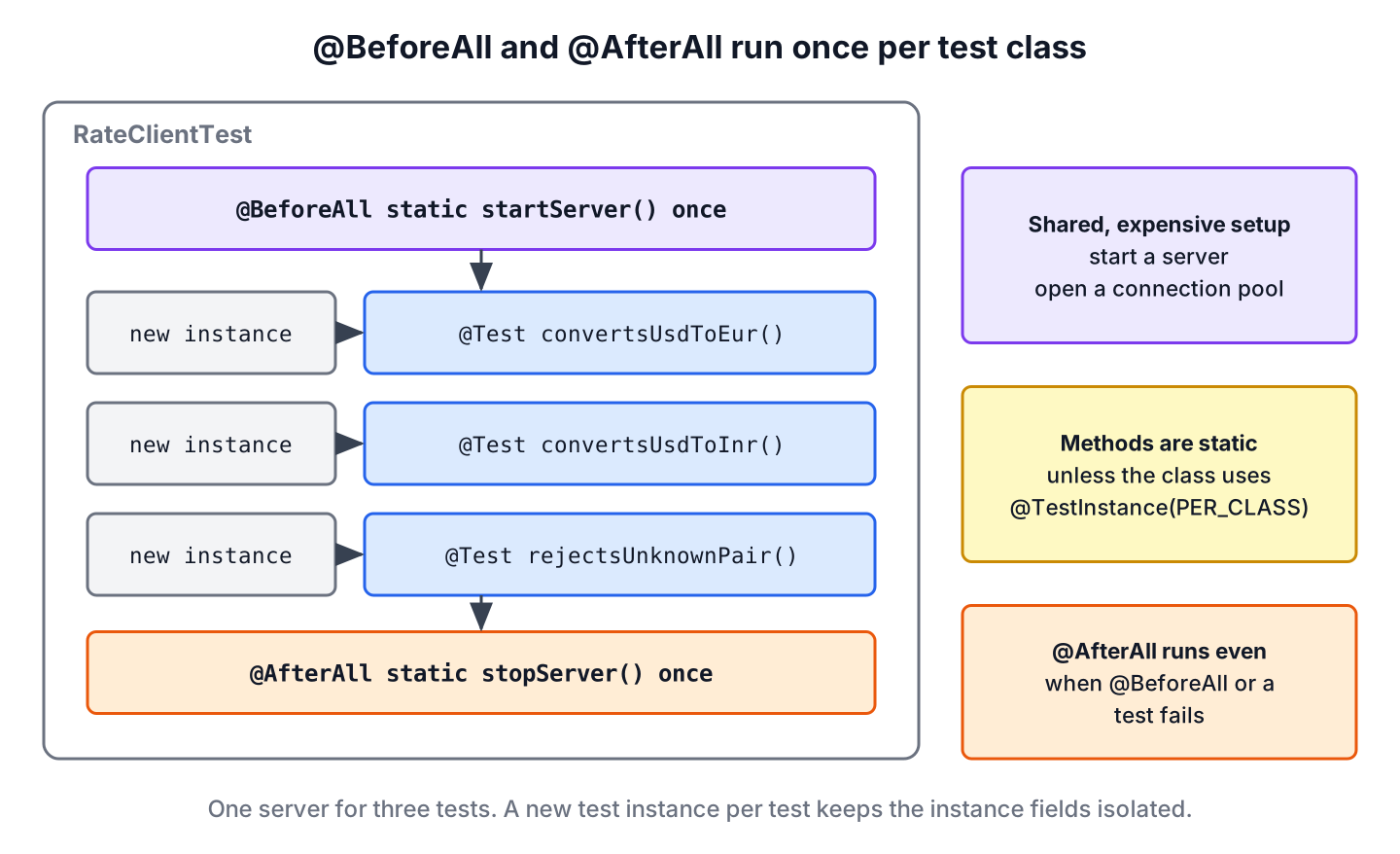
Both annotations follow the same rules.
- Both methods have a void return type and are static, unless the class uses @TestInstance(Lifecycle.PER_CLASS).
- The method can declare parameters, such as TestInfo, and JUnit resolves them for the class.
- A private lifecycle method still runs with a warning, but private lifecycle methods will be disallowed in a future release, so we leave out the modifier.
- Several @BeforeAll methods in one class run in a deterministic but intentionally non-obvious order, so one method per class is the safe choice.
JUnit 4 had @BeforeClass and @AfterClass for the same job. The JUnit 5 names describe the scope better, and the JUnit 5 vs JUnit 4 comparison lists the other renamed annotations. For setup and cleanup around every single test, we use @BeforeEach and @AfterEach instead.
2. Sharing One Stub Server Between Tests
Say a currency app reads exchange rates from a REST API, and its RateClient class sends GET /rates/USD/EUR and parses the plain-text answer 0.92. Starting a real rate service for each test is slow, so the test class starts one stub server with the JDK class HttpServer and shares it between all tests. The complete project is in the junit-beforeall-afterall folder on GitHub, and it needs only the junit-jupiter dependency from the JUnit Maven setup.
static HttpServer server;
static RateClient client;

@BeforeAll
static void startServer() throws IOException {
  server = HttpServer.create(new InetSocketAddress("localhost", 0), 0);
  server.createContext("/rates/USD/EUR", exchange -> RateStub.respond(exchange, "0.92"));
  server.createContext("/rates/USD/INR", exchange -> RateStub.respond(exchange, "88.50"));
  server.start();
  client = new RateClient(URI.create("http://localhost:" + server.getAddress().getPort()));
  System.out.println("@BeforeAll: rate server started");
}

@AfterAll
static void stopServer() {
  server.stop(0);
  System.out.println("@AfterAll: rate server stopped");
}
Port 0 asks the operating system for a free port, so two builds on the same machine do not collide. The tests use the static client field and never start a server themselves.
@Test
void convertsUsdToEur() throws Exception {
  System.out.println("  @Test convertsUsdToEur");
  assertEquals(new BigDecimal("0.92"), client.rate("USD", "EUR"));
}

@Test
void convertsUsdToInr() throws Exception {
  System.out.println("  @Test convertsUsdToInr");
  assertEquals(new BigDecimal("88.50"), client.rate("USD", "INR"));
}

@Test
void rejectsUnknownPair() {
  System.out.println("  @Test rejectsUnknownPair");
  assertThrows(IllegalStateException.class, () -> client.rate("USD", "XYZ"));   // HTTP 404
}
The output in the intro shows one start and one stop for the three tests. Shared objects created in @BeforeAll must stay read-only for the tests, or one test can change what the next test sees. The stub server here only answers requests, so sharing it is safe, whereas a list that tests add items to belongs in @BeforeEach.
3. Why @BeforeAll and @AfterAll Must Be Static
Under the default per-method lifecycle, each test method runs on its own new instance of the test class. JUnit calls @BeforeAll before the first instance exists and @AfterAll after the last one is gone, so there is no object to call an instance method on. A non-static method is therefore a discovery error, and the JUnit Jupiter engine runs none of its tests, not even those in other classes.
@AfterAll
void stopServer() {                       // missing static
  System.out.println("@AfterAll stopServer()");
}
[ERROR] TestEngine with ID 'junit-jupiter' encountered a critical issue during test discovery:
(1) [ERROR] @AfterAll method 'void com.howtodoinjava.junit.beforeall.demo.NonStaticAfterAllDemo.stopServer()' must be static unless the test class is annotated with @TestInstance(Lifecycle.PER_CLASS).
[INFO] Tests run: 0, Failures: 0, Errors: 0, Skipped: 0
[INFO] BUILD FAILUREThe message names the way out. With @TestInstance(Lifecycle.PER_CLASS), JUnit creates one instance for the whole class, so both methods can be instance methods that use instance fields. That mode has its own trade-offs, which we cover in non-static @BeforeAll and @AfterAll. The JUnit test lifecycle overview shows where both methods sit next to the constructor and extension callbacks.
4. Failures in @BeforeAll and @AfterAll
An exception in @BeforeAll stops the whole class. JUnit runs none of its tests, but it still calls the @AfterAll methods, so cleanup code must handle fields that the setup never assigned. In FailingBeforeAllDemo, the server start fails before server gets a value.
@BeforeAll
static void startServer() {
  System.out.println("@BeforeAll startServer()");
  throw new IllegalStateException("Port 8089 is already in use");
}

@AfterAll
static void stopServer() {
  if (server != null) {
    server.stop(0);
  }
  System.out.println("@AfterAll stopServer(), server = " + server);
}
@BeforeAll startServer()
@AfterAll stopServer(), server = null
[ERROR] Tests run: 1, Failures: 0, Errors: 1, Skipped: 0, Time elapsed: 0.498 s <<< FAILURE! -- in com.howtodoinjava.junit.beforeall.demo.FailingBeforeAllDemo
[ERROR] com.howtodoinjava.junit.beforeall.demo.FailingBeforeAllDemo.initializationError -- Time elapsed: 0.498 s <<< ERROR!
java.lang.IllegalStateException: Port 8089 is already in useThe class has two tests, yet Maven Surefire reports one error named initializationError, because no test method started. Without the null check, stopServer() would throw a NullPointerException as well.
An exception in @AfterAll comes after the tests, so their results stay as they are, and Surefire adds an error named executionError for the class. In FailingAfterAllDemo, the only test passes and the cleanup fails.
@Test convertsUsdToEur passed
[ERROR] Tests run: 2, Failures: 0, Errors: 1, Skipped: 0, Time elapsed: 0.315 s <<< FAILURE! -- in com.howtodoinjava.junit.beforeall.demo.FailingAfterAllDemo
[ERROR] com.howtodoinjava.junit.beforeall.demo.FailingAfterAllDemo.executionError -- Time elapsed: 0.315 s <<< ERROR!
java.lang.IllegalStateException: Cannot delete rates-2026.csv
The build fails in both cases, which is what we want, since a server that never stops or a file that stays behind can break the next test class.
5. @BeforeAll and @AfterAll in a Class Hierarchy
Lifecycle methods are inherited from superclasses unless the subclass hides or overrides them. JUnit runs the superclass @BeforeAll methods before those of the subclass, and the superclass @AfterAll methods after those of the subclass, so the parent wraps the child. For example, several rate test classes extend AbstractRateServerTest, which starts and stops the server.
abstract class AbstractRateServerTest {

  static HttpServer server;
  static URI baseUri;

  @BeforeAll
  static void startServer() throws IOException {
    server = HttpServer.create(new InetSocketAddress("localhost", 0), 0);
    server.createContext("/rates/EUR/USD", exchange -> RateStub.respond(exchange, "1.09"));
    server.start();
    baseUri = URI.create("http://localhost:" + server.getAddress().getPort());
    System.out.println("1. AbstractRateServerTest.startServer()");
  }

  @AfterAll
  static void stopServer() {
    server.stop(0);
    System.out.println("5. AbstractRateServerTest.stopServer()");
  }
}
The subclass creates its client from the baseUri that the superclass set. Its @BeforeAll method also takes a TestInfo parameter, whose display name is the class name at this level.
class EuroRateTest extends AbstractRateServerTest {

  static RateClient client;

  @BeforeAll
  static void createClient(TestInfo testInfo) {
    client = new RateClient(baseUri);              // baseUri is set here
    System.out.println("2. " + testInfo.getDisplayName() + ".createClient()");
  }

  @Test
  void convertsEurToUsd() throws Exception {
    System.out.println("3. @Test convertsEurToUsd");
    assertEquals(new BigDecimal("1.09"), client.rate("EUR", "USD"));
  }

  @AfterAll
  static void printSummary() {
    System.out.println("4. EuroRateTest.printSummary()");
  }
}
1. AbstractRateServerTest.startServer()
2. EuroRateTest.createClient()
3. @Test convertsEurToUsd
4. EuroRateTest.printSummary()
5. AbstractRateServerTest.stopServer()Keep in mind that the base class methods run once per subclass, not once per build. Ten test classes that extend AbstractRateServerTest start and stop the server ten times.
6. @BeforeAll and @AfterAll in @Nested Test Classes
Each @Nested class is a test class of its own, so it can have its own @BeforeAll and @AfterAll methods. A @Nested class is an inner class, and Java allowed static methods in inner classes only from Java 16. On Java 16 and later, which includes the Java 17 baseline of JUnit 6, the methods can stay static.
@BeforeAll
static void loadCurrencies() {
  System.out.println("@BeforeAll outer: load currencies");
}

@Nested
class HistoricalRates {

  @BeforeAll
  static void loadHistory() {                     // static in an inner class, Java 16+
    System.out.println("  @BeforeAll nested: load 2025 history");
  }

  @Test
  void nestedTest() {
    System.out.println("    @Test nestedTest");
    assertTrue(true);
  }
}
@BeforeAll outer: load currencies
@Test outerTest
@BeforeAll nested: load 2025 history
@Test nestedTest
@AfterAll nested
@AfterAll outerWe can see that the outer setup runs first and the outer cleanup runs last, around the whole nested class. On Java 8 to 15, the nested methods needed @TestInstance(PER_CLASS) on the inner class, which is why older tutorials pair @Nested with that annotation.
7. JUnit @BeforeAll and @AfterAll FAQs
Migrating JUnit 4 tests and moving slow setup code out of @BeforeEach raise the same few questions about these two annotations.
7.1. What Is the JUnit 5 Equivalent of @BeforeClass and @AfterClass?
@BeforeAll replaces @BeforeClass, and @AfterAll replaces @AfterClass. Both new annotations are in the org.junit.jupiter.api package, and JUnit 6 kept them unchanged. The method bodies stay the same when we migrate, and the methods stay static.
7.2. Does @AfterAll Run When a Test or @BeforeAll Fails?
Yes. JUnit calls the @AfterAll methods after a failed test and after a failed @BeforeAll method, as section 4 shows, so it is a reliable place to stop servers and delete files.
7.3. Can We Use @BeforeAll Without static?
Yes, when the class is annotated with @TestInstance(TestInstance.Lifecycle.PER_CLASS), or when the project sets junit.jupiter.testinstance.lifecycle.default to per_class. Kotlin projects use that mode often, because Kotlin has no static methods outside a companion object.
7.4. How Do We Start a Server Only Once for Several Test Classes?
A @BeforeAll method runs once per test class, even when a base class declares it. To share one resource between classes, we keep it in a static holder that starts it on first use, or write a JUnit extension that stores it in the root ExtensionContext.Store, which JUnit closes at the end of the run.
8. Conclusion
@BeforeAll and @AfterAll run once per test class, so we use them for slow, shared setup that the tests only read. Both methods are static under the default lifecycle, and a missing static is a discovery error.
A failed @BeforeAll skips every test of the class but still runs @AfterAll. In hierarchies, the superclass methods wrap the subclass methods, and @Nested classes get their own pair. More guides on writing tests are in the JUnit tutorial.
9. References
- @BeforeAll Javadoc (JUnit 6.1.3)
- @AfterAll Javadoc (JUnit 6.1.3)
- Nested Tests (JUnit User Guide)
- HttpServer Javadoc (Java 25)
Happy Learning !!

How add() method from Calculator class is accessible directly because it’s not static method?