
The @Disabled annotation in JUnit 5 and JUnit 6 turns off a test method or a whole test class, so JUnit reports the tests as skipped instead of running them. It takes one optional attribute, the reason, which JUnit shows in the IDE and writes into the test report.
We disable a test when it is known to fail for a reason we cannot fix in the current change, for example a bug that is already in the issue tracker or a feature that is switched off until a release. The following example disables one test of a shipping-rate calculator and keeps the other one running.
@Test
void domesticParcelUpToOneKilo() {
  assertEquals(499, calculator.domesticRate(800));                   // runs and passes
}

@Test
@Disabled("Bug #142: non-EU surcharge is not implemented yet")
void internationalParcelToCanada() {
  assertEquals(1797, calculator.internationalRate(800, "CA"));       // skipped
}
Notice that the reason names the issue, so anyone who sees the skipped test in the report knows why it is off and when to turn it back on. We look at what still runs around a disabled test, disable whole classes, read the reasons in the reports, and compare @Disabled with the conditional annotations and assumptions. The last sections show how to run disabled tests anyway and how JUnit 4’s @Ignore maps to it.
1. Disabling a Single Test Method
The @Disabled annotation is in the org.junit.jupiter.api package, next to @Test, so it comes with the junit-jupiter dependency. On a method, it switches off only that method. JUnit evaluates it before the test starts, so the test body never runs and neither do its @BeforeEach and @AfterEach methods.
The examples use JUnit 6.1.3 on Java 25, built with Maven Surefire 3.6.0, and they work unchanged on JUnit 5. The full project is junit-disabled-tests on GitHub, and the JUnit tutorial shows how to set up a project from scratch. In the ShippingCalculatorTest class, every lifecycle method prints its name, and the constructor prints a line too.
ShippingCalculatorTest() {
  System.out.println("constructor");
}

@BeforeAll
static void beforeAll() {
  System.out.println("@BeforeAll");
}

@BeforeEach
void beforeEach(TestInfo info) {
  System.out.println("@BeforeEach for " + info.getDisplayName());
}
Maven reports two tests, and one of them is skipped. The output shows that JUnit still creates a test instance for the disabled method, but it calls neither @BeforeEach nor @AfterEach for it. The class-level methods @BeforeAll and @AfterAll run once, as usual.
@BeforeAll
constructor
@BeforeEach for domesticParcelUpToOneKilo()
@AfterEach for domesticParcelUpToOneKilo()
constructor
@AfterAll
[WARNING] Tests run: 2, Failures: 0, Errors: 0, Skipped: 1, Time elapsed: 0.647 s -- in com.howtodoinjava.junit.shipping.ShippingCalculatorTest
A disabled test never fails the build, so Surefire prints the summary with [WARNING] and the build ends with BUILD SUCCESS. That is the reason to use it carefully. A test that is skipped for months protects nothing.
2. Disabling a Whole Test Class
On a class, @Disabled switches off every test method in it, including the tests of its @Nested classes. In that case JUnit skips the class container, so no instance is created and no lifecycle method runs, not even @BeforeAll.
@Disabled("Express shipping is paused until the new carrier contract, see #150")
class ExpressShippingTest {

  @BeforeAll
  static void connectToCarrier() {
    System.out.println("@BeforeAll of ExpressShippingTest");
  }

  @Test
  void nextDayDelivery() {
    assertEquals(1299, 1299);
  }
The @BeforeAll line never shows up in the output, and both tests are reported as skipped.
[WARNING] Tests run: 2, Failures: 0, Errors: 0, Skipped: 2, Time elapsed: 0 s -- in com.howtodoinjava.junit.shipping.ExpressShippingTestThe same rule holds for a disabled @Nested class inside an enabled class. Only the tests of the nested class are skipped.
@Nested
@Disabled("Pallet shipping is not offered yet")
class Pallets {

  @Test
  void palletRate() {
    assertEquals(9900, calculator.domesticRate(80000));
  }
}
A disabled @ParameterizedTest or @RepeatedTest is skipped as one test, because JUnit never asks the argument source for values. In the next example, Surefire counts smallParcels(int) as one skipped test, not three.
@ParameterizedTest
@ValueSource(ints = {200, 500, 900})
@Disabled("Rates for small parcels change on 1 November")
void smallParcels(int weightInGrams) {
  assertEquals(499, calculator.domesticRate(weightInGrams));
}
3. Writing a Useful Reason
The reason is optional, but the JUnit team recommends it, and many teams require an issue number in it. Without a reason, JUnit writes a generic text that only repeats the method name. The Surefire XML report in target/surefire-reports stores either text in the message attribute of the skipped element.
  <testcase name="internationalParcelToCanada" classname="com.howtodoinjava.junit.shipping.ShippingCalculatorTest" time="0.0">
    <skipped message="Bug #142: non-EU surcharge is not implemented yet"/>
  <testcase name="heavyParcel" classname="com.howtodoinjava.junit.shipping.NoReasonTest" time="0.0">
    <skipped message="void com.howtodoinjava.junit.shipping.NoReasonTest.heavyParcel() is @Disabled"/>
The second entry is the result of a bare @Disabled on heavyParcel(). Six months later, nobody remembers why that test is off, so a good reason answers three questions.
- Why is the test off, in a few words?
- Which issue or ticket tracks the fix?
- Which event turns it back on, such as a date, a release or a contract?
CI servers such as Jenkins read the same XML files, so the reason also appears in their test views. IntelliJ IDEA and Eclipse show it next to the skipped test.
4. @Disabled Is Not Inherited
The @Disabled annotation is not marked with @Inherited, so a subclass of a disabled test class runs normally. Teams sometimes disable an abstract-like base class whose tests should only run through its subclasses.
@Disabled("Base rates are tested in subclasses")
class BaseRateTest {

  @Test
  void baseRate() {
    assertEquals(499, new ShippingCalculator().domesticRate(100));
  }
}
class PostOfficeRateTest extends BaseRateTest {
}The inherited test is skipped in the base class and runs in the subclass.
[WARNING] Tests run: 1, Failures: 0, Errors: 0, Skipped: 1, Time elapsed: 0 s -- in com.howtodoinjava.junit.shipping.BaseRateTest
[INFO] Tests run: 1, Failures: 0, Errors: 0, Skipped: 0, Time elapsed: 0.171 s -- in com.howtodoinjava.junit.shipping.PostOfficeRateTest
If a subclass must stay disabled too, we add @Disabled to it again. Making the base class abstract is the cleaner option, because JUnit never runs an abstract class on its own.
5. @Disabled vs Conditional Annotations and Assumptions
A test that is wrong on every machine gets @Disabled. A test that is fine but cannot run in some environments needs a condition instead, because @Disabled would also turn it off where it works. JUnit offers three tools for that, and the decision tree picks one.
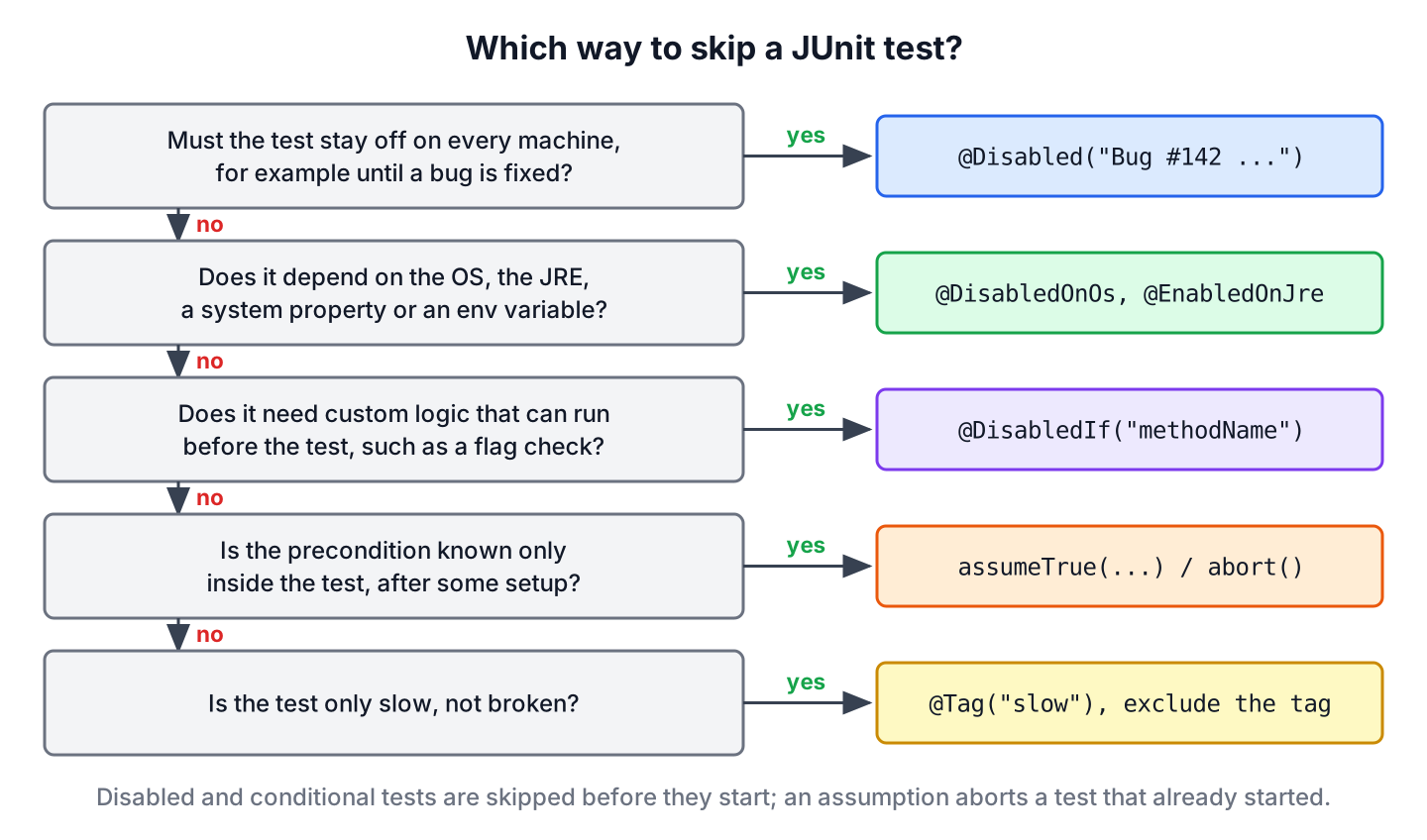
| Tool | Decided | Typical use |
|---|---|---|
| @Disabled(“reason”) | always, before the test starts | known bug, unfinished feature |
| @DisabledOnOs, @DisabledOnJre, @DisabledIfSystemProperty, @DisabledIfEnvironmentVariable | at runtime, before the test starts | OS, Java version, CI or local machine |
| @DisabledIf(“method”), @EnabledIf(“method”) | at runtime, by our own method, before the test starts | feature flag, service reachable |
| assumeTrue(), abort() | inside the test, after @BeforeEach | a value known only after setup |
The annotations are covered with examples in JUnit conditional test execution, and the runtime checks in the guide to JUnit 5 assumptions. All of them end in the same report state, skipped, so the build stays green.
6. Running Disabled Tests Anyway
Before we remove a @Disabled annotation, we want to know whether the bug is fixed. JUnit can switch off the condition behind the annotation with the configuration parameter junit.jupiter.conditions.deactivate. Its value is a pattern of fully qualified class names, and the class that evaluates @Disabled is org.junit.jupiter.engine.extension.DisabledCondition.
mvn test -Dtest=ShippingCalculatorTest "-Djunit.jupiter.conditions.deactivate=org.junit.*DisabledCondition"With this parameter, both tests run, together with their @BeforeEach and @AfterEach methods. Bug #142 is not fixed yet, so the disabled test fails, which tells us to keep the annotation.
@BeforeEach for internationalParcelToCanada()
@AfterEach for internationalParcelToCanada()
@AfterAll
[ERROR] Tests run: 2, Failures: 1, Errors: 0, Skipped: 0, Time elapsed: 0.136 s <<< FAILURE! -- in com.howtodoinjava.junit.shipping.ShippingCalculatorTest
org.opentest4j.AssertionFailedError: expected: <1797> but was: <1497>
The pattern org.junit.*DisabledCondition matches only the built-in condition for @Disabled, so the conditional annotations keep working. We set the parameter on the command line or in a separate CI job, never in junit-platform.properties, because the normal build should still skip the tests.
7. Migrating @Ignore From JUnit 4
JUnit 4 uses org.junit.Ignore for the same job. The Jupiter engine does not read @Ignore, so a migrated test that keeps @Ignore and switches to the Jupiter @Test runs again without warning. We replace the annotation along with the imports.
| JUnit 4 | JUnit 5 and JUnit 6 |
|---|---|
| @Ignore | @Disabled |
| @Ignore(“reason”) | @Disabled(“reason”) |
| @Ignore on the class | @Disabled on the class |
| org.junit.Ignore | org.junit.jupiter.api.Disabled |
| Assume.assumeTrue() to skip at runtime | Assumptions.assumeTrue() or a conditional annotation |
The deprecated junit-jupiter-migrationsupport module can honor @Ignore on Jupiter tests with @EnableJUnit4MigrationSupport, but replacing the annotation is a one-line change per test, so we prefer that. The full mapping is in JUnit 5 vs JUnit 4.
8. Disabling JUnit Tests FAQs
Skipped tests raise questions about JUnit 4, Maven counts and rules that apply only on CI.
8.1. What Is the Difference Between @Disabled and @Ignore?
Both annotations do the same job in different JUnit generations. @Ignore belongs to JUnit 4, and @Disabled belongs to JUnit Jupiter, the API of JUnit 5 and JUnit 6. Each engine reads only its own annotation.
8.2. Does a Disabled Test Count as Skipped in Maven?
Yes. Surefire adds it to the Skipped count, prints the summary line with [WARNING] and finishes with BUILD SUCCESS. The reason appears in the XML report, as section 3 shows.
8.3. Can We Disable a Test Only on CI?
Yes, but not with @Disabled. We use @DisabledIfEnvironmentVariable(named = “CI”, matches = “true”), which skips the test where the CI variable is true and runs it everywhere else.
8.4. How Do We Skip All Tests in a Maven Build?
We do not use annotations for that. The command mvn package -DskipTests compiles the tests but does not run them, and -Dmaven.test.skip=true skips compiling them as well. Both are build options, whereas @Disabled documents a decision in the code.
9. Conclusion
The @Disabled annotation skips a test method or every test in a class, and Maven reports those tests as skipped while the build stays green. On a method, JUnit still creates the test instance but skips @BeforeEach and @AfterEach. On a class, nothing in the class runs.
A short reason with an issue number makes the skipped test traceable in the IDE, in the Surefire XML report and on the CI server. The annotation is not inherited, and junit.jupiter.conditions.deactivate runs disabled tests on demand to check whether they can be switched back on. For tests that only fail in some environments, the conditional annotations and assumptions are the better choice.
10. References
- JUnit User Guide 6.1.3, Disabling Tests
- Disabled Javadoc (JUnit 6.1.3)
- JUnit User Guide 6.1.3, Conditional Test Execution
- JUnit User Guide 6.1.3, Configuration Parameters
- Ignore Javadoc (JUnit 4)
Happy Learning !!
